Proof of range
Start From What Already Works
Every example starts with an input. Revid analyzes it, extracts what matters, and creates something new for you.
Viral Video

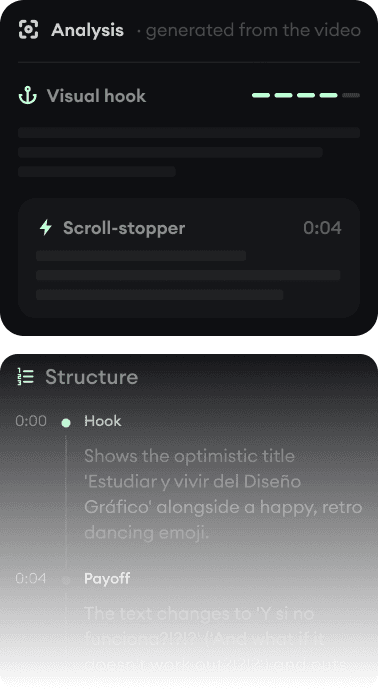
Your Version

The app is optional: your agent can run the whole channel. Connect Claude, ChatGPT, Cursor or any MCP client to Revid and it researches what goes viral, makes finished short-form videos with voice, captions, music and AI footage, then posts or schedules them on TikTok, YouTube, Instagram and X. Sign in once with your Revid account: no API key to paste.
Revid analytics, checked October 22, 2026. Rated 4.0 out of 5 on Trustpilot from 301 reviews.
Pick your app. OAuth clients only need the server URL and your Revid login.
https://www.revid.ai/api/mcpYour agent picks the right Revid tools on its own. Copy a prompt to try it.
“In my last Revid video, change the headline "GET MENTIONED." to "GET CITED.", check the frame, and export the new mp4.”
“Use Revid to find the 5 most viral TikToks about AI tools for founders this month, summarize their hooks, then make a 30 second video using the best hook.”
“Turn https://example.com/blog/launch-post into a 40 second vertical video with captions and a confident male voice. Tell me the credit cost before you render.”
“Create 3 short videos about morning routines for busy parents, then schedule them on my TikTok for Monday, Wednesday and Friday at 9am.”
“Make a 20 second product ad for our new running shoe from these images: <image URLs>. Punchy captions, upbeat music.”
“Create a Revid character from this mascot image: <image URL>. Then make a short cartoon where it explains why sleep matters.”
“Start a cartoon series about Mochi, a cat who runs a tiny Paris bakery where something goes wrong every morning. Make episode 1, about 60 seconds, vertical, then export it.”
“Write and produce a 30 second upbeat pop song about our launch at https://example.com, with a music video synced to the lyrics.”
“Check my last Revid project. When the video is ready, post it to my YouTube and Instagram with a short caption, then confirm it went live.”
Research, create, track and publish. Tools marked Plan need an active Revid plan; search, estimates, projects and publishing tools work without a plan. Publishing requires connected destinations.
Find what already performs before creating anything.
search_viral_videosSearch viral posts on YouTube, Instagram, TikTok, X, Reddit, Threads and LinkedIn, with transcripts, hooks and engagement data.
Render full videos or standalone media, and price them first.
generate_mediaGenerate a standalone AI image or video clip into your Revid media library.
get_media_statusFollow a long image or video generation until its media is ready.
render_videoStart a full video render from a script, prompt, link, audio, avatar, ad brief or song, or swap the people of a video. Returns a project id.
create_episodeMake a whole episode of a new or existing series on Autopilot, with the same characters and places in every scene and every episode.
list_seriesList your Series Maker series, to make the next episode of one.
create_upload_urlGet a link to upload a local image, video or audio file, and the public URL to use it in a render or generation.
upload_filesCopy the images, videos or audio attached in a chat to Revid, and get the public URLs to use them in a render or generation.
list_presetsList the visual styles, motion graphics categories and caption styles of the create form.
list_music_tracksBrowse the background music library by mood, with descriptions and lengths.
calculate_creditsEstimate the credit cost of a render payload before running it. Works without an API key.
Change an existing video in place: fix a line of text, swap a clip, recut, restyle captions.
get_timelineRead every item on a project's timeline, with its text, timing and the props you can change.
edit_projectChange a project in place with the editor assistant's tools: motion graphic text, captions, trims, clips and more, several edits in one call.
describe_edit_toolsList the edit tools, or read the full schema of the ones you need.
view_framesSee composed frames of the current timeline as images, with no export and no credits.
get_edit_jobFollow a long edit, like a motion graphic rebuild, until it lands on the timeline.
Follow renders, list projects, and export mp4s.
get_project_statusFollow a render with live progress (percent, current step, time left) until the finished video is ready. Each call waits up to 40 seconds.
get_episode_statusFollow a series episode from plan to finished project, with its scenes and credits.
cancel_episodeStop a series episode that is still being made.
list_projectsList the projects in your Revid account or active workspace.
export_videoExport a fresh mp4 of an existing project.
get_export_statusFollow a long export until its mp4 is ready.
rename_projectGive a project a new name.
duplicate_projectCopy a project, with the same content and folder, under a new id.
delete_projectDelete a project and take its public page offline.
set_project_visibilityMake a project's public page public, unlisted or private, and get its link.
get_accountSee your credits left, plan and workspace.
Post now or schedule to connected social accounts.
list_social_accountsList connected TikTok, YouTube, Instagram, X, Facebook Pages and webhook destinations.
publish_nowPost a rendered video right away to the accounts or channel you pick.
schedule_publishSchedule a video at an exact date and time, or drop it in the next open queue slot.
get_publish_statusCheck whether a published or scheduled post went live on each platform, with post links and error reasons.
Reusable characters, narration voices and cloned voices.
list_charactersList your saved consistent characters.
create_characterCreate a consistent character from an image so it looks the same in every video.
delete_characterDelete a saved character.
list_voicesFind a narration voice by language, gender, accent or style, your cloned voices included.
clone_voiceClone a custom voice from a public audio sample.
Renders use credits from your account or active workspace, and your agent can price any request first with calculate_credits. Generation tools need an active plan: credits alone return a 402.
This is the flow a good agent follows. It also reads the revid://docs/render resource for the always-current payload reference, so it builds valid requests without guessing.
search_viral_videosoptionalResearch what already performs on the topic: transcripts, hooks, engagement.
calculate_creditsoptionalPrice the payload before spending anything.
render_videoStart the render with a workflow and its input. Keep the returned pid.
get_project_statusPoll until the response includes videoUrl.
schedule_publishoptionalPick a destination with list_social_accounts, then post with publish_now or schedule at an exact scheduledTime.
render_video takes a workflow that matches what you start from. Each one has its own page with every parameter.
Script to video
script-to-video
Turn a written script into a voiced, captioned video with AI visuals.
Prompt to video
prompt-to-video
Describe the video you want; the AI writes the script and generates everything.
Audio to video
audio-to-video
Turn a podcast, voice note, or any audio/video URL into an illustrated video.
Music to video
music-to-video
Generate a music video synced to a track (upload, YouTube, or Spotify link).
Lyrics to music video
lyrics-to-video
Revid generates an original song from your lyrics (or writes the lyrics from a description), then a music video synced to it.
Song ad
song-ad
A singing ad for a product: Revid writes an original jingle, a performer sings the hook on camera, with product B-roll and an end card.
Article to video
article-to-video
Summarize any web page or article into a narrated short video.
Avatar to video
avatar-to-video
A talking avatar (from a photo or video) reads your script, with optional B-roll.
Static background video
static-background-video
Voiced captions over a looping background (gameplay, satisfying clips, ...).
Motion transfer
motion-transfer
Transfer the motion of a source video onto a character image (face swap style).
Character swap
character-swap
Replace every person in a video with the people of your photos, keeping the moves, lip sync, set and original audio.
Caption video
caption-video
Add animated captions (and optional B-roll) to an existing video.
Video to clips
video-to-clips
Cut a long YouTube video into short captioned clips.
Ad generator
ad-generator
Generate a product ad from a prompt and/or product images.
The CLI and the REST API do everything the MCP does. They authenticate with your API key.
Terminal agents, CI jobs, scripts
Stable --json output, viral search, guided planning, exact payload mode, render waiting, exports and credit estimates.
npm install -g revid-cli
revid auth login          # humans: sign in once
export REVID_API_KEY=... # agents and CI: use an env varrevid search "ai tools for founders" --min-views 100000 --json
revid plan --goal "A 30 second launch video for our app" --json
revid create --prompt "A cinematic 30 second product launch video" --wait --json
revid credits --payload payload.json --json
revid status <pid> --json
revid export <pid> --jsonBackends and your own products
Full control over every parameter, with webhooks when renders finish. Want to build your own Revid on top of it? Go ahead, we'll be your backend.
curl -X POST "https://www.revid.ai/api/public/v3/render" \
  -H "Content-Type: application/json" \
  -H "key: YOUR_REVID_API_KEY" \
  -H "User-Agent: my-app/1.0" \
  -d '{
    "workflow": "script-to-video",
    "source": {
      "text": "3 surprising AI productivity tips you can use today."
    },
    "voice": { "enabled": true },
    "captions": { "enabled": true, "preset": "Wrap 1" }
}'# Revid MCP OAuth 2.1 details
flow: authorization_code + PKCE (S256)
scope: mcp:use
dynamic client registration: POST https://www.revid.ai/api/oauth/register
authorization endpoint: https://www.revid.ai/api/oauth/authorize
token endpoint: https://www.revid.ai/api/oauth/token
protected resource metadata: https://www.revid.ai/.well-known/oauth-protected-resource
authorization server metadata: https://www.revid.ai/.well-known/oauth-authorization-server
access tokens: 1 hour; refresh tokens: rotating, long-lived
fallback auth: API key via Authorization Bearer, x-revid-api-key, x-api-key, or key header# Revid MCP quick reference
endpoint: https://www.revid.ai/api/mcp
transport: Streamable HTTP
auth (hosted clients): OAuth 2.1 with PKCE and dynamic client registration; discovery via https://www.revid.ai/.well-known/oauth-protected-resource
auth (header clients): Authorization Bearer, x-revid-api-key, x-api-key, or key header with a Revid API key
primary flow: search_viral_videos (optional) -> calculate_credits (optional) -> render_video -> get_project_status -> list_social_accounts -> publish_now or schedule_publish
plan: generation tools need an active Revid plan (402 SUBSCRIPTION_REQUIRED otherwise); clone_voice needs Elite
render docs resource: revid://docs/render
mcp guide resource: revid://docs/mcp
agent-readable docs: https://www.revid.ai/llms.txt, https://www.revid.ai/llm/revid-ai-mcp-server.md
tools (36): get_timeline, edit_project, describe_edit_tools, view_frames, get_edit_job, search_viral_videos, generate_media, get_media_status, render_video, create_episode, list_series, create_upload_url, upload_files, list_presets, list_music_tracks, calculate_credits, get_project_status, get_episode_status, cancel_episode, list_projects, export_video, get_export_status, rename_project, duplicate_project, delete_project, set_project_visibility, get_account, list_social_accounts, publish_now, schedule_publish, get_publish_status, list_characters, create_character, delete_character, list_voices, clone_voiceEvery example below was made with the same workflows render_video exposes, from prompts and PDFs to motion transfer and music videos.
Every example starts with an input. Revid analyzes it, extracts what matters, and creates something new for you.
Viral Video
Your Version
Most video apps now have an MCP server. What they hand back to your agent is what differs.
| Revid | Clip generatorsRunway, Higgsfield, fal.ai | Avatar toolsHeyGen, Synthesia | Template renderersShotstack, Creatomate | |
|---|---|---|---|---|
| What your agent gets back | A finished video: script, voice, captions, music, AI footage | A clip of a few seconds | A presenter video; their agents also assemble videos | Your template, filled with data |
| Research what goes viral first | Yes, 7 platforms with transcripts and engagement | No | No | No |
| Posts to TikTok, YouTube, Instagram, X | Yes, now or scheduled | No | No | No (Shotstack: TikTok in beta) |
| Sign-in | OAuth or API key | OAuth | OAuth | OAuth or API key |
From each vendor's documentation, checked . Read the full comparison of 18 video MCP servers
Updated
The Revid MCP is a Streamable HTTP Model Context Protocol server with 36 tools. AI agents use it to search viral videos across platforms, generate images and video clips, render full videos, track and export projects, manage characters and cloned voices, and publish or schedule posts to connected TikTok, YouTube, Instagram, X, Facebook Pages and webhook destinations.
It depends on the video you need. For finished short-form videos that are ready to post, with script, voiceover, captions, music, AI footage and publishing handled by one server, Revid is built for that job: one remote MCP server with 36 tools that covers research, creation, export and posting, with OAuth sign-in for Claude, ChatGPT, Cursor and VS Code. If you only need raw AI clips, a video model's own MCP server is enough; to fill fixed templates with data, a template rendering API fits better; for a talking avatar reading a script, use an avatar tool. Our comparison of video MCP servers covers each type: https://www.revid.ai/blog/best-video-mcp-servers
ChatGPT can write the script, but it needs a video tool connected to deliver a finished video. Add Revid as a connector: in ChatGPT settings, enable developer mode, create a connector with the server URL https://www.revid.ai/api/mcp, and sign in with your Revid account. Then ask, for example: "Make a 30 second vertical video about our launch and schedule it on TikTok for Friday 6pm." ChatGPT calls Revid's tools to render the video, returns the link and can post it.
Connect Revid to Claude once: open Settings, then Connectors, click Add custom connector, paste https://www.revid.ai/api/mcp and sign in with your Revid account. Then describe the video in the chat. Claude can search what is going viral on the topic (search_viral_videos), render the video (render_video), wait for it (get_project_status) and post or schedule it (publish_now, schedule_publish). In Claude Code, run claude mcp add --transport http revid https://www.revid.ai/api/mcp, or install the Revid plugin (the server plus 12 video skills) with /plugin marketplace add tmakersas/revid-skills and /plugin install revid@revid.
39,000+ videos were made through the Revid API, MCP server and CLI from October 2025 to October 2026, about 3,000 a month, and the number of accounts creating this way each month nearly tripled over that year (52 in October 2025, 148 in September 2026). Across the whole product, Revid renders 100,000+ videos and publishes 30,000+ to social media every month. Source: Revid's analytics, checked October 22, 2026.
Add https://www.revid.ai/api/mcp as a remote MCP server or custom connector, then sign in with your Revid account when prompted. Cursor and VS Code have one-click install buttons on this page, and Claude Code needs a single command. Revid supports OAuth 2.1 with PKCE and dynamic client registration, so hosted clients connect without pasting an API key.
Not for OAuth-capable clients like Claude, ChatGPT, Claude Code, Cursor, and VS Code: you just sign in with your Revid account. Header-configurable MCP clients, the Revid CLI, and direct API calls use a Revid API key from your account page.
Yes. The search_viral_videos tool searches viral posts on YouTube, Instagram, TikTok, X, Reddit, Threads and LinkedIn, and returns transcripts, hooks, engagement data and style labels. Searches cost no credits and are rate limited per plan. The CLI equivalent is revid search.
Yes. Call list_social_accounts to find the connected accounts, then schedule_publish with a scheduledTime (ISO 8601 or a unix timestamp, up to 365 days ahead). Without a scheduledTime the video takes the next open slot of your posting queue. publish_now posts immediately.
Yes. Connect a Facebook Page in your Revid account settings, then target it with the id or name returned by list_social_accounts. Personal profiles are not supported.
Hosted remote MCP clients authenticate with OAuth 2.1 and PKCE, discovered automatically from the server's well-known metadata. Header-configurable clients can authenticate with a Revid API key using Authorization Bearer, x-revid-api-key, x-api-key, or key headers.
The Revid CLI is the revid-cli npm package. It lets humans, scripts, CI jobs, and AI agents search viral videos, plan and create videos, wait for renders, export, and estimate credits from the terminal, with stable JSON output and an exact API payload mode.
Yes. The public REST API can be called directly from your backend, with webhooks when renders finish. MCP wraps the same API for agent-native tool calling. See https://www.revid.ai/docs for the quickstart and full reference.
Renders consume credits from your Revid account or active workspace, and need an active Revid plan: credits alone return a 402 SUBSCRIPTION_REQUIRED error. Agents can call the calculate_credits tool, or the CLI credits command, with their intended payload to estimate the exact cost before rendering. Viral search costs no credits.