AI YouTube Shorts in 2026: How to Make Them and Get Them Monetized
How to make AI YouTube Shorts step by step, which tools to use, what YouTube monetizes under its 2026 AI rules, and which faceless formats perform best.
On this page
AI YouTube Shorts are vertical videos of up to 3 minutes in which AI writes the script, generates the visuals and voice-over, and adds captions. YouTube lets them earn when they carry your own idea and creative input, but it demonetizes mass-produced template content and asks you to disclose realistic AI scenes.
The reach is there for new channels. Socialinsider's 2026 study of 69 million short-form videos found that accounts with under 5,000 followers averaged 15,160 views per Short, against 625 on Instagram Reels (see Meta's original Instagram Reels announcement) and 350 on TikTok. The money is thinner, and YouTube raises the bar for Shorts payouts on February 1, 2027. The AI Shorts channels that last use AI as the production crew, not as the author.
- Average views per YouTube Short for accounts under 5,000 followers
- 15,160
- Socialinsider, August 2026
- Daily YouTube Shorts views
- 200B+
- YouTube Official Blog, August 2026
- Share of allocated Shorts Feed ad revenue monetizing creators keep
- 45%
- YouTube Help, October 2026
- Qualified Shorts views in 90 days needed to earn Shorts ad revenue from Feb 1, 2027
- 10M
- YouTube Official Blog, August 2026
What counts as an AI YouTube Short, and what YouTube allows
An AI YouTube Short is any Short where AI does part of the production: the script, the voice, the visuals, the captions, or all of them. YouTube does not ban AI. Its monetization policy says AI and automated tools are fine when the final video shows your creative vision and gives viewers educational or entertainment value. What it rejects is volume without input.
| What AI does in your Short | Can it earn? | Disclosure needed? |
|---|---|---|
| Writes or edits your script, title or captions | Yes | No |
| Clones your own voice for the voice-over | Yes | No |
| Non-realistic visuals: animation, cartoons, motion graphics, backgrounds | Yes, if the video shows your creative vision | No |
| Realistic scenes, or a real person appearing to say or do something | Yes, once disclosed | Yes, with the "AI use" setting in YouTube Studio |
| Generic template videos that look mass-produced, with no original insight | No (inauthentic content) | Not relevant |
| Unrelated AI clips stitched together to shock, or realistic fake events | No | Not relevant |
| An AI persona presented as a human expert on health, legal, financial or political topics | No | Not relevant |
Two details matter more than most guides admit. Disclosure does not by itself limit a Short's audience or its eligibility to earn, so there is no reason to hide it. And since May 2026, YouTube automatically labels undisclosed videos with significant photorealistic AI, shows the label as an overlay on Shorts, and makes it permanent for content made with Veo or Dream Screen. On July 15, 2025, YouTube also renamed its "repetitious content" policy to "inauthentic content" to make clear it covers mass-produced videos.
Prompt to try
Make a 45-second vertical YouTube Short explaining why airplane windows are round. Open with the hook "Square plane windows once tore jets apart mid-flight." Use clean 3D motion graphics, a calm confident voice-over and bold captions kept in the center of the frame.
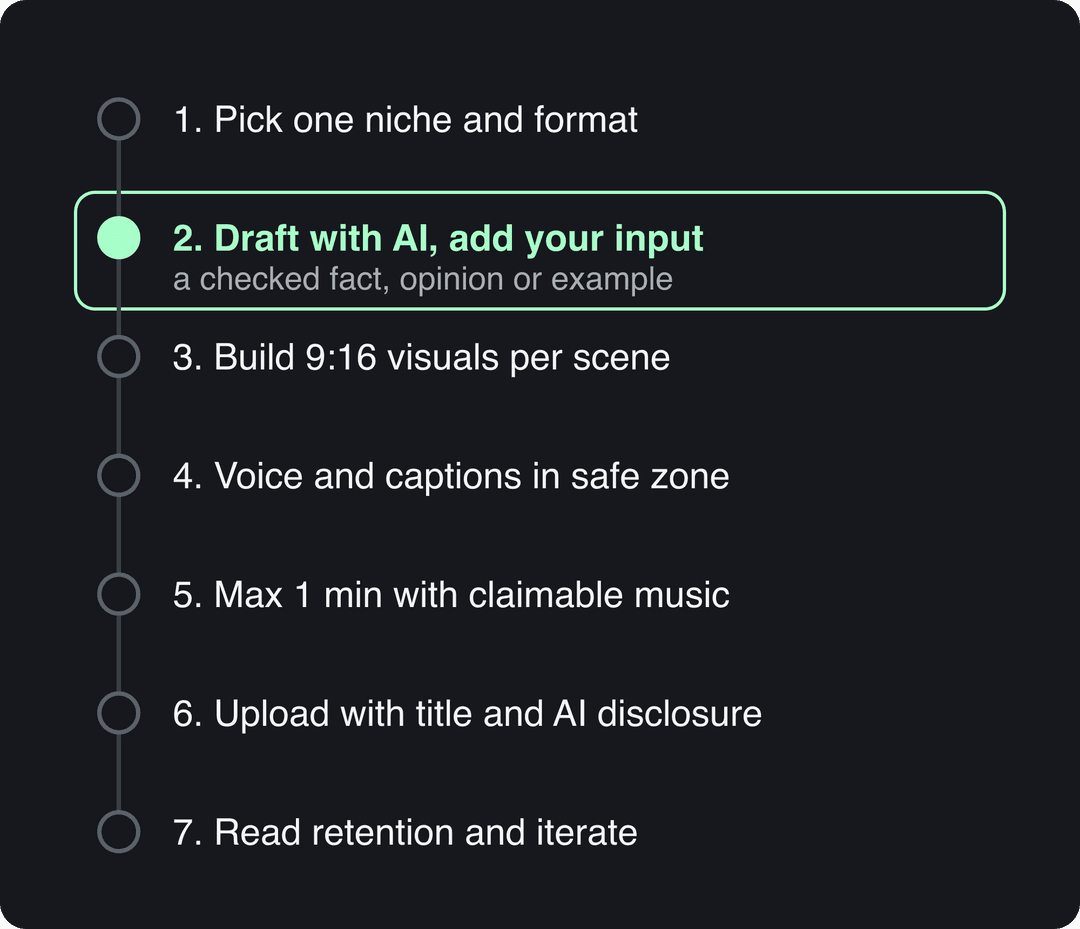
How to make AI YouTube Shorts, step by step
If you searched for a YouTube Shorts course with AI, this is the condensed version. Each step names the decision and the setting.
- Pick one niche and one repeatable format. If you cannot say in one sentence who the Short is for and what question it answers, narrow the niche. Formats that work without a face on camera (explainers, lists, stories, tutorials) are the easiest to produce with AI.
- Draft the script with AI, then add what only you know. A YouTube Shorts script generator gives you a first draft in seconds. Then add a fact you checked, an opinion or an example from your own work. The first line states the payoff or the problem, never a greeting. Reading out text you did not write (a Reddit thread, a news feed) counts as reused content, even with AI visuals.
- Build the visuals scene by scene. Work in vertical 9:16. Give each sentence its own visual: an AI video clip, a motion graphic, a screen recording or stock footage. A consistent style and recurring characters make the channel recognizable.
- Add the voice-over and captions inside the safe zone. YouTube's buttons, title and channel name sit over the bottom and right edge of the frame, so keep captions and key text toward the center. Check your layout with the YouTube Shorts safe zone template.
- Choose the length on purpose. Square or vertical videos up to 3 minutes count as Shorts. If your Short uses music that could get a Content ID claim, keep it at one minute or less: any Short longer than one minute with an active claim is blocked worldwide and cannot be monetized. Most Shorts Audio Library songs can run up to 90 seconds.
- Upload with a title, a cover and the right disclosure. Titles can be up to 100 characters. Turn on the "AI use" setting when the Short shows realistic AI people or events. Verified accounts can upload a custom Shorts thumbnail from YouTube Studio on a computer (9:16, 2160x3840 recommended). YouTube's Test & Compare tool does not work on Shorts, so test hooks by publishing variations as separate Shorts.
- Read the numbers and iterate. Since August 24, 2026, YouTube counts a view the moment a video starts to play, while YPP earnings still use engaged views. Compare retention between Shorts with different hooks and keep the opening that holds viewers. AIR Media-Tech's breakdown of viral Shorts analytics shows what those numbers look like on real channels.
How to make an AI YouTube Short with Revid
Revid handles the script, visuals, voice, captions and publishing in one place.
- Open the AI YouTube Shorts generator and enter an idea, a script or a link (a blog post, a YouTube video, a Reddit or X post).
- Or start from a format that already works: search Revid's library of about 2.77 million short-form videos, open one and choose "Make it about your topic". Revid keeps the hook style and pacing, then writes a new script and new visuals.
- Pick an AI video model per scene (Seedance 2.5, MiniMax Hailuo H3, Wan 3.0 or Google Veo 3), one of 1,000+ voices in 70+ languages, and a caption style.
- Fix any scene in the timeline editor, export up to 4K, then publish to YouTube directly or schedule the same video for TikTok and Instagram.
Sign-up is free and new accounts get free credits to try video creation, no credit card needed; regular creation then uses the credits of a paid plan, starting with Revid's Growth plan at $39/month for 2,000 credits. A 30-second Short with Pro AI visuals and a voice-over costs about 40 to 80 credits.
Which AI tools to use for YouTube Shorts
The right tool depends on one question: do you already have long videos? If yes, you need a clipper. If no, you need a generator that writes and builds the Short for you.
| Tool | What it does | Best for | Price |
|---|---|---|---|
| Revid | Turns an idea, script, link or viral reference into a finished Short: script, AI scenes from several models, voice-over, captions, timeline editing, direct publishing and daily Auto-Mode | Original faceless Shorts at volume | From $39/month |
| YouTube's built-in AI (Veo 3 Fast, Dream Screen) | Generates short clips with sound and AI backgrounds inside YouTube's Shorts tools | Adding a quick AI scene to a Short you are already making | Free, 480p clips |
| OpusClip | Cuts podcasts, streams and webinars into short clips with virality scores, captions and auto-reframing | Repurposing long recordings you already have | From $15/month; free plan with watermarked captions |
OpusClip is the stronger pick when your main need is clipping your own recordings; Revid also turns YouTube videos into Shorts, but it is built to create new videos from scratch. The Revid vs OpusClip comparison covers the differences in detail. YouTube added Veo 3 Fast to Shorts for free in September 2025, first in the US, UK, Canada, Australia and New Zealand. It is handy for a single scene, but it gives you 480p clips, not a finished Short.
What successful AI-generated YouTube Shorts channels have in common
Channel lists go stale fast, and a channel held up as a success story can be demonetized the next month. The patterns are more useful than the names, and they are consistent.
The first is that most successful AI Shorts are faceless. In Revid's analysis of 176,367 TikToks with 1,000+ likes posted between October 2025 and October 2026, faceless videos had a median of 114K views and 17.4% passed 1 million, against 67K and 12.7% for one person on camera. This is TikTok data, and the sample only includes videos that already reached 1,000+ likes, so it shows what top videos share rather than what causes success. The full study of what makes a TikTok go viral explains the method.
Faceless videos earned a median of 114K views, against 67K for videos with one person on camera, and passed 1M views 38% more often.
Source: Revid analysis of 176,367 TikToks with 1,000+ likes posted between Oct 1, 2025 and Oct 16, 2026 (61,203 creators)
Show the data
| Median views | Share that passed 1M views | |
|---|---|---|
| Animals | 147.4K | 24.1% |
| Faceless | 113.9K | 17.4% |
| Groups of people | 96.1K | 16% |
| Objects or products | 70.8K | 13.2% |
| One person on camera | 67.4K | 12.7% |
Formats that keep working for AI-made Shorts:
- Faceless tutorials and explainers. In the same TikTok data, faceless tutorials had a 156K median against 52K for on-camera tutorials. A screen recording or animation with a clear voice-over is easy to produce with AI and easy to make original.
- Animated story series. Recurring characters give viewers a reason to come back, and YouTube's Shorts series, rolling out since September 2026, lets you organize episodes into seasons.
- "What if" and history explainers with AI visuals, where the research and the angle are yours.
- Clips from your own long videos, which send viewers back to your main content.
Formats that get AI channels demonetized: narrated Reddit threads or articles you did not write, AI personas posing as doctors, lawyers or financial experts, compilations of unrelated AI clips built to shock, and realistic footage of events that never happened.
AI visuals also perform differently by platform. Revid's study of AI videos vs real footage found that AI-generated TikToks averaged twice the views of real footage, while on X, Instagram and Threads AI visuals clustered in the lowest engagement tier. Test on your own Shorts before assuming either result carries over.
To study real examples, filter Revid's library by platform (YouTube) and the viral tier (1 million+ views), or browse the most viewed YouTube Shorts. Look at the first line, the number of scenes and the length, not just the topic.
Prompt to try
Create a 60-second animated "what if" Short: what would happen if the Moon disappeared tonight. Start with the hook "Within hours, the oceans would start acting strange." Use a consistent cinematic illustrated style, a curious narrator voice and short punchy captions.
Posts with AI visuals
Source: Revid social index: 388,379 posts from X, Instagram, Threads, Reddit and LinkedIn with AI labels per post, snapshot of Sep 15, 2026.
Show the data
| Posts with AI visuals | |
|---|---|
| High engagement | 1.6% |
| Medium engagement | 2.9% |
| Low engagement | 6.7% |
How to find YouTube Shorts ideas and content gaps with AI
A content gap is a question your audience asks that has proven demand but no good Short yet in your niche, your language or at your depth. AI makes gaps faster to find:
- List the questions your viewers ask: comments, YouTube search suggestions and the questions you answer in your own work.
- Search each topic in a viral video library. Revid's library only holds videos that cleared an engagement bar, with transcripts and an AI description of their visuals, so you see which formats already perform on a topic.
- Run a deep analysis on the top results. Revid's deep analysis (free, up to 60 a day) explains each video's hook, its timed structure and three ways to adapt it to another niche.
- Apply the gap rule. If a format has viral examples in one niche but none in yours, that is a gap. If every top Short on a topic comes from large channels with the same angle, pick a narrower angle or a different format.
- Turn the winner into an original Short. Remixing a viral video keeps the structure and pacing while writing a new script and new visuals.
For general YouTube growth advice that applies to Shorts too, this compilation is worth watching:
Can AI YouTube Shorts make money?
Yes, through the YouTube Partner Program, but Shorts ad revenue alone rarely pays the bills. These are the thresholds:
| Requirement | Today | From February 1, 2027 |
|---|---|---|
| Join YPP for ad revenue | 1,000 subscribers plus 4,000 public watch hours in 12 months or 10 million qualified Shorts views in 90 days | New applicants: 1,000 subscribers plus 8,000 watch hours in 365 days or 20 million qualified Shorts views in 90 days |
| Earn Shorts ad revenue in a given month | Be in YPP | 10 million qualified Shorts views in the last 90 days |
| Lower tier (fan funding, Shopping, no ad revenue) | 500 subscribers plus 3,000 watch hours or 3 million qualified Shorts views in 90 days | Unchanged |
Watch hours from the Shorts Feed do not count toward the watch-hour threshold. Channels already in YPP keep their place but must accept the updated terms in YouTube Studio by January 31, 2027, and a channel below the new Shorts bar still keeps its long-form earnings.
Shorts Feed ad revenue is pooled each month and shared by engaged views, and monetizing creators keep 45% of their allocation. AIR Media-Tech's September 2026 analysis of 274 channels put US Shorts RPM at $0.328 per 1,000 views and found that, for most channels, Shorts brought in less than 2% of revenue while generating 1% to 35% of views. YouTube said in March 2024 that more than 80% of creators who joined YPP through the Shorts thresholds also earned through other features, such as long-form ads, fan funding or Premium.
The decision rule: if Shorts are your only format, plan your income around sponsors, your own products or long-form videos, and use Shorts to get discovered. In AIR Media-Tech's study of 18,000 channels, the best results came when Shorts made up 25% to 40% of uploads.
How is AI shaping the future of YouTube Shorts?
Four changes are already visible:
- Generation is built into YouTube. Veo 3 Fast has been free in Shorts since September 2025, and Alphabet said over one million channels used YouTube's AI creation tools on an average day in December 2025.
- Supply keeps growing. As of March 2026, over ten million channels were publishing Shorts each day, and YouTube said in August 2026 that Shorts get over 200 billion daily views.
- Labels are automatic. Undisclosed photorealistic AI gets labeled anyway, and Veo or Dream Screen content carries a permanent label.
- Payouts concentrate. The February 2027 rules reserve Shorts ad revenue for channels with 10 million qualified Shorts views in 90 days, and the inauthentic content policy targets mass-produced AI.
When anyone can generate a clip in seconds, the clip stops being the advantage. The edge moves to the inputs: the idea, the hook, the angle and evidence of what audiences actually watch. That is why the channels that grow pair AI production with their own research and voice.
For more numbers, StoryLab's YouTube Shorts statistics roundup and SendShort's Shorts statistics page collect third-party figures; check the source behind each one, because several widely shared Shorts statistics do not trace to a reliable source. Revid's sourced YouTube Shorts statistics lists only figures with a primary source.
FAQ
Are AI-generated YouTube Shorts allowed?
Yes. YouTube allows AI-made Shorts and lets them earn when they show your creative vision and add educational or entertainment value. Generic template content that looks mass-produced cannot be monetized.
Do I have to label AI YouTube Shorts?
Only when the Short shows realistic AI content, such as a real person saying something they did not say or a realistic scene that did not happen. AI scripts, captions, titles, thumbnails, non-realistic animation and your own cloned voice need no disclosure, and disclosing does not reduce reach on its own.
Can a faceless AI YouTube Shorts channel be monetized?
Yes, if it meets the YPP thresholds and the videos are original: your own script or commentary, a clear point and visuals that support it. Channels that only narrate other people's text or post near-identical template videos are rejected under the reused or inauthentic content policies.
How long should an AI YouTube Short be?
Up to 3 minutes is allowed for square or vertical videos. Keep it at one minute or less if it uses music that could get a Content ID claim, since claimed Shorts longer than one minute are blocked and cannot earn.
Sources
- Revid analysis of 176,367 TikToks with 1,000+ likes posted between Oct 1, 2025 and Oct 16, 2026 (61,203 creators)
- Revid social index: 388,379 posts from X, Instagram, Threads, Reddit and LinkedIn with AI labels per post, snapshot of Sep 15, 2026.
- Socialinsider, TikTok vs. Reels vs. Shorts: 2026 Engagement Data (August 2026)
- YouTube Official Blog, New opportunities to earn and changes to the YouTube Partner Program (August 2026)
- YouTube Help, YouTube Shorts monetization policies (October 2026)
- YouTube Official Blog, New opportunities to earn and changes to the YouTube Partner Program (August 2026)
Charts and figures checked on November 6, 2026.