Best InVideo AI Alternatives in 2026: 8 Tools Picked by Why You're Leaving
Why people leave InVideo AI (credits, chat-only editing, stock look, posting by hand) and the alternative that fixes each one, with prices and Trustpilot scores checked October 29, 2026 and Revid's own usage and cost data.

On this page
The best InVideo AI alternative depends on why you are leaving. If credits run out too fast, editing by chat is slowing you down, or you still download every video and post it by hand, Revid is the closest replacement for short-form video. If you need a presenter, pick HeyGen or Synthesia. If your videos start from a blog post or a webinar, pick Pictory. If the voice is the product, pick Fliki. If you want one cinematic clip rather than a finished short, pick Runway.
We rebuilt this guide on October 29, 2026. That day we read the pricing page of every tool below, InVideo's own credit table, and each tool's Trustpilot page. For Revid we used our own product analytics (every video built on Revid between September 29 and October 28, 2026) and our public credit calculator, so the cost of each kind of video is exact rather than estimated.
Disclosure: we make Revid. It comes first where it fits the reason you are switching, and each section says plainly when another tool is the better pick.
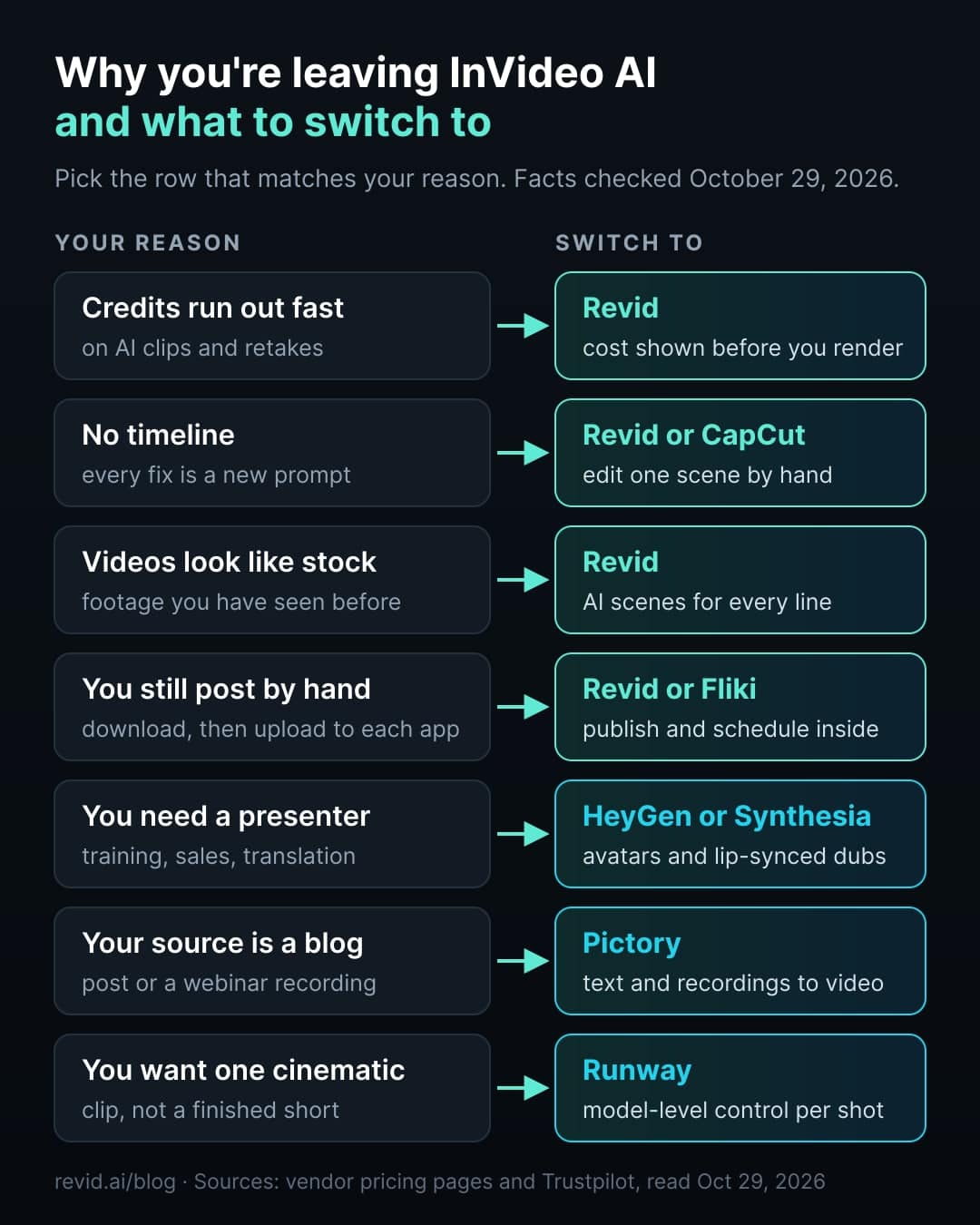
Why people leave InVideo AI
InVideo AI is a capable product. It turns one prompt into a draft video fast, bundles a large stock library, and gives you many generative models in one subscription. The reasons people switch are about how it bills and what happens after the draft.
1. Credits are hard to predict. InVideo's pricing page says generative models are billed at their original API pricing, that credit costs can change "at any time, without prior notice", and that unused credits do not roll over. Its own table shows what that means for Seedance 2.5, the model most people want: the Plus plan (2,000 credits) covers 35 five-second clips at 720p a month, which is under three minutes of generated footage.
2. The Starter plan leaves out the newest model. Starter (€20 per seat a month, or €10 billed yearly, as shown on October 29) includes only Seedance 2.0 Fast and Mini. Seedance 2.5 starts on Plus.
3. You edit by typing. InVideo AI's agent changes the video when you describe the change; when we compared the two products in September 2026, the AI product had no traditional timeline. That is fast for big edits and frustrating for small ones, because a one-word caption fix or a single bad scene becomes another prompt, and another round of credits.
4. The result still has to be posted by hand. In our last check of InVideo's product (September 2026) we found no direct posting to TikTok, YouTube or Instagram. You download the file and upload it to each app.
5. Reviews point at billing. InVideo AI's Trustpilot score was 2.9 out of 5 across 910 reviews on October 29, 2026. Among the recent reviews shown on the page, the most common complaint was credits used up faster than expected, followed by output quality and billing.
InVideo lists about 24.5 credits per 5 s for Draft, 56 for 720p and 96 for 1080p. Starter (400 credits) has no Seedance 2.5 access. Credits do not roll over.
Source: invideo.io/pricing, plan comparison table (annual billing), read October 29, 2026
Show the data
| Plus plan (2,000 credits) | Max plan (5,000 credits) | |
|---|---|---|
| Draft | 81 | 204 |
| 720p | 35 | 89 |
| 1080p | 20 | 52 |
InVideo AI alternatives compared
Prices are the entry paid plan as shown on each vendor's pricing page on October 29, 2026, unless a different date is given. Trustpilot scores were read the same day.
| Tool | Best for | Fixes this InVideo problem | Entry price | Free option | Posts to social | Trustpilot |
|---|---|---|---|---|---|---|
| InVideo AI | Drafting by chat, many models, big stock library | (the baseline) | €20 per seat/month, €10 billed yearly | Free plan with watermark | No (Sep 2026 check) | 2.9 (910) |
| Revid | Finished short-form videos, posted and scheduled | Credits, no timeline, stock look, manual posting | $39/month, $32 billed yearly | Free sign-up | Yes: TikTok, YouTube, Instagram, X | 3.9 (304) |
| Pictory | Articles, URLs and webinars into stock-footage videos | Source is long text or a recording | $29/month, $25 billed yearly | 14-day trial, 3 projects | Not verified | 4.3 (677) |
| Fliki | Voice-led videos and recurring TikTok series | Weak voices, manual posting | $28/month in August (no amount shown on Oct 29) | 5 min a month, 720p, watermark | Yes: TikTok, YouTube | 4.2 (3,047) |
| HeyGen | Avatar presenters, video translation | You need a person on screen | $29/month, $24 billed yearly | 3 videos a month, 1 min, watermark | Not found | 4.2 (4,937) |
| Synthesia | Training and internal video with avatars | Presenter videos at company scale | $19/month, $14 billed yearly | 10 min a month, watermark | No | 3.8 (1,830) |
| Zebracat | Multilingual marketing videos, easy to learn | Learning curve, many languages | $39/month, $23 billed yearly | 5 videos, 30 s, 720p | Scheduling per its site | 4.4 (298) |
| Runway | Cinematic clips and VFX edits | You want model-level control per shot | $15/month, $12 billed yearly | 125 one-time credits | No | Not re-checked |
| CapCut | Editing your own footage by hand | You want a manual timeline | About $9.99/month (Aug 2026, varies by region) | Full editor, 1080p | Yes: TikTok | Not re-checked |
Entry plans are not equal: they differ in credits, minutes, models and watermark rules. The chart below shows the sticker price only.
US dollars except InVideo, which showed euros on October 29. InVideo Starter has no Seedance 2.5; Revid Growth includes 2,000 credits, the editor, publishing and the API, MCP server and CLI.
Source: Vendor pricing pages (invideo.io, runway.com, synthesia.io, pictory.ai, heygen.com, zebracat.ai, revid.ai), read October 29, 2026
Show the data
| Billed monthly | Billed yearly, per month | |
|---|---|---|
| InVideo AI Starter (EUR) | 20 | 10 |
| Runway Standard | 15 | 12 |
| Synthesia Starter | 19 | 14 |
| Pictory Starter | 29 | 25 |
| HeyGen Creator | 29 | 24 |
| Zebracat Cat Mode | 39 | 23 |
| Revid Growth | 39 | 32 |
1. Revid: finished short-form videos, edited on a timeline and posted for you
Best for: founders, marketers and agencies who publish TikToks, Reels and Shorts every week and want one tool from idea to posted video.
Revid turns an idea, a script, a link, a song or a reference video into a finished vertical video: script, scene visuals, voice-over in 70+ languages, captions in 30 styles, music, then posting or scheduling to TikTok, YouTube, Instagram and X. Here is how it answers each reason for leaving InVideo.
Credits you can predict. Every Revid video is priced before you render, and the same prices are public through a free calculator API. The chart below is the exact cost of a 30-second and a 60-second video from a prompt, voice-over included, by the look you choose.
Growth is $39/month with 2,000 credits. Generated music adds 20 credits per started minute; sound effects add 1 credit each. Videos per month = 2,000 divided by the 30 s cost, rounded down.
Source: Revid public API POST /api/public/v3/calculate-credits, workflow prompt-to-video, 9:16, run October 29, 2026
Show the data
| 30 s video (credits) | 60 s video (credits) | 30 s videos per Growth month | |
|---|---|---|---|
| Stock footage | 11 | 22 | 181 |
| Animated AI images, Standard | 18 | 35 | 111 |
| Animated AI images, Pro | 37 | 75 | 54 |
| AI video clips, Base | 110 | 220 | 18 |
| AI video clips, Pro | 341 | 682 | 5 |
| AI video clips, Ultra (Seedance 2.5) | 671 | 1,342 | 2 |
That is also the honest comparison with InVideo. A Seedance 2.5 clip costs about the same share of a plan on both (20 five-second clips from 2,000 credits on Revid Growth, 20 at 1080p on InVideo Plus), and InVideo's yearly Plus price is lower. The difference is that most short-form videos do not need a generated clip in every scene. Animated AI images look original, cost a fraction, and are what most Revid videos use:
Stock footage, the core of InVideo's library, is the look 8.5% of Revid videos use. Shares are of the 71,907 builds that recorded a visual type (5,109 more had none recorded).
Source: Revid product analytics (Amplitude), event project_built grouped by mediaType, September 29 to October 28, 2026, 77,016 builds
Show the data
| Share of videos (%) | Videos built | |
|---|---|---|
| Animated AI images | 64.9% | 46.7K |
| AI video clips | 15.6% | 11.2K |
| Stock footage | 8.5% | 6.1K |
| Their own photos and videos | 6.4% | 4.6K |
| Still images | 2.2% | 1.6K |
| Motion graphics | 1.8% | 1.3K |
| Media from the source link | 0.6% | 397 |
A timeline, not a chat box. Every Revid video opens in a timeline editor. You trim a scene, swap one image, rewrite one caption or change the voice on one line without regenerating the rest.
Posting built in. Connect TikTok, YouTube, Instagram and X once, then publish now or schedule from a queue. Auto-Mode workers (3 on Growth) turn a prompt or a content source into new videos every day.
Built for AI agents. The REST API, an MCP server with 30 tools and a CLI come with every paid plan, so Claude, ChatGPT or Cursor can research, make and post videos for you. Here is a video an agent made through our MCP server for our video MCP comparison:
Revid at a glance
Pros
- Exact cost of every video shown before you render, from 11 credits for 30 s of stock footage
- Timeline editor for scene-by-scene fixes
- Direct posting and scheduling to TikTok, YouTube, Instagram and X
- Prompt, script, article, song, audio and long-video workflows in one place
- API, MCP server and CLI on every paid plan
Cons
- Higher entry price than InVideo Starter ($39 vs €20 a month)
- Built for short-form and vertical first; not a tool for long cinematic edits
- Trustpilot 3.9, below Pictory, Fliki, HeyGen and Zebracat
Price: Growth is $39/month ($32 billed yearly) with 2,000 credits. Sign-up is free. See plans and credits and the side-by-side Revid vs InVideo comparison.
Pick something else if you mostly need raw generated clips from many models at the lowest price per clip (InVideo yearly Plus, or Runway), or a presenter on screen (HeyGen, Synthesia).
Try it with a prompt
Make a 30-second vertical video for founders called "3 signs your landing page loses visitors in 5 seconds". Open on the hook "Most visitors decide in the time it takes to read this sentence." Use animated AI images in a clean editorial style, a confident voice-over and bold captions, and end by asking viewers which sign they recognize.
Made with Revid from a prompt, a script, an article or a song
Public videos made on Revid. Tap one to watch it and remake it with your own topic.
 Why Your Brain Loves Procrastination
 A Day in the Life of a Software Engineer — Morning Routine
 Types of Houses Explained
 The Storming of the Bastille
 Unconquerable Soul
 Red Riding Hood's Big Mistake
 Rooftop Truths With a Stranger
 I Still Love You
What people actually make with it tells you where it is strongest. In the last 30 days, prompt-to-video and voice-over videos from a script or link were almost two thirds of everything built:
Shares are of all 77,016 videos built in the period, including tools not shown.
Source: Revid product analytics (Amplitude), event project_built grouped by tool slug, September 29 to October 28, 2026, 77,016 builds
Show the data
| Videos built | Share of all videos (%) | |
|---|---|---|
| Prompt to video | 33.5K | 43.5% |
| Voice-over video from a script or link | 14.7K | 19.1% |
| Music video from a song | 12.4K | 16.1% |
| Audio to video | 4.3K | 5.6% |
| Article to video | 1.3K | 1.7% |
| Character swap | 1.2K | 1.6% |
| Captions on your own video | 999 | 1.3% |
| Clips from a long video | 973 | 1.3% |
| Talking avatar | 745 | 1% |
- videos built on Revid in 30 days
- 77,016
- September 29 to October 28, 2026
- of them used stock footage
- 8.5%
- 64.9% used animated AI images
- videos published to social from Revid every month
- 30,000+
- for a 30 s video with animated AI images and a voice-over
- 37 credits
- Pro images, from the public calculator
2. Pictory: when your video starts from an article or a webinar
Best for: content and marketing teams that turn blog posts, URLs, scripts and meeting recordings into videos at volume, and are happy with a stock-footage look.

- Pros: very good at summarizing long text into scenes; licensed Getty Images and Storyblocks library; highlight clips from Zoom, Teams and webinar recordings; Trustpilot 4.3 (677 reviews).
- Cons: scene-based storyboard, no timeline; stock footage by default; direct social posting not verified; its pricing FAQ says it does not offer refunds on paid subscriptions.
- Price: Starter $29/month ($25 billed yearly) for up to 30 video minutes a month. The 14-day trial covers 3 projects at 720p with Pictory branding.
Pick it instead of InVideo if your source is long text or recordings and you want the summary done for you. If you want generated visuals instead of stock, see Revid vs Pictory or our Pictory alternatives. For a narrated short from one article, Revid's article to video converter does the job.
3. Fliki: when the voice is the product
Best for: narrated explainers, listicles and story channels in many languages, and creators who want a recurring TikTok series posted automatically.
- Pros: the largest voice library in this list (2,000+ standard voices on Premium); publishing and recurring series built in (50 publications a month and 1 series on Standard); gentle learning curve; Trustpilot 4.2 (3,047 reviews).
- Cons: visuals lean on stock and slideshows; scene editor rather than a timeline; API only on Premium.
- Price: Standard was $28/month ($21 billed yearly) when we checked in August 2026. On October 29 Fliki's pricing page showed plan limits but no amounts. The free plan gives 5 minutes a month at 720p with a watermark.
Pick it instead of InVideo if listeners stay for the voice. Compare it with Revid in Revid vs Fliki.
4. HeyGen: when you need a presenter or a translation
Best for: sales, onboarding and marketing videos with a realistic avatar, and translating existing videos with lip sync.
- Pros: among the most realistic avatars and digital twins; video translation with lip sync; Video Agent turns one prompt into a presenter video; Trustpilot 4.2 (4,937 reviews).
- Cons: no native social posting found; scene visuals are secondary to the presenter; heavy users move to credit tiers that climb fast (Pro from $49 for 1,000 credits).
- Price: Creator $29/month ($24 billed yearly) with 600 credits and videos up to 30 minutes. Free plan: 3 watermarked videos a month, up to 1 minute.
Pick it instead of InVideo if a person on screen is the format. See Revid vs HeyGen. For a talking avatar inside a short-form workflow, Revid has a talking avatar tool.
5. Synthesia: presenter videos at company scale
Best for: training, onboarding and internal communication where slides, an avatar and many languages matter more than social reach.
- Pros: realistic avatars with gestures; 140+ languages and AI dubbing; SCORM and LMS export, SSO and brand controls; a free plan with 10 video minutes a month.
- Cons: no social publishing; slide-based look that reads as corporate on TikTok; the API is on the $89 plan.
- Price: Starter $19/month ($14 billed yearly) adds about 12 video minutes a month on top of the free allowance. Pro is $89/month ($59 billed yearly). Trustpilot 3.8 (1,830 reviews).
Pick it instead of InVideo for internal and learning video. See Revid vs Synthesia.
6. Zebracat: marketing videos with the gentlest learning curve
Best for: small marketing teams that want promo videos in many languages without learning an editor.
- Pros: very easy for non-video people; 170+ voice languages with translation; avatars and brand kits; the best Trustpilot score in this list, 4.4 (298 reviews).
- Cons: a fixed number of videos per plan (15 a month on Cat Mode, 2 minutes max); API only on Enterprise (from $599/month).
- Price: Cat Mode $39/month ($23 billed yearly). Free plan: 5 videos, 30 seconds, 720p, no card.
Pick it instead of InVideo if ease of use matters more than control. See Revid vs Zebracat.
7. Runway: when you want one cinematic shot, not a finished short
Best for: filmmakers, VFX artists and agencies who iterate shot by shot with frontier models.
- Pros: Gen-4.5 and other top models in one place; video-to-video editing such as relighting and object removal; a developer API and MCP server.
- Cons: no captions, voice-over, music or posting workflow for social; you assemble and post the video yourself.
- Price: Standard $15/month ($12 billed yearly) with 625 credits. Pro $35 ($28 yearly) with 2,250 credits. Free: 125 one-time credits. Credits roll over only on Max.
Pick it instead of InVideo if the clip is the product. See Revid vs Runway and our Runway alternatives.
8. CapCut: when you want to edit by hand, for free
Best for: creators who film their own footage and want a fast manual timeline, templates and auto-captions.
- Pros: the strongest free editing feature set; trend templates; native TikTok publishing.
- Cons: it edits footage, it does not make videos from a prompt; most AI features are paid; no public pricing page, and prices vary by region (about $9.99/month for Standard in our August 2026 check).
Pick it instead of InVideo if you have the footage and just need to cut it. See Revid vs CapCut and our CapCut alternatives.
Also on some lists: Lumen5 for template-led article videos (Lumen5 alternatives), Steve AI for animated explainers (Steve AI alternatives) and Canva for occasional video inside a design suite (Revid vs Canva). For the wider field, see the best AI video generators by use case.
Which InVideo alternative should you pick?
- You post short-form video every week and want one tool from idea to posted video: Revid.
- InVideo's model menu is the reason you use it and you only need clips: stay on InVideo yearly Plus, or use Runway.
- Your videos start from articles or recordings and stock is fine: Pictory.
- The voice carries the video: Fliki.
- You need a presenter or lip-synced translation: HeyGen for marketing and sales, Synthesia for training.
- You want the easiest marketing tool in many languages: Zebracat.
- You film your own footage: CapCut.
InVideo AI alternatives FAQ
What is the best InVideo AI alternative?
For short-form social video, Revid, because it adds what InVideo AI lacks, a timeline editor, a price shown before every render and direct posting to TikTok, YouTube, Instagram and X. For presenter videos pick HeyGen or Synthesia, for article and webinar repurposing pick Pictory, and for voice-led videos pick Fliki.
What is the best free InVideo alternative?
It depends on what you need to test. Synthesia's free plan gives 10 video minutes a month with a watermark, HeyGen gives 3 watermarked videos of up to 1 minute, Fliki gives 5 minutes a month at 720p, Zebracat gives 5 videos of 30 seconds, and CapCut's editor is free if you edit your own footage. Revid's sign-up is free; paid plans start at $39/month.
Why do InVideo AI credits run out so fast?
InVideo bills generative models at their API pricing, and generated video is expensive. Its own table shows the Plus plan (2,000 credits) covers 35 five-second Seedance 2.5 clips at 720p a month. Retakes and fixes made by prompting also use credits, and unused credits do not roll over.
Is Revid cheaper than InVideo?
Not at the entry price. InVideo Starter is €20 a month (€10 billed yearly) and Revid Growth is $39 ($32 billed yearly). For raw Seedance 2.5 clips the cost per clip is close and InVideo's yearly Plus plan is cheaper. Revid's default look, animated AI images, costs 37 credits for a 30-second video, so the 2,000 Growth credits cover about 54 of them.
Can InVideo AI post directly to TikTok or YouTube?
We found no direct posting to TikTok, YouTube or Instagram in InVideo AI in our September 2026 check, so you download and upload yourself. Revid, Fliki and CapCut (TikTok) publish directly.
Which InVideo alternative has a real timeline editor?
Revid and CapCut. Pictory, Fliki and Zebracat use scene-based editors, and HeyGen and Synthesia use slide or scene editors built around a presenter.
Can I still use Sora 2 in InVideo or other video tools?
No. OpenAI closed the Sora app on April 26, 2026 and removed Sora 2 from its API on September 24, 2026, so any tool or comparison still listing Sora 2 is out of date.
Can an AI agent make and post videos for me?
Yes. Revid's MCP server gives Claude, ChatGPT and Cursor 30 tools to research viral videos, make a finished video and publish it. InVideo also runs an MCP server, which edits videos in its own cloud editor. See our comparison of the best video MCP servers.
Sources
All checked on October 29, 2026 unless noted.
- InVideo AI plans, credit table, rollover and price-change terms: invideo.io/pricing. Direct publishing check: September 2026, see Revid vs InVideo.
- Pictory plans, trial and refund policy: pictory.ai/pricing.
- Fliki plan limits: fliki.ai/pricing (no prices shown on October 29; $28/month Standard as checked in August 2026).
- HeyGen plans: heygen.com/pricing.
- Synthesia plans: synthesia.io/pricing.
- Zebracat plans: zebracat.ai/pricing.
- Runway plans: runway.com/pricing.
- CapCut prices: third-party trackers, August 2026 (CapCut has no public pricing page).
- Trustpilot scores: the Trustpilot pages of InVideo AI (ai.invideo.io), Revid, Pictory, Fliki, HeyGen, Synthesia and Zebracat.
- Revid credit costs: Revid's public credit calculator, POST /api/public/v3/calculate-credits.
- Revid usage: Revid product analytics, every video built from September 29 to October 28, 2026 (77,016 builds).