How Many Videos Should You Post on YouTube Per Week? (2026 Plan)
Start with one long-form video a week, move to two or three once quality holds, and add Shorts in the mix that YouTube data supports. Here is how to pick your number and keep it.
On this page
Post one long-form video a week if you are starting out, then move to two to three a week once each video still gets your full effort. Shorts can go daily. The right number for your channel is the highest one you can keep up for months without the videos getting worse.
YouTube's own minimum is lower than most creators assume. Under the YouTube Partner Program activity rule that starts February 1, 2027, a monetized channel counts as active with as few as 2 long-form videos or 5 Shorts every 90 days. The common mistake runs the other way: creators jump to daily uploads in their first month, quality drops, and they quit before any schedule has had time to work.
- Share of a channel's uploads as Shorts that gave the best results
- 25-40%
- AIR Media-Tech, May 2026
- Shorts RPM as a share of long-form RPM in almost every niche
- 3-14%
- AIR Media-Tech, September 2026
- YouTube channels publishing Shorts each day
- 10M+
- Alphabet, April 2026
- Long-form videos per 90 days for a YPP channel to count as active from Feb 2027
- 2
- YouTube Partner Program rule
How many videos should you post on YouTube per week?
Use this table as a ceiling for your situation, not a target to hit at any cost.
| Your situation | Long-form videos | Shorts | Why |
|---|---|---|---|
| Starting out, working alone | 1 a week | 2 to 3 a week (optional) | Enough to learn from each upload without burning out |
| Growing, quality is holding | 2 to 3 a week | Daily or close to it | More chances for one video to take off |
| Team or established channel | 3 or more a week, up to daily | Daily | You have the editing capacity to keep quality |
| Shorts-first channel | 0 to 1 a week | 1 or more a day | Shorts reward volume more than polish |
Three decision rules to place yourself:
- If one video takes you a full weekend to script, film and edit, one a week is your ceiling until that time comes down.
- If your average view duration or click-through rate drops after you add a weekly slot, go back to the previous pace. The extra video is costing you more than it brings.
- If you have an editor, or you batch your work, add a second weekly slot before you try daily.
Prompt to try
Make a 40-second YouTube Short for a home cooking tutorial channel on why pasta water should be salted. Open with the hook "You are ruining your pasta before the sauce even starts." Use close-up kitchen visuals, a friendly upbeat voice-over and bold synced captions, and end with one clear tip viewers can try tonight.
How often to post by niche
- News, commentary and sports reaction: daily or more, because the topic expires within days.
- Gaming and entertainment: two to three a week; viewers come back for the next episode.
- Tutorials, education and reviews: one to two a week. Research is most of the work, and a good tutorial keeps getting found long after it goes up.
- Vlogs and lifestyle: one to two a week, on a fixed day your audience can expect.
Is one video a week enough for YouTube?
Yes. A new video every week is enough to grow a channel, especially in education, reviews and long-form storytelling, where each video can keep pulling views from search for months. One a week also gives you time to study what worked in the last upload before you make the next one.
What one a week does not give you is many attempts. If you post weekly, make each attempt count: test the title and thumbnail before you film, and add Shorts cut from the main video so you are not waiting a full week for your next data point.
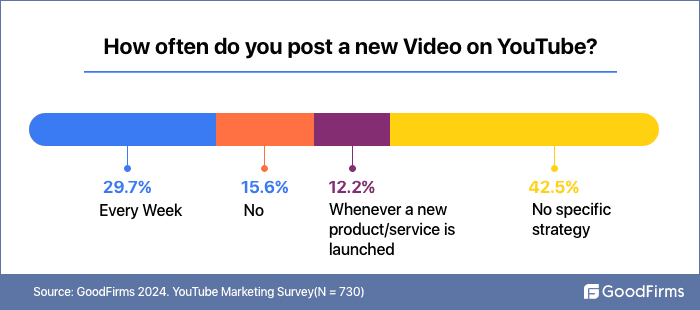
Most channels are not following any plan at all. In the GoodFirms survey below, the largest group of businesses said they had no specific posting strategy for YouTube, so simply committing to a fixed weekly slot already puts you ahead of many of them.
How many YouTube videos should you post a day?
For long-form, at most one a day, and only with a team or a format that is fast to produce (news recaps, gaming sessions). Several long videos a day only makes sense for breaking news or live sports coverage, where each upload covers a different event; otherwise you split your own audience across videos that compete with each other.
For Shorts, one a day is a realistic upper pace for a solo creator, and more works only if each Short is a distinct idea rather than a variation of the last one. You are also not competing in an empty feed: Alphabet said that as of March 2026, over ten million channels were publishing Shorts each day.
How should you split uploads between Shorts and long videos?
AIR Media-Tech's study of 18,000 English-language channels (March 2025 to March 2026) found the best results when Shorts made up 25% to 40% of a channel's total uploads. In practice, 3 long-form videos plus 1 or 2 Shorts a week lands in that range. Mixing is not automatically better, though: in niches where long-form-only channels led, their subscriber gap over mixed channels reached 85%, versus up to 41% where mixed channels led.
Money points the same way for most channels. AIR Media-Tech's September 2026 analysis of 274 channels found Shorts RPM was 3% to 14% of long-form RPM in almost every niche, so most channels need 11,000 to 34,000 Shorts views to earn what 1,000 long-form views generate. If income is your goal, protect your long-form cadence first and fit Shorts around it.
Shorts still earn their place for discovery. Alphabet said in April 2023 that channels posting weekly on Shorts saw the majority of their new channel subscribers come from their Shorts posts. Two limits to keep in mind:
- Watch hours from the Shorts feed do not count toward the 4,000 watch-hour YPP threshold. Today the alternative route is 1,000 subscribers plus 10 million qualified Shorts views in the last 90 days.
- From February 1, 2027, new YPP applicants need 1,000 subscribers plus 8,000 qualified watch hours in the last 365 days or 20 million qualified Shorts views in the last 90 days. Channels already in the program are not affected.
For how long each format should run, see our guide to the best video lengths for YouTube.
What frequency of YouTube uploads is consistent?
Consistent means a cadence you keep for months, on a predictable day, without long gaps. One video every Tuesday is consistent; four videos one week and none for a month is not, even though the monthly total is the same. A fixed day helps your audience know when to come back, and it forces you to plan instead of uploading when inspiration strikes.
YouTube also sets a hard floor for monetized channels:
| Rule | What it says |
|---|---|
| Current rule | YouTube may turn off monetization for channels that have not uploaded a video or posted to the Posts tab for 6 months or more |
| From February 1, 2027 | A YPP channel counts as active with 1,000 qualified watch hours in 365 days, or 1 million qualified Shorts views in 90 days, or 2 long-form videos or 5 Shorts uploaded every 90 days |
That floor keeps you monetized. It does not grow a channel, so treat it as the absolute minimum for a quiet season, not as your plan.
How often should you post AI videos?
As often as you can review each one and add your own angle, and no faster. YouTube allows AI and automated tools in monetized content when the final video shows your creative vision and gives viewers educational or entertainment value. What it does not allow to monetize is AI content made with generic templates that looks mass-produced, or videos that stitch together unrelated AI clips to shock viewers.
On July 15, 2025, YouTube renamed its "repetitious content" policy to "inauthentic content" to make clear it covers repetitive or mass-produced uploads. A daily AI upload schedule is fine; a daily schedule where every video has the same structure, voice and visuals with a new topic swapped in is the pattern that policy targets. If you use realistic AI visuals, turn on the "AI use" disclosure in YouTube Studio; YouTube says disclosure alone does not limit reach or earnings.
How to post more often without burning out
- Plan a month at a time. List the videos and their publish dates at the start of each month, so you never start a week without a topic.
- Batch the work. Script four videos in one session, film them in another, edit in a third. Our guide to batch creating short videos shows the workflow.
- Cut Shorts from every long video. One long-form upload can give you several Shorts, which fills your Shorts schedule without new filming.
- Hand off one task. Editing or thumbnails are the usual first things to outsource, because they take the most hours per video.
- Schedule ahead. Upload finished videos as scheduled, so a busy week does not break your streak.
Shares are of all 77,016 videos built in the period, including tools not shown.
Source: Revid product analytics (Amplitude), event project_built grouped by tool slug, September 29 to October 28, 2026, 77,016 builds
Show the data
| Videos built | Share of all videos (%) | |
|---|---|---|
| Prompt to video | 33.5K | 43.5% |
| Voice-over video from a script or link | 14.7K | 19.1% |
| Music video from a song | 12.4K | 16.1% |
| Audio to video | 4.3K | 5.6% |
| Article to video | 1.3K | 1.7% |
| Character swap | 1.2K | 1.6% |
| Captions on your own video | 999 | 1.3% |
| Clips from a long video | 973 | 1.3% |
| Talking avatar | 745 | 1% |
Make Shorts in bulk with Revid
If Shorts are the part of your schedule that keeps slipping, Revid can take most of the production work:
- Paste a long YouTube video into the YouTube clip maker to get vertical clips with captions.
- For original Shorts, start from a script or an idea in the AI YouTube Shorts generator, which adds visuals, an AI voice-over and synced captions.
- Schedule each video to YouTube, TikTok and Instagram from one queue.
- For a daily cadence, an Auto-Mode worker creates a fresh video every day from a prompt or a content source (3 workers on the Growth plan).
Review each video before it posts and edit it in the timeline when it needs your angle, for the policy reasons above.
How many videos can you schedule on YouTube?
YouTube does not publish a fixed number of videos you can schedule. Each upload can be set to publish at a date and time you choose, so you can line up weeks of videos in advance. Accounts can hit a daily upload limit, which YouTube Studio shows when you reach it; if that happens, spread your uploads over several days and schedule them as you go.
To schedule a video:
- Upload it in YouTube Studio and fill in the title, description and thumbnail.
- On the Visibility step, choose Schedule.
- Pick the date, time and time zone, then confirm.
Shorts can be scheduled the same way when you upload Shorts from a PC in YouTube Studio.
FAQ
How many videos per month should I upload on YouTube?
Between 4 and 12 long-form videos a month covers most channels: about one a week to start, up to three a week once quality holds. Shorts come on top of that, ideally kept to around a quarter to two fifths of your total uploads.
Does posting more often get more views on YouTube?
Only if the extra videos are as good as the rest. More uploads give you more chances for one to take off, but a weaker video does not get recommended just because it went out on schedule, and it can pull your channel averages down.
Should I upload on the same day every week?
Yes, for long-form series. A fixed day tells your audience when to come back and keeps your production on a deadline; pick the day after checking when your viewers are most active in YouTube Analytics.
Can I post a Short and a long video on the same day?
Yes, nothing stops you. Spacing them out usually works better, because each one gets its own day of attention and a Short posted between long videos keeps your channel active in the gap.
Sources
- Revid product analytics (Amplitude), event project_built grouped by tool slug, September 29 to October 28, 2026, 77,016 builds
- AIR Media-Tech, Do YouTube Shorts help your long-form videos? Data from 18,000 channels (May 2026)
- AIR Media-Tech, YouTube Shorts RPM vs long-form: real monetization data from 274 channels (September 2026)
- Alphabet, Q1 2026 earnings call transcript (April 2026)
Charts and figures checked on November 6, 2026.