On this page
To create a TikTok video, tap the + button, record or upload a vertical 9:16 clip (1080x1920 is TikTok's recommended size), trim it, add a sound, text and captions, then write a caption with 3 to 4 hashtags and post. Videos that go viral add one more step first: they start from a proven format and hook.
That first step matters more than gear or editing tricks. In Revid's analysis of 176,367 TikToks with 1,000+ likes posted between October 2025 and October 2026, challenges had a median of 182K views against 62K for tutorials, faceless videos beat one person on camera 114K to 67K, and selfie-style shots were the weakest filming style at 48K. Most new creators choose the format last. Choose it first.
- Median views for challenge TikToks, the top format (tutorials: 62K)
- 182K
- Revid analysis of 176,367 TikToks
- Median views for TikToks with under 40 characters of speech
- 123K
- Revid analysis of 176,367 TikToks
- Median views for POV shots, vs 48K for selfie-style
- 107K
- Revid analysis of 176,367 TikToks
- Median views with 4 hashtags; 9 or more dropped to 16K
- 77K
- Revid analysis of 176,367 TikToks
Step 1: Pick a format that already works
Decide what kind of video you are making before you decide what to say. In the same study, challenges (182K median views, 25.6% past 1 million) and comedy (155K) led every content type, ahead of reactions (105K), dance (84K), storytelling (66K) and tutorials (62K). The sample only holds videos that already passed 1,000 likes, so these figures show what top performers have in common, not what causes a hit. The full method is in our study of what makes a TikTok go viral.
Challenges and comedy passed 1M views about twice as often as tutorials and storytelling, which are the most common formats.
Source: Revid analysis of 176,367 TikToks with 1,000+ likes posted between Oct 1, 2025 and Oct 16, 2026 (61,203 creators)
Show the data
| Median views | Share that passed 1M views | |
|---|---|---|
| Challenge | 182.3K | 25.6% |
| Comedy | 154.8K | 22.1% |
| Reaction | 104.8K | 16% |
| Dance | 83.8K | 15.5% |
| Storytelling | 66.1K | 12.2% |
| Lip Sync | 61.7K | 12.3% |
| Tutorial | 61.9K | 12.1% |
You do not have to switch niches to use this. If you teach, keep teaching but change the perspective: faceless tutorials (hands, screen, voice-over) had a 156K median against 52K for on-camera tutorials.
Three places to find formats worth copying in structure (never in content):
- Your For You page. Scroll your niche for 15 minutes a day and save every video that made you stop. Note the first line, the length and the shooting style.
- Rising trends. Check TikTok trends today for hashtags, sounds and videos that are climbing right now.
- A searchable library. Revid indexes about 2.77 million short-form videos with their engagement data, so you can filter by topic and remix a proven viral format into an original video on your subject.
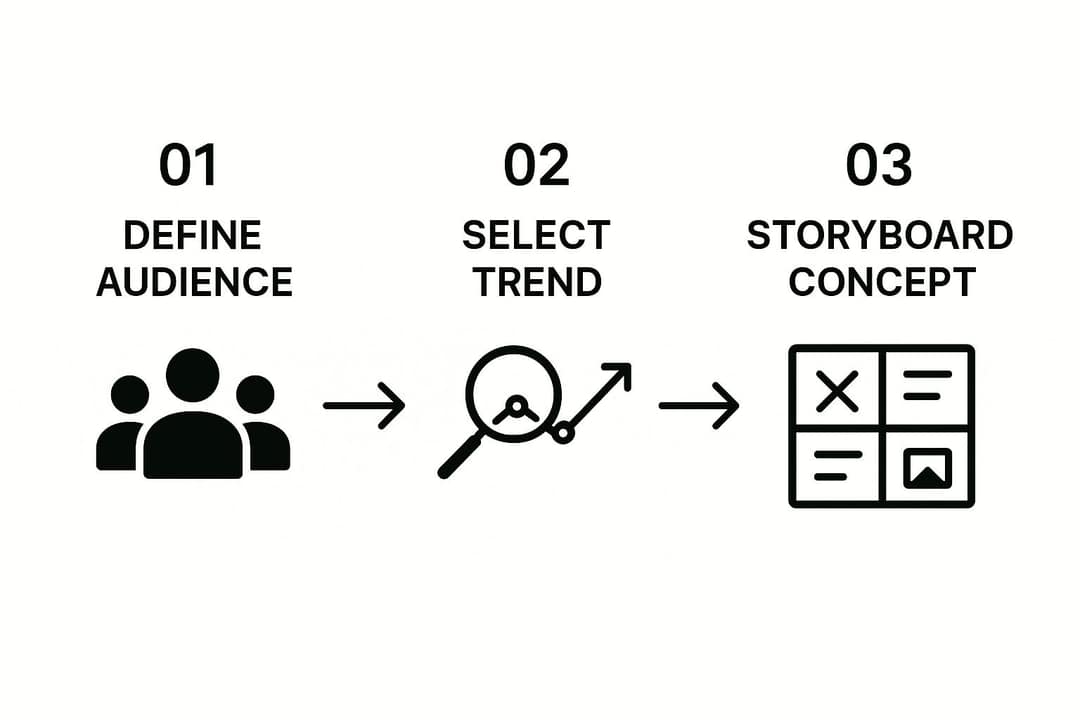
Before you film, fill in this checklist. If a row is blank, the video is not ready.
| Planning step | Question to answer | Example (beginner baking account) |
|---|---|---|
| Audience | Who is this for, and what do they want? | People nervous about their first sourdough |
| Format | Which proven format fits? | Faceless tutorial, hands only |
| Angle | What is your twist on it? | The one mistake that flattens loaves |
| Core message | What single sentence should they remember? | "Your loaf is flat because of this step." |
| Shot list | Which 3 to 5 shots tell it? | Flat loaf, the mistake, the fix, the good loaf |
Prompt to try
Make a 25-second faceless TikTok tutorial for nervous first-time bakers. Open with the hook "Your sourdough is flat because of this one step." Use hands-only close-ups showing the flat loaf, the mistake, the fix and the risen loaf, with voice-over only on the hook and payoff, and end on the flat loaf so the video loops back to the start.
Step 2: Write a hook and a four-beat script
The hook is the first line or image, and its only job is to stop the thumb. Talk less than you think: in Revid's data, videos with under 40 characters of speech (about one short sentence) had a 123K median and 20.2% passed 1 million views, while videos that talked throughout (300+ characters) had 68K. Fully silent videos landed at 73K. Let the visuals carry the story and use words for the hook and the payoff.
Emotion beats encouragement. Videos whose dominant mood was outrage had a 156K median and humor 121K, while inspirational videos sat at 45K. A hook that provokes a reaction ("this is wrong", "try not to laugh") outperforms a pep talk.
| Hook type | Example | Use it when |
|---|---|---|
| Mistake | "You're storing your coffee wrong." | You can show the fix on screen |
| Result first | Show the finished room, then "Here's how." | You have a visible transformation |
| Challenge | "Try watching this without laughing." | Comedy or reaction content |
| POV | "POV: your first shift as a barista" | A relatable scenario in your niche |
| Question | "Which one would you pick?" | You want comments |
For more starting lines, browse these copy-and-paste TikTok hooks. Then structure the rest in four beats:
- Hook: the line or image that stops the scroll.
- Context: one idea, delivered fast. No intro, no "hey guys".
- Payoff: deliver exactly what the hook promised.
- Loop: end on a frame or line that leads back to the start, so a replay feels natural.
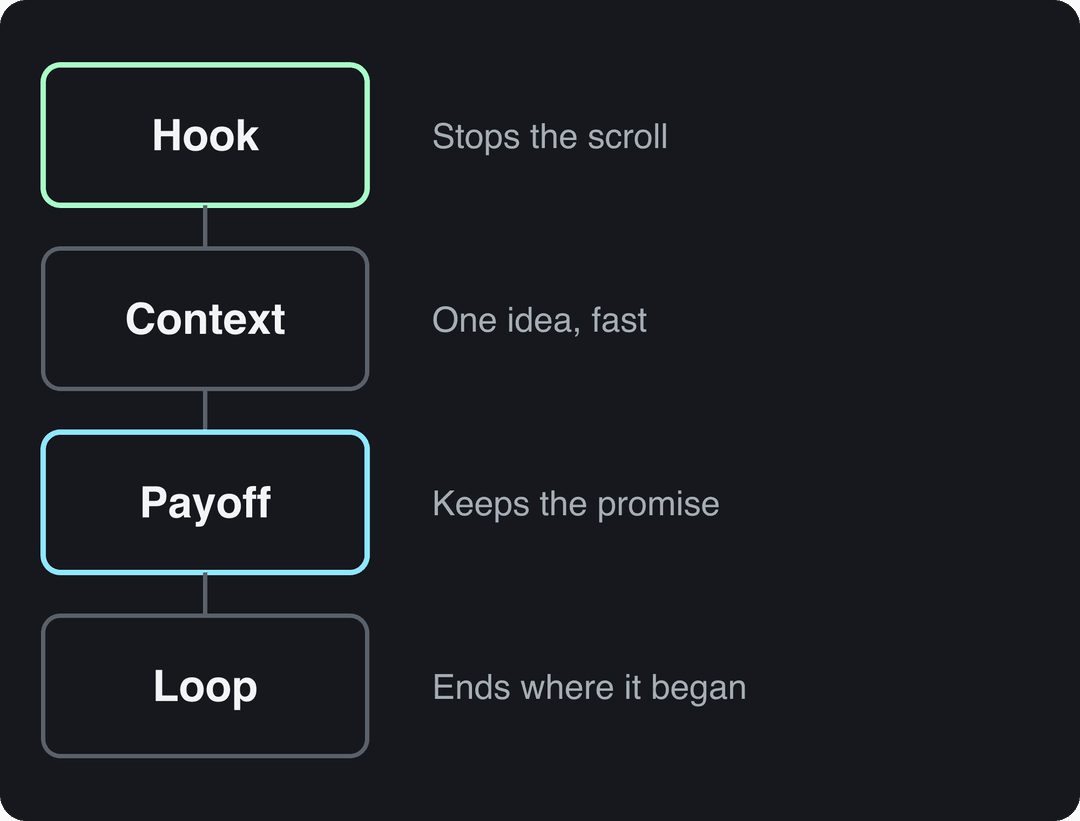
A script can be four bullet points. If you want a draft to edit, the free TikTok script generator writes a hook and beats from a topic.
Step 3: Film vertically with good light and clean sound
Your phone is enough. What you point it at, and how, matters more. In Revid's analysis, POV shots had a 107K median (19% past 1 million), screen recordings 91K, handheld 80K, tripod 77K and selfie-style 48K. If you usually film yourself talking at arm's length, try a POV or hands-only version of the same idea.
POV shots and screen recordings earned the most views. Selfie-style videos, the default for many creators, earned the least.
Source: Revid analysis of 176,367 TikToks with 1,000+ likes posted between Oct 1, 2025 and Oct 16, 2026 (61,203 creators)
Show the data
| Median views | Share that passed 1M views | |
|---|---|---|
| POV | 107.3K | 19% |
| Screen recording | 90.7K | 12.7% |
| Handheld | 79.8K | 14.5% |
| Steady cam | 78.2K | 14.9% |
| Drone | 83.4K | 14.9% |
| Tripod | 77.4K | 15.5% |
| Selfie | 48.4K | 9.2% |
The specs to know:
- Frame: vertical 9:16 at 1080x1920 pixels, TikTok's recommendation.
- Length: the in-app camera records up to 10 minutes; uploaded videos can run up to 60 minutes.
- Web uploads: TikTok Studio Web accepts 1080p, 2K or 4K files up to 30 GB.
The filming basics:
- Light: face a window during the day. At night, a ring light removes harsh shadows.
- Stability: prop the phone on books or use a small tripod. Handheld works when the movement is deliberate, not shaky.
- Sound: film in a quiet room with the phone close to you. Viewers forgive average video far faster than muddy audio.
- Angles and movement: shoot from above, low or the side, and add a slow pan or push-in at the key moment.
- In-camera transitions: cover the lens with your hand or whip-pan between shots so the cuts look intentional in the edit.
Step 4: Edit tight in TikTok or CapCut
TikTok's built-in editor handles most short videos: trim, add sound, text, effects and captions. For multi-track timelines, keyframes or trend templates, CapCut is the common next step; its free tier includes 1080p export and auto-captions.
- Trim hard. Cut every pause, "um" and dead second. The first frame should already be the hook.
- Add a sound that fits. Tap Add sound and browse what is trending. A trending sound helps only when it suits the video; a mismatched one reads as filler.
- Add text overlays. Big, bold, high-contrast, timed to appear with the moment they describe. In a recipe, "1 cup flour" appears as the flour goes in.
- Add captions for people watching with the sound off.
- Check the safe zone. TikTok's buttons and caption cover the right side and bottom of the screen, so keep text clear of them. The TikTok safe zone checker shows exactly where.
Duets and Stitches put you next to someone else's audience and are a fast way to join a conversation. Use them for reach, but know that TikTok does not count Duets, Stitches or lightly modified reposts as original for the Creator Rewards Program.
Step 5: Write the caption, hashtags and cover
Short captions win, but no caption loses. In Revid's data, captions of 41 to 80 characters had the best median (67K views); videos with no caption had 36K. One sentence plus a question works well:
- "The sourdough mistake nobody warned me about. Which one did you make?"
- "Three ways to fold a fitted sheet. Which one actually works for you?"
For hashtags, 4 had the best median (77K views, 13.4% past 1 million) and 3 came close at 75K. Videos with no hashtags had 51K, and 9 or more collapsed to 16K. Use one broad niche tag, two specific ones and one tag for the trend or sound you used. Generic tags like #fyp describe nothing about your video, so spend the slots on tags that do. Find current ones on the trending TikTok hashtags page.
TikTok's own Creator Academy breakdown of the elements of a TikTok video covers captions, sounds and effects from the platform's side.
Finally, the cover. It is what people see on your profile grid, so pick a clear, readable frame (TikTok recommends 9:16 at 1080x1920) and add a few words of text that say what the video is about.
Step 6: Post when your viewers are scrolling
Start with your own numbers. Open TikTok Studio (profile, menu, TikTok Studio, Analytics, View all): the Viewers tab shows when your viewers were most active over the last 7 days, and the Followers tab breaks follower activity down by hours and days.
If you have no audience data yet, Revid's study offers a starting point: English-language TikToks posted from 3 to 6 a.m. US Eastern performed best (4 a.m. posts had a 120K median), and 5 to 9 p.m. was the weakest window (7 p.m. posts had 50K). Those creators post from all over the world, so the early US hours also cover daytime in the UK, Europe, India and Asia. If your analytics point elsewhere, trust your analytics.
Know who you are posting for. Pew Research Center reported in March 2026 that 63% of U.S. adults under 30 use TikTok, compared with 12% of adults 65 and older (more in our short-form video statistics). For wider audience breakdowns, see these TikTok user trends and statistics from The Frank Agency.
On frequency, consistency beats volume. Posting 3 to 5 good videos a week, every week, teaches TikTok who your content is for. Space posts a few hours apart so each one gets its own start.
Step 7: Turn comments into your next video
The hour after posting is when the conversation starts. Reply to comments with real answers, not just hearts. Pin the best comment so it sets the tone for everyone who arrives later.
When someone asks a good question, answer it with a video reply instead of text. It gives you a new video with a built-in hook (their question) and an audience that already cares. Collaboration works the same way at a larger scale: the size of TikTok's creator community, per Exploding Topics, means there is almost always someone in your niche worth Stitching or Dueting.
How long should a TikTok video be?
Length matters less than whether people keep watching. In Revid's 12-month study, every length from under 15 seconds to 10 minutes had a median between 58K and 76K views, with 61 to 90 seconds slightly ahead at 70K. Videos under 15 seconds had the lowest median (58K) but the most shares per view: 1.41 per 100 views. Revid's full index across all posting dates (published on the statistics page) found 16 to 30 second videos ahead, so the edge of very short videos has faded for recent posts.
The most-viewed videos still skew short: in Revid's 100M Club of the most viewed TikToks, the median video runs 22 seconds and 59% are 30 seconds or less.
A decision rule:
- Starting out or making a joke, trend or reaction: keep it under 30 seconds and cut until nothing can go.
- Want Creator Rewards earnings: only videos at least one minute long qualify, and you need 10,000 followers and 100,000 views in the last 30 days.
- Teaching something with steps: take the time the steps need, and no more.
How to make a viral TikTok video with Revid
If filming and editing are the bottleneck, Revid builds the whole video from an idea, a link or a proven viral format.
- Open the AI TikTok video generator and paste an idea, a script or a link. Or start from a video in Revid's library and choose "Same energy, new script" to keep its structure on your topic.
- Run the free deep analysis (up to 60 a day) on a reference video to see its hook, timed structure and scroll-stopping moment.
- Revid writes the script and builds the scenes with stock footage, AI images or AI video (Seedance 2.5, MiniMax Hailuo H3, Wan 3.0 or Google Veo 3), plus a voice-over in 70+ languages, synced captions and music.
- Adjust any scene in the timeline editor and export in 1080p or 4K.
- Publish or schedule it directly to TikTok, Instagram and YouTube, then track each post's views, likes and comments.
Sign-up is free and new accounts get free credits to try video creation, no credit card needed; regular creation then uses the credits of a paid plan, from $39/month.
How do you make one video for TikTok and Instagram Reels?
Film or export once in 9:16 at 1080x1920, then post a clean file natively to each app. Instagram accepts Reels from 1.91:1 to 9:16, at a minimum of 30 FPS and 720 pixels, so the same file works on both. Adjust these details per platform:
- Hashtags: Instagram allows up to 5 per post; more and the caption won't post. Your 4-tag TikTok set fits.
- Length: Instagram Reels over 3 minutes are not recommended to non-followers, so keep cross-posts under that.
- Text placement: Reels and TikTok cover different parts of the screen with buttons. Keep key text near the center.
- Editing: if you want a phone editor built for Reels, Instagram's Edits app exports without a watermark.
- Sound: trending sounds differ between the apps. Pick a sound inside each app rather than baking one into the file.
FAQ
How do you create a TikTok reel?
A "TikTok reel" is simply a TikTok video: tap the + button, record or upload a vertical clip, edit it, add a caption and post. "Reels" is Instagram's name for the same short vertical format.
How do I find trending sounds on TikTok?
Tap the + button, then Add sound, and browse the trending lists TikTok shows you. Sounds that keep repeating on your For You page in your niche are the most reliable signal that one is rising.
Do I need expensive gear to make viral TikToks?
No. A phone, window light and a quiet room cover the basics, and selfie-style shots had the lowest median in Revid's data regardless of gear. A small tripod and a ring light are the first upgrades worth buying.
How often should I post on TikTok?
Post on a schedule you can sustain, such as 3 to 5 videos a week, every week. Regular posting beats bursts followed by silence.
Do Duets and Stitches count for TikTok Creator Rewards?
No. TikTok does not consider Duets, Stitches or lightly modified reposts original for Creator Rewards, so use them for reach and post original videos of at least one minute if you want to earn.
Sources
- Revid analysis of 176,367 TikToks with 1,000+ likes posted between Oct 1, 2025 and Oct 16, 2026 (61,203 creators)
Charts and figures checked on November 6, 2026.