How to Create a Viral Video: A Step-by-Step Guide With Data (2026)
Ten steps to create a viral video: hooks, formats, length, sound, hashtags, timing and iteration, backed by Revid's analysis of 176,367 TikToks with 1,000+ likes.

On this page
To create a viral video, open with a hook that stops the scroll in the first second and choose a format and emotion people already share. Cut everything that doesn't serve the payoff, and end with a reason to comment or rewatch. Then measure what worked and remake your winners instead of starting from scratch.
Most creators get the emotion wrong. In Revid's analysis of 176,367 TikToks with 1,000+ likes posted between October 2025 and October 2026, inspirational videos had a median of 45K views, against 156K for outrage and 121K for humor. Faceless videos also beat one person on camera, 114K to 67K. The safe, uplifting video with your face in it is the weakest default you can pick.
- Median views of outrage TikToks, the top-performing mood
- 156K
- Revid analysis of 176,367 TikToks
- Median views of faceless TikToks, vs 67K with one person on camera
- 114K
- Revid analysis of 176,367 TikToks
- Median views of TikToks with 4 hashtags, the best-performing count
- 77K
- Revid analysis of 176,367 TikToks
- US consumers who say a video must grab them in 30 seconds or less
- 88%
- Clutch, November 2025
What makes a video go viral?
A video goes viral when viewers act on it: they watch to the end, rewatch, share it or argue in the comments. Platforms read those signals and show the video to more people who don't follow you. So the useful question is not "is it good?" but "what would make a stranger send this to a friend?"
Three things drive that action: a strong emotion, a clear promise in the opening seconds, and a payoff worth the time. In Revid's study (the full method is in what makes a TikTok go viral), outrage videos had a 156K median and 23.7% passed 1 million views. Humor had 121K (19.3%), sadness 104K, and inspirational content 45K (11.3%).
High-arousal emotions (outrage, humor, sadness) earned the most views. Calm, inspirational videos earned the least, even though they collect the most likes per view.
Source: Revid analysis of 176,367 TikToks with 1,000+ likes posted between Oct 1, 2025 and Oct 16, 2026 (61,203 creators)
Show the data
| Median views | Share that passed 1M views | |
|---|---|---|
| Outrage | 156K | 23.7% |
| Humor | 121K | 19.3% |
| Sadness | 104.4K | 16.5% |
| Excitement | 92.5K | 15.9% |
| Joy | 89.9K | 18% |
| Informative | 64.1K | 11.2% |
| Neutral | 61.2K | 11.5% |
| Inspirational | 44.6K | 11.3% |
Two limits matter. The sample only includes TikToks that already reached 1,000+ likes, and it shows what top videos have in common, not what causes views. Mood labels come from Revid's AI analysis of each video. Use outrage with care: a video that makes people angry at a common mistake works, while one that makes them angry at you does not.
Prompt to try
Make a 30-second faceless tutorial video on 3 kitchen knife mistakes that ruin your blade. Open with the hook "Stop doing this if you want your knife to stay sharp", show close-up hands-only shots for each mistake and the fix, and use bold on-screen text with a calm, confident voice.
Step 1: Pick a format that already gets shared
Format matters more than topic. In the same TikTok data, challenges had the highest median views (182K, 25.6% past 1 million), followed by comedy (155K, 22%) and reactions (105K). Storytelling (66K) and tutorials (62K) sat close to the overall median of 64.4K.
You don't need to show your face to use these formats. Faceless tutorials had a 156K median versus 52K for tutorials with a person on camera. Screen recordings, hands-only shots and POV videos are often the stronger option, not a compromise.
Decision rules for choosing a format:
- If you sell a product or teach a skill, make faceless tutorials or "watch me fix this" screen recordings.
- If your niche has a running joke or shared frustration, make comedy or POV skits about it.
- If a trend or challenge fits your niche naturally, join it early with your own twist.
- If you mainly have opinions, react to something people already care about and add a take they can disagree with.
Before you script anything, look at what already worked in your niche. On Revid you can search about 2.77 million real short-form videos by topic, platform and engagement level, then turn a proven format into an original video. Google Trends and each app's search bar also show what people are looking for right now.
Step 2: Write a hook for the first second
Viewers decide almost instantly. In Clutch's October 2025 survey, 88% of US consumers said a video needs to grab their attention in 30 seconds or less, and only 9% said they give short-form videos their full attention. On a swipe feed, your real window is far shorter.
A hook is a promise plus a gap: it tells viewers what they will get and leaves something unanswered. Templates you can adapt:
- "Stop doing [common habit] if you want [result]."
- "Nobody tells you this about [topic]."
- "I tried [thing] so you don't have to."
- "POV: you just [relatable moment]."
- "This is the [product or tool] I wish I'd found sooner."
- "[Surprising result]. Here's how."
Show the hook visually too: on-screen text, movement, or the end result in the first frame. Talking less often works better. In Revid's data, videos with under 40 characters of speech had a 123K median and 20.2% passed 1 million views, against 68K for videos talking throughout. For more opening lines, browse these TikTok hooks that stop the scroll.
Prompt to try
Create a 25-second vertical TikTok about the common budgeting mistake of saving whatever is left at the end of the month. Hook: "Nobody tells you this about saving money." Set up the problem in one line, pay off with the pay-yourself-first rule, and end by asking viewers which method they use, with punchy captions and fast cuts.
Step 3: Structure the story: hook, setup, payoff, ending
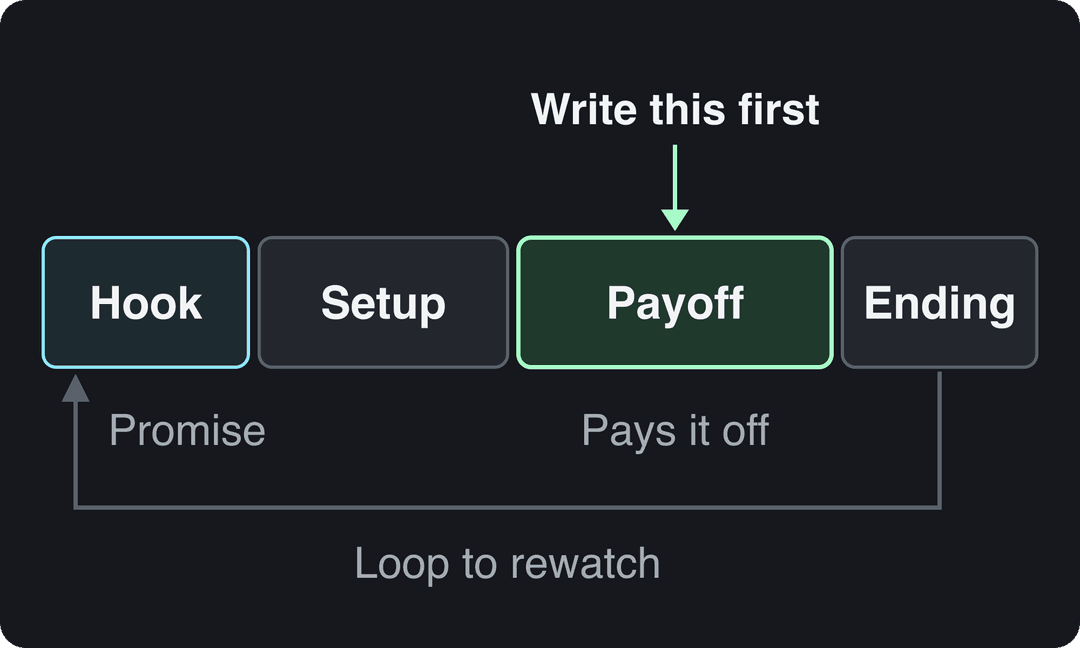
Most viral short videos follow the same four beats, whatever the topic.
- Hook: the promise or the most striking image, right away.
- Setup: the problem, the stakes or the question, as fast as you can make it clear.
- Payoff: the answer, reveal, punchline or transformation. Deliver exactly what the hook promised.
- Ending: stop as soon as the payoff lands. End on a line that invites a reply, or cut so the last frame flows into the first and people rewatch.
Write the payoff first, then work backward. If you can't state the payoff in one sentence, the video isn't ready. An AI script generator can draft several versions of the hook and setup so you can keep the tightest one.
Step 4: Keep it as short as the idea allows
There is no magic length. In the 12-month study, every length bucket from under 15 seconds to 10 minutes had a median between 58K and 76K views, with 61 to 90 seconds slightly ahead at 70K. Videos under 15 seconds had the lowest median (58K) but the most shares per view (1.41 per 100). Revid's full index of about 2.39 million TikToks across all posting dates favored 16 to 30 seconds (about 141K median), but that edge has faded for recent posts.
At the very top, short still dominates. In Revid's ranking of every TikTok over 100 million views, the median length was 22 seconds and 59% ran 30 seconds or less.
The rule: cut until removing anything else would break the story. A 20-second video people finish beats a 90-second one they abandon. Go longer only when every extra second adds information, as in a tutorial with several steps.
Platform limits in October 2026:
| Platform | Maximum length | What to know |
|---|---|---|
| TikTok | 60 minutes (uploads); 10 minutes in the in-app camera | Recommended 9:16 at 1080x1920 |
| YouTube Shorts | 3 minutes (square or vertical) | Most Audio Library songs usable for up to 90 seconds |
| Instagram Reels | 20 minutes | Reels over 3 minutes are not recommended to non-followers |
| No length limit | Every new video is shared as a reel |
Shoot vertical (9:16) once and you can post the same video to all four.
Step 5: Add sound, captions and hashtags
Sound. Trending sounds help on TikTok and Instagram because people browse videos by sound. Check viral TikTok songs right now and use each platform's licensed library instead of ripping music.
On-screen text. Many people watch with the sound off, and text on screen keeps them following. Keep important text away from the bottom and right edges, where the app's buttons and description sit.
Post caption. A short caption beats an empty one. TikToks with 41 to 80 characters of caption had the best median (67K views), while videos with no caption had 36K. Use the caption to add context or ask a question, not to repeat the video.
Hashtags. On TikTok, 4 hashtags had the best median (77K) and 3 hashtags 75K. No hashtags dropped to 51K, and 9 or more to just 16K. Pick 3 or 4 specific tags, and browse trending TikTok hashtags by niche to find them. Instagram now allows at most 5 hashtags per post, so the same habit works there.
Step 6: Make the cover or thumbnail earn the click
On TikTok and Reels, most views come from the feed, where the video plays on its own, so your first frame is the real thumbnail. The cover matters on your profile grid and in search results: choose a frame with clear text that states the topic.
On YouTube, the thumbnail drives long-form views. YouTube recommends 3840x2160 (16:9) custom thumbnails, and YouTube Studio on desktop can test up to 3 titles and thumbnails against each other (Shorts are not eligible). Verified accounts can upload a custom Shorts thumbnail from a computer at 9:16 (2160x3840 recommended). Instagram recommends Reels covers of 420x654 px.
A good cover has one idea, three to five words of large text, high contrast, and an image that matches what happens in the video. A face is optional; a clear subject is not. For long-form specifics, see how to create a viral video on YouTube.
Videos posted between 3 and 6 a.m. Eastern earned the most views and passed 1M views most often. The evening slot most guides recommend (5 to 9 p.m.) was the weakest of the day.
Source: Revid analysis of 123,704 English-language TikToks with 1,000+ likes posted between Oct 1, 2025 and Oct 16, 2026
Show the data
| Median views | Share that passed 1M views | |
|---|---|---|
| 12a | 67.3K | 14% |
| 1a | 79.4K | 15.1% |
| 2a | 79K | 14.2% |
| 3a | 90.8K | 16.1% |
| 4a | 120.4K | 19.9% |
| 5a | 93.5K | 16.7% |
| 6a | 97K | 17% |
| 7a | 75.8K | 13.1% |
| 8a | 83.9K | 14.3% |
| 9a | 70.5K | 13.1% |
| 10a | 65.5K | 13.6% |
| 11a | 65.7K | 13.1% |
| 12p | 60.4K | 11.9% |
| 1p | 60.9K | 11.8% |
| 2p | 53.7K | 11.2% |
| 3p | 63K | 11.9% |
| 4p | 63.8K | 11.5% |
| 5p | 55.6K | 11.1% |
| 6p | 55.3K | 11.5% |
| 7p | 50.4K | 11% |
| 8p | 60.5K | 12.3% |
| 9p | 62.2K | 13.1% |
| 10p | 62.3K | 12.6% |
| 11p | 67.2K | 13.3% |
Step 7: Post when your audience is scrolling
Start with your own analytics. TikTok Studio's Viewers tab shows when your viewers were most active over the last 7 days, and Instagram shows follower activity times once you have 100 followers.
As a starting point on TikTok, Revid's data found English-language posts at 3 to 6 a.m. US Eastern had the highest median views and 5 to 9 p.m. the weakest. Because those creators post from around the world, the early US hours also cover daytime in the UK, Europe, India and Asia.
Timing also means the calendar. A video tied to an event, a release or a holiday has a short window, so publish it while people are searching for it.
Step 8: Ask for shares and comments
Shares are rare, which is why they count. Across the TikToks in Revid's study, shares came to 0.88% of views and comments to 0.08%. A video that gets people to send it or reply gets noticed.
Give viewers a reason, not an order:
- Ask a question with two sides: "Which one would you pick?"
- Make a claim people want to correct: "Tell me I'm wrong."
- Make it useful to someone specific: "Send this to the friend who always [habit]."
- Leave a Part 2 open, then answer the best comments with a video.
Reply to comments in the first hours after posting, so new viewers see an active conversation. Giveaways that require shares can work, but check each platform's promotion rules first.
Step 9: Collaborate to reach a new audience
A creator in your niche brings an audience that already trusts them. Pick someone whose viewers match yours, not just someone big, and pitch a specific idea: a joint challenge, a duet or stitch on TikTok, a reaction, or a skit where each of you plays a role. Make the video work as content on its own, because an obvious ad gets skipped.
Step 10: Measure, then remake your winners
Viral hits rarely come from a single attempt. They come from posting, reading the numbers and making more of what worked. Check these in each platform's analytics:
- Retention in the opening seconds: if most viewers leave early, rewrite the hook.
- Average watch time and completion: a drop in the middle means the setup is too long.
- Shares and saves per view: the clearest sign a format is worth repeating.
- Views from the For You or Explore feed: proof that non-followers are seeing it.
On Instagram, use trial reels to test hooks. They are shown first to non-followers, insights arrive within 24 hours, and they don't affect the ranking of your standard reels. You need a public account with 200 followers (professional) or 1,000 (personal).
When a video does well, don't move on. Make it again with a new angle, a sequel, or the same structure on a related topic.
How to make a viral video with Revid
Revid starts from formats that have already worked instead of a blank prompt.
- Search Revid's viral video library by topic, platform and engagement tier, and open a video that fits your niche.
- Run Deep analysis (free, up to 60 a day) to see why it worked: the hook, the timed structure and the scroll-stopping moment.
- Choose "Make it about your topic" or "Same energy, new script". Revid writes an original script and generates the visuals, voice-over, captions and music.
- Fix any scene in the timeline editor, export up to 4K, then publish or schedule to TikTok, Instagram and YouTube. Each post reports its views, likes and comments, and you can remix a winner in one click.
To start from an idea or a link instead, the AI video generator turns a prompt, script or URL into a finished vertical video. Sign-up is free and new accounts get free credits to try video creation, no credit card needed; regular creation then uses the monthly credits of a paid plan, from $39/month.
FAQ
How many views does a video need to be viral?
There is no official threshold, but Revid's library counts 1 million+ views as viral. In its study of 176,367 TikToks with 1,000+ likes, the median was 64.4K views and 11.9% passed 1 million.
Can a new account go viral?
Yes, because short-form feeds recommend videos to people who don't follow you. Socialinsider's 2026 study found accounts under 5,000 followers averaged 15,160 views per YouTube Short, compared with 625 on Instagram Reels and 350 on TikTok.
Do AI-generated videos go viral?
They can. In Revid's AI videos vs real footage study, AI-generated TikToks averaged twice the views of real footage, while on X, Instagram and Threads AI visuals clustered in the lowest engagement tier. Label realistic AI content: TikTok and YouTube both say the label alone doesn't limit distribution.
Should I buy views to kick-start a video?
No. TikTok excludes paid, promoted and artificial views from the qualified views that earn Creator Rewards, and bought views tell you nothing about whether real viewers like the video.
Sources
- Revid analysis of 176,367 TikToks with 1,000+ likes posted between Oct 1, 2025 and Oct 16, 2026 (61,203 creators)
- Revid analysis of 123,704 English-language TikToks with 1,000+ likes posted between Oct 1, 2025 and Oct 16, 2026
- Clutch, Creating in the Attention Economy: You Have 30 Seconds or Go Bust (November 2025)
Charts and figures checked on November 6, 2026.