Instagram Video Editing: How to Edit Reels People Finish (2026)
Edit Instagram Reels that people actually finish: the export settings, a 7-step edit, the best apps, where to put text, and fixes for blurry uploads, with data from 176,367 viral TikToks.
On this page
Instagram video editing comes down to five moves: open on your strongest shot, cut every pause, put captions inside the safe zone, cut on the beat, and export a 9:16 MP4 at 1080x1920 and at least 30 fps. Instagram's own Edits app and CapCut both handle all five on a phone.
The edit most creators skip is cutting words. In Revid's study of 176,367 viral TikToks, videos with almost no speech had a median of 123K views, nearly double the 68K of videos that talk from start to finish. What you remove matters more than any transition or filter you add.
- Median views for viral TikToks with about one spoken line, vs 68K for nonstop talking
- 123K
- Revid study of 176,367 TikToks
- Longest Reel Instagram recommends to non-followers
- 3 min
- Reels reshared per day
- 4.5B
- Meta Platforms, January 2025
- Share of daily Reels views created in Instagram's Edits app
- 10%
- Meta Platforms, January 2026
Instagram Reels export settings
Get these right before you touch a transition. Most quality problems after upload come from a wrong setting here, not from Instagram.
| Setting | Use | Why |
|---|---|---|
| Aspect ratio | 9:16 vertical | Instagram accepts 1.91:1 to 9:16, and only 9:16 fills the phone screen |
| Resolution | 1080x1920 | Instagram's minimum is 720 px; full HD holds up better after compression |
| Frame rate | 30 fps (or 60) | Instagram asks for at least 30 FPS |
| File format | MP4, H.264 video, AAC audio at 44.1 or 48 kHz | Meta recommends this for Facebook Reels, and it is a safe target for Instagram |
| Length | Under 3 minutes if you want reach | Reels can run 20 minutes, but longer ones aren't shown to non-followers |
| Cover | 420x654 px (1:1.55) | Instagram's recommended Reel cover size |
| Caption | Up to 2,200 characters, 5 hashtags max | With more than 5 hashtags, the caption won't post |
If you publish through a scheduler that uses Meta's API, the Reel must also be 3 seconds to 15 minutes long, under 300 MB, and 23 to 60 FPS.
How to edit an Instagram Reel, step by step
- Pick the payoff first. Decide the one moment the video exists for (the reveal, the result, the punchline), then build backward from it.
- Open on the hook shot. Move the most surprising or most visual shot to the first frame. If you speak, start on the claim, not on "Hey guys". These scroll-stopping hook lines work as openers on Reels too.
- Cut every pause. Jump-cut breaths, "um", restarts and anything that repeats a point. One idea per shot.
- Cut on the beat. Place cuts on beats or on clear sound changes in your track. Pick trending audio only when it fits the mood of the video.
- Add text inside the safe zone. Burn in captions for people watching on mute, and keep them clear of the bottom and right edges where Instagram's buttons sit.
- Do one color and audio pass. Fix brightness, contrast and white balance once, then make sure the voice sits clearly above the music.
- Export once and upload the original file. Use the settings above, and upload the exported file itself, not a copy that went through a messaging app.
Why less talking makes a better Reel
In Revid's analysis of 176,367 TikToks with 1,000+ likes posted between October 2025 and October 2026, videos with under 40 characters of speech (about one line) had a median of 123K views, and 20.2% passed 1 million. Videos that talked throughout (300+ characters of speech) had a 68K median and 11.9% past 1 million. Silent videos landed in between at 73K and 14.3%.
Videos with just a few spoken words (a line or two) beat both silent videos and videos that talk the whole way through, which were the most common and the weakest.
Source: Revid analysis of 176,367 TikToks analyzed by AI, with 1,000+ likes posted between Oct 1, 2025 and Oct 16, 2026 (61,203 creators)
Show the data
| Median views | Share that passed 1M views | |
|---|---|---|
| No speech | 73.3K | 14.3% |
| Under 40 | 122.7K | 20.2% |
| 40 to 120 | 97.2K | 17.6% |
| 120 to 300 | 91.6K | 16.8% |
| 300+ | 67.7K | 11.9% |
This is TikTok data, and it only covers videos that already reached 1,000+ likes, so it shows what successful videos have in common, not what causes success. Still, the editing lesson carries over to Reels. Read your transcript and cut every sentence that isn't a hook, proof or payoff. Replace spoken explanation with on-screen text or B-roll that shows the thing.
Prompt to try
Make a 25-second Instagram Reel showing 3 mistakes people make when brewing pour-over coffee. Open on a close-up of coffee overflowing the filter with the text "You're ruining your coffee". Use fast cuts, on-screen text for each mistake with very little narration, and end on a perfect slow-motion pour.
Editing techniques that hold attention
Jump cuts and pacing
Jump cuts compress time and remove dead air. Short cuts feel urgent; one longer take before a reveal builds anticipation. Vary clip lengths so the rhythm doesn't feel mechanical.
Input
Your video as it is
Output
Pattern interrupts
A punch-in zoom, a change of angle, a sound effect or a text pop resets attention when a shot runs long. Use one when the content slows down, not on every cut, or the video starts to feel noisy.
Speed ramps
Slow motion shows detail (a pour, a reveal, a trick); a fast ramp adds energy between scenes. Ramp into the moment that matters, then return to normal speed.
Edit for shares and saves
End on the payoff or cut the last frame so it flows back into the first, which makes a replay feel natural. Sharing is where Reels spread: Meta said in January 2025 that Reels were being reshared over 4.5 billion times a day, a figure collected in Cropink's Instagram marketing statistics. Meta also said in July 2023 that Reels plays exceeded 200 billion per day across Instagram and Facebook. See our short-form video statistics for more sourced figures, or Cropink's roundup of Instagram Reels statistics and Vidico's Instagram Reels statistics, which compare Reels with photos and carousels.
For a broader walkthrough of social editing from first cut to export, Project Aeon has a guide to mastering social media video editing, and our own guide to video editing for social media covers the same steps across platforms.
Best apps for Instagram video editing
The rule is simple: if you film on your phone and post the same day, edit on your phone. If you need serious color grading, multicam or frame-by-frame stabilization, edit on a desktop.
Instagram's own editor, Edits, runs on Android and iPhone, generates captions, does cutouts, adds clickable links to reels or accounts, and exports without a watermark. Meta said on its Q4 2025 earnings call that nearly 10% of the Reels people view each day are created in Edits, almost triple the share a quarter earlier.
| Tool | Best for | Platform | Key features | Price | Learning curve |
|---|---|---|---|---|---|
| Edits | Native Reels editing | Mobile (iOS, Android) | Generated captions, cutouts, clickable links, no watermark | Check the app store | Easy |
| CapCut | Trend templates, quick edits | Mobile, desktop | Templates, auto-captions, effects | Free tier; paid plans for premium features | Easy |
| InShot | Beginners | Mobile (iOS, Android) | Cuts, filters, transitions, text | Free with in-app purchases | Easy |
| VN | Intermediate mobile editors | Mobile (iOS, Android) | Keyframes, color grading, multi-track | Free with in-app purchases | Medium |
| DaVinci Resolve | Color grading on a budget | Desktop (Mac, Windows, Linux) | Pro color tools, editing, VFX | Free; paid Studio version | Steep |
| Adobe Premiere Pro | Professional editors | Desktop (Mac, Windows) | Advanced editing, Adobe integration | Subscription | Steep |
| Final Cut Pro | Mac users | Desktop (Mac) | Magnetic timeline, fast exports | One-time purchase | Medium |
| Revid | Reels without filming, captions, auto-editing talking clips | Browser | AI visuals, voice-over, captions, publishing to Instagram | Free sign-up with free credits to try; paid plans from $39/month | Easy |
AI features are where most of these tools are adding to their offer, a trend Mordor Intelligence's video editing market report credits for the category's growth. If you are choosing between editing your own footage and generating new videos, see how Revid compares with CapCut.
Whatever the app, the gear that improves an edit most is cheap: a clip-on microphone, a window or a basic light, a tripod, and royalty-free music so your Reel isn't muted for copyright.
Where to put text and captions on a Reel
Instagram lays its own interface over your video: the header at the top, the like, comment and share buttons on the right, and your username and caption at the bottom. Text placed there gets covered. Keep titles and captions in the center of the frame.
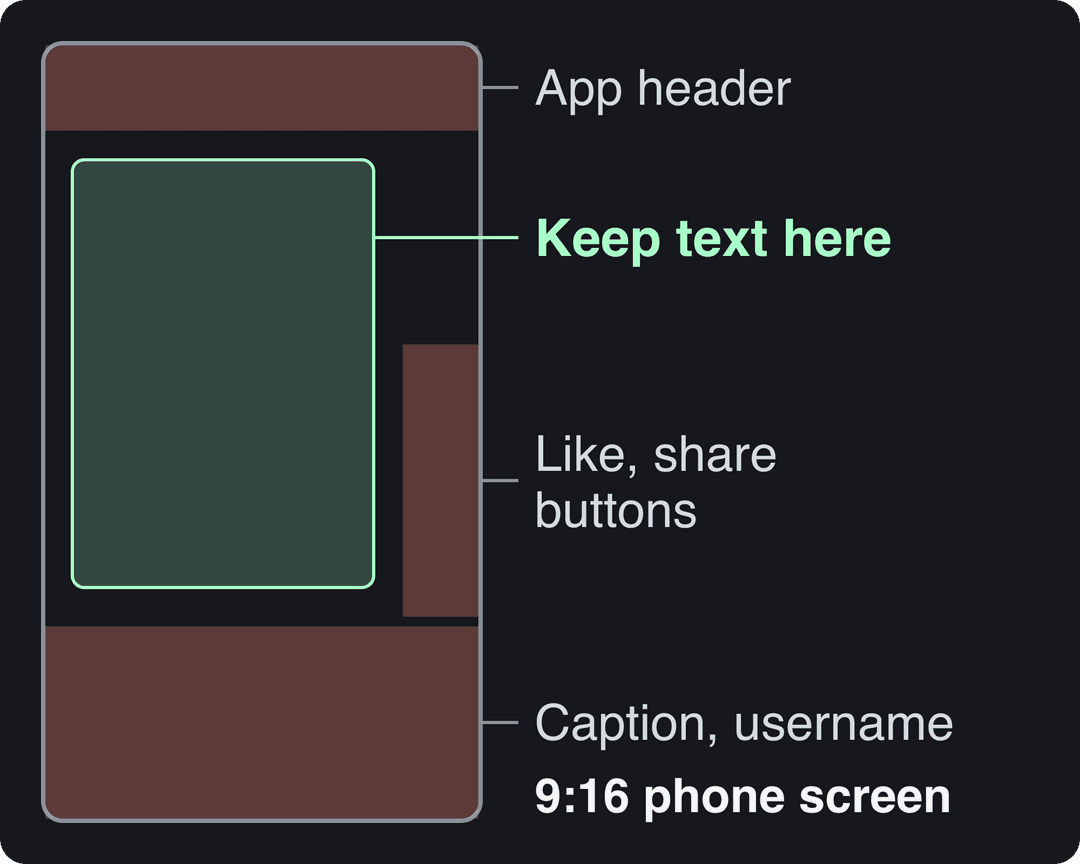
For exact margins, drop a frame into the free Instagram Reels safe zone checker. To add burned-in subtitles automatically, the AI caption generator writes them in 100+ languages.
Why your Instagram video looks blurry after upload
Instagram compresses every upload, so a weak file gets worse. Check these in order:
- Resolution too low. Exporting at 720 px meets Instagram's minimum but leaves little detail after compression. Export 1080x1920.
- Wrong aspect ratio. A 16:9 clip in a 9:16 Reel gets cropped or letterboxed and looks soft. Reframe it first with a video resizer that converts to 9:16, 4:5, 16:9 or 1:1.
- Frame rate below 30. Instagram asks for at least 30 FPS. Match your export to your footage (30 or 60).
- Double compression. Footage sent through a messaging app or downloaded from another platform has already been compressed once. Edit from the original camera file.
- Shaky or noisy footage. Shake and grain both eat bitrate. Stabilize and light the shot before you blame Instagram.
- Upload settings. Look in the Instagram app's media quality settings for a high-quality upload option, and upload on Wi-Fi.
How to fix out-of-sync audio, shaky footage and dark clips
Audio drifting out of sync
A gradual drift usually means a frame rate mismatch. Set your project to the same frame rate as your footage, and convert variable frame rate phone clips to a constant frame rate before editing. If sync is off from the first frame, slide the audio track until a clap or hard consonant lines up.
Shaky footage
Use your editor's stabilizer (Warp Stabilizer in Premiere Pro, or the equivalent in DaVinci Resolve and CapCut). It crops in slightly, so stabilize before you add text. For one bad section, keyframe position and scale by hand.
Dark or flat lighting
Raise brightness, then add contrast back so the image doesn't look washed out. Fix white balance to remove orange or blue casts, and pull up shadows to recover detail. Push too far and you add noise, which compression makes worse.
Length alone barely moves views: every bucket lands between 58K and 76K median views (the 790 videos over 10 minutes are a small, unusual group). Clips under 15 seconds get shared the most per view.
Source: Revid analysis of 176,367 TikToks with 1,000+ likes posted between Oct 1, 2025 and Oct 16, 2026 (61,203 creators)
Show the data
| Median views | Share that passed 1M views | Shares per 100 views | |
|---|---|---|---|
| Under 15 s | 57.6K | 11.6% | 1 |
| 16 to 30 s | 64.9K | 12.3% | 1 |
| 31 to 60 s | 61.8K | 11.8% | 1 |
| 61 to 90 s | 70.5K | 12.2% | 1 |
| 91 s to 3 min | 63.4K | 11.1% | 1 |
| 3 to 10 min | 76.4K | 12.4% | 1 |
| 10 min+ | 129.6K | 13.8% | 0 |
How long should an Instagram video be?
Instagram Reels can be recorded and edited up to 20 minutes, but only reels of 3 minutes or less are recommended to non-followers. Instagram raised that cutoff from 90 seconds on January 21, 2025. Story videos published through Meta's API run 3 to 60 seconds.
Within 3 minutes, length matters less than pacing. In Revid's 12-month TikTok study, every length bucket from under 15 seconds to 10 minutes had a median between 58K and 76K views, with 61 to 90 seconds slightly ahead at 70K. Videos under 15 seconds had the lowest median (58K) but the most shares per view, 1.41 per 100. Cut to the length the payoff needs, then stop.
Prompt to try
Create a 30-second Reel with 4 quick tips to organize a small closet. Hook: "Your closet is half empty, you just can't see it." Use bright stock footage, punchy captions in the center of the frame, upbeat music and a before-and-after payoff at the end.
Editing workflows that save hours
- One folder per Reel, with subfolders for raw footage, B-roll, music and exports.
- A naming convention such as date_project_shot, so you find any clip without previewing it.
- Templates for your intro, lower thirds, caption style and favorite transitions, saved as presets in your editor.
- Batch the boring parts. Film several Reels in one session, then apply the same color grade and audio settings to all of them at once.
- Review your workflow monthly. Drop any step that didn't change the result.
This start-to-finish walkthrough shows a full editing workflow in practice:
Edit an Instagram Reel with Revid
Revid handles the parts of Reels editing that take the longest:
- Talking footage: upload it to Auto Edit Video, and your key lines come back as motion graphics with the edit done.
- No footage: the AI Reel generator turns a script or idea into a Reel with AI visuals, a voice-over in 70+ languages, synced captions (30 caption styles) and music.
- Adjust any scene in the timeline editor, then export in 720p, 1080p or 4K at 30 or 60 fps.
- Publish or schedule the Reel directly to Instagram, and track its views, likes and comments in Revid.
FAQ
Can you edit Instagram videos without a watermark?
Yes. Instagram's Edits app exports without a watermark, and desktop editors such as DaVinci Resolve add none. Check the export screen of any free mobile app, since some add a mark on their free plan.
Can you edit an Instagram video on a computer?
Yes. Edit in DaVinci Resolve, Premiere Pro or Final Cut Pro, export a 9:16 MP4, then move it to your phone or publish it from a tool that posts to Instagram directly, such as Revid.
Do you have to label AI-edited videos on Instagram?
Only realistic ones. Meta requires its AI disclosure tool for photorealistic video or realistic audio that was digitally created or altered, and shows the label as "AI info". When AI was only used to edit, the label appears in the post's menu.
How can I test two edits of the same Reel?
Post one as a trial reel. Trial reels are shown first to non-followers, insights arrive within 24 hours, and they don't affect the ranking of your standard reels. You need a public account with 200 followers (professional) or 1,000 followers (personal).
Sources
- Revid analysis of 176,367 TikToks analyzed by AI, with 1,000+ likes posted between Oct 1, 2025 and Oct 16, 2026 (61,203 creators)
- Revid analysis of 176,367 TikToks with 1,000+ likes posted between Oct 1, 2025 and Oct 16, 2026 (61,203 creators)
- Meta Platforms, Meta Q4 2024 Results Conference Call transcript (January 2025)
- Meta Platforms, Meta Q4 2025 Results Conference Call transcript (January 2026)
Charts and figures checked on November 6, 2026.