Social Media Video Automation: How to Build a Pipeline in 2026
How social media video automation works in four stages, which tools cover which stage, the platform specs and rules your pipeline must follow, and how to run a 10-video pilot.

On this page
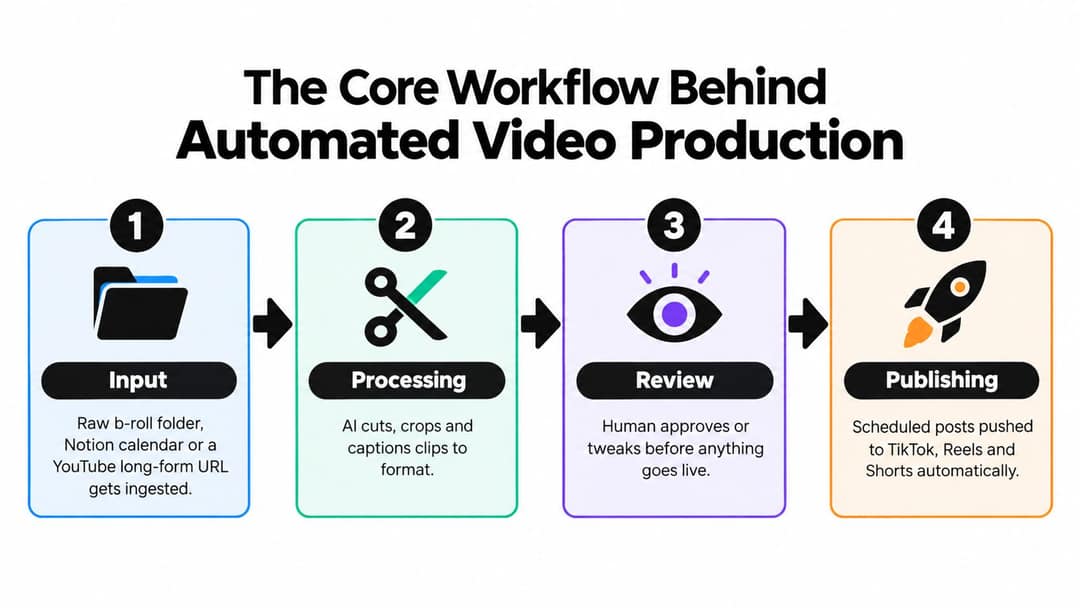
Social media video automation is a pipeline in which software turns a source (an idea, a link, a long video or a content feed) into a scripted, captioned, correctly sized short video and publishes it on a schedule to TikTok, Instagram Reels and YouTube Shorts. It runs in four stages, input, generation, rendering and publishing, with a person approving each video.
The hard part is not the software. It is what the software produces at volume. On July 15, 2025, YouTube renamed its "repetitious content" monetization policy to "inauthentic content" to make clear it covers repetitive or mass-produced videos, and since March 2026 Facebook deprioritizes reels that only narrate what is on screen or stitch clips together. Automate a format with a real point of view and a review step, not a content mill.
- Median TikTok views for faceless videos, vs 67K with one person on camera
- 114K
- Revid analysis of 176,367 TikToks
- Marketers who use short-form video in their content strategy
- 60%
- HubSpot, September 2026
- Marketers who name short-form video their top ROI-driving format
- 49%
- HubSpot, 2026
- Monthly price of Revid's Growth plan, with 2,000 credits
- $39
- Revid pricing
How social media video automation works
Treat the pipeline like a production line: if one station produces inconsistent output, the next one cannot fix it. Here is what each stage does and what a person should keep.
| Stage | What software automates | What stays human |
|---|---|---|
| 1. Input | Pulls in a long video URL, a folder of raw clips, a content calendar, an RSS feed or a reference video | Deciding which sources are allowed to become videos |
| 2. Generation | Drafts the hook and script, picks sections or visuals, adds voice-over, captions and music, applies the brand template | Checking facts, claims and tone |
| 3. Rendering | Exports one file per platform with the right frame, length and file size | Spot-checking the first frame and safe zones on a phone |
| 4. Publishing | Schedules and posts to each account, logs what went where, pulls back views and likes | Approving each video and setting the cadence |
Input: the source decides what the system can make
A clean talking-head recording gives the system speech, timing and visuals to cut from. An article or a text post gives only the idea, so narration and visuals have to be generated. Label each source by type and decide what it may produce: a podcast episode becomes clips, a blog post becomes a narrated explainer, a product page becomes ad variants.
Generation: templates need rules, not just colors
A template should fix caption placement, fonts, hook patterns, voice, music rules and banned claims. If those stay vague, two videos from the same source will look like they came from different channels. Write a one-page style guide with approved example videos and put it into every generation prompt.
Rendering: one master file is not enough
A 9:16 master at 1080x1920 is the practical target for full-screen vertical feeds, as Descript's TikTok video size guide explains, but each destination has its own limits (see the specs table below). Most breakage happens here: captions drift under the platform buttons, a horizontal crop lands in a vertical feed, or a template uses the wrong export preset. Give each platform its own render profile.
Publishing: close the loop
An API-connected social media video scheduler sends approved variants to TikTok, Instagram and YouTube and records which version went to which account. Keep "ready for review" and "approved for publishing" as separate states in your dashboard. If they look identical, someone will eventually schedule an unchecked draft.
What to automate and what to keep manual
The working rule: automate any decision you can write down as a rule, and keep decisions that need context, taste or accountability with a named person.
| Automate | Keep manual |
|---|---|
| Finding clip candidates and trimming silences | The final choice of which clips publish |
| Captions and subtitles | Factual claims, names, dates and product statements |
| Resizing and exporting per platform | Crisis responses and sensitive or cultural topics |
| Voice-over from an approved script | Messages to a brand-new audience |
| Scheduling and cross-posting | Posting cadence and pausing the queue |
| Pulling back views, likes and comments | Which formats to scale or drop |
Where can you get AI content pipeline automation that includes video creation?
Most tools automate one or two stages. Pick by the stage you are missing, not by the flashiest AI feature.
| Tool type | Examples | What it automates | What you still need |
|---|---|---|---|
| Social schedulers | Most social media management suites | Scheduling and publishing | A finished, captioned video for every post |
| Clipping tools | OpusClip, Klap, Vizard | Finding highlights in long recordings, reframing to 9:16, captions, scheduling | Your own long-form footage |
| Faceless automation tools | AutoShorts, Crayo | Recurring narrated series or viral templates such as Reddit stories and gameplay splits | A wider format range and manual editing |
| Template and stock editors | InVideo, Pictory | Assembling videos from scripts, URLs and stock media | Original visuals if you want to avoid a stock look |
| All-in-one AI video platforms | Revid | Research, script, AI visuals, voice, captions, editing, scheduling and daily automation workers, plus an API | Credits for generation; a classic editor for hand-cut long-form film |
If cutting your own podcasts and webinars into clips is the whole job, a dedicated clipping tool such as OpusClip may fit better. If you need videos made from ideas, links or songs and then published, you want a tool that covers all four stages. Our comparison of social media automation tools goes through the options one by one, and if you are still collecting creative resources around the pipeline, OohYeah's creative tools are another option to look at.
Match the workflow to the content you already have
Start with the trigger that already creates work for you, then match the AI tasks to it.
| Creator type | Trigger | What the AI does | Main safeguard |
|---|---|---|---|
| Podcasters, YouTubers, webinar hosts | A new long recording | Finds strong moments, cuts clips, captions, makes platform variants | Check that clips keep the original meaning |
| Faceless channel owners | A topic, article or niche feed | Drafts narration, selects visuals, adds subtitles, applies the channel template | Fact review and consistent pronunciation |
| Shopify and DTC sellers | A new product or promotion | Turns benefits into hooks, mixes product footage with b-roll, makes ad variants | Every claim matches the product page |
| News and trend creators | A developing headline or trend | Summarizes sources, drafts a timely script, formats it for fast review | A firm review gate on sensitive topics |
| Coaches and course creators | A lesson or recorded Q&A | Extracts single lessons, rewrites openings, captions, adds visuals | Keep the creator's own examples and voice |
Turning long videos into shorts is usually the easiest first workflow, because the source exists and the AI only has to find and package the best sections. A faceless video pipeline scales from structured prompts but carries more quality risk, since the system writes the words and picks the visuals.
Prompt to try
Make a 45-second faceless tutorial video on how to fix a slow home Wi-Fi connection in 3 steps. Open with the hook "Your router is probably in the worst spot in your house." Use clean screen-style visuals, a calm, clear voiceover and bold captions, and end with a one-line recap of the three fixes.
Which formats are worth automating
Faceless formats are the easiest to automate (nothing to film), and they also perform well. In Revid's analysis of 176,367 TikToks with 1,000+ likes posted between October 2025 and October 2026, faceless videos had a median of 114K views and 17.4% passed 1 million views, against 67K and 12.7% for videos with one person on camera. The gap was widest for tutorials: faceless tutorials had a 156K median versus 52K on camera (full TikTok virality study).
Faceless videos earned a median of 114K views, against 67K for videos with one person on camera, and passed 1M views 38% more often.
Source: Revid analysis of 176,367 TikToks with 1,000+ likes posted between Oct 1, 2025 and Oct 16, 2026 (61,203 creators)
Show the data
| Median views | Share that passed 1M views | |
|---|---|---|
| Animals | 147.4K | 24.1% |
| Faceless | 113.9K | 17.4% |
| Groups of people | 96.1K | 16% |
| Objects or products | 70.8K | 13.2% |
| One person on camera | 67.4K | 12.7% |
Two limits: this is TikTok data, and the index only holds videos that already cleared 1,000 likes, so it shows what well-performing videos have in common, not what causes success. AI visuals also behave differently by platform: Revid's AI videos vs real footage study found AI-generated TikToks averaged twice the views of real footage, while on X, Instagram and Threads AI visuals clustered in the lowest engagement tier. Test AI footage per platform instead of assuming one result everywhere.
Posts with 3 or 4 hashtags earned the most views. Captions stuffed with 9 or more hashtags did worst of all, with median views cut by about 80%.
Source: Revid analysis of 176,367 TikToks with 1,000+ likes posted between Oct 1, 2025 and Oct 16, 2026 (61,203 creators)
Show the data
| Median views | Share that passed 1M views | |
|---|---|---|
| None | 51.1K | 9.8% |
| 1 | 64K | 11.8% |
| 2 | 71.3K | 12.7% |
| 3 | 75.4K | 13.1% |
| 4 | 77.2K | 13.4% |
| 5 | 67.3K | 12.1% |
| 6 to 8 | 71.8K | 12.7% |
| 9+ | 15.6K | 7.8% |
Platform specs your render profiles need
Build one render profile per destination from these limits. API figures matter because most automation tools publish through the official APIs.
| Setting | TikTok | Instagram Reels | YouTube Shorts |
|---|---|---|---|
| Aspect ratio | 9:16 at 1080x1920 recommended | 1.91:1 to 9:16 accepted; 9:16 for full screen | Square or vertical |
| Maximum length | 60 minutes uploaded; 10 minutes via the Content Posting API | 20 minutes; over 3 minutes is not recommended to non-followers; 3 seconds to 15 minutes via the Graph API | 3 minutes |
| Frame rate (API) | 23 to 60 FPS | 23 to 60 FPS (minimum 30 FPS in the app) | Follow your upload settings |
| File size (API) | Up to 4 GB | Up to 300 MB | Up to 256 GB (YouTube upload limit) |
| Text limits | Video caption up to 2,200 characters via API | Caption up to 2,200 characters; up to 5 hashtags | Title up to 100 characters |
For Shorts framing, Hopper HQ's YouTube Shorts dimensions guide walks through the crop, and the free TikTok safe zone checker shows where buttons cover captions.
Two cross-posting traps break automated pipelines. Instagram allows up to 5 hashtags per post, and a caption with more will not post, so one long caption reused everywhere can fail silently. And any Short longer than one minute with an active Content ID claim is blocked globally, so use licensed or original music on longer Shorts.
On hashtags, the same Revid TikTok study found that posts with 4 hashtags had the best median (77K views), 3 hashtags 75K, no hashtags 51K, and 9 or more only 16K. A caption template with 3 to 4 hashtags works on TikTok and stays under Instagram's cap.
Platform rules that decide reach and monetization
Automation itself is allowed. What platforms penalize is output that looks mass-produced or unoriginal.
- YouTube: AI and automated tools are fine for monetized content when the final video shows your creative vision and gives educational or entertainment value. Not allowed to monetize: generic AI template content that looks mass-produced, stitched-together unrelated AI clips, AI personas presented as human experts on health, legal, financial or political topics, and videos that only read out material you did not write (website text, news feeds). That last rule hits RSS-to-video and article-to-video pipelines directly: add your own analysis. The policy applies to the whole channel. More in our guide to YouTube Shorts automation.
- Facebook: since March 2026, reaction-only reels, clip-stitching, narrate-what's-on-screen reels and reposts changed only with borders, captions or speed are treated as unoriginal and deprioritized; repeat offenders can be demonetized.
- AI labels: TikTok requires a label on AI-generated content with realistic images, audio or video. YouTube requires disclosure of realistic AI content through the "AI use" setting in YouTube Studio, and since May 2026 auto-labels undisclosed photorealistic AI. Meta requires its AI disclosure tool for photorealistic video. TikTok and YouTube both state that the label alone does not reduce distribution.
How to automate social media videos with Revid
Revid covers all four stages in one product. A typical setup:
- Pick a source: a prompt, a script, a URL, a long YouTube video, or a reference from Revid's library of about 2.77 million short-form videos with public engagement data.
- Set up automation: an Auto-Mode worker creates a fresh video every day from a prompt or content source (3 workers on Growth, 5 on Elite, 10 on Ultra). The Search & Remix automation instead picks a well-matched, high-engagement reference on your topic and generates an original video from it on a schedule, never reusing the same reference. Details on the automated video creation page.
- Review: open any video in the timeline editor to fix the hook, a scene, a caption or a claim before it goes out.
- Publish: schedule to TikTok, Instagram and YouTube from one queue; every published post reports its views, likes and comments, and a post that did well can be remixed in one click.
- Go programmatic if you need to: every paid plan includes the REST API, an MCP server and CLI, so a script or an AI agent such as Claude or ChatGPT can render and publish videos with the same account.
Plans start at $39/month (Growth, 2,000 credits); a 30-second video with Pro AI visuals and a voice-over costs about 40 to 80 credits, and you can see the cost before generating.
How to measure the ROI of video automation
The demand side is clear: 60% of marketers use short-form video in their content strategy and 49% name it their top ROI-driving format, according to HubSpot's 2026 State of Marketing data (more figures in HubSpot's video marketing statistics). In Wyzowl's 2026 survey, 63% of consumers said a short video is how they would most like to learn about a product, ahead of text articles (12%); Kapwing's video marketing statistics collect more numbers like these.
More posts give you more tests, but volume is not ROI. Track four areas:
- Production cost: editing time, software, voice and asset costs, and review time.
- Discovery signals: watch time, completion, saves, shares, profile visits and search visibility.
- Business signals: qualified clicks, email signups, booked calls or sales.
- Creative learning: hooks, topics, lengths and visual treatments worth repeating.
A simple planning formula: payback period = monthly automation cost ÷ monthly value created (time you actually redeploy, plus actions and revenue you can reasonably attribute to the videos). Use conservative assumptions.
Pitfalls to avoid
The most expensive mistake is publishing raw AI output without review: an off-brand claim, an invented statistic, a repeated script or a visual that changes the meaning of the narration. Adoption is ahead of experience: in the Social Angels 2025 industry report, 69% of marketers used generative AI daily or weekly, 56% had less than a year of experience or had not started, and 45% were concerned about content quality.
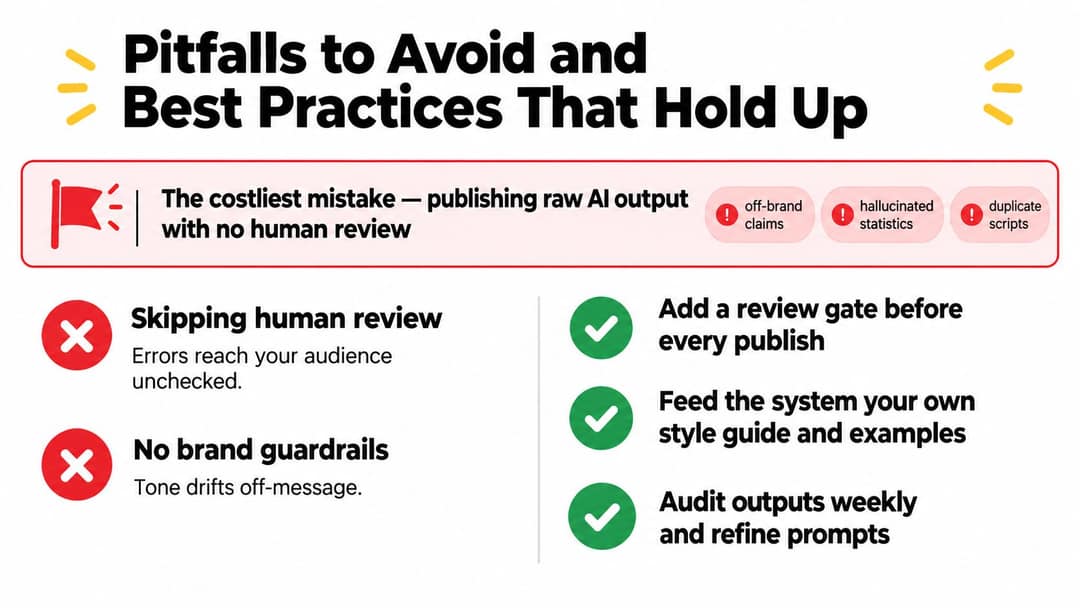
- Review factual claims: verify names, dates, product statements and comparisons before approval.
- Protect the channel voice: feed the system a style guide, approved examples and banned phrases.
- Validate every render: check aspect ratio, safe zones, captions, duration and file size per platform.
- Watch for repetition: compare scripts across accounts so the same hook does not ship with cosmetic changes.
- Cap the cadence: post only as often as your review process can check.
- Keep sensitive posts manual: crisis responses, cultural moments and controversial subjects need human context.
Caption accuracy matters more as video becomes a search surface: 49% of U.S. consumers surveyed by Adobe Express in 2026 said they use TikTok as a search engine.
Start with a 10-video pilot
Start with an audit, not a subscription. Write down how a video moves from idea to published today and mark the steps that repeat every time; the biggest delay is often finding source clips, waiting for approval or re-exporting for each platform, not editing.
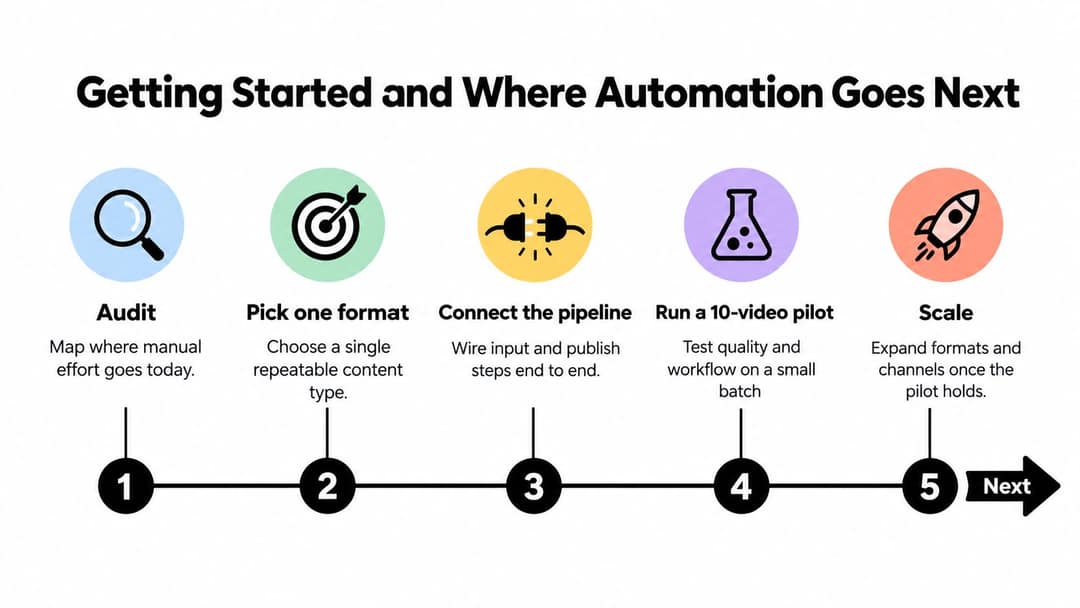
Pick one content type with a predictable source (one podcast segment, one product demo format, one lesson type) and run a 10-video pilot before adding channels. Log for every video:
- Render time: how long it takes to get a usable file.
- Approval pass rate: how many pass without major correction.
- Correction type: caption, pacing, factual, visual, voice or export.
- Platform behavior: watch time and retention by destination.
- Reliability: failed uploads, disconnected accounts, missing assets or scheduling errors.
Scale to a second format or channel only when the pass rate holds and the corrections shrink. If the pipeline starts adjusting hooks or styles on its own, keep those experiments separate from your approved templates and log what changed.
FAQ
Can automated or AI-made videos be monetized on YouTube?
Yes, if the final video shows your creative vision and adds educational or entertainment value. YouTube does not monetize generic, mass-produced AI template content, incoherent AI clip compilations, or videos that only read out text you did not write.
Do I have to label automated AI videos?
Yes, when they contain realistic AI-generated footage, audio or people: TikTok, YouTube and Meta all require disclosure. TikTok and YouTube say the label alone does not limit a video's reach.
How many videos a day should an automated account post?
No platform publishes an ideal number. Post as many as you can review properly; a single Revid Auto-Mode worker produces one fresh video a day, which is a sensible starting cadence for one format.
How much does social media video automation cost?
It depends on how many stages the tool covers. Revid is free to sign up, with free credits to try video creation and no credit card needed. Paid plans start at $39/month with 2,000 credits, including generation, scheduling, automation workers and the API.
Can an AI agent run the whole video pipeline?
Yes. With Revid's MCP server, CLI or REST API, an agent such as Claude or ChatGPT can search viral references, render a video and publish it with one account, while you keep an approval step before posting. Most other video MCP servers hand back a file instead of posting it: see our comparison of 18 video MCP servers.
Sources
- Revid analysis of 176,367 TikToks with 1,000+ likes posted between Oct 1, 2025 and Oct 16, 2026 (61,203 creators)
- HubSpot, The Future of Social Media [Research]: What Marketers Need to Know in 2026 (September 2026)
- HubSpot, 2026 Marketing Statistics, Trends & Data (2026)
Charts and figures checked on November 6, 2026.