On this page
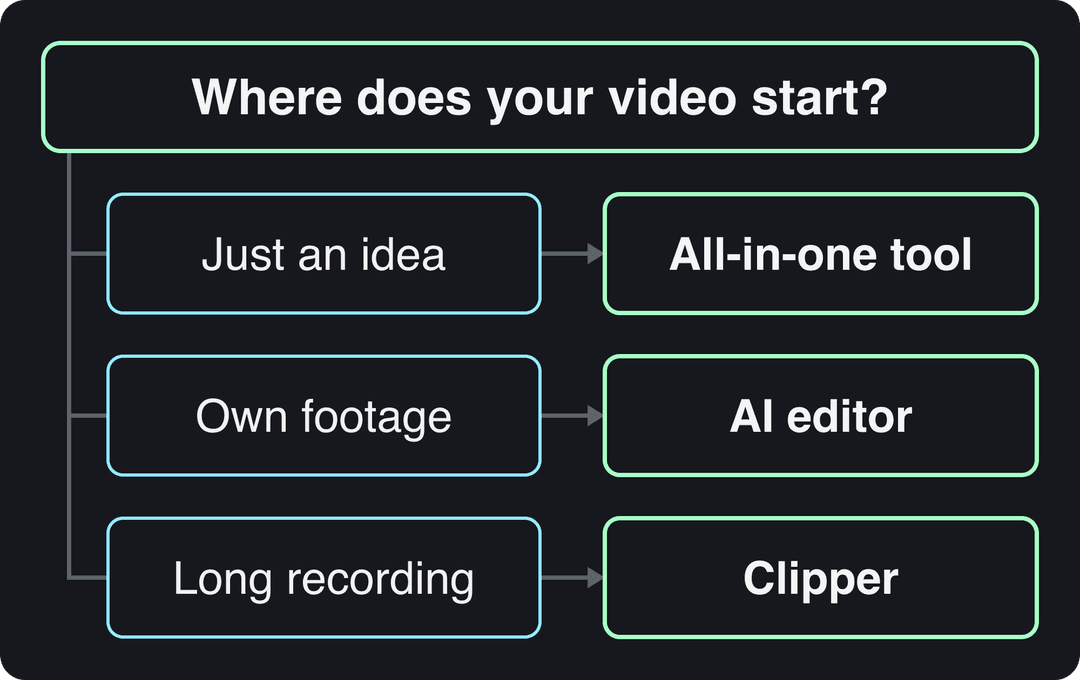
Choose an AI video editor for short-form content by where your video starts. With no footage, use an all-in-one generator such as Revid that writes, voices, captions and publishes the video; with your own footage, an editor such as VEED, CapCut or Descript; with long recordings, a clipper such as OpusClip.
The most common mistake is shopping by AI model. Google Veo, Seedance, Kling, Wan and MiniMax Hailuo are sold through APIs to many video tools, Revid included, so two tools sending the same prompt to the same model get comparable clips. What changes the result is everything around the clip: the idea, the hook, the pacing, the captions, and whether the tool can post the finished video for you.
- Video marketers who have used AI video tools to create or edit videos
- 63%
- Wyzowl, December 2025
- Revid Growth plan per month, with 2,000 credits
- $39
- Revid pricing
- Credits for a 30-second Revid video with Pro AI visuals and voice-over
- 40-80
- Revid credit estimate
- Real short-form videos in Revid's searchable viral library
- 2.77M
- Revid
How to choose the right AI video editor for short-form content and Reels
Answer these five questions in order. The first one rules out most of the market.
- Where does your video start? If you have only an idea, a script or a link, you need a generator that creates the visuals. If you filmed it, you need an editor. If you have podcasts, streams or webinars, you need a clipper. If you need a presenter on screen without filming one, you need an avatar tool.
- How many steps does it cover? A finished short needs a script, visuals, a voice, captions, music, a vertical export and a post. Count how many of those the tool handles. Every missing step is another app and another export.
- Does it export what the platforms want? At minimum: 9:16 vertical at 1080x1920, 30 fps or more, and captions you can edit before export (see the table below).
- Can you fix one scene without starting over? Prompt-only tools make you regenerate the whole video to change one line. A timeline or scene editor lets you swap one shot, one caption or one voice line.
- How is it priced? Credits, minutes per month or seats. Check the watermark and export resolution on the free plan, and estimate what one 30-second video costs before you subscribe.
Whatever tool you pick, it should export a file each platform accepts without cropping:
| Platform | Aspect ratio | Resolution and frame rate | Length |
|---|---|---|---|
| TikTok | 9:16 recommended | 1080x1920 recommended | Uploads up to 60 minutes |
| Instagram Reels | 1.91:1 to 9:16 accepted, 9:16 for full screen | At least 720 px and 30 fps | Up to 20 minutes; reels over 3 minutes are not recommended to non-followers |
| YouTube Shorts | Vertical or square | Use the same 1080x1920 master | Up to 3 minutes |
One more check in 2026: if a tool still lists Sora 2 among its models, ask what replaced it. OpenAI removed Sora 2 from its API on September 24, 2026.
Which AI tools can create and edit short-form video?
Here are the short-form video creation tools worth comparing, grouped by the job they do best. Competitor details were checked in August and September 2026; confirm current prices on each site.
| Tool | Best at | Starts from | Entry price |
|---|---|---|---|
| Revid | A finished video from an idea, link or viral reference, then publishing | Idea, script, link, song | $39/month (free sign-up with free credits) |
| VEED | Browser editing, auto-subtitles and translation | Your footage | About $10 to $24/month; free plan with watermark |
| CapCut | Fast manual editing and trend templates | Your footage | About $9.99/month; free tier with 1080p export |
| Descript | Editing recordings by editing the transcript | Your recordings | $24/month ($16 billed yearly); free plan |
| OpusClip | Cutting long videos into clips, with virality scoring | Long recordings | From $15/month |
| Submagic | Animated captions and one-click polish | Your footage | From $19/month |
| HeyGen | Realistic avatars and lip-synced translation | A script | From $29/month |
| ElevenLabs | AI voiceovers and voice cloning | A script | See ElevenLabs' pricing page |
| ChatGPT | Scripts, hooks and caption drafts | A prompt | See OpenAI's pricing page |
US dollars per month
Revid's $39 Growth plan includes 2,000 credits, the editor, direct posting and the API. Yearly billing is cheaper on most tools.
Source: Pricing page of each tool, checked for Revid's comparison pages (revid.ai/vs) in November 2026.
Show the data
| US dollars per month | |
|---|---|
| Creatify | 15 |
| OpusClip | 15 |
| Higgsfield | 19 |
| Synthesia | 19 |
| CapCut | 20 |
| InVideo | 20 |
| Fliki | 28 |
| Klap | 29 |
| Revid | 39 |
1. Revid: from a brief to a published short
Revid is an AI video platform that turns an idea, a link or a proven viral format into finished short-form videos and publishes them to TikTok, Instagram and YouTube. It is the pick when you have no footage and want one tool for the whole job.
What one subscription covers:
- Several AI video models: Seedance 2.5, MiniMax Hailuo H3, Wan 3.0 and Google Veo 3, chosen per scene, up to native 4K.
- Voice and captions: 1,000+ AI voices in 70+ languages (from ElevenLabs, Google Gemini and MiniMax), 30 caption styles and automatic captions in 100+ languages, plus music.
- Editing and export: a full timeline editor, with export in 720p, 1080p or 4K at 30 or 60 fps.
- Publishing: direct publishing and scheduling to TikTok, Instagram and YouTube from one queue.
- Automation: Auto-Mode workers that create a fresh video every day from a prompt or a content source (3 on the Growth plan).
The real difference is where a video starts. Revid includes a searchable library of about 2.77 million real short-form videos and posts with their public engagement data. Open one that already performed in your niche, choose an option such as "Same energy, new script" or "Make it about your topic", and Revid writes an original video with the same structure, hook and pacing. That workflow lives under remixing viral videos with AI.
For specific jobs there are dedicated tools: article to video for blog posts, the YouTube clip maker for turning long YouTube videos into vertical clips, and the AI caption generator for footage you already filmed.
Sign-up is free and new accounts get free credits to try video creation, no credit card needed; regular creation uses the credits of a paid plan, from $39/month (Growth, 2,000 credits). A 30-second video with Pro AI visuals and a voice-over costs about 40 to 80 credits, and Revid shows the estimate before generating. The current Revid plans and credits page is the authoritative price list.
Where another tool fits better: for editing your own footage by hand with no AI generation, CapCut; for cutting your own long recordings into many clips as the main job, a dedicated clipper such as OpusClip; for cinematic work where every shot is edited by hand, Premiere Pro, DaVinci Resolve or Runway.
In dollars at the Growth rate ($39 for 2,000 credits), a 60-second video costs about $0.43 with stock footage, $0.68 with animated AI images, $1.46 with pro AI images, $4.29 with AI video clips and $13.30 with pro AI video. A 90-second video costs 1.5 times the 60-second price. Every price includes the AI voice-over (10 credits per 30 seconds); motion graphics show the calculator's upper bound.
Source: Revid public credit calculator (POST /api/public/v3/calculate-credits, no key), prompt-to-video workflow, 30, 60 and 90 seconds, queried Oct 29, 2026.
Show the data
| 60-second video, credits | 30-second video, credits | 60-second videos per Growth month | |
|---|---|---|---|
| Stock footage | 22 | 11 | 90 |
| Animated AI images | 35 | 18 | 57 |
| AI images, pro | 75 | 37 | 26 |
| AI video clips | 220 | 110 | 9 |
| Motion graphics | 275 | 160 | 7 |
| AI video, pro | 682 | 341 | 2 |
How to make a short-form video with Revid
- Start from a brief in Prompt to Video: describe the topic, the story and the tone. Or paste a link (a blog post, a YouTube video, a Reddit thread) into the matching tool.
- Or start from proof: search the viral library by topic, platform, engagement tier and length, open a video that worked, and pick a remix option.
- Revid writes the script and generates scene-by-scene visuals, the voice-over, synced captions and music.
- Open the timeline editor to swap a scene, change the model for one shot or fix a caption.
- Export in 1080p or 4K, or publish and schedule to TikTok, Instagram and YouTube directly.
2. VEED: AI editing for footage you filmed
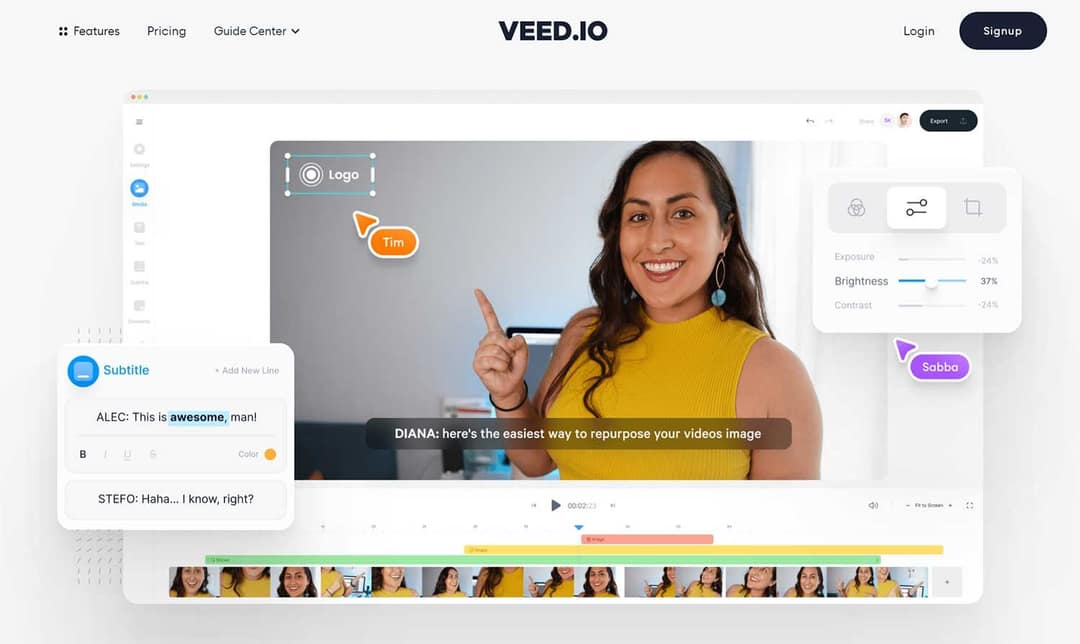
VEED's online video editor is a browser editor with a full manual toolbox: a multi-track timeline, screen recording and brand kits. Its auto-subtitles and translation are among the best known in the category, and it adds AI dubbing, eye-contact correction and stock avatar presenters. It can also generate AI clips inside the editor when you need a missing shot.
Use VEED if you record talking-head videos or screen recordings and want them captioned, translated and trimmed fast. Skip it if you have no footage, because it is an editor first. Entry plans run roughly $10 to $24 a month, and the free plan exports at 720p with a watermark. The Revid vs VEED comparison covers when generating the whole video makes more sense.
3. ElevenLabs: AI voiceovers when you only need the voice
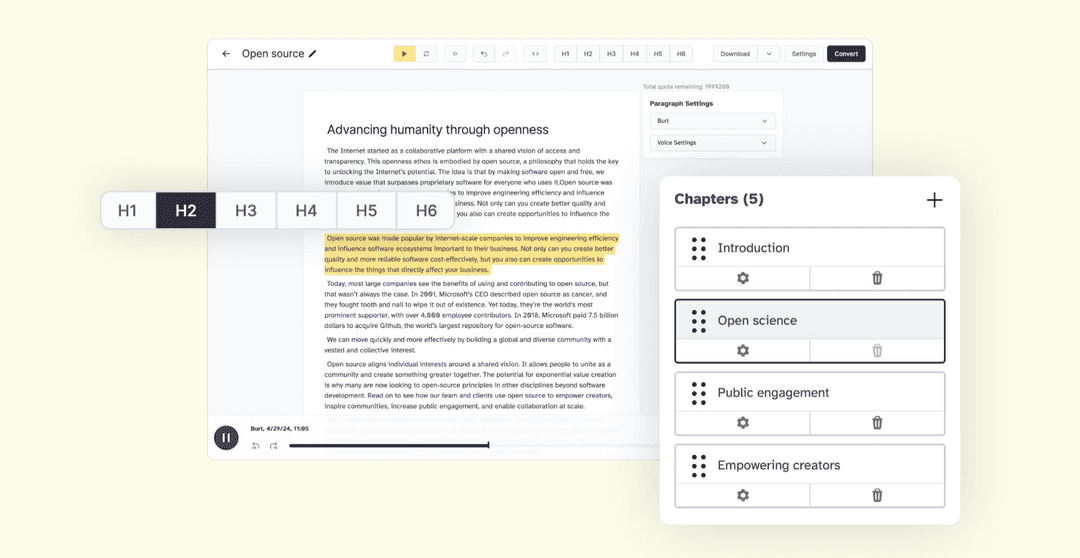
ElevenLabs generates realistic AI voices from text in many languages and can clone your own voice. It does not create visuals or edit video, so you pair it with an editor, which adds an export and an import to every video.
Two practical notes. Revid's voice library already includes ElevenLabs voices, so if you build videos in Revid you may not need a separate voice subscription. And YouTube does not require AI disclosure when you clone your own voice for voiceovers. For better takes, write for the ear: short sentences, one idea each, and punctuation where you want a pause.
4. Descript: edit recordings by editing text
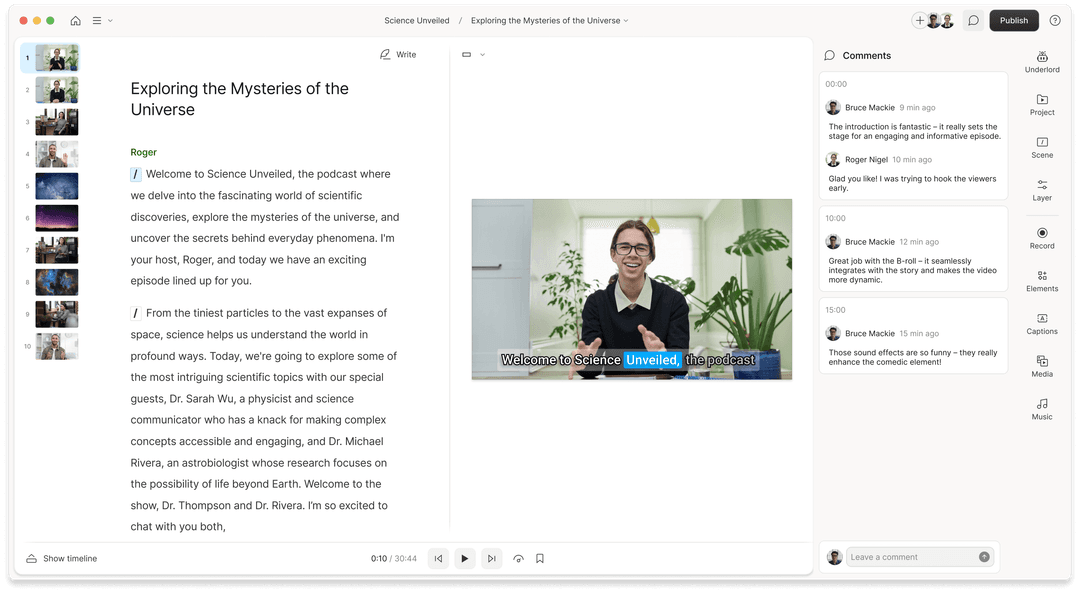
Descript lets you edit video and podcasts by editing the transcript: delete a sentence in the text and it disappears from the video. Studio Sound and filler-word removal clean up spoken content, Underlord acts as an AI co-editor, and Create Clips repurposes long recordings into shorter ones.
It is the right AI short-form video editor if you already record interviews, tutorials or podcasts. Plans start at $24/month ($16 billed yearly); the free plan includes 60 media minutes a month and exports at 720p. The Revid vs Descript comparison explains when starting from an idea instead of a recording is faster.
5. ChatGPT: scripts and hooks, not video
ChatGPT is a writing partner for short-form video: hook variations, scripts, caption drafts and series ideas. It is not a video maker. OpenAI discontinued the Sora web and app experiences on April 26, 2026, so plan to render the video somewhere else.
A prompt that gives usable output:
Write 5 hooks under 10 words for a 30-second TikTok about [topic] for [audience]. Then write a script for the strongest hook: the hook in the first 3 seconds, one problem, three steps, and a one-line call to action. Keep it under 90 words.
If you would rather skip the copy-paste, the free AI script generator writes short-form scripts directly. On any paid Revid plan, ChatGPT can also connect to the Revid MCP server with one-click sign-in, so it can search viral videos, render a video and publish it for you.
Other AI short-form tools worth knowing
- CapCut: the fastest way to edit footage you filmed, on mobile or desktop, with a free tier that exports 1080p with auto-captions and trend templates that drop your clips into viral formats.
- OpusClip: turns podcasts, streams and webinars into short clips, ranks moments with virality scoring, and reframes talking heads to vertical with animated captions. From $15/month.
- Submagic: animated captions in 48 languages plus b-roll, zooms, sound effects and silence removal, with direct publishing. From $19/month.
- HeyGen: the most realistic avatars and digital twins, plus video translation with lip sync across 175+ languages. From $29/month.
- Runway: shot-level control over single generated clips; scripting, voice, assembly and posting are up to you. From $15/month.
Prompt to try
Make a 30-second vertical video for home bakers in their first month on why their sourdough is flat. Open with the hook "The mistake almost every beginner makes", then explain the cause and one fix in a friendly, slightly blunt tone. Use close-up kitchen shots in warm light and end with "Follow for the next fix".
Is there an AI that can take a video brief and deliver a finished video?
Yes. Prompt-to-video generators take a written brief and return a finished video with a script, visuals, a voice-over, captions and music. Raw clip generators such as Runway, Pika or Kling return single clips you still have to assemble, and avatar platforms return a presenter talking to camera.
The output is only as good as the brief. A blank prompt carries no evidence of what performs, so results drift toward a generic average. When Revid writes a script from a prompt in automations and several tools, it first pulls transcripts of related TikToks with more than 10,000 likes and uses them as references for style and story. Give any tool a brief with these fields:
| Field | Example |
|---|---|
| Topic | Why your sourdough is flat |
| Audience | Home bakers in their first month |
| Hook | The mistake almost every beginner makes |
| Length | 30 seconds |
| Tone | Friendly, a little blunt |
| Visual style | Close-up kitchen shots, warm light |
| Call to action | Follow for the next fix |
FAQ
What is the best AI to create short videos?
It depends on your starting point. Revid fits if you start from an idea or a link and want the video published for you; CapCut or VEED if you filmed the footage; OpusClip if you are cutting long recordings.
Can AI video tools post directly to TikTok, Instagram and YouTube?
Some can. Revid publishes and schedules to all three from one queue, Submagic offers direct publishing and scheduling, and OpusClip posts on its paid tiers; editors without it make you download and upload each file.
Is there a free AI tool for short-form video?
Yes, with limits. CapCut's free tier exports 1080p with auto-captions, Descript's free plan gives 60 media minutes a month at 720p, and VEED's free plan exports 720p with a watermark; Revid's sign-up is free and includes free credits to try video creation, while regular creation uses paid-plan credits.
Can AI-made short videos be monetized on YouTube?
Yes, if the final video shows your creative vision and gives educational or entertainment value. YouTube does not monetize mass-produced AI content made from generic templates, stitched-together AI clips with no narrative, or AI personas posing as experts on health, legal, financial or political topics.
Sources
- Pricing page of each tool, checked for Revid's comparison pages (revid.ai/vs) in November 2026.
- Revid public credit calculator (POST /api/public/v3/calculate-credits, no key), prompt-to-video workflow, 30, 60 and 90 seconds, queried Oct 29, 2026.
- Wyzowl, Video Marketing Statistics 2026 (December 2025)
Charts and figures checked on November 6, 2026.