Blog to Video: How to Turn a Blog Post into a Short Video (2026)
How to turn a blog post into a video: pick one idea, script a hook, match every line to a visual and export for each platform. Includes a script template, tool comparison, automation options and Revid's data on how much narration works.

On this page
To turn a blog post into a video, pick one idea from the post, rewrite it as a 30-second to 2-minute spoken script that opens with a hook, give every line a visual, then add voice-over, captions and music and export 9:16 for TikTok, Reels and Shorts. A blog to video tool does it from the URL.
The most common mistake is narrating the whole post. In Revid's TikTok data, videos with very little speech had nearly twice the median views of videos that talked from start to finish. A blog post is a source of ideas for a video, not a script to read aloud, and the rest of this guide shows how to cut it down.
- Median TikTok views for videos with under 40 characters of speech
- 123K
- Revid analysis of 176,367 TikToks
- Consumers who would most like to learn about a product from a short video
- 63%
- Wyzowl, December 2025
- Marketers who say 30 seconds to 2 minutes is the most effective video length
- 71%
- Wyzowl, December 2025
- Monthly price of Revid's Growth plan, with 2,000 credits
- $39
- Revid pricing
How to turn a blog post into a video, step by step
- Pick one post and one idea. Start with a post that already gets traffic or comments, then choose the single point a viewer should remember. A long guide can feed several short videos, one idea each.
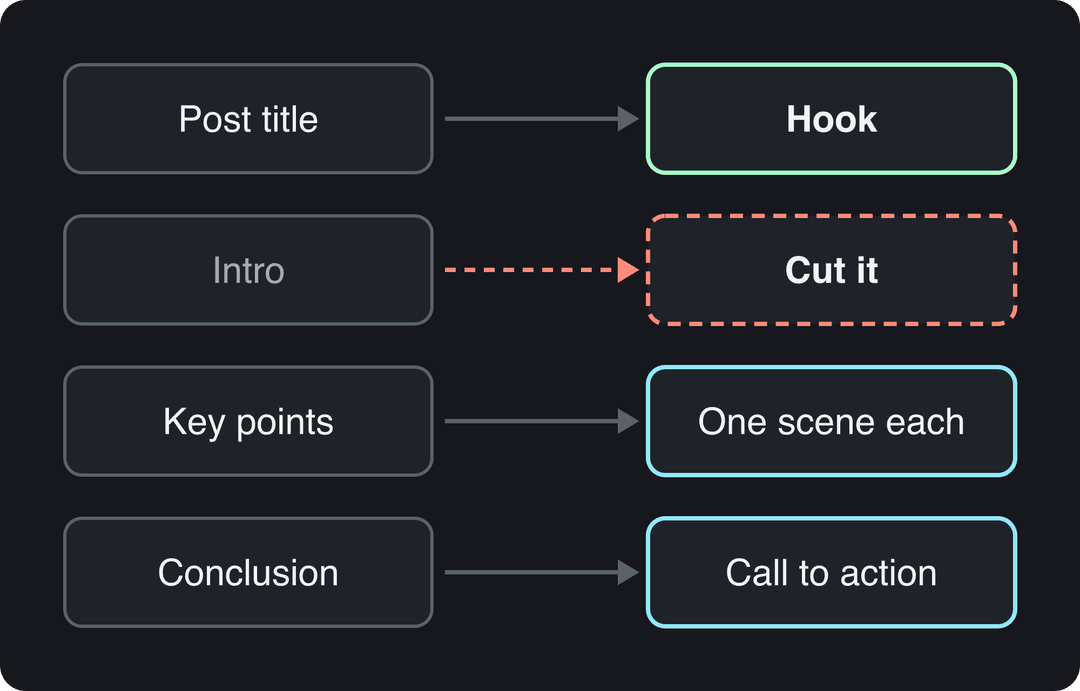
- Cut the intro and the context. A blog intro warms readers up. A viewer decides in the first line whether to keep watching. Keep the strongest points, the concrete examples and any surprising figure.
- Rewrite it as a spoken script. Use short sentences, one idea each, and put the payoff first. Read it aloud: if you run out of breath, split the sentence.
- Give every line a visual. Write a simple two-column storyboard: what is said, and what is on screen. Screen recordings suit tutorials, product shots suit reviews, stock or AI scenes suit abstract points, and on-screen text carries any number you want remembered.
- Add voice-over, captions and music. Record your own voice or use an AI voice. Burn in captions so people can follow without sound, and keep music low under speech.
- Export for each platform. Use 9:16 at 1080x1920 for TikTok, Reels and Shorts, and 16:9 for regular YouTube videos and the embed on your blog.
- Publish, link back and measure. Point viewers to the full post (link in bio, description or pinned comment), embed the video in the post, and compare what each version brings in.
Which blog posts make the best videos?
Not every post deserves a video. Start in your analytics: posts with long time on page, steady search traffic, shares or active comments cover topics that already hold attention. Then check whether the idea can be shown, not just told.
| Post type | Video potential | Why |
|---|---|---|
| How-to guides and tutorials | High | Steps map directly to scenes, and screen recordings do the explaining |
| Lists of tips or tools | High | Each item becomes a scene or a separate short |
| Common mistakes, myth vs fact | High | The hook is built in: name the mistake |
| Data or research posts | Medium to high | One striking figure makes the hook; charts need to be redrawn for vertical |
| Opinion essays | Medium | Works best when you narrate it yourself, in your own voice |
| News recaps, legal or long reference pages | Low | They go stale fast or need more nuance than a short allows |
The audience is there. In Wyzowl's 2026 survey, 63% of consumers said a short video is how they would most like to learn about a product or service, ahead of text articles (12%); more figures like this are in our sourced short-form video statistics. For wider context, Yans Media's roundup of video marketing statistics and Databox's blogging statistics collect third-party benchmarks. Use them as background, not as targets for your own channel.
How much of the post should the video actually say?
Less than you think. In Revid's analysis of 176,367 TikToks with 1,000+ likes posted between October 2025 and October 2026, videos with under 40 characters of speech had a median of 123K views, and 20.2% passed 1 million views. Videos that talked throughout (300+ characters of speech) had a 68K median and 11.9% past 1 million, while silent videos had a 73K median. The sample only includes videos that already cleared 1,000 likes, so this shows what top performers have in common, not proof that talking less causes views.
Videos with just a few spoken words (a line or two) beat both silent videos and videos that talk the whole way through, which were the most common and the weakest.
Source: Revid analysis of 176,367 TikToks analyzed by AI, with 1,000+ likes posted between Oct 1, 2025 and Oct 16, 2026 (61,203 creators)
Show the data
| Median views | Share that passed 1M views | |
|---|---|---|
| No speech | 73.3K | 14.3% |
| Under 40 | 122.7K | 20.2% |
| 40 to 120 | 97.2K | 17.6% |
| 120 to 300 | 91.6K | 16.8% |
| 300+ | 67.7K | 11.9% |
For a blog conversion, the lesson is practical: narrate only the points that need words and let visuals and on-screen text carry the rest. If a sentence only restates what the viewer can already see, delete it.
Prompt to try
Make a 40-second vertical video from my post "Why your sourdough comes out flat". Open with the hook "Your sourdough is flat because of one step you're rushing", then show two fixes, under-proofing and loose shaping, one scene each with close-up kitchen shots and bold on-screen text. Keep the narration short and end with "Full method on the blog, link in bio."
A script template for any blog post
- Hook (first line): the post's most surprising claim, or the reader's problem, in one sentence.
- Promise: what the viewer gets by staying.
- Points: the two or three strongest points from the post, one scene each.
- Proof: one example, screenshot or figure from the post.
- Call to action: where to read the full post.
Here is the template applied to a baking post titled "Why your sourdough comes out flat":
Hook: "Your sourdough is flat because of one step you're rushing." Point: "A common cause is under-proofing. Poke the dough: if it springs back instantly, give it more time." Point: "Loose shaping lets the dough spread. Build tension by dragging it toward you on the counter." Call to action: "Full method and timings are on the blog, link in bio."
For more openers, browse these TikTok hook templates. If you'd rather start from a draft, an AI script generator can turn your post into a first script that you then cut down.
Animated AI images are generated images with camera motion; AI video clips are generated footage. Own or article images covers uploads and, for articles, the article's own pictures mixed with stock. Each tab adds up to about 100%.
Source: Revid data, Amplitude project_built by tool and visual type, Sep 29 to Oct 28, 2026; 33,514 prompt, 14,706 script and 1,294 article projects.
Show the data
| From a prompt | From a script | From an article | |
|---|---|---|---|
| Animated AI images | 69.4% | 65.3% | 50.9% |
| AI video clips | 14.3% | 8% | 5.7% |
| Stock footage | 5.6% | 13.7% | 12.1% |
| Motion graphics | 2.9% | 1% | 1.2% |
| Own or article images | 5.8% | 8% | 30.1% |
| Static images | 2.1% | 3.9% | 0% |
How to convert a blog post to video with Revid
Revid's blog to video converter handles steps 2 to 6 from a URL:
- Paste the post's URL. Revid reads the post and writes a short script.
- Edit the script so the first line is your hook and the narration covers only the points that need words.
- Choose a voice (1,000+ AI voices in 70+ languages) and one of 30 caption styles. Scenes use stock footage, AI images or AI video from Seedance 2.5, MiniMax Hailuo H3, Wan 3.0 or Google Veo 3, and you can pick the model per scene.
- Fix any scene in the timeline editor, then export in 720p, 1080p or 4K.
- Publish or schedule the video to TikTok, Instagram and YouTube from the same queue.
Sign-up is free and new accounts get free credits to try it. Paid plans start at $39/month (Growth, 2,000 credits), and a 30-second video with Pro AI visuals and a voice-over costs about 40 to 80 credits. To borrow a format that already works, search Revid's library of about 2.77 million viral videos for your topic and use "Make it about your topic" to apply that video's hook and pacing to your post.
How to turn blog posts into videos automatically
There are three levels of automation, depending on how many posts you have:
- One post at a time: paste the URL as above, review the script and the scenes, then publish. This is the right level for most blogs.
- A steady schedule: Revid's Auto-Mode workers create a fresh video every day from a prompt or a content source, and the videos can be published on a schedule (3 workers on Growth, 5 on Elite, 10 on Ultra).
- From your CMS or an AI agent: Revid's REST API has an article to video workflow, and the same capability is available through the MCP server and the revid-cli. A script or an agent such as Claude or ChatGPT can turn each new post into a video. All three are included on every paid plan.
Blog to video converter tools compared
| Tool | Type | Starting price | Best for | Watch out for |
|---|---|---|---|---|
| Revid | Blog or link to finished short video, with publishing | $39/month ($32 billed yearly) | TikToks, Reels and Shorts with AI scenes, voice and captions, posted from one queue | Free credits to try; regular creation uses a paid plan's credits |
| Pictory | Blog or URL to stock-footage video | $29/month, free trial | Converting many posts at volume with 12M+ licensed Getty Images and Storyblocks assets | Stock-footage look; no permanent free tier |
| InVideo | Chat-style AI video agent | $20/month | Editing by typing commands, with a 16M+ stock library | Free plan has a watermark and weekly limits |
| Fliki | Voice-first text to video | $28/month | The largest voice library (2,000+ voices) | Free plan is watermarked, 720p and capped at 1 minute |
| DaVinci Resolve | Manual editor | Free version available | Full control over footage you assemble yourself | Steep learning curve for advanced features |
| Filmora | Manual editor | Paid, entry level | Beginners who want templates and effects | Fewer advanced features than pro editors |
| Adobe Premiere Pro | Professional editor | Subscription | Teams with a dedicated editor | Cost and hardware needs |
How to choose:
- If you want short videos made and posted for you every week, use an AI converter with publishing, such as Revid.
- If you have a large archive and want narrated stock-footage summaries, Pictory is built for that. For a side-by-side, see Revid vs Pictory.
- If you film yourself or want frame-level control, use a manual editor.
- If voices in many languages matter most, compare Fliki's library with Revid's voices.
Editing the video yourself
If you'd rather build the video by hand, DaVinci Resolve is the strongest free editor, Filmora is the gentler paid option for beginners, and Adobe Premiere Pro is the standard for professional editors. For visuals, Pexels and Pixabay offer free stock clips, and Adobe Stock is a paid library with a wider professional selection.
One post rarely has to stop at one video. A detailed guide can become a YouTube explainer, several shorts and a carousel; our guide to repurposing content for social media covers that wider plan.
What format and length does each platform need?
| Where it goes | Shape | What the platform allows |
|---|---|---|
| YouTube videos | 16:9 horizontal | 15 minutes by default; verified accounts can upload longer |
| YouTube Shorts | Vertical or square | Up to 3 minutes |
| TikTok | 9:16, 1080x1920 recommended | Uploads up to 60 minutes |
| Instagram Reels | 9:16 recommended | Up to 20 minutes, but reels over 3 minutes are not recommended to non-followers |
| 1:2.4 to 2.4:1 | Up to 15 minutes |
These are ceilings, not targets. In Wyzowl's 2026 survey, 71% of marketers said videos between 30 seconds and 2 minutes are the most effective length. Revid's TikTok study points the same way from another angle: every length bucket from under 15 seconds to 10 minutes had a median between 58K and 76K views, so holding attention matters more than hitting a magic duration.
If your video uses realistic AI-generated visuals, label it. TikTok requires the AI-generated content label, and YouTube asks you to disclose it with the "AI use" setting in YouTube Studio. Both platforms say the label alone does not reduce a video's reach, and YouTube does not require disclosure for AI-written scripts.
Publish and measure what the video does for the post
Views alone tell you little, especially since YouTube started counting a view the moment a video starts to play (August 24, 2026). Track these instead:
- Watch time and completion: whether people stay past the hook. Vidyard's 2024 benchmark data found 65% of viewers stay engaged to the end of business videos under 1 minute, compared with 20% for videos over 20 minutes. Wistia's roundup of video marketing statistics has more retention benchmarks.
- Clicks to the post: use a tracked link in the bio, description or pinned comment so you can see which videos send readers.
- Sign-ups and sales: if leads go to a sales team, connect video sources to records in your customer relationship management (CRM) system so you can see which topics turn into customers.
- Shares and saves: the clearest sign that a topic deserves more videos.
For timing, use your own data: TikTok Studio's Followers tab breaks follower activity down by hours and days, and Instagram shows follower activity once you have at least 100 followers. On Instagram, keep to 5 hashtags or fewer, since posts with more won't publish.
How to turn a video into a blog post
The reverse works too, and it's a quick way to get search traffic from videos you've already made:
- Get a transcript from YouTube's automatic captions, your editor's transcription feature or a caption tool.
- Cut the spoken filler and reorder the content: answer first, then one heading per point.
- Add what video can't do well: links, tables, exact settings and step lists people can copy.
- Pull frames as screenshots for the key steps.
- Embed the video near the top and write a title that uses the words people search for.
FAQ
Can I convert a blog post to video for free?
Yes, if you do it by hand: DaVinci Resolve's free version, free stock clips from Pexels or Pixabay, and your own voice are enough. AI converters save hours but usually cost money; Revid's sign-up is free and includes free credits to try video creation, and regular creation uses a paid plan's credits from $39/month.
Do I need to show my face in videos made from blog posts?
No. In Revid's TikTok study, faceless videos had a 114K median views versus 67K for one person on camera, among videos that reached 1,000+ likes. Narrated screen recordings, stock footage or AI scenes all work for blog conversions.
Can I monetize YouTube videos made from my blog posts?
Yes, if the post is yours and the video adds value. YouTube allows AI tools when the result shows your creative vision, but it won't monetize videos that only read out text you didn't write or that look mass-produced from a template.
Can I turn a social media post into a video?
Yes. The same method works for short posts: Revid turns links, X posts and Reddit threads into videos, and its LinkedIn post to video tool does the same for LinkedIn posts.
Should I embed the video in the original blog post?
Yes. Embedding the YouTube version gives readers who prefer watching another way in, and it links the two formats so each one can send people to the other.
Sources
- Revid analysis of 176,367 TikToks analyzed by AI, with 1,000+ likes posted between Oct 1, 2025 and Oct 16, 2026 (61,203 creators)
- Revid data, Amplitude project_built by tool and visual type, Sep 29 to Oct 28, 2026; 33,514 prompt, 14,706 script and 1,294 article projects.
- Wyzowl, Video Marketing Statistics 2026 (December 2025)
- Wyzowl, Video Marketing Statistics 2026 (December 2025)
Charts and figures checked on November 6, 2026.