On this page
A YouTube video ideas generator is an AI tool that turns a topic, keyword or channel description into a list of video ideas in seconds. Treat the list as a first draft. Keep only the ideas that real videos have already proven, adapt them to your niche, then write the title and thumbnail before you film.
Most creators skip the proof step, and it matters more than the brainstorm. A text generator writes ideas that sound plausible, but it has no record of what people actually watched. In Revid's analysis of 176,367 TikToks with 1,000+ likes, tutorials had a median of 62K views and challenges 182K. The idea you choose limits how far the video can go before you record anything.
- Median views for challenge-format TikToks, the top format
- 182K
- Revid analysis of 176,367 TikToks
- Share of challenge TikToks that passed 1 million views
- 25.6%
- Revid analysis of 176,367 TikToks
- Median views for tutorial TikToks, among the lowest formats
- 62K
- Revid analysis of 176,367 TikToks
- Average views per YouTube Short for accounts under 5,000 followers
- 15,160
- Socialinsider, August 2026
What does a YouTube video ideas generator do?
Most free generators send what you type (a topic, a niche, sometimes a short channel description) to a language model and return a list of video ideas or titles. That is useful against a blank page: you get options in seconds instead of an afternoon of brainstorming.
Know the limits before you trust the list:
- No evidence. A suggestion is a prediction of plausible text, not proof that anyone watched a video like it. Unless the tool shows real videos and their numbers next to an idea, treat it as a guess.
- Same input, same ideas. Everyone who types "home workouts" gets a similar list, so raw output drifts toward the generic middle of your niche.
- No knowledge of your audience. Your comments, search terms and best-performing videos tell you more about your viewers than any generator can.
Use a generator to get many ideas quickly, and use evidence to decide which ones to make.
Free YouTube video idea generators worth trying
Three free web tools handle the brainstorming part well enough to get started:
- Toolsaday's YouTube Video Ideas Generator: enter a topic and get a batch of AI-written ideas for a quick first list.
- quso.ai's Video Ideas Generator, part of quso.ai's set of AI writing tools, for the same kind of fast brainstorm.
- LenosTube's YouTube Video Idea Generator, a free generator you can point at your channel's theme.
They differ mostly in interface and limits, so check each page for its current inputs. None of them replaces the other idea sources below, which show whether people actually watch an idea:
| Idea source | What it gives you | Evidence it will work | Best use |
|---|---|---|---|
| AI text generator (the tools above, ChatGPT) | A fast list of ideas and titles | None on its own | Getting past a blank page |
| YouTube search autocomplete | The words viewers type in the search bar | Search interest, not views | Phrasing titles the way viewers search |
| Competitor channels | Videos that beat a channel's usual views | Strong, if the channel is close to your size | Spotting outliers in your niche |
| Viral video library (Revid) | Real short-form videos with views, likes, transcript and AI analysis | Public engagement data | Choosing formats and hooks with proof |
| Your own analytics and comments | What your viewers watch and ask for | The strongest, for your channel | Follow-ups and series |
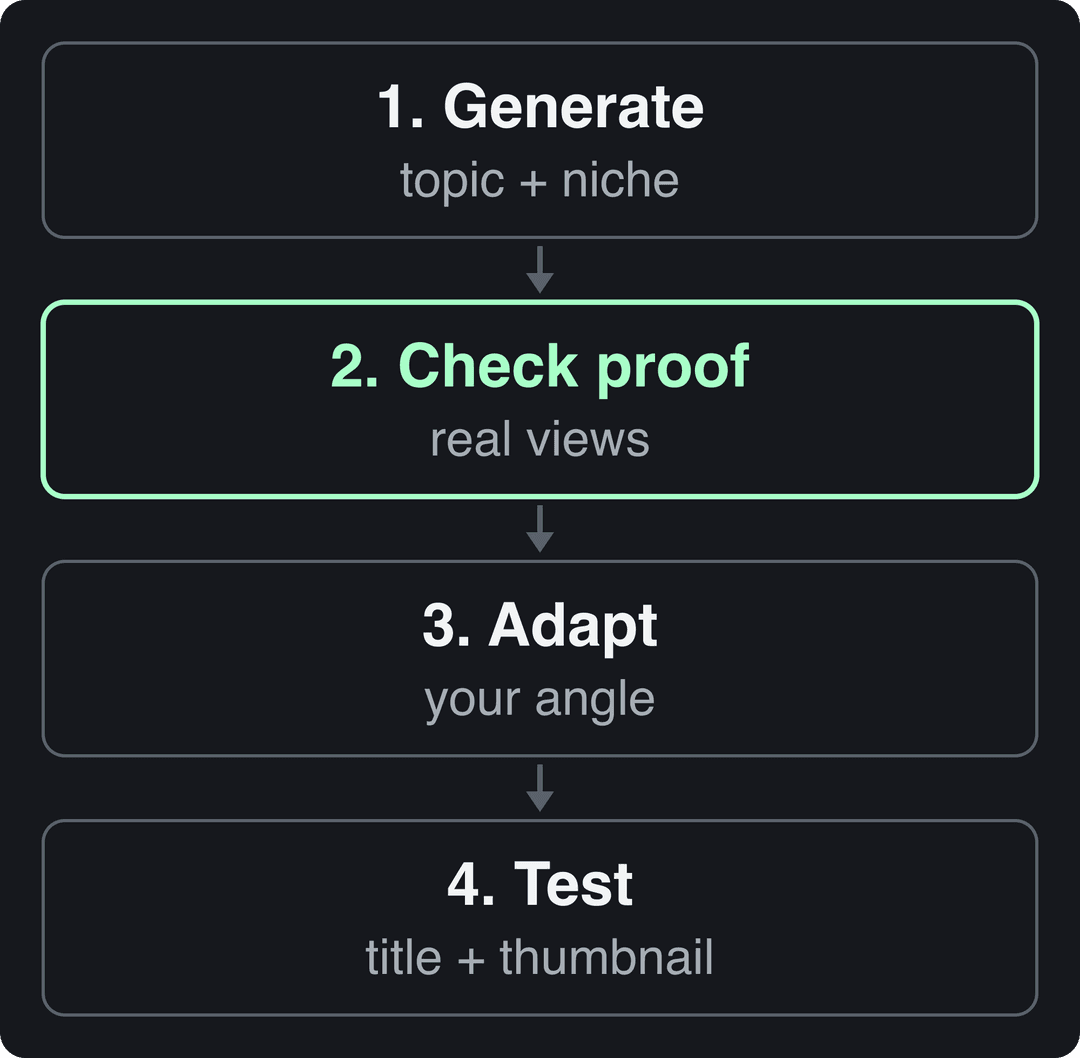
How to use an AI video idea generator in 4 steps
1. Generate with context, not a keyword
A one-word keyword gets you generic ideas. Give the generator your niche, your audience and what already worked for you. Here is a prompt you can paste into any generator or chatbot:
My channel: [niche] for [specific audience].
My best-performing videos: [titles].
Give me 10 video ideas this audience would search for or share.
For each: a working title under 100 characters and the problem it solves.The 100-character limit matches YouTube's maximum title length, so every idea arrives with a title you can actually use.
2. Check each idea for proof
For each idea, look for videos on the same idea that beat their channel's usual numbers. Search it on YouTube, scan channels in your niche, and search a viral library. Then decide:
- If several channels around your size had an outlier on the idea, keep it.
- If only one giant channel made it work, the evidence is weak for you: their audience did most of the work.
- If you find nothing, the idea is either new or unwanted. Test it as a Short before you put time into a long video.
3. Adapt it to your angle
The generic version of an idea is the one everyone else will make. Narrow it to a specific viewer, situation or skill you know well (examples below).
4. Package it, then test it
Write the title and thumbnail before you film. If you can't write a title you would click yourself, drop the idea. A YouTube title generator helps you draft variants quickly, and the testing options are covered further down.
Prompt to try
Make a 45-second vertical YouTube Short titled "I meal prepped like a bodybuilder vs. like a broke student." Open with the hook "Same budget of time, two very different fridges." Use a fast split-screen comparison style with bold captions, show the cost and prep time for each side, and end by asking viewers which week they would pick.
High-arousal emotions (outrage, humor, sadness) earned the most views. Calm, inspirational videos earned the least, even though they collect the most likes per view.
Source: Revid analysis of 176,367 TikToks with 1,000+ likes posted between Oct 1, 2025 and Oct 16, 2026 (61,203 creators)
Show the data
| Median views | Share that passed 1M views | |
|---|---|---|
| Outrage | 156K | 23.7% |
| Humor | 121K | 19.3% |
| Sadness | 104.4K | 16.5% |
| Excitement | 92.5K | 15.9% |
| Joy | 89.9K | 18% |
| Informative | 64.1K | 11.2% |
| Neutral | 61.2K | 11.5% |
| Inspirational | 44.6K | 11.3% |
How do you know if a video idea will work?
The format and the emotion are part of the idea, and you choose them before you edit anything. In Revid's analysis of 176,367 TikToks with 1,000+ likes posted between October 2025 and October 2026, challenges had the highest median views (182K, with 25.6% passing 1 million views), ahead of comedy (155K) and reactions (105K). Storytelling (66K) and tutorials (62K) came last. Mood showed a similar spread: outrage 156K, humor 121K, inspirational 45K. The full method is in our TikTok virality study.
Challenges and comedy passed 1M views about twice as often as tutorials and storytelling, which are the most common formats.
Source: Revid analysis of 176,367 TikToks with 1,000+ likes posted between Oct 1, 2025 and Oct 16, 2026 (61,203 creators)
Show the data
| Median views | Share that passed 1M views | |
|---|---|---|
| Challenge | 182.3K | 25.6% |
| Comedy | 154.8K | 22.1% |
| Reaction | 104.8K | 16% |
| Dance | 83.8K | 15.5% |
| Storytelling | 66.1K | 12.2% |
| Lip Sync | 61.7K | 12.3% |
| Tutorial | 61.9K | 12.1% |
Read these numbers with care. This is TikTok data, the sample only includes videos that already reached 1,000 likes, and it shows what successful short videos have in common, not what causes success. It tells you most about Shorts and about choosing an angle, and little directly about long-form YouTube.
The practical rule: when a generator gives you a tutorial idea, try a different frame before you throw it out. "How to meal prep" can become "I meal prepped like a bodybuilder vs. like a broke student" (a challenge-style comparison), or a reaction to a popular tutorial that gets it wrong. Keep the useful information and change the frame around it.
Turn generic AI ideas into ideas only you can make
Generators tend to hand back broad ideas like the ones on the left. Your job is the right-hand column:
| Generic AI idea | Your version | What changed |
|---|---|---|
| 10 Tips for Baking a Cake | 10 Techniques for Sculpting a Tiered Wedding Cake | A specialist skill |
| 10 Tips for Baking a Cake | 10 Egg-Free and Dairy-Free Cake Recipes | An audience constraint (vegan viewers) |
| 10 tips for gardening | 10 tips for organic urban gardening in small spaces | A situation and a method |
| Top 10 Productivity Hacks | Productivity hacks for college students during exam season | A specific viewer and moment |
Before you commit, answer these questions:
- Who exactly is watching? Name the viewer, not the topic.
- What do you know that the generic list doesn't? Your mistakes, numbers, tools or behind-the-scenes footage.
- Can it become a series? Ideas that support recurring episodes build a channel identity faster than one-off topics.
For more starting points, see our list of YouTube ideas for channel growth.
Find proven video ideas with Revid
Revid starts from the evidence instead of a blank prompt. Its library holds about 2.77 million real short-form videos and posts with their public engagement data, including 73,227 from YouTube.
- Search the library by topic, platform, engagement tier and length to find viral videos to remix in your niche.
- Open a video and run a deep analysis (free, up to 60 a day). It breaks down the hook, the timed structure, the scroll-stopping moment and ways to adapt it to another niche, and gives you a checklist to replicate it.
- Track competitors with the channel watcher, which syncs TikTok and YouTube channels daily and surfaces their outlier videos (5 channels on the Growth plan).
- Turn an idea into a Short with the AI YouTube Shorts generator, or use a Short you found as a reference with the YouTube Shorts repurposing tool. Revid writes a new script and new visuals rather than copying the original.
Searching the library is free. New accounts get free credits to try making videos, no credit card needed, and regular creation uses the credits of a paid plan, from $39/month. Revid is built for short-form, so for long-form channels it works best as the research and Shorts-testing step.
Test an idea before you commit to a long video
Shorts are the cheapest test. A Short can run up to 3 minutes, and small channels get reach there: Socialinsider's 2026 study of 69 million short-form videos found that accounts under 5,000 followers averaged 15,160 views per YouTube Short, against 625 per Instagram Reel and 350 per TikTok. If a Short on an idea holds viewers, a long version has a better chance.
For long-form videos, use Test & Compare in YouTube Studio on desktop. It tests up to 3 titles and thumbnails and shows all viewers the variant with the highest watch time (Shorts are not eligible). Draft the script once the packaging works: an AI script generator gives you a structure in minutes, and our guide to a YouTube video script generator covers hooks and pacing.
After each upload, note the click-through rate and where audience retention drops. Then add your new winners to the "best-performing videos" line of your generator prompt. Each round of ideas gets more specific to your audience.
Don't let AI ideas turn into mass-produced videos
Where an idea came from doesn't matter to YouTube. How the final video is made does. AI tools are allowed in monetized content when the finished video shows your creative vision and gives viewers educational or entertainment value. If you plan a channel built mostly on AI visuals, read our faceless YouTube channel blueprint before you scale.
FAQ
Is there a free YouTube video ideas generator?
Yes. Toolsaday, quso.ai and LenosTube all offer free AI idea generators, and any chatbot works with a good prompt. Searching Revid's library of real viral videos is also free with a sign-up.
Can ChatGPT generate YouTube video ideas?
Yes, and it works best when you give it your niche, your audience and your best-performing titles. It has no view data behind its suggestions, so check each idea against real videos before you film.
How do I find video ideas for a small channel?
Look for outlier videos from channels close to your size, not from the biggest channels in your niche. Then test the strongest ideas as Shorts, where small accounts get comparatively wide reach.
Can I monetize videos based on AI-generated ideas?
Yes. YouTube judges the finished video, not where the idea came from. What can't be monetized is mass-produced, template-based AI content that shows no original insight.
Sources
- Revid analysis of 176,367 TikToks with 1,000+ likes posted between Oct 1, 2025 and Oct 16, 2026 (61,203 creators)
- Socialinsider, TikTok vs. Reels vs. Shorts: 2026 Engagement Data (August 2026)
Charts and figures checked on November 6, 2026.