On this page
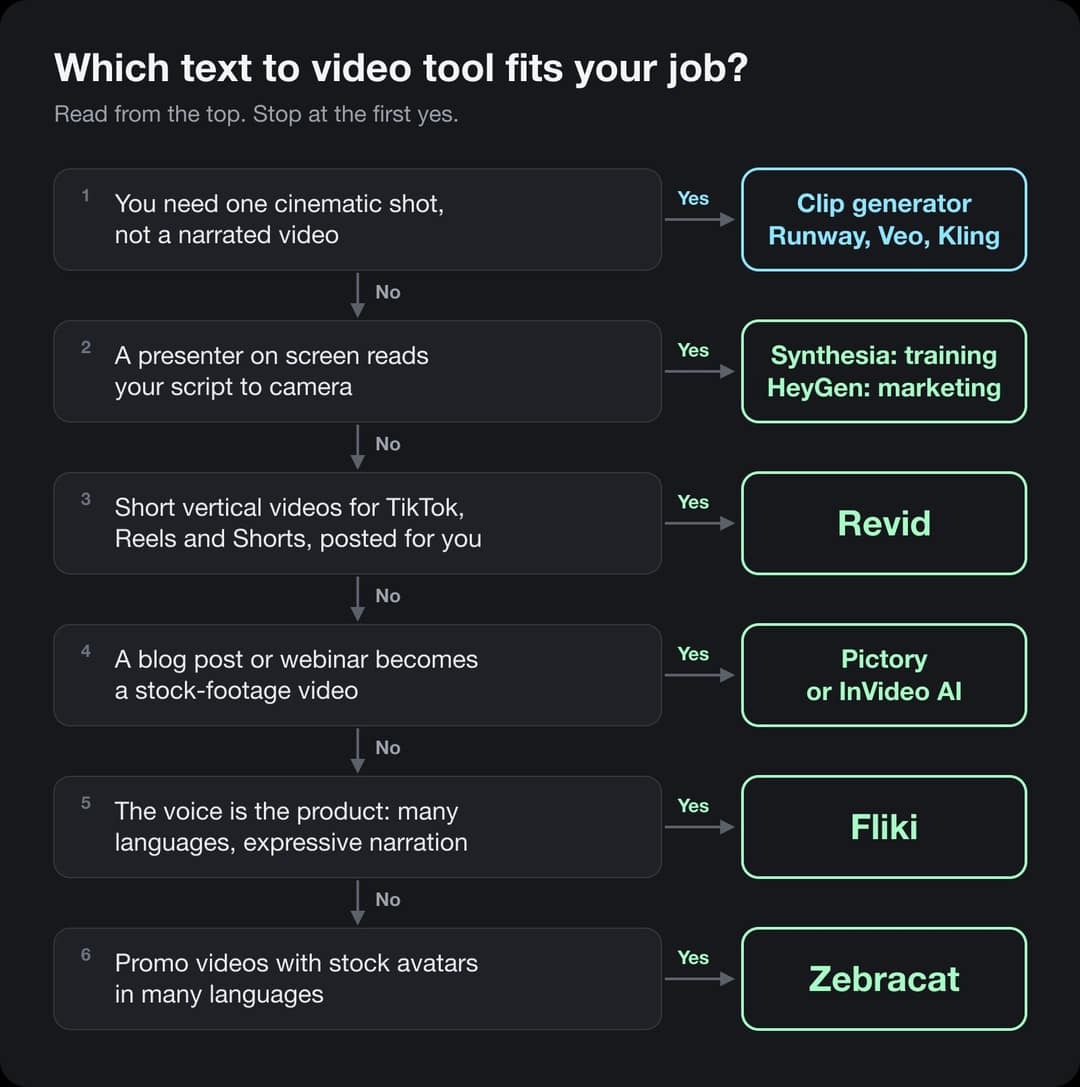
The best text to video AI in 2026 depends on what the finished video needs to look like. Revid is the pick for short vertical videos (TikTok, Reels, Shorts) that come out with voice, captions and music and get posted for you. Synthesia and HeyGen are the picks when a presenter has to read your script on camera. Pictory and InVideo AI turn long text into stock-footage videos. Fliki is the pick when the voice is the product. Zebracat covers avatar promos in many languages.
This guide is about tools that turn text (an idea, a script, an article, a PDF) into a finished, narrated video. If you only want one cinematic shot from a prompt, you want a clip generator such as Runway, Veo or Kling instead: we compare those in the best AI video generators by use case. If you want the steps rather than the tools, read how to convert text to video.
How we made this list (October 29, 2026). We read each vendor's product and pricing pages, rechecked every price on October 29, 2026, and noted what each tool does with your text: what it accepts, what visuals it uses, how it voices and captions, and whether it can post. We did not buy competing plans, so we do not grade their output quality. The usage numbers come from the 50,623 text-to-video projects people built on Revid between September 29 and October 28, 2026, and every Revid cost comes from Revid's public credit calculator.
Disclosure: we make Revid. We put it first only for the job it is built for, short-form social video, and we say plainly below when another tool is the better pick.
The 7 best text to video AI tools, compared
| Tool | Best for | Text it accepts | Visuals | Posts to social | Entry price (Oct 29, 2026) |
|---|---|---|---|---|---|
| Revid | Short vertical videos for TikTok, Reels, Shorts | Prompt, script, article or URL, PDF, social posts | Animated AI images, AI video clips, stock footage, motion graphics, your own media | Yes: TikTok, YouTube, Instagram, X, now or scheduled | $39/month, $32/month billed yearly |
| InVideo AI | Stock-heavy videos you edit by chat | Prompt or script | Stock library plus third-party AI models, avatars | No, you download | €20/month, €10/month billed yearly (EU view) |
| Pictory | Blog posts and webinars turned into videos | Script, article or URL, recordings | Licensed stock footage, AI media on credits | No direct posting verified | $29/month, $25/month billed yearly |
| Fliki | Narration in many languages | Prompt, script, blog URL, PowerPoint or Google Slides | Stock and AI media | Yes: TikTok, Instagram, YouTube | $28/month, $21/month billed yearly (August check) |
| Synthesia | Training and internal comms with a presenter | Script, prompt for the script, PowerPoint | Avatar presenter over slides and templates | No, share pages and LMS export | $19/month, $14/month billed yearly |
| HeyGen | Marketing presenters and translation | Script, or a prompt for Video Agent | Avatar presenter, templates, generated B-roll | No native posting found | $29/month, $24/month billed yearly |
| Zebracat | Avatar promos in many languages | Prompt, script, blog URL, audio | Avatars over stock and generated footage | Yes: scheduling and posting | $39/month, $23/month billed yearly |
Prices are the cheapest paid plan on each vendor's pricing page on October 29, 2026. Fliki's page showed plan limits but no prices to our check that day, so its prices are from our August 13, 2026 check. InVideo showed us euro prices; check the page in your own currency.
An entry price buys very different amounts: Synthesia's Starter covers about 12 video minutes a month, Pictory's up to 30, Zebracat's 15 videos of up to 2 minutes, and Revid's Growth plan 2,000 credits (about 90 one-minute stock-footage videos). InVideo's figures were shown in euros.
Source: Vendor pricing pages read on Oct 29, 2026 (invideo.io, pictory.ai, synthesia.io, heygen.com, zebracat.ai, revid.ai/pricing); Fliki from fliki.ai/pricing on Aug 13, 2026. US dollars except InVideo (euros).
Show the data
| Billed monthly | Billed yearly, per month | |
|---|---|---|
| Revid | 39 | 32 |
| InVideo AI | 20 | 10 |
| Pictory | 29 | 25 |
| Fliki | 28 | 21 |
| Synthesia | 19 | 14 |
| HeyGen | 29 | 24 |
| Zebracat | 39 | 23 |
What 50,623 text-to-video projects tell you before you pick a tool
Most lists compare features. We can also show what people actually do with text when they have every option in front of them. These numbers cover every project built from text on Revid in the 30 days from September 29 to October 28, 2026.
- videos built from text on Revid in 30 days
- 50,623
- Sep 29 to Oct 28, 2026
- started from a one-line prompt, not a written script
- 66%
- were vertical 9:16, made for TikTok, Reels and Shorts
- 83%
- for a 60-second video with stock footage, about $0.43 on the Growth plan
- 22 credits
Most people start from an idea, not a script
Two thirds of text-to-video projects begin with a short prompt, such as "why your brain loves procrastination", and let the tool write the script. Under a third paste a finished script. Articles, PDFs and social posts are a small share, but they are where a tool that reads links and documents saves the most time.
Script includes pasted text in the TikTok-style voiceover tool and text-to-gameplay videos. PDF includes PDF-to-video and PDF-to-gameplay. Social post covers tweets, LinkedIn posts and Reddit posts or stories.
Source: Revid data, Amplitude event project_built, grouped by tool, Sep 29 to Oct 28, 2026 (UTC), 50,623 projects from text inputs.
Show the data
| Projects | Share of projects | |
|---|---|---|
| Prompt or idea | 33.5K | 66.2% |
| Written script | 14.9K | 29.5% |
| Article or URL | 1.3K | 2.6% |
| 550 | 1.1% | |
| Social post | 341 | 0.7% |
What this means for your pick: if you have ideas but no scripts, choose a tool that writes the script for you and lets you edit it before it renders. Revid, InVideo AI, Fliki, HeyGen's Video Agent and Zebracat do that. Pictory and Synthesia work best when you already have the text.
The visuals you choose decide the look, the speed and the price
The same text can be illustrated four ways: animated AI images (still images with camera motion), full AI video clips, stock footage, or motion graphics (animated text and shapes). Here is what people chose for each kind of text.
Animated AI images are generated images with camera motion; AI video clips are generated footage. Own or article images covers uploads and, for articles, the article's own pictures mixed with stock. Each tab adds up to about 100%.
Source: Revid data, Amplitude project_built by tool and visual type, Sep 29 to Oct 28, 2026; 33,514 prompt, 14,706 script and 1,294 article projects.
Show the data
| From a prompt | From a script | From an article | |
|---|---|---|---|
| Animated AI images | 69.4% | 65.3% | 50.9% |
| AI video clips | 14.3% | 8% | 5.7% |
| Stock footage | 5.6% | 13.7% | 12.1% |
| Motion graphics | 2.9% | 1% | 1.2% |
| Own or article images | 5.8% | 8% | 30.1% |
| Static images | 2.1% | 3.9% | 0% |
Two patterns are worth copying. Animated AI images are the default for most people because they match any topic and cost a fraction of AI video. And articles are the one input where people keep their own pictures: almost a third of article videos reuse the article's images, which keeps a product or news story accurate.
Make it vertical unless you know you need wide
Generating in the final shape matters: cropping a wide video to 9:16 cuts off text and faces. Avatar tools such as Synthesia and HeyGen default to 16:9 for training and web use.
Source: Revid data, Amplitude project_built by ratio for text-input tools, Sep 29 to Oct 28, 2026, 50,623 projects.
Show the data
| Share of projects | Projects | |
|---|---|---|
| 9:16 vertical | 83.2% | 42.1K |
| 16:9 wide | 15.2% | 7.7K |
| 1:1 square | 0.9% | 457 |
| 4:5 portrait | 0.7% | 356 |
What a text-to-video costs, by length and visuals
Text costs almost nothing to process. The visuals and the voice are what you pay for. We priced the same prompt at three lengths and six visual styles with Revid's free credit calculator, then converted credits to dollars at the Growth plan rate ($39 for 2,000 credits).
In dollars at the Growth rate ($39 for 2,000 credits), a 60-second video costs about $0.43 with stock footage, $0.68 with animated AI images, $1.46 with pro AI images, $4.29 with AI video clips and $13.30 with pro AI video. A 90-second video costs 1.5 times the 60-second price. Every price includes the AI voice-over (10 credits per 30 seconds); motion graphics show the calculator's upper bound.
Source: Revid public credit calculator (POST /api/public/v3/calculate-credits, no key), prompt-to-video workflow, 30, 60 and 90 seconds, queried Oct 29, 2026.
Show the data
| 60-second video, credits | 30-second video, credits | 60-second videos per Growth month | |
|---|---|---|---|
| Stock footage | 22 | 11 | 90 |
| Animated AI images | 35 | 18 | 57 |
| AI images, pro | 75 | 37 | 26 |
| AI video clips | 220 | 110 | 9 |
| Motion graphics | 275 | 160 | 7 |
| AI video, pro | 682 | 341 | 2 |
A practical rule: test a new format with animated AI images or stock footage, then spend AI video credits on the few videos that already work.
1. Revid: best for short vertical videos that get posted
Best for: founders, marketers and agencies who need TikToks, Reels and Shorts every week from ideas, scripts, links or documents.
Revid turns text into a finished vertical video in one pass: it writes or tightens the script to the length you pick, voices it, illustrates each line, adds captions and music, and lets you post it. You can start from a one-line prompt, a script, an article or URL or a PDF.
What you get:
- Visual styles for every budget: animated AI images, AI video clips (Seedance 2.5, MiniMax Hailuo H3, Wan 3.0, Google Veo 3), stock footage, motion graphics, or your own media, with the costs shown above before you render.
- Voice and captions: voices in 70+ languages, voice cloning, 30 caption styles and captions in 100+ languages.
- A real editor: a timeline to swap a shot, retime a line or change the caption style without starting over.
- Posting: publish now or schedule to TikTok, YouTube, Instagram and X, or let an automation post a series.
- For agents and developers: the same engine through a REST API, an MCP server with 30 tools and a CLI, on every paid plan.
Revid for text to video
Pros
- Writes the script from a one-line idea, or keeps your script word for word
- Costs are public and shown before you render
- Vertical by default, with captions and music included
- Posts and schedules to TikTok, YouTube, Instagram and X
Cons
- No on-camera avatar presenter as polished as Synthesia or HeyGen
- Built for short-form; long training videos are not its focus
- No permanent free plan; regular use needs a paid plan
Price: Growth is $39/month ($32/month billed yearly) with 2,000 credits; Elite is $89/month with 5,000; Ultra is $199/month with 12,000.
Pick something else when: you need a person presenting to camera (Synthesia, HeyGen) or a 20-minute training module.
2. InVideo AI: best for stock-heavy videos you edit by chat
Best for: people who like describing changes in plain words ("delete scene 2, use a calmer voice") and want a huge stock library.
InVideo AI takes a prompt or a script and assembles a video from its stock library and third-party AI models, with an AI voice and subtitles in 50+ languages. You refine the result by typing instructions to its agent rather than working on a timeline. It also has an official MCP server, so an AI agent can drive it.
- Pros: a very large stock library, avatars and voice clones from the entry plan, many AI models in one subscription.
- Cons: no direct posting (you download and upload), and credit use varies by model, a common complaint in its reviews.
- Price on October 29, 2026: Starter €20/month (€10/month billed yearly) with 400 credits per seat; Plus €60 (€30 yearly) with 2,000; Max €150 (€75 yearly) with 5,000.
- Pick something else when: you want precise timeline control or automatic posting. More options in our InVideo AI alternatives and the Revid vs InVideo comparison.
3. Pictory: best for turning blog posts and webinars into videos
Best for: content and marketing teams with a library of articles, scripts and recordings to repurpose.
Pictory reads a script, an article or a URL, picks matching licensed stock footage (Getty Images and Storyblocks), adds a voice and captions, and lets you adjust scene by scene. It can also cut highlights out of Zoom, Teams and webinar recordings.
- Pros: strong for long-form text, licensed stock, ElevenLabs voices on higher plans, an enterprise API and an MCP server.
- Cons: a storyboard editor rather than a timeline, stock-led visuals that can feel generic for social, no verified one-click posting.
- Price on October 29, 2026: Starter $29/month ($25 yearly), up to 30 video minutes a month; Professional $59 ($35 yearly), up to 90 minutes; Teams $199 ($119 yearly). A 14-day free trial includes up to 10 minutes.
- Pick something else when: your output is mostly vertical social video. See our Pictory alternatives and Revid vs Pictory.
4. Fliki: best when the voice is the product
Best for: narrated explainers, faceless channels and multilingual content where the voice carries the video.
Fliki is built around text-to-speech: it lists 2,000+ voices in 80+ languages and dialects, with emotional delivery, and turns a one-line prompt, a script, a blog URL or a PowerPoint or Google Slides deck into a narrated video with stock and AI media. It publishes in one click to TikTok, Instagram and YouTube and can run a recurring series.
- Pros: the deepest voice library here, direct TikTok publishing, a long-lived free plan.
- Cons: a scene editor rather than a timeline, undisclosed video models, API only on Premium.
- Price: Standard $28/month ($21 yearly) and Premium $88/month ($66 yearly) at our August 13, 2026 check. On October 29, 2026 its page listed 180 credits a month on Standard and 600 on Premium but showed no prices to us.
- Pick something else when: visuals matter more than the voice. Compare in Revid vs Fliki.
5. Synthesia: best for training videos with a presenter
Best for: L&D, HR and internal communication teams that turn written policies and courses into presenter-led videos.
Synthesia puts an AI avatar on screen to read your script over slides and templates. Its AI video assistant drafts a script from a prompt, and you can import a PowerPoint. Videos export to share pages and to learning platforms (SCORM).
- Pros: the most mature avatars for corporate use, 140+ languages, re-render when a policy changes, enterprise controls.
- Cons: minute quotas on every plan, no social posting, a presenter look that is not made for TikTok.
- Price on October 29, 2026: Starter $19/month ($14 yearly), about 12 video minutes a month; Pro $89/month ($59 yearly), about 60 minutes. A free plan includes 10 minutes a month with a watermark.
- Pick something else when: you are making marketing content for social feeds. See Revid vs Synthesia.
6. HeyGen: best for marketing presenters and translation
Best for: sales, marketing and creator teams who want a realistic presenter, or the same video in many languages with lip sync.
HeyGen turns a script into a video read by a stock avatar or your own digital twin. Its Video Agent assembles a full video from one prompt, and its translation re-voices and lip-syncs a video in 175+ languages and dialects.
- Pros: very realistic avatars, the strongest translation here, a free plan to test.
- Cons: no native social posting found, credit-based tiers that climb fast on Pro, presenter-led by design.
- Price on October 29, 2026: Creator $29/month ($24 yearly) with 600 credits and videos up to 30 minutes; Pro from $49/month; Business $149/month. Free: 3 watermarked videos a month, up to 1 minute each.
- Pick something else when: you want faceless or footage-led videos. See Revid vs HeyGen.
7. Zebracat: best for avatar promos in many languages
Best for: small marketing teams who want promo videos with stock avatars and translation.
Zebracat turns a prompt, a script, a blog URL or an audio file into a video with avatars over stock and generated footage, AI voices in many languages and a scene editor, and schedules and posts approved videos to your social channels.
- Pros: a low yearly entry price, avatars and translation in one plan, a free plan to try.
- Cons: video counts and length caps per plan (2 minutes on Cat Mode), API only on Enterprise.
- Price on October 29, 2026: Cat Mode $39/month ($23 yearly) with 15 videos a month up to 2 minutes; Super Cat $99 ($59 yearly) with 40 videos up to 5 minutes; Unlimited Cat $199 ($119 yearly). Free: 5 videos in total, 720p, 30 seconds.
- Pick something else when: you need longer videos or an API on a small plan. See Revid vs Zebracat.
Real videos made from text with Revid
Every video below started as text: a prompt, a script, an article or a PDF. Open any of them to watch it and make your own version.
Made from text on Revid
Prompts, scripts and PDFs turned into vertical videos with voice, captions and music.





Which tool fits your job
| You need | Pick | Why |
|---|---|---|
| 3 to 7 TikToks, Reels or Shorts a week from ideas | Revid | Writes, voices, captions and posts in one flow |
| A script read by a presenter for training | Synthesia | LMS export, minute quotas sized for courses |
| A presenter video translated into 10 languages | HeyGen | Lip-synced translation in 175+ languages |
| A blog archive turned into videos | Pictory or InVideo AI | Read long text and match stock footage |
| Narration in a rare language or a very specific voice | Fliki | 2,000+ voices in 80+ languages |
| Avatar promos in several languages on a small budget | Zebracat | Avatars and translation from the entry plan |
| One cinematic hero shot | A clip generator | See best AI video generators |
How to write text that turns into a good video
The tool matters less than the text you give it. Four habits help with every tool on this list:
- Say who it is for and where it will run. "A 45-second TikTok for first-time founders" gets a better script than "a video about fundraising".
- Ask for one idea per video. One clear point is easier to script, voice and caption well than a list of ten.
- Name the hook. Tell the tool what the first sentence should promise.
- Pick the visual style on purpose. AI images for ideas, stock for real places and people, motion graphics for numbers and steps.
A prompt that renders well
A 45-second vertical video for first-time founders: why your first 100 customers should come from one channel, not five. Open with the hook: most startups die from doing too much marketing, not too little. Three short points, one concrete example each, end with one question for the viewer. Calm, confident voice. Animated illustrations, clean captions.
If you are starting from a script, our list of script to video AI tools goes deeper. For YouTube in particular, see text to YouTube video AI.
Frequently asked questions
What is the best text to video AI?
It depends on the video. For short vertical videos that get posted to TikTok, Reels and Shorts, Revid. For a presenter reading a script, Synthesia (training) or HeyGen (marketing and translation). For blog posts and webinars turned into stock-footage videos, Pictory or InVideo AI. For narration in many languages, Fliki.
Which AI can turn text into a video for free?
Several have free plans with limits and watermarks: Synthesia includes 10 minutes a month, HeyGen 3 videos a month of up to 1 minute, Zebracat 5 videos in total of up to 30 seconds, and Fliki a small monthly allowance. Pictory has a 14-day trial. Revid sign-up is free with credits to try it, and regular use needs a paid plan.
What is the difference between text to video and a clip generator?
A clip generator (Runway, Veo, Kling) turns a prompt into one short shot with no script, voice or captions. A text to video tool turns a topic, script or document into a finished video with narration, captions, music and every scene assembled.
Can I turn a blog post or a PDF into a video?
Yes. Revid, Pictory, Fliki and Zebracat read articles or URLs, Fliki also takes PowerPoint and Google Slides, and Revid also reads PDFs. On Revid, article videos often reuse the article's own images: about 30% of article projects did in October 2026.
How much does it cost to make a one-minute video from text?
On Revid, a 60-second video costs 22 credits with stock footage, 35 with animated AI images and 220 with AI video clips, which is about $0.43, $0.68 and $4.29 on the Growth plan. Avatar tools usually sell video minutes instead: Synthesia's Starter covers about 12 minutes a month for $19.
Is Sora still available for text to video?
No. OpenAI closed the Sora app on April 26, 2026 and removed Sora 2 from its API on September 24, 2026, so tools that relied on it have moved to models such as Veo, Seedance, Kling, Wan and MiniMax Hailuo.
Is there a text to video API that includes narration and captions?
Yes. Revid's REST API, MCP server and CLI return a finished video with voice-over, captions and music from a prompt, a script or a URL, and its credit calculator works without a key. Synthesia and HeyGen have APIs for avatar videos, and Pictory has an enterprise API.
Can I monetize AI-generated videos on YouTube?
Yes, if the video shows your own creative choices and gives real value. YouTube does not monetize mass-produced videos from generic templates or repetitive AI compilations, so write a real script and vary your formats.
Sources
- Revid usage: Amplitude, event
project_builtfor text-input tools, September 29 to October 28, 2026 (UTC), 50,623 projects, grouped by tool, visual type and aspect ratio. - Revid costs: public credit calculator,
POST /api/public/v3/calculate-credits, prompt-to-video workflow, October 29, 2026. Plans: revid.ai/pricing. - Prices read on October 29, 2026: invideo.io/pricing (euros), pictory.ai/pricing, synthesia.io/pricing, heygen.com/pricing, zebracat.ai/pricing. Fliki: fliki.ai/pricing on August 13, 2026 (no prices shown on October 29).
- Features: each vendor's product pages, read between August 13 and October 29, 2026, and the official MCP endpoints we checked on October 22, 2026 for our video MCP server comparison.
- Sora shutdown dates: OpenAI's announcements of the Sora app closure (April 26, 2026) and Sora 2 API removal (September 24, 2026).