Automatic Video Editor: What It Does and How to Use It (2026)
What an automatic video editor really does, which editing jobs to hand to AI, how to re-edit a video you already have, and which type of tool fits your footage.
On this page
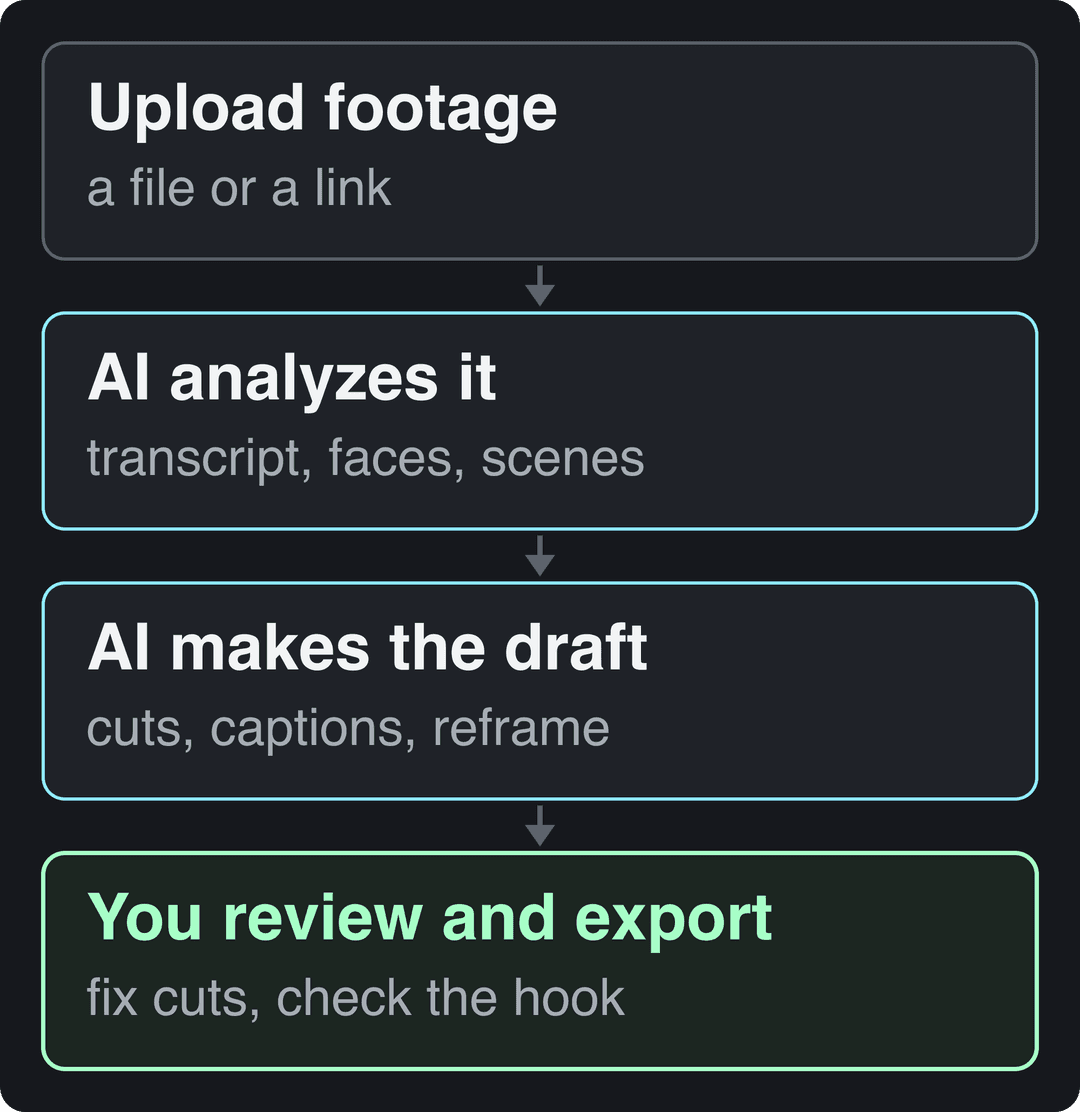
An automatic video editor uses AI to handle the repetitive parts of editing: it transcribes your footage, cuts silences and filler words, splits scenes, adds synced captions and reframes horizontal video to vertical. You upload a file or paste a link, review the draft it builds, fix what it got wrong and export.
The catch most people miss: an automatic editor is only as good as the footage and the job you give it. A clipping tool needs a long recording to mine, a caption tool needs a finished cut, and none of them will rescue a weak opening line. Pick the tool by what you start with, not by its feature list.
- Estimated value of the AI video editing tools market
- $1.6B
- Virtue Market Research
- Projected AI video editing tools market by 2030
- $9.3B
- Virtue Market Research
- Shares per 100 views for TikToks under 15 seconds, the highest of any length
- 1.41
- Revid analysis of 176,367 TikToks
- Longest square or vertical video YouTube counts as a Short
- 3 min
- YouTube Official Blog, October 2024
What does an automatic video editor do?
Most tools combine the same two AI passes. Speech recognition turns the audio into a transcript, and computer vision scans the frames for faces, scene changes and on-screen action. Every automated edit is built on those two passes.
| Task | What the AI does | What you still check |
|---|---|---|
| Silence and filler removal | Finds pauses and "ums" in the audio and cuts them | Cuts that clip a word or kill a comic pause |
| Scene detection | Splits footage where the location, speaker or shot changes | Splits in the middle of a sentence |
| Captions | Transcribes speech and times each line | Names, brand terms and slang spelled wrong |
| Reframing | Crops 16:9 to 9:16 and keeps the speaker centered | Shots with two people or text near the edge |
| Highlight picking | Ranks moments in a long video and cuts them into clips | Whether each clip makes sense without context |
| Audio cleanup | Reduces hum, wind and room noise | Voices that sound thin after cleanup |
For a wider look at AI features beyond automation (generation, effects, voice), see our guide to AI video editing.
How to auto edit a video, step by step
- Decide the output first: one tightened video, a set of vertical clips, or a captioned version of something already cut. That choice decides the tool.
- Upload the cleanest source you have. Clear audio matters more than resolution, because the transcript drives the cuts and the captions.
- Choose what to automate: silence removal, filler words, captions, reframing, clip selection. Turn off anything you plan to do by hand.
- Review the draft at normal speed instead of scrubbing. Listen for words cut short and watch for jump cuts that land mid-gesture.
- Correct captions on names and numbers, then check the opening of every clip. If the first line is not the strongest line, move it.
- Export at the platform's native size. TikTok's Creator Academy recommends 9:16 at 1080x1920 pixels.
How do you re-edit a video you already have?
To re-edit a video, start from the original file when you can (a downloaded copy has already been compressed once), decide what the new version is for, and let an automatic editor do the mechanical part. Most re-edits are one of four jobs:
| You want to | Do this |
|---|---|
| Make an old video tighter | Run silence and filler removal, then cut the intro down to the first line that matters |
| Post a horizontal video on TikTok, Reels or Shorts | Reframe to 9:16 and re-check that captions sit clear of the app's buttons |
| Turn one long video into several short ones | Run a clipping tool, then keep only the clips that stand on their own |
| Fix or add captions | Re-transcribe, correct names, and pick a caption style that suits the platform |
For a pure format change, Revid's free video resizer converts a file to portrait 9:16, feed 4:5, landscape 16:9 or square 1:1. If you re-edit footage you did not shoot, make sure you have the rights to it, and watch the music: on YouTube, any Short longer than one minute with an active Content ID claim is blocked globally and cannot be monetized.
Re-editing old long videos into clips is one of the cheapest ways to fill a posting calendar. Our guide to repurposing content for social media covers which pieces to recycle first.
Automatic vs manual editing: what to hand to the AI
The rule is simple: automate anything that has a correct answer, keep anything that is a judgment call.
| Job | Automate it? | Why |
|---|---|---|
| Cutting dead air | Yes | Pauses are easy to detect and slow to cut by hand |
| Captions | Yes, then proofread | Transcription is fast; the errors cluster on names and jargon |
| Reframing to vertical | Yes, check group shots | Tracking one face is reliable; two or more is not |
| Picking highlights from a 30-minute recording | Yes, as a first pass | It saves the scrubbing; you still choose what ships |
| The hook and first line | No | It depends on what your audience cares about |
| Pacing, music timing, jokes | Mostly no | Timing is taste, and AI tends to cut every pause |
| Color grade and signature style | No | Your look is what makes the channel recognizable |
US dollars per month
The plans do not buy the same thing: OpusClip, Vizard and Quso sell minutes of uploaded video, Klap sells clips, Submagic sells videos, Descript and Kapwing sell seats, and Revid sells credits that also make new videos from scratch. Billed yearly, most of these drop by 30 to 50%.
Source: Vendor pricing pages read October 29, 2026. Vizard's page did not render prices that day, so its figure is from vizard.ai/pricing on September 30, 2026; Klap's page showed yearly prices only, so its monthly price is from klap.app/pricing on August 13, 2026.
Show the data
| US dollars per month | |
|---|---|
| OpusClip Starter | 15 |
| Kapwing Pro | 16 |
| Submagic Starter | 19 |
| Descript Hobbyist | 24 |
| Vizard Creator | 29 |
| Klap Basic | 29 |
| Quso Lite | 29 |
| Revid Growth | 39 |
Which type of automatic video editor do you need?
"Automatic video editor" covers very different products. Match the type to what you start with:
| You start with | Tool type | Examples | What it does well |
|---|---|---|---|
| Long recordings (podcasts, webinars, streams) | Clipping tools | OpusClip, Klap, Vizard | Finds highlights, reframes to vertical, adds captions; OpusClip and Klap also score clips for virality |
| A finished short video | Caption and polish tools | Submagic | Animated captions, b-roll, zooms, sound effects and silence removal |
| Interviews and spoken content | Transcript-based editors | Descript | Edit the video by editing the text, remove filler words, clean up studio sound |
| Your own footage, edited by hand | Editors with AI features | CapCut, Veed | A full manual timeline plus auto-captions and templates |
| An idea, a script or a link, no footage | AI video generators | Revid | Writes the script, generates the scenes, voice and captions, and publishes |
If clipping is your main need, compare the options in our roundup of OpusClip alternatives, or read the fact-checked Revid vs OpusClip comparison. If you mostly edit recorded talk, see Revid vs Descript: Descript is built for editing recordings you already have, Revid for creating new videos.
There are narrower automations too. AI lyric video makers handle one tedious job, syncing on-screen words to a song, which shows how far single-purpose automation has gone.
Demand for these tools is growing quickly: Virtue Market Research valued the AI video editing tools market at $1.6 billion and projects $9.3 billion by 2030 in its AI video editing tools market report. More tools means more overlap, so test each one on a real file from your own channel before paying.
How long should auto-generated clips be?
Start with the platform limits. TikTok accepts uploads up to 60 minutes, YouTube treats square or vertical videos up to 3 minutes as Shorts, and Instagram does not recommend reels longer than 3 minutes to non-followers. Inside those limits, length matters less than most clipping tools suggest.
In Revid's analysis of 176,367 TikToks with 1,000+ likes posted between October 2025 and October 2026, every length bucket from under 15 seconds to 10 minutes had a median between 58K and 76K views. Clips of 61 to 90 seconds reached a 70K median, while clips under 15 seconds had the lowest median (58K) but the most shares per view (1.41 per 100). The sample only includes TikToks that already passed 1,000 likes, so it shows what successful videos have in common, not what causes success; the full method is in our study of what makes a TikTok go viral.
Length alone barely moves views: every bucket lands between 58K and 76K median views (the 790 videos over 10 minutes are a small, unusual group). Clips under 15 seconds get shared the most per view.
Source: Revid analysis of 176,367 TikToks with 1,000+ likes posted between Oct 1, 2025 and Oct 16, 2026 (61,203 creators)
Show the data
| Median views | Share that passed 1M views | Shares per 100 views | |
|---|---|---|---|
| Under 15 s | 57.6K | 11.6% | 1 |
| 16 to 30 s | 64.9K | 12.3% | 1 |
| 31 to 60 s | 61.8K | 11.8% | 1 |
| 61 to 90 s | 70.5K | 12.2% | 1 |
| 91 s to 3 min | 63.4K | 11.1% | 1 |
| 3 to 10 min | 76.4K | 12.4% | 1 |
| 10 min+ | 129.6K | 13.8% | 0 |
So set your clipping tool by the moment, not by a fixed duration:
- If the moment is a single punchline or reaction, keep it under 15 seconds: short clips get shared more.
- If it is an explanation or a story, let it run 60 to 90 seconds rather than cutting it off mid-thought.
- If you want TikTok Creator Rewards, only videos at least one minute long can earn, so cut those clips past the one-minute mark.
Input
Your video as it is
Output
How to auto edit a video with Revid
Revid fits two cases: you have a talking video or a long YouTube video to turn into shorts, or you have no footage at all. For the first case:
- Open Revid's auto edit video tool, upload a talking video or paste a link. It comes back edited, with your key lines turned into motion graphics.
- Adjust anything in the timeline editor: trim a cut, swap a visual, move a line.
- Add or restyle captions with the AI caption generator: 30 caption styles and automatic captions in 100+ languages.
- For a long recording, the long video to short video converter cuts it into vertical clips.
- Export in 720p, 1080p or 4K at 30 or 60 fps, or publish and schedule directly to TikTok, Instagram and YouTube from one queue.
Sign-up is free and new accounts get free credits to try video creation, no credit card needed; regular creation then uses the monthly credits of a paid plan, from $39/month (see the live pricing page for current plans). Every paid plan also includes an API, an MCP server and a CLI, so an AI agent can run the same edits and publishing on its own.
Where automatic editing still falls short
- Context. A highlight picker can pull a strong sentence that only makes sense after the setup it cut away. Watch every clip as if you had never seen the full video.
- Timing. Silence removal treats a dramatic pause and dead air the same way. Restore the pauses that carry a joke or a reveal.
- Several speakers. Reframing and speaker detection get less reliable when two people talk over each other or sit far apart.
- The hook. No current tool knows which line your audience will stop for. Write or choose the opening yourself.
- Monetization on YouTube. YouTube allows AI and automated tools when the final video shows your creative vision, but content made from generic templates that looks mass-produced cannot be monetized. Automate the edit, not the ideas.
The hours you save only pay off if they go into a repeatable routine. This outside guide to building a content creation workflow shows how to plan, batch and schedule around a faster edit.
Is automatic video editing new?
No. Desktop software was already automating fades and effects in the early 1990s: Amiga Computing magazine covered tools like OpalVision for the Amiga, as you can read in this archived issue of Amiga Computing. What changed is machine learning. Older tools automated effects you chose; current tools understand speech and images well enough to decide where to cut.
FAQ
Is there a free automatic video editor?
Yes, with limits. CapCut's free tier includes the full editor, 1080p export and auto-captions, and Descript's free plan gives 60 media minutes a month with 720p export. Revid's sign-up is free and includes free credits to try video creation, with no credit card needed; regular creation then uses paid-plan credits.
What does autoedit mean?
Autoedit (or auto edit) means letting software make editing decisions for you, usually cutting silences and filler words, adding captions and reframing. You still review the result and make the creative calls.
Will automatic video editing replace human editors?
No. It replaces the mechanical part (scrubbing footage, cutting pauses, typing captions), while story, pacing, hooks and style still need a person. It mostly helps creators and small teams who do not have an editor at all.
Do I have to disclose AI editing on YouTube or TikTok?
Not for ordinary edits. YouTube does not require disclosure for captions or minor edits, only for realistic AI-generated or altered content, and TikTok requires a label for AI-generated content with realistic images, audio or video. Both say the label alone does not reduce a video's reach.
How accurate is AI video editing?
Accurate enough for a strong first draft, not for publishing unseen. Expect errors on names and jargon in captions, cuts that clip words, and reframes that lose a second speaker, so always review before you export.
Sources
- Revid analysis of 176,367 TikToks with 1,000+ likes posted between Oct 1, 2025 and Oct 16, 2026 (61,203 creators)
- Vendor pricing pages read October 29, 2026. Vizard's page did not render prices that day, so its figure is from vizard.ai/pricing on September 30, 2026; Klap's page showed yearly prices only, so its monthly price is from klap.app/pricing on August 13, 2026.
- YouTube Official Blog, Tall updates coming to Shorts (October 2024)
Charts and figures checked on November 6, 2026.