Video Content Scheduler: 9 Tools to Plan and Post AI Videos
A video content scheduler queues finished videos and posts them for you. Here are the three types of schedulers, which one fits AI-generated videos, and a weekly batching workflow.
On this page
A video content scheduler queues finished videos and publishes them to TikTok, Instagram, YouTube and other networks at the times you set. Social schedulers such as Hootsuite, Buffer, Later, Sprout Social and Loomly post videos you already have; for AI-generated videos, tools like Revid create and publish in one place, and clipping tools like OpusClip or Vizard schedule the clips they cut.
The common mistake is buying a scheduler before you have a supply problem solved. A calendar with empty slots does nothing, and most schedulers assume the video already exists. Pick your scheduler by where your videos come from, not by which dashboard looks nicest.
- Monthly starting price of Revid's paid plans, which create and schedule videos
- $39
- Revid pricing
- Languages available for Revid's AI voice-overs
- 70+
- Revid
- Marketers who use short-form video in their content strategy
- 60%
- HubSpot, September 2026
- Marketers who already use generative AI tools to create social content
- 73%
- HubSpot, September 2026
Which type of video content scheduler do you need?
There are three kinds of tools that schedule video, and they solve different problems.
| Type | Best for | Examples | What it does not do |
|---|---|---|---|
| Social media scheduler | Teams posting finished videos, images and text across many networks | Hootsuite, Buffer, Later, Sprout Social, Loomly | Make the videos |
| AI clipping tool with publishing | Creators who record long videos, podcasts or streams | OpusClip, Vizard, Submagic | Create videos without source footage |
| AI creator with publishing | Founders and creators who need new videos from ideas, scripts or links | Revid | Schedule text posts to every network |
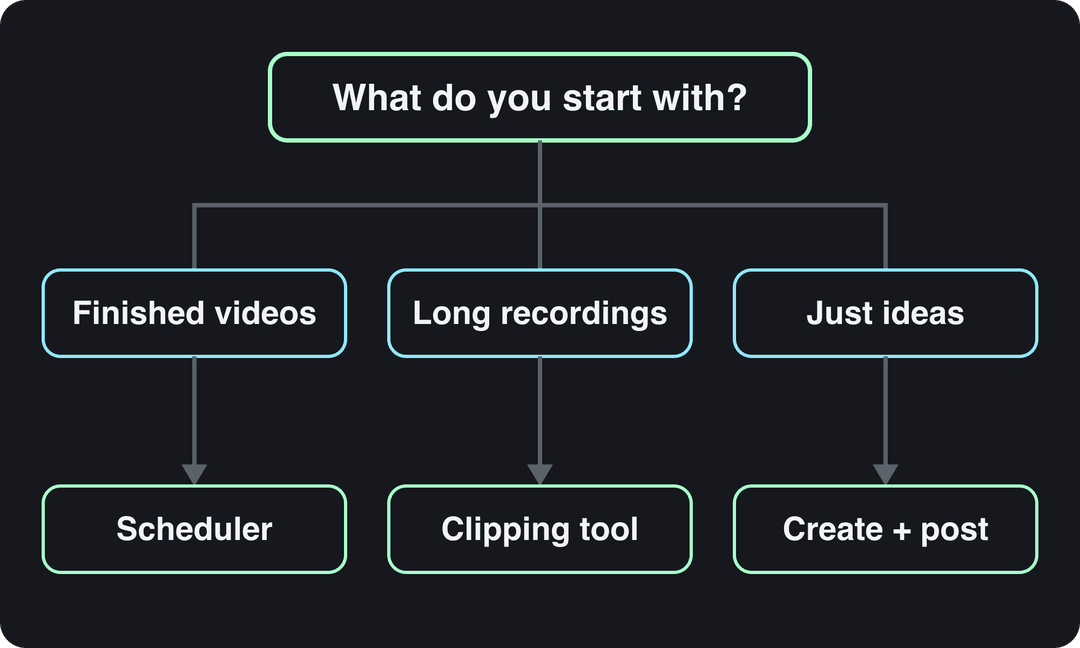
The decision rule is simple: if you already have videos, a social scheduler is enough. If you have long recordings, a clipping tool that publishes saves the export and upload step. If you start from an idea, use a tool that creates and publishes, so the video never leaves the place it was made.
Best social media schedulers for video
These tools post videos you already have, alongside the rest of your social content. Features and plans change often, so confirm current limits on each tool's pricing page before you commit.
Hootsuite
Hootsuite schedules posts to Facebook, Instagram, X, LinkedIn and TikTok from one dashboard, with built-in analytics and approval workflows. It fits businesses that manage several brands or a team that needs sign-off before anything goes live.
Buffer
Buffer is a common pick for solo creators and small teams that want a simple queue: add videos, let it post at your chosen times, and review results in its analytics. Check its current plans if budget is the deciding factor.
Later
Later is built around visual scheduling: a drag-and-drop calendar and a preview of how posts will look in your feed. It suits brands that care about how an Instagram grid or TikTok profile looks as a whole.
Sprout Social
Sprout Social is a full social media management suite with bulk scheduling, cross-platform publishing including TikTok, and detailed reporting on performance and ROI. It is aimed at larger teams and agencies that need reporting for stakeholders.
Loomly
Loomly offers a visual content calendar, approval workflows and scheduled posting. It works well for small teams that want a clear calendar view and client approvals without the weight of an enterprise suite.
US dollars per month
The plans do not buy the same thing: OpusClip, Vizard and Quso sell minutes of uploaded video, Klap sells clips, Submagic sells videos, Descript and Kapwing sell seats, and Revid sells credits that also make new videos from scratch. Billed yearly, most of these drop by 30 to 50%.
Source: Vendor pricing pages read October 29, 2026. Vizard's page did not render prices that day, so its figure is from vizard.ai/pricing on September 30, 2026; Klap's page showed yearly prices only, so its monthly price is from klap.app/pricing on August 13, 2026.
Show the data
| US dollars per month | |
|---|---|
| OpusClip Starter | 15 |
| Kapwing Pro | 16 |
| Submagic Starter | 19 |
| Descript Hobbyist | 24 |
| Vizard Creator | 29 |
| Klap Basic | 29 |
| Quso Lite | 29 |
| Revid Growth | 39 |
Are there schedulers built for video creators with AI clipping?
Yes. Several AI clipping tools cut long videos into short vertical clips and then post or schedule them, so you can batch a week of Shorts, Reels and TikToks from one recording.
| Tool | AI clipping | Publishing and scheduling | Note |
|---|---|---|---|
| OpusClip | Clips podcasts, streams and webinars, with virality scoring | Posting and scheduling on paid tiers | Strong animated captions |
| Vizard | Clips webinars, podcasts and interviews | Scheduling to up to 6 social accounts (Creator) or 20 (Business) | 1 credit per minute of video |
| Submagic | Captions and polishes clips, with hook titles and silence removal | Direct publishing and scheduling to TikTok, Instagram and YouTube | Best known for captions |
| Revid | Turns a YouTube video into vertical Shorts with the YouTube clip maker | Direct publishing and scheduling to TikTok, Instagram and YouTube | Also creates new videos without footage |
If a calendar view matters to you, test it during a trial: these tools differ in how they display scheduled posts, and a list-style queue is not the same as a weekly grid. If your main job is cutting your own long recordings into many clips, a dedicated clipper such as OpusClip is the most focused option.
How to create and schedule AI videos with Revid
Revid makes the video and publishes it, so there is no download and re-upload between tools. The steps:
- Create a video with the AI video generator from an idea, a script or a link. Revid writes the script and adds visuals, a voice-over in 70+ languages, synced captions and music, using models such as Seedance 2.5, MiniMax Hailuo, Wan 3.0 and Google Veo 3.
- Adjust any scene in the timeline editor, then export in 720p, 1080p or 4K.
- Connect your accounts and publish or schedule videos directly to TikTok, Instagram and YouTube from one queue.
- To keep the calendar full, set up Auto-Mode workers that automate video creation and produce a fresh video every day from a prompt or a content source (3 workers on Growth, 5 on Elite, 10 on Ultra).
- Check the views, likes and comments reported for every post, and remix the ones that did well in one click.
Paid plans start at $39/month, and every plan includes the API, MCP server and CLI with webhooks, for teams that want an agent or script to fill the calendar. See current plans and credits for details.
Prompt to try
Make a 40-second vertical video for small business owners titled '3 posting mistakes that kill your reach'. Open with the hook 'You are posting at the wrong time, and here is how to fix it.' Use clean motion graphics, a calm confident voice-over and bold synced captions, and end with a call to check your analytics.
The bright band is the early morning, every day of the week. Each cell counts at least 242 videos.
Source: Revid analysis of 123,704 English-language TikToks with 1,000+ likes posted between Oct 1, 2025 and Oct 16, 2026
Show the data
Median views
| 12a | 1a | 2a | 3a | 4a | 5a | 6a | 7a | 8a | 9a | 10a | 11a | 12p | 1p | 2p | 3p | 4p | 5p | 6p | 7p | 8p | 9p | 10p | 11p | |
|---|---|---|---|---|---|---|---|---|---|---|---|---|---|---|---|---|---|---|---|---|---|---|---|---|
| Mon | 72K | 70.9K | 66.4K | 86.9K | 104.6K | 84.9K | 95.2K | 82.6K | 77.4K | 69.9K | 75.3K | 65.6K | 56.9K | 67.2K | 53.4K | 57.5K | 60.5K | 58K | 57.9K | 49.4K | 60.3K | 62.9K | 61.8K | 60.9K |
| Tue | 69.9K | 90.2K | 103.9K | 110.5K | 127.6K | 91K | 91.6K | 69.4K | 88.8K | 65.1K | 62.2K | 65.4K | 62.4K | 58.4K | 51.5K | 64.7K | 60.7K | 58K | 53K | 45.7K | 57.5K | 60.4K | 60.4K | 57.2K |
| Wed | 62K | 91.2K | 63.8K | 79.8K | 113.7K | 81.2K | 95.1K | 76.3K | 75.6K | 72.6K | 60.3K | 61.2K | 56K | 57.8K | 55.1K | 63.7K | 74.5K | 44.7K | 68K | 47.4K | 62.7K | 60.9K | 60.8K | 64.6K |
| Thu | 70.5K | 52.7K | 72.4K | 102.4K | 111K | 119.1K | 118.1K | 91.7K | 74.5K | 73K | 67.9K | 62.2K | 60.2K | 61.7K | 55.2K | 61.2K | 68.5K | 55.8K | 59.6K | 45.8K | 52K | 58.2K | 61.7K | 78K |
| Fri | 65.5K | 73.3K | 86.2K | 84.1K | 104.5K | 98.6K | 96.8K | 60.6K | 91.6K | 71.2K | 62K | 62.4K | 58.2K | 59.5K | 54.8K | 64.5K | 63.8K | 58.6K | 52.1K | 54.4K | 68.4K | 58.3K | 56.9K | 70.7K |
| Sat | 71.3K | 79.9K | 74.9K | 76.9K | 160.2K | 88.8K | 92.7K | 80.3K | 75.8K | 70.3K | 68.9K | 70.8K | 72.2K | 62.9K | 55.4K | 71.9K | 64.2K | 71.2K | 49.9K | 55K | 72K | 76.2K | 76.7K | 86.7K |
| Sun | 65K | 111.5K | 91.4K | 89.2K | 138.2K | 92K | 92.8K | 75K | 104.3K | 75.6K | 65.5K | 75K | 57.8K | 61.2K | 49K | 61K | 60.2K | 47.7K | 51.8K | 52.2K | 58.2K | 66.6K | 65.4K | 76.3K |
Share that passed 1M views
| 12a | 1a | 2a | 3a | 4a | 5a | 6a | 7a | 8a | 9a | 10a | 11a | 12p | 1p | 2p | 3p | 4p | 5p | 6p | 7p | 8p | 9p | 10p | 11p | |
|---|---|---|---|---|---|---|---|---|---|---|---|---|---|---|---|---|---|---|---|---|---|---|---|---|
| Mon | 13% | 14.1% | 13.3% | 15.1% | 21.4% | 15.2% | 17.7% | 13% | 15.5% | 13.6% | 14.3% | 12.8% | 11.4% | 12.7% | 9.7% | 11% | 12.6% | 11.1% | 11% | 10.5% | 11.8% | 11.8% | 11.6% | 13.5% |
| Tue | 13.1% | 15.6% | 14.7% | 17.8% | 20.5% | 14.6% | 18.5% | 13.6% | 16% | 13.4% | 12.2% | 12.6% | 12.6% | 11% | 10.4% | 12.2% | 10.1% | 11.3% | 10.6% | 9.7% | 12% | 13.3% | 12.1% | 10.9% |
| Wed | 13.8% | 15.2% | 13.2% | 15.1% | 18% | 15.5% | 14.1% | 14.8% | 11% | 11.7% | 13.3% | 12.3% | 11.3% | 11.6% | 11.5% | 11.9% | 12.4% | 9.8% | 13.4% | 10.8% | 12.2% | 13.2% | 11.5% | 16.5% |
| Thu | 13.8% | 11.3% | 12.5% | 15% | 18.3% | 18.4% | 16.4% | 13.7% | 11.9% | 13.1% | 13.5% | 12.3% | 10.7% | 11.7% | 12.1% | 12.6% | 12.4% | 10.6% | 11% | 12.1% | 10.5% | 11.9% | 12.3% | 14.1% |
| Fri | 15.3% | 14.3% | 14.5% | 15.1% | 20.1% | 17.9% | 17.5% | 10.5% | 14.3% | 12.9% | 11.5% | 14.2% | 13% | 12.5% | 10.8% | 12.2% | 10.6% | 11.3% | 10.5% | 10.5% | 13.4% | 11.9% | 11.3% | 11.5% |
| Sat | 14.8% | 16.8% | 16.7% | 18.6% | 20.2% | 17.1% | 15.3% | 12.6% | 14.7% | 12% | 14.3% | 12.9% | 12% | 10.8% | 11.7% | 12.4% | 10.5% | 13.5% | 13.4% | 10.8% | 13.4% | 15.8% | 17.1% | 13.4% |
| Sun | 14.4% | 18.2% | 14.7% | 16.1% | 21.5% | 17.9% | 19.5% | 13.5% | 17.5% | 15.9% | 16.4% | 14.6% | 12% | 12% | 12.3% | 10.8% | 11.7% | 10.4% | 10.3% | 13% | 13.6% | 14% | 13.3% | 12.7% |
When should you schedule videos to post?
Start with your own audience data, not a generic chart. In TikTok Studio, the Viewers tab shows when your viewers were most active over the last 7 days, and the Followers tab breaks follower activity down by hours and days. On Instagram, follower insights, including most-active times, appear once you have at least 100 followers.
For a starting point on TikTok: in Revid's analysis of 176,367 TikToks with 1,000+ likes posted between October 2025 and October 2026, posts at 3 to 6 a.m. US Eastern had the highest median views and 5 to 9 p.m. the lowest. Those times are converted to US Eastern for creators worldwide, and the sample only includes videos that already did well, so treat it as a test to run, not a rule (the full method is in our study on what makes a TikTok go viral).
TikTok has its own built-in scheduling too; the trade-offs against third-party tools are covered in can you schedule TikTok videos.
A weekly workflow for scheduling video content
- Plan once a week. Pick the topics and formats for the next 7 days in a social media content calendar, with one slot per post.
- Batch create. Make all the week's videos in one session, or let an automation produce them, so you review instead of scramble.
- Review before queuing. Watch every AI-generated video once for wrong facts, odd visuals and caption errors. Scheduling a mistake only makes it public on time.
- Label what needs labeling. Turn on the AI disclosure setting for realistic AI images, audio or video before the post goes into the queue.
- Schedule by your data. Use the most-active times from your analytics, then test one new time slot per week.
- Review results weekly. Move topics and times toward what got views, and make more of the formats that worked.
FAQ
Can AI create and schedule videos automatically?
Yes. Revid's Auto-Mode workers create a fresh video every day from a prompt or a content source and can publish it to TikTok, Instagram and YouTube. Review the output regularly, since automated content still needs a human check for accuracy.
Does labeling a scheduled video as AI-generated hurt its reach?
No, according to the platforms. TikTok says turning on its AI-generated content setting does not affect distribution if the video follows its Community Guidelines, and YouTube says disclosure alone does not limit a video's audience or its eligibility to earn.
Can you schedule YouTube Shorts and Instagram Reels?
Yes. YouTube Studio and Meta Business Suite both have built-in scheduling, and third-party tools such as Hootsuite, Later or Revid can schedule Shorts and Reels alongside TikTok posts from one place.
Is it better to use the native scheduler or a third-party tool?
Use the native scheduler if you post to one platform. A third-party tool pays off once you publish to two or more platforms, work with a team that needs approvals, or want creation and posting in the same place.
Sources
- Vendor pricing pages read October 29, 2026. Vizard's page did not render prices that day, so its figure is from vizard.ai/pricing on September 30, 2026; Klap's page showed yearly prices only, so its monthly price is from klap.app/pricing on August 13, 2026.
- Revid analysis of 123,704 English-language TikToks with 1,000+ likes posted between Oct 1, 2025 and Oct 16, 2026
- HubSpot, The Future of Social Media [Research]: What Marketers Need to Know in 2026 (September 2026)
- HubSpot, The Future of Social Media [Research]: What Marketers Need to Know in 2026 (September 2026)
Charts and figures checked on November 6, 2026.