How to Create a Social Media Content Calendar in 7 Steps (2026)
A step-by-step way to build a social media content calendar you will actually keep: goals, pillars, the exact columns, batching, review and an AI workflow, with Revid's TikTok data.
On this page
To create a social media content calendar, audit what you already post, set one goal per platform, choose three to five content pillars, pick a posting frequency you can keep, then build a sheet or scheduler with date, platform, format, pillar, caption, owner and status columns. Batch-create a month ahead and review results monthly.
Most calendars fail on volume, not on dates: teams plan more posts than they can produce, miss slots, and quietly abandon the sheet. The exact day matters less than people assume. In Revid's analysis of 176,367 TikToks with 1,000+ likes posted between October 2025 and October 2026, every weekday landed at 63K to 65K median views, with Saturday only slightly ahead at 70K. Plan what you can deliver first, then tune timing.
- Median TikTok views for every weekday, so the posting day matters less than assumed
- 63K-65K
- Revid analysis of 176,367 TikToks
- Median TikTok views on Saturday, only slightly ahead of weekdays
- 70K
- Revid analysis of 176,367 TikToks
- Median views for TikTok challenges, the top format in the sample
- 182K
- Revid analysis of 176,367 TikToks
- Share of recommended Reels that were same-day posts in Q1 2026
- 30%
- Meta Platforms, April 2026
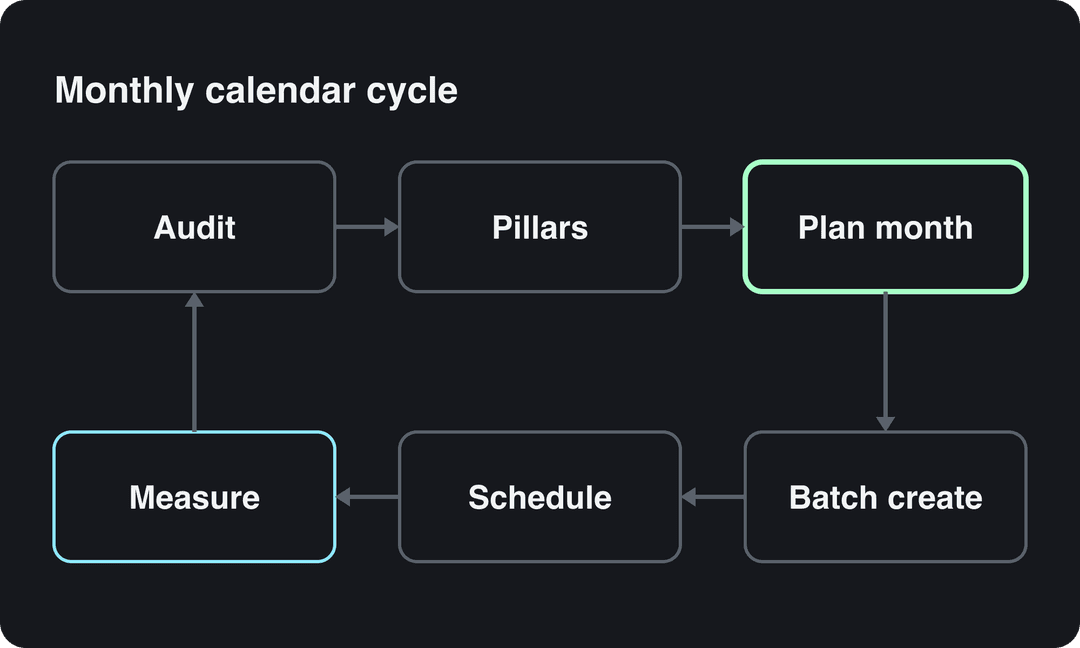
How to create a social media content calendar in 7 steps
- Audit what you already post and what performed.
- Set one goal and one metric per platform.
- Choose three to five content pillars and the formats that carry them.
- Pick a posting frequency you can keep, with open slots for trends.
- Build the calendar in a spreadsheet or a scheduling tool.
- Batch-create a month ahead and review every post before it goes live.
- Schedule, measure and adjust once a month.
Step 1: Audit what you already post
Open the analytics on each platform (TikTok Studio, Instagram insights, YouTube Studio) and list your posts from the last quarter. For each one, note the platform, format, topic and the one number that matches your goal. Sort by that number.
You are looking for three things: the formats and topics that clearly beat your average, the ones that never do, and the posting rhythm you actually managed (not the one you planned). That last figure is your starting frequency.
Step 2: Set one goal and one metric per platform
A calendar without a goal turns into a list of dates. Give each platform a single job, then let that job decide what fills its slots.
| Goal | Metric to watch | What fills the slots |
|---|---|---|
| Awareness | Views, reach | Short-form video aimed at non-followers |
| Community | Comments, shares, saves | Questions, behind-the-scenes posts, replies to comments |
| Traffic | Link clicks | Posts built around one link and one clear call to action |
| Sales | Conversions, sign-ups | Product demos, customer stories, offers |
If a platform has no clear job, drop it from the calendar until it does. Two platforms run well beat four run badly.
Prompt to try
Make a 30-second vertical TikTok for a small bakery's education pillar, framed as a reaction to a common myth: "You have to knead bread for 20 minutes." Open with the hook "Stop kneading your bread this long" and debunk it in three quick points over warm close-up kitchen visuals. Use bold captions and end with a call to save the post.
Step 3: Choose content pillars and the formats that carry them
Pillars are the recurring themes your account is about. For a small business, three to five might be education (tips a customer can use today), product (demos and updates), behind the scenes, customers (stories, reviews, user-generated content) and offers. Tag every calendar row with one pillar so you can see the mix at a glance and catch weeks that are all promotion.
The pillar says what a post is about; the format decides whether anyone watches it. In the same Revid TikTok sample, challenges had the highest median views (182K, with 25.6% passing 1M), followed by comedy (155K) and reactions (105K), while storytelling (66K) and tutorials (62K) trailed. These are TikTok-only figures from videos that already passed 1,000 likes, so they show what top videos have in common, not what causes views.
Challenges and comedy passed 1M views about twice as often as tutorials and storytelling, which are the most common formats.
Source: Revid analysis of 176,367 TikToks with 1,000+ likes posted between Oct 1, 2025 and Oct 16, 2026 (61,203 creators)
Show the data
| Median views | Share that passed 1M views | |
|---|---|---|
| Challenge | 182.3K | 25.6% |
| Comedy | 154.8K | 22.1% |
| Reaction | 104.8K | 16% |
| Dance | 83.8K | 15.5% |
| Storytelling | 66.1K | 12.2% |
| Lip Sync | 61.7K | 12.3% |
| Tutorial | 61.9K | 12.1% |
Use formats as packaging for your pillars: an education pillar can run as a reaction to a common myth, a product pillar as a challenge, a customer pillar as a short story. Before you fill the month, check today's rising TikTok trends to see which formats are moving in your niche.
Step 4: Pick a posting frequency you can keep
Start with the rhythm your audit shows you actually hit, or what you could still deliver in your busiest week, whichever is lower. Raise it only after a full month without missed slots. A smaller calendar you keep beats an ambitious one you abandon.
For timing, use your own audience data rather than generic best-time lists:
- TikTok: in TikTok Studio > Analytics, the Viewers tab shows when viewers were most active over the last 7 days, and the Followers tab breaks follower activity down by hours and days.
- Instagram: follower insights show your followers' most-active times once you have at least 100 followers, covering up to the past 90 days.
Then leave room for posts you cannot plan. Block one or two open slots each week for trends, news in your niche and replies to comments. Freshness gets rewarded: Meta said that in Q1 2026, same-day posts made up more than 30% of recommended Reels on Instagram and Facebook, more than double the level a year earlier (one of the figures in our short-form video statistics).
The day matters far less than the hour: every weekday lands within a few percent of the others, and Saturday and Sunday posts pass 1M views slightly more often.
Source: Revid analysis of 123,704 English-language TikToks with 1,000+ likes posted between Oct 1, 2025 and Oct 16, 2026
Show the data
| Median views | Share that passed 1M views | |
|---|---|---|
| Monday | 63.5K | 12.5% |
| Tuesday | 63.5K | 12.4% |
| Wednesday | 62.7K | 12.5% |
| Thursday | 64.6K | 12.5% |
| Friday | 64.5K | 12.6% |
| Saturday | 70.2K | 13.4% |
| Sunday | 65.1K | 13.6% |
Step 5: Build the calendar
One row per post per platform, even when the same idea goes to several networks. These are the columns worth having:
| Column | What goes in it | Example |
|---|---|---|
| Date and time | Publish slot in your audience's time zone | Tue, 2 PM |
| Platform | One network per row | |
| Format | Reel, carousel, Short, TikTok, Story, text post | Reel |
| Pillar | One of your themes | Education |
| Topic and hook | The idea and the first line on screen | "Stop posting daily. Do this instead." |
| Caption and hashtags | Final copy (Instagram allows up to 5 hashtags per post) | Draft text |
| Call to action | The one action you want | Save this post |
| Asset link | Where the file lives | Shared folder link |
| Owner | Who makes it | Name |
| Status | Idea, drafting, in review, approved, scheduled, live | In review |
| Result | Your goal metric, read at the same point after posting | Views, clicks |
A sample week, filled in:
| Format | Platform | Date and time | Pillar | Goal | Metrics |
|---|---|---|---|---|---|
| Carousel | Tuesday 2 PM | Education | Brand awareness | Reach, views | |
| Blog post promotion | X | Wednesday 10 AM | Education | Leads | Website visits, sign-ups |
| Short video | TikTok | Friday 5 PM | Product | Website traffic | Clicks, conversions |
Which tool to build it in:
- One person or a small team: a shared Google Sheets file is free, filterable and enough. Start from a ready-made social media calendar template instead of a blank sheet.
- Several people with approvals: management suites such as Sprout Social or Hootsuite add approval steps, a shared visual calendar and cross-network analytics. Check their current plans on their sites.
- Mostly short-form video: create and schedule in the same tool so you skip the export and re-upload loop (see the AI section below).
The rule: if more than one person touches a post before it goes live, you need status columns or approval states. If one person plans, makes and posts everything, a spreadsheet plus scheduling is enough. For more layout examples, Sprout Social's guide to social media calendars covers the same ground from a scheduling-suite angle.
Step 6: Batch-create a month ahead and review before posting
Batching means doing one kind of task for many posts at once: one session for hooks and captions, one for filming or generating, one for editing. Switching tasks per post is what eats the week. The video below walks through planning and batching a month of content.
If video is most of what you publish, our guide to a content calendar for video creators covers scripting and filming batches in more detail.
Give every post a creator, a second pair of eyes and one approver (in a solo setup, review it yourself a day later). Run the same checklist each time:
- Facts, prices, dates and links are correct.
- The caption fits the platform and stays within its hashtag limit.
- You have the rights to the music, footage and images.
- Realistic AI visuals or audio are labeled: TikTok, Meta and YouTube all require disclosure for realistic AI content, and TikTok and YouTube state that the label alone does not limit distribution.
- Nothing in the queue clashes with a sensitive date or current news.
For teams across regions, keep one calendar as the single source of truth and add written rules for tone, language and imagery per market. For an enterprise-software view of the same process, see Sprinklr's guide to social media content calendars.
Step 7: Schedule, measure and adjust once a month
Read results for each post at the same point after publishing, so posts are compared fairly.
| Metric | What it tells you | Watch out for |
|---|---|---|
| Views, reach | How far a post traveled | Platforms count differently: YouTube counts a view the moment playback starts (since August 24, 2026), and Instagram insights lead with Views, separate from unique Viewers |
| Comments, shares, saves | Whether people cared | Compare per view, not raw totals |
| Link clicks | Whether the post drove traffic | Use tracked links so you can attribute visits |
| Conversions | Whether traffic became sign-ups or sales | Measure in your site analytics, not the platform |
In the monthly review, answer four questions: which pillar and format won on each platform's goal metric, which slots were missed and why, what to cut, and what to repeat. Remake winners with a new angle instead of reposting them. If a pillar trails the others for a full quarter, change its format or drop it.
Keep a test slot. On Instagram, trial reels are shown first to non-followers, report insights within 24 hours and do not affect the ranking of your standard reels; they need a public account with at least 200 followers (professional) or 1,000 (personal).
How to build a social media content calendar with AI
AI helps most at the two slow parts: filling the calendar with ideas and producing the posts. A workflow that keeps you in control:
- Draft ideas: paste your audit results and pillars into an AI assistant and ask for a month of topics and hooks, one row per slot, in your column order so it pastes straight into the sheet. You edit; it drafts.
- Start from proven formats: Revid's library of about 2.77 million short-form videos and posts with engagement data lets you search by topic, platform and engagement tier, then remix a viral format into an original video about your topic.
- Turn existing content into posts: Revid's blog to video tool turns a blog post URL into a narrated short video, so one article fills several slots.
- Automate recurring slots: Auto-Mode workers create a fresh video every day from a prompt or a content source.
- Schedule and track: publish and schedule to TikTok, Instagram and YouTube from one queue. Each post reports its views, likes and comments, and a post that did well can be remixed in one click.
Keep the review step from Step 6. YouTube does not let mass-produced, template-looking AI content monetize, and realistic AI visuals need a label on TikTok, Instagram and YouTube. Automation should fill slots you then check, not publish blind.
FAQ
How far in advance should you plan a social media content calendar?
Plan scheduled posts a month ahead and check the calendar weekly. Keep open slots each week for trends and replies, since same-day posts now make up a large share of recommended Reels.
Is Google Sheets enough for a content calendar?
Yes, for one person or a small team. Move to a scheduling suite when several people need approval steps, a shared visual calendar and combined analytics.
How often should you post on social media?
As often as you can sustain without missing slots, which for most small teams is less than they first plan. Start at the rhythm your audit shows you actually managed and raise it after a month on schedule.
What is the difference between a content calendar and a content strategy?
The strategy decides who you are talking to, why, and what your account stands for; the calendar decides what goes out where and when. Build the strategy first with a social media content strategy guide, then turn it into calendar rows.
Can you schedule posts to TikTok, Instagram and YouTube from one place?
Yes. Social media management suites such as Sprout Social and Hootsuite schedule to several networks, and Revid publishes and schedules videos to TikTok, Instagram and YouTube from one queue.
Sources
- Revid analysis of 176,367 TikToks with 1,000+ likes posted between Oct 1, 2025 and Oct 16, 2026 (61,203 creators)
- Revid analysis of 123,704 English-language TikToks with 1,000+ likes posted between Oct 1, 2025 and Oct 16, 2026
- Meta Platforms, Meta Q1 2026 Results Conference Call transcript (April 2026)
Charts and figures checked on November 6, 2026.