On this page
To create an AI video, write a short script, generate each scene with an AI video model, add a voice-over, captions and music, then export at 9:16 for TikTok, Reels and Shorts or 16:9 for YouTube. Models generate clips of a few seconds, so a finished video is several scenes edited together.
The model you pick matters less than most people think. Every major tool rents the same handful of models (Veo, Seedance, Kling, Wan, MiniMax Hailuo), so what separates a watched AI video from a skipped one is the script, the hook and the pacing you feed in. Platform matters too: in Revid's study of AI videos versus real footage, AI-generated TikToks averaged twice the views of real footage, while on X, Instagram and Threads AI visuals clustered in the lowest engagement tier.
- Video marketers who have used AI video tools to create or edit videos
- 63%
- Wyzowl, December 2025
- Average views of AI-generated TikToks versus real footage
- 2x
- Revid study of AI vs real videos
- Median TikTok views for videos with under 40 characters of speech
- 123K
- Revid analysis of 176,367 TikToks
- Longest clip Google's Veo 3.1 generates in one go
- 8 s
- Google Veo 3.1
The AI video workflow, from idea to export
Creating AI videos is an assembly job: one idea, one script, a stack of short generated scenes, then audio and editing on top. Skip the script and you get pretty clips that say nothing.
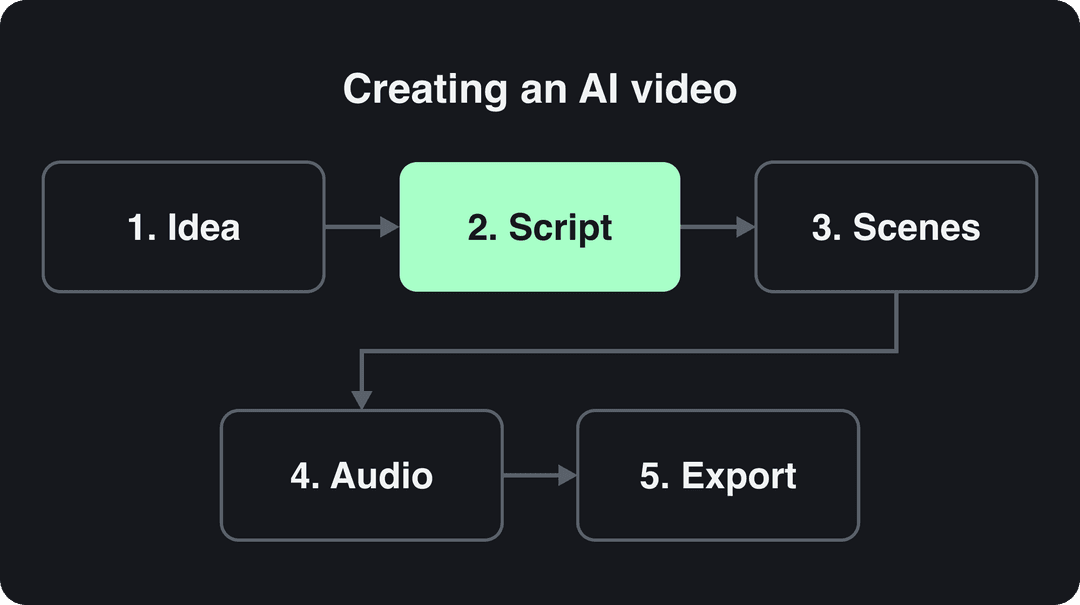
If you want a beginner walkthrough that ends with a posted video, our guide on how to make AI videos step by step covers it. This page focuses on the decisions that change the result: what to generate, how to prompt it, which tool to use and what the platforms require.
1. Pick a concept AI is good at
AI video models are deep learning systems trained on huge amounts of footage (IBM's explainer on deep learning covers the basics). They are strong at some things and still weak at others.
| AI handles well | AI still struggles with |
|---|---|
| Stylized looks (anime, 3D, painterly) | Readable text inside the frame |
| Shots you cannot film (space, history, microscopic) | Precise hand and finger movement |
| Product scenes and b-roll | The same face across many shots without a character tool |
| Narrated explainers and faceless stories | Subtle, believable emotion in close-ups |
Decision rule: if the video depends on a specific real person talking, film it or use an avatar tool. If it depends on visuals you cannot film, generate them.
2. Write the script before you open a model
The script decides the scene list, the length and the pacing. Write it first:
- Line one is the hook: state the payoff or the tension in one sentence ("This $5 tool replaced my whole editing setup").
- Give each sentence its own scene. One sentence, one visual.
- Cut every line that does not move the story forward.
- End on a reason to act: a question, a part 2, a follow.
Less talking often works better on TikTok. In Revid's analysis of 176,367 TikToks with 1,000+ likes posted between October 2025 and October 2026, videos with under 40 characters of speech had a 123K median and 20.2% passed 1M views, versus 68K and 11.9% for videos that talk throughout. This is TikTok data on videos that already did reasonably well, so it shows what top performers share, not a cause; the full TikTok virality study has the method.
Videos with just a few spoken words (a line or two) beat both silent videos and videos that talk the whole way through, which were the most common and the weakest.
Source: Revid analysis of 176,367 TikToks analyzed by AI, with 1,000+ likes posted between Oct 1, 2025 and Oct 16, 2026 (61,203 creators)
Show the data
| Median views | Share that passed 1M views | |
|---|---|---|
| No speech | 73.3K | 14.3% |
| Under 40 | 122.7K | 20.2% |
| 40 to 120 | 97.2K | 17.6% |
| 120 to 300 | 91.6K | 16.8% |
| 300+ | 67.7K | 11.9% |
In practice: let the visuals carry the story and keep narration to the lines that add something the picture cannot show.
Prompt to try
A 30-second vertical explainer on why octopuses have three hearts. Open with the hook "Your heart beats alone. An octopus has three." Use stylized 3D underwater scenes, one short narrated line per scene, and end by asking viewers which animal fact they want next.
Share of clips
Source: Revid production data: 713,649 AI video clips generated Jun 29, 2026 to Sep 26, 2026.
Show the data
| Share of clips | |
|---|---|
| 16:9 | 54% |
| 9:16 | 40.3% |
| 1:1 | 4.3% |
| 3:4 | 0.5% |
3. Generate the scenes
Turn each script line into a scene prompt (formulas below), then generate scene by scene.
- Set the aspect ratio first. Regenerating a 16:9 clip as 9:16 costs credits and changes the composition. TikTok recommends 9:16 at 1080x1920.
- Expect short clips. Google's Veo 3.1, for example, generates 4, 6 or 8-second clips. A 30-second video is several scenes.
- Match the model to the shot. Some models handle motion better, others faces or stylized looks. Tools that let you pick a model per scene save you from forcing one model onto every shot.
- Generate variations of key shots (the hook especially) and keep the best take.
4. Add voice, captions and music
- Voice-over: pick one AI voice per channel and keep it. Consistency makes a faceless channel recognizable.
- Captions: burn them in, keep them large, and place them away from the platform buttons on the right and bottom of the screen.
- Music: use licensed tracks. On YouTube Shorts, most Audio Library songs can be used for up to 90 seconds in a 3-minute Short, and any Short longer than one minute with an active Content ID claim is blocked globally.
5. Edit, export and check the specs
Trim the dead frames at the start and end of every clip, cut each scene to the length of its line, and check that characters and colors stay consistent from shot to shot. Export at 1080p for social; use 4K only when the destination supports it.
| Platform | Aspect ratio | Length | Watch out for |
|---|---|---|---|
| TikTok | 9:16, 1080x1920 recommended | Uploads up to 60 minutes | Label realistic AI content |
| YouTube Shorts | Vertical or square | Up to 3 minutes | Content ID claims on Shorts over one minute block the video |
| Instagram Reels | 1.91:1 to 9:16 | Up to 20 minutes | Reels over 3 minutes are not recommended to non-followers |
| YouTube (long-form) | 16:9 | 15 minutes by default, longer for verified accounts | Templated, mass-produced AI content cannot be monetized |
How to write AI video prompts that work
A strong prompt describes what the camera sees, in this order: subject, action, setting, camera, lighting, style, mood. Vague prompts get the model's generic average; specific prompts get your shot. A free AI video prompt generator can draft these if you are stuck.
| Prompt level | Example | What you get |
|---|---|---|
| Basic | A dog running in a park | A generic stock-style clip |
| Detailed | A golden retriever puppy chasing a red ball across a green park, dappled sunlight through trees | A specific, visually rich shot |
| With camera | Same, low tracking shot following the puppy, shallow depth of field | Cinematic motion |
| With style | Same, in the style of a 3D animated film | A distinct look |
| With mood | A lone figure walking along a foggy beach at sunset, melancholic atmosphere | A clear emotional tone |
Rules that save regenerations:
- One camera move per clip. "Slow pan left" works; "pan, zoom, then orbit" usually breaks.
- Describe visuals, not plot. "She realizes she is late" means nothing to a model; "she checks her watch, eyes widen" does.
- Reuse character descriptions word for word in every scene ("a woman in her 30s, short black hair, yellow raincoat") to keep the character consistent.
- Leave text out of the prompt. Add titles and captions in the editor, where they stay sharp and spelled correctly.
- Put transitions in the edit, not the prompt. Cuts and dissolves are editing decisions.
Try this prompt
A 25-second cinematic short in the style of a 3D animated film: a golden retriever puppy chasing a red ball across a green park, dappled sunlight, low tracking shot, shallow depth of field. Hook: "He waited all week for this." Warm, joyful mood with gentle music and large captions.
Which tool should you use to create AI videos?
Tools fall into a few camps: raw clip generators, avatar platforms, template editors and full short-form pipelines. Pick by the job, not by the model list.
| Tool | Best for | Starting price | Free option |
|---|---|---|---|
| Revid | Finished short-form videos from a prompt, script, link or viral format, with direct publishing | $39/month | Free sign-up with free credits to try creation |
| Runway | Shot-level creative control over high-quality generated clips | $15/month | 125 one-time credits, watermarked |
| HeyGen | Realistic avatars and video translation in 175+ languages | $29/month | 3 watermarked videos a month |
| Synthesia | Corporate training videos with avatar presenters | $29/month | Up to 10 minutes of video a month |
| InVideo | Editing by typing commands to a chat agent, large stock library | $20/month | Plan with watermark |
| Pictory | Turning blog posts and URLs into videos at volume | $29/month | Free trial |
| CapCut | Editing footage you filmed yourself | About $9.99/month | Generous free tier with 1080p export |
Prices change; check each vendor's page before buying. If budget is the main filter, this third-party roundup of affordable AI tools lists more options. For detailed head-to-heads, see Revid's side-by-side tool comparisons.
Decision rules:
- You need single cinematic shots for a film edit: a clip generator such as Runway.
- You need a presenter reading a script: an avatar platform.
- You have long recordings to cut down: a clipping tool.
- You need complete TikToks, Reels and Shorts every week: a full pipeline that scripts, generates, captions and publishes.
How to create an AI video with Revid
Revid covers the whole workflow above in one place, and it starts from evidence instead of a blank prompt.
- Open the AI video generator and start from an idea, a script or a link (a blog post, YouTube, TikTok, X or Reddit). For a pure text description, use prompt to video.
- Or start from a proven format: search Revid's library of about 2.77 million short-form videos with engagement data and remix a viral video into an original one on your topic.
- Revid writes the script and builds the scenes with stock footage, AI images or AI video from Seedance 2.5, MiniMax Hailuo H3, Wan 3.0 or Google Veo 3, chosen per scene.
- Add a voice from 1,000+ AI voices in 70+ languages and pick one of 30 caption styles.
- Adjust anything in the timeline editor, export in 720p, 1080p or 4K at 30 or 60 fps, and publish or schedule to TikTok, Instagram and YouTube.
A 30-second video with Pro AI visuals and a voice-over costs about 40 to 80 credits, and the cost is shown before you generate. Current plans are on the pricing page.
What can Revid AI do?
If you searched "arevidai" or "revid.ai features", this is the short version. Revid (revid.ai, formerly Typeframes) is an AI video platform that turns an idea, a link or a proven viral format into finished short-form videos and publishes them to TikTok, Instagram and YouTube.
- Ways to create: script to video, prompt to video, article or link to video, YouTube long video to Shorts, audio to video, music videos, lyrics videos, talking avatars, video podcasts, face swap, captions for any video, ad generator and motion graphics.
- Viral library: about 2.77 million real videos and posts with their engagement data, plus a free deep analysis (up to 60 a day) that explains why a video worked.
- Automation: Auto-Mode workers create a fresh video every day (3 on the Growth plan).
- For developers and AI agents: a REST API, an MCP server and a CLI on every paid plan.
Input
A charming stop-motion clay adventure following a small, expressive clay character on a journey through a handcrafted miniature world.
Output
Revid AI music video generator
The AI music video generator turns a song (MP3, WAV or a Suno link) into a music video with scenes synced to the lyrics or the beat, with optional singer lip sync. It outputs 9:16, 16:9, 1:1 or 4:5 at 720p, 1080p or 4K, and you can fix any scene in the timeline editor before publishing.
Mixing AI scenes with real footage
Some of the strongest AI videos are hybrids: you film the parts that need a real person (your face, your product in your hand) and generate the rest (b-roll, impossible shots, backgrounds). This keeps the trust of real footage and the range of AI.
A phone is enough for the filmed half. Shoot in the same aspect ratio as your AI scenes, light the subject from the side, and match the color mood you used in your prompts so the cuts do not jump.
Rules for posting AI videos in 2026
- TikTok: label AI-generated content that contains realistic images, audio or video. TikTok may auto-label uploads carrying C2PA Content Credentials, and says the label does not affect distribution if the video follows the Community Guidelines.
- YouTube: disclose realistic AI content with the "AI use" setting in YouTube Studio. Since May 2026 YouTube also auto-labels undisclosed videos with significant photorealistic AI. AI-written scripts, captions and non-realistic visuals do not need disclosure, and disclosing does not by itself limit reach or earnings.
- Instagram and Facebook: Meta asks you to use its AI disclosure tool for photorealistic AI video and shows an "AI info" label.
- Monetization: YouTube allows AI-assisted videos that show your creative vision, but not mass-produced template content, incoherent AI clip compilations, or AI personas giving health, legal, financial or political advice.
- Likeness and copyright: never put a real person's face or voice in a video without permission, and only use music and footage you have rights to. In the EU, the AI Act's rule that deep fakes must be clearly labelled takes effect in August 2026.
- Accuracy: fact-check every claim in an AI-written script before it goes out under your name.
Is it worth learning to create AI videos?
Yes, if you publish video regularly. In Wyzowl's 2026 survey, 63% of video marketers said they had used AI video tools to create or edit marketing videos, up from 51% a year earlier. Grand View Research estimated the AI video generator market at USD 554.9 million in 2023, growing at 19.9% a year from 2024 to 2030, and Market.us projects the AI in video creation market growing from USD 1,054.3 million in 2023 to about USD 7,452.5 million by 2033 (21.6% a year). Those are vendor forecasts, not guarantees, but the direction is clear: the skill that pays is not prompting a model, it is turning a good idea into a tight script and a clean edit.
FAQ
Can I create AI videos for free?
Partly. Runway gives 125 one-time watermarked credits and HeyGen 3 watermarked videos a month; on Revid, sign-up is free and new accounts get free credits to try video creation, while regular creation uses the credits of a paid plan from $39/month.
How long can an AI-generated video be?
As long as you want, but each generated clip is short: Veo 3.1, for example, makes 4, 6 or 8-second clips. Longer videos are several scenes edited together, which is why tools that assemble scenes automatically save the most time.
Do AI videos get less reach?
Not because of the label. TikTok and YouTube both say an AI disclosure alone does not reduce distribution, but on Revid's cross-platform data AI visuals clustered in the lowest engagement tier on X, Instagram and Threads, so the script and hook still decide performance.
What is arevidai?
It is a common misspelling of Revid AI, the AI video platform at revid.ai. Revid is not affiliated with other companies or apps that use the name Revid.
Can you monetize AI videos on YouTube?
Yes, if the video shows your own creative vision and gives educational or entertainment value. YouTube does not let mass-produced, template-style AI content or misleading realistic AI clips earn money.
Sources
- Revid analysis of 176,367 TikToks analyzed by AI, with 1,000+ likes posted between Oct 1, 2025 and Oct 16, 2026 (61,203 creators)
- Revid production data: 713,649 AI video clips generated Jun 29, 2026 to Sep 26, 2026.
- Wyzowl, Video Marketing Statistics 2026 (December 2025)
Charts and figures checked on November 6, 2026.