How to Grow a Faceless YouTube Channel (and Stay Monetizable)
How to grow a faceless YouTube channel in 2026: pick a searchable niche, package every video for the click, use Shorts to feed long videos, and avoid the monetization rules that sink most faceless channels.

On this page
To grow a faceless YouTube channel, pick a niche people actively search for, publish on a schedule you can keep, put the keyword early in every title, and design thumbnails that read at a glance. Use Shorts to send viewers to your long videos, then fix the weakest metric in YouTube Analytics first.
Skipping the camera is not what holds faceless channels back. Looking mass-produced is. Since July 15, 2025, YouTube's monetization policy calls repetitive or mass-produced videos inauthentic content, and template AI videos, text read aloud from websites and random AI clip compilations can't earn. Growth and monetization depend on the same thing: a script and an edit that are clearly yours.
If the channel isn't set up yet, start with how to start a faceless YouTube channel. This guide covers getting traffic once you're publishing.
- Median views of faceless TikToks, vs 67K with one person on camera
- 114K
- Revid analysis of 176,367 TikToks
- Share of uploads as Shorts where channels got the best results
- 25% to 40%
- AIR Media-Tech, May 2026
- Shorts RPM as a share of long-form RPM in almost every niche
- 3% to 14%
- AIR Media-Tech, September 2026
- Qualified Shorts views in 90 days needed for Shorts ad revenue from Feb 1, 2027
- 10M
- YouTube Official Blog, August 2026
Do faceless channels get fewer views?
Not on TikTok, the platform where Revid has the data. In Revid's analysis of 176,367 TikToks with 1,000+ likes posted between October 2025 and October 2026, faceless videos had a median of 114K views, and 17.4% passed 1 million views. Videos with one person on camera had a median of 67K, and 12.7% passed 1 million.
Faceless videos earned a median of 114K views, against 67K for videos with one person on camera, and passed 1M views 38% more often.
Source: Revid analysis of 176,367 TikToks with 1,000+ likes posted between Oct 1, 2025 and Oct 16, 2026 (61,203 creators)
Show the data
| Median views | Share that passed 1M views | |
|---|---|---|
| Animals | 147.4K | 24.1% |
| Faceless | 113.9K | 17.4% |
| Groups of people | 96.1K | 16% |
| Objects or products | 70.8K | 13.2% |
| One person on camera | 67.4K | 12.7% |
Two caveats. The sample only holds TikToks that already reached 1,000+ likes, so it shows what successful videos have in common, not what causes success. And YouTube long-form is a different viewing habit from a TikTok feed. The takeaway still applies: viewers come for the content, not the presenter. The full method is in our study of what makes a TikTok go viral.
The index leans toward videos that surface in hashtag and keyword searches, so its view counts run high: compare the groups, not the absolute numbers.
Source: Revid TikTok index: 2,377,477 TikToks with AI labels per video, snapshot of Sep 15, 2026. Median views estimated from view buckets.
Show the data
| Median views | Share past 1M views | |
|---|---|---|
| #art | 157.6K | 27.5% |
| #family | 152.8K | 28.4% |
| #ai | 113K | 18.7% |
| #faith | 93.6K | 20.1% |
| #school | 90.7K | 18.8% |
| #motivation | 78.2K | 17.3% |
Pick a faceless niche people search for
A faceless channel grows fastest when each video answers something people already type into YouTube. Choose a format where your own script, voice or edit is obvious, because that is also what keeps you monetizable.
| Format | What makes it work | Monetization risk |
|---|---|---|
| Explainers and education | An original script, clear voiceover, animations or screen recordings | Low, if the script is yours |
| Storytelling over stock footage | A story you wrote, with footage matched scene by scene | Medium: never read out articles you didn't write |
| Compilations | Your commentary, ranking or edit between the clips | High: raw compilations count as reused content |
| Gaming | Live commentary and personality in the voice | Low, with commentary |
| ASMR and ambient | Distinctive sounds, a consistent series | Medium: avoid near-identical uploads |
Tutorials are a strong bet. In the same TikTok study, faceless tutorials had a 156K median versus 52K for on-camera tutorials. A quick test: if you can't list a month of video titles people would search for, the niche is too narrow. For starting points, see these faceless YouTube channel ideas.
Make your voice and script do the work of a face
Audio
Without a face, viewers judge your channel by its sound first. A USB microphone such as the Rode NT-USB or Blue Yeti, recorded in a small room with soft furnishings, beats an expensive mic in an echoing kitchen.
AI voices are allowed. YouTube doesn't require an AI disclosure for AI-written scripts or for cloning your own voice for voiceovers. A voiceover video maker covers the narration if you'd rather not record.
Prompt to try
Make a 60-second faceless explainer titled "Most people store coffee wrong." Open with the hook "Most people store coffee wrong. Here's what roasters do instead," then cover air, light, heat and freezing in four quick points. Use a calm, confident voiceover, close-up stock footage of beans and kitchens, and bold on-screen text for each tip.
Script
Open with the payoff, not the context. State what the viewer gets in the first sentence, then earn the rest. Sample hooks for faceless niches:
- "Most people store coffee wrong. Here's what roasters do instead."
- "This bridge should have collapsed. Engineers still argue about why it didn't."
- "You're paying for an app your phone already does for free."
Prompt to try
Create a 90-second faceless storytelling video with the hook "This bridge should have collapsed. Engineers still argue about why it didn't." Tell the story of one famous bridge failure that almost happened, changing the visual at every new point with stock footage, simple diagrams and on-screen text. Use a suspenseful documentary voiceover and end with the open question.
Visuals
Change the picture whenever the narration makes a new point. Your main sources:
- Stock footage from Pexels or Storyblocks.
- Animations from After Effects or Canva.
- Screen recordings for software and tutorials.
- On-screen text for the key point of each section.
How do you find keywords for a faceless YouTube channel?
- Type your topic into YouTube search and write down the autocomplete suggestions. They are real searches.
- In YouTube Analytics, open the traffic source "YouTube search" to see which terms already bring you viewers. Make more videos on those.
- Check demand and rising topics with Google Trends, then size them with Google Keyword Planner, Ahrefs or Semrush.
- Prefer long-tail phrases. "Easy faceless YouTube content ideas for beginners" is easier to rank for than "YouTube ideas", and the viewer knows exactly what they want.
Jump on rising topics in your niche early, but don't plan around a general Trending page: YouTube's Help Center now only describes Trending Charts for a few categories (movie trailers, music videos, gaming). More methods are in how to find YouTube keywords.
Write titles and descriptions that earn the click
- Titles: up to 100 characters, but put the keyword and the promise first. Aim for 60 characters or fewer so nothing important gets cut off, as in "10 Tips for Growing a Faceless YouTube Channel Fast". A YouTube title generator gives you variations to test.
- Descriptions: up to 5,000 characters. Open with a plain summary that repeats the main keyword once, then add chapters and links to related videos. A YouTube description generator drafts a first version.
- Tags: 500 characters in total, not per tag. They are a minor signal next to the title and description, so use them for common misspellings and close variants.
Design thumbnails that work without a face
Most thumbnails lean on a face. Yours needs another focal point: the object, the result, a before and after, or one big readable word.
- Use a few bold words that add to the title instead of repeating it.
- Use one high-contrast subject on a plain background, readable on a phone.
- Point at the key detail with an arrow or circle, and only one.
- Keep a consistent color, font or mascot, so returning viewers recognize you in the feed.
| Spec | Long-form video | Short |
|---|---|---|
| Recommended size | 3840x2160 (16:9), minimum width 640 px | 2160x3840 (9:16), minimum height 640 px |
| File size | Up to 50 MB on desktop, 2 MB on mobile | Not specified |
| Where to upload | YouTube Studio | YouTube Studio on a computer only |
| Who can | Verified accounts | Verified accounts |
For vertical videos, YouTube replaces a 16:9 custom thumbnail with an auto-generated 4:5 one on the home, explore and subscription pages. On desktop, YouTube Studio's Test & Compare runs up to 3 titles and thumbnails against each other and shows every viewer the one with the most watch time. Shorts are not eligible. Use it on every long video while you learn what your audience clicks.
Use Shorts to feed your long videos
Square or vertical videos up to 3 minutes count as Shorts. They are your cheapest discovery channel, but they earn far less. In a September 2026 analysis of 274 channels by AIR Media-Tech's Shorts vs long-form RPM study, Shorts RPM was 3% to 14% of long-form RPM in almost every niche. In AIR Media-Tech's separate study of 18,000 English-language channels, results were best when Shorts made up 25% to 40% of total uploads.
The practical rule: Shorts bring new viewers, long videos make money and watch hours. Watch hours from the Shorts feed don't count toward the 4,000-hour YPP threshold. Alphabet said in April 2023 that channels posting Shorts weekly got the majority of their new subscribers from Shorts.
- Cut the strongest moment of each long video into a Short with a YouTube clip maker.
- Link the full video from the Short with the related video option.
- Keep text inside the YouTube Shorts safe zone so the buttons don't cover it.
- Compilation channels: any Short longer than one minute with an active Content ID claim is blocked worldwide, so clear your music and clips.
Keep viewers watching with playlists, end screens and CTAs
Playlists turn one view into several. Name them the way viewers search ("Faceless Channel Ideas", "YouTube Growth Tips") and order them so each video sets up the next. Share playlist links, not single videos, on social media.
Ask for one thing at a time:
- After the first payoff, not at second zero: "If this saved you an hour, subscribe for the next one on editing."
- Mid-video: point to one related video by name instead of asking for a like.
- End screen: one specific next video or playlist, introduced in the voiceover.
Promote your channel outside YouTube
- TikTok and Instagram Reels: post the same vertical highlights and send viewers to the full video from your bio.
- Pinterest: works well for how-to, recipe, design and finance niches. Pin a vertical image that links to the video.
- Reddit and Quora: answer the question in text first, then link the video as the longer version. Read each subreddit's self-promotion rules before posting.
Read YouTube Analytics and fix one metric at a time
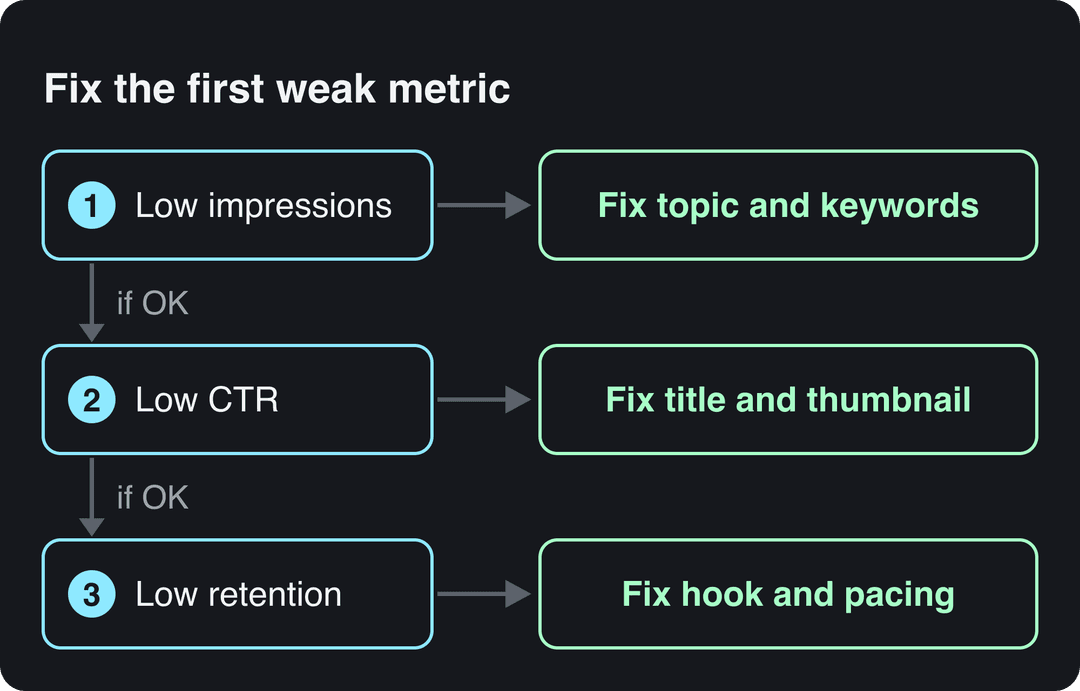
Growth problems usually sit in one place. Find the first metric that is weak and fix that before touching anything else.
| What you see | What it means | What to change |
|---|---|---|
| Low impressions | YouTube isn't showing the video, or few people search the topic | Topic choice, keywords, title wording |
| Impressions fine, low click-through rate | People see it but don't click | Thumbnail and title, tested with Test & Compare |
| Clicks fine, early drop in the retention graph | The opening doesn't deliver the promise | Hook, intro length, first visual |
| Mid-video dips | A slow or off-topic section | Cut it, or add visuals and on-screen text |
| Traffic sources mostly external | YouTube isn't recommending you yet | More searchable topics and playlists |
Since August 24, 2026, YouTube counts a view the moment a video starts to play, so raw views now look higher than before. Judge videos by retention and watch time. YPP earnings still use engaged views and engaged watch hours.
Build a community without showing your face
- Reply to comments in the first hours after upload, and pin a comment that asks a question.
- Run polls and quizzes in the Posts tab (formerly the Community tab) to choose your next topics.
- Give the channel a recognizable identity: the same voice, intro sound, logo or mascot in every video.
- Turn good viewer questions into videos and credit the commenter by name.
Stay monetizable: YouTube rules for faceless channels
The YouTube Partner Program thresholds are changing for new applicants.
| Tier | Today | New applicants from February 1, 2027 |
|---|---|---|
| Ad revenue | 1,000 subscribers plus 4,000 qualified watch hours in 12 months, or 10 million qualified Shorts views in 90 days | 1,000 subscribers plus 8,000 qualified watch hours in 365 days, or 20 million qualified Shorts views in 90 days |
| Fan funding, Shopping, Creator Partnerships (no ad revenue) | 500 subscribers plus 3,000 qualified watch hours in the last year, or 3 million qualified Shorts views in 90 days | Unchanged |
Channels already in YPP are not affected by the new entry thresholds. From February 1, 2027, however, earning Shorts ad revenue in a given month requires 10 million qualified Shorts views in the last 90 days.
Per YouTube's channel monetization policies, these faceless formats can't earn:
- Videos that only read out text you didn't write, such as website articles or news feeds. This counts as reused content, and the policy applies to the whole channel.
- AI videos made from generic templates that look mass-produced, without your own insight.
- Unrelated or inconsistent AI clips stitched together to shock, or realistic visuals that fake events.
- AI personas presented as human experts giving health, legal, financial or political advice.
Using AI is allowed when the final video shows your creative vision and gives educational or entertainment value, for example AI to edit a script or create a background visual.
How to make faceless YouTube videos with Revid
Revid turns an idea, a script or a link into a finished faceless video, then publishes it to YouTube.
- Open the faceless video generator and paste your script, an idea or a link.
- Pick a voice (1,000+ AI voices in 70+ languages) and a caption style. Revid builds the scenes from stock footage, AI images or AI video.
- Fix any scene in the timeline editor and export in 720p, 1080p or 4K.
- To start from a format that already performs, search Revid's library of about 2.77 million videos and run a free Deep analysis (up to 60 a day) to see why a video worked. Then use "Same energy, new script" and write the angle yourself.
- Publish or schedule the video and its Shorts straight to YouTube from one queue.
Keep the script and the point of view yours. That is what separates a growing channel from the mass-produced content YouTube refuses to monetize. Sign-up is free and new accounts get free credits to try video creation, no credit card needed; regular creation then runs on a paid plan from $39/month.
FAQ
How long does it take to grow a faceless YouTube channel?
There is no fixed timeline, and YouTube publishes no typical figure. Instead of waiting for a subscriber milestone, check each month whether impressions, click-through rate and retention are rising.
Can you monetize a faceless YouTube channel that uses AI voices?
Yes, as long as the final video shows your own creative work, such as an original script, research or edit. What YouTube refuses is template, mass-produced content and AI personas posing as human experts on health, legal, financial or political topics.
How many subscribers does a faceless channel need to make money?
Ad revenue needs 1,000 subscribers, plus 4,000 qualified watch hours in 12 months or 10 million qualified Shorts views in 90 days (higher for new applicants from February 1, 2027). At 500 subscribers, the lower tier opens fan funding and Shopping, not ad revenue.
Can you use stock footage on a faceless YouTube channel?
Yes. Licensed stock from sites like Pexels or Storyblocks is fine when it illustrates a script you wrote. The risk is reading someone else's text over it, which counts as reused content.
How often should a faceless channel upload?
As often as you can keep the quality steady for months. From February 1, 2027, YouTube counts a YPP channel as active if it uploads 2 long-form videos or 5 Shorts every 90 days, or meets a watch-hour or Shorts-view minimum. Treat that as a floor, not a growth target.
Sources
- Revid analysis of 176,367 TikToks with 1,000+ likes posted between Oct 1, 2025 and Oct 16, 2026 (61,203 creators)
- Revid TikTok index: 2,377,477 TikToks with AI labels per video, snapshot of Sep 15, 2026. Median views estimated from view buckets.
- AIR Media-Tech, Do YouTube Shorts help your long-form videos? Data from 18,000 channels (May 2026)
- AIR Media-Tech, YouTube Shorts RPM vs long-form: real monetization data from 274 channels (September 2026)
- YouTube Official Blog, New opportunities to earn and changes to the YouTube Partner Program (August 2026)
Charts and figures checked on November 6, 2026.