How to Make Faceless YouTube Shorts: 6 Steps, Scripts and Settings
A step-by-step guide to faceless YouTube Shorts: lock a repeatable format, script a three-layer hook, keep one voice, edit on attention beats and stay monetizable under YouTube's 2026 rules.

On this page
To make a faceless YouTube Short, pick a narrow niche with one repeatable format, script a hook that shows the payoff in the first second, use one consistent voice, match every visual to the words, add synced captions, and upload a vertical video up to 3 minutes long. YouTube classifies it as a Short automatically.
Most faceless channels fail for boring reasons: the hook lands late and the format changes every week. A third mistake is more expensive. A channel that only reads out Reddit posts or articles it didn't write counts as reused content under YouTube's monetization policy, and that policy applies to the whole channel, not one video.
- Daily YouTube Shorts views
- 200B+
- YouTube Official Blog, August 2026
- Share of global YouTube views in 2025 from videos under a minute
- 77%
- Tubular Labs (Tube Trends column on TVREV), January 2026
- Median views for faceless TikToks, vs 67K with one person on camera
- 114K
- Revid analysis of 176,367 TikToks
- Share of allocated Shorts Feed ad revenue monetizing creators keep
- 45%
- YouTube Help, October 2026
Do faceless Shorts actually get views?
Yes, and the feed is built for them. YouTube said in August 2026 that Shorts see over 200 billion daily views, and Tubular Labs data published in January 2026 found that 77% of global YouTube views in 2025 came from videos under a minute long. Teleprompter's roundup of YouTube Shorts statistics collects more figures, and Revid keeps the sourced ones on its YouTube Shorts statistics page. The feed tests each upload on whether it holds attention, not on whether viewers know your face.
There is no public dataset comparing faceless and on-camera Shorts on YouTube, but TikTok data points the same way. In Revid's analysis of 176,367 TikToks with 1,000+ likes posted between October 2025 and October 2026, faceless videos had a median of 114K views and 17.4% passed 1 million views, against 67K and 12.7% for one person on camera. The sample only includes videos that already reached 1,000 likes, so it shows what successful videos have in common, not proof that hiding your face causes views. The method is in our study of what makes a TikTok go viral.
Faceless videos earned a median of 114K views, against 67K for videos with one person on camera, and passed 1M views 38% more often.
Source: Revid analysis of 176,367 TikToks with 1,000+ likes posted between Oct 1, 2025 and Oct 16, 2026 (61,203 creators)
Show the data
| Median views | Share that passed 1M views | |
|---|---|---|
| Animals | 147.4K | 24.1% |
| Faceless | 113.9K | 17.4% |
| Groups of people | 96.1K | 16% |
| Objects or products | 70.8K | 13.2% |
| One person on camera | 67.4K | 12.7% |
Faceless has real limits:
- Trust builds slower in some niches. If you sell coaching, high-ticket services or personality-driven products, faceless can work, but authority takes longer.
- Low-effort formats get cloned fast. Stock footage plus flat narration is cheap to copy, so any edge disappears.
- Weak structure gets exposed immediately. With no face carrying the viewer, the script and the edit do all the work.
Step 1: Pick a niche and lock one repeatable format
Starting from "what am I interested in?" is the common mistake. Choose a niche that gives you repeatable ideas, visible demand and enough structure that editing feels like assembly instead of reinvention.
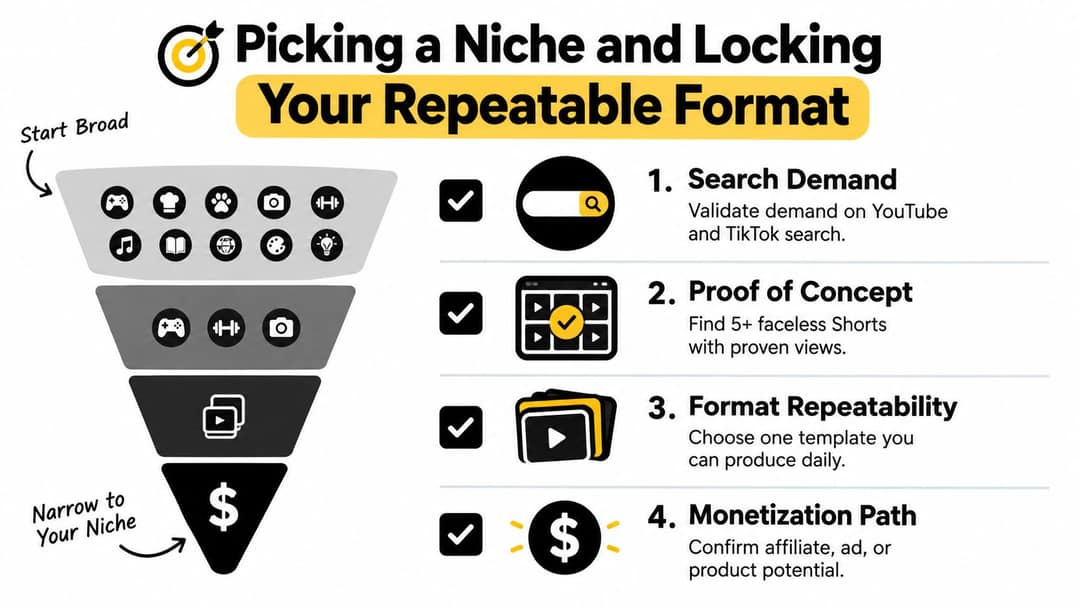
Run three filters before you commit:
- Search demand. Type the topic into YouTube and TikTok search and read the suggestions. You want people searching for it repeatedly, phrased in different ways.
- Proof that faceless works in this niche. Look for faceless winners specifically. If every successful channel depends on on-camera charisma, the format may not transfer.
- Room for repetition. "Personal finance" is broad. "Money mistakes people make every month" is tighter. "Receipt-based grocery savings breakdowns" is tighter still, and easier to recognize.
Format choice matters as much as topic. In the same TikTok data, faceless tutorials (screen recordings, hands-only demos) had a 156K median against 52K for tutorials with the creator on camera. Software walkthroughs, recipes, finance breakdowns, trivia, Reddit-style stories and gaming tips all fit a faceless container.
Then lock the format by answering four questions:
- What type of video is it: list, story, explainer, recap, comparison or tutorial?
- What does the visual skeleton look like on every upload?
- Where does the hook appear, and what does the first frame show?
- How does the video close?
A money-saving channel might use the same frame every time: price tags, zoomed receipts, bold captions and the savings reveal before the midpoint. A true-crime recap channel might keep dark clips, one text style, ambient audio and a "what happened next" close. If you can't describe your format in one sentence, it isn't locked yet.
A quick saturation test:
- Find recent faceless Shorts in your lane. Revid's viral video library lets you search about 2.77 million real short-form videos by topic, platform and engagement tier, so you can see which faceless formats are working now, not two years ago.
- List the recurring visual patterns. If all the winners look identical, you need better packaging to get in.
- Write 25 hooks in one sitting. If you can't, the niche is too thin.
- Name the monetization path: affiliate products, a service, sponsorships, a digital product, leads, or growth into long-form.
Step 2: Script the first second as a three-layer hook
The viewer decides in a fraction of a second whether to stay, so scripting faceless Shorts starts with the opening beat. The scripts that hold do three jobs at once: the screen shows a clear event or result, the text sharpens the claim, and the voice gives a reason to keep going.
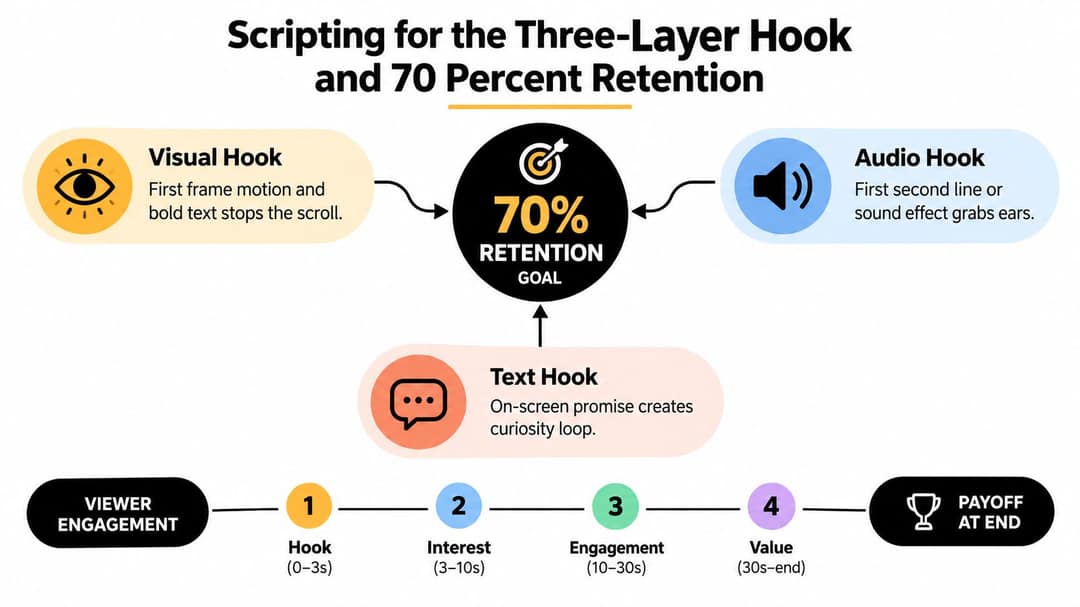
- Visual hook. Show the mistake, result, comparison or consequence on frame one. If the viewer has to wait to understand the image, the opening is late.
- Text hook. On-screen text narrows the promise. "3 AIM MISTAKES KILLING YOUR RANK" beats a topic label because it names the problem and the payoff.
- Audio hook. The first spoken line creates tension or specificity: a mistake, a hidden cause, a fast promise. General setup does not work.
Prompt to try
Make a 40-second faceless YouTube Short on the top 3 aim mistakes in Valorant. Open on a lost duel caused by bad crosshair placement with the text "3 AIM MISTAKES KILLING YOUR RANK" and the line "If you keep losing clean duels, mistake two is probably why." Use gameplay-style visuals, bold synced captions, a confident male AI voice, and end on the payoff instead of an outro.
A worked example
Topic: the top 3 aim mistakes in Valorant.
Weak opening: "Today I'm going to show you the top three mistakes that many Valorant players make when aiming." It burns time, repeats the title and creates no tension.
Stronger opening:
- Visual: a lost duel caused by bad crosshair placement, on frame one
- Text: "3 AIM MISTAKES KILLING YOUR RANK"
- Audio: "If you keep losing clean duels, mistake two is probably why."
It starts inside the problem and withholds the most interesting point long enough to give a reason to stay. A reusable script shape:
- Hook
- Micro-promise
- Point one: the most relatable
- Point two: the most surprising and specific
- Point three: the payoff or broadest mistake
- One-line close that resolves the loop
What retention to aim for
Two faceless-video tool vendors publish Shorts retention benchmarks. GoFaceless's Shorts retention rate benchmarks treat average viewed percentage in the low 70s as a strong result, and VirVid's faceless YouTube algorithm and retention guide puts 70 to 85 percent on sub-60-second videos in its strong band, naming slow intros and overloaded text as common failure points. Neither is an official YouTube figure, so use them as rough targets and compare your own Shorts with each other.
Read the retention graph in YouTube Studio like this:
- Steep drop in the first seconds: the promise was vague, slow or visually unclear. Rewrite the hook.
- Holds, then slides through the middle: the script lists facts instead of escalating. Each beat should add tension, specificity or consequence.
- Viewers stay late but don't finish: the best moment came too early, or the last line sounds like an outro. End on the payoff.
The fix is usually subtraction: shorter clauses, earlier specifics, fewer setup words.
Step 3: Choose one voice and keep it
A lot of Shorts fail before the second sentence because the audio sounds borrowed or stiff. A stable voice is what makes a faceless channel feel like a channel. Coverage of YouTube Shorts trends for faceless channels reports better retention for faceless Shorts with a clear voiceover or a consistent AI avatar than for generic stock-footage-and-narration formats, and notes those generic formats are getting crowded.
It matters for revenue too. In July 2025, YouTube renamed its "repetitious content" monetization policy to "inauthentic content", and AI content made with generic templates that looks mass-produced, without the creator's own insight, is not allowed to monetize.
| Voice type | Cost per Short | Retention effect | Brand consistency | Best for |
|---|---|---|---|---|
| AI voice | Low to moderate, by provider and script length | Works when delivery sounds natural; weak in emotional stories if robotic | Strong if you keep one voice | Explainers, lists, productivity, tutorials |
| Your own or a hired human voice | Low if you record it, moderate if hired | Usually stronger for nuance, pacing and emphasis | Very strong: listeners learn the cadence | Storytelling, commentary, true crime, gaming |
| No voice | Low | Works for highly visual ideas; narrative content suffers | Depends on visuals and caption style | Satisfying clips, process videos, silent comparisons |
Decision rules:
- If the channel depends on explanation, use a voice. If it depends on tension or feeling, use a more expressive voice. If it depends on pure visual satisfaction, you may not need one.
- Use an AI voice only if it sounds deliberate, and pick one voice profile for the channel.
- Don't switch between AI, your own voice and text-only in the first weeks. It hides the real problem, which is usually the script.
- Viewers tolerate synthetic voices more in fact formats than in emotional stories.
Step 4: Source visuals and edit on attention beats
Bad faceless Shorts look busy and feel empty. Every shot should clarify the script, intensify the promise or reset attention.
Common sources:
- Stock libraries such as Pexels and Pixabay for broad B-roll
- Screen recordings for software and tutorial content
- Gameplay clips for gaming tips and commentary
- AI image and video generators when you need a consistent character or a stylized look
- Your own templates in CapCut or Premiere Pro for recurring layouts
If the script says "this mistake ruins your aim", the viewer should see the mistake, not a random keyboard clip. The first frame should communicate the topic before a word is spoken.
Editing choices that hold attention:
- Motion on stills: a pan, push-in or crop shift keeps static frames alive
- Hard zooms on the payoff beat when a reveal lands mid-line
- Captions that stress the key claim, not every word equally, placed inside the YouTube Shorts safe zone so buttons don't cover them
- Subtitles synced to the voice, never lagging behind it
- Cuts on attention beats, not sentence endings: don't wait for the sentence to finish if the viewer's attention already has
This walkthrough shows those pacing choices in a real edit:
When a Short feels slow, cut before you add effects: soft intros, overwritten on-screen text, unrelated stock footage, dead air between clauses, and transitions that call attention to themselves.
Step 5: Upload settings for faceless Shorts
Most of the outcome is decided by the idea, hook and edit, but sloppy packaging can still cost you a fair test.
| Setting | What to use |
|---|---|
| Aspect ratio | 9:16 vertical (square also counts as a Short) |
| Resolution | 1080x1920 |
| Maximum length | 3 minutes for square or vertical videos uploaded since October 15, 2024 |
| Title | Up to 100 characters; lead with the topic |
| #Shorts hashtag | Not required: YouTube classifies by aspect ratio and length |
| Custom thumbnail | Verified accounts only, in YouTube Studio on a computer; 9:16 at 2160x3840 recommended, minimum height 640 px |
| Music | Most Shorts Audio Library songs can run up to 90 seconds in a 3-minute Short (some only 60 or 30) |
| AI disclosure | Turn on the AI use setting when visuals are realistic AI scenes |
Two rules catch faceless creators who use music. Any Short longer than one minute with an active Content ID claim is blocked globally and can't be monetized, so use cleared tracks or keep claimed audio out of longer Shorts.
Length matters less than most guides claim. In Revid's TikTok data, every length bucket from under 15 seconds to 10 minutes had a median between 58K and 76K views. Make the Short as long as the payoff needs and no longer.
For metadata, match the title to the opening frame ("3 Valorant Aim Mistakes" beats a vague curiosity title) and put the main phrase plus a close variant in the description. For how Shorts get distributed after upload, read how the YouTube Shorts algorithm works.
Prompt to try
Create a 35-second faceless YouTube Short for a money-saving channel: "3 grocery mistakes costing you $50 a month." Hook on a zoomed receipt with the savings total circled, show price tags and bold captions for each mistake, reveal the total savings before the midpoint, and use a calm, clear AI voice.
Length alone barely moves views: every bucket lands between 58K and 76K median views (the 790 videos over 10 minutes are a small, unusual group). Clips under 15 seconds get shared the most per view.
Source: Revid analysis of 176,367 TikToks with 1,000+ likes posted between Oct 1, 2025 and Oct 16, 2026 (61,203 creators)
Show the data
| Median views | Share that passed 1M views | Shares per 100 views | |
|---|---|---|---|
| Under 15 s | 57.6K | 11.6% | 1 |
| 16 to 30 s | 64.9K | 12.3% | 1 |
| 31 to 60 s | 61.8K | 11.8% | 1 |
| 61 to 90 s | 70.5K | 12.2% | 1 |
| 91 s to 3 min | 63.4K | 11.1% | 1 |
| 3 to 10 min | 76.4K | 12.4% | 1 |
| 10 min+ | 129.6K | 13.8% | 0 |
Step 6: Build a weekly system you can sustain
Channels that last run on a boring operating system that removes decisions from each upload.
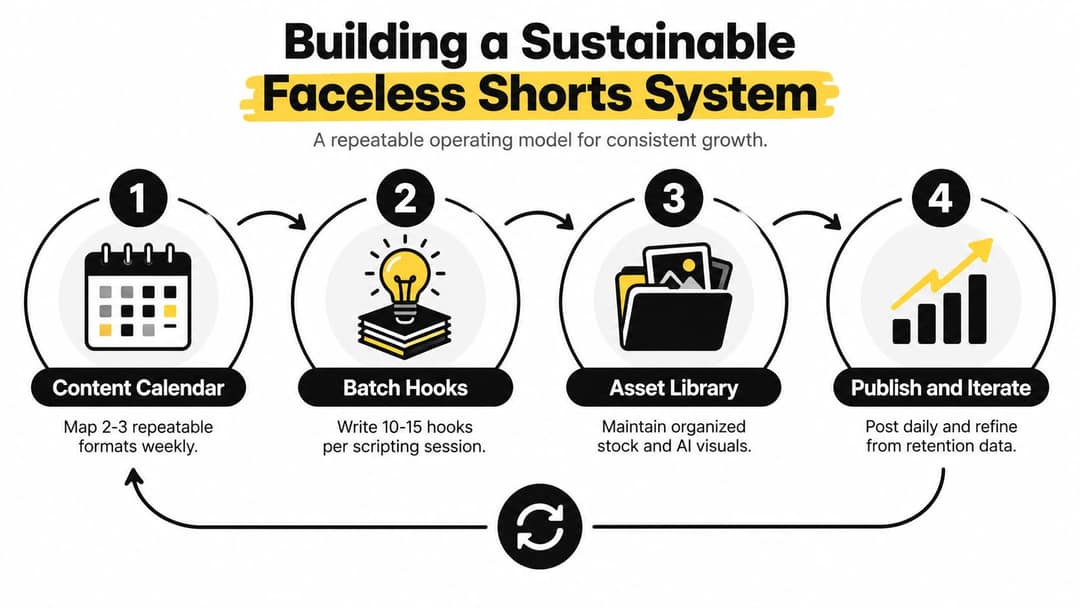
A workable week has three slots:
- One primary format that carries most uploads
- One secondary format for adjacent ideas
- One experimental slot for a new hook or visual treatment, without changing the whole channel
Start with a posting cadence you can hold for several weeks, and increase it only after one format clearly beats the others. Posting more of the same winning format beats posting more of everything.
Batch the work that drains the most energy:
- Hooks: draft a bank of openings in one session
- Scripts: turn the strongest hooks into full scripts
- Assets: save B-roll, overlays and sound beds in named folders
- Captions and metadata: reuse templates instead of rewriting routine parts
If you bring in help for editing or scheduling, document naming conventions, fonts and export presets. This overview of the social media manager role from Virtustant Jobs explains what that kind of hire can take off your plate.
Review by format, not by single upload: which hook pattern shows up in the better retention curves, which visual style is understood fastest, which topics package easily, and which closes make viewers leave.
How to make faceless YouTube Shorts with Revid
Revid turns an idea, a script or a link into a finished faceless Short and can publish it straight to YouTube.
- Open the faceless video generator and paste your idea, script or a link. When it writes from a prompt, Revid can use transcripts of related viral TikToks as references for structure and style.
- Pick one AI voice (1,000+ voices in 70+ languages) and one of 30 caption styles, and reuse them on every video so the channel stays recognizable.
- Check each scene in the timeline editor and swap visuals: stock footage, AI images or AI video from Seedance 2.5, MiniMax Hailuo, Wan 3.0 or Google Veo 3.
- Export in 1080p or 4K, or publish and schedule directly to YouTube, TikTok and Instagram.
- Once a format works, set up Auto-Mode workers that create a fresh video every day from a prompt or a content source.
For story channels, the Reddit story video generator turns a topic or an #askreddit thread into a narrated vertical video. Sign-up is free and new accounts get free credits to try video creation, no credit card needed; regular creation then uses credits from a paid plan, starting with Growth at $39/month.
Can faceless YouTube Shorts be monetized?
Yes. YouTube allows AI and automated tools in monetized content when the final video shows your creative vision and gives educational or entertainment value, such as using AI to edit a script or create a background visual. What it blocks:
- AI content made with generic templates that looks mass-produced, without your own insight
- Videos stitching unrelated AI clips together to shock, or realistic visuals faking events
- AI personas presented as human experts giving health, legal, financial or political advice
- Content that only reads out material you didn't write, such as website text or news feeds
Today, YPP ad revenue sharing requires 1,000 subscribers plus either 4,000 qualified public watch hours in the last 12 months or 10 million qualified Shorts views in the last 90 days. Watch hours from the Shorts Feed don't count toward the 4,000 hours. Monetizing creators keep 45% of the Shorts Feed ad revenue allocated to them.
The rules tighten on February 1, 2027: new applicants will need 20 million qualified Shorts views in 90 days or 8,000 qualified watch hours in 365 days, and earning Shorts ad revenue in a given month will require at least 10 million qualified Shorts views in the last 90 days. Channels below that stay in YPP and keep long-form earnings.
If you use realistic AI visuals, disclose them with the AI use setting in YouTube Studio. Disclosure alone does not limit reach or earnings, while repeatedly skipping it risks labels, removals or YPP suspension. Cloning your own voice for voiceovers and AI-written scripts don't need disclosure.
FAQ
How long should a faceless YouTube Short be?
As long as the payoff needs, up to the 3-minute limit. In Revid's TikTok data, median views barely changed between lengths (58K to 76K), so cutting dead air matters more than hitting a target length. Keep claimed music out of Shorts over one minute.
Can I use an AI voice on faceless Shorts and still get monetized?
Yes, if the video carries your own script, angle and value. YouTube blocks mass-produced template content, not AI voices, and cloning your own voice for voiceovers doesn't require disclosure.
Do I need to add #Shorts to the title?
No. YouTube classifies square or vertical videos up to 3 minutes as Shorts automatically. Use the title space for a clear, topic-first promise instead.
Is Revid AI good for Reddit story Shorts?
It handles the production: a topic or an #askreddit thread becomes a narrated vertical video with captions, ready to publish to YouTube. To stay monetizable, rewrite or comment on the story rather than reading the post word for word.
How many faceless Shorts should I post per week?
There is no official number. Start with a cadence you can keep for several weeks, then increase it once one format clearly outperforms the others.
Sources
- Revid analysis of 176,367 TikToks with 1,000+ likes posted between Oct 1, 2025 and Oct 16, 2026 (61,203 creators)
- YouTube Official Blog, New opportunities to earn and changes to the YouTube Partner Program (August 2026)
- Tubular Labs (Tube Trends column on TVREV), Tube Trends: Over 75% Of YouTube Views Came From Shorts In 2025 (January 2026)
- YouTube Help, YouTube Shorts monetization policies (October 2026)
Charts and figures checked on November 6, 2026.