On this page
To add AI voice to a video, write a short script meant for speaking, paste it into an AI voiceover tool, pick a voice and generate the audio. Then sync it to your clip, add captions and export at 9:16 for TikTok, Reels or Shorts. Free options include CapCut, Descript's free plan and Revid's free sign-up credits.
The tool is rarely why a voiceover sounds robotic. The script is, and so is saying too much. In Revid's TikTok data, videos with under 40 characters of speech had a median of 123K views, against 68K for videos that talked from start to finish. Short, spoken lines win, and the steps below show how to write them.
- Median TikTok views with under 40 characters of speech
- 123K
- Revid TikTok analysis
- Median views for TikToks that talk throughout (300+ characters)
- 68K
- Revid TikTok analysis
- AI voices available in Revid, in 70+ languages
- 1,000+
- Revid
- Median views for faceless tutorials, vs 52K for on-camera tutorials
- 156K
- Revid TikTok analysis
4 free ways to add AI voice to a video
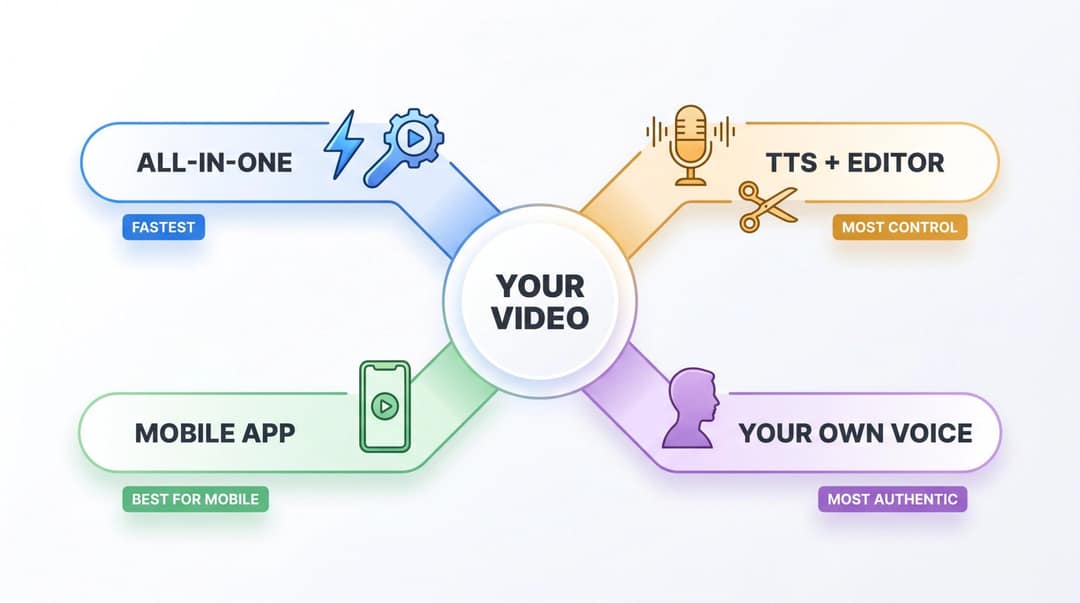
Most AI voice and video tools follow the same logic, but the right method depends on what you start with: footage, a script, an audio file or just an idea.
| Method | Use it when | Tradeoff |
|---|---|---|
| All-in-one AI voiceover tool | You have footage or a script and want voice, captions and sync in one pass | Less manual audio control than an audio editor |
| Text-to-speech tool + video editor | Voice quality and fine control matter more than speed | You sync the audio to the video by hand |
| Mobile editor with built-in text-to-speech | Quick TikToks and Reels edited on your phone | Fewer voices, less control over pacing |
| Your own voice + AI for the rest | Founder, coaching or sales videos where trust matters | You need a clean recording |
Decision rule: for faceless shorts, product demos and tutorials, use an all-in-one tool. For long YouTube narration you will edit line by line, generate audio in a standalone text-to-speech tool and import it. If you want to record yourself or dub an existing video, our guide to adding voice to a video covers recording and dubbing.
Which free AI voice tool should you use?
| Tool | Best for | Free plan to know |
|---|---|---|
| Revid | Narrated videos from footage, a script, a link or audio; faceless shorts; direct publishing | Free sign-up with credits to try it; regular creation uses a paid plan's credits, from $39/month |
| CapCut | Editing your own clips on mobile or desktop | Free tier with the full editor and 1080p export; premium templates and most AI features are paid |
| Descript | Editing recordings and podcasts through the transcript | 60 media minutes a month, 100 one-time AI credits, 720p export; watermark-free export on paid plans |
| VEED | Browser editing with subtitles and AI voice | "Made with VEED" watermark and 720p export on the free plan |
| Canva | Template videos and narrated slides | Small AI allowance on the free plan (up to 20 uses) |
| ElevenLabs | Standalone, high-quality AI audio to import into an editor | Monthly character allowance; commercial use is limited on the free plan, so check its terms |
| Clipchamp | Text-to-speech inside Microsoft's browser editor | Text-to-speech on the free plan; check the current length limit |
Free does not always mean free for business. Before you use a free AI voice in ads, client work or monetized videos, check three things: whether the free plan allows commercial use, whether attribution is required, and whether exports carry a watermark.
How to add AI voice to a video with Revid, step by step
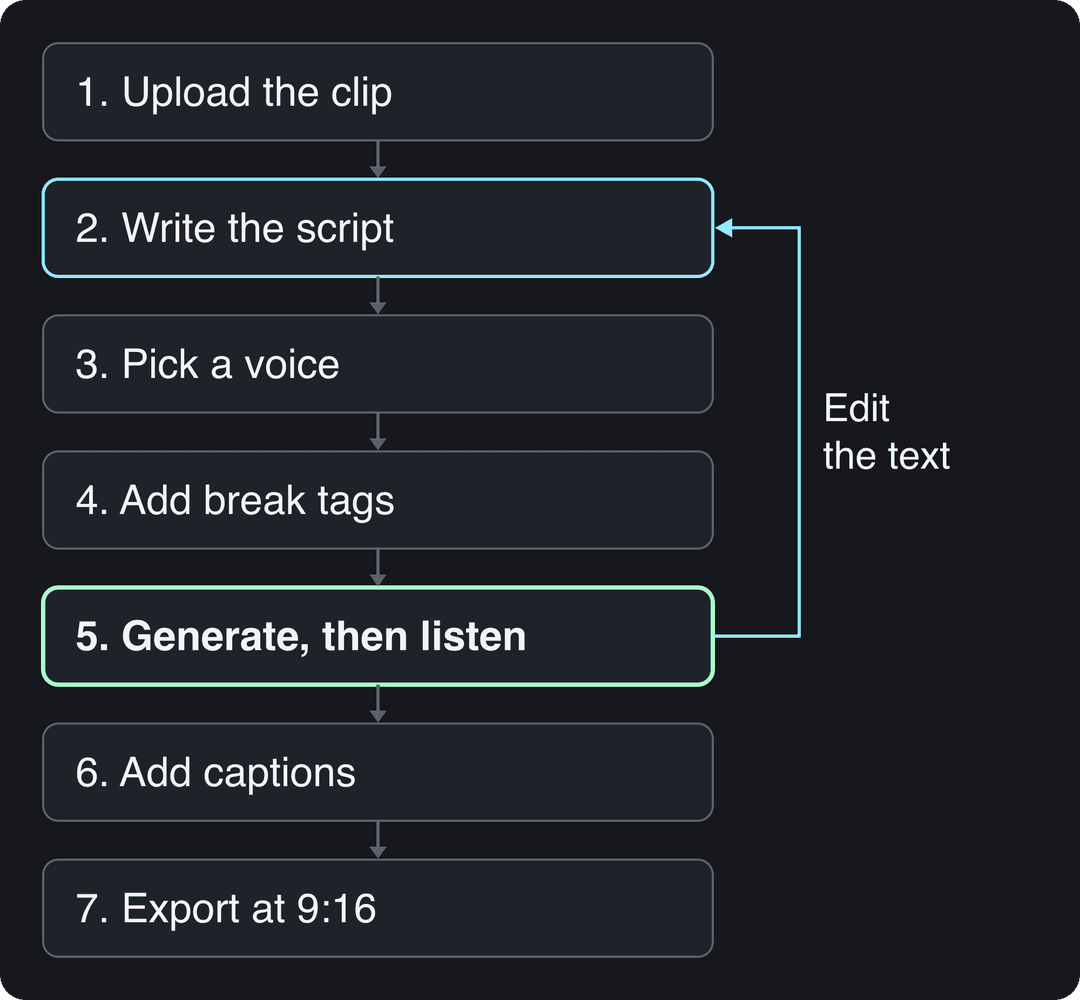
This workflow is for a clip that needs narration. If you only have a script or a link, use Revid's AI video generator with voiceover instead: paste the text or URL and it builds the visuals, voice and captions around it.
- Upload the clip. Open the AI voice for silent videos tool and upload your footage: a product demo, screen recording, gameplay, b-roll. Use vertical footage for short-form.
- Write or edit the script. Revid can write commentary for the clip. Rewrite it in short spoken lines (rules in the next section).
- Pick a voice. Revid has 1,000+ AI voices in 70+ languages from ElevenLabs, Google Gemini and MiniMax. Filter by language, gender, age and accent, and match the voice to the format: calm for tutorials, casual for UGC-style ads, faster and expressive for TikTok.
- Add pauses. Insert break tags such as
<break time="0.8s" />where you want a beat before a key line. - Generate, then listen before you watch. Check brand names, numbers and pacing. If a line sounds wrong, change the text, then regenerate. Regenerating the same text gives the same problem.
- Add captions. Pick one of 30 caption styles in the caption generator; captions sync to the voice automatically, in 100+ languages.
- Export or publish. Export in 720p, 1080p or 4K at 30 or 60 fps, or publish and schedule straight to TikTok, Instagram and YouTube.
Want the narrator to be you without recording every video? Voice cloning is included on Elite ($89/month) and above; Revid's pricing page lists credits per plan.
How to write a voiceover script an AI voice can read
Less speech tends to perform better. In Revid's analysis of 176,367 TikToks with 1,000+ likes posted between October 2025 and October 2026, videos with under 40 characters of speech had a median of 123K views and 20.2% passed 1M views. Videos that talked throughout (300+ characters of speech) had a 68K median and 11.9% past 1M, and even silent videos did better (73K and 14.3%). The sample only holds videos that already reached 1,000 likes and shows what top videos share, not causes, but the lesson for voiceovers holds: let the visuals carry the video and give the voice only the lines that matter. The method is in our study of what makes a TikTok go viral.
Videos with just a few spoken words (a line or two) beat both silent videos and videos that talk the whole way through, which were the most common and the weakest.
Source: Revid analysis of 176,367 TikToks analyzed by AI, with 1,000+ likes posted between Oct 1, 2025 and Oct 16, 2026 (61,203 creators)
Show the data
| Median views | Share that passed 1M views | |
|---|---|---|
| No speech | 73.3K | 14.3% |
| Under 40 | 122.7K | 20.2% |
| 40 to 120 | 97.2K | 17.6% |
| 120 to 300 | 91.6K | 16.8% |
| 300+ | 67.7K | 11.9% |
Write the script the way you would say it to a friend:
- One idea per sentence. Periods are free.
- Contractions and "you", never "users" or "one".
- The strongest line in the first 1 to 3 seconds.
- One call to action at the end, not three.
Written to be read: "Our platform provides a comprehensive set of features that enable the efficient creation of short-form video content across multiple social networks." An AI voice reads that in one flat breath.
Written to be spoken:
Your clip is silent. That's why people scroll.
[show the silent product clip]
Paste a script. Pick a voice.
<break time="0.8s" />
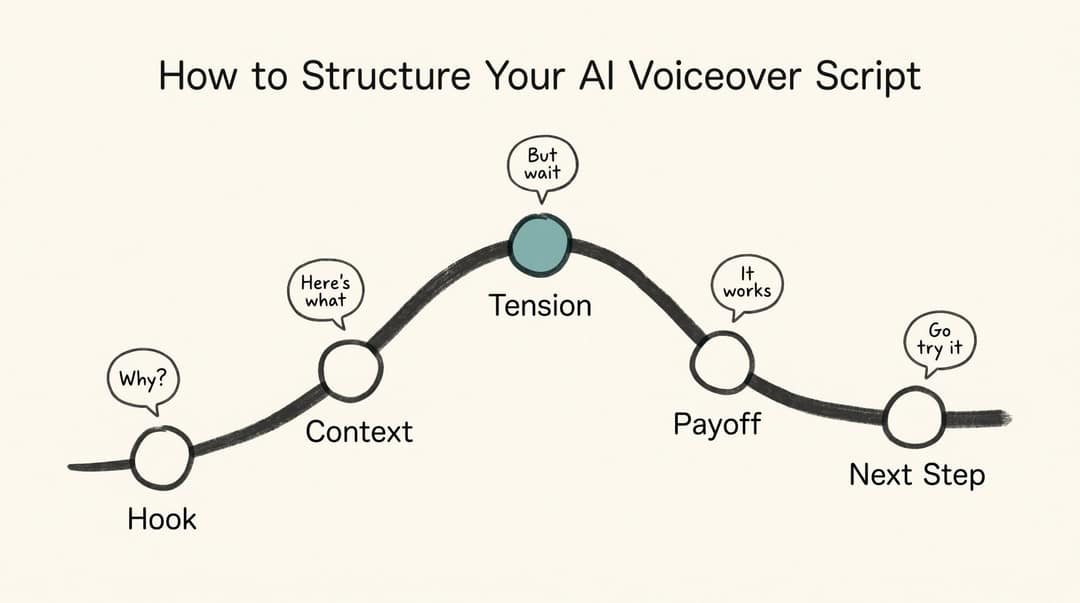
Now it talks.For anything longer than a single hook, use a five-beat arc: a hook that raises a question, context, a moment of tension, the payoff, and the next step.
Prompt to try
Make a 45-second vertical voiceover video about why most home coffee tastes bitter. Open with the hook "Your coffee isn't bad. Your grind is." Use short spoken lines with one idea per scene, a calm and friendly voice over close-up brewing b-roll, and end with one tip to try tomorrow morning.
Brackets and break tags in Revid scripts
In a Revid script, text in square brackets guides the visuals without being read aloud, so [show product dashboard] puts the dashboard on screen in silence. Break tags add timed pauses: <break time="1.0s" /> stops the voice for one second. Punctuation directs the rest: a period stops cleanly, a comma adds a light pause, and a line break separates scenes. More examples are in our guide to adding a pause in a Revid voiceover.
Spell hard words the way they sound
If the voice stumbles on a word, rewrite it phonetically instead of switching voices:
- "SaaS" becomes "sass" or "software as a service"
- "API" becomes "A P I"
- "$39" becomes "thirty-nine dollars"
- "2026" becomes "twenty twenty-six"
Build long voiceovers scene by scene
For a 60-second video, generate the voice per scene (hook, problem, demo, result, call to action) instead of one long block. Timing is easier to adjust, and you can regenerate one awkward line without touching the rest.
How to sync AI voice to video
Sync has three levels, and each format needs a different one.
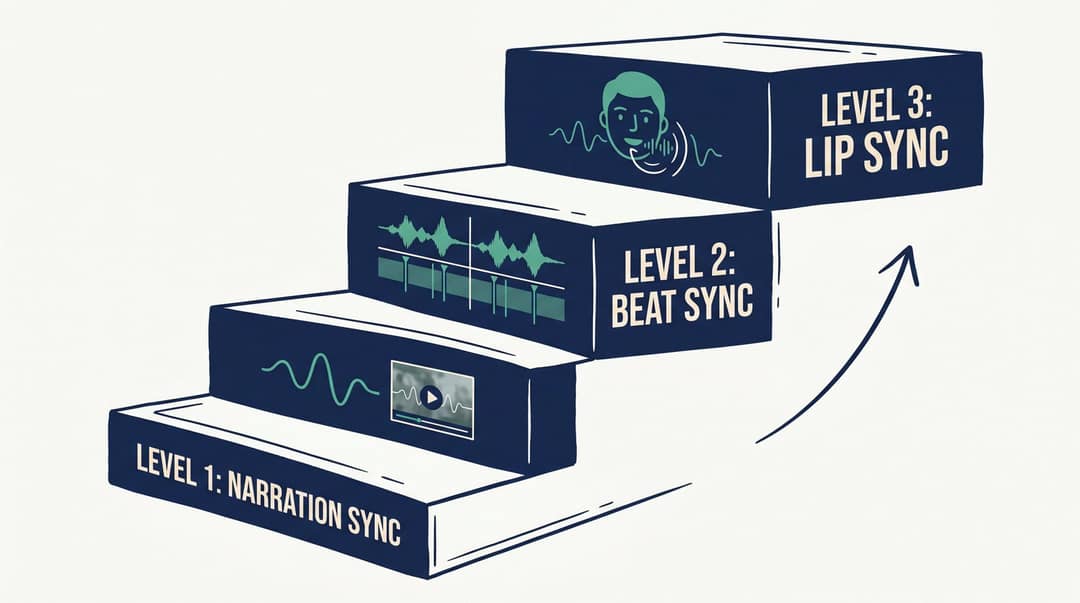
| Level | What must match | Use it for | Fix when it feels off |
|---|---|---|---|
| Narration sync | The voice plays over the footage | Travel montages, listicles, motivational clips | Adjust speed, trim dead air, nudge the audio on the timeline |
| Beat sync | The visual changes when the idea changes | Tutorials, demos, software walkthroughs, before-and-after | One sentence per shot, line breaks between scenes, zoom on key moments |
| Lip sync | Mouth movement matches the voice | Avatars, AI presenters, dubbing | Shorter sentences, steady speed, a voice that fits the avatar's age |
For lip sync, the talking avatar tool aligns the generated voice with the avatar's mouth automatically. For the other two levels, follow four rules: change the shot when the idea changes, never show a feature before the voice names it, cut silence unless it builds suspense, and keep captions out of the areas covered by platform buttons.
How to fix a robotic AI voice
| Problem | Likely cause | Fix |
|---|---|---|
| Voice sounds robotic | Long sentences, weak punctuation | Split sentences, add periods and commas |
| Voice too fast | The script says too much | Cut 20 to 30% of the words, add pauses |
| Voice too slow | Formal phrasing, too many commas | Pick a more energetic voice, remove commas |
| Brand name mispronounced | The model is guessing | Spell it phonetically |
| Captions don't match the voice | The script changed after captions were made | Regenerate captions after the final audio |
| Video feels fake | Voice, visuals and captions have different tones | Make all three match one style |
How to add AI voice to Reels, TikTok and YouTube Shorts
You have two routes. The first: generate the narrated video in an AI tool, export it at 9:16, and upload it (or publish it directly to Instagram, TikTok or YouTube from Revid). The second, for quick trend posts: TikTok's and Instagram's in-app editors offer text-to-speech on text overlays in many app versions. Add text, tap it and look for the text-to-speech option. The voice choice is narrow, so use it for speed, not for branded content.
| Platform | Format | Length to know |
|---|---|---|
| TikTok | 9:16 at 1080x1920 | Uploads up to 60 minutes; in-app recording up to 10 minutes |
| Instagram Reels | 9:16 recommended (1.91:1 to 9:16 accepted), at least 30 FPS and 720 px | Up to 20 minutes, but reels over 3 minutes are not recommended to non-followers |
| YouTube Shorts | Square or vertical | Up to 3 minutes |
TikTok's in-feed ad specs also recommend vertical 9:16 and describe the safe zone, the part of the screen not hidden by buttons and captions. For Instagram, Buffer's Instagram size guide lists Reels at 1080x1920. Since January 2025 the profile grid shows vertical rectangles instead of squares, so keep the key text of your cover frame centered.
Voice to video AI: turn a recording into a video
If you already have the voice (a podcast, an interview, a voice memo) and need the visuals, the job runs the other way. Revid's audio to video converter takes an MP3, WAV or M4A file, transcribes it, adds matching visuals and synced captions, and returns a vertical video. It is also the simplest way to put your own voice in a video without filming yourself.
Can you use AI voice on YouTube, TikTok and Instagram?
Yes, on all three, as long as you follow each platform's labeling rules and, on YouTube, its originality rules for monetization.
YouTube: disclosure and monetization
YouTube's disclosure rules require you to use the "AI use" setting in YouTube Studio for realistic synthetic content, such as making a real person appear to say something they didn't, or a realistic scene that never happened. You don't need to disclose AI-written scripts, captions, or a clone of your own voice used for voiceovers. Disclosure alone does not limit reach or earnings, and since May 2026 YouTube automatically labels undisclosed videos with significant photorealistic AI.
Monetization is a separate test. YouTube's channel monetization policies allow AI tools when the final video shows your creative vision and gives educational or entertainment value. They exclude mass-produced template content (the "repetitious content" policy was renamed "inauthentic content" on July 15, 2025) and AI personas presented as human experts giving health, legal, financial or political advice.
TikTok: AI-generated labels
TikTok requires creators to label AI-generated content that contains realistic images, audio or video, and the creator label reads "creator labeled as AI-generated". TikTok may also apply an automatic label to uploads carrying C2PA Content Credentials, and that label cannot be removed. Turning on the label does not affect distribution if the video follows the Community Guidelines. A stock AI voice reading your own script imitates no one, but when in doubt, label it: in IAB's January 2026 study, nearly half of Gen Z and Millennial consumers wanted advertisers to disclose AI voices or AI avatars.
Instagram and Facebook: the "AI info" label
Meta shows AI labels on Instagram, Facebook and Threads as "AI info" (renamed from "Made with AI" on July 1, 2024), applied when it detects industry-standard AI signals or when you disclose. Meta's approach to labeling AI content also asks you to use its disclosure tool when you post photorealistic video or realistic-sounding audio that was digitally created or altered.
Is it legal to clone a voice?
Cloning your own voice is the safe case. For anything else:
- Use stock AI voices for generic narration.
- Clone another person's voice only with explicit, documented permission.
- Never make a real person appear to say something they didn't say.
- Never imply endorsement by a public figure without permission.
- Label realistic AI content where the platform requires it.
The FTC has warned about AI-enabled voice cloning as a tool for impersonation and fraud, and has said existing laws apply to AI with no exemption.
AI voice or your own voice?
| Situation | Better option |
|---|---|
| Daily faceless niche videos | AI voice |
| Founder-led product launch | Your own voice |
| Multilingual versions of one video | AI voice |
| Coaching or mentoring | Your own voice |
| Product demos at volume | AI voice |
| High-ticket sales video | Your own voice or an approved clone of it |
| Health, finance or legal advice | A real expert's voice, with disclosure |
Faceless formats are where AI voice does its best work. In the same Revid dataset, faceless TikToks had a median of 114K views with 17.4% past 1M, against 67K and 12.7% for one person on camera, and faceless tutorials reached 156K against 52K for on-camera tutorials. Perspective comes from Revid's AI analysis of each video, and the figures describe videos that already performed, not proof that hiding your face causes views.
Faceless videos earned a median of 114K views, against 67K for videos with one person on camera, and passed 1M views 38% more often.
Source: Revid analysis of 176,367 TikToks with 1,000+ likes posted between Oct 1, 2025 and Oct 16, 2026 (61,203 creators)
Show the data
| Median views | Share that passed 1M views | |
|---|---|---|
| Animals | 147.4K | 24.1% |
| Faceless | 113.9K | 17.4% |
| Groups of people | 96.1K | 16% |
| Objects or products | 70.8K | 13.2% |
| One person on camera | 67.4K | 12.7% |
Most serious creators end up with a hybrid: their own voice for brand and high-trust videos, AI voices for faceless series, translations and fast experiments.
FAQ
Can I add AI voice to a video for free?
Yes. CapCut's free tier, Descript's free plan and Revid's free sign-up credits all let you generate AI narration. The limits are watermarks, export resolution and commercial-use terms, so check them before posting ads or client work.
What is the best AI voice generator for videos?
It depends on the job. For a finished video with voice, visuals, captions and publishing in one place, use an all-in-one tool like Revid; for standalone audio you will edit yourself, a text-to-speech tool like ElevenLabs; for editing footage you filmed, CapCut.
Can I monetize YouTube videos that use an AI voice?
Yes, if the video is original. YouTube allows AI tools when the result shows your creative vision, but it won't monetize mass-produced template videos or narration that only reads text you didn't write.
Does labeling a video as AI hurt its reach?
No. YouTube and TikTok both state that the AI disclosure label alone does not limit distribution or eligibility to earn; skipping a required label is what creates risk.
How do I add AI voice to a video on my phone?
Use a mobile editor with text-to-speech, such as CapCut, or the text-to-speech option on text overlays in TikTok's and Instagram's editors. For more voices and languages, generate the voiceover video in an AI tool and upload the 9:16 export.
Sources
- Revid analysis of 176,367 TikToks analyzed by AI, with 1,000+ likes posted between Oct 1, 2025 and Oct 16, 2026 (61,203 creators)
- Revid analysis of 176,367 TikToks with 1,000+ likes posted between Oct 1, 2025 and Oct 16, 2026 (61,203 creators)
Charts and figures checked on November 6, 2026.