On this page
To boost subscribers on YouTube, give viewers a reason to come back: pick one clear niche, post Shorts that funnel into longer videos, end every video with an end screen pointing to your next one, and ask for the subscribe at the moment you promise more. Avoid paid or sub-for-sub 'boosts'; they add accounts that never watch.
Shorts are the biggest lever most channels ignore. Alphabet said in April 2023 that channels posting weekly on Shorts saw the majority of their new subscribers come from those Shorts. The most common mistake runs the other way: buying or trading subscribers, which inflates the count while the people behind it never watch, so your real audience signals get weaker.
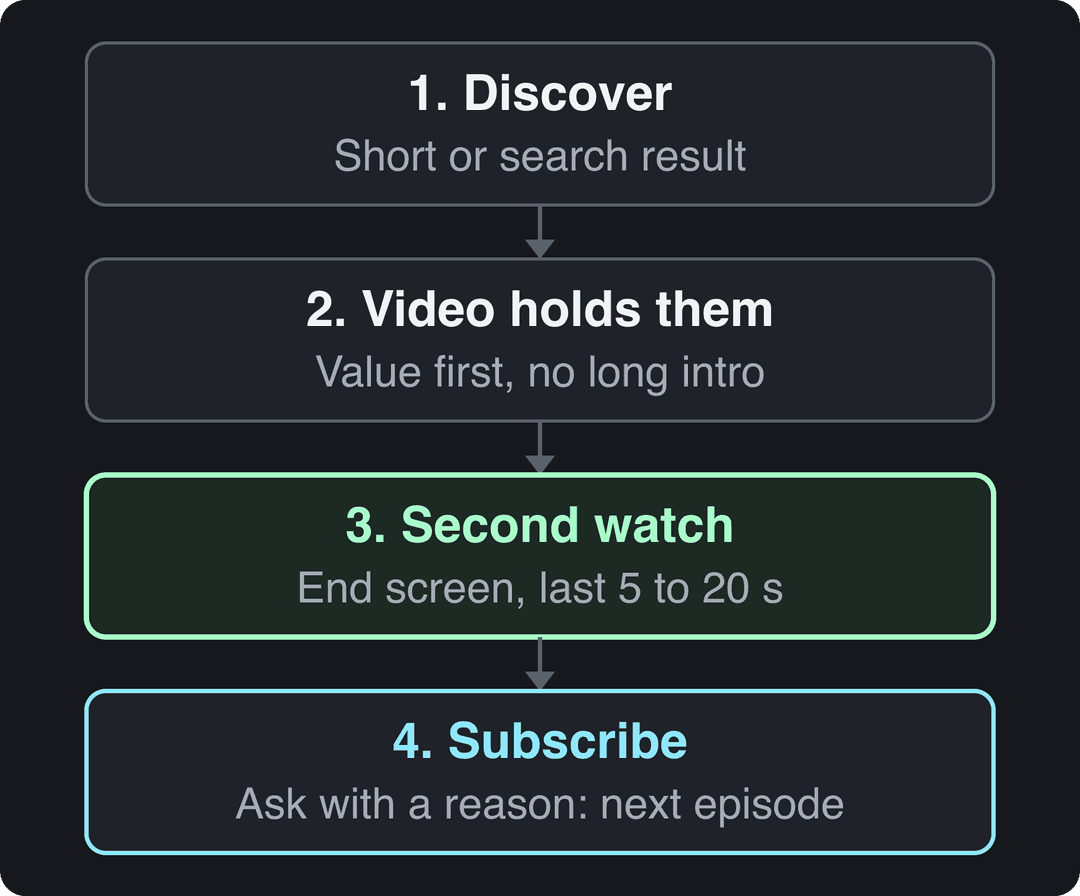
Every subscriber follows the same path: they discover a video, it holds them, they watch another, and they subscribe because they expect more of the same. Each section below fixes one step of that path.
- Share of uploads as Shorts that gave channels the best results
- 25-40%
- AIR Media-Tech, May 2026
- Maximum length of a YouTube Short (square or vertical video)
- 3 min
- YouTube Official Blog, October 2024
- Daily views on YouTube Shorts
- 200B+
- YouTube Official Blog, August 2026
- Gen Z who use short-form apps to find things they then watch in longer form
- 59%
- Think with Google, September 2022
Set up a channel page that turns visitors into subscribers
People who like a video often tap through to your channel before subscribing. If the page does not tell them in a second what you post and for whom, they leave.
| Element | What to do | Why it adds subscribers |
|---|---|---|
| Profile picture | A clear headshot or a simple logo that still reads as a small circle | Viewers recognize you in feeds and comments |
| Banner | Say what you post, for whom and how often ("Easy weeknight meals, new recipe every Thursday") | Visitors know instantly if the channel is for them |
| Channel trailer | 30 to 90 seconds for non-subscribers, ending on a subscribe ask | Converts people who land on your page |
| Channel description | Up to 1,000 characters: who it is for in the first line, then the phrases your viewers search | Helps search and suggestions place you |
| Playlists | 3 to 5 playlists that match your main topics | Longer sessions and proof of depth |
The trailer is a pitch, not a highlight reel. Answer three questions fast: who you are, what you make, and what a subscriber gets next week. End with one sentence that asks for the subscribe and names the payoff.
How do you get found on YouTube search?
New subscribers cannot find a video nobody surfaces. Search is the most predictable source of viewers because it matches you with people who already want your answer.
Start with YouTube's own search bar. Type a topic from your niche and read the autocomplete suggestions: "how to grow tomatoes" turns into "from seed", "in containers" and "indoors". Each suggestion is a real query and a ready video idea. The YouTube keyword research guide covers this step in detail.
| Field | Limit | How to use it |
|---|---|---|
| Title | 100 characters | Put the search phrase first and the promise after: "How to Grow Tomatoes in Containers (Beginner Guide)" |
| Description | 5,000 characters | Open with the search phrase in a full sentence, then summarize what the video covers |
| Tags | 500 characters in total | A few variants and common misspellings; title, description and the video itself matter more |
| Thumbnail | 3840x2160 recommended, at least 640 px wide | One subject, a few words, readable at phone size |
The title and thumbnail decide whether someone clicks, so test them. YouTube Studio on desktop can A/B test up to 3 titles and thumbnails per video and shows the one with the highest watch time to everyone; Shorts are not eligible. If you are stuck for options, a free YouTube title generator gives you variants to test, and our YouTube SEO tips go further on descriptions and chapters.
The index leans toward videos that surface in hashtag and keyword searches, so its view counts run high: compare the groups, not the absolute numbers.
Source: Revid TikTok index: 2,377,477 TikToks with AI labels per video, snapshot of Sep 15, 2026. Median views estimated from view buckets.
Show the data
| Median views | Share past 1M views | |
|---|---|---|
| 0-7s | 88.3K | 19.9% |
| 8-15s | 111.1K | 22.6% |
| 16-30s | 141K | 25.1% |
| 31-60s | 120.4K | 22.8% |
| 61-120s | 97K | 19.8% |
| 2-5 min | 89.1K | 18.3% |
| 5 min+ | 90.1K | 17.2% |
Use YouTube Shorts as your subscriber engine
Shorts reach people who would never search for you. Square or vertical videos up to 3 minutes long count as Shorts, which leaves room for a full tip, not just a teaser.
What to post:
- Clips from long videos. Cut the strongest 30 to 90 seconds of a long video into a vertical Short, then link the full video from the Short with YouTube's related video option.
- One-tip Shorts. One problem, one fix, no intro. These show your expertise and give viewers a reason to expect more.
- Series. Since September 2026, YouTube is rolling out Shorts series, which organize Shorts into seasons and episodes. A numbered series gives people a concrete reason to subscribe: the next episode.
How many Shorts? AIR Media-Tech's study of 18,000 English-language channels found the best results when Shorts made up 25% to 40% of a channel's uploads. For a channel posting one long video a week, that means a few Shorts alongside it, not a Shorts-only feed. For more on vertical editing and pacing, these YouTube Shorts best practices from JoinBrands are a useful checklist. Verified channels can also upload custom Shorts thumbnails in YouTube Studio on a computer.
Format choice matters too. In Revid's analysis of 176,367 TikToks with 1,000+ likes posted between October 2025 and October 2026, challenges had the highest median views (182K), followed by comedy (155K) and reactions (105K), while tutorials sat at 62K. Faceless tutorials did far better than on-camera ones (156K vs 52K median). This is TikTok data, it only covers videos that already passed 1,000 likes, and it shows what top videos share rather than causes, so treat it as a starting hypothesis for Shorts. The full TikTok virality study has the method.
Challenges and comedy passed 1M views about twice as often as tutorials and storytelling, which are the most common formats.
Source: Revid analysis of 176,367 TikToks with 1,000+ likes posted between Oct 1, 2025 and Oct 16, 2026 (61,203 creators)
Show the data
| Median views | Share that passed 1M views | |
|---|---|---|
| Challenge | 182.3K | 25.6% |
| Comedy | 154.8K | 22.1% |
| Reaction | 104.8K | 16% |
| Dance | 83.8K | 15.5% |
| Storytelling | 66.1K | 12.2% |
| Lip Sync | 61.7K | 12.3% |
| Tutorial | 61.9K | 12.1% |
Make every video end on a next step
A viewer who watches two of your videos is far more likely to subscribe than one who watches one. Your job at the end of each video is to start the second one.
End screens can be added in the last 5 to 20 seconds of a long video. Use three elements:
- A subscribe element (your channel icon).
- A video element set to "Best for viewer", so YouTube picks the one of your videos that person is most likely to watch.
- A playlist element that sends them into a series.
Cards are the small pop-ups during the video. Place one at the exact moment you mention an earlier tutorial, so curious viewers can jump there without you breaking flow. For layouts, see these YouTube end screen templates.
Prompt to try
Create a 30-second one-tip Short for a home cooking channel: 'Stop your pasta from sticking with this one step'. Start straight on the problem with no intro, show the fix in three quick scenes, then close with 'I post one kitchen fix like this every week, subscribe for the next one'. Warm stock footage, upbeat music, large captions.
When and how should you ask viewers to subscribe?
Ask when you have just delivered value or are about to promise more, not in the first seconds. "Like, comment and subscribe" on autopilot gets ignored; a specific reason gets acted on.
Sample lines you can adapt:
- Series: "Part two drops Thursday, where we test this on a real car. Subscribe so it lands in your feed."
- Tutorial: "I post one fix like this every week. If this saved you an hour, subscribing gets you the next one."
- Mid-video, after a strong moment: "If that tip was new to you, that is what this channel is for. Subscribe and keep going."
If you plan a sequence, say so in the video. A viewer who knows the next episode exists has a reason to subscribe now rather than later.
Post on a schedule you can keep
A predictable schedule turns one-time viewers into people who check back, and it gives your banner promise ("new video every Tuesday") meaning. Pick a pace you can sustain for months: one video a week beats daily uploads that stop after three weeks.
Plan around 3 to 5 core topics. A personal finance channel might rotate budgeting, investing basics, side hustles and paying off debt. Fixed topics make ideas easier to find and tell viewers exactly what subscribing gets them. If you want a broader framework, these content marketing best practices apply well to a video calendar.
One rule to know: YouTube may turn off monetization for channels that have not uploaded a video or posted to the Posts tab for 6 months or more.
Turn viewers into a community
Subscribers who feel known stay, watch and share. Three habits do most of the work:
- Reply to comments, especially questions, in the first day after upload. Good questions become your next video, and you can say so in a pinned reply.
- Use the Posts tab (formerly the Community tab) between uploads: polls on what to make next, a behind-the-scenes photo, a preview of the next video.
- Go live for Q&As, live tutorials or casual chats. Live is where casual viewers become regulars.
The potential audience is enormous; Global Media Insight keeps a roundup of YouTube user statistics if you want the scale. You only need a small, engaged slice of it.
Make Shorts and clips faster with Revid
The hard part of the Shorts strategy above is volume. Revid handles the production steps:
- Paste a long YouTube video into the YouTube clip maker: it cuts it into short vertical clips with captions.
- Or start from an idea or script with the AI YouTube Shorts generator, which writes the script and adds visuals, a voice-over and synced captions.
- Fix any scene in the timeline editor, then publish or schedule directly to YouTube.
Revid's library also includes 73,227 YouTube posts with engagement data, so you can start from a format that already performs. Keep your own angle in every video: YouTube does not let mass-produced, template AI content without original insight earn money.
Do subscriber boost services, sub4sub and boost games work?
No. Sites that sell subscribers, sub-for-sub groups and "free subscribers" boost apps or games add accounts that do not watch your videos. YouTube's fake engagement policy prohibits artificially inflating subscribers or views, and channels that use these services risk removed subscribers, removed videos or worse. Sites promising to boost Trovo likes and subscribers work the same way and carry the same risk.
The damage is quieter than a ban. Your subscriber count grows, but those accounts never watch, so new uploads reach people who ignore them. For legitimate free tactics, read how to get subscribers on YouTube for free.
Promotion outside YouTube is fine and useful: share videos in relevant subreddits, niche groups, your newsletter and your other social accounts, with context about why the video helps that audience, not a bare link.
FAQ
How long does it take to get 1,000 subscribers on YouTube?
There is no fixed timeline: some channels get there in a few months, others take a year or more. Niche demand, video quality and a steady schedule decide it, and adding Shorts usually speeds it up because they reach non-subscribers.
Do I need 1,000 subscribers to make money on YouTube?
For ad revenue, yes: today YPP requires 1,000 subscribers plus 4,000 qualified watch hours in 12 months or 10 million qualified Shorts views in 90 days. From February 1, 2027, new applicants need 8,000 watch hours in 365 days or 20 million Shorts views in 90 days. A lower tier (500 subscribers plus 3,000 watch hours or 3 million Shorts views) gives access to fan funding and shopping, not ads.
Should I focus on quality or quantity?
Quality first, then consistency. One strong video earns the subscribe; a schedule you keep earns the return visit, so choose the highest pace you can hold without dropping quality.
Do people who find me through Shorts watch my long videos?
Many do. In a 2022 Ipsos survey for YouTube, 59% of Gen Z said they use short-form video apps to discover things they then watch longer versions of, which is why linking each Short to a related long video matters.
Sources
- Revid analysis of 176,367 TikToks with 1,000+ likes posted between Oct 1, 2025 and Oct 16, 2026 (61,203 creators)
- Revid TikTok index: 2,377,477 TikToks with AI labels per video, snapshot of Sep 15, 2026. Median views estimated from view buckets.
- AIR Media-Tech, Do YouTube Shorts help your long-form videos? Data from 18,000 channels (May 2026)
- YouTube Official Blog, Tall updates coming to Shorts (October 2024)
- YouTube Official Blog, New opportunities to earn and changes to the YouTube Partner Program (August 2026)
- Think with Google, Short and long-form video content (September 2022)
Charts and figures checked on November 6, 2026.