On this page
The YouTube SEO tips that still work in 2026: put the exact phrase viewers search at the start of your title and description, design a thumbnail that earns the click, hold viewers past the opening, and link videos into playlists so one view leads to the next. Tags help only at the margins.
Most creators still optimize for the click. YouTube does not: its own Test & Compare tool picks the winning title and thumbnail by watch time, not click-through rate. A title that wins clicks and then loses viewers in the first seconds is a losing title, and every tip below follows from that.
- Daily YouTube Shorts views
- 200B+
- YouTube Official Blog, August 2026
- Share of uploads as Shorts linked to the best channel results
- 25% to 40%
- AIR Media-Tech, May 2026
- Characters within which to place your primary search phrase in the title
- 60
- Qualified Shorts views in 90 days needed for Shorts ad revenue from Feb 1, 2027
- 10M
- YouTube Official Blog, August 2026
How does YouTube SEO work in 2026?
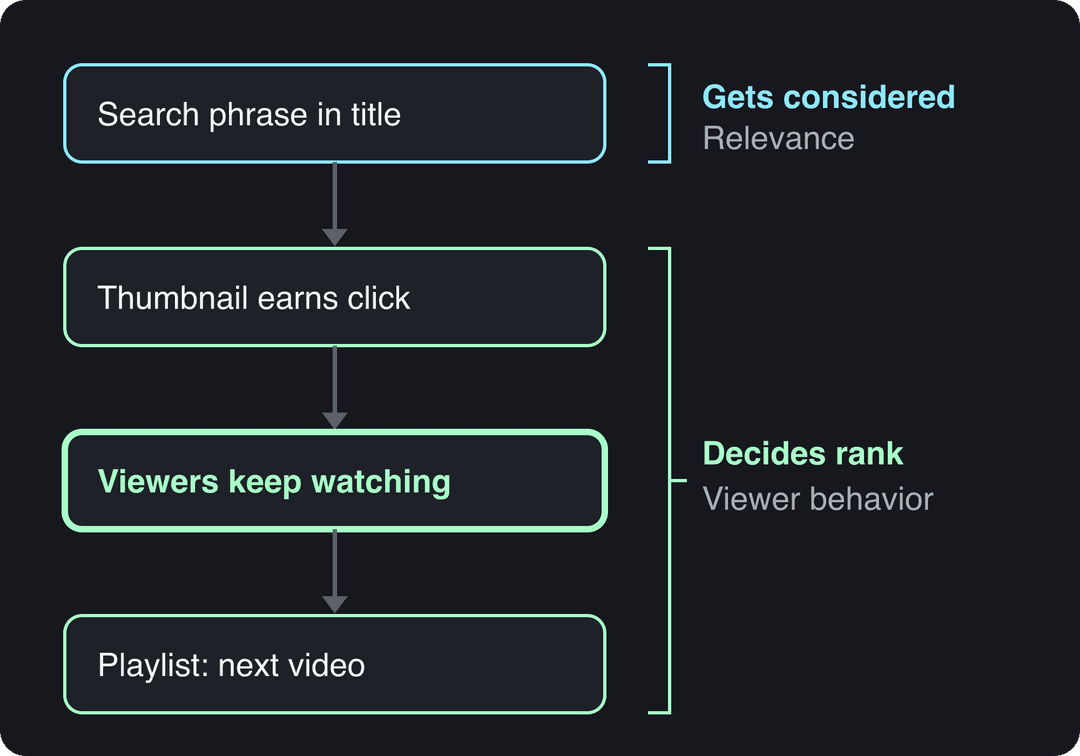
YouTube decides where a video shows up in search from two kinds of signals. Relevance tells it what the video is about: the title, the description, chapters and what is said in the video. Viewer behavior tells it whether the video is a good answer: whether people who see it click, keep watching and keep watching more of your channel.
Metadata gets your video considered for a search. Viewer behavior decides how high it ranks and whether it keeps getting shown in browse and suggested feeds.
Two 2026 changes are worth knowing. Since August 24, 2026, YouTube counts a view the moment a video starts to play on Shorts, long-form and live, so raw view counts say less about quality than before; YPP earnings still use engaged views and engaged watch hours. And since May 2026, YouTube automatically labels undisclosed videos that contain significant photorealistic AI. For how video ranking works across both YouTube and Google, see our explainer on what video SEO is.
How do you find keywords for YouTube videos?
Start from what people already type, not from what you want to call your video.
- Type your topic into the YouTube search bar and write down the autocomplete suggestions. They come from real searches.
- Open YouTube Studio > Analytics > Research to see what viewers in your niche search for, including searches where few good videos exist yet.
- Check the YouTube search traffic report for your existing videos (Analytics > Reach > Traffic source types > YouTube search). It shows the exact terms already sending you viewers.
- Look at the top results for your phrase. If they are all from channels far bigger than yours and match the query word for word, go narrower.
- Pick one primary phrase per video, plus 2 to 3 close variants for the description.
The narrower phrase usually wins for small channels. "Makeup tutorial" is searched far more than "smokey eye makeup tutorial for beginners", but the second one brings viewers who want exactly your video, so they watch longer, which is the signal that lifts rankings.
Tools like TubeBuddy and vidIQ add search-volume and competition estimates on top of this. Treat their scores as estimates, and trust your own search traffic report over them once you have one.
YouTube title optimization best practices
A YouTube title can be up to 100 characters, but many surfaces cut it much earlier. Put your primary phrase within the first 60 characters and use the rest for the promise.
- Use the viewer's words. If people search "how to improve SEO on YouTube", that wording beats "Optimizing Video Discoverability".
- Promise a specific outcome. A number, a result or a constraint ("for beginners", "without a mic") makes the value concrete.
- Open a question the video answers. Curiosity is fine; a promise the video does not keep costs you watch time, and watch time is what YouTube's own tests reward.
- Write the title and thumbnail as a pair. The thumbnail should add information, not repeat the title word for word.
| Weak title | Stronger title | Why it works |
|---|---|---|
| My Makeup Routine | Smokey Eye Makeup Tutorial for Beginners | Matches a real search phrase |
| Dinner Ideas!! | Easy Weeknight Dinner Recipes: Quick Meals Under 30 Minutes | Search phrase first, then a specific promise |
| The SHOCKING Truth About This Phone | [Phone name] Review After a Month: What Holds Up | Product name for search, honest curiosity |
| Etsy Update | How I Made $10,000 in 30 Days Selling on Etsy | Concrete result (use only if true) |
If you are stuck, the free YouTube title generator drafts options from your topic that you can then trim to your search phrase.
YouTube description SEO best practices
Descriptions can run to 5,000 characters, but only the first line or two show in search results and above the "more" fold. Those lines do the SEO work and the selling: repeat the primary phrase naturally and say what the viewer gets.
A structure that works for most videos:
Line 1: [Primary search phrase] + what the viewer will be able to do after watching.
Line 2: Who it is for and what makes this video different.

Chapters:
[timestamp] Intro
[timestamp] Step one
[timestamp] Step two
[timestamp] Common mistakes

Resources mentioned:
[Link] Tool or product, with one line on why it is here

More on this topic:
[Playlist link] The full series

#PrimaryTopic #SecondaryTopic- Add chapters. Timestamps listed in order in the description become chapters in the player, which helps viewers jump to what they searched for. Check YouTube Help for the current minimum rules if your chapters do not appear.
- Write a paragraph, not a keyword list. Two or three sentences that use the variants you found in keyword research help YouTube understand the topic; a block of repeated keywords reads as spam.
- Link with intent. Put the one link you most want clicked near the top, and a playlist link lower down.
- Use 2 to 3 hashtags. More adds nothing and looks spammy.
The free YouTube description generator gives you a first draft in this shape; edit the opening line so it starts with your exact search phrase.
| Metadata field | Limit |
|---|---|
| Video title | 100 characters |
| Video description | 5,000 characters |
| Tags | 500 characters in total, not per tag |
| Channel description | 1,000 characters |
Do YouTube tags still matter for SEO?
Barely. YouTube says tags play a minimal role in discovery and are mainly useful when your topic is commonly misspelled. Spend a minute on them, not an hour.
Fill the 500-character budget with your primary phrase, one or two variants, and the misspellings people actually type (a product name, a creator name, a foreign word). Do not paste in competitors' channel names or unrelated trending terms: irrelevant tags can break YouTube's rules on misleading metadata and do nothing for ranking.
YouTube thumbnail best practices for more clicks
The thumbnail decides whether your title is even read. Custom thumbnails require a verified account, and the specs changed from the old 1280x720 advice.
| Format | Recommended size | Ratio | Minimum | Where to upload |
|---|---|---|---|---|
| Long-form video | 3840x2160 | 16:9 | 640 px wide | Desktop (up to 50 MB) or mobile (up to 2 MB) |
| YouTube Short | 2160x3840 | 9:16 | 640 px tall | YouTube Studio on a computer |
For vertical videos, a 16:9 custom thumbnail is replaced by an auto-generated 4:5 thumbnail on the home, explore and subscription pages, so keep the key subject in the center of the frame.
- One focal subject. A face, a product or a result, big enough to read on a phone.
- A few words at most. Text should add what the title does not say.
- Strong contrast. Bright subject against a plain or dark background survives both light and dark mode.
- Clear emotion when a person is in it. A visible reaction tells viewers what kind of video this is.
- A consistent look. Same fonts and colors across a series make your videos recognizable in suggested feeds.
Prompt to try
Create a 30-second vertical Short on "Easy Weeknight Dinner: 20-Minute Garlic Butter Pasta". Start by showing the finished plate with the hook "Dinner in 20 minutes, one pan", then walk through four quick steps with a new shot every few seconds. Warm kitchen visuals, upbeat voiceover, synced captions.
How do watch time and engagement affect YouTube rankings?
Once a viewer clicks, what they do next is the strongest feedback YouTube gets. A video that holds viewers keeps getting impressions; one they abandon early fades from search and suggested feeds.
- Deliver the promise in the opening seconds. Show the result, the finished dish or the answer first, then explain. Cut the logo intro and "before we start".
- Read your retention graph. In YouTube Studio, find the steep drops. A drop at the start means the opening does not match the title; a drop mid-video usually means a slow section to cut next time.
- Reset attention. A change of shot, a graphic, an on-screen list or a quick example every so often keeps longer videos moving.
- Ask one specific question. "Which step did you skip?" gets more comments than "Let me know what you think". Reply to early comments to get the thread going.
- Use end screens and cards to send viewers to the next video in the series, not to your channel page.
If you also run other social accounts and want a consistent way to compare results, this ReplyGuy guide on how to measure social media engagement explains the common engagement metrics and formulas. For a full ranking playbook beyond metadata, see how to rank YouTube videos.
Use playlists and series to keep viewers on your channel
Playlists turn one search click into a viewing session, and they can rank in search on their own.
- Title playlists with a search phrase, for example "YouTube SEO for Beginners" rather than "My Videos".
- Write a two-sentence playlist description that uses the same phrase and its variants.
- Order videos as a path, from the most-searched entry topic to the more advanced ones.
- Name series consistently ("SEO Basics Part 1", "SEO Basics Part 2") so viewers know there is a next episode.
- Link the next episode in the end screen and the description of every video in the series.
Series work best for tutorials, ongoing projects and recurring formats. In September 2026, YouTube began rolling out Shorts series, which organize Shorts into seasons and episodes across web, mobile and TV. For channel growth beyond search, see our guide to growing a YouTube channel fast.
Prompt to try
Make a 40-second YouTube Short titled "Smokey Eye Makeup Tutorial for Beginners". Open with the finished look in the first second and the hook "3 steps, no fancy brushes", then show each step with on-screen labels. Bright, clean beauty style with a friendly voiceover and bold captions, ending with "Full tutorial linked below".
The index leans toward videos that surface in hashtag and keyword searches, so its view counts run high: compare the groups, not the absolute numbers.
Source: Revid TikTok index: 2,377,477 TikToks with AI labels per video, snapshot of Sep 15, 2026. Median views estimated from view buckets.
Show the data
| Median views | Share past 1M views | |
|---|---|---|
| 0-7s | 88.3K | 19.9% |
| 8-15s | 111.1K | 22.6% |
| 16-30s | 141K | 25.1% |
| 31-60s | 120.4K | 22.8% |
| 61-120s | 97K | 19.8% |
| 2-5 min | 89.1K | 18.3% |
| 5 min+ | 90.1K | 17.2% |
Do YouTube Shorts help your channel's SEO?
They can, if they point viewers to your long videos. Square or vertical videos up to 3 minutes count as Shorts, and YouTube said in August 2026 that Shorts get over 200 billion daily views, so they are a large discovery surface.
AIR Media-Tech's study of 18,000 English-language channels (March 2025 to March 2026) found the best results when Shorts made up 25% to 40% of a channel's total uploads. Title and describe Shorts with the same care as long videos, and avoid copyrighted music in Shorts longer than one minute: any Short over one minute with an active Content ID claim is blocked globally. Shorts-specific ranking steps are in our YouTube Shorts SEO guide, and official platform numbers are on our YouTube Shorts statistics page.
Videos include an AI voiceover; clip quotes are AI highlights without one. Clip and motion graphics quotes are minimums: the final charge depends on the source video or the footage generated. AI video clips are on the Pro model; the Base model costs 110 credits for 30 s.
Source: Revid public endpoint POST /api/public/v3/calculate-credits, queried October 29, 2026: workflow video-to-clips with 1 and 3 outputs, and prompt-to-video at 30 and 60 seconds with each media type. Cents = credits x $39 / 2,000, rounded.
Show the data
| Credits | US cents on Growth | |
|---|---|---|
| 1 clip from a YouTube link | 1 | 2 |
| 3 clips from a YouTube link | 3 | 6 |
| 30 s video, stock footage | 11 | 21 |
| 30 s video, animated AI images | 37 | 72 |
| 60 s video, animated AI images | 75 | 146 |
| 30 s video, motion graphics (estimate) | 190 | 371 |
| 30 s video, AI video clips (Pro model) | 341 | 665 |
How to make SEO-ready Shorts faster with Revid
If you already have long videos ranking, Shorts cut from them are the fastest way to add search entry points.
- Paste a YouTube link into Revid's YouTube clip maker: the AI picks moments from the long video and turns them into vertical clips.
- To start from an idea or a script instead, use the AI YouTube Shorts generator, which writes the script and builds the visuals, voice-over and synced captions.
- Adjust any scene in the timeline editor and export in 720p, 1080p or 4K.
- Publish or schedule the Short directly to YouTube from Revid, with the title and description you wrote around your search phrase.
If a video contains realistic AI-generated scenes, turn on the "AI use" disclosure in YouTube Studio; YouTube says disclosure by itself does not limit reach.
How to use YouTube Analytics to improve your SEO
Check these once a week and change one thing at a time, so you know what worked.
| Metric | Where in YouTube Studio | What it tells you | What to do |
|---|---|---|---|
| Impressions and click-through rate | Analytics > Reach | Whether your thumbnail and title earn clicks | Many impressions but few clicks: test a new thumbnail and title |
| YouTube search terms | Reach > Traffic source types > YouTube search | The exact phrases bringing viewers | Use them in the titles and descriptions of your next videos |
| Audience retention | Analytics > Engagement, or the video's analytics | Where viewers leave | Steep early drop: tighten the opening to match the title |
| Research | Analytics > Research | What your audience searches across YouTube | Plan videos for searches with few good answers |
| Traffic source mix | Analytics > Reach | Whether views come from search, browse or suggested | Mostly suggested: build playlists and series around the topic |
Old videos that get impressions but few clicks are the cheapest wins: a better thumbnail and a title rewritten around the search terms report can bring them back without a new upload.
YouTube SEO checklist before you publish
| Element | Do this |
|---|---|
| Keyword | One primary phrase taken from search suggestions or the Research tab |
| Title | Phrase within the first 60 characters, specific promise, under 100 characters |
| Description | Phrase and payoff in the first line, chapters, one key link, 2 to 3 hashtags |
| Tags | Phrase, variants and common misspellings, within 500 characters |
| Thumbnail | 3840x2160 for long-form, one subject, readable on a phone |
| Opening | The promise delivered in the first seconds, no long intro |
| End screen | Next video in the series or the playlist |
| Playlist | Added to a playlist titled with a search phrase |
| AI disclosure | "AI use" turned on if the video has realistic AI scenes |
FAQ
How long does YouTube SEO take to work?
Search traffic often builds over weeks rather than days, because YouTube needs viewer data before it ranks a video higher. Judge a video on its search terms report and retention after it has had time to collect impressions, not on its first day.
Should you update the title and description of old videos?
Yes, when a video gets impressions but few clicks, or when its search terms report shows a phrase you did not target. Change the title, thumbnail or opening description lines one at a time and compare the results over the following weeks.
Does labeling AI content hurt YouTube SEO?
No. YouTube says disclosing AI content does not by itself limit a video's audience or its eligibility to earn, while creators who keep failing to disclose realistic AI risk labels, removal or YPP suspension.
Are YouTube SEO tools like TubeBuddy and vidIQ worth it?
They are useful for search-volume and competition estimates and for bulk metadata edits, but they are optional. YouTube search suggestions, the Research tab and your own search terms report cover the essential keyword work for free.
Do YouTube SEO tips from 2025 still work in 2026?
Mostly yes: matching search phrases, strong thumbnails and watch time still drive rankings. What changed is that views now count the moment playback starts (since August 24, 2026), YouTube auto-labels undisclosed photorealistic AI (since May 2026), and from February 1, 2027 earning Shorts ad revenue requires 10 million qualified Shorts views in the last 90 days.
Sources
- Revid TikTok index: 2,377,477 TikToks with AI labels per video, snapshot of Sep 15, 2026. Median views estimated from view buckets.
- Revid public endpoint POST /api/public/v3/calculate-credits, queried October 29, 2026: workflow video-to-clips with 1 and 3 outputs, and prompt-to-video at 30 and 60 seconds with each media type. Cents = credits x $39 / 2,000, rounded.
- YouTube Official Blog, New opportunities to earn and changes to the YouTube Partner Program (August 2026)
- AIR Media-Tech, Do YouTube Shorts help your long-form videos? Data from 18,000 channels (May 2026)
- YouTube Official Blog, New opportunities to earn and changes to the YouTube Partner Program (August 2026)
Charts and figures checked on November 6, 2026.