
How to Create Videos for Social Media: A 2026 Step-by-Step Guide
A step-by-step guide to creating social media videos in 2026: platform specs, hook-first scripts, gear by budget, editing, AI creation, and what Revid's data on 176,367 TikToks says about length and faceless content.

On this page
To create videos for social media, pick one platform and one idea, write a script that opens with a hook, and film or generate a vertical 9:16 video at 1080x1920. Edit it tight, add captions, and post it natively on each platform with a short caption and a few relevant hashtags.
Most beginners put their budget into a camera and their nerves into appearing on it. Neither is the bottleneck. In Revid's analysis of 176,367 TikToks with 1,000+ likes posted between October 2025 and October 2026, faceless videos had a median of 114K views, against 67K for one person on camera. The sample only holds videos that already did reasonably well, so it shows what strong videos share rather than proving causes. Still, the message is plain: the idea, the hook and the edit carry the video, not the gear or your face.
- Median views for faceless TikToks, vs 67K for one person on camera
- 114K
- Revid analysis of 176,367 TikToks
- Median views for faceless tutorials, vs 52K for on-camera tutorials
- 156K
- Revid TikTok data
- Median views for TikToks with 4 hashtags, vs 16K with 9 or more
- 77K
- Revid TikTok data
- Marketers who name short-form video their top ROI-driving format
- 49%
- HubSpot, 2026
How to create a social media video, step by step
- Pick one platform and one goal. Reach, followers, leads or sales. A video built for TikTok discovery is not the same as a LinkedIn explainer for buyers.
- Choose a format that already works in your niche. Tutorials, behind the scenes, product demos, reactions, before and after. Scroll your niche and note which formats keep coming back.
- Write a hook-first script. The first line or the first frame must tell viewers why to keep watching.
- Film vertical, in good light, with a decent mic, or generate the visuals with AI.
- Edit tight. Cut every pause, add captions, and use music you have the rights to.
- Export at 1080x1920 as an .mp4 file with H.264.
- Post natively, then read the numbers. Write the caption, add hashtags, publish, and check retention and shares in the platform's analytics.
The sections below cover each step.
What size and length does each platform accept?
Shoot vertical 9:16 at 1080x1920 and one file works on TikTok, Reels, Shorts and Facebook; TikTok's Creator Academy recommends exactly that size. The limits below for TikTok, Instagram, YouTube and Facebook, plus LinkedIn and X, come from each platform's help center or developer documentation.
| Platform | Shape | Maximum length | Note that changes your edit |
|---|---|---|---|
| TikTok | 9:16, 1080x1920 recommended | Uploads up to 60 minutes (10 minutes when recording in the app) | Videos open in the personalized For You feed |
| Instagram Reels | 1.91:1 to 9:16, at least 30 FPS and 720 px | Up to 20 minutes | Reels over 3 minutes are not recommended to non-followers |
| YouTube Shorts | Vertical or square | Up to 3 minutes | Titles up to 100 characters |
| YouTube long-form | 16:9 | 15 minutes by default, longer for verified accounts | Custom thumbnails at 3840x2160 recommended |
| Any orientation | No length limit | 1080p .mp4, H.264 or H.265, 24 to 60 FPS | |
| 1:2.4 to 2.4:1 | Up to 15 minutes and 5 GB | The vertical video feed is mobile-only | |
| X | 1:3 to 3:1, 720x1280 for portrait | 20 minutes (125 minutes with Premium) | Up to 1 video per post |
Three rules matter most when you plan the edit:
- Instagram: captions are capped at 2,200 characters and you can use at most 5 hashtags. With more, the caption won't post.
- YouTube Shorts: anything vertical or square up to 3 minutes counts as a Short. Verified accounts can add a custom Shorts thumbnail from YouTube Studio on a computer (9:16, 2160x3840 recommended).
- Facebook: since June 2025 every new video is published as a reel, so your vertical cut is your Facebook cut.
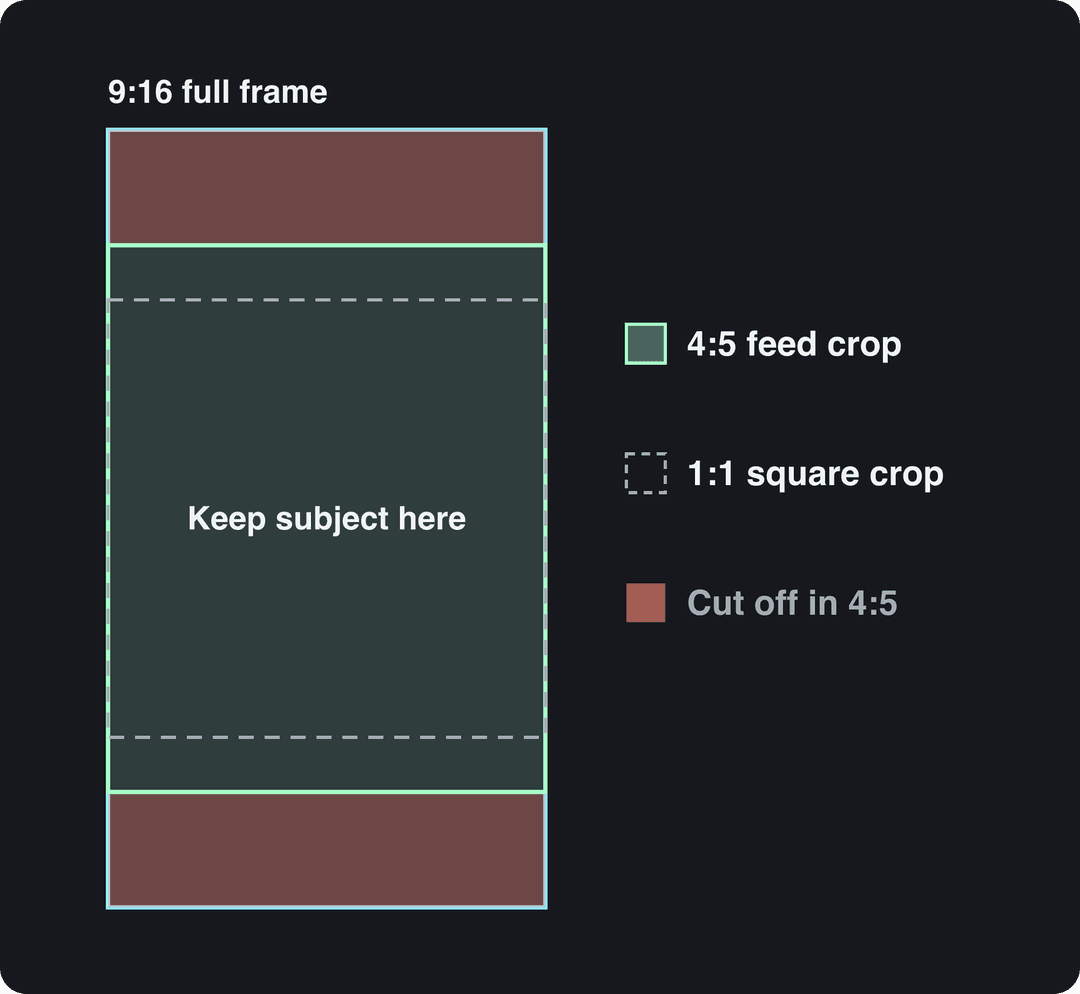
Your vertical video won't always be shown in full. YouTube replaces a 16:9 custom thumbnail with an auto-generated 4:5 thumbnail for vertical videos on the home and subscription pages, and profile grids show a cropped rectangle. Keep faces, products and on-screen text in the middle of the frame so the same 9:16 file still reads in a 4:5 or 1:1 crop.
How long should a social media video be?
As long as the idea needs and not a second longer. Length on its own barely separates winners from the rest. In the same Revid TikTok dataset, every length bucket from under 15 seconds to 10 minutes had a median between 58K and 76K views. Videos of 61 to 90 seconds reached a 70K median, and videos under 15 seconds had the lowest median (58K) but the most shares per view (1.41 per 100).
Length alone barely moves views: every bucket lands between 58K and 76K median views (the 790 videos over 10 minutes are a small, unusual group). Clips under 15 seconds get shared the most per view.
Source: Revid analysis of 176,367 TikToks with 1,000+ likes posted between Oct 1, 2025 and Oct 16, 2026 (61,203 creators)
Show the data
| Median views | Share that passed 1M views | Shares per 100 views | |
|---|---|---|---|
| Under 15 s | 57.6K | 11.6% | 1 |
| 16 to 30 s | 64.9K | 12.3% | 1 |
| 31 to 60 s | 61.8K | 11.8% | 1 |
| 61 to 90 s | 70.5K | 12.2% | 1 |
| 91 s to 3 min | 63.4K | 11.1% | 1 |
| 3 to 10 min | 76.4K | 12.4% | 1 |
| 10 min+ | 129.6K | 13.8% | 0 |
That is TikTok data, and the timeframe matters. Revid's full index across all posting dates, published with our short-form video statistics, found 16 to 30 second videos ahead with about 141K median views: the edge of very short videos has faded for recent posts. Short still wins on budgets, though. In HubSpot's 2026 State of Marketing Report, 49% of marketers named short-form video their top ROI-driving format, and in Sprout Social's 2026 Content Strategy Report, 52% of social media users said they are most likely to interact with short-form video (under 60 seconds) on Instagram, while only 19% favor videos longer than 60 seconds.
Use these decision rules:
- One tip, one joke or one reveal: cut until nothing else can go. Short clips get shared the most.
- A tutorial with steps: run as long as the steps need. On TikTok, only videos of at least one minute can earn under the Creator Rewards Program.
- Instagram reach: stay under 3 minutes if you want non-followers to see the reel.
- YouTube Shorts: up to 3 minutes, but check your music above one minute (see the warning in the editing section).
- In-depth reviews, vlogs and full courses: publish them as long-form YouTube videos and cut Shorts from them.
Prompt to try
Make a 30-second vertical video for home bakers that opens with the hook "Your sourdough is flat because of one thing you do before baking." Explain the poke test in three quick steps with close-up shots of dough and a cut loaf, bold captions, and a calm, friendly voice. End with "Follow for the shaping step next."
How to plan and script a social media video
The first seconds decide whether anyone sees the rest, so write the hook before anything else. Three openers work in almost every niche:
- A question your viewer already asks: "Why does your homemade bread come out flat?"
- A visual surprise: start on the finished result, the mess, or the odd object, then explain.
- A bold claim: "You're storing your coffee wrong, and it's why it tastes stale."
More openers to copy and adapt are in our list of TikTok hooks that stop the scroll. Then fill this structure:
| Part | What it does | Example (home bakery) |
|---|---|---|
| Hook | States the problem or shows the payoff | "Your sourdough is flat because of one thing you do before baking." |
| Setup | One sentence of context | "Most home bakers skip this check." |
| Value | The steps or proof, shown on screen | The poke test, the fold, the cut loaf |
| Payoff and call to action | Delivers the promise, asks for one action | "Follow for the shaping step next." |
Say less than you think. In Revid's TikTok data, videos with under 40 characters of speech had a 123K median, while videos talking throughout (300+ characters of speech) had 68K. If a shot can show it, cut the sentence that explains it.
For longer YouTube videos, the same skeleton stretches into a full arc: a hook, a promise of what the viewer will get, chapters, then the payoff. Keep the tone, colors and on-screen text style the same across platforms so people recognize you in any feed.
What equipment do you need to make social media videos?
A phone, a window and a cheap microphone. Upgrade in this order: light, then sound, then camera.
- Light: face a window and film in daylight. Natural light does more for a phone video than a new lens. When you film often or at night, a softbox kit gives you the same soft light on demand.
- Sound: viewers forgive soft focus but leave over muffled or echoing speech. Get an external mic before a new camera: a lavalier clipped to your shirt for talking to camera, or a shotgun mic for noisy rooms. Brands like Rode cover both.
- Camera: recent smartphones are enough for social video. A mirrorless camera adds control over depth of field and low light, but framing and composition matter more than the sensor.
| Gear | Under $100 | $100 to $500 | $500+ |
|---|---|---|---|
| Camera | Your smartphone | Mirrorless camera | Full-frame mirrorless camera |
| Light | Window light and a white reflector | Softbox kit | LED panel lights |
| Audio | Wired lavalier mic | Wireless lavalier kit | Shotgun mic on the camera |
| Editing | CapCut or InShot on mobile | DaVinci Resolve (free version) | Adobe Premiere Pro |
How to film social media videos with your phone
- Shoot vertical at 1080x1920 (or 4K if your phone and editor handle it), at 30 or 60 fps.
- Put the lens at eye level on a tripod or a stack of books. Low angles look accidental.
- Lock exposure and focus on your face or the product so the image doesn't pulse.
- Leave room for the interface. Captions, buttons and the username cover the bottom and the right side of the screen. Check your framing with the free TikTok safe zone overlay.
- Record a few extra seconds before and after each take so you have clean cut points.
- Film B-roll (hands, product close-ups, the screen) for every main shot. It hides cuts and gives faceless versions of the same video.
How to edit social media videos
Start with a rough cut. Lay your best takes in script order before you touch effects. It shows you fast whether the story works.
Cut every pause. Jump cuts between sentences keep the pace up on TikTok and Reels. Long-form YouTube can breathe more, but trim anything that repeats.
Add captions to every video. Many people scroll with the sound off, captions help viewers who are deaf or hard of hearing, and they let you repeat the key line on screen. Revid's AI caption generator adds synced captions in 100+ languages. Bold, high-contrast styles suit promos; smaller, cleaner text suits calm stories.
Use music you have the rights to. Trending sounds help discovery inside TikTok and Instagram, but only use them through the in-app library. Outside it, use royalty-free tracks you have a license for.
Grade color lightly. Warm tones read as energetic and friendly, cool tones as calm or serious. Pick one look and keep it across videos.
Save templates. Reusable intros, lower thirds, caption styles and export presets cut the time per video more than any shortcut. If you edit in Premiere Pro, this walkthrough shows a full workflow:
Faceless tutorials earned about 3x the median views of on-camera tutorials (156K vs 52K).
Source: Revid analysis of 176,367 TikToks with 1,000+ likes posted between Oct 1, 2025 and Oct 16, 2026 (61,203 creators)
Show the data
| Median views | Share that passed 1M views | |
|---|---|---|
| Faceless tutorials | 155.6K | 22.1% |
| Product or object tutorials | 80.7K | 14.9% |
| On-camera tutorials | 52.5K | 10% |
| Faceless storytelling | 72.7K | 13.3% |
| On-camera storytelling | 64.4K | 11.7% |
| Faceless comedy | 326.7K | 26.4% |
| On-camera comedy | 135.5K | 20.7% |
How to create social media videos without filming
If you don't want to film, Revid's social media video maker turns an idea, a script or a link into a finished vertical video:
- Paste a prompt, a script or a link (a blog post, a YouTube video, a product page). Or start from a video in Revid's library of about 2.77 million short-form videos with their engagement data and choose "Make it about your topic" to reuse its hook style and pacing for your niche.
- Revid writes the script and builds each scene with stock footage, AI images or AI video (models such as Seedance 2.5 and Google Veo 3), then adds a voice-over in 70+ languages, synced captions and music.
- Fix any scene in the timeline editor and export in 720p, 1080p or 4K at 30 or 60 fps.
- Publish or schedule to TikTok, Instagram and YouTube from one queue.
Sign-up is free and new accounts get free credits to try video creation, no credit card needed; regular creation then uses credits from a paid plan, starting at $39/month. Faceless formats are not a compromise either: in Revid's TikTok data, faceless tutorials had a 156K median versus 52K for on-camera tutorials.
Two rules apply to AI visuals. TikTok, YouTube and Meta all require you to label realistic AI-generated video, and TikTok and YouTube both say the label alone does not reduce distribution. YouTube also refuses to monetize mass-produced, template-style AI videos without the creator's own insight, so add your angle, your script and your examples.
How to adapt one video for every platform
Make one strong master video, then tailor it. A long YouTube video can become several vertical clips with Revid's long video to short video converter, and the key points can become a text post on LinkedIn or Facebook. To change the shape of a file, the free video resizer converts it to 9:16, 4:5, 16:9 or 1:1.
Don't paste the same file and caption everywhere. Re-export a clean version for each platform, rewrite the first line of the caption for that audience, and respect each platform's hashtag rules. Which format goes where:
| Format | Fits best on | Why |
|---|---|---|
| Short entertaining clips | TikTok, Instagram Reels, YouTube Shorts | Built for feeds where people swipe |
| Tutorials | YouTube, LinkedIn, Shorts | Viewers search for them and save them |
| Behind the scenes | Instagram, TikTok, Facebook | Shows the people and process behind a brand |
| Testimonials and reviews | LinkedIn, YouTube, Facebook | Buyers research before they commit |
| Product demos | Instagram, YouTube, Pinterest | Pinterest video Pins suit how-to and inspiration |
| Live streams | TikTok, YouTube, Instagram | Live Q&A builds a regular audience |
Going live on TikTok requires being at least 18 with 1,000 followers (the threshold may vary by region).
Prompt to try
Create a 20-second vertical TikTok for a reusable insulated coffee tumbler that opens on a cold, abandoned cup of coffee with the hook "My coffee used to be cold by 9 a.m." Show the tumbler in use during a busy morning commute as a light, funny before and after, filmed in a casual smartphone style. End with a short call to action to check the link in bio.
How to make TikTok videos that sell
People buy from short videos: in Adobe Express's 2024 survey of short-form video users in the US and UK, three in eight said they had bought a product or service after watching a short video about it. More figures are collected in Dash's video marketing statistics roundup. The videos that sell on TikTok rarely look like ads.
- Show the product in use, not on a table. A skit, a before and after, or a problem solved on camera beats a feature list.
- Pick formats with proven reach. In Revid's TikTok data, challenges (182K median) and comedy (155K) far outpaced tutorials (62K). A funny demo travels further than a dry one.
- Use Duets and Stitches to join conversations, but know they don't count as original content for Creator Rewards.
- Sell inside the app with TikTok Shop. In the US, affiliate creators must apply themselves, be at least 18 and have at least 1,000 followers.
- Read your analytics weekly. TikTok Studio shows retention, traffic sources and follower activity; Monetized Profiles has a walkthrough of TikTok account analytics.
How to post, schedule and measure your videos
Write the caption and hashtags. In Revid's TikTok data, captions of 41 to 80 characters had the best median (67K) and posts with no caption only 36K. Posts with 3 or 4 hashtags did best (75K and 77K medians), while 9 or more fell to 16K. On Instagram the cap is 5 hashtags anyway.
Post when your audience is online. TikTok Studio's Viewers tab shows when your viewers were most active over the last 7 days, and Instagram shows follower activity once you have at least 100 followers. As a starting point, posts at 3 to 6 a.m. US Eastern outperformed the evening in Revid's TikTok data, partly because those hours are daytime for English-speaking viewers in the UK, Europe, India and Asia.
Batch your production. Script several videos in one session, film them in another, edit in a third. Fewer setups means more output with the same hours. Plan it in a social media content calendar and leave open slots for trends.
Schedule from one place. Buffer and Hootsuite schedule posts across many networks. Revid publishes and schedules to TikTok, Instagram and YouTube from one queue, reports the views, likes and comments of every post, and its Auto-Mode workers can create a fresh video every day from a prompt or a content source.
Measure what predicts growth:
- Retention: where viewers drop off. A cliff in the first seconds means the hook failed; a slow slide means the middle drags.
- Shares and saves: the clearest sign a video was worth something to the viewer.
- Comments: the questions people ask are your next scripts.
- Clicks and sales: if views are high and clicks are low, rewrite the call to action, not the video.
Change one thing per video (hook, length or format) so you can tell what moved the numbers.
FAQ
What is the best app to make videos for social media?
It depends on your footage. CapCut and InShot are the easiest free editors for clips you filmed on your phone, DaVinci Resolve and Premiere Pro suit detailed desktop editing, and Revid generates complete videos (script, visuals, voice, captions) when you don't want to film.
Can I post the same video on TikTok, Instagram and YouTube?
Yes, as long as you upload a clean file to each and adjust the caption and hashtags. Keep Instagram versions under 3 minutes for non-follower reach and check music rights before posting a Short longer than one minute.
Do I need to label AI-generated videos?
Yes, when the video looks realistic. TikTok, YouTube and Meta require disclosure of realistic AI video or audio, and TikTok and YouTube state the label alone does not limit distribution or earnings.
How much does it cost to make a social media video?
It can cost nothing: a phone, window light and a free editor like CapCut are enough to start. A wired lavalier mic is the best first purchase, and AI tools such as Revid start at $39/month for generated videos.
How often should I post videos on social media?
Post as often as you can keep the quality steady, on a schedule you can repeat every week. Batching scripts, filming and editing is the simplest way to keep that schedule without burning out.
Sources
- Revid analysis of 176,367 TikToks with 1,000+ likes posted between Oct 1, 2025 and Oct 16, 2026 (61,203 creators)
- HubSpot, 2026 Marketing Statistics, Trends & Data (2026)
Charts and figures checked on November 6, 2026.


