Social Media Calendar Template: 7 Options and a Free Layout (2026)
Copy a free 10-column social media calendar template, fill it in 5 steps, and compare 7 options from Google Sheets and Trello to Hootsuite and CoSchedule.

On this page
A social media calendar template is a sheet or board with one row per post: date, time, platform, format, pillar, caption, hashtags, asset link, status and results. Copy the free layout below into Google Sheets, or start from a HubSpot, Trello, Airtable or Asana template; move to Hootsuite or CoSchedule when you need automatic publishing.
Most calendars break in the same place: the date is planned, the asset is not. A row that says "Reel, Thursday" with an empty file link is the post that quietly never goes out, so the layout below tracks each post's asset and status, not just its slot.
- Median TikTok views for posts with 4 hashtags, the best result
- 77K
- Revid analysis of 176,367 TikToks
- Median TikTok views for posts with 9 or more hashtags
- 16K
- Revid analysis of 176,367 TikToks
- Median TikTok views for Saturday posts, the best day
- 70K
- Revid TikTok study
- Maximum hashtags Instagram allows per post
- 5
- Instagram platform limit
Free social media calendar template: the 10 columns
Make one tab per month and one row per post per platform. A video you adapt for TikTok, Instagram and YouTube is three rows, because each version needs its own caption, hashtags and posting time.
| Column | What goes in it | Example |
|---|---|---|
| Date | Publish date | Tuesday, week 2 |
| Time | Publish time with its time zone | Morning, ET |
| Platform | One network per row | |
| Format | Reel, Short, TikTok, carousel, Story or text post | Reel |
| Pillar | The recurring theme the post belongs to | Behind the scenes |
| Hook and caption | The first line on screen, then the caption | "Nobody shows this part of the job" |
| Hashtags | The tags for this platform only | #smallbusiness #packingorders |
| Asset link | Link to the final video or image file | Drive or Dropbox link |
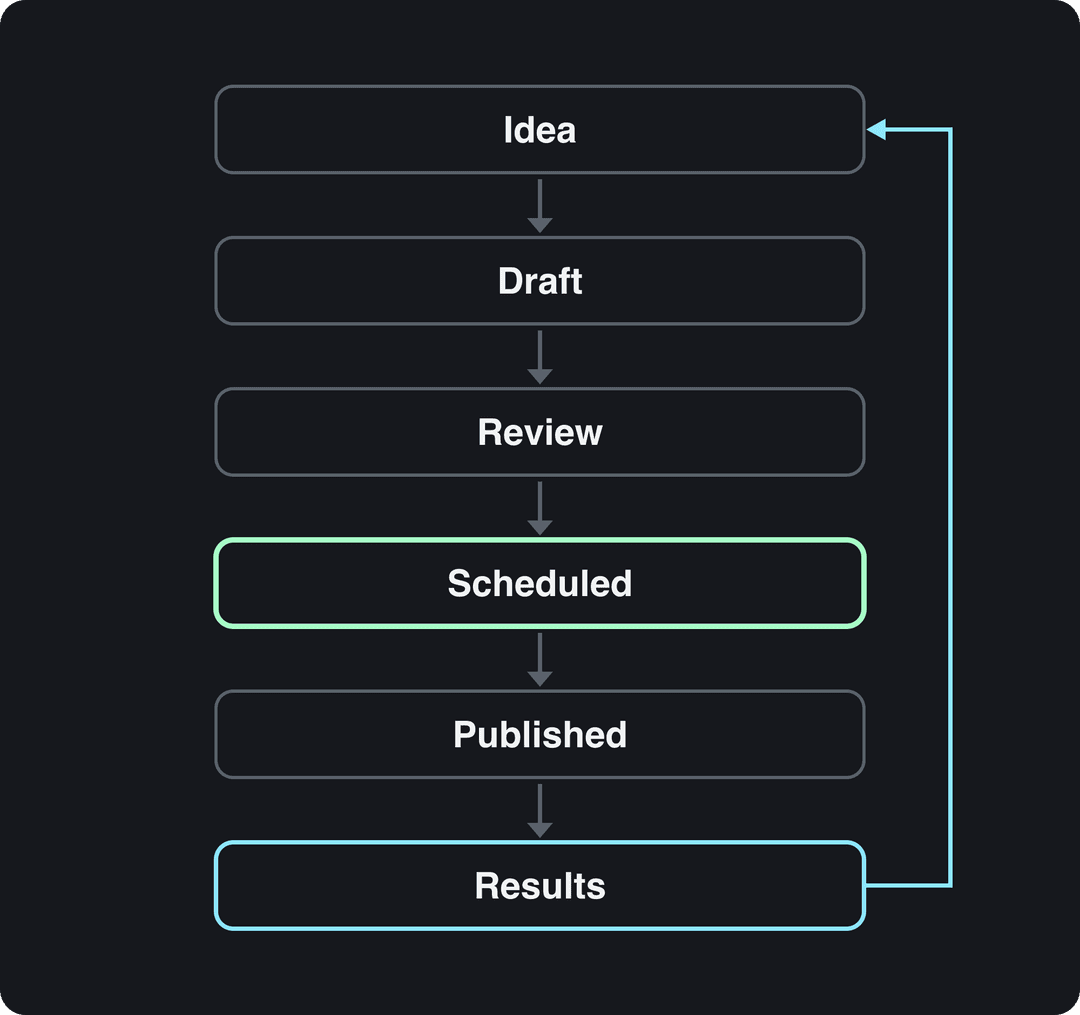
| Status | Idea, Draft, Review, Scheduled or Published | Review |
| Results | Views, likes, shares and comments after a week | Filled in later |
For a team, add Owner and Approver columns so every row has a name next to it. Turn Status and Platform into dropdowns (Data > Data validation in Google Sheets) so filters stay clean.
Build two sets of platform limits into the caption and hashtag columns. Instagram allows up to 5 hashtags per post and 2,200 characters per caption, and YouTube titles stop at 100 characters. On TikTok, more tags are not better: in Revid's analysis of 176,367 TikToks with 1,000+ likes posted between October 2025 and October 2026, posts with 4 hashtags had the best median (77K views), while 9 or more hashtags dropped to 16K. The full study on what makes a TikTok go viral covers the method and its limits.
Every row moves through the same stages, and the Status column is what stops a post from stalling between them.
Prompt to try
Make a 30-second vertical behind-the-scenes video for a small bakery packing online orders. Open with the hook "Nobody shows this part of the job" over a close-up of hands taping a box, then walk through three quick steps of packing with warm, natural lighting and upbeat music. End with a line inviting viewers to order for the weekend.
Posts with 3 or 4 hashtags earned the most views. Captions stuffed with 9 or more hashtags did worst of all, with median views cut by about 80%.
Source: Revid analysis of 176,367 TikToks with 1,000+ likes posted between Oct 1, 2025 and Oct 16, 2026 (61,203 creators)
Show the data
| Median views | Share that passed 1M views | |
|---|---|---|
| None | 51.1K | 9.8% |
| 1 | 64K | 11.8% |
| 2 | 71.3K | 12.7% |
| 3 | 75.4K | 13.1% |
| 4 | 77.2K | 13.4% |
| 5 | 67.3K | 12.1% |
| 6 to 8 | 71.8K | 12.7% |
| 9+ | 15.6K | 7.8% |
How to fill a social media calendar in 5 steps
- Pick the platforms you can sustain. Two platforms posted every week beat four posted when you remember. Add a network only when the current ones run on schedule.
- Set three or four content pillars. A bakery might rotate how it's made, customer orders, baking tips and offers. Spread them across the week so the same pillar never runs twice in a row, and pull timely ideas from TikTok trends today.
- Choose slots from your own audience data. TikTok Studio's Viewers tab shows when your viewers were most active over the last 7 days, and Instagram shows your followers' most active times once you have 100 followers. As a TikTok starting point, the same Revid study found weekdays within a few percent of each other (63K to 65K median views), Saturday the best day (70K), and posts at 3 to 6 a.m. US Eastern ahead of 5 to 9 p.m. The sample only includes videos that already passed 1,000 likes, and early US hours also cover daytime posting in Europe and Asia.
- Batch the production. Write a week of hooks in one sitting, produce the assets in a second, and paste each file into its Asset link cell before the row moves to Scheduled. A row without an asset stays in Draft.
- Review results weekly. Fill the Results column a week after each post, mark the winners, and plan next week's ideas from them. Our social media analytics report template gives you a layout for the monthly view.
For the full planning method (goals, pillars, cadence), read how to create a social media content calendar. For a planning sheet organized by pillar, see the social media content planning template.
The day matters far less than the hour: every weekday lands within a few percent of the others, and Saturday and Sunday posts pass 1M views slightly more often.
Source: Revid analysis of 123,704 English-language TikToks with 1,000+ likes posted between Oct 1, 2025 and Oct 16, 2026
Show the data
| Median views | Share that passed 1M views | |
|---|---|---|
| Monday | 63.5K | 12.5% |
| Tuesday | 63.5K | 12.4% |
| Wednesday | 62.7K | 12.5% |
| Thursday | 64.6K | 12.5% |
| Friday | 64.5K | 12.6% |
| Saturday | 70.2K | 13.4% |
| Sunday | 65.1K | 13.6% |
Which social media calendar template should you use?
| Option | Best for | Publishes posts for you | Free option |
|---|---|---|---|
| HubSpot template | Solo creators who like spreadsheets | No | Yes, free download |
| Google Sheets | Small teams editing one plan live | No | Yes, with a Google account |
| Trello | A visual Idea-to-Published pipeline | No | Free plan |
| Airtable | Many channels, custom fields, several views | No, only through integrations | Free plan with limits |
| Asana | Teams with tasks, approvals and deadlines | No | Limited; advanced features paid |
| Hootsuite | Scheduling and publishing from the calendar | Yes | Paid plans |
| CoSchedule | Marketing campaigns across channels | Yes, on plans with social scheduling | Free marketing calendar |
Three rules cover most cases:
- If you work alone and want to spend nothing, use Google Sheets or the HubSpot template, then copy each post into a scheduler such as Buffer.
- If several people touch each post, use Trello or Asana so every card has an owner and a due date.
- If you want the calendar itself to publish, choose Hootsuite or CoSchedule. Our roundup of tools to schedule video content compares more schedulers.
The 7 social media calendar templates compared
HubSpot social media calendar template
HubSpot offers a free downloadable spreadsheet template for planning posts by social network. It suits solo creators and small teams who want a ready structure without learning new software.
- Strengths: free, familiar spreadsheet logic, easy to rename columns and add networks.
- Limits: no publishing, and you keep it current by hand.
To set it up, download it from HubSpot, delete the networks you don't use, add the Asset link, Status and Results columns from the layout above, and block a weekly slot to update it.
Google Sheets social media calendar
Google Sheets is the simplest place to run the 10-column layout above: it is free with a Google account, several people can edit at once, and changes sync live. Make one tab per month, freeze the header row, and filter by Status to see what still needs an asset.
For a head start, browse social media calendar add-ons in the Google Workspace Marketplace. The search results mix calendar tools with unrelated apps, so check what each add-on does before installing it. Limits: everything is entered by hand and nothing posts automatically.
Trello social media calendar
Trello turns each post into a card you drag through lists such as Ideas, Draft, Review, Scheduled and Published. Labels mark the platform or campaign, attachments keep the video with its card, and due dates hold the publish date. There is a free plan.
Start from Trello's social media calendar template in its template gallery. Limits: no direct publishing, and a board with hundreds of cards gets hard to scan, so archive Published cards every month.
Airtable social media calendar
Airtable works like a spreadsheet with database features: the same posts appear in Grid, Calendar, Kanban or Gallery views, attachments show the image or video inline, and custom fields track campaign, audience or budget. Automations can send notifications or update records when a status changes.
It suits creators and teams running several channels who want to filter by any field. Limits: more setup than a spreadsheet, and advanced features need a paid plan, so check Airtable's pricing page for the current limits before you build.
Asana social media calendar template
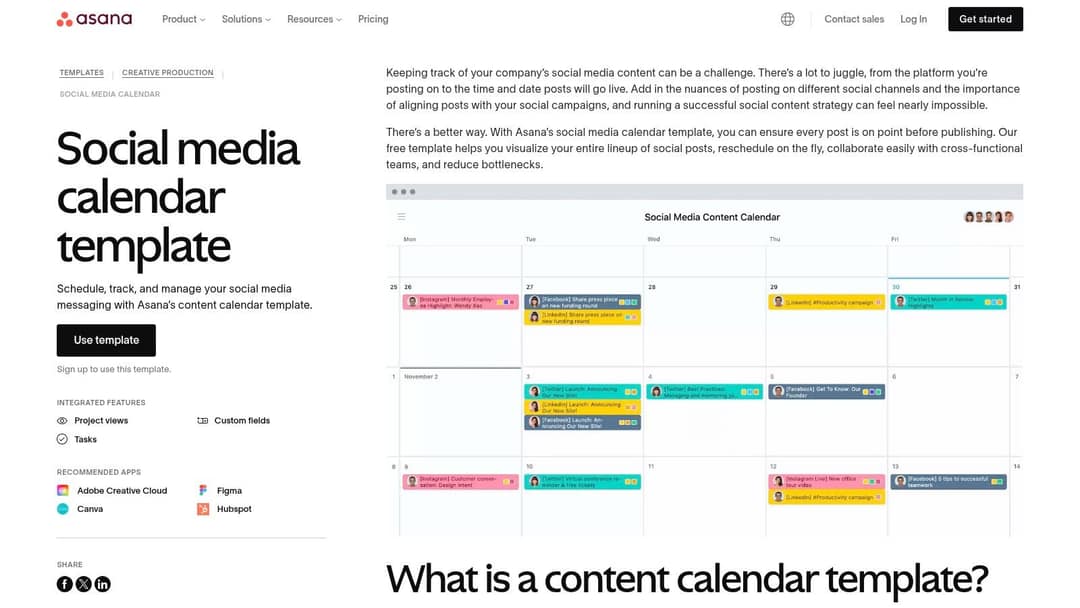
Asana's social media calendar template puts each post in a project with calendar and timeline views, so the writing, design, approval and publishing tasks behind it sit in one place. Custom fields hold the platform, format and hashtags, and rules can assign tasks or update statuses automatically.
Asana fits teams and agencies where several people touch every post. Limits: it does not publish to social networks, so pair it with a scheduler, and advanced features are on paid plans.
Hootsuite content calendar
Hootsuite is a scheduler first: its calendar shows every scheduled post across connected accounts, including X, Facebook, Instagram, LinkedIn, YouTube and Pinterest, and publishes them for you. Teams can assign posts, leave notes and route content through approvals, and analytics show how scheduled posts performed.
Limits: the calendar comes with a paid plan, and the feature set takes time to learn. Connect every profile first, then switch between the week and month views to spot gaps. Check current pricing on Hootsuite's site.
CoSchedule marketing calendar
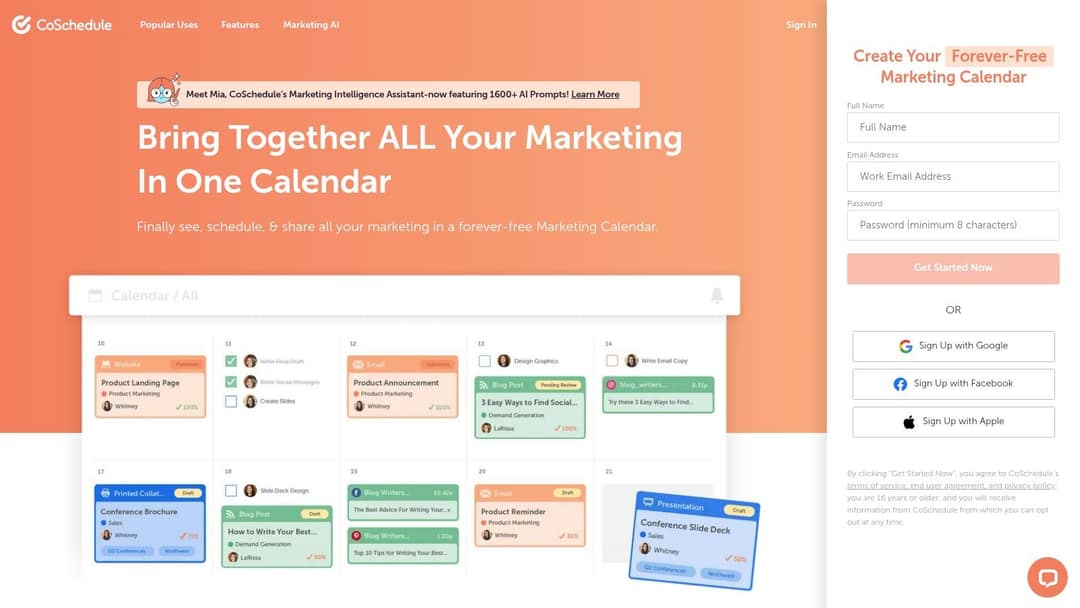
CoSchedule's marketing calendar plans social posts alongside blog posts, emails and campaigns in one view, and its sign-up page offers a free marketing calendar. Its ReQueue feature reshares evergreen posts automatically to fill gaps in the schedule.
It fits marketers coordinating launches across many channels. Limits: it is more than a solo creator needs, so check which plan includes social publishing and ReQueue before you commit.
Fill the video slots with Revid
In most calendars, the video rows are the ones that slip. With Revid's AI video generator, you turn a row's hook and pillar into a finished short video with a script, scene-by-scene visuals, a voice-over, synced captions and music. You can then schedule it to TikTok, Instagram and YouTube from one queue and paste the link into the Asset link column. For a slot that repeats every day, an Auto-Mode worker creates a fresh video daily from a prompt or a content source (the Growth plan, $39/month, includes 3). Every post published through Revid reports its views, likes and comments, which fills your Results column.
Prompt to try
Create a 25-second TikTok baking tip: "Your cookies spread too much because of this one mistake." Show soft butter versus chilled dough side by side, explain the fix in two short lines with bold captions, and close with a question asking viewers what they bake next.
FAQ
Is there a free social media calendar template?
Yes. The 10-column layout above works in Google Sheets for free, and HubSpot, Trello, Airtable and CoSchedule all offer free templates or free plans. Paid tools mainly add automatic publishing and team approvals.
Can a social media calendar post automatically?
Only if it is part of a scheduler. Spreadsheets, Trello, Airtable and Asana plan posts, while Hootsuite, Buffer, CoSchedule and Revid (for videos on TikTok, Instagram and YouTube) publish them.
How far ahead should you plan a social media calendar?
Plan pillars and campaigns a month ahead and finished posts a week or two ahead. That leaves room to react to trends without leaving rows empty on the day.
When publishing and managing YouTube content using Hootsuite, what can users do?
Users can schedule and publish YouTube videos from the same calendar as their other networks, and track how those posts perform in Hootsuite's analytics. For the exact upload fields Hootsuite supports for YouTube, check its help center, since they change with its YouTube integration.
Sources
- Revid analysis of 176,367 TikToks with 1,000+ likes posted between Oct 1, 2025 and Oct 16, 2026 (61,203 creators)
- Revid analysis of 123,704 English-language TikToks with 1,000+ likes posted between Oct 1, 2025 and Oct 16, 2026
Charts and figures checked on November 6, 2026.