How to Make a Video from Videos and YouTube Clips: 8 Steps
How to turn YouTube clips and other videos into a new video that is legal, original and monetizable: 8 steps, export settings, a credits template and the free options.
On this page
To make a video from videos or YouTube clips, collect clips you have the right to use (your own uploads, Creative Commons videos or short fair-use excerpts), then trim and arrange them in an editor around a script. Add your own commentary, captions and music, export in the right format, and credit every source.
The step most people skip decides whether the video earns anything. YouTube treats compilations that only stitch other people's clips together as reused content and won't monetize them, Facebook has deprioritized clip-stitching reels since March 2026, and TikTok's Creator Rewards Program doesn't count lightly modified reposts as original. The clips are raw material; your angle, edit and voice are the product.
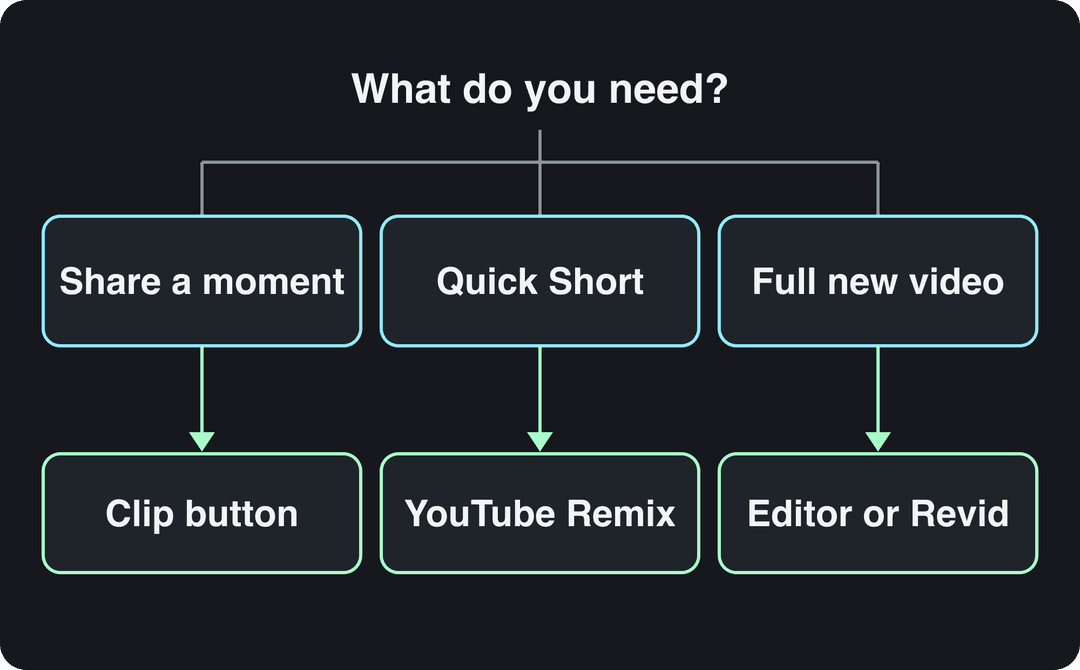
Three different tasks hide behind "making a YouTube clip", and each has a different tool. Pick yours first:
- Maximum length of a YouTube Short, and of a Reel recommended to non-followers
- 3 min
- YouTube Official Blog, October 2024
- How long most Shorts Audio Library songs can run in a 3-minute Short
- 90 s
- YouTube Help, October 2026
- Shares per 100 views for TikToks under 15 seconds, the highest of any length
- 1.41
- Revid analysis of 176,367 TikToks
- Video marketers who have used AI video tools to create or edit marketing videos
- 63%
- Wyzowl, December 2025
How to make a video from YouTube clips in 8 steps
Steps 1 to 4 happen before you open an editor, and they save most of the editing time.
1. Decide what your video adds
Write one sentence that says what a viewer gets from your video that the original clips don't give them. If you can't write it, you have a re-upload, not a new video.
| Format | What you add | Example angle |
|---|---|---|
| Ranked list | Your criteria and verdict | "Every goalkeeper mistake this season, ranked by how avoidable it was" |
| Breakdown | Analysis between clips | "Why these three trailers open with the same shot" |
| Critique or reaction | Your voice or on-camera commentary | "What this viral cooking video gets wrong about knife safety" |
| Themed supercut | A theme, context and a payoff | "Every time the judges say 'it's raw', and what went wrong" |
| Tutorial | Your own steps, with clips as examples | "How pro editors cut on action, shown in famous scenes" |
Know who you're making it for. Broad audience breakdowns like DemandSage's roundup of YouTube user statistics give a general picture, but your own YouTube Analytics shows who actually watches your channel.
2. Check that you can use each clip
Rank your sources from safest to riskiest:
- Your own videos.
- Clips the creator has given you written permission to use.
- Videos with a Creative Commons license (CC BY on YouTube), which allow reuse with credit.
- Short excerpts used under fair use for commentary, criticism, news or teaching.
The legal section further down explains how fair use works.
3. Find clips on YouTube
Search on YouTube, click Filters and choose Creative Commons under Features to see only videos you may reuse with credit. Search specific phrases: "cat misjudges jump" finds more usable clips than "funny cats". Put a phrase in quotation marks to match it exactly, and put a minus sign before a word (-dogs) to exclude it.
Before you keep a clip, check three things: a resolution of at least 720p (1080p is better), clear audio, and a moment that makes your point within a few seconds. A busy comment section on the original is a good sign the moment already holds attention.
4. Organize your files before editing
Create one project folder with subfolders for Clips, B-roll, Music, Sound effects and Credits. Rename every file by content (GoldenRetriever_SlidesOnIce_01.mp4, not clip_final_01.mp4) so you can find it mid-edit.
Start a credits file as you collect: channel name, video title, URL, license or permission, and the section you used. Rebuilding it after the edit is how sources get lost.
Prompt to try
Make a 60-second vertical breakdown video titled 'Three chefs, one mistake, and only one of them noticed.' Open with the most surprising moment as the hook, add one line of setup, then walk through three kitchen mistakes with a dry, fast voice-over and one joke between each. End with a verdict on which mistake was worst, with bold captions throughout.
5. Write the script before you cut
A script is what turns a pile of clips into a video. Use this structure:
- Hook: the promise or the most surprising clip, in the first line.
- Setup: one sentence on what the viewer is about to see and why it matters.
- Clips with your lines between them: each clip earns its place by proving a point.
- Payoff: the best clip or your verdict comes last.
- Close: one line pointing to your next video.
Sample hooks: "This is the moment a world record stopped counting." "Three chefs, one mistake, and only one of them noticed." You can draft the full voice-over with Revid's free AI script generator: give it the theme, your clip list in order and the tone ("dry, fast, one joke between clips").
6. Trim, arrange and preview
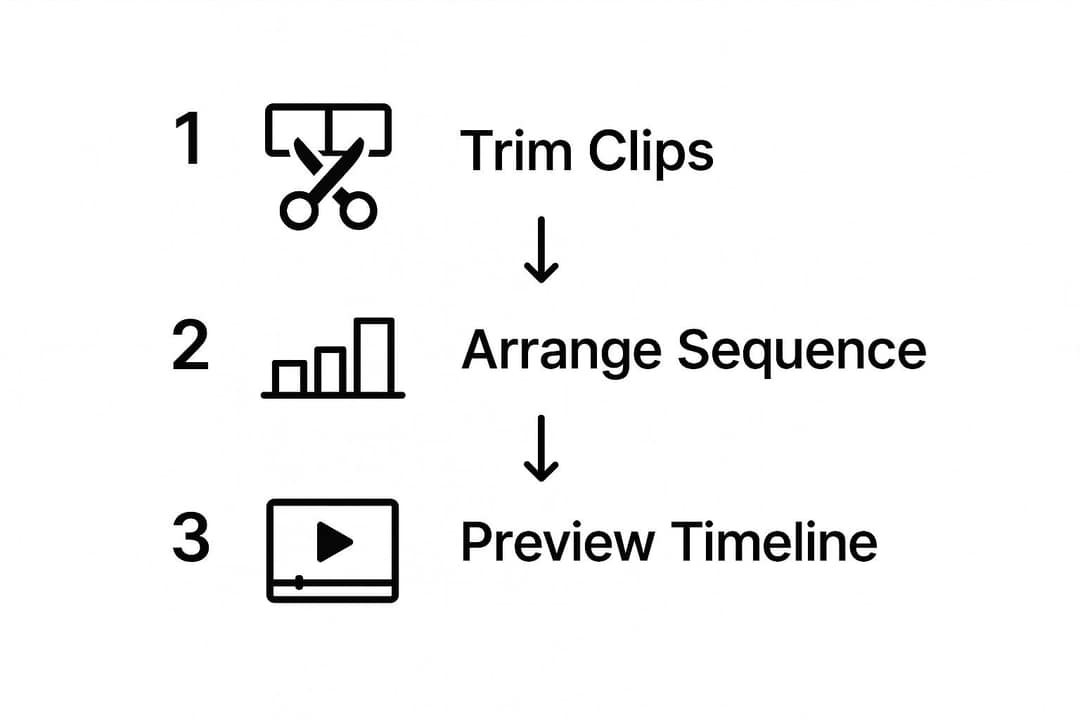
- Trim: cut each clip to the shortest stretch that makes your point. If 5 seconds does the job, don't use 15. Shorter excerpts also strengthen a fair-use position.
- Arrange: follow your script's argument, or order clips by escalation with the strongest last.
- Preview: watch the whole timeline at normal speed with sound, then once on mute. If a clip only makes sense with audio, add on-screen text.
Any editor can do this. CapCut has a free tier with 1080p export and auto-captions (see how Revid compares with CapCut), iMovie is free on Mac and iPhone, and DaVinci Resolve has a free desktop version.
7. Add your voice, captions and music
- Voice: record commentary or use an AI voice. This is usually where the transformation happens, so say something the clips don't.
- Captions: generate them with an AI subtitle generator, then correct names and slang by hand.
- Music: a claim on the background track can block or demonetize a video just like a claim on footage. Use the free YouTube Audio Library in YouTube Studio, read up on what royalty-free music licenses actually allow, or pick from these free music sources for creators. In YouTube Shorts, most Shorts Audio Library songs can run up to 90 seconds in a 3-minute Short; some are limited to 60 or 30 seconds.
8. Export, title and credit your sources
| Where you post | Aspect ratio | Resolution | Length limit |
|---|---|---|---|
| YouTube (regular video) | 16:9 | 1080p or 4K | 15 minutes by default; longer once your account is verified |
| YouTube Shorts | 9:16 or square | 1080x1920 | Up to 3 minutes |
| TikTok | 9:16 | 1080x1920 (recommended) | Uploads up to 60 minutes |
| Instagram Reels | 9:16 (1.91:1 to 9:16 accepted) | At least 720 px, 30 FPS minimum | Up to 20 minutes; reels over 3 minutes aren't recommended to non-followers |
YouTube titles can be up to 100 characters, but put the promise in the first few words: "Every Goalkeeper Mistake This Season, Ranked" beats "Funny Football Clips". A YouTube title generator gives you options to choose from. For thumbnails, YouTube recommends 3840x2160 (16:9), custom thumbnails need a verified account, and YouTube Studio on desktop can A/B test up to 3 titles and thumbnails (Shorts aren't eligible).
Put a credits block in every description:
Clips used, in order:
[timestamp] "Original video title" by Channel Name: [link]
License: Creative Commons (CC BY) / used with permission / excerpt for commentaryVideos include an AI voiceover; clip quotes are AI highlights without one. Clip and motion graphics quotes are minimums: the final charge depends on the source video or the footage generated. AI video clips are on the Pro model; the Base model costs 110 credits for 30 s.
Source: Revid public endpoint POST /api/public/v3/calculate-credits, queried October 29, 2026: workflow video-to-clips with 1 and 3 outputs, and prompt-to-video at 30 and 60 seconds with each media type. Cents = credits x $39 / 2,000, rounded.
Show the data
| Credits | US cents on Growth | |
|---|---|---|
| 1 clip from a YouTube link | 1 | 2 |
| 3 clips from a YouTube link | 3 | 6 |
| 30 s video, stock footage | 11 | 21 |
| 30 s video, animated AI images | 37 | 72 |
| 60 s video, animated AI images | 75 | 146 |
| 30 s video, motion graphics (estimate) | 190 | 371 |
| 30 s video, AI video clips (Pro model) | 341 | 665 |
How to make a video from clips with Revid
Revid handles two versions of this task:
- One long YouTube video you own or have the rights to: paste the link into the YouTube clip maker. The AI finds the strongest moments and cuts them into vertical clips with captions.
- Your own clips and photos: upload them to turn your videos into a story, and Revid builds a story out of them.
Then open the result in the timeline editor to reorder scenes, add a voice-over (1,000+ AI voices in 70+ languages), pick one of 30 caption styles, export in 720p, 1080p or 4K, and publish directly to TikTok, Instagram and YouTube. Sign-up is free and new accounts get free credits to try video creation, no credit card needed; regular creation then uses the monthly credits of a paid plan, from $39/month. You still need the rights to any footage you bring in. AI editing is now common practice: in Wyzowl's 2026 survey, 63% of video marketers said they had used AI video tools to create or edit marketing videos, up from 51% a year earlier (short-form video statistics).
Can you legally use YouTube clips in your video?
Yes, if you own the clips, have permission, use Creative Commons content with credit, or use short excerpts in a way that qualifies as fair use. Fair use is a US legal doctrine (other countries have narrower "fair dealing" rules), courts decide it case by case, and nothing here is legal advice.
The core test is whether your use is transformative: it adds new meaning, commentary or context instead of replacing the original. A film reviewer showing a scene to critique its lighting is transformative. A "top 10 funny moments" upload with no voice or analysis is not.
| Fair use factor | Favors fair use | Weighs against fair use |
|---|---|---|
| Purpose | Commentary, criticism, parody, education, news reporting | Direct re-upload, simple compilation, commercial reuse |
| Nature | Factual, published works (news footage) | Highly creative or unpublished works (a short film) |
| Amount | A small, necessary portion | A large share or the "heart" of the work |
| Market effect | Doesn't replace the original | Competes with or substitutes for the original |
The more rows land in the left column, the stronger your position. Three habits keep you safer:
- Use only what you need. Every extra second weakens the "amount" factor.
- Credit on screen and in the description. A small text overlay with the channel name while its clip plays is good practice.
- Expect Content ID anyway. An automated claim can hit a fair-use video; you can dispute it in YouTube Studio. A Short longer than one minute with any active Content ID claim is blocked worldwide and can't be monetized, so keep claimed material out of longer Shorts.
How to make a clip of a YouTube video
If you only want to share one moment, use YouTube's built-in Clip tool:
- Open the video and select Clip (the scissors icon) in the buttons under the player; on some screens it sits in the "..." menu.
- Drag the slider to select the section you want.
- Add a title, select Share clip and copy the link.
A YouTube clip is a link that plays that section of the original video. It doesn't create a file you can edit, and it only appears on videos where clipping is available. For other ways to cut a section from your own videos, see how to take clips from a YouTube video.
How to make clips from YouTube videos for free
- YouTube Clip tool: free, for sharing a moment as a link (steps above).
- YouTube Studio Editor: free trimming for your own uploads under Content, then Editor, then Trim and cut.
- YouTube mobile app: the Remix button under eligible videos, and the option to edit one of your own videos into a Short, turn a section into a new Short.
- Free editors: CapCut, iMovie and DaVinci Resolve for building a new video from clips you have the right to use.
How to make a Reel or Short from a YouTube video
- Pick a moment that works without context, or add one line of setup at the start.
- Reframe to 9:16 so the subject stays centered, and keep text away from the bottom of the frame where the app's buttons sit.
- Add captions, since many people scroll with the sound off.
- Keep Reels at 3 minutes or less so Instagram can recommend them to non-followers; Shorts also cap at 3 minutes.
Revid's YouTube to Instagram Reels converter does the cutting, reframing and captions from a link.
How long should a video made from clips be?
For a regular YouTube video, as long as every clip earns its place: when you're unsure, cut the weakest clip before adding another. For TikTok, Shorts and Reels, length matters less than most guides claim.
In Revid's analysis of 176,367 TikToks with 1,000+ likes posted between October 2025 and October 2026, every length bucket from under 15 seconds to 10 minutes had a median between 58K and 76K views. Videos under 15 seconds had the lowest median (58K) but the most shares per view (1.41 per 100 views). This is TikTok data on videos that already passed 1,000 likes, so it shows what successful videos have in common, not what causes success; the method is in our study of what makes a TikTok go viral.
Length alone barely moves views: every bucket lands between 58K and 76K median views (the 790 videos over 10 minutes are a small, unusual group). Clips under 15 seconds get shared the most per view.
Source: Revid analysis of 176,367 TikToks with 1,000+ likes posted between Oct 1, 2025 and Oct 16, 2026 (61,203 creators)
Show the data
| Median views | Share that passed 1M views | Shares per 100 views | |
|---|---|---|---|
| Under 15 s | 57.6K | 11.6% | 1 |
| 16 to 30 s | 64.9K | 12.3% | 1 |
| 31 to 60 s | 61.8K | 11.8% | 1 |
| 61 to 90 s | 70.5K | 12.2% | 1 |
| 91 s to 3 min | 63.4K | 11.1% | 1 |
| 3 to 10 min | 76.4K | 12.4% | 1 |
| 10 min+ | 129.6K | 13.8% | 0 |
The decision rule: if your video is one standout moment or reveal, post it short, because that's what people share. If it's a ranked list or breakdown with commentary, take the time the argument needs and keep the pace tight.
Can you make money from a video made of YouTube clips?
Yes, if the video is transformative and you have the rights to what you use. Each platform draws the line a little differently:
- YouTube: content that only reads out material you didn't write, or relies on mostly non-verbal reactions, counts as reused content and can't be monetized, and the policy applies to the whole channel. On July 15, 2025, YouTube renamed its "repetitious content" policy to "inauthentic content" to cover mass-produced videos. AI tools are allowed when the result shows your creative vision.
- TikTok: Creator Rewards only pays on original videos at least one minute long, and Duets, Stitches and lightly modified reposts don't count as original.
- Facebook: since March 2026, reaction-only, clip-stitching and narrate-what's-on-screen reels are treated as unoriginal and deprioritized, and repeat offenders can be demonetized.
The Facebook rule is the useful warning: describing what's on screen isn't commentary. Add analysis, a verdict or context the viewer didn't have.
FAQ
How many seconds of a YouTube video can I use without permission?
There is no safe number of seconds. Fair use weighs purpose, amount, the nature of the work and market effect together, so a short clip can still infringe and a longer one can qualify if your commentary needs it. Use the shortest excerpt that makes your point.
Will I get a copyright strike for using YouTube clips?
Usually the first thing you get is a Content ID claim, which can block the video or send its revenue to the rights holder but isn't a strike. Strikes come from formal takedown requests, and three active copyright strikes get a channel terminated.
Can I use Creative Commons YouTube videos in a monetized video?
Yes. YouTube's Creative Commons option is the CC BY license, which allows reuse, including commercial reuse, as long as you credit the original creator. You still need to add your own value to pass YouTube's reused content policy.
What is the easiest way to make a video from videos on a phone?
Use a mobile editor such as CapCut or iMovie on iPhone: import the clips, drag them into order, trim each one, add text and music, and export in 9:16. For clips from YouTube, start with videos you own or have permission to use.
Do I need to credit clips I use under fair use?
Credit doesn't make a use fair, but it shows good faith and is required for Creative Commons clips. List each channel, video link and the section you used in your description.