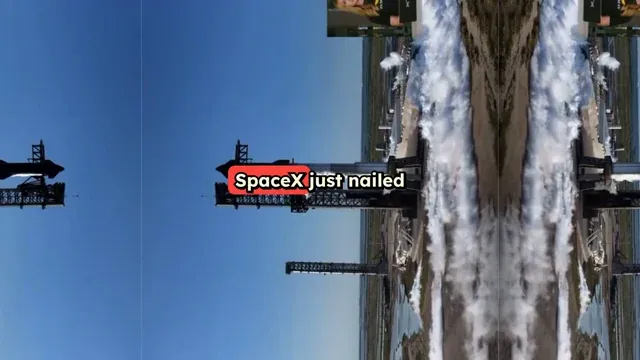
Sum up sharship flight 6, share how it went almost perfectly
booster catch by Mechazilla was not attempted because of an antenna failure (coming from take off)
but starship heat shield worked very well and landing on the ocean was simulated
Source Media
FINAL VIDEO
How to Create a Story from Video and Images in 3 Easy Steps
1 Upload Your Videos and Images
Start by importing your raw footage, photos, or clips. Whether you want to create a story from video clips of a recent trip or turn images into a story with AI for a brand, simply upload your media to the Revid AI platform.
2 Provide a Prompt and Select Options
Tell the AI what your story is about. You can leave it open-ended or give specific directions. You can also enable our Style Transfer feature to give your images a unique artistic look.
3 Generate Your AI Story Video
Click generate and let our video to story generator do the heavy lifting. In minutes, the AI will find the narrative, sequence your media, add a voiceover, and apply captions. Your cohesive, story-driven short is now ready for TikTok, Instagram Reels, or YouTube Shorts!
01
Video to Story Generator That Finds the Narrative in Your Footage
Revid's video to story generator watches your footage and does what most editors spend hours doing manually finding the emotional arc, identifying the key moments, and assembling them into a coherent story with narration and captions that pull the viewer through from start to finish. Upload any video clip, and the AI produces a complete story-driven short in minutes, ready for TikTok, Instagram Stories, or YouTube Shorts.
02
Turn Images into a Story with AI
Got a collection of photos but no idea how to turn them into compelling video content? Revid's image to story AI takes your pictures, reads the visual context, and builds a narrative around them automatically. Whether you are working with travel photos, product shots, event pictures, or personal memories, the AI sequences your images, writes a story to connect them, and produces a finished video complete with voiceover and captions. No manual arrangement, no scripting, no editing required.
03
Video to Story Converter, No Editing Experience Needed
Revid's video to story converter gives any creator the ability to transform raw footage into polished, story-driven content without touching a timeline. Drop in your video link or upload your clip, let the AI identify the narrative worth telling, and download a finished story video ready to post anywhere. It works for travel content, brand storytelling, personal vlogs, and anything else where great footage deserves a better story wrapped around it.
More Tools
Explore Similar Social Media AI Video Tools
Discover more ways to create engaging videos with our AI-powered tools
FAQs
Frequently Asked Questions
What is the Create Story from Video tool?
Our Create Story from Video tool is an advanced AI story video creator that transforms your raw videos and images into a compelling, cohesive narrative. Instead of spending hours editing, our video to story generator watches your footage, identifies key moments, and automatically assembles them into a polished social media short complete with voiceover and captions.
How do I create a story from video clips using this tool?
To create a story from video, simply upload your video clips or images to Revid AI and provide a brief text prompt explaining what the story is about. Our video to story converter will automatically sequence your media, write a script, generate an AI voiceover, and apply captions to produce a ready-to-post video.
Can I turn images into a story with AI?
Absolutely! This tool isn't just for videos; it's a powerful image to story AI as well. If you have a collection of photos—like travel memories or product shots—you can upload them, and the AI will analyze the visual context to build a narrative, seamlessly turning your images into a story with AI.
Do I need video editing experience to use the video to story generator?
No video editing experience is needed. Our video to story converter is designed to be completely automated. The AI handles the emotional arc, clip sequencing, scripting, and captioning. You just supply the media and a prompt, and the AI story video creator does the rest.
What is the Style Transfer feature?
Style Transfer is a premium AI feature that allows you to transform the visual aesthetic of your uploaded images into a specific art style (like Anime, Pixar, Ghibli, or 3D Render). Applying this to turn images into a story with AI costs 16 credits per image, but it yields incredibly unique and highly engaging visual results.
Can uploaded characters or mascots talk in the video?
This tool does not animate uploaded characters or mascots to speak. It focuses on turning your uploaded videos and images into a narrated story with voiceover and captions. For talking characters, explore Revid's AI avatars and saved AI characters.
What platforms are the generated story videos optimized for?
When you create a story from video using our tool, the default output is optimized in a 9:16 aspect ratio. This makes your final AI-generated story perfectly formatted for TikTok, Instagram Reels, YouTube Shorts, and Snapchat.
How does the AI know what story to tell?
Our AI story video creator analyzes both the visual context of your uploaded videos and images, as well as the text prompt you provide. By combining your creative direction with advanced image recognition, the video to story generator crafts a logical, engaging narrative arc that fits your media perfectly.
How much does it cost to create a story from video?
The base cost depends on the length of the generated video and your subscription plan's credit system. Standard generation uses standard credits. However, if you choose to use the Style Transfer feature to apply artistic filters when you turn images into a story with AI, it will cost an additional 16 credits per image.
Can I edit the story after the AI generates it?
Yes. Once the video to story generator has finished creating your initial video, you can use Revid AI's built-in editor to make adjustments. You can tweak the captions, change the background music, or adjust the timing to ensure your final AI story video is exactly how you envisioned it.
RevidAI's Viral Search and Channel Watcher surface the formats, creators, and trends getting attention right now, then help you turn them into ideas of your own.
Discover winning video formats in your niche
Follow creators and channels that matter
Start with proven ideas instead of guessing
2
Turn An Idea Into A Story.
Found something worth making? Revid AI writes the script, suggests the structure, and turns links, prompts, or topics into complete video concepts.
Start with a prompt, topic, or URL
Generate scripts inspired by proven patterns
Build stories designed to keep people watching
3
Generate The Finished Video.
Script, voiceover, visuals, subtitles, and editing all come together in one workflow. No stitching together five different tools.
Turn text into complete, multi-minute videos
Generate everything in one place
Refine the result in the editor
4
Publish Everywhere.
Share your videos to TikTok, YouTube, Instagram, and wherever your audience is.