How to Turn a YouTube Video Into a Short: 4 Ways, Step by Step
Cut one self-contained moment, reframe it to 9:16 and keep it under 3 minutes. Here is how to do it in the YouTube app, in CapCut or DaVinci Resolve, or in batches with AI.

On this page
To turn a YouTube video into a Short, cut one self-contained moment of 3 minutes or less, reframe it from 16:9 to vertical 9:16, and upload it: YouTube treats any square or vertical video up to 3 minutes as a Short. The fastest route is the YouTube app's Edit into a Short tool.
Shorts are still where small channels get seen. In Socialinsider's 2026 study of 69 million short-form videos, accounts under 5,000 followers averaged 15,160 views per Short, against 625 per Instagram Reel and 350 per TikTok. The usual mistake is a lazy crop: a horizontal clip with black bars, or a speaker sliced in half, gets swiped before the first line lands.
- Maximum length for a square or vertical video to count as a YouTube Short
- 3 min
- YouTube Official Blog, October 2024
- Average views per Short for accounts under 5,000 followers (vs. 625 Reels, 350 TikTok)
- 15,160
- Socialinsider, August 2026
- Daily YouTube Shorts views
- 200B+
- YouTube Official Blog, August 2026
- YouTube channels publishing Shorts each day
- 10M+
- Alphabet, April 2026
4 ways to turn a YouTube video into a Short
| Method | Best for | Speed | Control | Watch out for |
|---|---|---|---|---|
| YouTube app: Edit into a Short | One quick clip from your own video | Fastest | Low: trim, text, music | Little control over framing; mobile only |
| Mobile editor (CapCut) | Clips with styled text, effects and captions | Medium | Medium | Premium effects and most AI features are paid |
| Desktop editor (DaVinci Resolve) | Exact framing, color and audio | Slowest | Full | Learning curve; needs a capable computer |
| AI clip maker (Revid) | Several Shorts from one long video | Fast in batches | Medium: edit after generation | Review the opening of every clip |
Pick by volume. If you need one clip today, use the YouTube app. If you run a long-form channel and want several Shorts from each upload, start with an AI clip maker and fix the clips in an editor. If color, framing and audio have to be exact, cut it in a desktop editor.
The effort pays because the Shorts feed is enormous and crowded. YouTube said in August 2026 that it sees over 200 billion daily Shorts views, and Alphabet said that as of March 2026 more than ten million channels were publishing Shorts each day. Our page of sourced YouTube Shorts statistics tracks the official figures, and DemandSage's YouTube Shorts statistics roundup collects third-party numbers.
Step 1: Pick a moment that works on its own
The clip you choose matters more than any edit. A random 60-second chunk from the middle of a long video fails because it depends on context the viewer never saw. Skip slow intros and long explanations and look for peaks:
- Emotional peaks: genuine surprise, a real laugh, visible frustration.
- One quick win: a single tip pulled from a long tutorial, such as one keyboard shortcut from a 20-minute software walkthrough.
- Reveals: the twist in a vlog, the result of an experiment, the before-and-after of a renovation.
- Punchlines: the setup and the joke, with everything that needs outside context cut.
The test is simple: if a viewer has to wonder what happened before the clip started, pick another moment. Favor clips that loop cleanly, where the last frame leads naturally back into the first, because every replay adds watch time.
Emotion beats importance. In Revid's analysis of 176,367 TikToks with 1,000+ likes posted between October 2025 and October 2026, videos whose dominant mood was outrage had a median of 156K views and humor 121K, while inspirational videos had only 45K (Revid's study of what makes TikToks go viral). This is TikTok data, the sample only holds videos that already passed 1,000 likes, and it shows what top videos have in common rather than what causes views. Still, it is a useful rule for Shorts too: cut the moment with the strongest reaction, not the one you think is most important.
High-arousal emotions (outrage, humor, sadness) earned the most views. Calm, inspirational videos earned the least, even though they collect the most likes per view.
Source: Revid analysis of 176,367 TikToks with 1,000+ likes posted between Oct 1, 2025 and Oct 16, 2026 (61,203 creators)
Show the data
| Median views | Share that passed 1M views | |
|---|---|---|
| Outrage | 156K | 23.7% |
| Humor | 121K | 19.3% |
| Sadness | 104.4K | 16.5% |
| Excitement | 92.5K | 15.9% |
| Joy | 89.9K | 18% |
| Informative | 64.1K | 11.2% |
| Neutral | 61.2K | 11.5% |
| Inspirational | 44.6K | 11.3% |
How long should a Short cut from a long video be?
As long as the moment needs, and never more than 3 minutes, or YouTube will not treat it as a Short. In Revid's recent TikTok data, length barely separated the winners: in the same 12-month study, every length bucket from under 15 seconds to 10 minutes had a median between 58K and 76K views. Clips of 61 to 90 seconds reached 70K, and clips under 15 seconds had the lowest median (58K) but the most shares per view (1.41 per 100 views).
Length alone barely moves views: every bucket lands between 58K and 76K median views (the 790 videos over 10 minutes are a small, unusual group). Clips under 15 seconds get shared the most per view.
Source: Revid analysis of 176,367 TikToks with 1,000+ likes posted between Oct 1, 2025 and Oct 16, 2026 (61,203 creators)
Show the data
| Median views | Share that passed 1M views | Shares per 100 views | |
|---|---|---|---|
| Under 15 s | 57.6K | 11.6% | 1 |
| 16 to 30 s | 64.9K | 12.3% | 1 |
| 31 to 60 s | 61.8K | 11.8% | 1 |
| 61 to 90 s | 70.5K | 12.2% | 1 |
| 91 s to 3 min | 63.4K | 11.1% | 1 |
| 3 to 10 min | 76.4K | 12.4% | 1 |
| 10 min+ | 129.6K | 13.8% | 0 |
Revid's full TikTok index across all posting dates (about 2.39 million videos) told a different story, with 16 to 30 second videos on top at about 141K median views. For recent posts, that edge of very short clips has faded. Use these rules instead of a fixed target:
- One tip or one punchline: keep it tight, often under 30 seconds.
- A story or demo with a payoff: let it run past a minute if every second moves it forward.
- Claimed music in the clip: stay under 1 minute (see the warning below).
How to turn a YouTube video into a Short in the YouTube app
Edit into a Short works on videos on your own channel and needs no other app.
- Open the YouTube app and go to the long video on your channel.
- Tap Remix below the player (on some app versions it sits under Create), then choose Edit into a Short.
- Drag the selection to the segment you want. The tool limits how much of the video you can pull, so check the length shown on screen.
- Adjust the framing if the layout options allow it. If your subject sits off-center, an editor will do a better job.
- Add text, a track or captions, tap Next, write a title and upload.
The tool lives in the mobile app. On a computer, export a vertical file from an editor and upload it as described below.
How to make Shorts from a YouTube video in an editor
An editor gives you real control over framing, captions and pacing. CapCut is the quickest option on a phone or desktop, and DaVinci Resolve gives the most precise control over framing, color and audio.
- Get the source file. Use your original export, or download the video from YouTube Studio (Content, then the video's options menu, then Download).
- Set up a 9:16 project. 1080x1920 is the common vertical size.
- Cut the segment. Start on the first strong line and delete greetings, filler words and pauses.
- Reframe the shot. Crop and reposition so the subject stays inside the vertical frame (layouts below).
- Add burned-in captions and keep them inside the YouTube Shorts safe zone so the title and buttons do not cover them.
- Export and check the length. Vertical, 3 minutes or less.
- Upload from the YouTube app or from YouTube on a computer. A vertical file up to 3 minutes is classified as a Short automatically.
Reframing is where most repurposed Shorts go wrong. A 9:16 crop of a 16:9 frame keeps only about a third of its width, so you have to choose which third:
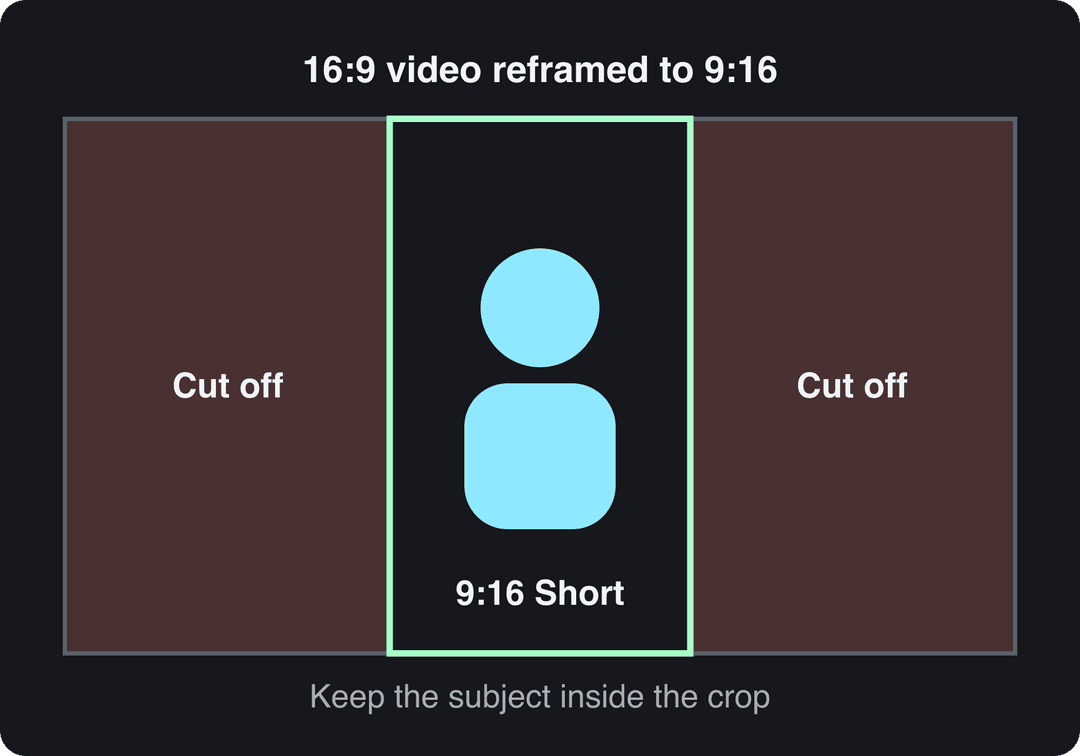
| Layout | Use it for | How |
|---|---|---|
| Crop and follow the subject | One speaker or one action | Scale to fill the frame, then keyframe the position as the subject moves |
| Split screen | Podcasts and interviews with two speakers | Stack each speaker in one half of the frame |
| Blurred background | Wide shots, slides, screen recordings | Place the clip in the middle over a blurred, enlarged copy of itself |
| Black bars | Nothing | Reads as a lazy repurpose; avoid it |
For the mechanics in each editor, see our guide to changing a video's aspect ratio, or run the clip through Revid's free video resizer to convert it to portrait 9:16. Up North Media's social media size guide lists the 9:16 format next to other platform sizes.
How to make YouTube Shorts fast with AI
Cutting clips by hand takes the longest when one long video holds several good moments. An AI clip maker does the search and the first cut for you.
- Paste the video's link into Revid's YouTube clip maker.
- The AI picks the strongest moments and returns them as short vertical clips with captions.
- Open each clip in the timeline editor: trim the first seconds so it starts on a strong line, and fix any caption errors.
- Publish or schedule the clips to YouTube, TikTok and Instagram from one queue.
Sign-up to Revid is free and new accounts get free credits to try video creation, no credit card needed; regular creation then uses the monthly credits of a paid plan, from $39/month. Review every clip before it goes out: the AI finds candidates, but you know which moments your audience cares about.
Before you publish: title, captions, music and links
Packaging decides whether a good clip gets watched. Check these before you tap upload:
- Title: up to 100 characters, but the best ones are short and tease a result or ask a question. A YouTube title generator helps when you are stuck.
- #shorts: optional. It does not make a video a Short; the length and aspect ratio do.
- Captions: many people scroll with the sound off. Burn bold captions into the video, or add them with an AI caption generator.
- Music: most Shorts Audio Library songs can play for up to 90 seconds in a Short, though some tracks are limited to 60 or 30 seconds.
- Related video: in the Short's details, link the full video so interested viewers can jump to it.
- Hashtags: two or three specific to the topic beat a long list.
- Thumbnail: verified accounts can upload a custom Shorts thumbnail in YouTube Studio on a computer; YouTube recommends 9:16 at 2160x3840.
https://www.youtube.com/embed/PMQvXw39Aok
Mistakes that keep repurposed Shorts from getting views
- A clip that needs context. If the joke or point depends on the previous five minutes, viewers swipe.
- A bad crop. A cut-off forehead, on-screen text pushed out of frame, or black bars top and bottom.
- A soft image. Cropping a 1080p horizontal video to vertical throws away most of its pixels, so export from the highest-resolution source you have, ideally 4K.
- No captions. Silent viewers miss the point entirely.
- No Related video link. You lose the easiest path from the Short back to the full video.
- Claimed music in a Short over 1 minute. It gets blocked worldwide.
For finishing touches, our tips on editing YouTube Shorts cover pacing and text, and Gainsty's overview of content repurposing strategies shows how Shorts fit into a wider repurposing plan.
FAQ
Can I change an existing YouTube video into a Short?
Not with a setting. YouTube classifies a video as a Short at upload when it is square or vertical and up to 3 minutes long (for uploads since October 15, 2024), so a horizontal video stays a regular video. Cut a vertical version and upload it as a new Short, or use Edit into a Short in the app.
Can you make money from Shorts cut from your long videos?
Yes, if your channel is in the YouTube Partner Program: Shorts share in the Shorts Feed ad revenue pool, and you keep 45% of your allocation. From February 1, 2027, earning Shorts ad revenue in a month requires at least 10 million qualified Shorts views in the last 90 days.
Will YouTube penalize me for reusing my own videos as Shorts?
No. Cutting Shorts from your own long videos is normal, and YouTube built Edit into a Short for exactly that. The reused content policy targets material you did not create, such as reading out other people's text or reactions that are mostly non-verbal.
How can AI repurposing tools improve a Short's hook and watch time?
They read the transcript to find moments that make sense on their own and start each clip on a strong line instead of a warm-up. Revid's free Deep analysis (up to 60 videos a day) also breaks down why any video's hook works, so you can rewrite your opening line or on-screen text before you publish.
How do I create a short video from scratch instead?
Start from one idea, write a hook for the first line, film or generate vertical footage, and add captions. Our guide on how to create short videos walks through it step by step.
Sources
- Revid analysis of 176,367 TikToks with 1,000+ likes posted between Oct 1, 2025 and Oct 16, 2026 (61,203 creators)
- YouTube Official Blog, Tall updates coming to Shorts (October 2024)
- Socialinsider, TikTok vs. Reels vs. Shorts: 2026 Engagement Data (August 2026)
- YouTube Official Blog, New opportunities to earn and changes to the YouTube Partner Program (August 2026)
- Alphabet, Q1 2026 earnings call transcript (April 2026)
Charts and figures checked on November 6, 2026.