How to Take Clips From YouTube Videos: 3 Methods, Step by Step
YouTube's Clip button gives you a link, not a file. Here is how to share a moment in seconds, and how to turn your own long videos into clips for TikTok, Reels and Shorts.

On this page
To take a clip from a YouTube video, click Clip under the player, select up to 60 seconds, add a title and click Share clip. That creates a shareable link, not a video file. To post clips on TikTok, Reels or Shorts, cut them from your own video file with an editor or an AI clip maker.
Most guides blur those two jobs, and it costs people hours. A YouTube clip only plays inside the original video, so you can't upload it to TikTok, and ripping other people's videos breaks YouTube's Terms of Service. The route that works for growth is your own long videos: one recording can feed short clips for weeks if you pick the right moments.
- Longest clip you can share with YouTube's Clip button
- 60 s
- YouTube Clip feature
- Maximum length of a YouTube Short (square or vertical)
- 3 min
- YouTube Official Blog, October 2024
- Viewers who stay to the end of business videos under 1 minute
- 65%
- Vidyard, 2024
- Video marketers who have used AI video tools to create or edit videos
- 63%
- Wyzowl, December 2025
Three ways to take clips from a YouTube video
| Method | Best for | What you get | Time |
|---|---|---|---|
| YouTube's Clip button | Sharing a moment from any video | A link that plays a section of the original (up to 60 seconds) | Under a minute |
| Edit into a Short (YouTube app) | Turning part of your own long video into a Short on YouTube | A Short linked to the original | A few minutes |
| AI clip maker or video editor | Posting your own clips on TikTok, Reels, Shorts, X or LinkedIn | A video file you control, vertical and captioned | Minutes with AI, longer by hand |
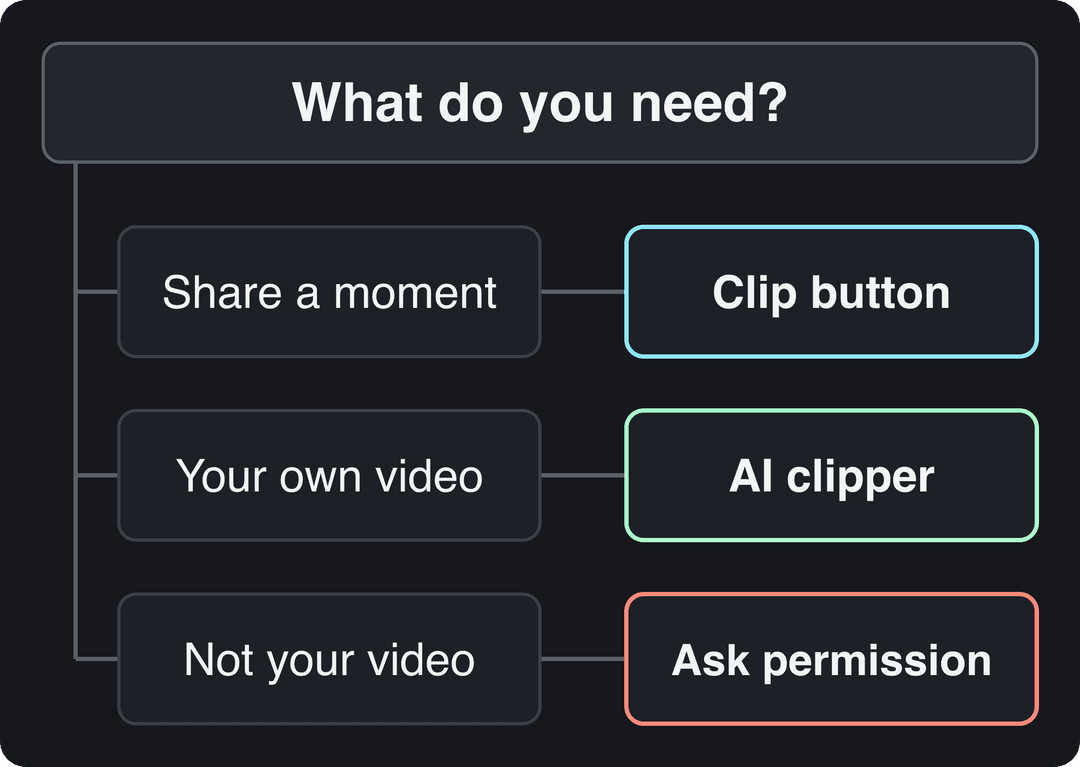
The decision rule is simple. If you only want to send someone a moment, use the Clip button. If you want to publish the clip anywhere, you need the file, which means your own video or the creator's written permission.
How to clip a YouTube video with the Clip button
On a computer:
- Open the video on youtube.com and sign in.
- Click Clip (the scissors icon) below the player. If you don't see it, open the three-dot menu next to Share.
- Drag the edges of the selection to the section you want, up to 60 seconds.
- Add a title so the clip makes sense to someone who hasn't seen the full video.
- Click Share clip, then copy the link or send it straight to a platform.
In the YouTube app, tap Clip in the row of buttons under the video (swipe that row sideways if it's hidden) and follow the same steps.
Your clips are saved under Your clips in the You tab (Library on older versions of the app). Three limits to know before you rely on them:
- A clip is a pointer to the original. If the creator deletes the video or makes it private, your clip stops working.
- Viewers can open the full video from the clip, which makes clips a good way to send people to an exact moment, not a way to build your own content.
- The button doesn't appear on every video. Creators can turn clipping off, and some video types, such as content made for kids, don't support it.
How to take clips from your own YouTube videos for TikTok, Reels and Shorts
Step 1: get the source file
Start from your original export whenever you still have it: it's the sharpest version you will ever have. If you don't, download your upload from YouTube Studio: open Content, hover over the video, click the three-dot Options menu and choose Download. The Studio copy can be lower quality than what you uploaded, so treat it as the fallback.
Step 2a: let an AI clip maker find the moments
Scrubbing a long video for the few lines worth posting is the slowest part of clipping. Revid does that pass for you:
- Open Revid's YouTube clip maker and paste the link to your video.
- The AI goes through the video and returns short vertical clips built around its strongest moments.
- Open a clip in the timeline editor to move the start and end points, pick one of 30 caption styles and add a headline.
- Export in 720p, 1080p or 4K at 30 or 60 fps, or publish and schedule it to TikTok, Instagram and YouTube from one queue.
Sign-up is free and new accounts get free credits to try it, no credit card needed; regular clip generation then uses the credits of a paid plan, from $39 a month.
Step 2b: cut it by hand in an editor
- Import the file into Premiere Pro, DaVinci Resolve or CapCut.
- Set the start at the first line that makes sense on its own, and the end at a natural pause.
- Change the sequence to 9:16 (1080x1920) and reframe so the speaker's face stays centered.
- Add captions and a headline, kept clear of the app buttons.
- Export at 1080p or higher.
Shortcut inside YouTube: Edit into a Short
In the YouTube app, open one of your own long videos, tap Remix, then Edit into a Short, select the segment and publish. The Short links back to the full video, which is the point. The full walkthrough is in our guide on how to make a YouTube video a Short. This only publishes on YouTube: for TikTok and Reels you still need a file.
Price divided by included minutes, assuming you use the whole allowance. Descript's hours are editing hours, not automatic clipping, so it is cheap per hour but you do the picking. Klap (billed per clip) and Revid (billed per job in credits) do not bill by source minutes and are left out.
Source: Monthly prices and allowances from vendor pricing pages on October 29, 2026 (Quso, Descript, Munch Studio yearly price), OpusClip allowances (150 and 300 minutes) from Castmagic's OpusClip pricing guide verified August 20, 2026, Vizard from vizard.ai/pricing on September 30, 2026.
Show the data
| US dollars per 10 hours of uploads | Minutes of video included per month | |
|---|---|---|
| Quso Lite | 174 | 100 |
| Quso Essential | 78 | 300 |
| OpusClip Starter | 60 | 150 |
| OpusClip Pro | 58 | 300 |
| Munch Studio Essential | 46 | 500 |
| Vizard Creator | 29 | 600 |
| Descript Hobbyist | 24 | 600 |
Which clipping tool should you use?
| Tool | Best for | Gives you a file | Trade-off |
|---|---|---|---|
| YouTube Clip button | Sharing a moment of any video | No, a link | No editing, no reposting |
| Revid | Your own videos turned into captioned vertical clips, then published to TikTok, Instagram and YouTube | Yes | Uses paid credits |
| OpusClip | Podcasts, streams and webinars, with virality scoring that ranks moments | Yes | Free plan captions carry a watermark |
| CapCut | Editing footage you own by hand, with a generous free tier and 1080p export | Yes | You find every moment yourself |
| Premiere Pro or DaVinci Resolve | Frame-level control, color and sound | Yes | Slow, steep learning curve |
AI clipping is now standard practice: 63% of video marketers in Wyzowl's 2026 survey said they had used AI video tools to create or edit marketing videos, up from 51% a year earlier. ShortGenius is another tool built around turning long videos into a steady stream of short clips.
If clipping long recordings is your main need, a dedicated clipper fits well. Revid also writes original videos from scripts, links or songs and publishes them, so it suits people who want clips and new videos in one place; the Revid vs OpusClip comparison lays out the differences. For ways to reuse a recording beyond short clips (newsletters, threads, carousels), this overview of content repurposing strategies is a useful starting list.
How long should a YouTube clip be?
Cut the clip to the length of the idea, not to a target number. In Revid's analysis of 176,367 TikToks with 1,000+ likes posted between October 2025 and October 2026, every length bucket from under 15 seconds to 10 minutes had a median between 58K and 76K views. Clips of 61 to 90 seconds reached a 70K median; clips under 15 seconds had the lowest median (58K) but the most shares per view, 1.41 per 100 views. This is TikTok data on videos that already did well, so it shows what successful videos have in common, not what causes success. The full method is in our study of what makes a TikTok go viral.
Length alone barely moves views: every bucket lands between 58K and 76K median views (the 790 videos over 10 minutes are a small, unusual group). Clips under 15 seconds get shared the most per view.
Source: Revid analysis of 176,367 TikToks with 1,000+ likes posted between Oct 1, 2025 and Oct 16, 2026 (61,203 creators)
Show the data
| Median views | Share that passed 1M views | Shares per 100 views | |
|---|---|---|---|
| Under 15 s | 57.6K | 11.6% | 1 |
| 16 to 30 s | 64.9K | 12.3% | 1 |
| 31 to 60 s | 61.8K | 11.8% | 1 |
| 61 to 90 s | 70.5K | 12.2% | 1 |
| 91 s to 3 min | 63.4K | 11.1% | 1 |
| 3 to 10 min | 76.4K | 12.4% | 1 |
| 10 min+ | 129.6K | 13.8% | 0 |
Attention still drops on long business videos: Vidyard's 2024 benchmarks found 65% of viewers stay to the end of videos under 1 minute, against 20% for videos over 20 minutes (more in our short-form video statistics). Practical rule: a punchline or reaction under 15 seconds, one complete tip or story in 30 to 90 seconds, and nothing that needs the viewer to know what happened before the clip started.
How to make a clip that works on its own
A clip that worked inside a 20-minute video often fails alone, because the setup is missing. Fix that before you export.
https://www.youtube.com/embed/7oQVqZHAjpI
Open on the strongest line
Start at the payoff, the surprising claim or the question, and cut the warm-up. If the best line comes 40 seconds into the segment, move it to the front as a teaser. Our list of TikTok hooks gives opening lines you can adapt to clips.
Add a headline that promises something
A headline at the top of the frame tells muted viewers why to stay.
- Weak: "My Thoughts on Marketing"
- Strong: "The #1 Marketing Mistake Everyone Makes"
Burn in captions
People scroll with the sound off, so word-by-word captions carry the clip. Use a bold font with an outline or background so they stay readable over any shot. An AI caption generator does this in 100+ languages.
Keep text out of the buttons
Usernames, captions and the like and share buttons cover the bottom and right edges of every vertical feed. Check placement with the YouTube Shorts safe zone template before exporting.
Clean the audio and the cuts
Uneven volume and room noise are more obvious in a short clip than in a long video. Run the clip through an audio enhancer, start and end on a natural pause, and add a short fade where a hard cut feels abrupt.
Clip specs for each platform
| Platform | Aspect ratio | Length | Watch out for |
|---|---|---|---|
| TikTok | 9:16, 1080x1920 recommended | Uploads up to 60 minutes | Creator Rewards only pays on videos at least 1 minute long |
| Instagram Reels | 9:16 recommended (1.91:1 to 9:16 accepted) | Up to 20 minutes | Reels over 3 minutes are not recommended to non-followers |
| YouTube Shorts | Square or vertical | Up to 3 minutes | A Short over 1 minute with an active Content ID claim is blocked |
| X | 1:3 to 3:1 (720x1280 vertical, 1280x720 horizontal recommended) | Up to 20 minutes without Premium | Horizontal clips still read well in the timeline |
| 1:2.4 to 2.4:1 | Up to 15 minutes | Vertical videos can also appear in the mobile video feed |
If you only master one format, make it 9:16: it covers TikTok, Reels and Shorts with a single export.
Clipping videos you don't own
Reposting a section of someone else's video without permission invites copyright claims and takedowns. On YouTube, Content ID flags reused footage automatically, and any Short longer than one minute with an active claim is blocked worldwide and can't be monetized. Fair use can cover commentary, criticism or teaching, but it's decided case by case and is narrower than most people assume.
FAQ
How long can a YouTube clip be?
Up to 60 seconds with YouTube's Clip button. For longer sections of your own video, cut them from the file in an editor or turn them into a Short of up to 3 minutes.
Can you download a YouTube clip?
No. A YouTube clip is a link to a section of the original video, and YouTube's Terms don't allow downloading other people's videos without a download feature or permission. For your own videos, download the file from YouTube Studio.
Where do I find clips I've made on YouTube?
In the You tab (Library on older app versions), under Your clips. Each clip keeps working as long as the original video stays public.
Why don't I see the Clip button?
The creator may have turned clipping off, the video may be a type that doesn't support clips (such as content made for kids), or you may not be signed in. Check the three-dot menu next to Share before giving up.
How do I keep clips from looking blurry?
Start from your original export instead of a re-downloaded copy, and export the final clip at 1080p or higher. More resolution gives the platform's compression more to work with.
Sources
- Revid analysis of 176,367 TikToks with 1,000+ likes posted between Oct 1, 2025 and Oct 16, 2026 (61,203 creators)
- Monthly prices and allowances from vendor pricing pages on October 29, 2026 (Quso, Descript, Munch Studio yearly price), OpusClip allowances (150 and 300 minutes) from Castmagic's OpusClip pricing guide verified August 20, 2026, Vizard from vizard.ai/pricing on September 30, 2026.
- YouTube Official Blog, Tall updates coming to Shorts (October 2024)
- Vidyard, Video in Business Benchmark Report (2024)
- Wyzowl, Video Marketing Statistics 2026 (December 2025)
Charts and figures checked on November 6, 2026.