AI Travel Video Generator: Make a Travel Video in Revid (4 Steps)
Turn a voiceover into a finished travel video with stock footage or AI visuals, using today's Revid interface step by step. If you have your own trip clips, the guide also shows which tool to use instead.

On this page
An AI travel video generator turns a voiceover, a script or your own clips into a finished travel video. In Revid, click Create, pick From a link or audio, upload your narration, choose Stock videos or AI video, set 9:16 or 16:9 and click Generate video.
You do not need to film anything, and on short-form platforms that can work in your favor. In Revid's analysis of 176,367 TikToks with 1,000+ likes posted between October 2025 and October 2026, faceless videos had a median of 114K views and 17.4% passed 1M views, against 67K and 12.7% for videos with one person on camera. A narrated stock-footage travel video is faceless by design. The sample only holds TikToks that already reached 1,000+ likes, so it shows what strong videos have in common, not a cause (full method in the study on what makes a TikTok go viral).
Faceless videos earned a median of 114K views, against 67K for videos with one person on camera, and passed 1M views 38% more often.
Source: Revid analysis of 176,367 TikToks with 1,000+ likes posted between Oct 1, 2025 and Oct 16, 2026 (61,203 creators)
Show the data
| Median views | Share that passed 1M views | |
|---|---|---|
| Animals | 147.4K | 24.1% |
| Faceless | 113.9K | 17.4% |
| Groups of people | 96.1K | 16% |
| Objects or products | 70.8K | 13.2% |
| One person on camera | 67.4K | 12.7% |
Here is the travel video this guide builds:
- Median views for faceless TikToks, vs 67K with one person on camera
- 114K
- Revid analysis of 176,367 TikToks
- Share of faceless TikToks that passed 1M views, vs 12.7% on camera
- 17.4%
- Revid analysis of 176,367 TikToks
- Longest vertical or square video that still counts as a YouTube Short
- 3 min
- YouTube Official Blog, October 2024
- Starting price per month of a Revid paid plan
- $39
- Revid pricing page
Which Revid travel video tool should you use?
Pick the tool by what you already have, not by the look you want.
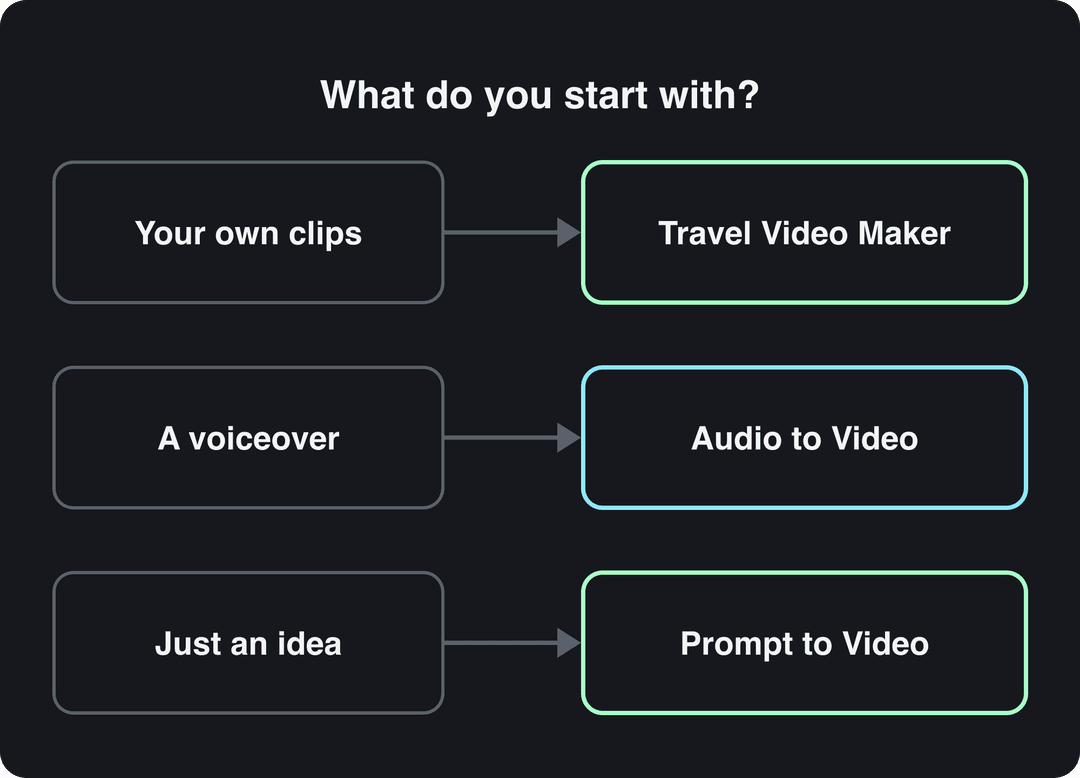
| You start with | Use | What you get |
|---|---|---|
| Your own travel photos and clips | Travel Video Maker | Revid picks the best parts of your uploads and builds the video |
| A voiceover (MP3, WAV or M4A) | Audio to Video | Stock footage or AI video matched to what the voice says (this guide) |
| Only an idea or a description | Prompt to Video | A video written and generated from your description |
What does Revid's AI travel video maker do?
Revid's Travel Video Maker is for trips you actually filmed: upload your images and videos, and Revid selects the strongest moments and assembles them into one video. If you have no footage, or you want to cover a destination you have not visited yet, the Audio to Video workflow below fills every scene with stock travel footage or AI-generated video instead.
Prompt to try
Make a 30-second vertical travel video about one day in Lisbon. Open with the hook "If you only have one day in Lisbon, do this." Then show three moments: a yellow tram climbing Alfama at sunrise, a warm pastel de nata at a café counter, and the city lights from a miradouro at dusk. Use a calm, inspiring voiceover, cinematic stock footage and bold captions, and end with "Save this for your next trip."
The index leans toward videos that surface in hashtag and keyword searches, so its view counts run high: compare the groups, not the absolute numbers.
Source: Revid TikTok index: 2,377,477 TikToks with AI labels per video, snapshot of Sep 15, 2026. Median views estimated from view buckets.
Show the data
| Median views | Share past 1M views | |
|---|---|---|
| #pets | 209.3K | 35.5% |
| #nature | 190.9K | 32.2% |
| #cars | 134.3K | 27.4% |
| #food | 110K | 22.5% |
| #sports | 81.8K | 17.8% |
| #travel | 72.4K | 18.5% |
| #fashion | 63.7K | 15.4% |
Plan your travel story first
Pick one destination or theme your audience cares about: the beaches of Thailand, a tour of European cities, a trip through the Amazon rainforest. One place and one angle beat a montage of everywhere. To see what already works, browse viral travel and adventure TikToks and note the destinations and formats people actually watch.
A simple structure for a short travel video:
- Hook (first line): a promise or a surprise about the place.
- Three moments: a sight, a taste, a feeling. Each one becomes a scene.
- Close: one line that makes people save or share it.
Sample hooks you can adapt (more in this list of TikTok hooks):
- "This is what waking up in [place] looks like."
- "If you only have one day in [city], do this."
- "Nobody tells you [place] feels like this at sunrise."
For the example video, the voiceover is the audio of the YouTube video "Wake up, Travel Motivation", saved as an MP3. The download notes for that file are on a Notion page with the original walkthrough.
No voiceover yet? The voiceover video maker writes and voices a story for you, with 1,000+ AI voices in 70+ languages. You can also record your narration on your phone and upload that file in Step 1.
Step 1: Open Audio to Video and upload your narration
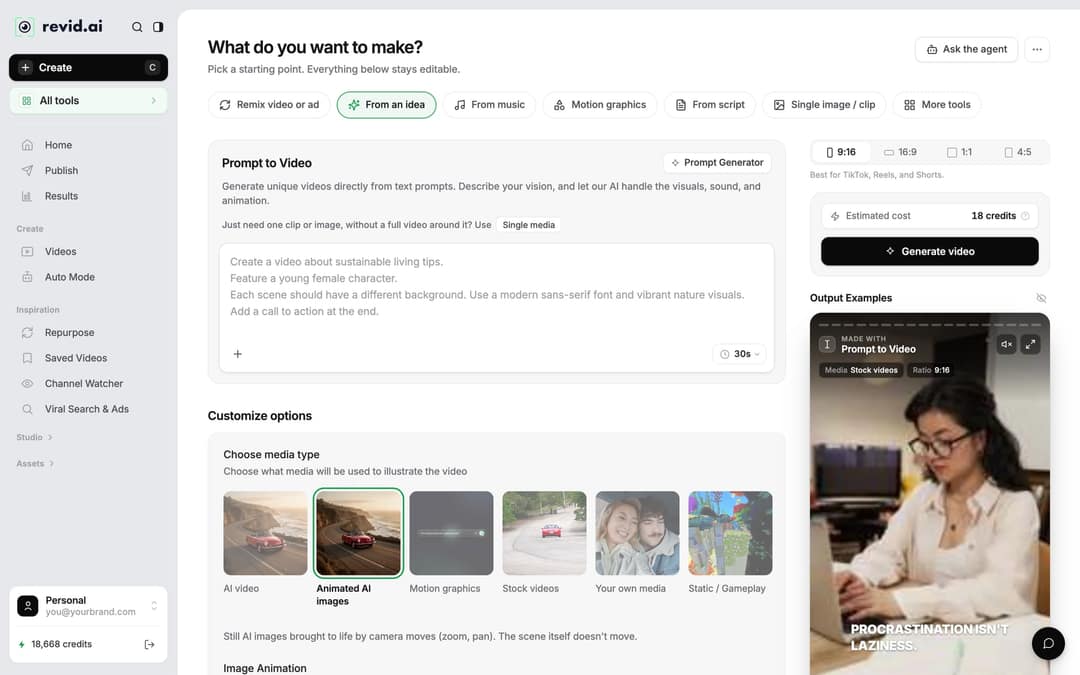
- Click Create at the top of the left sidebar (or press C). The page opens on "What do you want to make?"
- Click the From a link or audio chip. If your screen is narrow, it sits first under More tools. The tool opens as "Audio/Video to video".
- Upload your audio file (MP3, WAV or M4A), or paste a link to the audio or video you want to use.
Step 2: Choose the footage and the ratio
Under Choose media type, pick what fills each scene:
| Media type | Pick it when | Note |
|---|---|---|
| Stock videos | You want real landscapes, streets and landmarks | What the example video uses |
| AI video | You want visuals nobody else has | Needs a paid plan; models include Seedance 2.5, MiniMax Hailuo H3, Wan 3.0 and Google Veo 3 |
| Animated AI images | You want a stylized look at a lower cost | Still AI images with camera moves (zoom, pan) |
| Your own media | You have trip photos or clips to mix in | For a full video from your own footage, use Travel Video Maker |
Then set the ratio in the picker next to the cost estimate: 9:16, 16:9, 1:1 or 4:5.
Which screen ratio should a travel video use?
| Where you post | Ratio to pick | Note |
|---|---|---|
| TikTok | 9:16 | TikTok recommends 1080x1920 |
| Instagram Reels | 9:16 | Reels accept 1.91:1 to 9:16; vertical fills the screen |
| YouTube Shorts | 9:16 | Vertical or square videos up to 3 minutes count as Shorts |
| YouTube videos, websites, TVs | 16:9 | Widescreen |
If you post the same trip everywhere, make the 9:16 version first: it covers all three short-form platforms.
Step 3: Check the cost and generate
Look at Estimated cost at the bottom of the page before you start: it shows the credits the video will use. AI video costs more than stock footage, so if the number is higher than you expected, switch the media type and watch the estimate update.
Click Generate video. Revid matches footage to what your narration says, adds captions and builds the video. If a build fails, the credits are refunded automatically.
Step 4: Fix scenes in the editor and export
When you review the preview, check one thing above all: does each scene match what the voice says at that moment? A beach shot over a line about street food is the most common mismatch, and it takes seconds to fix.
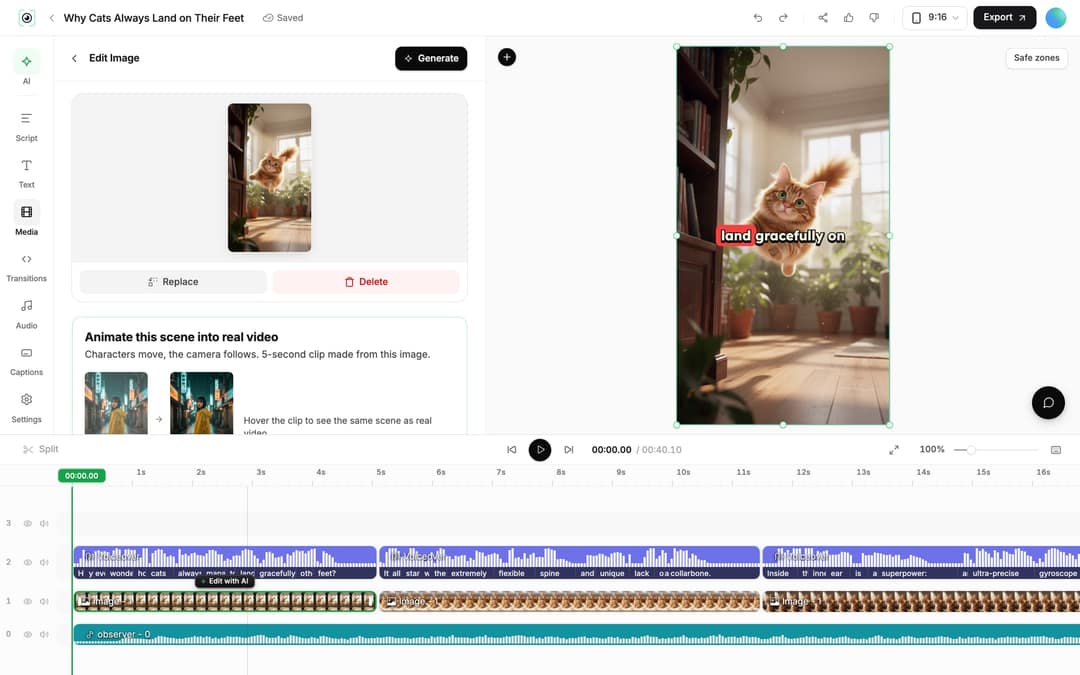
- Open the project from Videos in the sidebar by clicking its card (or use the card menu, Open in editor).
- Click the scene on the timeline. The clip panel shows Replace and Delete.
- Click Replace to open the Media panel. In the Stock tab, search Videos or Photos for the shot you need ("Lisbon tram", "Bali rice terrace"), or click Generate to create one with AI.
- To shorten a scene, drag its start or end edge on the timeline, or place the playhead and press S to split.
- Click Export in the top right and pick 720p, 1080p or 4K.
If you used an AI voice and change a line in the Script panel, Revid reminds you to re-generate the voice if the timing changed. Open the Audio panel, click Re-generate on that voiceover, then Generate Voice. This is for paid plans and costs 10 credits per started 500 characters.
Share your travel video
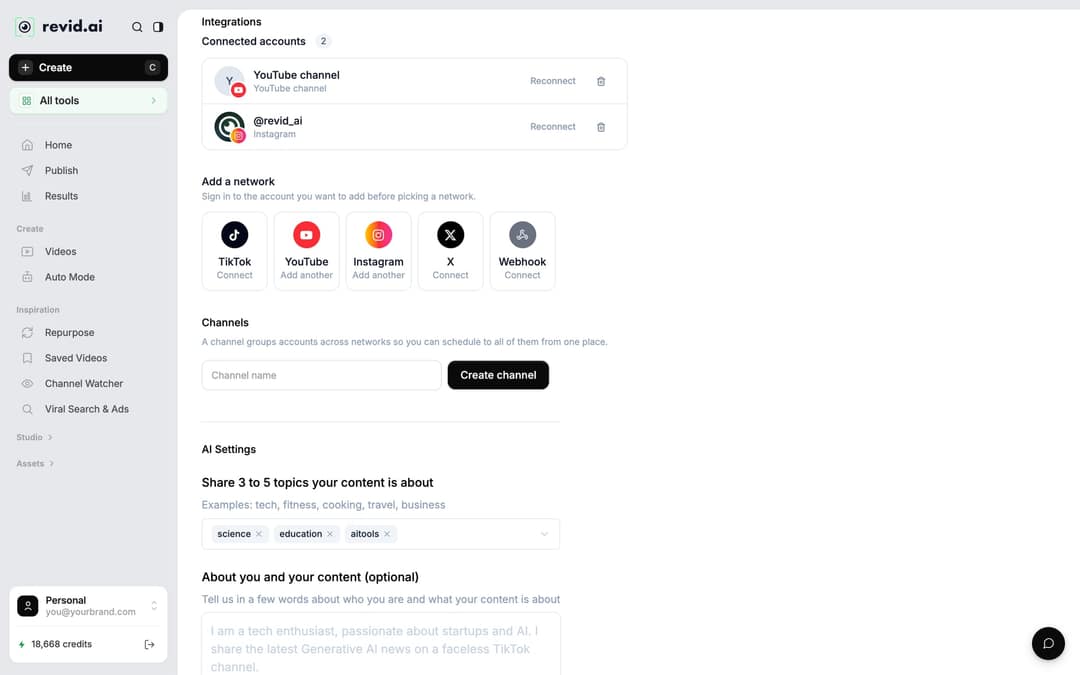
Revid can publish and schedule directly to TikTok, Instagram and YouTube, so you do not need to download and re-upload.
- Go to Settings, then Integrations, and under Add a network connect TikTok, YouTube, Instagram (business or creator account required) or X.
- On the project card, click Publish (or Export / Publish in the editor).
- Choose the accounts under Publish to, then click Publish to post now or Add to queue to schedule it.
Beyond social media, send the video to friends who were on the trip, or use it to promote a travel business such as a hotel, a tour or a travel shop.
FAQ
Is there a free AI travel video generator?
You can start free: signing up for Revid costs nothing, and new accounts get free credits to try video creation with no credit card. Regular creation then uses the monthly credits of a paid plan, from $39/month; the current plans are on the Revid pricing page.
Do I need to label an AI-generated travel video?
Only if it looks realistic. TikTok requires a label on realistic AI-generated video, and YouTube requires you to disclose realistic scenes that did not happen; both say the label alone does not reduce a video's reach. Stock footage of real places needs no AI label.
Can I use the audio from a YouTube video as my voiceover?
Only if you own it or have permission. For anything you publish, record your own narration or use an AI voice so the audio is yours.
Can I make a travel video in another language?
Yes. Write or record the narration in that language, or open the finished project's card menu, click Translate and pick a target language in the video translator, which keeps your edit, footage and captions.
Sources
- Revid analysis of 176,367 TikToks with 1,000+ likes posted between Oct 1, 2025 and Oct 16, 2026 (61,203 creators)
- Revid TikTok index: 2,377,477 TikToks with AI labels per video, snapshot of Sep 15, 2026. Median views estimated from view buckets.
- YouTube Official Blog, Tall updates coming to Shorts (October 2024)
Charts and figures checked on November 6, 2026.