Increase Content Production Speed: How to Make Videos Faster
The fastest creators don't use faster software. They make fewer decisions per video. This playbook covers batching, templates, AI tools and soundtracks, with Revid's TikTok data on what polish is actually worth.
On this page
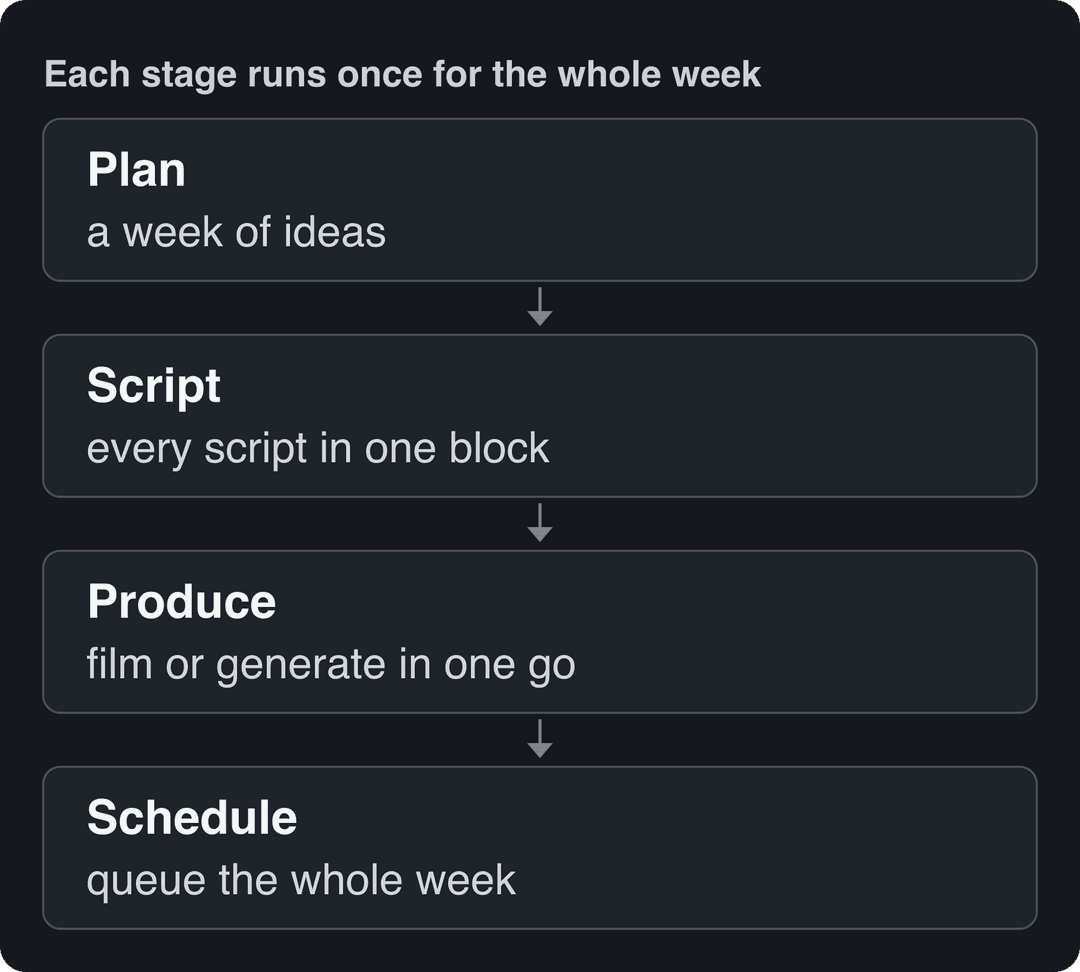
To increase content production speed, stop making videos one at a time. Plan a week of ideas in one sitting, write every script in one block, film or generate in one session, and edit from saved templates. Then hand the repeatable jobs (captions, clipping, music, scheduling) to AI tools.
The most common mistake is spending the saved time on more polish. In Revid's analysis of 176,367 TikToks with 1,000+ likes posted between October 2025 and October 2026, handheld videos had a slightly higher median than tripod shots (80K vs 77K views), screen recordings reached 91K and POV videos 107K. The sample only holds videos that already did reasonably well, and it shows what they have in common rather than causes. Even so, setup time is not what separates them (method and limits in our study of what makes a TikTok go viral).
POV shots and screen recordings earned the most views. Selfie-style videos, the default for many creators, earned the least.
Source: Revid analysis of 176,367 TikToks with 1,000+ likes posted between Oct 1, 2025 and Oct 16, 2026 (61,203 creators)
Show the data
| Median views | Share that passed 1M views | |
|---|---|---|
| POV | 107.3K | 19% |
| Screen recording | 90.7K | 12.7% |
| Handheld | 79.8K | 14.5% |
| Steady cam | 78.2K | 14.9% |
| Drone | 83.4K | 14.9% |
| Tripod | 77.4K | 15.5% |
| Selfie | 48.4K | 9.2% |
- Video marketers who have used AI video tools to create or edit videos
- 63%
- Wyzowl, December 2025
- Median TikTok views for faceless videos, vs 67K with one person on camera
- 114K
- Revid analysis of 176,367 TikToks
- Median views for POV TikToks, vs 77K for tripod shots
- 107K
- Revid analysis of 176,367 TikToks
- Starting price of Revid paid plans per month
- $39
- Revid pricing
Find where your time goes before you change anything
Spend one normal production week timing every stage with a tracker such as Toggl Track. Most creators guess wrong about their bottleneck. They blame editing when the real loss is deciding what to make each morning, or hunting for files.
| Stage | Typical time sink | Fastest fix |
|---|---|---|
| Ideas | Deciding what to make every day | Plan a week of topics in one sitting |
| Scripting | Blank page, rewriting hooks | AI first draft, then edit for your voice |
| Filming | Setup and teardown for each video | Batch shoots and keep the set standing |
| Editing | Hunting for files, manual captions | Project templates, a folder system, auto-captions |
| Music | Browsing tracks for every video | A pre-sorted library and a saved audio preset |
| Publishing | Writing captions and uploading one by one | Schedule the whole week from one queue |
The decision rule: fix the slowest stage first. Speeding up a stage that isn't your bottleneck changes nothing about how many videos you ship.
Speed up pre-production: decide everything before you record
Planning is where most of the time is won or lost, because every decision you leave for the shoot or the edit gets made slowly and under pressure.
- Plan a week in one sitting. List topics, hooks and formats for the week, then stop thinking about "what to post" until next week. A content calendar for video creators turns this into a habit.
- Write all scripts in one block. Switching between writing and filming is expensive. An AI script generator gets you a first draft in seconds; always rewrite the hook and anything that doesn't sound like you.
- Reuse one structure. For short-form, a fixed skeleton (hook, payoff, call to action) means you never design a video from zero.
- Make a shot list. List every shot you need. Stick-figure storyboards are enough. A missed shot found in the edit costs a reshoot.
- Keep one project board. A workspace like Notion holds ideas, scripts, status and links to files in one place. For more on removing manual steps across the whole pipeline, Outbrand has a practical overview of content creation automation.
- Brief clients up front. If you make videos for someone else, agree on purpose, audience and key message, and share the script and shot list before filming. Late revisions are the biggest schedule killer in client work.
Batch production: one session, a week of videos
Batching means doing the same type of task for several videos in a row instead of finishing one video at a time. Every switch between writing, filming and editing costs you setup time and focus.
- Set up lights, camera and mic once, and leave them standing for the session.
- Record all hooks first, then all main sections, then all calls to action. Same energy, same framing.
- Change your shirt or background between videos if you want them to look like separate days.
- Name files as you go (date, video title, take) so editing starts with no searching.
- Edit in one block from your template, then schedule the whole batch.
How can I create video content faster without hiring a video production team?
You don't need a crew to publish consistently. You need a format that doesn't depend on one. Pick the approach that matches what you already have:
| Approach | What you need | Best for |
|---|---|---|
| Faceless voice-over videos | A script, a voice (yours or AI), stock or AI visuals | Explainers, lists, stories, product education |
| Screen recordings | A screen recorder such as Loom | Software tutorials, walkthroughs, demos |
| Clips from long videos | An existing podcast, webinar or YouTube video | Turning one recording into many shorts |
| AI-generated videos | A prompt, script or link | Product videos, ads, daily faceless series |
| Handheld phone videos | A phone and a clip-on mic | Personality-led content, behind the scenes |
If you already have long recordings, a YouTube clip maker cuts them into vertical shorts, which is the fastest way to fill a calendar without new filming.
Faceless formats also hold up well on views. In the same Revid sample of TikTok data, faceless videos had a median of 114K views, and 17.4% passed 1 million, against 67K and 12.7% for videos with one person on camera. Faceless tutorials had a 156K median versus 52K for on-camera tutorials.
Faceless videos earned a median of 114K views, against 67K for videos with one person on camera, and passed 1M views 38% more often.
Source: Revid analysis of 176,367 TikToks with 1,000+ likes posted between Oct 1, 2025 and Oct 16, 2026 (61,203 creators)
Show the data
| Median views | Share that passed 1M views | |
|---|---|---|
| Animals | 147.4K | 24.1% |
| Faceless | 113.9K | 17.4% |
| Groups of people | 96.1K | 16% |
| Objects or products | 70.8K | 13.2% |
| One person on camera | 67.4K | 12.7% |
How do you speed up post-production?
Post-production gets faster when you remove decisions and waiting, not when you edit with more effects.
- Learn keyboard shortcuts. Start with cut, ripple delete, add marker and zoom, then map your most repeated actions to single keys.
- Use proxies for heavy footage. Edit low-resolution copies and switch to the originals for export. Timelines stop lagging.
- Save presets. Color settings, caption style, audio levels and transitions you use every time should be one click.
- Build project templates. One per video type (tutorial, Reel, Short) with intro, outro, title cards and music already placed.
- Edit talking videos by transcript. Transcript-based editors let you cut a recording by deleting text, and remove filler words automatically.
- Automate captions. An AI caption generator creates synced captions in 100+ languages, so you only proofread.
- Export in the background. Queue renders and keep editing the next video instead of watching a progress bar.
- Upgrade the cheap parts first. An SSD for your projects and more RAM usually help more than a new computer.
If you're choosing or reconsidering an editor, pick on speed for your type of footage rather than on feature lists:
| Software | Speed strength | Learning curve | Best for |
|---|---|---|---|
| Adobe Premiere Pro | Proxy workflow, team projects through Creative Cloud | Steep | Professional editors, complex projects |
| Final Cut Pro | Background rendering, optimized for Mac | Moderate | Mac users, solo creators |
| DaVinci Resolve | Free version, cut page for fast assembly | Steep | Color grading, enthusiasts and pros |
| Filmora | Templates and a simple timeline | Easy | Beginners, quick edits |
For market context, Straits Research's video editing software market report and SendShort's roundup of video editing software statistics track which editors lead and where the category is heading.
Prompt to try
Make a 30-second vertical faceless explainer titled '3 kitchen habits that waste the most food'. Open with the hook 'You throw away about a third of what you buy, and it starts here.' Use a calm AI voice-over, bright close-up AI visuals of each habit, bold captions and a short call to follow for part 2.
How to speed up content creation with AI
AI saves the most time on the stages that repeat in every video: first-draft scripts, visuals you would otherwise film or search for, voice-over, captions, clipping and assembly. It saves the least on judgment: picking the idea and the hook. In Wyzowl's 2026 survey, 63% of video marketers had used AI video tools to create or edit marketing videos, up from 51% a year earlier (more in our short-form video statistics). Triple A Review keeps a broader list of video editing statistics.
Match the tool to the stage it speeds up:
| Tool | What it speeds up | Where it falls short |
|---|---|---|
| Runway | Generating and editing single AI clips, with camera moves, relighting and object removal | Script, voice, captions and assembly are up to you |
| Pictory | Turning blog posts, scripts and URLs into stock-footage videos, clipping webinar recordings | Stock-footage look |
| Descript | Editing recordings by editing the transcript, filler-word removal | Needs footage you recorded (Revid vs Descript) |
| CapCut | Fast manual editing of filmed clips, auto-captions, trend templates | You still film and edit by hand |
| OpusClip | Turning podcasts and webinars into short clips | Needs a long recording to start from |
| Revid | Complete short-form videos from a script, prompt, link or viral reference: script, AI visuals, voice-over, captions and music, then direct publishing | Not built for long-form film editing |
What's a simple workflow to soundtrack short-form videos faster?
Music eats time because you browse tracks for every video. Make the choice once and reuse it.
- Decide what leads. If a voice-over carries the video, music is a quiet bed under it. If the video is visual, music sets the cut.
- Build a small library sorted by mood. Keep folders like energetic, calm and tense with tracks you have the rights to use. For trending sounds, add them in the app when you post.
- Save an audio preset. Put the music level and your editor's auto-ducking (music dips under speech) in your template so you never mix by hand.
- Cut on the beat. Play the track and tap the marker shortcut on each beat, then snap cuts to the markers.
- Check rights before export. On YouTube, most Shorts Audio Library songs can run up to 90 seconds in a 3-minute Short, and any Short longer than one minute with an active Content ID claim is blocked globally. On TikTok, videos with copyrighted music playing over one minute don't count as original for Creator Rewards.
- Skip the step entirely for generated videos. AI video tools such as Revid add synced music automatically; if the song itself is the content, a dedicated tool helps, and mykaraoke.video has a guide to AI lyric video makers.
Match the production effort to the format
Not every video deserves the same effort. Spend time where viewers notice it and cut it everywhere else.
| Format | Where the effort pays | What to skip |
|---|---|---|
| Short social clip | The hook, clear audio, readable captions | Color grading, complex transitions |
| Tutorial or explainer | Clear structure, clean audio, legible screen | Cinematic b-roll |
| Ad | Opening seconds, product shown early, several variants | Long intros |
| Long YouTube video | Script, pacing, thumbnail and title | Re-editing for perfection after it's watchable |
Repurposing multiplies the effort you do spend: one long video can feed a week of Shorts, Reels and TikToks.
How to make a short-form video faster with Revid
Revid compresses scripting, visuals, voice, captions, music and publishing into one flow, which is where most of the hours go for faceless and product videos.
- Open the AI video generator and paste a script, a prompt or a link (a blog post, a YouTube video, a product page).
- Or start from a proven format: search Revid's library of about 2.77 million short-form videos with their engagement data, open one and choose "Same energy, new script" to get an original video on the same recipe.
- Review the script, the scene visuals (AI video from Seedance 2.5, MiniMax Hailuo, Wan 3.0 or Google Veo 3, AI images or stock), the voice-over in 70+ languages, captions and music, and fix any scene in the timeline editor.
- Export in 720p, 1080p or 4K, or publish and schedule directly to TikTok, Instagram and YouTube.
- For a daily series, set up an Auto-Mode automation worker that creates a fresh video every day. Paid plans start at $39/month.
A phased plan to increase content production speed
Phase 1: audit (1 week). Time every stage of your current process and list the steps that frustrate you most. That list is your priority order.
Phase 2: tools (2 weeks). Fix the slowest stage with one or two tools, not five. Learn their shortcuts and presets before adding anything else.
Phase 3: templates and automation (3 weeks). Turn every repeated element (intro, outro, caption style, audio preset, upload description) into a template, and automate captions, clipping and scheduling.
Phase 4: refine (ongoing). Re-time your process every month, watch whether retention and comments hold as output rises, and cut any step viewers don't notice.
FAQ
How can I improve the quality of my videos using a video maker?
Use it to make quality consistent: templates lock in your caption style, fonts and audio levels so every video meets the same bar. Export vertical videos at 1080x1920 (9:16, TikTok's recommendation) or higher, and spend the time you save on the hook and the script.
Can videos made with AI tools be monetized on YouTube?
Yes, if the final video shows your creative vision and gives educational or entertainment value. YouTube blocks monetization for mass-produced template content, incoherent AI clip compilations, and AI personas giving health, legal, financial or political advice.
Do I need a faster computer to edit videos faster?
Usually not. Proxies, shortcuts and templates save more time than new hardware, and an SSD plus more RAM fixes most lag. AI generators that render in the cloud need no editing hardware at all.
What should I automate first?
Automate captions and scheduling first: both repeat in every video, need little judgment and are easy to check. Then automate clipping of long videos and first-draft scripts.
Do shorter, simpler videos perform worse?
Not in Revid's recent TikTok data: every length bucket from under 15 seconds to 10 minutes had a median between 58K and 76K views. Length matters less than whether the hook and payoff land.
Sources
- Revid analysis of 176,367 TikToks with 1,000+ likes posted between Oct 1, 2025 and Oct 16, 2026 (61,203 creators)
- Wyzowl, Video Marketing Statistics 2026 (December 2025)
Charts and figures checked on November 6, 2026.