Video Workflow: 6 Stages, Templates and the Right Tool for Each
The six stages every video goes through, what "done" means at each one, and how to pick the tools that actually remove your bottleneck.
On this page
A video workflow is the fixed sequence every video follows from idea to published post: plan, script, produce, edit, review, publish, then measure. Write it down once, give each stage one owner, one tool and a clear "done" check, and each video after the first gets faster and more consistent.
The usual mistake is buying a faster editor. Editing is rarely where the days go. They go to rework caused by a vague brief, to review rounds with no deadline, and to re-cutting one edit by hand for every platform. Fix those three handoffs and the edit speeds up on its own.
- Median views for TikTok challenges, the top format in Revid's study
- 182K
- Revid analysis of TikToks
- Median views for faceless TikToks, vs 67K for one person on camera
- 114K
- Revid analysis of TikToks
- Video marketers who have used AI video tools to create or edit videos
- 63%
- Wyzowl, December 2025
- Monthly price of Revid's Growth plan, with 2,000 credits
- $39
- Revid pricing
What are the stages of a video workflow?
Every video, from a quick Reel to a product demo, moves through the same six stages. A solo creator and a marketing team differ in who owns each stage and which tool does the work. The stages stay the same.
| Stage | What happens | Done when | Typical tools |
|---|---|---|---|
| 1. Plan | Brief, format choice, storyboard or shot list | The approver signs off the brief | Project manager, shared doc |
| 2. Script | Hook, main point, proof, call to action | Read aloud, it hits the length target | Doc, script generator |
| 3. Produce | Filming, screen recording or AI generation | Every shot on the list is captured | Camera, mics, AI video platform |
| 4. Edit | Assembly, captions, color, audio mix | First cut exported | Premiere Pro, DaVinci Resolve, Descript |
| 5. Review | Feedback, revisions, approval | One named person approves the final cut | Timestamped review tool, chat |
| 6. Publish and measure | Versions per platform, scheduling, results | Posted everywhere, numbers logged | Scheduler, AI video platform |
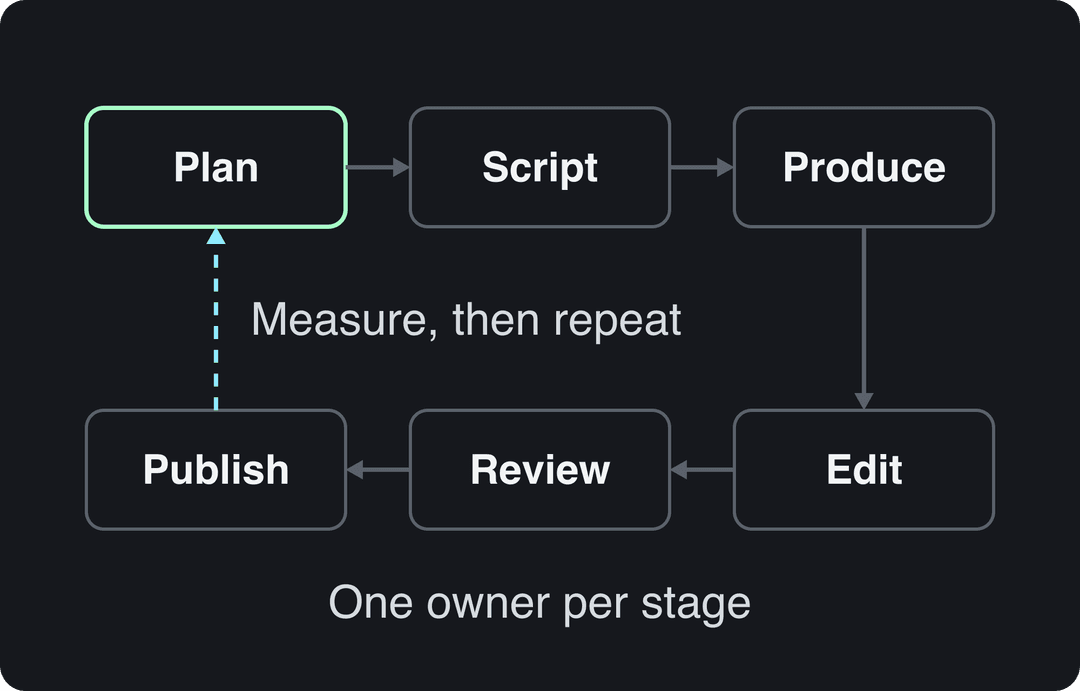
The loop back from publishing to planning is the part most teams skip. What you learn from last week's results should change next week's brief, or the workflow only gets faster, never better.
Stage 1: Plan the video before anyone films
Planning is the cheapest place to fix a video. Changing the hook costs one sentence in a brief. Changing it after the shoot costs a reshoot.
A one-page video brief template
Copy this into your project tool and duplicate it for every video:
- Goal: the one action the viewer should take (follow, sign up, buy, book a call).
- Audience: who they are and what they already know.
- Platform and shape: 9:16 for TikTok, Reels and Shorts; 16:9 for YouTube long-form.
- Format: tutorial, reaction, story, comedy sketch, demo, challenge.
- Hook: the first line or first image.
- Key message: one sentence. If you need two, you have two videos.
- Length target.
- Owner and approver: one name each.
- Deadline per stage, not just a publish date.
- Done when: the check that ends the project.
A clear brief is what stops scope creep: when someone asks for "one more message" during review, you point to the brief. For a recurring series such as weekly product updates or daily Shorts, the brief becomes a checklist, and a content calendar for video tells you which brief to fill in next.
Choose the format in the plan, not in the edit
The format decision carries more weight than any editing choice, and it is made in this stage. In Revid's analysis of 176,367 TikToks with 1,000+ likes posted between October 2025 and October 2026, challenges had a median of 182K views (25.6% passed 1M), comedy 155K and reactions 105K, while storytelling (66K) and tutorials (62K) trailed. The full method is in our study of what makes a TikTok go viral.
Challenges and comedy passed 1M views about twice as often as tutorials and storytelling, which are the most common formats.
Source: Revid analysis of 176,367 TikToks with 1,000+ likes posted between Oct 1, 2025 and Oct 16, 2026 (61,203 creators)
Show the data
| Median views | Share that passed 1M views | |
|---|---|---|
| Challenge | 182.3K | 25.6% |
| Comedy | 154.8K | 22.1% |
| Reaction | 104.8K | 16% |
| Dance | 83.8K | 15.5% |
| Storytelling | 66.1K | 12.2% |
| Lip Sync | 61.7K | 12.3% |
| Tutorial | 61.9K | 12.1% |
Two limits matter. This is TikTok data, and it only covers videos that already reached 1,000 likes, so it shows what well-performing videos have in common, not what causes success. The practical rule: if your plan defaults to a plain tutorial on TikTok, test a challenge, reaction or comedy angle on the same topic before spending more time on editing polish.
Storyboard or shot list?
Storyboard when the visuals carry the story: ads, scripted explainers, anything with scenes. A shot list is enough for talking-head videos and screen recordings. Either way, tie every shot to a line of the script so the editor never has to guess what goes where.
Stage 2: Write the script
The script is both the message and the timing guide: read it aloud at your normal pace and you know the video's length before you film. Use this structure for short-form and adapt it for longer videos:
- Hook: the claim, result or question that makes the next seconds worth watching.
- Setup: why this matters to the viewer, in one line.
- Point: the one thing you show or say.
- Proof: a demo, an example or a result.
- Call to action: one action, the one from the brief.
Mark B-roll and on-screen text in the margin next to each line. That margin becomes the shot list for production and the edit plan for post. An AI script generator is a fast way to get a first draft you then cut down to the one point.
Prompt to try
Make a 40-second vertical video for small business owners on why most product videos fail in the first 3 seconds. Open with the hook "Your video lost the viewer before your logo appeared." Then give one setup line, one clear point about leading with the result, a quick before-and-after example as proof, and end with "Rewrite your first line today." Clean motion graphics style with bold captions.
Faceless videos earned a median of 114K views, against 67K for videos with one person on camera, and passed 1M views 38% more often.
Source: Revid analysis of 176,367 TikToks with 1,000+ likes posted between Oct 1, 2025 and Oct 16, 2026 (61,203 creators)
Show the data
| Median views | Share that passed 1M views | |
|---|---|---|
| Animals | 147.4K | 24.1% |
| Faceless | 113.9K | 17.4% |
| Groups of people | 96.1K | 16% |
| Objects or products | 70.8K | 13.2% |
| One person on camera | 67.4K | 12.7% |
Stage 3: Production techniques that save hours
Start with a question most workflows never ask: does this video need a person on camera at all? In the same Revid TikTok study, faceless videos had a median of 114K views (17.4% passed 1M) against 67K (12.7%) for one person on camera. Faceless formats such as screen recordings, voice-over with B-roll or AI visuals also remove the slowest parts of production: scheduling talent, lighting and retakes. If you do film, these habits cut the most rework.
If you are still deciding whether to produce in-house or hire an agency, Here Now's roundup of video marketing statistics covers how companies split that work.
Light once, shoot many
A three-point setup (key, fill and backlight) gives you a base that works for most shots with small adjustments, so you are not relighting between every setup. LED panels with adjustable color temperature and intensity make those adjustments a dial turn instead of a gel change.
Record clean audio from the start
Bad audio is the most expensive problem to fix in post, and often it can't be fixed. Use a lavalier mic for dialogue and a shotgun mic for room sound, put wind protection on anything outdoors, and have someone watch the levels during every take so nothing clips.
Shoot B-roll from a list
B-roll shot without a plan fills drives and rarely makes the cut. Build the list from the script margin. For a software product, that means interface close-ups, a user clicking through the key feature, and the result on screen. For tutorials and demos, a screen capture often replaces the shoot entirely: Screendesk's guide to recording your screen and camera covers the options. If you fly drones for aerial shots, Dronedesk's overview of drone management software shows how to keep flight logs, permits and equipment organized.
Track continuity and get it right in camera
Note wardrobe, props and positions between takes (which hand holds the product, which sleeve is rolled up), or the editor will find the mismatch for you. Every problem solved on set is one less hour in post, which is why "fix it in post" is the most expensive phrase in production.
Stage 4: Post-production without the chaos
Name files so anyone can find them
Agree on one naming convention before the first import, such as ProjectName_Scene_ShotNumber_Take, and one folder structure (footage, audio, graphics, exports). An editor who never searches for a clip spends that time on the cut.
Build templates once
For recurring videos, save templates for the intro, outro, lower thirds, caption style, transitions and common effects. They cut editing time on every video and keep your brand consistent across the series without anyone policing it.
Scope color and audio in the brief
Color grading and audio mixing can absorb unlimited time. Decide in the brief whether a video gets a full grade or a basic correction, and a full mix or a cleanup, so nobody discovers the scope during review.
Which editing software fits your workflow?
The right editor is the one that matches your projects and your team's skills, not the one with the longest feature list.
| Software | Pricing model | Best for | Key strength | Learning curve |
|---|---|---|---|---|
| Adobe Premiere Pro | Subscription | Professional teams | Industry standard, works with other Adobe apps | Steep |
| Final Cut Pro | One-time purchase | Mac users | Optimized for Mac, fast timeline | Moderate |
| DaVinci Resolve | Free version and paid | Color-heavy work | Advanced color tools, capable free version | Moderate |
| Filmora | Free version and paid | Beginners | Simple interface | Easy |
If your team is mixed, pick one editor for the whole team. Two editors in one workflow means project files that can't be handed over.
Stage 5: Review and approval rules that prevent endless revisions
The review loop is where most delivery dates slip. These rules keep it short:
- One approver. Others can comment, but only the person named in the brief can approve.
- Timestamped comments only. "Change the bit in the middle" costs a call; a comment pinned to a timestamp costs nothing.
- Consolidated feedback. Reviewers comment in the same round, and the owner resolves conflicts before the editor sees them.
- A fixed number of rounds and a deadline for each, written into the brief.
- Review against the brief. Feedback that adds a new goal is a new video, not a revision.
Stage 6: Publish one edit everywhere
Publishing the same video natively on each platform is where a workflow multiplies your output without multiplying your work. Plan for it in the shoot: frame important action in the center so one edit can be cropped to vertical, square and horizontal.
| Platform | Shape | Length | Worth knowing |
|---|---|---|---|
| TikTok | 9:16, 1080x1920 recommended | Uploads up to 60 minutes | The in-app camera records up to 10 minutes |
| Instagram Reels | Accepts 1.91:1 to 9:16; use 9:16 | Up to 20 minutes | Reels over 3 minutes are not recommended to non-followers; up to 5 hashtags per post |
| YouTube Shorts | Vertical or square | Up to 3 minutes | Titles up to 100 characters |
| YouTube long-form | 16:9 | 15 minutes by default; longer once verified | Custom thumbnails need a verified account |
| Any; every new video is shared as a reel | No length restriction | 1080p .mp4 with H.264 or H.265, 24 to 60 FPS recommended |
Build modular content: shoot extra coverage and record the hook in a couple of versions so you can rearrange segments per platform. Then adapt more than the crop. A YouTube viewer chose a long tutorial; a TikTok viewer is deciding in the first seconds whether to stay. Adjust pacing, on-screen text and the call to action for each.
Two tools remove most of the manual work: resize one video to 9:16, 4:5, 16:9 or 1:1 instead of re-exporting by hand, and turn a long video into short clips instead of scrubbing for highlights. If you need audience and ROI numbers to justify the extra versions to a stakeholder, SundaySky's video marketing statistics are a starting point.
Which video production workflow tool should you use?
No single tool runs the whole workflow for every team. Match one tool to each job, and add a tool only when it removes a bottleneck you can name.
| Job in the workflow | Example tool | Add it when |
|---|---|---|
| Briefs, tasks and deadlines | Asana | More than one person touches each video |
| File storage and handoff | Google Drive or Dropbox | Editors and reviewers work in different places |
| Live feedback sessions | Zoom | A cut needs a walkthrough, not comments |
| Daily coordination | Slack | Questions block work while waiting for email |
| Transcripts and text-based editing | Descript | You edit recorded talk: podcasts, interviews, webinars |
| Scheduling across social networks | Hootsuite | You manage many accounts and post types beyond video |
| Script to published short-form video | Revid | You need finished vertical videos without filming or manual editing |
Decision rules for choosing:
- If you film your own footage and edit by hand, build around one editor from the table above, plus shared storage and a review process. A classic editor fits better than an AI generator here.
- If most of your videos are recordings of people talking, a transcript-based editor saves the most time. Our Revid vs Descript comparison explains where each fits.
- If you publish short-form every day and don't want to film, an AI video platform that goes from idea to scheduled post removes whole stages, not minutes.
- If several people approve videos, add a project manager before you add another editing tool. Your bottleneck is coordination.
Before buying, score each candidate on four questions: how fast your team can learn it, whether it holds up when volume grows, whether the cost fits your budget per video, and whether it connects to the tools you already use. A tool that fails the last question creates copy-paste work between stages.
AI is now a normal part of this stack: in Wyzowl's 2026 survey, 63% of video marketers said they had used AI video tools to create or edit marketing videos, up from 51% a year earlier (more sourced figures on our short-form video statistics page). Zebracat also keeps a roundup of AI video creation statistics; it is a vendor page, so check the original sources before quoting it.
How to run this workflow in Revid
Revid collapses stages 2 to 6 into one place for short-form video. With the AI video generator:
- Start from an idea, a script, a link (a blog post or a YouTube video) or a viral video from Revid's library used as a reference for structure and pacing.
- Revid writes the script and builds scene-by-scene visuals (stock footage, AI images or AI video from models such as Seedance 2.5, MiniMax Hailuo H3, Wan 3.0 and Google Veo 3), with a voice-over in 70+ languages, synced captions and music.
- Fix any scene in the timeline editor, then export in 720p, 1080p or 4K at 30 or 60 fps.
- Publish or schedule to TikTok, Instagram and YouTube from one queue, and check each post's views, likes and comments afterward.
- For a recurring series, an Auto-Mode worker creates a fresh video every day from a prompt or a content source.
Generation uses credits; sign-up is free and new accounts get free credits to try it (no credit card needed), then paid plans start at $39/month (Growth, 2,000 credits).
Measure the workflow, then improve it
Views and likes measure the video. To improve the workflow, track how the video was made, too.
| Metric | What it tells you | If it's off |
|---|---|---|
| Time per stage | Where the days actually go | Fix the slowest stage first, usually the brief or review |
| Cost per video | Whether the process scales | Template the recurring parts, or drop filming where it adds nothing |
| Audience retention | Whether the hook and pacing work | Rework the hook in the next brief |
| Shares and comments | Whether people cared enough to act | Revisit the format choice |
| Conversion rate | Whether the video drives the goal in the brief | Rewrite the call to action |
After each project, or each month for a series, answer four questions in writing: what went well, what slowed you down, whether you hit the budget and deadline, and what you learned about the audience. Turn each answer into one change to the brief template, the checklist or the tools.
Separate one-off problems from patterns. A single late delivery can be bad luck; three late deliveries caused by review are a review problem. Then change one thing at a time on a small project, so you know which change worked before you roll it out. For a deeper look at the production side of this process, see our guide to the video production workflow.
FAQ
How do I choose the right system for my content production workflow?
Start from your bottleneck, not a feature list. Time each stage on your last few videos, then pick the tool that removes the slowest one, and check that it is easy to learn, scales with volume, fits your budget and connects to the tools you already use.
What video production platforms streamline production and reduce delivery times?
It depends on your footage. Editors such as Premiere Pro and DaVinci Resolve suit filmed footage, Descript suits recorded talk, clipping tools such as OpusClip cut long recordings into clips, and AI video platforms such as Revid go from an idea to a published short-form video without filming.
What are the best practices for efficient video production in an organization?
Use one brief template, one approver per video, one file naming convention and saved templates for intros, lower thirds and effects. Then time each stage so you fix the real bottleneck instead of guessing.
Can AI automate the whole video workflow?
AI can handle scripting, visuals, voice-over, captions, resizing and scheduling, but not the brief or the final judgment. Keep a human on the plan and the approval, especially on YouTube, where mass-produced template AI content is not allowed to monetize.
Do I need a different workflow for short-form and long-form video?
The stages are the same; the weight shifts. Short-form puts more effort into the hook, the format and publishing to several platforms, while long-form puts more into the script, production and the edit.
Sources
- Revid analysis of 176,367 TikToks with 1,000+ likes posted between Oct 1, 2025 and Oct 16, 2026 (61,203 creators)
- Wyzowl, Video Marketing Statistics 2026 (December 2025)
Charts and figures checked on November 6, 2026.