Long Video to Short Video AI: YouTube to Shorts in 7 Steps
Turn a long YouTube video into a vertical Short with Revid's YouTube Long to Shorts tool: paste the link, pick up to 3 extracts, then trim, caption and publish. Updated for the 2026 interface.
On this page
To turn a long video into a short video with AI in Revid, open the YouTube Long to Shorts tool, paste the YouTube link, choose 1 to 3 extracts and click Generate video. Revid finds the best parts, reframes them to vertical 9:16 and saves each extract as a video you can trim, caption and publish.
The generation takes one click. The edit decides whether anyone watches. A raw extract can start mid-sentence, carry transcription errors in its captions, or crop the speaker out of a wide shot. Fix those three things before you post: YouTube says the platform sees over 200 billion daily Shorts views (August 2026), and a sloppy first second is how a clip gets skipped.
- Daily YouTube Shorts views
- 200B+
- YouTube Official Blog, August 2026
- Longest square or vertical video YouTube counts as a Short
- 3 min
- YouTube Official Blog, October 2024
- Most extracts Revid's YouTube Long to Shorts tool makes per generation
- 3
- Revid
- Monthly price of Revid's paid plan for regular creation (2,000 credits)
- $39
- Revid pricing
What you need before you start
- A long YouTube video with self-contained moments. Interviews, podcasts, tutorials and talks work best, because one answer or one tip can stand alone.
- A Revid account. Sign-up is free, new accounts get free credits with no card, and regular creation uses a paid plan's monthly credits (see Revid plans and credits).
- The rights to the footage. Clip your own videos, or videos you have permission to reuse.
How to turn a YouTube video into a Short with Revid
Step 1: Open Create and find YouTube Long to Shorts
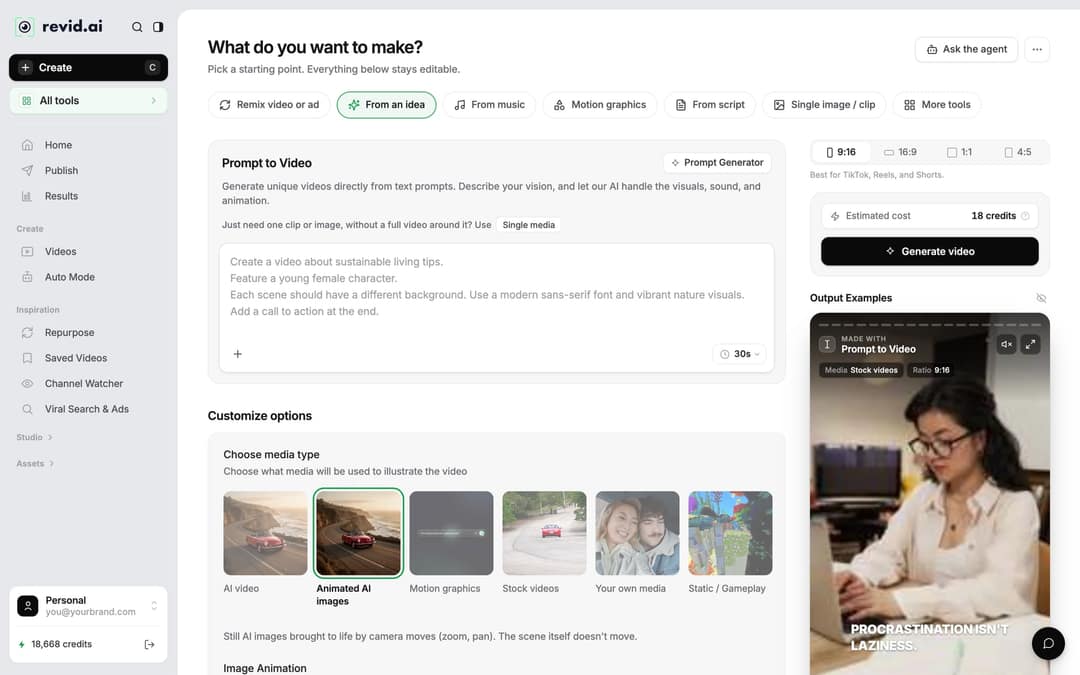
Click Create at the top of the left sidebar (or press C). The page asks What do you want to make? and shows tabs such as Remix video or ad, From an idea, From music and From script. YouTube Long to Shorts is not one of the main tabs: open More tools (or the All tools card in the sidebar) and pick it. You can also start from the YouTube clip maker tool page.
If you followed an older version of this guide: the Create New Video button and the strip of templates are gone. Everything now starts from Create.
Step 2: Paste the link and set the extracts
Paste the YouTube URL, then set the two options that shape the result:
| Setting | What it does | Decision rule |
|---|---|---|
| How many extracts do you want? | Creates 1, 2 or 3 separate videos from the best parts | Pick 3 on your first run: you choose the best one instead of betting on a single pick |
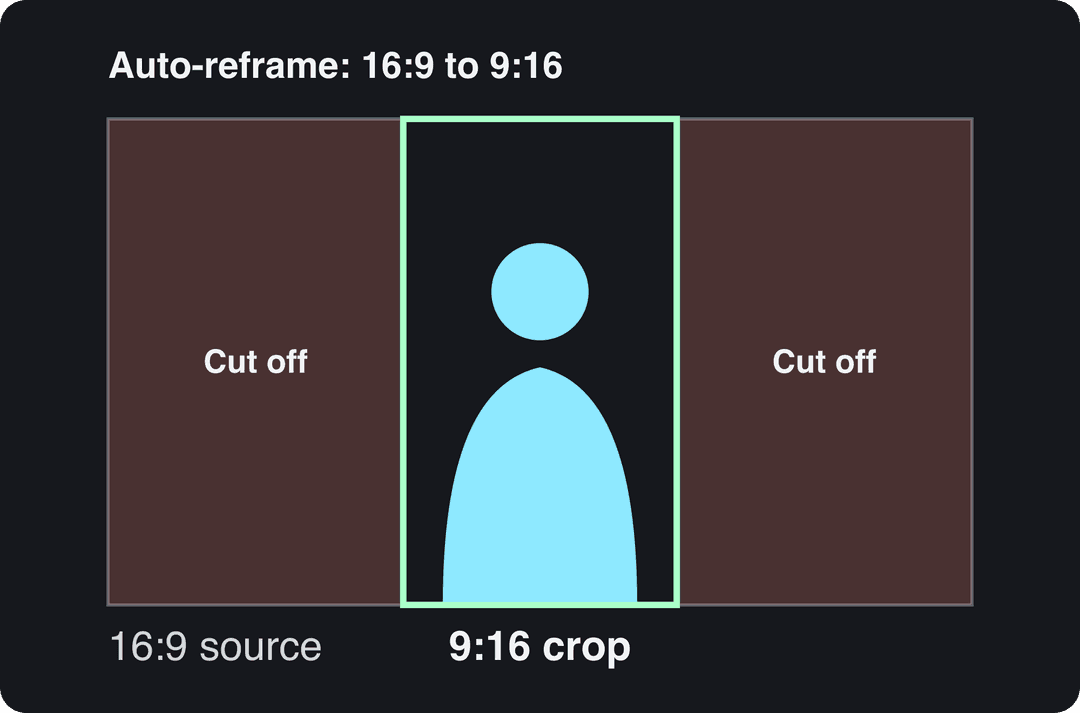
| Auto-reframe video | Crops the wide frame to vertical around the subject (on by default) | Keep it on for a 16:9 source; check the result when two people talk or the speaker moves |
A good extract holds one complete idea: a clear first line, one point and a payoff, with no need for the rest of the video to make sense. If the source rambles for an hour with no clean answers, no AI will find a clean 40 seconds in it, so pick the source carefully.
Videos include an AI voiceover; clip quotes are AI highlights without one. Clip and motion graphics quotes are minimums: the final charge depends on the source video or the footage generated. AI video clips are on the Pro model; the Base model costs 110 credits for 30 s.
Source: Revid public endpoint POST /api/public/v3/calculate-credits, queried October 29, 2026: workflow video-to-clips with 1 and 3 outputs, and prompt-to-video at 30 and 60 seconds with each media type. Cents = credits x $39 / 2,000, rounded.
Show the data
| Credits | US cents on Growth | |
|---|---|---|
| 1 clip from a YouTube link | 1 | 2 |
| 3 clips from a YouTube link | 3 | 6 |
| 30 s video, stock footage | 11 | 21 |
| 30 s video, animated AI images | 37 | 72 |
| 60 s video, animated AI images | 75 | 146 |
| 30 s video, motion graphics (estimate) | 190 | 371 |
| 30 s video, AI video clips (Pro model) | 341 | 665 |
Step 3: Check the cost and generate
The footer shows Estimated cost in credits next to Generate video, so you know the price before you click. Auto-reframe and more extracts raise the estimate. If a build fails, Revid refunds its credits automatically.
Step 4: Open the clip in the editor
When the build finishes, open Videos in the sidebar and click the clip's card (or use the card menu's Open in editor). The editor's left rail has Script, Text, Media, Transitions, Audio, Captions and Settings, with the preview in the middle and the timeline below.
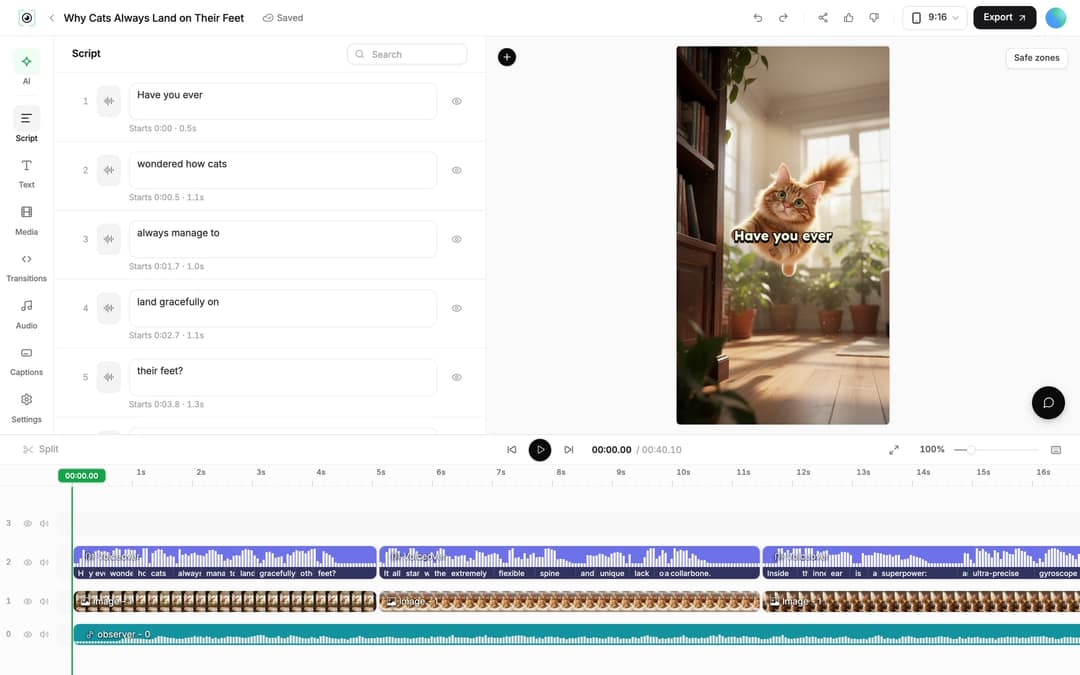
The old Frames panel is now the Script panel. When the video has a transcript, it shows the tabs Script, Transcript and Edit captions.
Step 5: Trim to one complete idea
Cut anything before the first full sentence and after the payoff. You have three ways to do it:
- Drag the start or end edge of the clip on the timeline.
- Move the playhead and press Split (shortcut S), then remove the piece with Delete selection (Del) or Ripple delete (Shift+Del), which also closes the gap.
- Select the video clip and type exact start and end times in its Trim section (Reset undoes it).
If the AI's pick misses the moment you wanted, trimming a different extract is usually faster than regenerating.
Input
Your video as it is
Output
Step 6: Fix captions and add emphasis
Most viewers decide with the sound off, so captions come first.
- Fix the words. In the Script panel, correct any transcription error directly in the segment's text box. The eye icon hides a segment's caption without cutting the audio.
- Style the captions. Open Captions in the left rail and pick one of Revid's 30 caption styles. Keep them clear of the like and comment buttons; the free YouTube Shorts safe zone checker shows where.
- Add visuals where the speaker gets static. The Media panel has Library, Stock (videos and photos), Stickers and Effects, plus a Generate button for AI media and drag-and-drop uploads.
- Add a title line with Text, and music or sound effects from Audio. Avoid copyrighted music (see the warning below).
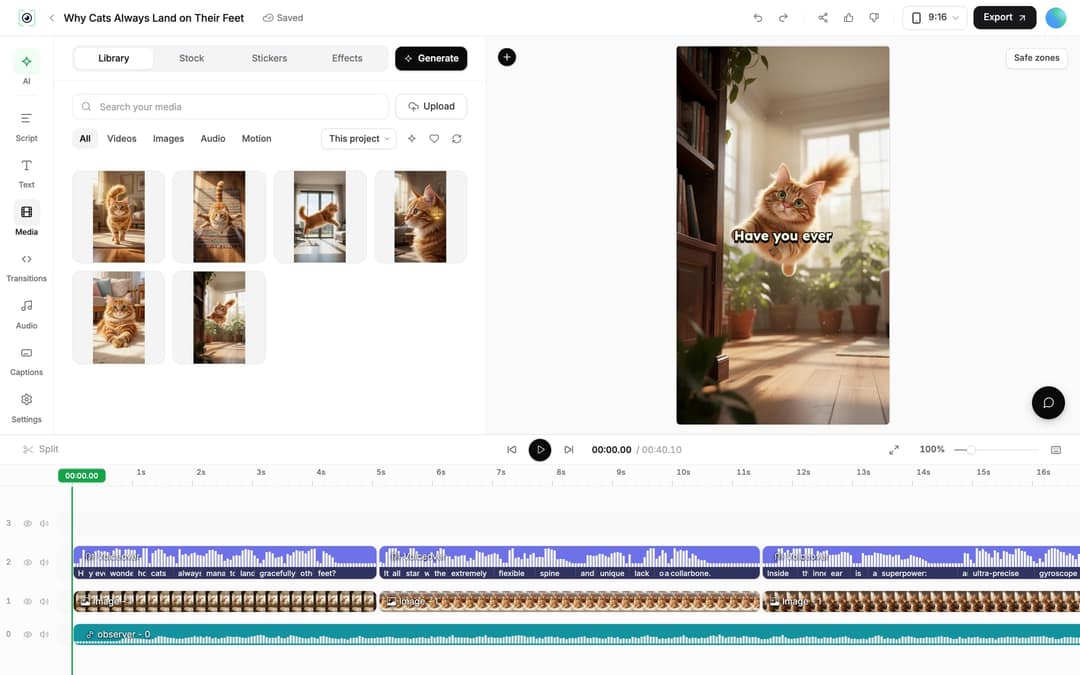
If you would rather not build emphasis by hand, Auto Edit Video takes a talking video or a link and turns your key lines into motion graphics automatically.
Step 7: Export and publish
Click Export at the top right (free accounts see Export / Publish). You can export in 720p, 1080p or 4K at 30 or 60 fps. To post without downloading, open the Publish Video dialog, choose accounts under Publish to, then click Publish to post now or Add to queue to schedule it with Revid's social publishing.
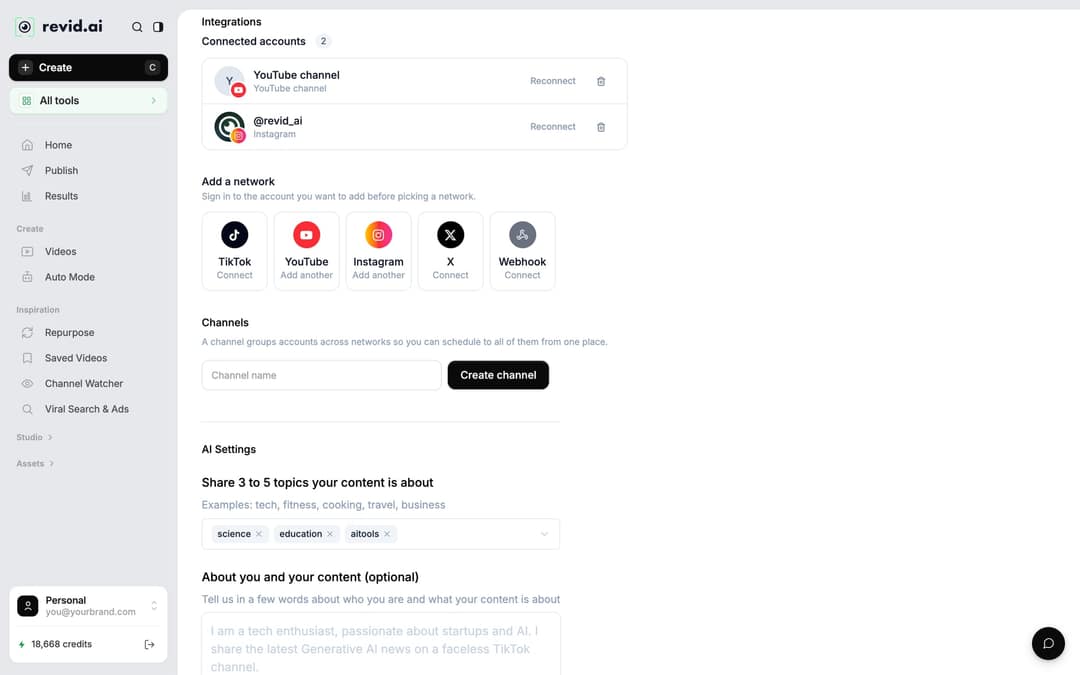
Connect your accounts first in Settings > Integrations > Add a network: TikTok, YouTube, Instagram, X and Webhook are available. Instagram needs a business or creator account.
How do I re-edit a Short after it's generated?
Every clip stays in Videos as a project. Click its card to reopen the editor, change the trim, captions, media or music, and export again. The new export does not overwrite the one you already posted, so publish the new version as a fresh upload.
To reuse the same Short in another language, open the card menu and choose Translate: Revid keeps the edit, media, timing and captions and swaps the language (70+ languages). It costs 10 credits per 500 characters of voice.
How long should a Short cut from a long video be?
YouTube classifies square or vertical videos up to 3 minutes long as Shorts (for uploads on or after October 15, 2024). Instagram does not recommend Reels longer than 3 minutes to non-followers. Inside those limits, cut to the length of the idea, not to a target number.
Revid's TikTok data supports that. In Revid's analysis of 176,367 TikToks with 1,000+ likes posted between October 2025 and October 2026, length barely moved results: every bucket from under 15 seconds to 10 minutes had a median between 58K and 76K views, with 61 to 90 seconds at 70K. Clips under 15 seconds got the most shares per view (1.41 per 100). This is TikTok data covering only videos that already passed 1,000 likes, so it shows what successful videos share, not what causes success. The method is in the full study, what makes a TikTok go viral.
Length alone barely moves views: every bucket lands between 58K and 76K median views (the 790 videos over 10 minutes are a small, unusual group). Clips under 15 seconds get shared the most per view.
Source: Revid analysis of 176,367 TikToks with 1,000+ likes posted between Oct 1, 2025 and Oct 16, 2026 (61,203 creators)
Show the data
| Median views | Share that passed 1M views | Shares per 100 views | |
|---|---|---|---|
| Under 15 s | 57.6K | 11.6% | 1 |
| 16 to 30 s | 64.9K | 12.3% | 1 |
| 31 to 60 s | 61.8K | 11.8% | 1 |
| 61 to 90 s | 70.5K | 12.2% | 1 |
| 91 s to 3 min | 63.4K | 11.1% | 1 |
| 3 to 10 min | 76.4K | 12.4% | 1 |
| 10 min+ | 129.6K | 13.8% | 0 |
How to make Shorts from every new upload automatically
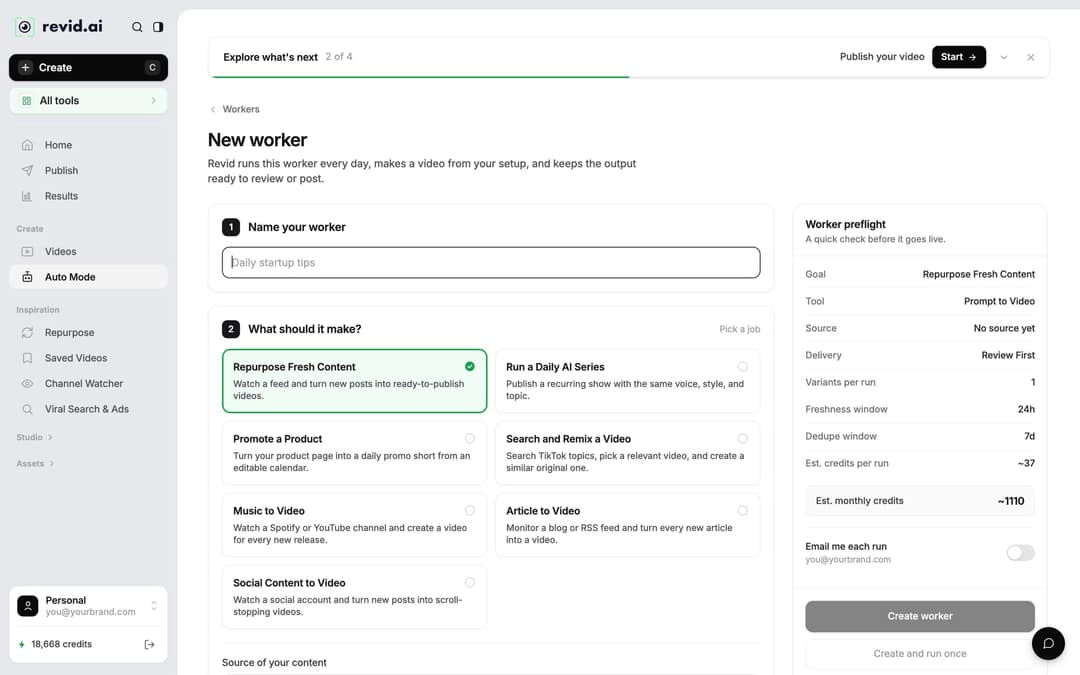
If a channel publishes long videos every week, Auto Mode can watch it for you. Open Auto Mode in the sidebar, click New worker, name it, choose the job Repurpose Fresh Content and enter the YouTube channel as the source. Revid reads the channel's 5 latest videos, and the worker runs once a day between 1 AM and 5 AM, making a video from one new upload (and skipping the day when there is nothing new).
One trap: the ready-made YouTube to Shorts template uses the Voiceover Video format, which writes and voices a new script instead of clipping. To get real clips, choose YouTube Long to Shorts in step 3, Pick the format. Under delivery, Review First keeps each video in Revid for you to check, and Auto Queue sends it to your posting queue. Workers need a paid plan (Growth includes 3), and the Worker preflight panel shows the estimated credits per run and per month before you save.
Can you turn a long video into a short with AI for free?
You can try it for free, but no tool here gives unlimited free clipping without trade-offs. The free options as of August and September 2026:
| Tool | Free option | The catch |
|---|---|---|
| Revid | Free credits on sign-up, no card | Regular creation needs a paid plan, from $39/month (2,000 credits) |
| OpusClip | Free plan with 1080p exports | Watermarked animated captions; media expires after 3 days |
| Vizard | 60 credits a month (1 credit = 1 minute of video) | 720p export with watermark, 3-day storage |
| Klap | Limited trial | Watermarked; card required for the full 3-day trial |
If cutting your own long recordings into many clips is the whole job, a dedicated clipping tool such as OpusClip fits well (see Revid vs OpusClip). Revid fits when the clip is one part of a bigger workflow: AI visuals, scripts, captions, publishing and automation in the same account. For long videos that are not on YouTube, upload them to the long video to short video AI converter.
FAQ
What is Revid AI?
Revid is an AI video platform that turns an idea, a link or a proven viral format into finished short-form videos and publishes them to TikTok, Instagram and YouTube. YouTube Long to Shorts is one of its 100+ tools.
How many Shorts can I get from one YouTube video?
Up to 3 per generation, using How many extracts do you want?. For more, run the tool again or trim a second moment from an existing extract; the guide to turning one long video into multiple Shorts covers batching.
How do I make a short video from a long one?
Pick one self-contained moment, cut it to start on a full sentence and end on the payoff, reframe it to 9:16, add captions and post it. Revid's YouTube Long to Shorts tool does the finding and reframing; you check the trim and captions.
Can I clip someone else's YouTube video?
Only if you have the rights or the owner's permission. Revid processes the link you give it but does not grant rights to the footage, and claimed Shorts over one minute are blocked on YouTube.
Why did my Short come out with the speaker cut off?
Auto-reframe crops a wide frame to vertical, so a speaker at the edge of the shot or two people far apart can fall outside the crop. Try another extract, or trim to the part where the speaker is centered.
Sources
- Revid analysis of 176,367 TikToks with 1,000+ likes posted between Oct 1, 2025 and Oct 16, 2026 (61,203 creators)
- Revid public endpoint POST /api/public/v3/calculate-credits, queried October 29, 2026: workflow video-to-clips with 1 and 3 outputs, and prompt-to-video at 30 and 60 seconds with each media type. Cents = credits x $39 / 2,000, rounded.
- YouTube Official Blog, New opportunities to earn and changes to the YouTube Partner Program (August 2026)
- YouTube Official Blog, Tall updates coming to Shorts (October 2024)
Charts and figures checked on November 6, 2026.