How to Increase Instagram Engagement in 2026: 7 Strategies That Work
Seven practical ways to increase Instagram engagement in 2026: original Reels, strong hooks, save-worthy carousels, captions that ask for a reply, up to 5 hashtags, active replies and trial reel testing, with benchmarks to measure against.
On this page
To increase Instagram engagement, post original Reels and carousels people want to save or send, hook viewers in the opening second, end each caption with one specific question, use up to 5 relevant hashtags and reply to early comments. Test new ideas as trial reels, then repeat whatever earned the most shares and saves in Insights.
The bar is lower than most creators assume. Socialinsider's 2026 study comparing TikTok, Reels and Shorts, based on 69 million short-form videos, put the average Instagram Reel at a 0.45% engagement rate by followers and about 20 comments per video, against 2.60% and 50 comments on TikTok. Most accounts are not losing to better content. They are posting content nobody has a reason to answer, save or send.
- Average engagement rate by followers for an Instagram Reel
- 0.45%
- Socialinsider, August 2026
- Average engagement rate for Instagram carousels, the top format
- 0.50%
- Socialinsider benchmarks, 2024
- Maximum hashtags an Instagram post can carry
- 5
- Instagram Help Center
- Share of recommended Reels that were same-day posts in Q1 2026
- 30%+
- Meta Platforms, April 2026
What is a good engagement rate on Instagram?
Engagement rate is the share of your audience that interacts with a post. The common formula, and the one Socialinsider uses for its benchmarks:
Engagement rate = (likes + comments + shares + saves) ÷ followers × 100
If most of your Reel views come from non-followers, also calculate it against views. A follower-based rate undercounts a Reel that traveled far beyond your audience.
Socialinsider's Instagram benchmarks show every format slipping from 2023 to 2024:
| Post type | 2023 | 2024 |
|---|---|---|
| Carousel | 0.55% | 0.50% |
| Reels | 0.50% | 0.45% |
| Single image | 0.45% | 0.40% |
Its 2026 short-form study kept Reels at 0.45%, ahead of YouTube Shorts at 0.30% (more sourced platform numbers on our YouTube Shorts statistics page).
Two rules for reading these numbers:
- Compare with your peers. Larger accounts usually have lower percentage engagement, and visual niches such as fashion tend to outscore B2B accounts. Benchmark against accounts of your size in your niche, not against the average.
- Separate reach from engagement. In the same 2026 study, Reels from accounts under 5,000 followers averaged 625 views. If your views are tiny, fix distribution first (originality, hooks, trial reels) before polishing captions.
1. Post original content Instagram wants to recommend
Instagram ranks posts on what each viewer has interacted with before, how other people react to the post (likes, comments, shares, saves) and the viewer's relationship with your account. That favors accounts that spark real interactions over accounts that simply have many followers, a shift The Breezy Company covers in its piece on why followers are no longer the metric to chase.
Originality is the other filter. Instagram has said it gives priority to original content over reposts and limits recommendations for aggregator accounts that mostly re-share other people's work, as Social Media Today reported on Instagram's push for original creators.
Decision rule: if a post is mostly someone else's clip with your caption on top, do not publish it from your main account. Film or generate your own version with your angle, your example or your result.
Prompt to try
Create a 30-second vertical Instagram Reel for home cooks titled "Stop salting your pasta water like this if you want restaurant-level pasta." Open with the finished plate on screen, then show 3 quick fixes with bold burned-in captions, upbeat music and a fast, friendly voice-over. End with: "Which fix will you try first? One word is enough."
2. Hook viewers in the opening second of every Reel
A Reel that loses people in its first frame never collects the likes, shares and saves that drive reach. Show the result, the conflict or the question immediately, then explain.
Hook templates you can adapt:
- "Stop [common habit] if you want [result]."
- "I wish someone had shown me this before I [costly mistake]."
- "3 mistakes that make your [thing] look cheap."
- "Here's what [price or time] actually gets you in [place]."
- Show the finished result on screen first, then rewind to "here's how."
Get the basics right so nothing distracts from the hook:
| Setting | What to use |
|---|---|
| Aspect ratio | 9:16 vertical (Instagram accepts 1.91:1 to 9:16) |
| Frame rate and resolution | At least 30 FPS and 720 px, ideally 1080x1920 |
| Length for new audiences | 3 minutes or less (longer Reels are not recommended to non-followers) |
| Text placement | Inside the Instagram Reels safe zone, clear of the caption and buttons |
| Captions | Burned in, so the Reel works with sound off |
3. Choose formats people react to
Instagram does not publish engagement by content type, but Revid's TikTok data gives a useful signal. In Revid's analysis of 176,367 TikToks with 1,000+ likes posted between October 2025 and October 2026, challenges had the highest median views (182K, with 25.6% passing 1 million), followed by comedy (155K) and reactions (105K), while tutorials sat at 62K. The sample only includes videos that already did reasonably well, so it shows what top videos share rather than proving causes. The full method is in our study of what makes a TikTok video go viral.
Challenges and comedy passed 1M views about twice as often as tutorials and storytelling, which are the most common formats.
Source: Revid analysis of 176,367 TikToks with 1,000+ likes posted between Oct 1, 2025 and Oct 16, 2026 (61,203 creators)
Show the data
| Median views | Share that passed 1M views | |
|---|---|---|
| Challenge | 182.3K | 25.6% |
| Comedy | 154.8K | 22.1% |
| Reaction | 104.8K | 16% |
| Dance | 83.8K | 15.5% |
| Storytelling | 66.1K | 12.2% |
| Lip Sync | 61.7K | 12.3% |
| Tutorial | 61.9K | 12.1% |
Humor carries across platforms: in HubSpot's 2026 research, 48% of marketers said funny content yields the highest ROI among short-form content types. If you teach, the same TikTok data found faceless tutorials (screens, hands, product shots) at a 156K median versus 52K for on-camera tutorials, so a screen recording with a sharp voice-over is a fair test before you build a talking-head series.
Prompt to try
Make a 25-second vertical Reel called "5 things to check before you post on Instagram" for small business owners. Hook: "Your Reel is failing before anyone sees it." Use one clear checklist item per scene with big on-screen text, a calm confident voice-over, and close with "Save this for your next post."
4. Use carousels to earn saves
Carousels led Socialinsider's engagement benchmarks in both years, and they are the natural format for content people bookmark. A feed carousel can hold up to 20 photos and videos.
Carousel formats that invite saves:
- Checklists: "Before you post, check these" with one item per slide.
- Step-by-step: one step per slide, with the finished result on slide one.
- Before and after: the swipe itself becomes the reveal.
- Mini guides: a framework, an example, then a template on the last slide.
Make slide one the hook and the last slide the ask ("Save this for your next launch"). Instagram now shows profile grid thumbnails as vertical rectangles, and 3:4 (1080x1440) is the tallest portrait it keeps uncropped, so design the cover for that shape.
5. Write captions that ask for one specific reply
Captions can run to 2,200 characters, but the first line does the work: it is what people see before they tap "more." Lead with the payoff, then end with a single, easy question. Vague asks ("Thoughts?") get silence; specific ones get answers.
Caption endings to copy:
- "Which would you pick, A or B? One word is enough."
- "Save this for the next time you [task]."
- "Send this to the friend who still [habit]."
- "What did I miss? Add yours below and I'll reply to every one."
If you are stuck on wording, our free Instagram caption generator drafts options you can edit into your own voice.
How many hashtags should you use on Instagram?
Up to 5. The Instagram Help Center on hashtags says a post can carry at most 5, and a caption or comment with more will not post. Use them to describe the post, not to chase reach: one broad niche tag, 2 to 3 specific ones and, if you have it, one branded tag.
Revid's TikTok data points the same way: TikToks with 4 hashtags had the best median views (77K) and 3 hashtags 75K, against 51K with none and only 16K with 9 or more.
Posts with 3 or 4 hashtags earned the most views. Captions stuffed with 9 or more hashtags did worst of all, with median views cut by about 80%.
Source: Revid analysis of 176,367 TikToks with 1,000+ likes posted between Oct 1, 2025 and Oct 16, 2026 (61,203 creators)
Show the data
| Median views | Share that passed 1M views | |
|---|---|---|
| None | 51.1K | 9.8% |
| 1 | 64K | 11.8% |
| 2 | 71.3K | 12.7% |
| 3 | 75.4K | 13.1% |
| 4 | 77.2K | 13.4% |
| 5 | 67.3K | 12.1% |
| 6 to 8 | 71.8K | 12.7% |
| 9+ | 15.6K | 7.8% |
6. Reply, ask back and use Stories stickers
Early replies turn one comment into a thread. Answer with a follow-up question rather than "thanks," pin the best comment, and set a daily reply window so community work does not eat your whole day.
Stories are where followers interact with the least effort:
| Sticker | Use it for | Example |
|---|---|---|
| Poll | Choosing your next post | "Next tutorial: lighting or editing?" |
| Question | Collecting FAQ material | "Ask me anything about pricing your work" |
| Quiz | Teaching your niche | "Which of these is the real photo?" |
| Countdown | Building up a launch or Live | "New series drops Friday" |
Close the loop: if a poll picks a topic, make that post and say so in the caption. Featuring followers' answers or content in your Stories shows people their input changes what you publish, which is the strongest reason to keep replying.
7. Test new ideas with trial reels
Trial reels let you test a hook or format on strangers without hurting your main feed. They are shown first to non-followers, insights arrive within 24 hours, and you can share a trial to everyone manually or automatically if it performs well. They do not affect the ranking of your standard reels. You need a public account with at least 200 followers (professional accounts) or 1,000 followers (personal accounts), per the Instagram Help Center on trial reels.
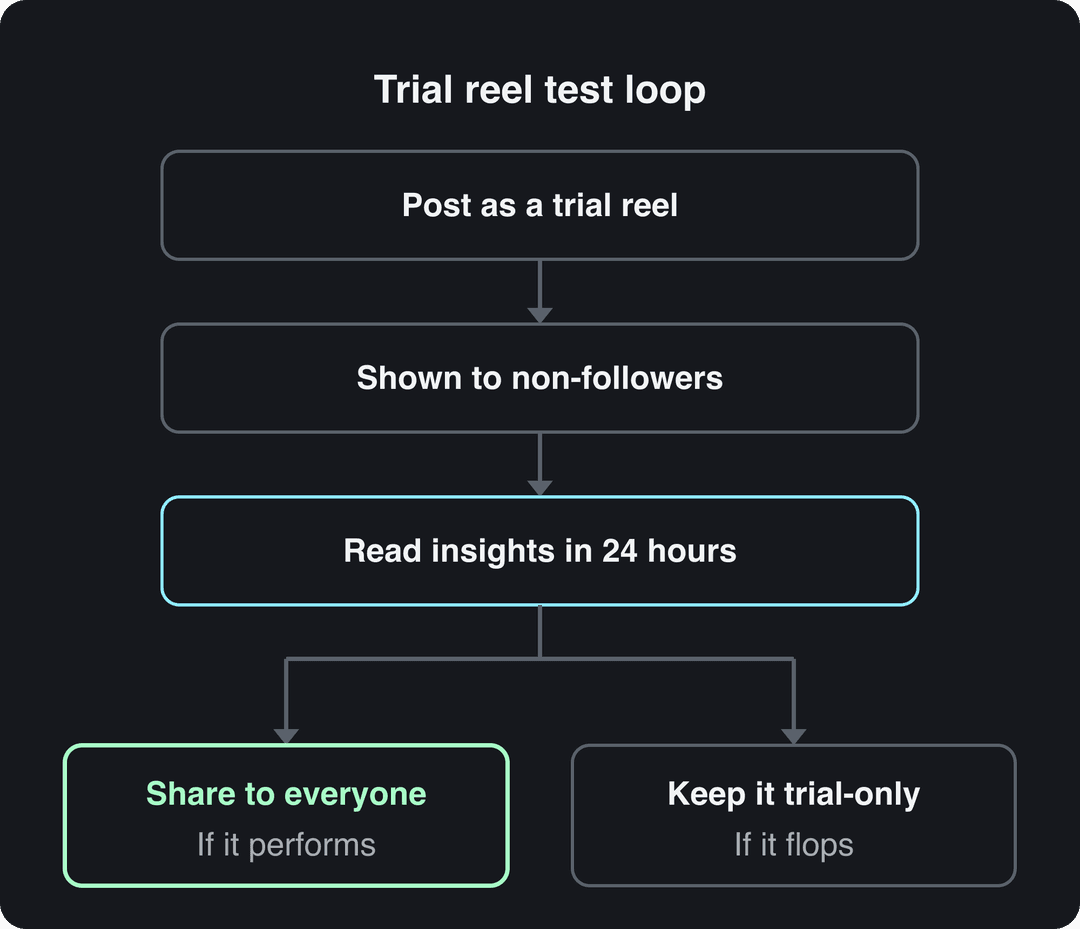
The best test is a controlled one: post the same video with two different opening lines or covers as separate trials, then share the winner. Over time you build a list of hooks your audience actually responds to.
When should you post on Instagram for more engagement?
Post shortly before your followers are most active. Find that window in Insights under your follower activity (it needs at least 100 followers), then test posting 30 minutes earlier or later than your usual slot. Freshness also matters: Meta said same-day posts made up more than 30% of recommended Reels on Instagram and Facebook in Q1 2026, more than double a year earlier.
There is no official ideal frequency. Pick a cadence you can keep with original work for a full 90-day Insights window, so you have enough posts to compare. Plan it in a social media content calendar; a Trello board or a simple spreadsheet is enough to track format, hook and posting time per post.
Which Instagram metrics show your engagement is improving?
Instagram Insights now lead with Views (every time content is played or displayed) and show Viewers (unique accounts) separately, with data for up to the past 90 days. Check these per post, grouped by format:
| Metric | What it tells you | If it is low |
|---|---|---|
| Views from non-followers | Whether Instagram recommends you | Check originality, hook and length |
| Shares (sends) | Content worth passing on | Make posts about a shared situation or a strong opinion |
| Saves | Content worth keeping | Add steps, checklists or templates |
| Comments | Content worth answering | End captions with one specific question |
| Likes | Quick approval | Least useful on its own; read it with the others |
Every month, list your top five posts by shares and saves, find what they have in common (format, topic, hook style), and plan next month around it.
How to make engagement-ready Reels with Revid
If filming every Reel is what limits your posting, Revid can build them from an idea or a proven format:
- Browse viral Instagram Reels in your niche to find a format that already holds attention.
- Add it as a reference in the Instagram Reels repurposing tool: Revid creates an original short that follows the format's structure with a fresh script and visuals.
- Or start from a topic or script in the AI Reel generator, which writes the script and adds AI visuals, a voice-over and synced captions.
- Adjust any scene in the timeline editor, then schedule it straight to Instagram alongside TikTok and YouTube.
If a Reel uses photorealistic AI footage, use Meta's AI disclosure tool when you post.
FAQ
Why is my Instagram engagement suddenly dropping?
Usually because reach dropped, not interest. Check Views from non-followers in Insights first; common causes are reposted content losing recommendations, Reels longer than 3 minutes (not recommended to non-followers) and hooks that lose viewers in the first frame.
How often should I post on Instagram to get more engagement?
Instagram publishes no ideal number. Post as often as you can keep making original content for at least 90 days, because a steady cadence gives Insights enough data to show which formats and times work.
Does buying followers hurt Instagram engagement?
Yes. Engagement rate divides interactions by followers, so inactive bought accounts push it down, and they never save, share or comment on your posts.
Do AI-generated Reels get less engagement on Instagram?
They can. In Revid's study of AI videos vs real footage, AI-generated TikToks averaged twice the views of real footage, but on Instagram AI visuals clustered in the lowest engagement tier. Use AI for scripts, captions and visuals that serve a real idea, and disclose photorealistic AI video as Meta requires.
Do comments or likes matter more for Instagram engagement?
Comments, shares and saves matter more, because they show stronger intent than a quick like. Write each post to earn one of the three: a question for comments, a relatable situation for shares, or steps worth keeping for saves.
Sources
- Revid analysis of 176,367 TikToks with 1,000+ likes posted between Oct 1, 2025 and Oct 16, 2026 (61,203 creators)
- Socialinsider, TikTok vs. Reels vs. Shorts: 2026 Engagement Data (August 2026)
- Meta Platforms, Meta Q1 2026 Results Conference Call transcript (April 2026)
Charts and figures checked on November 6, 2026.