How to Make Clips from Video: 6 Steps, Tools and Settings
Make clips from any video in six steps: pick moments that stand alone, cut tight, reframe to 9:16, caption and export with the right settings. Plus the best tools, platform lengths and TikTok data on clip length.
On this page
To make clips from a video, find moments that make sense on their own, mark an in and out point for each, cut them out, reframe to 9:16 vertical, add captions, and export at 1080x1920. A free editor like DaVinci Resolve or CapCut does it by hand; an AI clip maker finds and cuts the moments for you.
Most people worry about the wrong thing: clip length. In Revid's analysis of 176,367 TikToks, median views barely moved from the shortest videos to the longest. What separates a clip that travels from one that dies is its first second. It has to start on the payoff, not on the context that led up to it.
- Recommended resolution for 9:16 vertical clips on TikTok
- 1080x1920
- TikTok Creator Academy
- Shares per 100 views for TikToks under 15 seconds, the highest of any length
- 1.41
- Revid analysis of 176,367 TikToks
- Maximum length of a YouTube Short (square or vertical)
- 3 min
- YouTube Official Blog, October 2024
- Businesses that use video as a marketing tool
- 91%
- Wyzowl, December 2025
How to make clips from a video in 6 steps
The method is the same in any editor. The shortcuts below are for desktop editors. Phone apps like CapCut use a Split button on the timeline instead.
1. Pick moments that make sense on their own
A good clip has one idea, a hook in its first line and a payoff before it ends. Skim the transcript instead of rewatching the whole video, because most editors and AI tools now generate one. Mark every moment that has one of these:
- A strong opinion or a claim people will argue with
- A specific number, result or before-and-after
- A short story with an ending
- A question asked and answered in the same breath
- A mistake, a reveal or a laugh
Decision rule: if a moment only makes sense with what came before it, add a one-line setup as on-screen text ("Why I stopped running ads:") or skip it. Viewers in a feed will not guess the context.
2. Mark in and out points tightly
Set the in point on the first word of the hook, not on "so", a breath or "great question". In Adobe Premiere Pro and DaVinci Resolve, press I to set the in point and O to set the out point. To cut on the timeline, use Cmd/Ctrl+K in Premiere Pro or Cmd/Ctrl+B in Resolve.
End right after the payoff. Cut the wind-down ("anyway, that's basically it") so the clip ends on its strongest line. Remove long pauses inside the clip too, because jump cuts are normal in short-form video.
3. Reframe from 16:9 to 9:16
Short-form feeds are vertical. TikTok's Creator Academy recommends 9:16 at 1080x1920 pixels, and YouTube Shorts and Instagram Reels are built for the same shape. A vertical crop of a horizontal video keeps the full height but only a narrow slice of the width, so you have to decide what stays in frame.
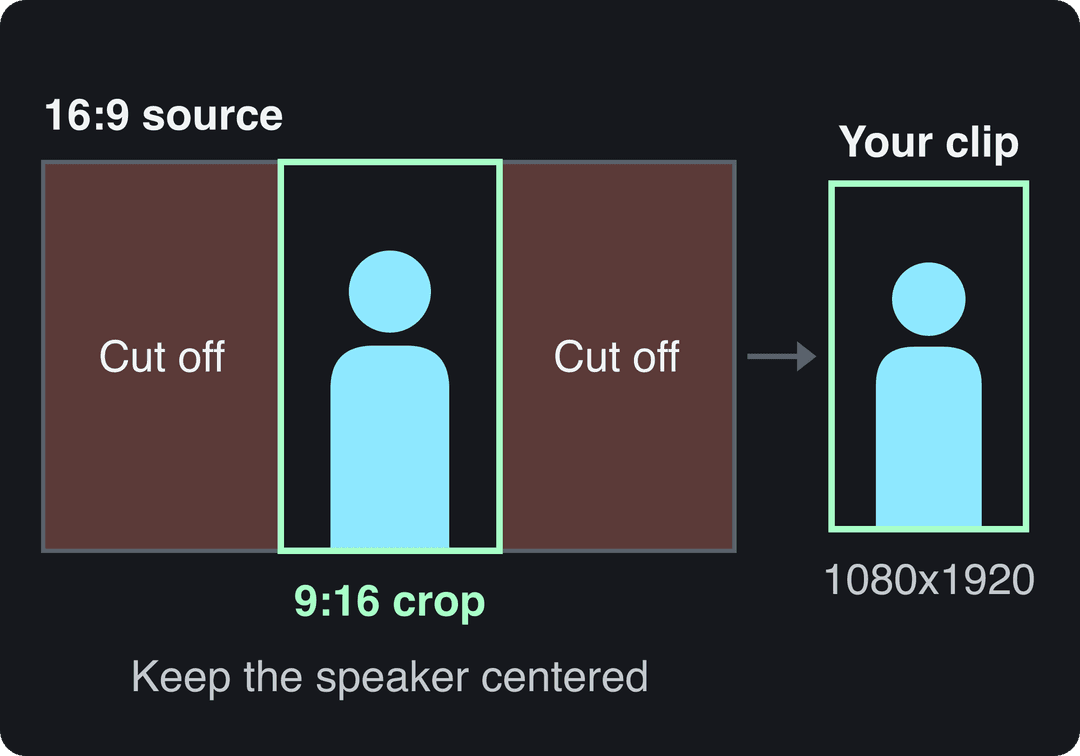
- One speaker: center the crop on their face. Most editors include an auto-reframe feature that tracks faces.
- Two speakers: move the crop to whoever is talking, or stack both in a split screen.
- Screen recording or slides: zoom into the part that matters, or put the speaker on top and the screen below.
If you only need the format change, Revid's resize video tool converts a file to 9:16, 4:5, 16:9 or 1:1.
4. Add captions and a text hook
Captions keep the clip watchable with the sound off and make the hook readable before anyone decides to scroll. Put a short text hook on screen from the first frame, a few words that state the promise of the clip. Generate the captions automatically, then fix names and jargon by hand. Revid's caption generator adds synced captions in 100+ languages.
Keep all text away from the edges, where the app's buttons, username and caption cover the video. Check your frame against a TikTok safe zone overlay before you export.
5. Clean up the audio
Normalize the dialogue so every clip plays at a similar volume, and keep any music well below the voice. Cut out any music you don't have the rights to reuse: a claimed track can block or demonetize the clip (see the platform table below). For export, Meta recommends AAC stereo audio at 44.1 or 48 kHz, a setting that works on every platform.
6. Export with the right settings
| Setting | What to choose |
|---|---|
| File and codec | MP4, H.264 |
| Resolution | 1080x1920 for vertical clips |
| Frame rate | Same as the source, usually 30 or 60 fps |
| Audio | AAC stereo, 44.1 or 48 kHz |
Instagram Reels need at least 30 FPS and 720 pixels. TikTok's Content Posting API accepts 23 to 60 FPS. Keep the source frame rate instead of converting it, because a frame-rate conversion can make motion stutter.
Price divided by included minutes, assuming you use the whole allowance. Descript's hours are editing hours, not automatic clipping, so it is cheap per hour but you do the picking. Klap (billed per clip) and Revid (billed per job in credits) do not bill by source minutes and are left out.
Source: Monthly prices and allowances from vendor pricing pages on October 29, 2026 (Quso, Descript, Munch Studio yearly price), OpusClip allowances (150 and 300 minutes) from Castmagic's OpusClip pricing guide verified August 20, 2026, Vizard from vizard.ai/pricing on September 30, 2026.
Show the data
| US dollars per 10 hours of uploads | Minutes of video included per month | |
|---|---|---|
| Quso Lite | 174 | 100 |
| Quso Essential | 78 | 300 |
| OpusClip Starter | 60 | 150 |
| OpusClip Pro | 58 | 300 |
| Munch Studio Essential | 46 | 500 |
| Vizard Creator | 29 | 600 |
| Descript Hobbyist | 24 | 600 |
Which tool should you use to make clips?
Choose by how you work, not by feature count. The market is crowded and still growing (Straits Research tracks it in its video creation tool market report), and most tools cut, crop and export equally well.
| Tool | Where it runs | Price | Best for |
|---|---|---|---|
| Adobe Premiere Pro | Desktop | Paid subscription | Full control, frame-accurate edits, team workflows |
| DaVinci Resolve | Desktop | Free version; paid Studio version | Professional editing and color grading without paying |
| CapCut | Phone, desktop | Free tier with 1080p export; Standard about $9.99/month | Fast clips from phone footage, auto-captions, trend templates |
| OpusClip | Browser | From $15/month; free plan with watermarked captions | Auto-clipping podcasts, streams and webinars, with virality scoring |
| Revid | Browser | Free sign-up with free trial credits; paid plans from $39/month | YouTube links turned into captioned vertical clips, new AI videos and direct publishing |
Decision rules:
- You cut a few clips a week from your own footage and want control: DaVinci Resolve (free) or Premiere Pro.
- You film and edit on your phone: CapCut.
- You have hours of podcasts, streams or webinars: an AI clipper that finds moments for you. Automated clipping is now a common feature, and Project Aeon's page on automated video clipping shows one approach. Always review and trim what the AI picks.
- You also need original videos and scheduled posting: Revid, covered below.
How to make clips from a video with Revid
Revid's YouTube clip maker handles the six steps above from a single link:
- Paste the YouTube link into the YouTube clip maker. For a file on your computer, upload it to the long video to short video converter instead.
- The AI picks the moments and returns short vertical clips with synced captions.
- Open any clip in the timeline editor to trim it, fix a caption or switch between 30 caption styles.
- Export in 720p, 1080p or 4K at 30 or 60 fps, or publish and schedule it to TikTok, Instagram and YouTube from one queue.
Sign-up is free and new accounts get free credits to try video creation, no credit card needed. Regular creation then uses the monthly credits of a paid plan, from $39/month. If all you do is cut your own long recordings into many clips, a dedicated clipping tool may fit better: see Revid vs OpusClip for an honest comparison.
How long should a clip be?
Cut the clip to the length of the moment, then check the platform limit. In Revid's analysis of TikToks with 1,000+ likes posted between October 2025 and October 2026, every length bucket from under 15 seconds to 10 minutes had a median between 58K and 76K views. Videos of 61 to 90 seconds reached a 70K median. Videos under 15 seconds had the lowest median (58K) but the most shares per view, 1.41 per 100. The sample only covers videos that already did reasonably well, so these figures show what successful videos have in common, not what causes success. The method is in the full study of what makes a TikTok go viral.
Length alone barely moves views: every bucket lands between 58K and 76K median views (the 790 videos over 10 minutes are a small, unusual group). Clips under 15 seconds get shared the most per view.
Source: Revid analysis of 176,367 TikToks with 1,000+ likes posted between Oct 1, 2025 and Oct 16, 2026 (61,203 creators)
Show the data
| Median views | Share that passed 1M views | Shares per 100 views | |
|---|---|---|---|
| Under 15 s | 57.6K | 11.6% | 1 |
| 16 to 30 s | 64.9K | 12.3% | 1 |
| 31 to 60 s | 61.8K | 11.8% | 1 |
| 61 to 90 s | 70.5K | 12.2% | 1 |
| 91 s to 3 min | 63.4K | 11.1% | 1 |
| 3 to 10 min | 76.4K | 12.4% | 1 |
| 10 min+ | 129.6K | 13.8% | 0 |
A second Revid sample tells an older story. Revid's full index of about 2.39 million TikToks (all posting dates) found that 16 to 30 second videos had the highest median, about 141K views. The advantage of very short videos has faded for recent posts. The practical rule: a 20-second clip with a strong hook beats a 60-second clip padded to hit a target, and so does the reverse.
Platform limits and clip lengths
| Platform | Maximum length | Clip length to aim for | Watch out for |
|---|---|---|---|
| TikTok | 60 minutes (uploads) | 15 to 90 seconds | 9:16 at 1080x1920 recommended |
| YouTube Shorts | 3 minutes (square or vertical) | Under 1 minute if the clip contains claimed music or footage | A Short over one minute with a Content ID claim is blocked worldwide |
| YouTube long-form | 15 minutes by default, longer for verified accounts | The full segment | 16:9; better for multi-minute excerpts |
| Instagram Reels | 20 minutes | 15 to 90 seconds | Reels over 3 minutes are not recommended to non-followers |
| No length limit (all videos are reels) | 1 to 3 minutes | Reposts with only borders, captions or speed changes count as unoriginal | |
| 15 minutes | 30 to 60 seconds | Aspect ratios from 1:2.4 to 2.4:1 | |
| X | 20 minutes (125 with Premium) | 30 to 60 seconds | 720x1280 recommended for portrait |
The "aim for" column is a starting point, not a platform rule. Check your own analytics after a few posts and follow what your audience finishes.
Mistakes that ruin clips
- Starting on context. If the first line is "so, as I was saying", the viewer is gone. Move the in point to the hook, or add a text setup.
- Cropping out the subject. A center crop of a two-person interview often shows the gap between them. Reframe by hand or use face tracking.
- Text under the app's interface. Captions at the very bottom sit under the caption and buttons. Keep them in the safe zone.
- The same clip and caption everywhere. Adjust the length and the post caption for each platform. Instagram, for example, now allows only up to 5 hashtags per post.
- Skipping the cover. Instagram recommends Reels covers at 420x654 px. On YouTube, verified accounts can upload a custom Shorts thumbnail from YouTube Studio on a computer.
Turn one recording into a week of clips
Clips are the cheapest way to get more out of a recording you already paid for. Video is now standard practice: 91% of businesses use video as a marketing tool and 82% of marketers say it gives them a good ROI, according to Wyzowl's 2026 survey (collected on our short-form video statistics page). For broader roundups, see Insivia's video marketing statistics and Vidico's video marketing statistics. Grand View Research's video production market report tracks the industry side.
To make clipping a routine instead of a chore:
- Mark candidate moments while you record or right after, while you still remember them.
- Save a template with your caption style, font, text-hook position and export preset.
- Name files by source and topic ("webinar-oct-pricing-objection") so you can find them again.
- Cut all clips in one session, then schedule them across the week.
For the full system, from blog posts to newsletters, read our guide on how to repurpose video content.
FAQ
Can I make clips from a YouTube video that isn't mine?
Not safely without permission. Clips of someone else's video can draw copyright claims, and YouTube and Facebook limit monetization or reach for reposted content. Clip your own videos, or ask the creator and add your own commentary.
What is the best free way to make clips from a video?
On a computer, use the free version of DaVinci Resolve. On a phone, CapCut's free tier includes the full editor, auto-captions and 1080p export.
What resolution should video clips be?
Use 1080x1920 at 9:16 for TikTok, Instagram Reels and YouTube Shorts. Keep 16:9 only for clips that go on YouTube as regular videos.
Can AI make clips from a video automatically?
Yes. AI clip makers transcribe the video, pick the moments, reframe them to vertical and add captions. They save hours, but review each clip, because the AI can still cut a sentence short or pick a moment that needs context.
How do I make a clip from a video on my phone?
Open the video in CapCut, move the playhead to the start of the moment and tap Split, then do the same at the end and delete the rest. Set the ratio to 9:16, add auto-captions and export.
Sources
- Revid analysis of 176,367 TikToks with 1,000+ likes posted between Oct 1, 2025 and Oct 16, 2026 (61,203 creators)
- Monthly prices and allowances from vendor pricing pages on October 29, 2026 (Quso, Descript, Munch Studio yearly price), OpusClip allowances (150 and 300 minutes) from Castmagic's OpusClip pricing guide verified August 20, 2026, Vizard from vizard.ai/pricing on September 30, 2026.
- YouTube Official Blog, Tall updates coming to Shorts (October 2024)
- Wyzowl, Video Marketing Statistics 2026 (December 2025)
Charts and figures checked on November 6, 2026.