How to Write Video Titles for YouTube, TikTok and Instagram (2026)
A good video title puts the words viewers search first and adds one specific promise. Here is how that works on YouTube, TikTok and Instagram, with limits, formulas and TikTok data.
On this page
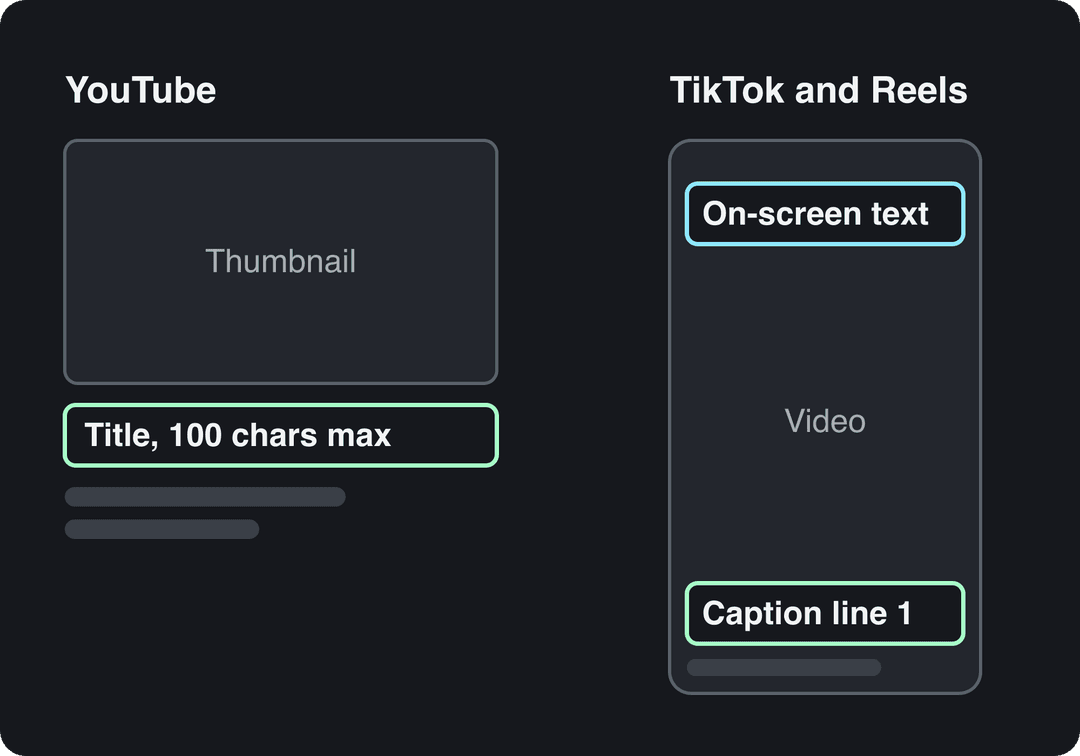
A good video title puts the words your viewer would search first, then adds one specific promise: a number, a result or what is at stake. On YouTube that is the title field (up to 100 characters). On TikTok and Instagram, the title is the first line of your caption plus the text on screen.
The most common mistake is writing one title and pasting it everywhere. A YouTube title is read as text next to a thumbnail and matched against searches. A TikTok or Reels title is read in a second over moving video. The same sentence rarely does both jobs well, so write one version per platform.
- Maximum characters in a YouTube or YouTube Shorts title
- 100
- YouTube title field limit
- Median TikTok views for captions of 41 to 80 characters, the best range
- 67K
- Revid analysis of 176,367 TikToks
- Median TikTok views with 4 hashtags, vs 16K with 9 or more
- 77K
- Revid analysis of 176,367 TikToks
- US consumers who use TikTok as a search engine
- 49%
- Adobe Express, February 2026
What makes a good video title
Every title that works does three things, in this order:
- Names the topic in search words. The phrase a viewer would type, placed at the start.
- Makes one specific promise. A number, a result, a timeframe or a clear outcome.
- Gives a reason to watch now. A mistake to avoid, a surprising detail, or a stake the viewer cares about.
You rarely fit all three. Topic plus promise is enough most of the time.
| Weak title | Stronger title | What changed |
|---|---|---|
| My morning routine | 5-Minute Morning Routine for People Who Hate Mornings | Format, length and audience are named |
| Insane transformation | My Garage Before and After: 3 Weekends, No Contractor | A vague adjective became concrete details |
| Tokyo vlog | 3 Days in Tokyo on a Budget: Where We Ate | The viewer knows what they get |
| You won't believe this hack | How to Film Yourself Without a Tripod | A searchable how-to replaced a teaser |
| Cold showers?? | I Tried Cold Showers for 30 Days: What Changed | An experiment with a timeframe |
Video title rules by platform
| Platform | Where the title appears | Limit | Its job |
|---|---|---|---|
| YouTube (long-form) | Title field next to or under the thumbnail, in search and suggested videos | 100 characters | Match a search and promise a payoff the thumbnail does not repeat |
| YouTube Shorts | Title over the bottom of the Short, and in search | 100 characters | Name the topic; the first frame does the hooking |
| TikTok videos | Caption, plus on-screen text in the first second | 2,200 characters through TikTok's posting API (no official in-app figure) | Keywords in the caption, hook on screen |
| TikTok photo posts | A separate title field | 90 characters through TikTok's posting API | Short headline for the carousel |
| Instagram Reels | First line of the caption, on-screen text and the cover | 2,200-character caption, up to 5 hashtags | Hook before Instagram cuts the caption with "more" |
How to write YouTube video titles
Put the search phrase first
YouTube matches your title against what people type, and it truncates long titles in many places, especially on phones. Start with the phrase you want to rank for, then add the promise. A practical target is 60 to 70 characters, well under the 100-character limit, so the full idea survives on small screens.
Compare "I Finally Fixed My Sourdough: How to Get an Open Crumb" with "How to Get an Open Crumb in Sourdough (I Finally Fixed Mine)". Same words, but the second leads with the search.
Find the words people actually search
Type the start of your topic into YouTube's search bar and read the autocomplete suggestions. They come from real searches, so they give you the exact wording to use, not the wording you assume people use.
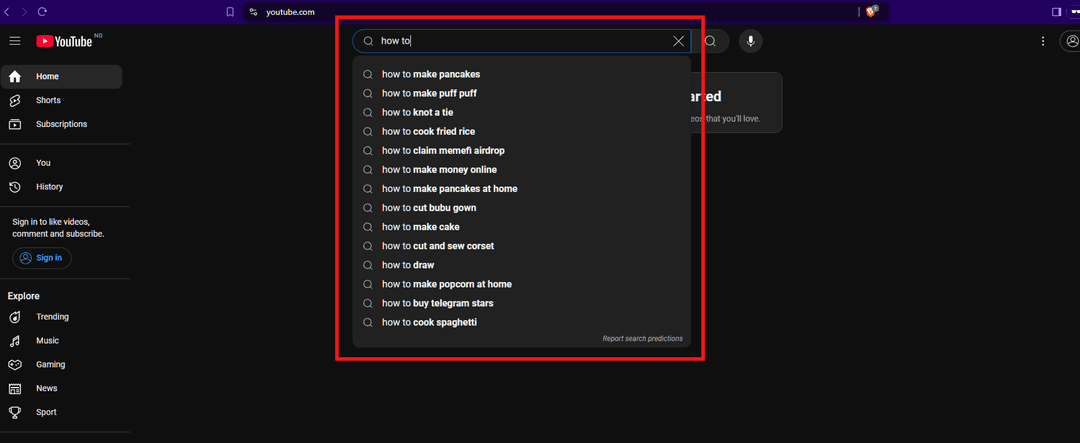
If two phrasings compete, pick the one that appears higher in the suggestions and matches what your video delivers. For the wider picture (descriptions, tags, chapters), see these YouTube SEO tips.
Let the title and thumbnail split the work
The thumbnail and title are read together, so they should not say the same thing. If the thumbnail shows the result (a finished room, a number on a screen), the title explains how or why. If the thumbnail text says "I quit", the title says what you quit and what happened. Our guide to creating YouTube thumbnails covers the visual side.
YouTube Shorts titles
Shorts titles also allow 100 characters and show over the bottom of the video, where few people read them before deciding to stay. Write them for search, not for the hook: the topic in plain words ("how to fold a fitted sheet"), and let the first second of video stop the scroll. More on ranking Shorts in our YouTube Shorts SEO steps.
How to write TikTok video titles
TikTok videos have no title field. Your caption carries the keywords, and the text on screen in the first second does what a YouTube title does: tell people what they are about to see. Search matters here too: 49% of US consumers in Adobe Express's 2026 survey said they use TikTok as a search engine, up from 41% in Adobe's 2024 survey.
Writing a caption at all pays off. In Revid's analysis of 176,367 TikToks with 1,000+ likes posted between October 2025 and October 2026, captions of 41 to 80 characters had the best median views (67K, with 12.5% passing 1 million), while videos with no caption had a median of 36K (7.5% past 1 million). The sample only holds videos that already reached 1,000 likes, so it shows what strong videos have in common, not a guaranteed cause. The method and every chart are in the full TikTok virality study.
A caption of 41 to 80 characters (one clear sentence) performed best. Posts with no caption at all earned roughly half the median views.
Source: Revid analysis of 176,367 TikToks with 1,000+ likes posted between Oct 1, 2025 and Oct 16, 2026 (61,203 creators)
Show the data
| Median views | Share that passed 1M views | |
|---|---|---|
| No caption | 36.4K | 7.5% |
| 1 to 40 | 58K | 11.1% |
| 41 to 80 | 67.3K | 12.5% |
| 81 to 150 | 66.6K | 12.3% |
| 151 to 300 | 63.8K | 11% |
| 300+ | 67.8K | 11.7% |
How to apply it:
- Caption: one sentence of 41 to 80 characters with the searchable phrase and the payoff. Example: "How to clean white sneakers with baking soda, no scrubbing".
- Hashtags: add 3 or 4 after the sentence. In the same study, 4 hashtags had the best median (77K views) and 9 or more only 16K.
- On-screen title: 3 to 6 words in the first second, such as "Sneakers look new in 5 minutes". Keep it inside the TikTok safe zone so the caption and buttons do not cover it.
The on-screen line is really a hook, so borrow structures from these TikTok hooks that stop the scroll. For caption drafts, the free TikTok caption generator gives you several versions to choose from.
Posts with 3 or 4 hashtags earned the most views. Captions stuffed with 9 or more hashtags did worst of all, with median views cut by about 80%.
Source: Revid analysis of 176,367 TikToks with 1,000+ likes posted between Oct 1, 2025 and Oct 16, 2026 (61,203 creators)
Show the data
| Median views | Share that passed 1M views | |
|---|---|---|
| None | 51.1K | 9.8% |
| 1 | 64K | 11.8% |
| 2 | 71.3K | 12.7% |
| 3 | 75.4K | 13.1% |
| 4 | 77.2K | 13.4% |
| 5 | 67.3K | 12.1% |
| 6 to 8 | 71.8K | 12.7% |
| 9+ | 15.6K | 7.8% |
What is the video title on Instagram?
Instagram Reels have no separate title field. The title is the first line of your caption, the part people see before Instagram cuts it off with "more", backed by the text on screen and the cover image.
- Caption: up to 2,200 characters, but treat the first line as the headline. Lead with the keyword and the promise: "3 shoulder moves for desk workers (no equipment)".
- Hashtags: Instagram allows up to 5 per post. With more than 5, the caption will not post.
- Cover: Instagram recommends 420x654 px. Put the same idea as your first caption line on it in a few large words, because the cover is what people see on your profile grid.
If you post the same video to TikTok and Reels, you can reuse the on-screen text, but rewrite the caption's first line so it reads as a complete headline on its own. The free Instagram caption generator can draft options.
Prompt to try
Create a 45-second vertical travel video titled "3 Days in Lisbon Without a Plan". Hook in the first second with the text "No itinerary. 3 days. Here's what happened." Show one highlight per day (a tram ride, a pastry shop, a sunset viewpoint) with a relaxed first-person voiceover and warm cinematic visuals.
How to title a vlog
Vlog titles fail when they only say "vlog" or a date, because nobody searches for your week. Name the place, situation or question, then the angle:
- Place + angle: "3 Days in Lisbon Without a Plan"
- Role + day: "A Day in My Life as a Night-Shift Nurse"
- First or last: "First Week Living Alone: What Nobody Tells You"
- Question you answer: "Is Living in a Van Cheaper Than Rent?"
- Series name + episode topic: "Building the Cabin: Pouring the Foundation"
If you run a recurring vlog, keep a stable series name at the end and put the episode's topic first, so search and returning viewers both find what they want.
Prompt to try
Make a 30-second vertical video titled "Why Your Sourdough Is Flat (and the Fix)". Open with the on-screen hook "Flat sourdough? It's not your flour", then cover 3 common causes and one clear fix each. Warm kitchen close-up visuals, friendly voiceover, bold captions.
6 video title formulas, with examples
| Formula | Template | Example |
|---|---|---|
| How-to + condition | How to [result] without [pain] | How to Film Yourself Without a Tripod |
| Numbered list | [Number] [things] for [audience] | 5 Lighting Mistakes Beginners Make |
| Experiment | I tried [X] for [time] | I Posted Every Day for 30 Days: Here Is What Happened |
| Comparison | [A] vs [B]: [deciding factor] | iPhone vs Android Camera: Which Looks Better at Night |
| Result + time | [Result] in [time] | Learn the Basics of Excel in 10 Minutes |
| Mistake + fix | Why your [thing] [problem] (and the fix) | Why Your Sourdough Is Flat (and the Fix) |
Numbered lists and timeframes work because they set expectations: the viewer knows how much they get and roughly how long it takes. Use the real number from the video, never a rounder one that sounds better.
Clickbait, urgency and power words: when they backfire
Use urgency only when it is true
"Last chance" and "before it's gone" work for a real deadline: a sale ending, an application window, an event date. On evergreen content they read as a trick, and viewers who click and find nothing urgent leave early, which hurts the video more than a calm title would.
Swap power words for specifics
"Ultimate", "insane", "epic" and "you won't believe" promise nothing in particular. Replace the adjective with the detail that made you want to use it. Not "Incredible Results" but "My Skin After 30 Days of Retinol: Photos Every Week". Curiosity works best when it is specific: the viewer knows the topic and wants the outcome.
How to test video titles
- YouTube: in YouTube Studio on desktop, Test & Compare lets you test up to 3 titles and thumbnails on long-form videos. The version with the highest watch time is then shown to everyone. Shorts are not eligible.
- Without a formal test: read impressions click-through rate together with average view duration in YouTube Studio. A title that lifts clicks but drops watch time is a bad trade.
- Instagram: trial reels are shown first to non-followers, insights arrive within 24 hours, and they do not affect how your standard reels rank. They need a public account with at least 200 followers (professional) or 1,000 (personal). Post the same video with two different on-screen titles and compare.
- TikTok: reuse a format that worked with a new on-screen title and caption, then compare the two in TikTok Studio analytics.
To get variants worth testing, the free YouTube title generator drafts several options from a short description of your video.
How to draft titles from what already works, with Revid
When you are stuck, start from videos that already performed in your niche instead of a blank line.
- Search Revid's library of about 2.77 million short-form videos with engagement data by topic and engagement tier, then open the ones that did well with Revid's viral video search.
- Run the free deep analysis (up to 60 a day) on a video: it explains the hook, its formula and strength, and how to adapt it to another niche.
- Turn that hook structure into your on-screen title, then use the title and caption generators above for the text version.
- If you make the video in Revid, you can publish and schedule it to TikTok, Instagram and YouTube from one queue.
FAQ
How long should a video title be?
On YouTube, the limit is 100 characters, but 60 to 70 with the key phrase first is a safer target for phones. On TikTok, captions of 41 to 80 characters had the best median views in Revid's data; on Instagram, keep the headline to the first caption line.
Can you change a YouTube video title after publishing?
Yes. You can edit the title in YouTube Studio at any time, and on eligible long-form videos Test & Compare can test up to 3 versions for you.
Should the video title and thumbnail say the same thing?
No. Let the thumbnail show the result or the emotion and the title add the context or the how, so together they say more than either one alone.
Should you put hashtags in a YouTube title?
Rarely. They take room from the words people read and search for; put hashtags in the description instead and keep the title for the topic and promise.
Can AI write good video titles?
Yes, as a draft generator. Ask for several options, keep the one that matches what the video really delivers, and check that it uses the words your audience searches.
Sources
- Revid analysis of 176,367 TikToks with 1,000+ likes posted between Oct 1, 2025 and Oct 16, 2026 (61,203 creators)
- Adobe Express, Using TikTok as a search engine (February 2026)
Charts and figures checked on November 6, 2026.