Short Instagram Video: Specs, Steps and Best Practices
Learn what a short Instagram video is, the specs for Reels and Stories, how to produce one step by step, and how to get it seen in 2026.

On this page
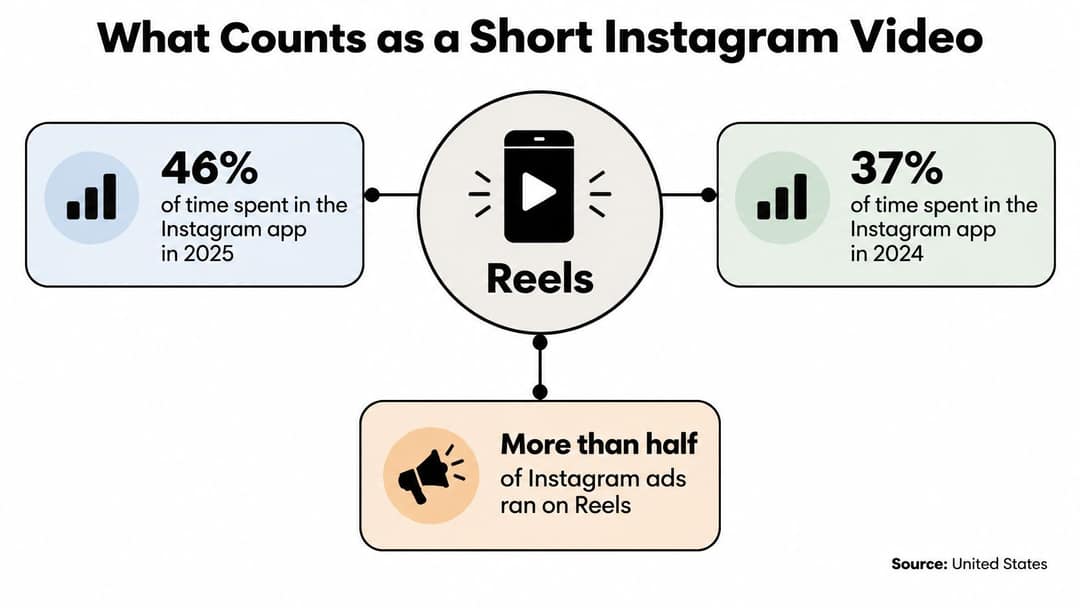
In the United States, Reels accounted for 46% of time spent in the Instagram app in 2025, up from 37% in 2024, and more than half of Instagram advertisements ran on Reels, according to Sensor Tower data reported by CNBC. A short Instagram video is no longer a side format next to photos. It is where a large share of in-app time and ad placements now sit, which is why the clip you export has to be built for that surface on purpose.
- Share of US Instagram app time spent on Reels in 2025, up from 37% in 2024
- 46%
- Sensor Tower via CNBC
- Year-over-year growth in US Instagram Reels watch time in Q4 2025
- 30%
- Meta Platforms, 2026-01
- Maximum length of an Instagram Reel
- 3 min
- Instagram guidance
- Largest file size the Reels advertising guide permits
- 4 GB
- Instagram Reels ad guide
What Counts as a Short Instagram Video
Think of your profile as a shop on a busy street. A short Instagram video is a vertical, phone-first clip built around one idea, and you can publish that idea in three different places. A Reel is the shop window. It can reach people who do not follow you yet, through the Reels feed and Explore. A feed video is the shelf inside the shop. It sits on your profile grid and reaches followers first. A Story is the conversation at the door. It disappears after 24 hours, so it suits a quick, personal update rather than a piece you want people to find next month.
That window became a permanent part of the app when Meta introduced Instagram Reels on August 5, 2020. The first version let people share 15-second videos with music, effects, and speed controls, either publicly or with friends. Instagram had tested Reels in Brazil in November 2019, then expanded to France and Germany in June 2020 and India in July 2020, before the United States and other markets in August 2020. The launch was a native answer to TikTok's growth, so creators could stay inside Instagram.
Say you run a small bakery. The same loaf can be a Reel that shows the crumb to strangers, a feed video that sits on your grid for regulars, or a Story that says the batch sells out at noon. The file can look similar. The goal should not. Strangers, followers, or a same-day update each need a different surface.
Specs for Reels, Feed Videos and Stories
Most upload problems start in the export, not in the idea. Match the file to the placement before you spend time on captions or music.
| Format | Aspect ratio | Maximum length | Frame rate and file |
|---|---|---|---|
| Reels | 9:16 vertical | Up to 3 minutes | 30 FPS constant, MP4 or MOV |
| Feed video | 4:5 (1:1 and 3:4 also supported) | Check Instagram's help centre for the current limit | 30 FPS constant, MP4 or MOV |
| Stories | 9:16 vertical | Check Instagram's help centre for the current limit | 30 FPS constant, MP4 or MOV |
A 9:16 Reel should be exported as a high-quality master, typically 1440 × 2560, and a 1080 × 1920 file is a practical floor for a sharp phone screen. Feed video reads more naturally at 4:5 (1080 × 1350) because that shape fills more of the grid without the extreme crop of a full-screen Reel. Stories use the same vertical frame as Reels, but a long take usually needs splitting. If a current length limit is not confirmed in Instagram's help centre, check it there before you lock an edit to a number you found in an old tutorial.
File settings that break uploads
Instagram's Reel guidance points to a predictable encode: H.264 video, square pixels, progressive scanning, a fixed frame rate, and stereo AAC audio at 128 kbps or higher. General publishing requirements specify at least 30 FPS and a 720-pixel minimum resolution. The Reels advertising guide permits files up to 4 GB and supports MP4 or MOV. Meta recommends captions and strongly recommends sound, because people watch Reels full screen. A constant frame rate matters more than a high one. Variable frame rate often slips out of sync after Instagram transcodes the file. If you are cutting product clips for paid placements, the video advertising guide for ecommerce brands from Headline Marketing Agency shows how a clean export fits a wider campaign.
The safe area and a three-point check
Keep faces, key text, and calls to action in the central safe area. The caption, profile name, and engagement buttons cover the edges, so a headline parked at the bottom disappears the moment the clip goes live.
Practical rule: Before you upload, confirm aspect ratio, a constant 30 FPS, and AAC at 128 kbps or higher.
A lightweight, correctly encoded 9:16 file is safer for scheduled or automated publishing than a heavily compressed or odd export. If one of those three checks fails, fix the export. Do not hope the app will repair it.
How to Shoot and Edit a Short Instagram Video
A short Instagram video holds attention when every step removes a reason to swipe. Work in this order, and do not skip the preview.
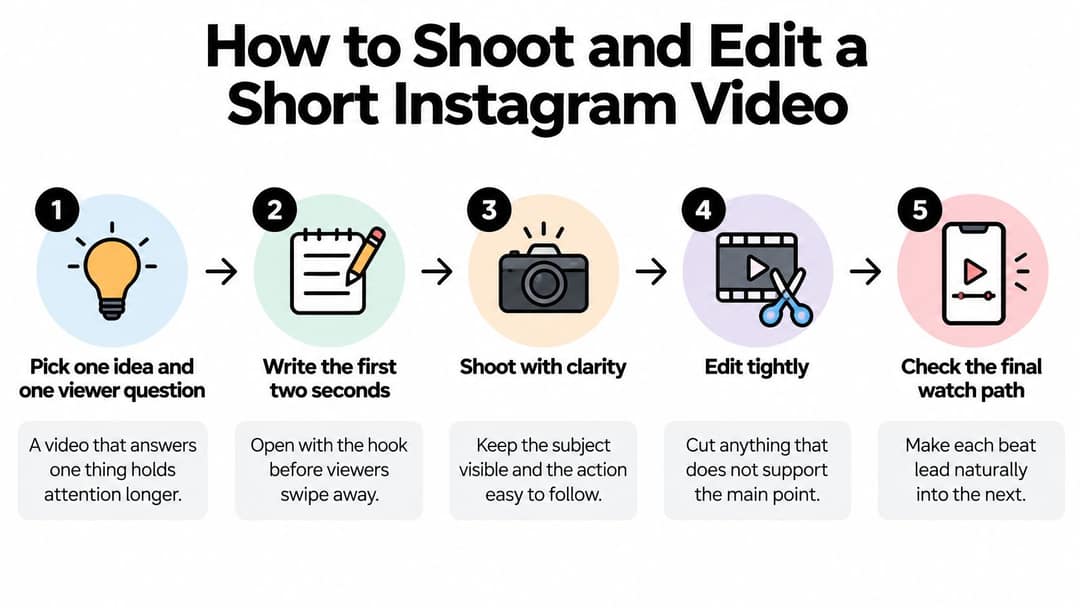
- Pick one idea and one viewer question. A clip that answers one thing holds attention longer than a tour of everything you sell. Write the question in a sentence, such as "Why did this loaf collapse?"
- Write the first two seconds as the hook. Lead with the result, the question, or a surprising image, in the words you would use to someone already scrolling. If the opening is setup, people leave before the point.
- Plan three to five shots. List the action in each shot. Tight shots keep the pace up. A wide room shot with no movement usually stalls.
- Record vertically on the rear camera. Use 1080p and 30 fps, soft window light, and a stand so the frame does not wander. The rear camera is sharper than the selfie camera, and a locked frame lets you cut without jumpiness.
- Edit to the length you planned. Cut pauses, delete anything before the hook, and place on-screen text in the central zone. If a sentence does not answer the question from step 1, it goes.
- Add captions and set the audio. Speech should stay clear over music. If you need an original bed instead of a stock loop, you can explore Mureka's AI music generation from Vocuno, then drop the track under the voice so it never competes.
- Export with the settings for that placement. Use the frame, codec, and audio bitrate you already checked. Do not re-export from a messaging app, which often crushes quality.
- Preview on your phone inside the app. Watch what the interface covers. A line that looked fine on a laptop is often hidden by the caption bar.
- Publish with one next step. The caption should tell people what to do, and the cover frame should show the subject clearly, not a blur between two shots.
Prompt to try
Make a 30-second vertical Instagram Reel answering "Why did my sourdough loaf collapse?" Open on a close-up of a flat loaf with the on-screen question, then show three quick causes (overproofing, weak shaping, low oven heat) with hands-on baking shots. Use a calm, knowledgeable voice, captions in the center of the frame, and end with one tip to save.
The index leans toward videos that surface in hashtag and keyword searches, so its view counts run high: compare the groups, not the absolute numbers.
Source: Revid TikTok index: 2,377,477 TikToks with AI labels per video, snapshot of Sep 15, 2026. Median views estimated from view buckets.
Show the data
| Median views | Share past 1M views | |
|---|---|---|
| Drone | 173.9K | 27.9% |
| Steady cam | 162.7K | 26.2% |
| Screen recording | 159.9K | 23.8% |
| Handheld | 140.9K | 25.6% |
| POV | 139.9K | 26% |
| Tripod | 117K | 23.6% |
| Selfie | 67K | 16.3% |
Why the middle of the edit matters
Steps 5 and 6 are where most homemade clips go soft. Creators leave the "hello, today I'm going to" at the front, then bury the answer under music that is louder than the voice. Cut that greeting. If you want a walkthrough of the same rhythm, this short demo shows a tight open, a visible action, and a clean end.
Watch it once for structure, not for production value. Notice how quickly the subject is identifiable and how little dead time sits between beats. That is the standard to copy with a phone on a stand, not a bigger camera.
Hooks, Presence and Tone That Keep Viewers Watching
People stay when they can tell who is talking, what the clip is about, and that something is happening. A 2024 machine-learning analysis of 438 Instagram Reels from global celebrities and brands ranked the strongest modeled predictors of engagement as the presence of a celebrity or brand (22.10% feature importance), content type (19.03%), age representation (16.27%), and human activity (16.16%). The same study found that a neutral emotional tone produced higher engagement than an overtly positive one.
Those percentages are feature-importance scores inside a model. They are not proof that adding a logo will lift your views by that amount. Treat them as hypotheses you can test, not as a formula.

Three choices worth trying
Show a recognizable person or the brand early. A face, hands, or a clear product in the first frames tells the viewer this clip is from someone specific, not a generic stock loop.
Show visible activity. Hands shaping dough, a brush on a brow, or a screen being tapped give the eye a reason to stay. A still pack shot with loud music asks people to imagine the action instead of seeing it.
Keep the energy natural. Forced cheer often reads as an ad. A calm, specific sentence usually sounds more trustworthy than a shouted promise.
Neutral tone beat maximum enthusiasm in that model, so talk like a person who knows the subject, not like a host who has to smile through every line.
The index leans toward videos that surface in hashtag and keyword searches, so its view counts run high: compare the groups, not the absolute numbers.
Source: Revid TikTok index: 2,377,477 TikToks with AI labels per video, snapshot of Sep 15, 2026. Median views estimated from view buckets.
Show the data
| Median views | Share past 1M views | |
|---|---|---|
| Angry | 232.4K | 29.8% |
| Sad | 178.1K | 28.6% |
| Humorous | 173.9K | 28.3% |
| Excited | 129.1K | 24.8% |
| Neutral | 116K | 23.3% |
| Happy | 114.2K | 23.8% |
| Informative | 104.4K | 20.6% |
| Inspirational | 88.4K | 20.8% |
A bakery comparison
Say the bakery posts two clips of the same loaf. In the first, the finished bread fills the frame in second one, then the baker's hands shape the next dough. The voice stays even: "This is the crumb when the dough got one extra fold." In the second, a static photo of the loaf sits under upbeat music and a caption that says the bread is amazing. The first clip gives presence, a clear subject, and activity. The second gives none of those, so the music has to do all the work.
Hold length, opening frame, caption length, and posting time constant. Change only presenter visibility, activity level, or emotional framing. Compare completion rate, shares, saves, and follows. Likes alone will flatter a clip that people tapped and left.
How Short Videos Reach People Beyond Your Followers
Hashtag stacks, one universal posting time, and follower count are weaker levers than most older advice claims. Instagram's recommendation guidance says Reels recommendations are personalized from signals such as accounts followed and recent viewing, liking, and engagement. Original content is favored for reach. Simple reposts, stitched clips, or watermarked material do not qualify as materially edited content.
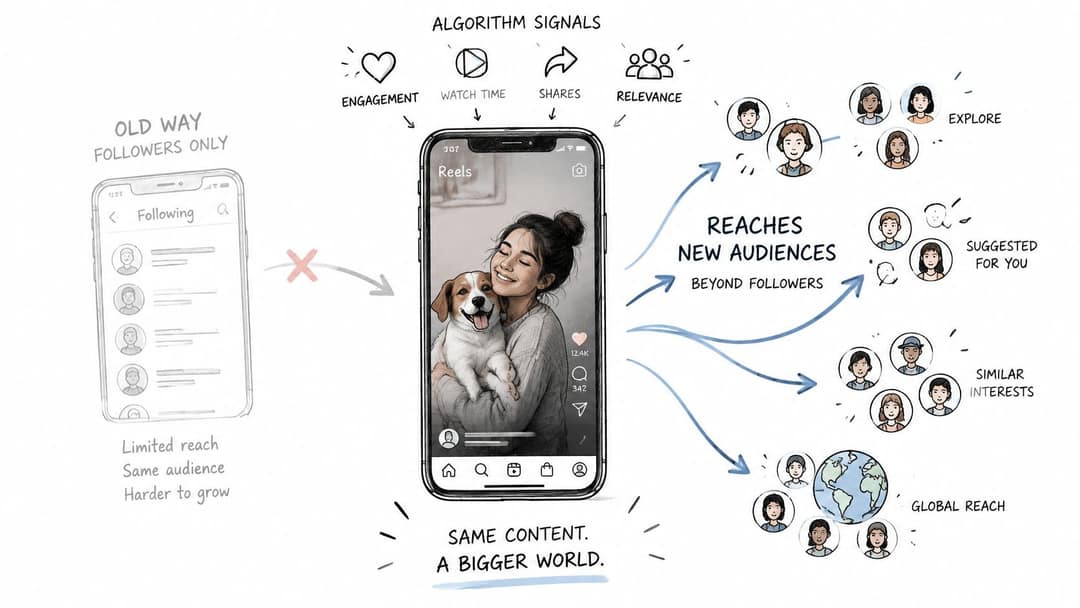
Relevance and originality are the practical levers. The system is trying to show a clip to people whose recent behavior suggests they will watch it, not to everyone who might make the view count look large.
Repost versus a real edit
A downloaded clip that still carries another app's watermark, posted unchanged, is a repost. The same footage becomes a different video when you cut a new opening, add your own narration, and end on a written takeaway. The pictures may be familiar. The argument is yours. That is the difference between borrowing attention and earning a recommendation.
A clip can reach non-followers and still fail you. Exposure does not create a profile visit, trust, or a sale. Someone can watch a satisfying pour and never care who baked it.
A high view count from the wrong people is not a business result. It is only proof that the clip was easy to watch.
Prompt to try
Create a 20-second Instagram Reel titled "3 bread mistakes home bakers make" with the topic written on screen in the first second. Use a neutral, expert tone, tight shots of dough being shaped and cut, captions on every line, and close with "Follow for one baking fix a week."
What to read after seven days
Look at these in order, and ignore vanity totals until they are done.
- Completion rate: Did people stay through the point you made?
- Shares and saves: Did they pass it on or keep it?
- Profile visits and follows: Did they want more from you, not just from the clip?
- Audience fit: Do the people reached match the customer you actually serve?
Write the caption as the phrase your viewer would type into search, and put the topic in on-screen text within the first seconds. That gives both the person and the recommendation system a clear subject, which a pile of broad tags does not.
Captions and Accessibility for Silent Viewing
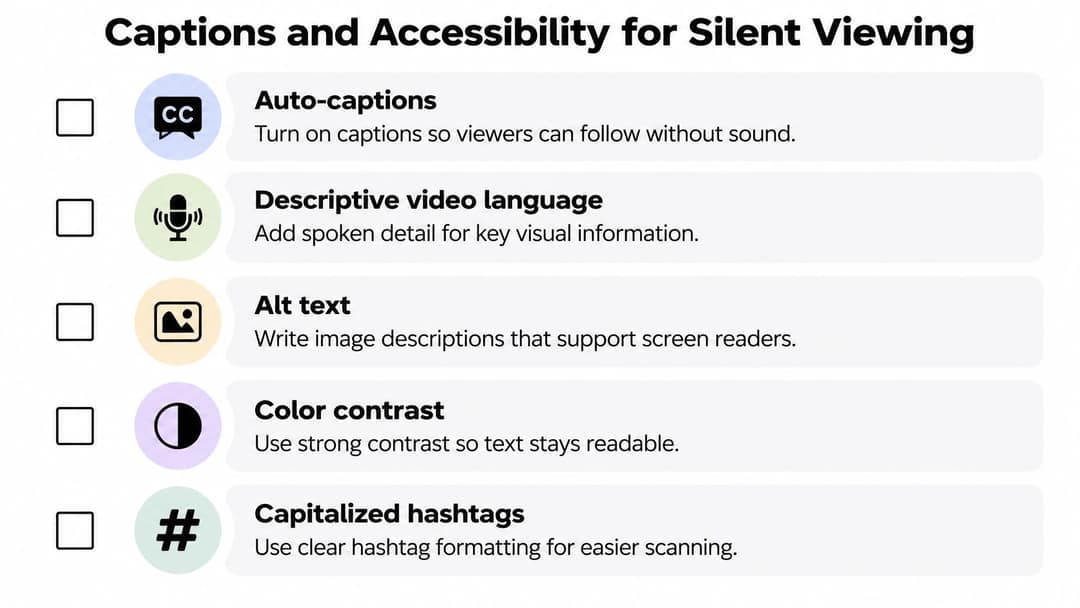
Turning on auto-captions is the start, not the job. Clemson University's reporting on social media accessibility notes that captions, descriptive video language, alt text, color contrast, and capitalized hashtags remain underused, which leaves deaf, hard-of-hearing, and blind viewers with a weaker experience. Deaf, hard-of-hearing, neurodivergent, and multilingual viewers also expect a way to flag bad captions. The same clarity helps everyone else, because plenty of people watch muted on a bus, in a second language, or on a small screen.
Auto captions versus a human pass
Automatic captions often miss names, product terms, and punctuation that change the meaning. "Don't add salt" and "Do not, add salt" are not the same instruction. Read every line out loud against the picture. When two people talk, label the speaker. Describe a key sound in a few words, such as "[door slams]" or "[notification]," when that sound carries information. If a chart or a price only appears visually, say it in narration too.
Burned-in captions stay visible in every app and every re-export. Platform captions can be switched on or off by the viewer, which is better for people who do not need them, and worse if a reshare strips them. For Stories, the frame is even tighter, so captions on Instagram Stories is worth a look before you lock text into a clip that vanishes in a day. If the video is built around a track, you can also turn music discovery into listener engagement with SCHelper's guide, but only after the words on screen are readable.
A mute test before you post
Use a short list, not a vibe.
- Accuracy: Names, prices, and product words match what was said.
- Timing: Lines appear with the words, not a beat late.
- Contrast and size: Light text on a light counter fails. Use a dark bar or a heavy weight, and keep type in the central zone.
- Speaker labels: Two voices are not left as one unnamed stream.
- Mute sense: With sound off, a stranger still gets the point.
- Language: A large non-English audience gets its own version, not a caption full of untranslated slang.
Capitalize each word in a hashtag so a screen reader does not treat it as one long string. Accessibility here is a comprehension tool for the whole audience, not a niche extra you add when you have spare time.
Common Mistakes and How to Fix Them
Match the symptom to one change. Fixing three things at once makes the next post impossible to read.
| Symptom | Likely cause | Fix |
|---|---|---|
| Viewers drop off in the first three seconds | Slow or generic opening | Start on the result or a question |
| Text cut off at the edges | Text outside the safe area | Move text to the central zone and check the preview |
| Quiet or muffled audio | Low audio bitrate or unbalanced levels | Export AAC at 128 kbps or higher with matched loudness |
| Views but no profile visits | Reposted or unclear material | Make materially edited content with a clear next step |
| Choppy playback | Variable frame rate or low resolution | Export at a constant 30 FPS and at least 1080 × 1920 |
| Stretched or rejected upload | Wrong aspect ratio | Export a 9:16 master |
What one post can prove
The opening, the text placement, the audio level, and the aspect ratio can be judged from a single upload. Watch the first three seconds yourself with the sound at phone volume. If you would swipe, the hook is the fix, not a new hashtag set. A stretched or rejected file is an export problem. Re-export the master. Do not crop it inside a story editor and hope.
Views without profile visits, and choppy playback that only shows up for some viewers, need a short series. One quiet day is not a verdict on the idea. Post the same offer at least three times, change one cause from the table, and compare that one metric. If completion rises when you open on the result, keep that opening and stop rewriting the caption every time. If profile visits stay flat after you add a clear next step and your own narration, the topic may be interesting to strangers and irrelevant to buyers. That is a useful finding. It is not a reason to declare the whole format broken.
Publish Your First Short Video This Week
Pick one idea you can explain in a sentence that answers a question your audience already asks. Make one vertical video from the spec table, with the hook in the first two seconds and captions on every spoken line. Preview it in the app so you can see what the buttons cover, then post it or schedule it. Videos can be posted now or scheduled to TikTok, Instagram, and YouTube from one queue. Robert says that after exporting his first video with Revid, he posted it within 10 minutes.
After seven days, read completion rate, shares, saves, profile visits, and follows, and check whether the people reached match the audience you wanted. Views alone do not make that decision. Make a second version with one change, such as a new opening or a person in frame, and compare the two on those same measures. Keep the format that holds viewers and brings profile visits. Drop the habit that does not.
Revid.ai turns an idea, a link, or a script into a finished short Instagram video with visuals, voiceover, captions, and music, then lets you publish it to Instagram, TikTok, and YouTube. Use it to run the one-change test in this guide instead of rebuilding every clip by hand. Visit revid.ai and post the first version this week.
FAQ
What size and aspect ratio should a short Instagram video be?
Reels and Stories use a 9:16 vertical frame, with 1080 × 1920 as a practical floor and 1440 × 2560 as a high-quality master. Feed video reads best at 4:5 (1080 × 1350), and 1:1 and 3:4 are also supported.
How long can an Instagram Reel be?
Reels can run up to 3 minutes. For feed videos and Stories, check Instagram's help centre for the current limit before locking your edit, since old tutorials often list outdated numbers.
What export settings stop Instagram uploads from breaking?
Export H.264 video with square pixels, progressive scanning and a constant 30 FPS, with stereo AAC audio at 128 kbps or higher. Use MP4 or MOV; the Reels ad guide permits files up to 4 GB. A variable frame rate often slips out of sync after Instagram transcodes the file.
How do Instagram Reels reach people who don't follow you?
Instagram personalizes Reels recommendations from signals such as accounts followed and recent viewing, liking and engagement. Original content is favored, while simple reposts, stitched clips and watermarked material do not count as materially edited. Relevance and originality matter more than hashtag stacks or a universal posting time.
What metrics should I check after posting a Reel?
After seven days, look at completion rate, shares and saves, profile visits and follows, and whether the audience reached matches your customer. Likes and views alone can flatter a clip people tapped and left. Change one thing per test so you can tell what made the difference.
Are auto captions enough for Instagram videos?
No. Automatic captions often miss names, product terms and punctuation that change meaning, so read every line against the picture. Label speakers, describe key sounds, keep text in the central safe area with strong contrast, and run a mute test before posting.
Sources
- Revid TikTok index: 2,377,477 TikToks with AI labels per video, snapshot of Sep 15, 2026. Median views estimated from view buckets.
- Meta Platforms, Meta Q4 2025 Results Conference Call transcript (January 2026)
Charts and figures checked on November 6, 2026.