How Captions Work on Instagram Stories: Add, Style and Read Them
Instagram's Captions sticker transcribes the speech in your Story and shows it on screen in sync with the audio. Here is how it works, what it looks like, how to place it and when to use another method.

On this page
Captions on Instagram Stories come from the Captions sticker: add a video with speech, tap the sticker icon, choose Captions, and Instagram transcribes the audio into on-screen text that appears as the words are spoken. You can correct the words, pick a style and move the text before you post.
The catch is that the transcript is a draft, and a posted Story cannot be edited. In Clutch's October 2025 survey of U.S. consumers, 88% said a video needs to grab their attention in 30 seconds or less, and only 9% give short-form videos their full attention (see our short-form video statistics). A misheard product name in the first caption is often all a skimming viewer reads.
- Consumers who say a video must grab their attention in 30 seconds or less
- 88%
- Clutch, November 2025
- Consumers who give short-form videos their full attention
- 9%
- Clutch, November 2025
- Average likes on Instagram posts with written captions, vs 86.27 with blank ones
- 132.02
- AgoraPulse experiment
- Languages Revid's caption generator transcribes for burned-in captions
- 100+
- Revid
How do captions work on Instagram Stories?
The Captions sticker is automatic speech-to-text built into the Story editor. When you add it, Instagram listens to the audio track of your clip, writes a transcript and lays it over the video, timed to the speech. Instagram launched it for Stories in May 2021, first in English and in select English-speaking markets, according to Mashable's report on Instagram's automatic Story captions.
Three things follow from how it is built:
- It needs clear speech. The sticker transcribes spoken words. Music, wind or a loud soundtrack under the voice produces gaps and wrong words.
- It is editable only before posting. You can fix the text in the editor. Once the Story is live, the only fix is to delete it and post a corrected version.
- It is part of the Story, not a toggle. Story captions are open captions: every viewer sees them, and nobody can switch them off. That makes placement a design decision, not an afterthought.
Instagram later extended automatic captions to other video surfaces, with availability that varies by product, language and market, as summarized in this overview of Instagram's captioning rollout.
How to add captions to an Instagram Story
- Record with clean audio. Film close to the phone's microphone in a quiet space and keep music low or off. If your clip already has muddy sound, clean it first with an audio enhancer before you upload.
- Open the Story camera. Record the clip or pick a video from your camera roll.
- Tap the sticker icon and choose Captions. Instagram processes the speech and places the transcript on the video.
- Tap the caption text to edit it. Fix names, product terms, numbers, punctuation and words that sound alike. Remove filler words only if it does not change the meaning.
- Pick a style and color. Tap through the style options at the top of the editor and choose one that stays readable over your footage.
- Drag and pinch to place it. Keep it in the middle band of the screen, away from the profile bar, your other stickers and the reply bar.
- Preview the whole clip, then post. Watch it once with sound off. If a line is wrong, fix it now.
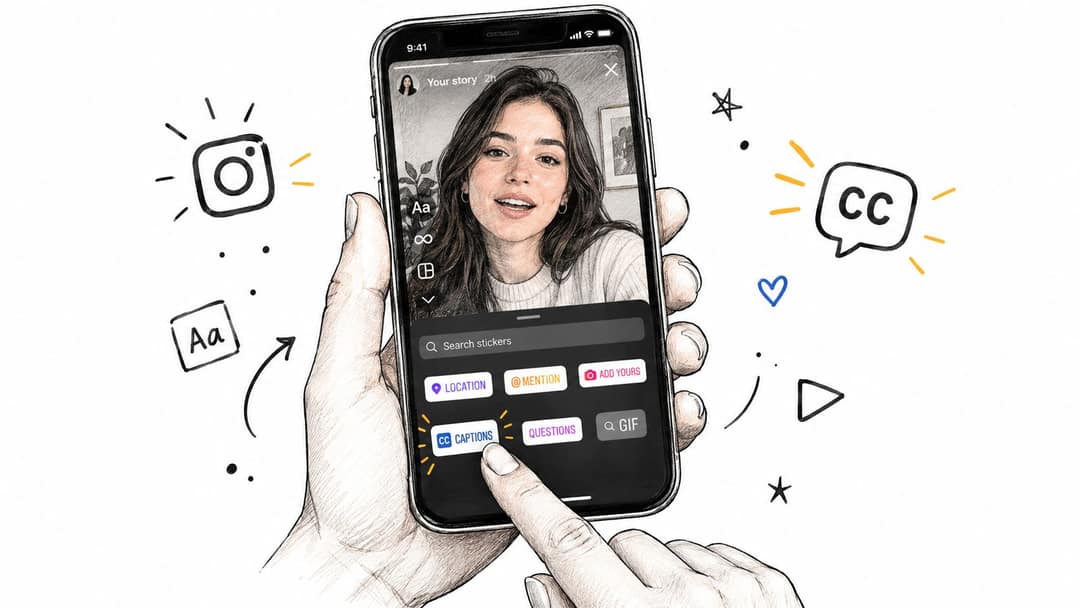
If Captions does not appear in your sticker tray, update the app first. If it is still missing, the feature may not be available for your language or region yet; use the Text tool or an outside caption app instead (both covered below).
What do captions look like on Instagram Stories?
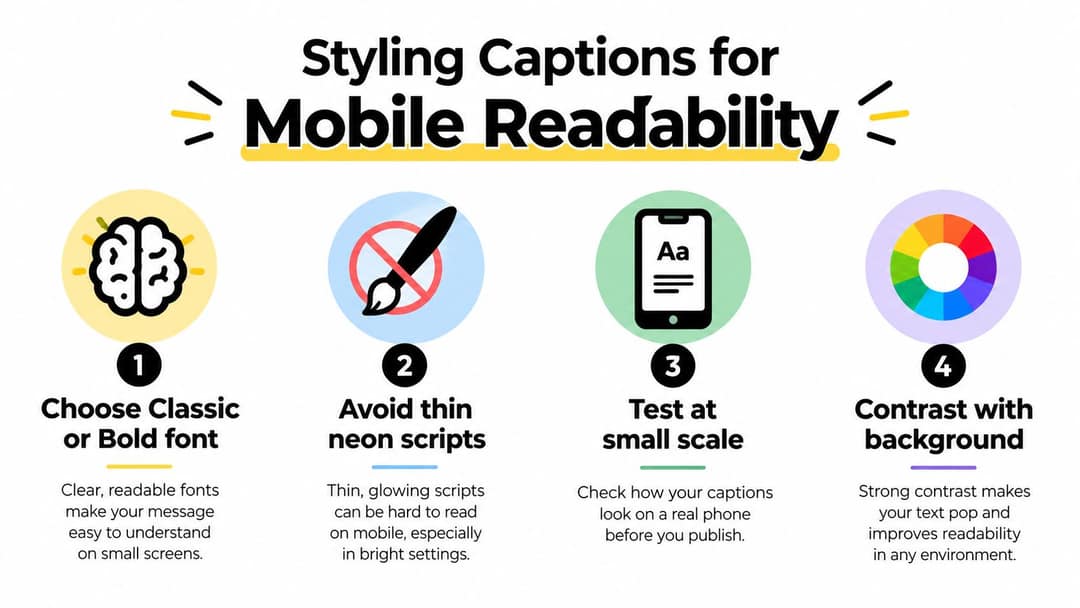
Captions appear as a block of text on the video that changes as the person speaks, so the viewer reads along with the audio. You control how they look in the editor: Instagram offers several text styles (legible ones such as Classic or Bold work best), color options, and you can resize the sticker and drag it anywhere on the frame. Style names and options change with app updates, so check what your version shows.
A few rules keep them readable on a phone:
- Pick weight over flair. Thin or neon-style lettering loses its shape over moving footage.
- Use strong contrast. Light text over pale footage, or yellow over white, disappears. If the background changes, choose a style with a solid or translucent background behind the words.
- Keep lines short. Split long sentences at natural pauses so a viewer can read the line and still watch the speaker.
- Test at phone size. Preview with screen brightness turned down. If you squint, your viewers will swipe.
Where should captions go on a Story?
The top of a Story holds the profile name and progress bar, and the bottom holds the reply bar and other controls. Both cover whatever sits under them. Put captions in the middle-lower band, and give polls, questions, mentions and link stickers their own space so the text and the call to action never overlap.
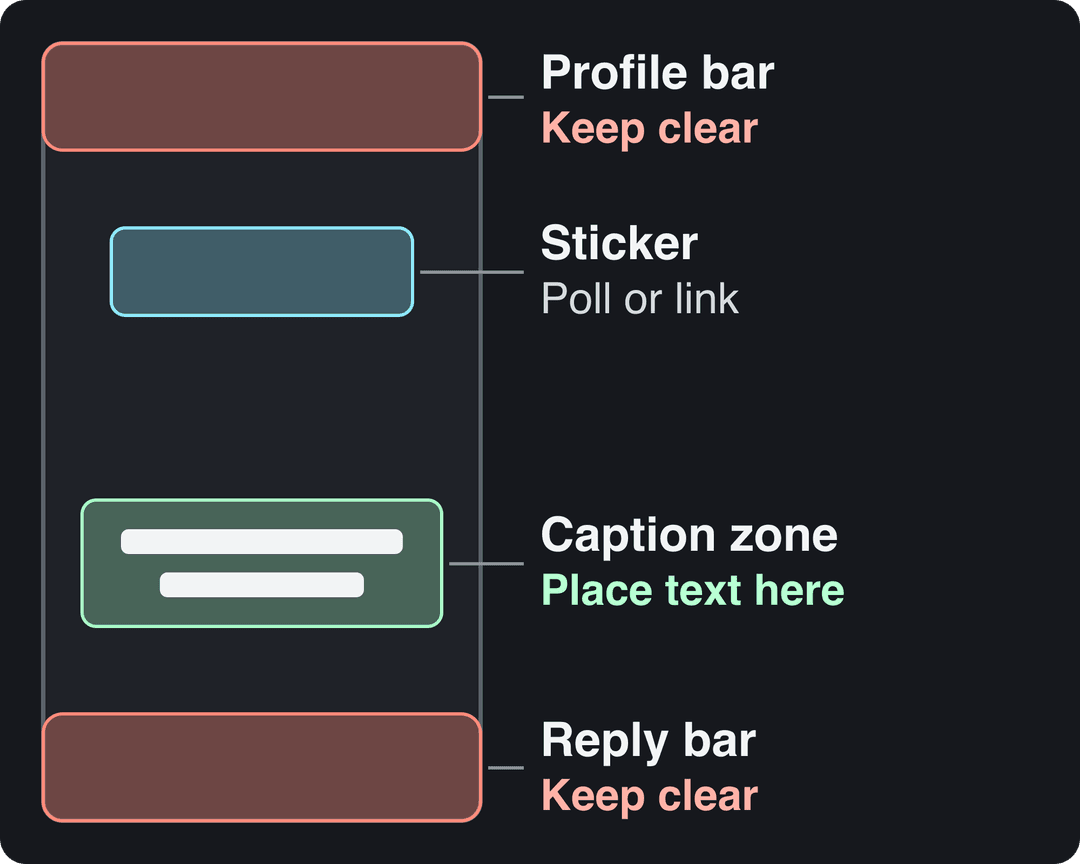
In a Story with several clips, check each frame separately. A spot that works against a plain wall may cover the speaker's hands or a product label in the next shot. The same logic applies to Reels, where you can check placement with the free Instagram Reels safe zone checker.
How to read captions on an Instagram Story
As a viewer, you do not need to turn anything on. If the creator added the Captions sticker (or typed text), the words are part of the Story and show up automatically, even with your sound off. If a caption moves too fast, press and hold on the screen to pause the Story and read it.
If a Story has no captions, there is no switch to add them: Story captions exist only when the creator includes them. For Reels and other videos, Instagram offers automatic captions in some markets; look in the Accessibility section of your Instagram settings to see what your app supports.
Captions sticker vs text overlays vs caption apps
The sticker is fast, but it is not the only option. Choose by what the Story needs.
| Method | How it works | Best for | Language coverage | Speed |
|---|---|---|---|---|
| Captions sticker | Instagram transcribes the speech; you correct it in the editor | Daily talking-head Stories, quick updates, interviews | Depends on Instagram's supported languages and markets | Fast |
| Text tool overlays | You type and place each line yourself | Scripted frames, short key phrases, brand layouts | Any language you can type | Slowest |
| Caption apps (burned in) | Export the clip, caption it in another app, re-upload | Custom fonts, word-by-word animation, other languages | Usually broader than the sticker, depending on the app | Moderate |
Decision rule: if you post daily and speak in a supported language, use the sticker. If the text is part of the design (a price, a headline, one phrase next to a product), type it with the Text tool. If you need a specific look, animated words or a language the sticker handles badly, burn the captions in with an app. For a side-by-side of those apps, see our roundup of the best apps for video captions.
Burned-in captions have one trade-off: a correction means a new export. Use them for planned content rather than spontaneous updates.
Add burned-in captions with Revid
When the sticker is not enough (a launch, a translated version, a branded look), you can caption the clip before it reaches Instagram:
- Upload your vertical clip to Revid's caption generator. It transcribes the speech automatically, in 100+ languages.
- Proofread the transcript, then choose one of 30 caption styles.
- Adjust position and timing in the timeline editor so the words sit in the middle band, clear of the Story interface.
- Export and upload the file to your Story. If the original was filmed landscape, convert it to 9:16 first with the video resizer.
The step-by-step version, with screenshots, is in our guide to creating captions and subtitles with Revid.
Accessibility and multi-language accounts
Captions are first an accessibility feature. A Deaf or hard-of-hearing viewer cannot recover information that exists only in the soundtrack, so the caption must carry the words that matter. If a sound changes the meaning (a doorbell, a laugh, a beep at the reveal), add a short text cue such as "[doorbell]".
Automatic transcription is not self-checking. Review proper names, technical terms, accents, overlapping speakers and fast delivery every time, and make sure each corrected line stays on screen long enough to read.
Language is a separate problem. The sticker launched English-only in select markets, as covered in The Indian Express report on the Captions sticker launch, and support still varies. If you post for several audiences:
- Speak one language per Story so the transcript has one job.
- If the sticker misreads your language, type the lines yourself or caption the clip with a subtitle generator that supports it.
- Keep translated lines short; two lines of text should never hide the speaker.
A caption of 41 to 80 characters (one clear sentence) performed best. Posts with no caption at all earned roughly half the median views.
Source: Revid analysis of 176,367 TikToks with 1,000+ likes posted between Oct 1, 2025 and Oct 16, 2026 (61,203 creators)
Show the data
| Median views | Share that passed 1M views | |
|---|---|---|
| No caption | 36.4K | 7.5% |
| 1 to 40 | 58K | 11.1% |
| 41 to 80 | 67.3K | 12.5% |
| 81 to 150 | 66.6K | 12.3% |
| 151 to 300 | 63.8K | 11% |
| 300+ | 67.8K | 11.7% |
Do captions help your Stories perform?
Judge captions by viewer behavior, not by whether the sticker is there. In Story insights, watch four things on captioned versus uncaptioned Stories with the same hook, footage and offer:
- Exits: did viewers leave before the spoken point became clear?
- Forward taps: did they skip faster?
- Completion: did more viewers reach the last frame?
- Replies and sticker taps: did the caption make the next action obvious?
Outside research is suggestive, not a forecast. A controlled experiment by AgoraPulse found Instagram posts with written captions averaged 132.02 likes and 873.77 reach versus 86.27 likes and 678.49 reach for posts with blank captions, detailed in AgoraPulse's Instagram caption experiment. That test measured the text under feed posts, not on-screen Story captions. Likewise, Socialinsider's analysis of Instagram caption length found post captions under 30 words usually earn higher engagement; apply the same idea to Stories by keeping spoken lines short.
If you already review content across platforms, run Story tests with the same habits. This guide to content analysis for social media from Xburst is written for X, but its review process transfers to Story exits and completion. And keep each clip tight; our guide to Instagram Story length covers how long each segment can run.
Pre-publish caption checklist
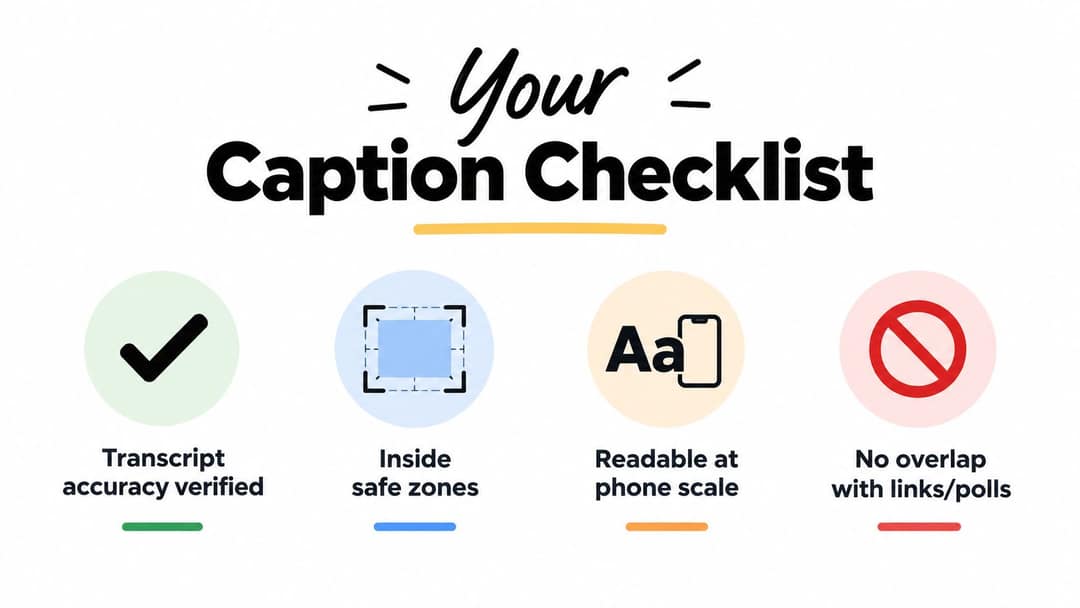
- Transcript checked: names, terms, numbers and punctuation are right.
- Placement clear: nothing under the profile bar, the reply bar or another sticker.
- Readable at phone size: bold style, strong contrast, short lines.
- Sound-off test passed: with the audio muted, a viewer knows who is speaking, what the Story is about and what to do next.
- Text jobs separated: the caption transcribes speech; a separate sticker or overlay carries the offer or link.
When you reuse Story footage as a Reel, recheck placement and timing for that format; our Instagram Reels best practices cover what changes.
FAQ
Can I edit captions after posting an Instagram Story?
No. A published Story cannot be edited, so delete it and post it again with the corrected caption. Proofread every line in the editor before you share.
Why don't I see the Captions sticker on Instagram?
Update the app first, then check that your clip has spoken audio. If the sticker is still missing, it may not be available for your language or region; use the Text tool or a caption app instead.
Can viewers turn off captions on an Instagram Story?
No. Captions added with the sticker are part of the Story image, so everyone sees them and nobody can hide them. That is why placement and size matter.
Do Instagram Story captions work in languages other than English?
Sometimes. The sticker launched in English and expanded unevenly by language and market, so test it in your language and fall back to typed text or burned-in subtitles if the transcript is unreliable.
Are captions on Instagram Stories good for accessibility?
Yes, as long as the transcript is accurate and readable. Correct the automatic text, use strong contrast, and add short cues for sounds that change the meaning.
Sources
- Revid analysis of 176,367 TikToks with 1,000+ likes posted between Oct 1, 2025 and Oct 16, 2026 (61,203 creators)
- Clutch, Creating in the Attention Economy: You Have 30 Seconds or Go Bust (November 2025)
Charts and figures checked on November 6, 2026.