Turn Plays into Videos with AI: Romeo and Juliet Step by Step
How to turn a classic play like Romeo and Juliet into a short AI video with Revid: pick one scene, script it, choose visuals and a voice, fix scenes in the editor and publish.
On this page
To turn a play like Romeo and Juliet into a video with AI, pick one scene, write it as a short script, and paste it into Revid's AI Movie Maker. Choose animated AI images or AI video, a voice, music and a 9:16 ratio, then click Generate video. Fix any scene in the editor and publish to TikTok, Instagram or YouTube.
The scene you pick matters more than the polish. In Revid's analysis of 176,367 TikToks with 1,000+ likes posted between October 2025 and October 2026, videos whose dominant mood was sadness had a 104K median views, against 45K for inspirational ones. Outrage (156K) and humor (121K) did even better. A tragedy already carries that emotion; the common mistake is flattening it into a polite book-report summary. The sample only holds videos that already passed 1,000 likes, and the figures show what strong videos share, not causes. The method is in our study of what makes a TikTok go viral.
High-arousal emotions (outrage, humor, sadness) earned the most views. Calm, inspirational videos earned the least, even though they collect the most likes per view.
Source: Revid analysis of 176,367 TikToks with 1,000+ likes posted between Oct 1, 2025 and Oct 16, 2026 (61,203 creators)
Show the data
| Median views | Share that passed 1M views | |
|---|---|---|
| Outrage | 156K | 23.7% |
| Humor | 121K | 19.3% |
| Sadness | 104.4K | 16.5% |
| Excitement | 92.5K | 15.9% |
| Joy | 89.9K | 18% |
| Informative | 64.1K | 11.2% |
| Neutral | 61.2K | 11.5% |
| Inspirational | 44.6K | 11.3% |
Here is the example balcony-scene video this guide builds:
- Median views of TikToks whose dominant mood is sadness
- 104K
- Revid analysis of 176,367 TikToks
- Median views of TikToks driven by outrage, the top-performing mood
- 156K
- Revid analysis of 176,367 TikToks
- Credits for a 30-second video with Pro AI visuals and a voice-over
- 40-80
- Revid credit guide
- Monthly price of the entry paid plan, with 2,000 credits
- $39
- Revid pricing
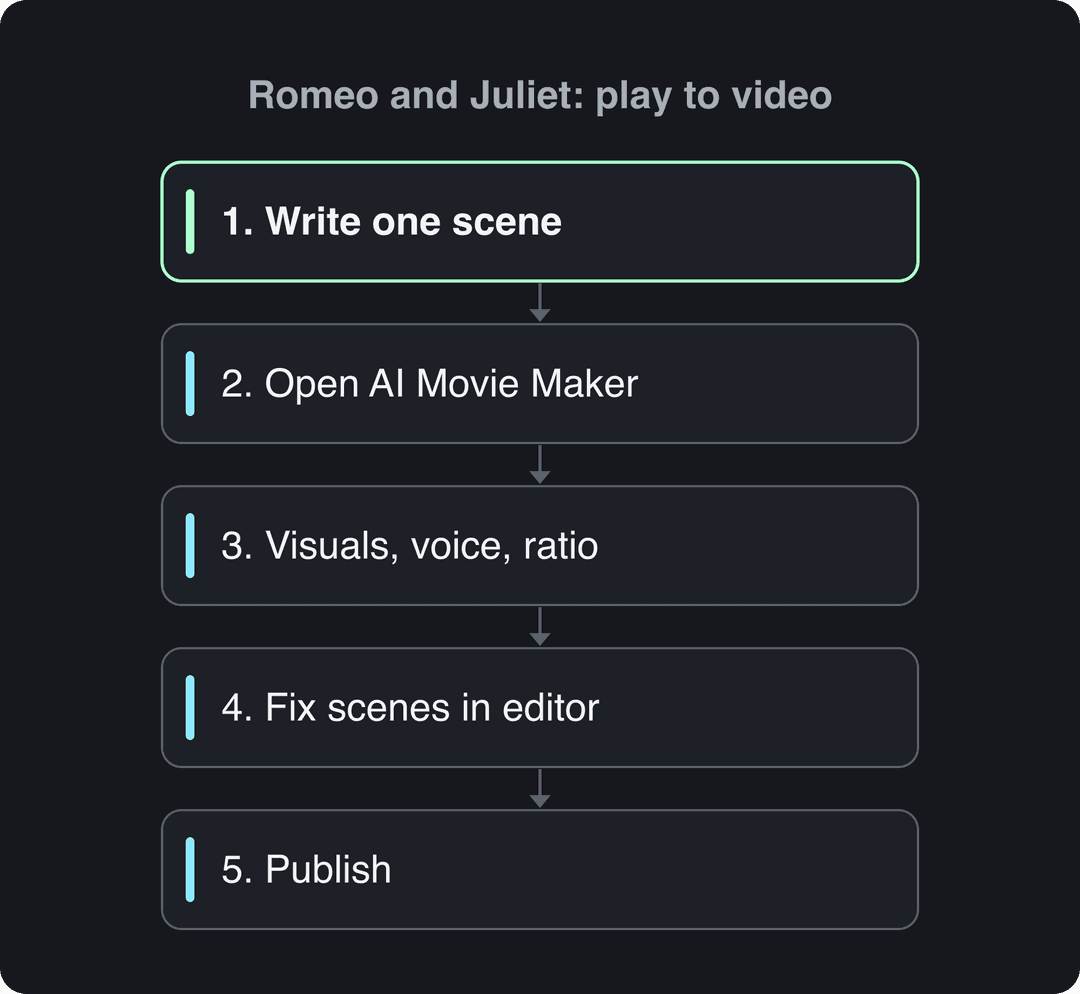
Step 1: Pick one scene and write it as a short script
One video, one dramatic beat. Do not feed the AI a whole act: choose a single moment and write it in a few lines. If the original verse feels heavy, Revid's free AI script generator can rewrite a passage in plain modern English.
For the balcony scene, a script like this works:
Two families at war. Their children just fell in love. [moonlit Verona street, painted Renaissance illustration]
Romeo climbs into the Capulet garden at night. [young man in a dark cloak below a stone balcony]
Juliet steps onto the balcony, thinking she is alone. <break time="1.0s" />
"But soft, what light through yonder window breaks?" [close-up of Romeo looking up]
By sunrise they plan to marry. Their families must never know.Three pieces of syntax do the staging for you:
- New line, new scene. Each line break tells Revid to generate new content, so one line equals one shot.
- [Brackets] are visual notes. Text in brackets is not narrated; in the script flow it guides the visuals of that scene. One caveat: ElevenLabs v3 and v4 voices may read bracketed words as acting cues (like [whispers]), so keep bracket notes descriptive.
<break time="1.0s" />adds a pause. Use it before a famous line to let it land. Pauses are capped at 10 seconds, and Gemini and Kling voices ignore the tag.
Writing rules that make the scene hit:
- Open on the conflict, not the background. "Two families at war. Their children just fell in love." beats "In Verona, there lived two noble households."
- Modernize the narration, keep one quote. Explain the scene in plain words, then let one original line carry the emotion.
- Do not soften the ending. The tragedy is the hook; skip the moral.
- End on a question for the next scene. "She has one way out. It is a poison." sets up the next video.
Step 2: Open AI Movie Maker on the Create page
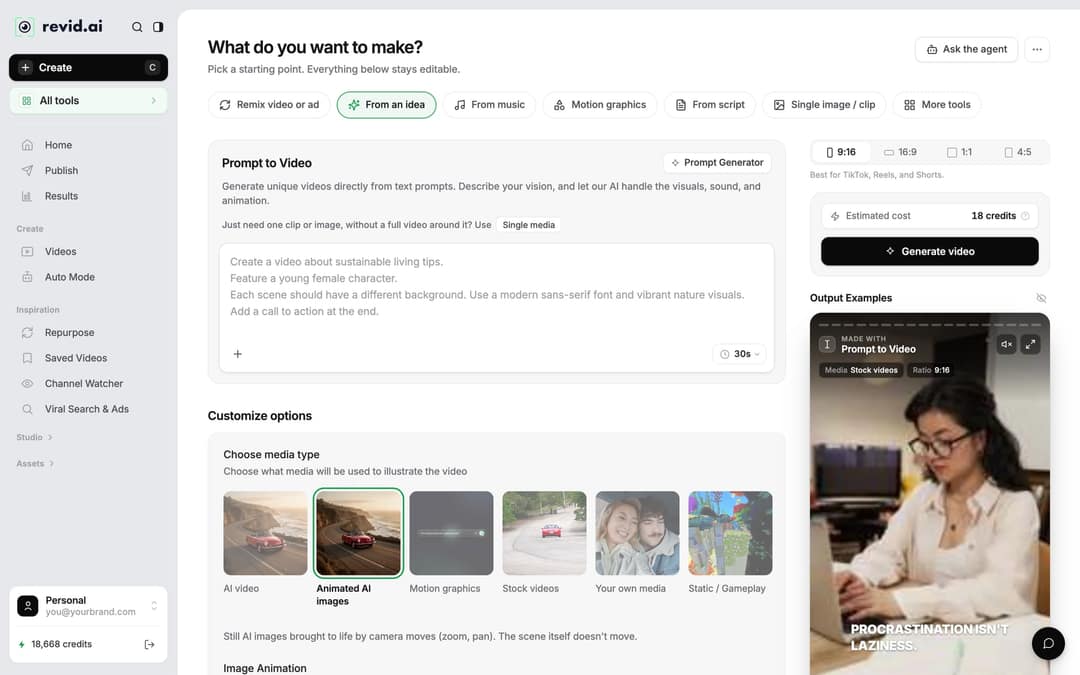
- In Revid, click Create at the top of the sidebar (or press C). The page asks "What do you want to make?"
- Open the AI Movie Maker from More tools (or the All tools card in the sidebar). It turns a script, a story or a one-line idea into a short movie and writes the scenes for you.
- Paste your script, or a one-line summary such as "Romeo professes his love to Juliet under her balcony at night."
Two other starting points fit plays: From an idea opens Prompt to Video for a looser, prompt-driven take, and From script voices your exact words when you want full control of the narration.
Step 3: Choose the visuals, voice, music and ratio
Under Choose media type, decide how the play should look:
| Media type | What you get | Pick it when | Cost guide |
|---|---|---|---|
| Animated AI images (default) | Still AI images brought to life by zoom and pan | You want a painted, storybook look at the lowest cost | 1, 4 or 16 credits per image (Low, Pro, Ultra) |
| AI video | Real motion in every scene | You want actors that move; needs a paid plan | 15, 50 or 100 credits per 5 seconds (Low, Pro, Ultra) |
| Motion graphics | Animated text and graphics | Quote cards, lesson recaps, act summaries | 2, 3 or 5 credits per second, 15 seconds minimum |
With AI video you can use several models (Seedance 2.5, MiniMax Hailuo H3, Wan 3.0 and Google Veo 3) under one subscription, and choose the model per scene. Premium models such as Veo 3 and MiniMax Hailuo H3 cost 100 credits per 5 seconds. Since the visual style is no longer a separate preset, put it in your text: "painted Renaissance illustration" or "3D animated" in the brackets keeps costumes and setting consistent.
Then finish the setup:
- Voice: pick a voice that matches the scene, soft and earnest for Romeo, slower and lower for the tomb. Revid offers 1,000+ AI voices in 70+ languages.
- Music: choose a romantic or classical-feeling track from the built-in library (199 tracks). You can swap it later in the editor.
- Ratio: the ratio picker offers 9:16, 16:9, 1:1 and 4:5. Use 9:16 for TikTok, Reels and Shorts, 16:9 for a classroom screen or regular YouTube.
- Check Estimated cost next to the button, then click Generate video. As a guide, a 30-second video with Pro AI visuals and a voice-over costs about 40 to 80 credits.
Step 4: Fix scenes in the editor
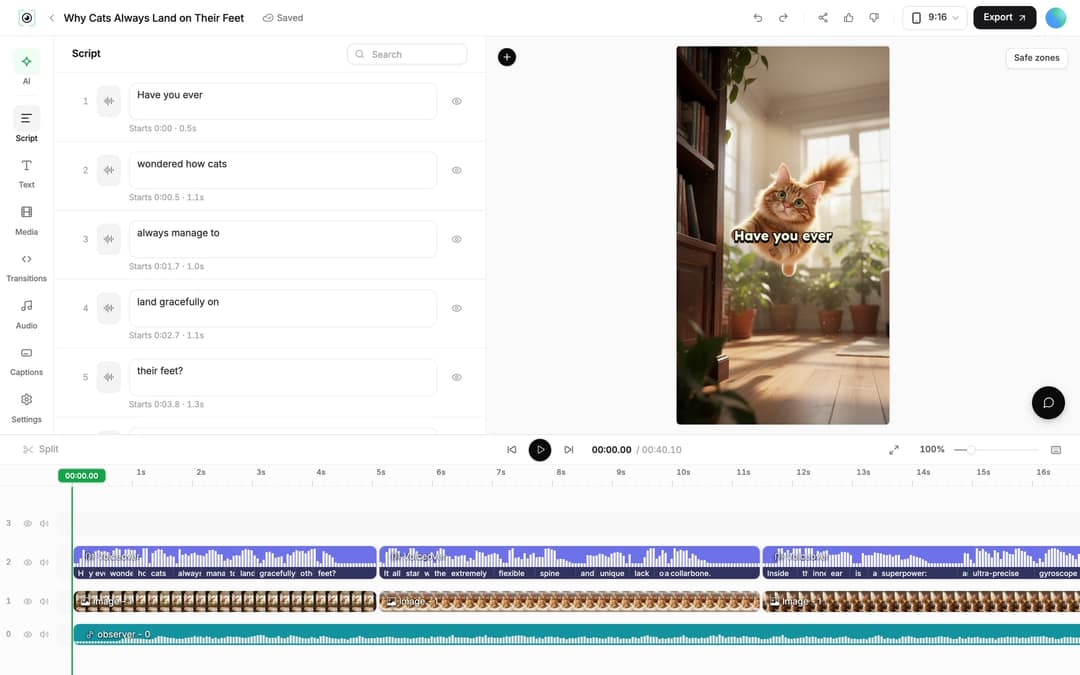
The first render is a draft. Open the project from Videos (click its card) to land in the editor.
- Change a line: the Script panel lists every caption segment with its text box and start time. Edit the text, then regenerate the voice if the timing changed: Audio panel, Re-generate next to the voiceover, then Generate Voice. It costs 10 credits per started 500 characters and needs a paid plan.
- Swap a scene's image or clip: select it on the timeline and click Replace to pick another file, or use Regenerate/Edit image (for AI images) or Regenerate from prompt (for AI video clips) to make a new version.
- Trim: drag a clip's edge on the timeline, or press S to split at the playhead.
- Change the music: Audio panel, Music tab.
Step 5: Publish your play adaptation
Click Publish on the project card (or Export / Publish in the editor) to open Publish Video. Choose your accounts under Publish to, then click Publish to post now or Add to queue to schedule it for later. Scheduled posts appear on the Publish page in the sidebar.
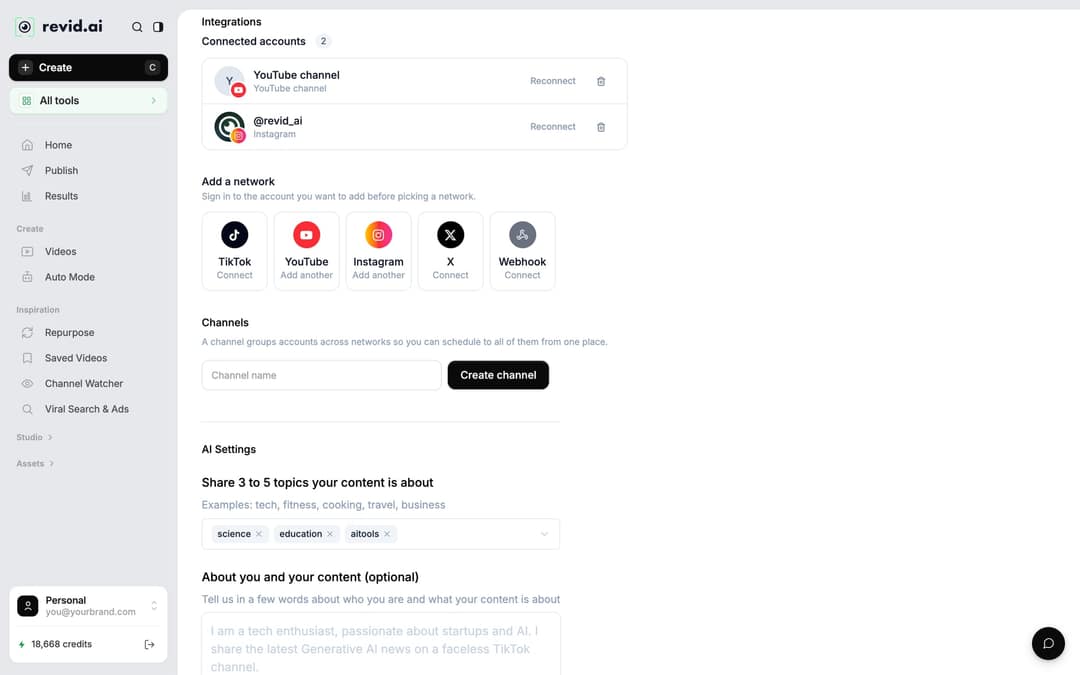
If no account is connected yet, go to Settings, then Integrations, then Add a network: TikTok, YouTube, Instagram (Business or creator account required), X and Webhook are available. The full walkthrough is in how to link a social account to Revid.
Prompt to try
A 40-second vertical short movie of Mercutio's death in Romeo and Juliet, in a painted Renaissance illustration style. Open on the hook "One joke too many, and the comedy ends." Show the street fight in Verona, Romeo stepping between Mercutio and Tybalt, and Mercutio's line "A plague o' both your houses!" in a close-up. End on Romeo's anger with the question: what will he do now?
Which scenes of a play work best as short videos?
Pick moments people already know, and keep each video to one beat. For Romeo and Juliet:
| Scene | Why it works | Suggested tone |
|---|---|---|
| The balcony scene | The most recognized moment in the play | Romantic, hushed |
| The first meeting at the Capulet feast | A clean love-at-first-sight setup | Light, curious |
| Mercutio's death | A sudden turn from comedy to tragedy | Shock, anger |
| The tomb | The ending everyone waits for | Sad, slow |
The same rule works for any play: Hamlet's "To be or not to be", Macbeth's dagger speech, the ghost on the battlements. Iconic lines give viewers instant recognition, so put one famous quote on screen or in the narration.
The index leans toward videos that surface in hashtag and keyword searches, so its view counts run high: compare the groups, not the absolute numbers.
Source: Revid TikTok index: 2,377,477 TikToks with AI labels per video, snapshot of Sep 15, 2026. Median views estimated from view buckets.
Show the data
| Median views | Share past 1M views | |
|---|---|---|
| 0-7s | 88.3K | 19.9% |
| 8-15s | 111.1K | 22.6% |
| 16-30s | 141K | 25.1% |
| 31-60s | 120.4K | 22.8% |
| 61-120s | 97K | 19.8% |
| 2-5 min | 89.1K | 18.3% |
| 5 min+ | 90.1K | 17.2% |
How long should a play video be?
One scene per video, usually well under a minute, keeps the story tight. Platform limits leave room if you need more: YouTube treats vertical or square videos up to 3 minutes as Shorts, Instagram recommends reels up to 3 minutes to non-followers, and TikTok accepts uploads up to 60 minutes.
Other ways to adapt a play with Revid
- For dialogue-driven episodes with recurring characters, the AI short drama generator turns a script into a vertical micro-drama episode with voiced dialogue.
- For a funny take, the AI cartoon video generator turns a scene into an animated cartoon.
- Teaching younger readers? The same approach works for fairy tales: see how to turn a children's story into a video.
FAQ
Can I use Shakespeare's original text in my video?
Yes. Shakespeare's plays are in the public domain, so you can quote and adapt the original text. Modern translations, film scripts and stage adaptations may still be under copyright, so work from the original play.
Do I need to label an AI-generated play video?
Only if it looks realistic. TikTok requires a label on AI-generated content with realistic images, audio or video, and YouTube requires disclosure of realistic AI content; both say the label alone does not reduce a video's reach. A clearly illustrated or animated style is not realistic content.
Is Revid free for making play videos?
You can start free: sign-up is free and new accounts get free credits to try video creation, no credit card needed. Regular creation then uses the monthly credits of a paid plan, from $39/month for 2,000 credits, and you see the estimated cost before you click Generate video.
Can I turn other plays or books into videos the same way?
Yes. The same five steps work for any play, novel or story: write one scene as a few lines, paste it into AI Movie Maker, then pick the visuals, voice and music that fit its mood.
Can I make the same play video in another language?
Yes. Click Translate on the project card to open the video translator, pick a target language (74 are available), and Revid keeps the edit, media, timing and captions. It costs 10 credits per 500 characters per voice segment.
Sources
- Revid analysis of 176,367 TikToks with 1,000+ likes posted between Oct 1, 2025 and Oct 16, 2026 (61,203 creators)
- Revid TikTok index: 2,377,477 TikToks with AI labels per video, snapshot of Sep 15, 2026. Median views estimated from view buckets.
Charts and figures checked on November 6, 2026.