
10 Best Twitter Video Tools for X Creators in 2026, by Job
The 10 best Twitter (X) video tools in 2026, grouped by job: tweet-to-video, screen recording, voice-over, clipping and X's native tools, plus X's current video specs.
On this page
The best Twitter video tools in 2026 depend on the job. Revid turns tweets, text, audio or YouTube videos into finished clips, Screen Studio and Tella record your screen, ElevenLabs adds voice-overs, CapCut edits footage you filmed, and X's Media Studio manages uploads natively. Most creators need two of these, not all ten.
Pick tools for X specifically, not for TikTok. X displays landscape video well. In Revid's study of 63 Claude Opus 5.5 motion graphics videos that passed 100 likes on X, 78% were landscape and 71% used music only, with no voiceover. For that kind of post, a tool that only exports 9:16 is the wrong default.
This list covers tools for making and posting video on X. Some links to third-party tools are partner links; they do not change the descriptions below.
- Share of top AI motion graphics videos on X that were landscape
- 78%
- Revid study of 63 videos past 100 likes
- Share of those X videos that used music only, with no voiceover
- 71%
- Revid study of 63 videos past 100 likes
- Maximum video length per post for non-Premium X accounts
- 20 min
- X media upload documentation
- Maximum video length per post for Premium or verified X accounts
- 125 min
- X media upload documentation
The 10 best Twitter video tools at a glance
| # | Tool | Best for | Pricing |
|---|---|---|---|
| 1 | Revid | Turning tweets, text, audio and YouTube videos into finished videos | Free sign-up with free credits to try it; plans from $39/month |
| 2 | SuperX | Finding tweets worth turning into video | See site |
| 3 | AnimStats | Animated stats, revenue and growth charts | See site |
| 4 | Screen Studio | Polished screen recordings on a Mac | See site |
| 5 | Tella | Screen and camera recording with layouts and captions | See site |
| 6 | ElevenLabs | Standalone AI voice-overs | See site |
| 7 | CapCut | Editing footage you filmed | Free tier with 1080p export; Standard about $9.99/month |
| 8 | OpusClip | Cutting clips from streams, podcasts and webinars | Free plan with watermarked captions; paid from $15/month |
| 9 | X Media Studio | Uploading and organizing video on X | Built into X |
| 10 | X Live Producer | Broadcasting live on X | Built into X |
The list is grouped by job, not ranked:
- Tools 1 and 2 create.
- Tools 3 to 6 record and add assets.
- Tools 7 and 8 edit and clip.
- Tools 9 and 10 publish.
1. Revid: turn tweets, text and long videos into X videos
Revid is an AI video platform that turns an idea, a script or a link into a finished video. It writes the script and generates the scene visuals, a voice-over in 70+ languages, synced captions and music. A timeline editor lets you fix any scene. Visuals come from several AI video models under one subscription (Seedance 2.5, MiniMax Hailuo H3, Wan 3.0 and Google Veo 3), and you export in 720p, 1080p or 4K at 30 or 60 fps.
The Revid tools that fit X best:
- The Tweet/X to Video tool turns a post's URL into a narrated video of that post.
- Text to video AI turns a thread, a blog post or notes into a video with visuals, voice and captions. For background on how these models work, read Magicspace's overview of text-to-video AI.
- The YouTube clip maker cuts a long YouTube video into short clips you can post as teasers on X.
- The audio to video converter turns a podcast or interview (MP3, WAV or M4A) into a captioned video.
- The resize video tool converts any clip to 16:9, 1:1, 9:16 or 4:5, so you don't have to re-edit a vertical TikTok for X.
What sets Revid apart is where a video starts. Its library holds about 2.77 million short-form videos and posts with public engagement data, including 155,417 posts from X (snapshot of September 15, 2026). Instead of starting from a blank prompt, you can open a post that already performed and have Revid write an original video on the same structure.
Sign-up is free and new accounts get free credits to try video creation, no credit card needed; regular creation then uses the credits of a paid plan, from $39/month (Growth, 2,000 credits). Revid was called Typeframes until April 2024, so older articles, like this explainer on what Typeframes is, still use the old name.
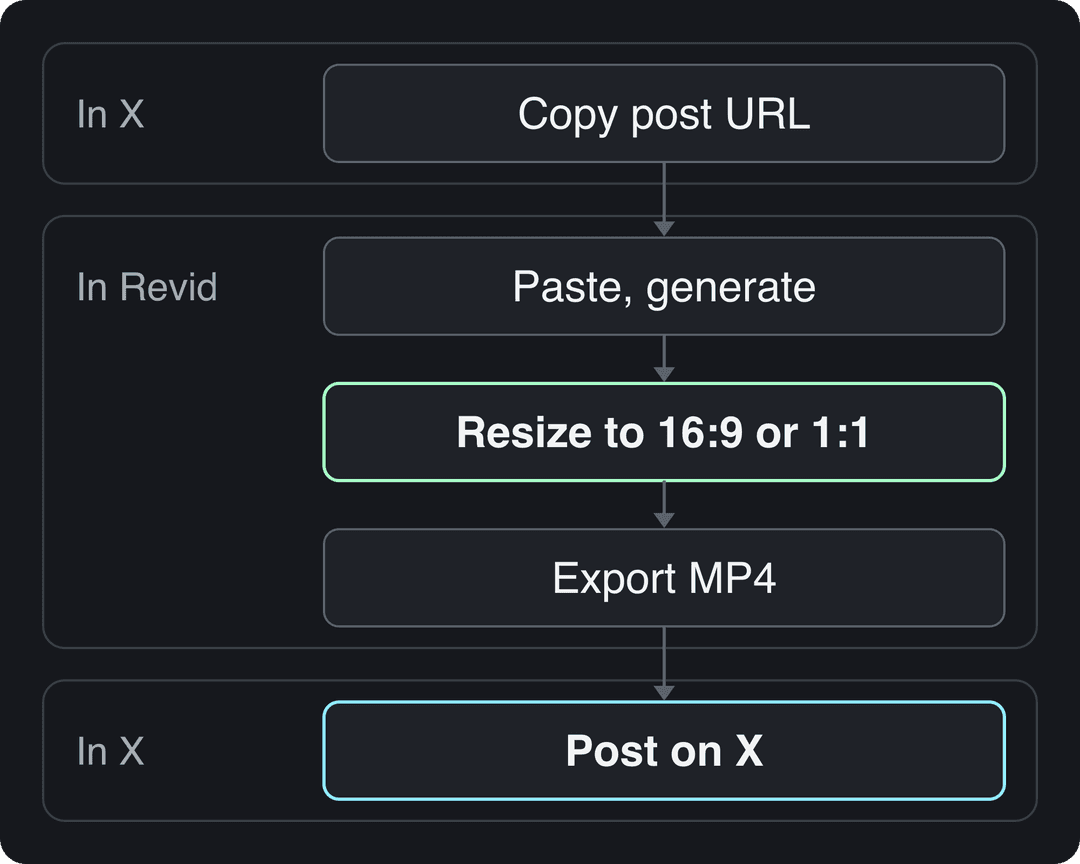
How to make a video for X from a tweet with Revid
- Copy the URL of the post you want to feature (your own, or one you have permission to reuse).
- Paste it into the Tweet/X to Video tool and pick a voice.
- Generate the video, then adjust scenes, captions or music in the editor.
- If the video will live mainly on X, resize it to 16:9 or 1:1.
- Export the MP4 and upload it to X with a one-line caption.
To turn every new post from an X account into a video automatically, follow the guide to automating videos from an X account.
2. SuperX: find the tweets worth turning into video
The hardest part of a tweet-to-video workflow is picking the post. SuperX is a tool for finding high-performing tweets, which turns it into a shortlist of video ideas. Start with posts that already earned replies and reposts: the idea is proven, and the video only has to package it.
If you are looking for viral video posts rather than text posts, Revid's library lets you filter by platform (X included), topic and engagement tier.
Prompt to try
Make a 30-second landscape video for X about a solo founder's SaaS growing from $0 to $10k MRR in 12 months. Open with the hook "Twelve months ago this product made zero dollars." Show three turning points as animated charts and clean motion graphics, with upbeat music and short captions, and end with the one lesson that mattered most.
3. AnimStats: animated stats and charts
AnimStats turns numbers such as MRR, ARR or user counts into animated GIFs and short videos built from ready-made templates. It suits founders who build in public on X: a moving revenue chart reads faster in a feed than a dashboard screenshot.
Use it when the number is the story. When the post needs a narrative, a voice-over video works better.
4. Screen Studio: polished screen recordings on a Mac
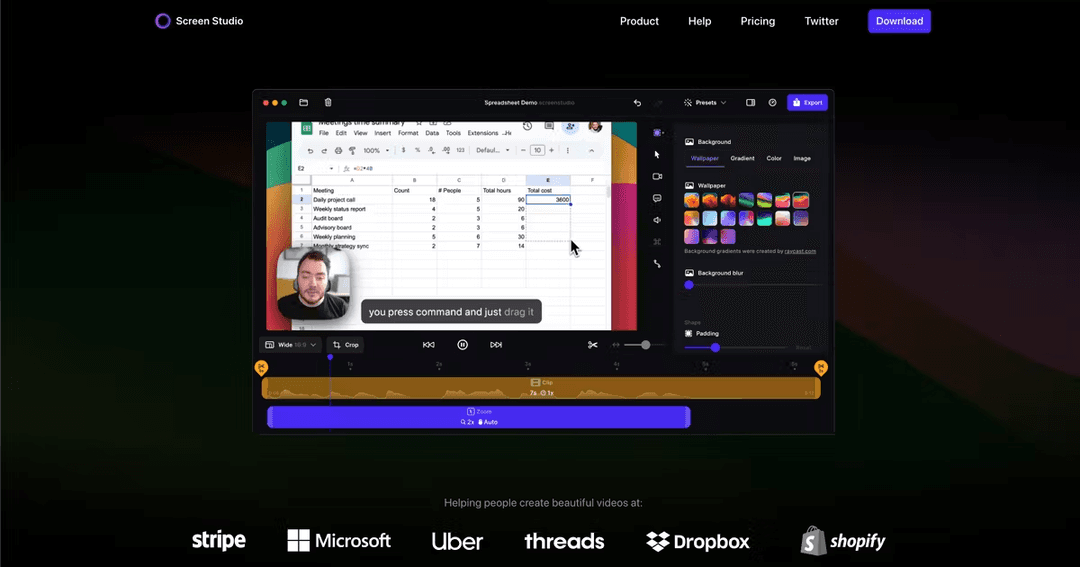
Screen Studio is a macOS screen recorder that automatically adds smooth cursor movement, zooms on clicks, motion blur and backgrounds. You can record the full screen, a window or an area, include your webcam and microphone, and adjust or add zooms afterwards.
It is the fastest way to make a product demo that looks edited without editing it. The limits: it runs on Mac only, and any editing beyond trims and zooms happens in another tool. Check its site for current pricing.
5. Tella: screen and camera recording with captions
Tella records your screen and camera together, with customizable layouts, automatic captions and basic editing. It runs in the browser, as a Chrome extension and as a Mac app, and is sold as a subscription.

Screen Studio or Tella: which screen recorder fits X?
- If you are on a Mac and want a short demo that looks finished with no editing, pick Screen Studio.
- If you are not on a Mac, or you need your face on screen plus captions and cuts in one place, pick Tella.
- If you only need a still image of a tweet or an app, you don't need video at all: see Xnapper's guide to Mac snipping tools.
6. ElevenLabs: standalone AI voice-overs
ElevenLabs generates lifelike AI voices in many languages, with control over emotion and accent. Use it when you need a voice file for a video you are editing elsewhere, such as a narrated screen recording or a product demo.
If you make the video in Revid, you don't need a separate voice tool. Revid includes 1,000+ AI voices from ElevenLabs, Google Gemini and MiniMax.
7. CapCut: edit footage you filmed
CapCut is the default editor for footage you shot yourself, on mobile or desktop. Its free tier includes the full editor, 1080p export and auto-captions. Premium templates and most AI features are paid, with Standard at about $9.99/month.
CapCut does not generate videos from text. For how the two approaches differ, see Revid vs CapCut.
US dollars per month
The plans do not buy the same thing: OpusClip, Vizard and Quso sell minutes of uploaded video, Klap sells clips, Submagic sells videos, Descript and Kapwing sell seats, and Revid sells credits that also make new videos from scratch. Billed yearly, most of these drop by 30 to 50%.
Source: Vendor pricing pages read October 29, 2026. Vizard's page did not render prices that day, so its figure is from vizard.ai/pricing on September 30, 2026; Klap's page showed yearly prices only, so its monthly price is from klap.app/pricing on August 13, 2026.
Show the data
| US dollars per month | |
|---|---|
| OpusClip Starter | 15 |
| Kapwing Pro | 16 |
| Submagic Starter | 19 |
| Descript Hobbyist | 24 |
| Vizard Creator | 29 |
| Klap Basic | 29 |
| Quso Lite | 29 |
| Revid Growth | 39 |
8. OpusClip: clips from streams, podcasts and webinars
OpusClip turns long recordings such as podcasts, streams and webinars into short clips automatically. It ranks moments with a virality score and adds animated captions and auto-reframing. Paid plans start at $15/month. The free plan exports 1080p with watermarked captions, and media expires after 3 days.
See Revid vs OpusClip for when clipping existing footage beats creating new videos.
Looking for a Twitter Livecut alternative?
If what you need is short highlight clips cut from a long broadcast or recording, two options cover it:
- OpusClip, which picks highlights automatically.
- Revid's YouTube clip maker, if the recording is on YouTube.
To go live on X itself, use Live Producer (tool 10 below).
9. X Media Studio: upload and manage video on X
Media Studio (formerly Twitter Media Studio) is X's own library for uploading, organizing and publishing video from a desktop. It has historically covered trimming, caption files, scheduling and video analytics. X has changed access over the years, so sign in to see which of these features your account has.
For the basics of attaching a video to a post, see StoryChief's guide to tweeting a video.
10. X Live Producer: broadcast live on X
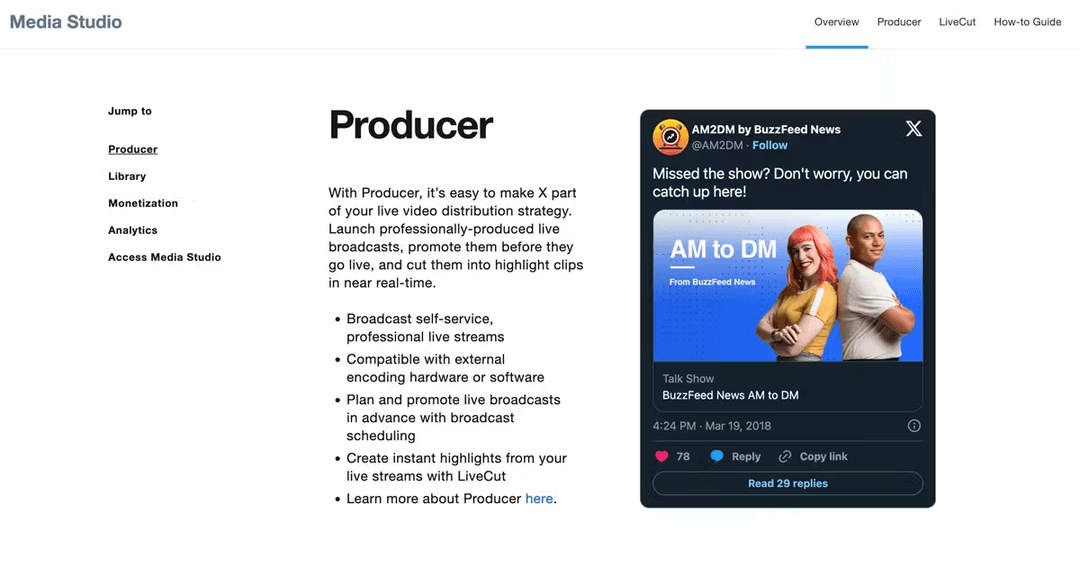
For live video, X's Live Producer lets you run broadcasts from streaming software via RTMP or HLS instead of your phone, with your own graphics and branding. Setup steps and eligibility are on X's Live Producer help page.
Share of clips
Source: Revid production data: 713,649 AI video clips generated Jun 29, 2026 to Sep 26, 2026.
Show the data
| Share of clips | |
|---|---|
| 16:9 | 54% |
| 9:16 | 40.3% |
| 1:1 | 4.3% |
| 3:4 | 0.5% |
What video specs does X accept?
X's developer documentation lists these limits for video in posts and says they match the X app:
| Limit | Non-Premium accounts | Premium or verified accounts |
|---|---|---|
| Maximum length | 20 minutes | 125 minutes |
| Maximum file size | 8 GB | 16 GB |
A post can carry one video, one animated GIF or up to 4 photos. You may remember a 140-second, 512 MB limit: it now applies only to video sent in direct messages from non-Premium accounts. Source: X media upload documentation.
For quality, X recommends H.264 High Profile video at one of three sizes:
- 1280x720 (16:9 landscape)
- 720x1280 (9:16 portrait)
- 720x720 (1:1 square)
X accepts aspect ratios between 1:3 and 3:1, per X's media best practices.
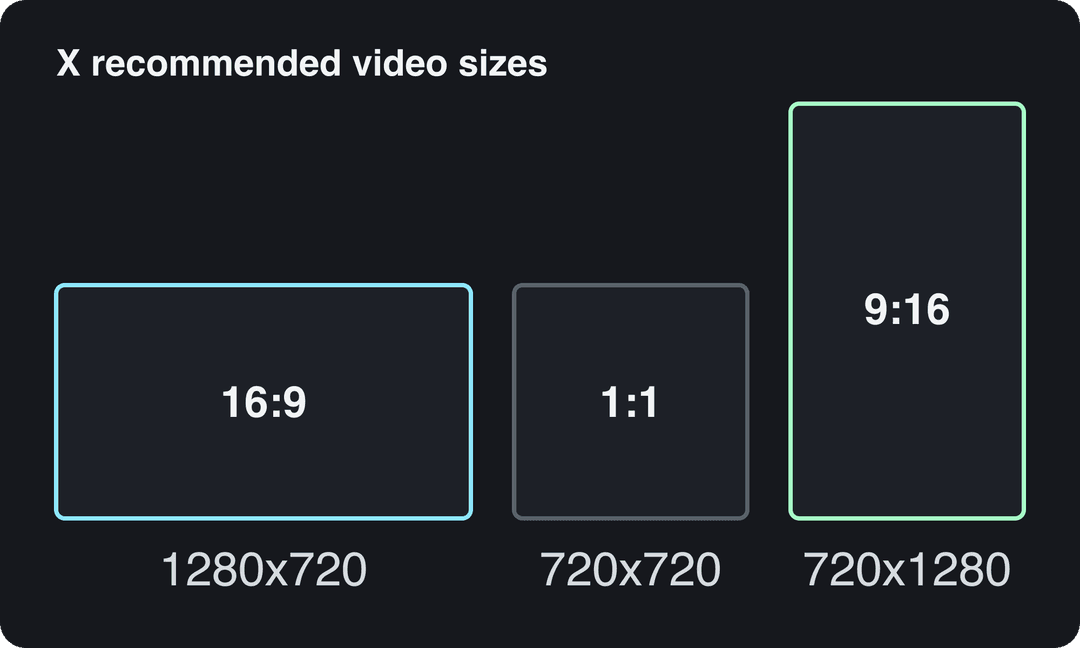
If a video was made for TikTok, decide its shape before posting to X. Keep 9:16 for a talking head. Resize to 16:9 or 1:1 for a demo, a chart or a screen recording that people need to read.
Which Twitter video tool should you pick?
- You have an idea or a tweet but no footage: Revid.
- You have a product to demo: Screen Studio on a Mac, Tella anywhere else.
- Your story is a number: AnimStats.
- You filmed something and need to cut it: CapCut.
- You have a long stream, podcast or webinar: OpusClip, or Revid's YouTube clip maker.
- You need a voice file for a video edited elsewhere: ElevenLabs.
- You need to upload, organize or go live natively: Media Studio and Live Producer.
FAQ
Is there a free Twitter video tool?
Yes. CapCut's free tier includes 1080p export and auto-captions, OpusClip has a free plan with watermarked captions, and X's native tools are built into X. Revid's sign-up is free, lets you search its viral video library, and includes free credits to try video creation; regular creation then uses paid plan credits.
Can Revid post videos directly to X?
No. Revid publishes directly to TikTok, Instagram and YouTube. For X, export the MP4 and upload it yourself.
What is twittervideotools?
It is not a video-making tool. Searches for "twittervideotools" usually lead to third-party sites that rank or collect trending X videos; these sites are unrelated to the tools on this page and to Revid.
Is Twitter Media Studio still available?
It depends on your account. Sign in at studio.twitter.com to see whether you have access and which features X currently offers you.
Can I turn a Twitter thread into a video?
Yes. Paste the thread into a text-to-video tool such as Revid, keep one idea per scene, and open with the thread's strongest line as the hook.
Sources
- Vendor pricing pages read October 29, 2026. Vizard's page did not render prices that day, so its figure is from vizard.ai/pricing on September 30, 2026; Klap's page showed yearly prices only, so its monthly price is from klap.app/pricing on August 13, 2026.
- Revid production data: 713,649 AI video clips generated Jun 29, 2026 to Sep 26, 2026.
Charts and figures checked on November 6, 2026.

