On this page
An AI video generator starts from random visual noise and removes it step by step with a diffusion model, steered by your prompt or reference image, until a short clip with consistent frames and motion appears. Full video tools then wrap those clips in a script, voice-over, captions and music to produce a finished video.
The model is rarely what separates good AI video from bad. Google Veo, Seedance, Kling, Wan and MiniMax Hailuo are sold through APIs to video tools across the market, Revid included, so two tools that send the same prompt to the same model get comparable clips. What changes the result is what goes in: the idea, the hook, the structure and the pacing.
- Views of AI-generated TikToks compared with real footage
- 2x
- Revid study of AI videos vs real footage
- Video marketers who have used AI video tools to create or edit videos
- 63%
- Wyzowl, December 2025
- Longest single clip Google Veo 3.1 generates in its API
- 8 s
- Google Veo 3.1 API
- Monthly price of Revid's entry paid plan
- $39
- Revid pricing
What is AI video generation?
AI video generation is software that produces moving images from inputs that are not video: a text prompt, a still image, a script, an article link or a song. Generative AI video, in the strict sense, means a model creates every pixel of the clip itself instead of retrieving or cutting existing footage.
In practice the phrase covers three different kinds of product, which is why tool comparisons and market reports rarely line up. As this breakdown of how reports define the AI video market shows, some count only generation models, some add editing and avatars, and some fold in every kind of video AI.
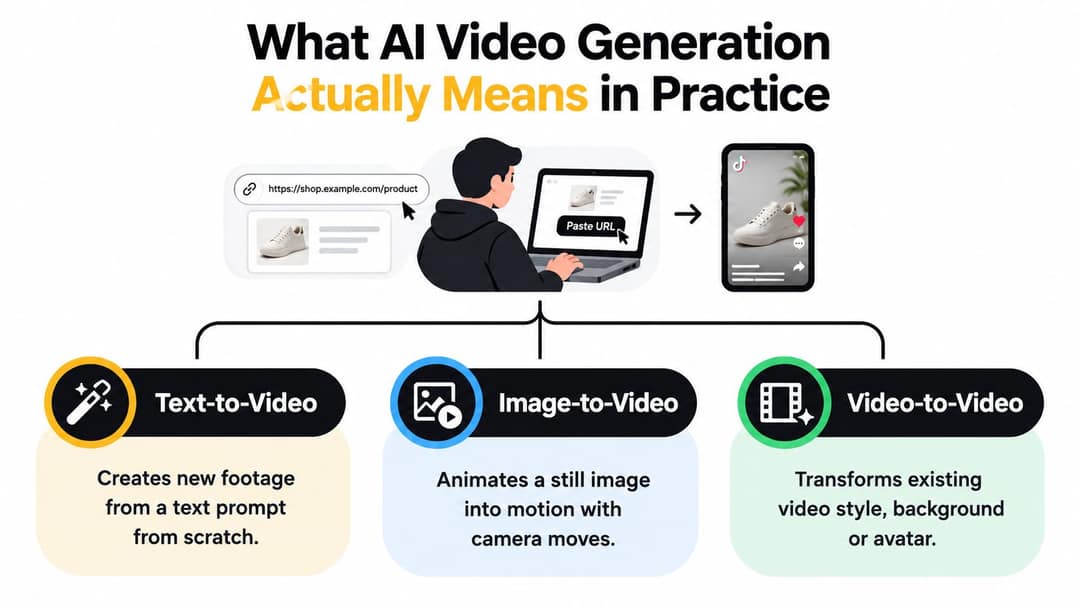
| Type | What you give it | What the AI does | Typical use |
|---|---|---|---|
| Fully generative video | A prompt or an image | Creates new footage frame by frame | Concept shots, stylized B-roll, AI story scenes |
| AI-assisted production | A script, URL, PDF or song | Writes the script, generates or picks visuals, adds voice, captions and music, assembles the edit | Faceless shorts, product videos, explainers |
| Post-production automation | Video you already have | Trims silences, captions, dubs, reframes, extends shots | Repurposing podcasts, translating videos |
AI-generated video vs AI-assisted video production
The difference is who makes the footage. In AI-generated video, a model invents the visuals, so you get shots that never existed, along with the artifacts that come with them. In AI-assisted production, AI handles the labor around the visuals (script, voice, captions, timing, assembly), and the footage can be stock, your own clips or generated scenes.
Most videos labeled AI on TikTok or Reels are a mix: generated scenes inside an AI-assisted edit. Decision rule: if you need a shot that does not exist, you need generation. If you need a finished, postable video from material you already have, AI-assisted production gets you there faster and with fewer errors.
How does an AI video generator work, step by step?
Most current video models are diffusion models: they learn to turn noise into images, then extend that skill across a sequence of frames while keeping motion believable and the prompt on track (see this peer-reviewed overview of diffusion-based video generation). Here is what happens between your prompt and the clip.
- Your input becomes guidance. A text encoder turns the prompt into numbers the model can read. A reference image, a first frame, a pose or a source video can be added as extra conditioning.
- The model starts from noise. It does not store clips and fetch one. It begins with random static in a latent space, a compressed representation of the video that is far cheaper to work on than raw pixels.
- It denoises in many passes. At each step, the network (a transformer in most recent models) predicts what to remove so the result moves closer to the guidance. Rough shapes appear first, then objects, lighting, texture and motion.
- All frames are refined together. Video models process the frames of a clip as one block, with attention across time, so a red jacket at the start is still a red jacket at the end. This temporal consistency is the hard part.
- The latent is decoded into frames. A decoder turns the compressed result back into pixels. Many tools then upscale it, and some models generate synchronized audio alongside the picture.
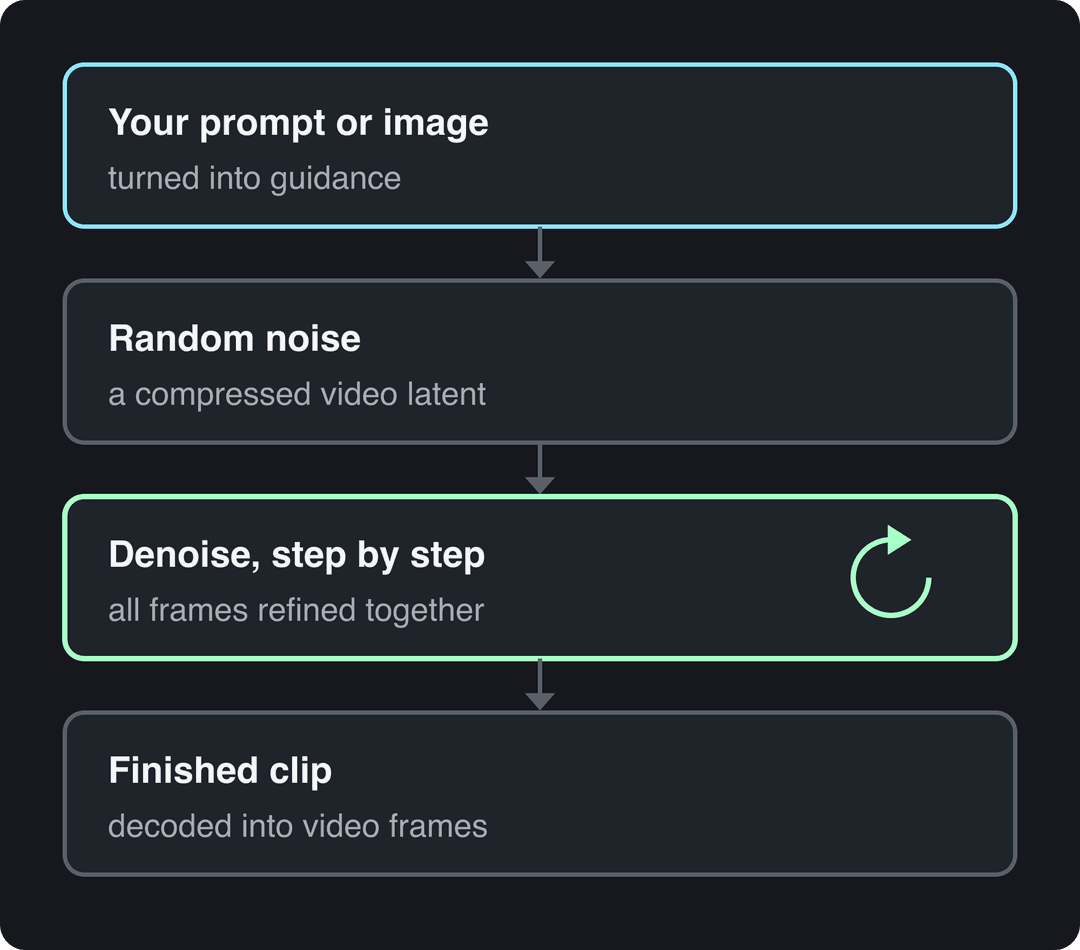
So the model solves two problems at once: what appears in the scene, and how that scene changes over time. The second problem is the one beginners underestimate.
Single generations are also short. Google's Veo 3.1, for example, produces 4, 6 or 8-second clips in its API. That is why a 30-second video from an AI tool is almost always several generated scenes stitched together with a voice-over and cuts, not one long generation.
How do image-to-video generators work?
Image-to-video uses the same denoising process, with your still image fixed as the first frame or used as strong conditioning. The model only has to invent the motion, not the whole scene, so results are usually more predictable than text-to-video: the product, face or artwork stays recognizable, and your prompt describes the movement ("slow push-in, steam rising from the cup").
The usual failures are floaty motion and warped edges wherever the model has to reveal something the photo never showed, such as the side of a product or the back of a head. To try it, upload a photo to Revid's AI image animator.
Why smooth motion is still the hardest part
A model can produce a beautiful still frame and a broken clip. The problems show up in motion: a hand changes shape mid-gesture, a face drifts, an object slides when it should stay planted. Researchers score video with metrics such as FVD (Fréchet Video Distance) and consistency measures instead of single-frame quality, because a clip has to hold together across time. Sharp frames sell the demo; motion decides whether the clip is usable.
Can AI generate a video on its own?
Yes. AI can now produce a complete short video from a single prompt or link: script, scenes, voice-over, captions, music and edit. What it cannot do reliably is guarantee that every shot is accurate, on brand and physically plausible, so a person still reviews the result before it goes out.
What an AI video generator does end to end, and what still needs manual editing
| Step | What AI handles well | What you check or fix by hand |
|---|---|---|
| Script | A first draft from a prompt, article or product page | Facts, product claims, the hook in the opening seconds |
| Visuals | Generated scenes, animated photos, stock matching | Hands, faces, logos, on-screen text, physics |
| Voice-over | Natural AI voices in many languages | Pronunciation of names and brand terms |
| Captions | Timed, styled captions | Spelling of names, captions covering faces |
| Music and pacing | Track choice, cuts on the beat | Whether the pacing fits your audience |
| Publishing | Vertical 9:16 formatting and posting | AI disclosure label, post caption, hashtags |
The pattern: AI is strong at volume and assembly, weak at anything that has to be exactly right. Plan your review time around the right-hand column.
Prompt to try
Make a 30-second vertical video explaining why the deep ocean is darker than space at night. Open with the hook "There is a place on Earth no sunlight has ever touched." Use moody cinematic AI scenes of the deep sea, slow camera push-ins, a calm narrator voice and bold captions.
Types of AI-generated videos you can make today
| Output type | Best for | Common failure |
|---|---|---|
| Text-to-video | Mood shots, concept scenes, stylized B-roll | Flicker and weak control over exact details |
| Image-to-video | Animating product photos, portraits, cover art | Floaty motion, distorted edges and faces |
| Avatar and talking-head video | Explainers, training clips, scripted promos | Lip-sync drift, uncanny expressions |
| AI-assisted editing | Extending shots, trimming pauses, dubbing, reframing | Generated inserts that don't match the surrounding footage |
Text-to-video is the category most people picture: you turn a written prompt into a video and get scenes back. It works best when the shot can stay a little loose, such as background loops, scenic cutaways and atmosphere.
Avatar tools solve a different job. They generate a presenter delivering your script, which is enough for onboarding videos, multilingual explainers and faceless channels that need a host. Revid's AI talking avatar builds one from text or a URL.
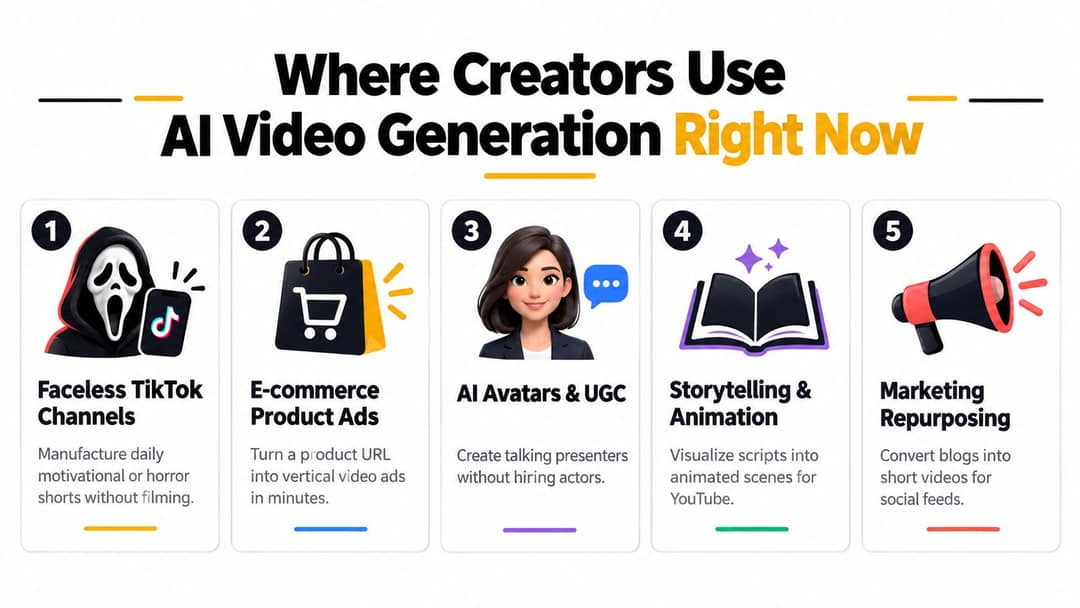
The common thread across these uses: AI takes the repetitive slice of production, and the creator keeps the hook, the judgment and the parts people follow them for.
What is AI video directability?
Directability is how precisely you can tell an AI video tool what you want and actually get it: a specific camera move, the same character across scenes, a product label that stays legible. It is the gap between a striking demo and a usable ad. These are the main levers, from loosest to tightest control:
- Prompt wording: describe shot type, lens, camera move, lighting and action. Our guide to writing AI video prompts has templates.
- Reference images: a first frame or a character image anchors identity and composition.
- Scene-by-scene generation: several short scenes, each with its own prompt, are easier to fix than one long generation.
- Model choice per scene: models differ in motion, realism and speed, so pick per shot instead of forcing one model on everything.
- A timeline editor: replace one bad scene instead of regenerating the whole video.
- A proven reference video: starting from a structure audiences already watched gives the model better direction than a blank prompt.
Decision rule: if a shot must be exact (a product label, a real person, on-screen text), use a real photo with image-to-video, or real footage, instead of pure text-to-video.
The index leans toward videos that surface in hashtag and keyword searches, so its view counts run high: compare the groups, not the absolute numbers.
Source: Revid TikTok index: 2,377,477 TikToks with AI labels per video, snapshot of Sep 15, 2026. Median views estimated from view buckets.
Show the data
| Median views | Share past 1M views | |
|---|---|---|
| AI generated | 151.7K | 19.5% |
| Animation/Cartoon | 121.3K | 14.2% |
| Mixed | 87.3K | 11.4% |
| Real shot | 67.3K | 9.5% |
Do AI videos work, and do they get views?
They can, but it depends on the platform. In Revid's study of AI videos vs real footage, AI-generated TikToks averaged twice the views of real footage, while on X, Instagram and Threads, posts with AI visuals clustered in the lowest engagement tier. The data comes from public posts in Revid's library that already cleared an engagement bar, so it describes patterns among posts that did well, not a guarantee for yours.
Businesses are using them at scale too. In Wyzowl's 2026 survey, 63% of video marketers said they had used AI video tools to create or edit marketing videos, up from 51% a year earlier (collected in AdWave's roundup of 2026 AI video statistics).
When AI videos flop, the cause is usually a generic prompt producing a generic video, not the AI itself. YouTube's monetization rules point the same way: AI tools are allowed when the final video shows the creator's creative vision and adds educational or entertainment value, while mass-produced template content and incoherent AI clip compilations cannot earn.
Calls that failed
Source: Revid production data: 713,649 AI video clips generated Jun 29, 2026 to Sep 26, 2026.
Show the data
| Calls that failed | |
|---|---|
| Seedance | 2.7% |
| MiniMax Hailuo | 2.2% |
| PixVerse | 6.4% |
Where AI video generation still falls short
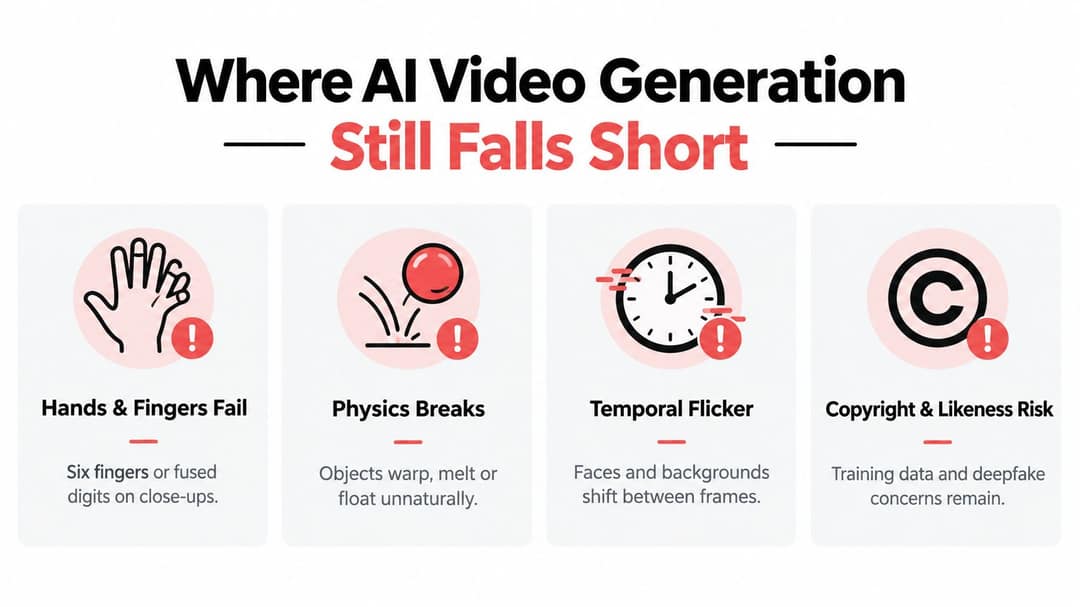
- Anatomy: extra or fused fingers, shifting teeth, glasses and earrings that shimmer.
- Physics: liquids without weight, objects that melt into hands, collisions with no impact.
- Consistency: a character's face or a package's logo changes between scenes, because the model regenerates its best guess every time instead of remembering your brand.
- Text: labels, signs and on-screen words come out garbled.
- Reliability: generations fail or vary by model. Revid's AI video model index tracks speed and failure rates across 713,649 production generations.
To train your eye, learn the artifacts in our guide on how to tell if a video is AI-generated. For client work or recurring characters, budget time to regenerate or replace the scenes that drift.
How AI video generation got from labs to your feed
- September 29, 2022: Meta publishes Make-A-Video, one of the first convincing text-to-video systems; Google shows Imagen Video around the same time.
- 2023: Runway Gen-2 brings text-to-video to creators, and Stability AI releases Stable Video Diffusion in November.
- February 2024: OpenAI previews Sora and resets expectations for clip length and realism.
- 2024 to 2025: Adobe Firefly Video Model, Google Veo 2 and Veo 3, and OpenAI Sora 2 arrive.
- 2026: OpenAI closes the Sora app (April 26) and shuts down the Sora 2 API (September 24); Google now recommends Gemini Omni Flash as the default video model in its Gemini API.
The early dates come from this AI video generation timeline on AI Wiki. Market-size estimates vary widely depending on which of the three definitions a report uses; this roundup of AI-generated video statistics shows how far apart the figures can be, so treat any single number with care.
AI video generation tools: which kind do you need?
| Category | Examples | Choose it when |
|---|---|---|
| Raw clip generators | Runway, Pika, Kling | You want single shots with fine creative control and will edit them yourself |
| Avatar platforms | Synthesia, HeyGen | You need a presenter reading a script, such as training or localized explainers |
| Clipping and caption tools | OpusClip, Klap, Vizard, Submagic | You already have long recordings to cut into shorts |
| Template and stock editors | InVideo, Pictory, Fliki | You turn text into stock-based videos |
| Faceless automation | Crayo, AutoShorts, Zebracat | You want a narrated series on autopilot |
| Full short-form pipeline | Revid | You want research, generation, editing and publishing in one place, starting from formats that already performed |
Many vendors blend several categories, so compare what each one actually outputs. For prices and free tiers across more products, see this list of affordable AI video creation tools, and Revid's side-by-side tool comparisons for fact-checked head-to-heads.
How to make an AI video with Revid
Revid turns an idea, a link or a proven viral format into a finished short-form video and publishes it.
- Open the AI video generator and paste a prompt, a script or a link (an article, a product page, a YouTube video), or start from a video in Revid's library of about 2.77 million short-form videos with engagement data.
- Revid writes the script and plans the scenes. In several tools, it first pulls transcripts of related TikToks with more than 10,000 likes as references for style and story.
- Choose the visuals and a model per scene: Seedance 2.5, MiniMax Hailuo H3, Wan 3.0 or Google Veo 3. Revid shows the credit cost before you generate.
- Pick a voice (1,000+ voices in 70+ languages) and a caption style, then fix any scene in the timeline editor.
- Export in 720p, 1080p or 4K, or publish directly to TikTok, Instagram and YouTube.
Sign-up is free and new accounts get free credits to try video creation, no credit card needed; regular creation then uses the credits of a paid plan, from $39/month. As a guide, a 30-second video with Pro AI visuals and a voice-over costs about 40 to 80 credits. Sora 2 is no longer offered, since OpenAI shut down its API.
Before you publish: rights, consent and AI labels
Platform labeling rules are now part of publishing, and none of them penalize honest disclosure:
- TikTok requires a label on AI-generated content with realistic images, audio or video, and says the label does not affect distribution for videos that follow its Community Guidelines.
- YouTube requires disclosure of realistic AI content through the AI use setting in YouTube Studio. Since May 2026 it automatically labels undisclosed videos with significant photorealistic AI, shown as an overlay on Shorts. AI-written scripts, captions and cloning your own voice don't need disclosure.
- Instagram, Facebook and Threads show Meta's AI info label, and Meta requires disclosure when you post photorealistic video that was digitally created or altered.
Then run four checks on every AI-assisted video:
- Commercial rights: read the current terms of the tool and model you used.
- Consent: get explicit permission before using a real person's face, voice or customer photos; avoid celebrity likeness and fake testimonials.
- Records: save the prompt, inputs, tool and model, and the human edits you made.
- The honesty test: if a reasonable viewer would feel misled on learning how the clip was made, label it or change it.
FAQ
Are AI video generators free?
Most offer a limited free tier or trial, and regular use costs credits or a subscription. Revid sign-up is free and new accounts get free credits to try video creation (no credit card needed), and regular creation then uses credits from a paid plan starting at $39/month.
How long can an AI-generated video be?
A single model generation is short, for example 4, 6 or 8 seconds with Google's Veo 3.1. Longer videos are built from several generated scenes edited together with a voice-over, captions and music.
Do I have to label AI-generated videos?
Yes, when the content looks realistic: TikTok, YouTube and Meta all require disclosure of realistic AI-generated video. TikTok and YouTube both say the label by itself does not reduce reach.
Can AI-generated videos be monetized on YouTube?
Yes, if the video shows your own creative vision and adds educational or entertainment value. Mass-produced template videos, incoherent AI clip compilations and AI personas giving health, legal, financial or political advice cannot monetize.
Is Sora still available?
No. OpenAI discontinued the Sora app on April 26, 2026 and removed Sora 2 from its API on September 24, 2026.
Sources
- Revid TikTok index: 2,377,477 TikToks with AI labels per video, snapshot of Sep 15, 2026. Median views estimated from view buckets.
- Revid production data: 713,649 AI video clips generated Jun 29, 2026 to Sep 26, 2026.
- Wyzowl, Video Marketing Statistics 2026 (December 2025)
Charts and figures checked on November 6, 2026.