How to Tell If a Video Is AI Generated: 7 Signs and a 15-Minute Check
Slow the clip down, watch faces, hands and the edges of the frame, listen with your eyes closed, then trace the source and check AI labels. Here are the 7 signs and a 15-minute workflow to verify any suspicious video.

On this page
To tell if a video is AI generated, slow it to 0.5x and watch the face as it turns, the hands touching objects, the shadows and the background text, then listen with your eyes closed. Next, find the original uploader and check for AI labels or Content Credentials. One sign proves nothing. Several together mean verify before you share.
The stakes are now measured in money. The FBI's 2025 Internet Crime Report, released April 6, 2026, included an AI section for the first time: 22,364 AI-related complaints and nearly $893 million in losses, out of nearly $21 billion lost to cyber-enabled crime. The most common mistake is not paranoia. It is assuming a clip is real because it carries no AI label, when labels vanish the moment a video is screen-recorded or reuploaded.
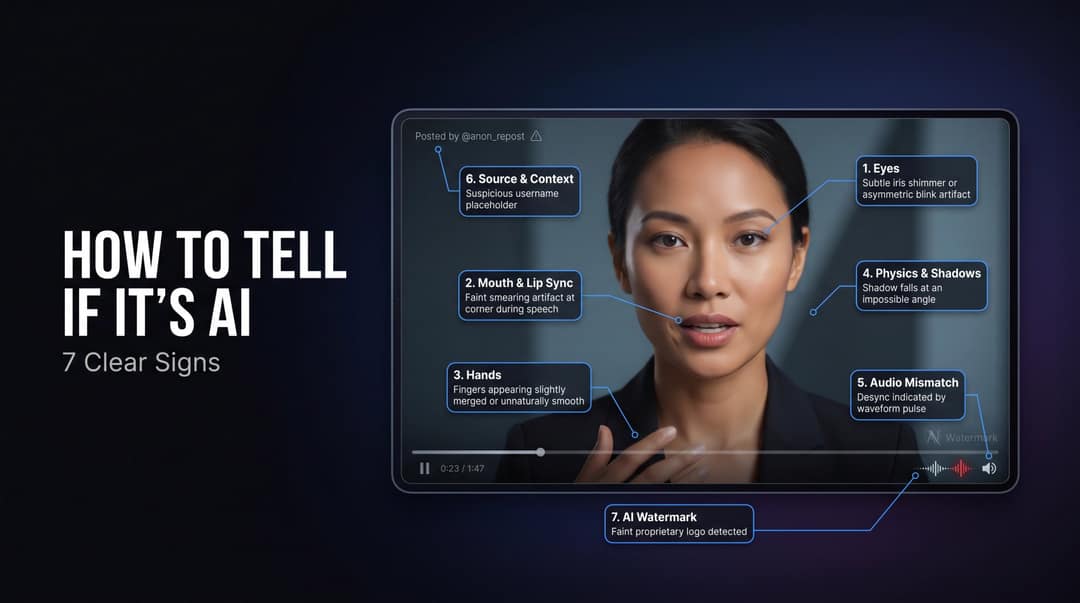
- AI-related complaints in the FBI's 2025 Internet Crime Report
- 22,364
- FBI, April 2026
- Losses tied to AI-related complaints reported to the FBI
- $893M
- FBI, April 2026
- Videos TikTok has labeled as AI-generated
- 3B
- TikTok, July 2026
- Consumers concerned about running into AI deepfakes
- 84%
- Sprout Social, September 2026
AI video, deepfake or edited clip: what you are checking for
"AI-generated video" covers more than scenes invented from a text prompt. It also includes animated photos, talking avatars, face swaps, cloned voices dubbed over real footage, people or objects inserted into a real scene, and AI b-roll inside an otherwise real video.
The UK government's March 2026 deepfake detection report separates two ideas. Synthetic media is any video, image, text or audio generated wholly or partly by AI. Deepfakes are the narrower set of audio-visual content that misrepresents someone or something. Most AI video is the first kind and harmless: music videos, explainers and animated stories that never pretend to be footage.
What you are hunting is undisclosed realism: a real person appearing to say something they never said, or an event that never happened presented as news.
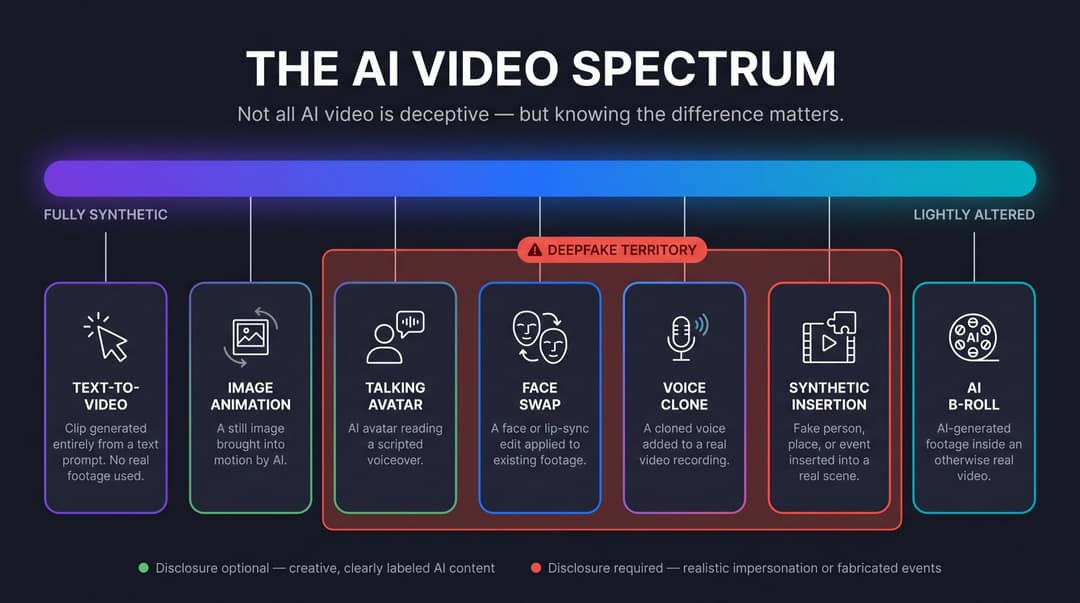
The 7 signs at a glance
Use these as a convergence test, not as a checklist where one hit settles the question. A single sign can come from compression or a cheap phone camera. Four or five pointing the same way mean you should stop and verify.
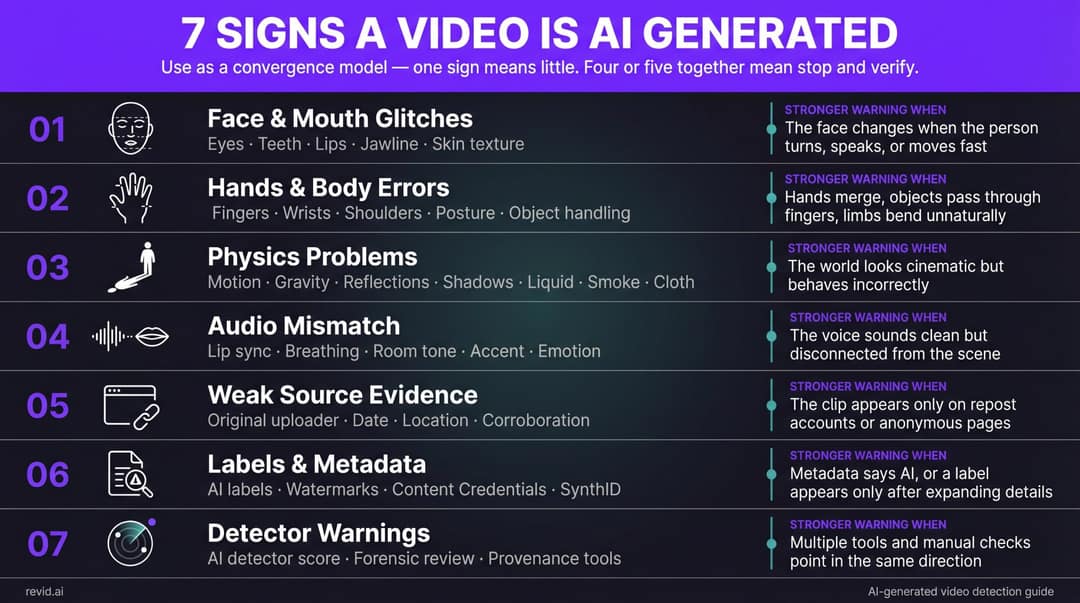
| Sign | What to check | Stronger warning when |
|---|---|---|
| Face and mouth glitches | Eyes, teeth, lips, jawline, skin texture | The face changes when the person turns, speaks or moves fast |
| Hands and body errors | Fingers, wrists, posture, object handling | Hands merge, objects pass through fingers, limbs bend wrongly |
| Physics problems | Shadows, reflections, liquid, smoke, cloth, background text | The scene looks cinematic but behaves incorrectly |
| Audio mismatch | Lip sync, breathing, room tone, accent, emotion | The voice sounds clean but disconnected from the scene |
| Weak source | Original uploader, date, location, corroboration | The clip exists only on repost accounts or anonymous pages |
| Labels and metadata | Platform AI labels, watermarks, Content Credentials, SynthID | Metadata says AI, or a label appears only after expanding details |
| Detector warnings | Detector scores, forensic review, provenance tools | Several tools and your manual checks point the same way |
1. The face breaks down when it moves
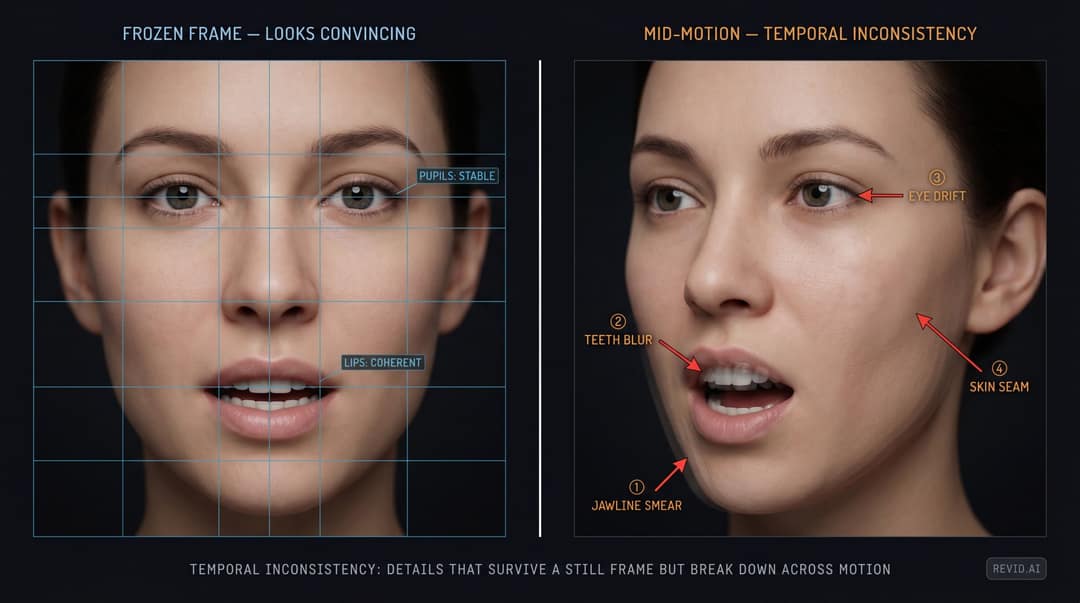
AI faces hold up best in the easy case: the subject faces the camera and speaks at a moderate pace. The seams show in hard moments such as quick head turns, laughter, side profiles, fast speech and sudden changes of emotion.
What you are looking for is temporal inconsistency: details that look fine in a frozen frame but drift across motion. Check:
- Eyes: do they track naturally and blink at plausible intervals? Are the pupils stable from frame to frame?
- Mouth: do the lips close fully on "m", "b" and "p", and change shape smoothly between sounds?
- Teeth and tongue: do they blur, flicker or change shape mid-sentence?
- Jawline: does the lower face smear or wobble while the person talks?
- Skin: is the face plastic-smooth while the neck and hands have texture?
- Expression: does the emotion match the words, or is it generic animation?
How to run the check:
- Watch once at normal speed and note what feels off.
- Replay at 0.5x and watch only the mouth.
- Replay again and watch only the eyes.
- Pause on head turns, emotional peaks and hard sounds such as "f", "v", "th" and "sh".
Beauty filters, makeup, heavy compression, dubbing, motion blur and phone HDR all create face artifacts in genuine videos. Facial weirdness is one clue, never proof on its own.
2. Hands and bodies ignore cause and effect
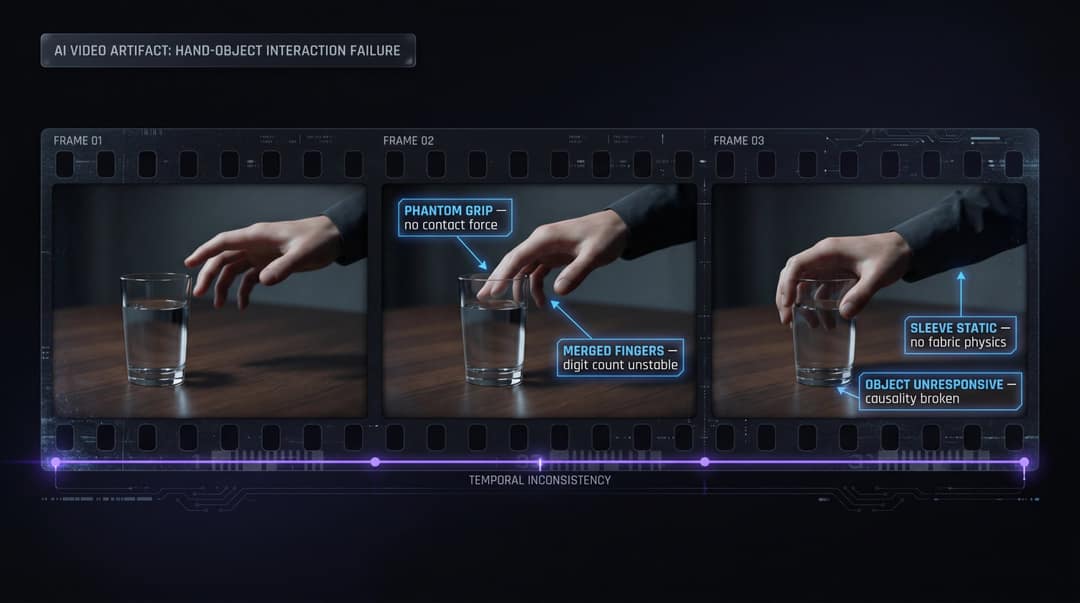
Video models are good at beautiful single frames and weaker at cause and effect across time. A hand should touch a door before it opens, fingers should wrap a glass before it moves, and a sleeve should fold when the arm bends. When OpenAI released Sora in December 2024, it said the model "often generated unrealistic physics and struggled with complex actions over long durations." Models have improved since, but physical causality is still where they slip.
Pause every time the person touches something (a cup, a phone, a door handle, a microphone, their hair, another person) and ask:
- Did the object move because the hand touched it?
- Did the fingers wrap around it, or hover just off it?
- Did the object keep its shape and size?
- Did the body shift its weight naturally?
Also watch for fingers that merge or change length, rings and watches that appear and vanish, heads that turn without the torso, clothing that never creases, and feet that slide instead of stepping.
3. Shadows, reflections and background text drift
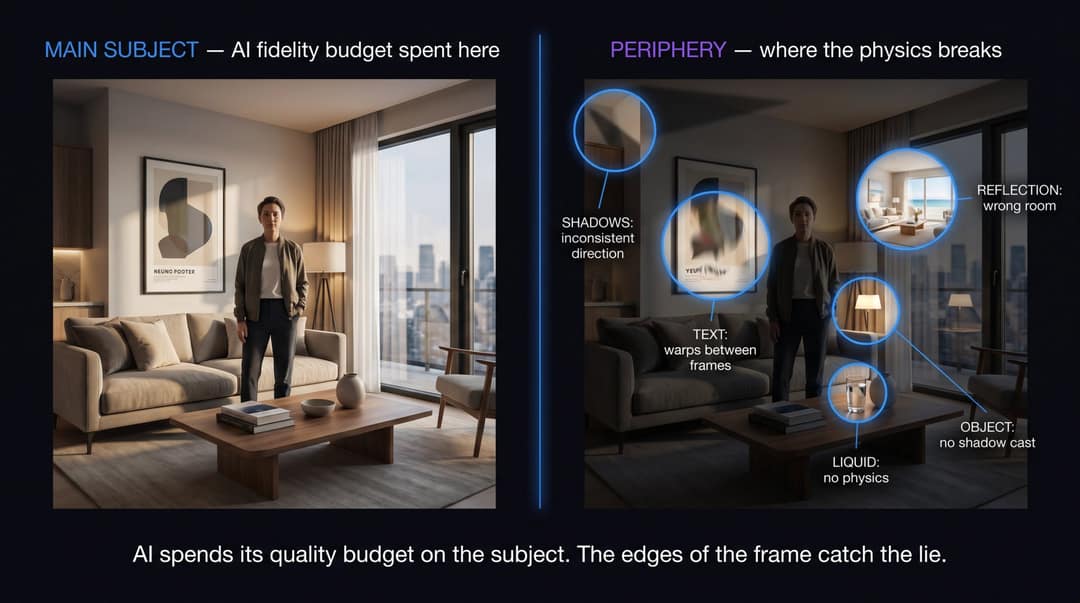
AI video tends to spend its quality on the main subject, so the edges of the frame give it away first. Look at:
- Shadows pointing in different directions in the same scene, or objects with no shadow at all
- Reflections in windows, mirrors and glasses that show the wrong room
- Signs, posters, license plates and labels whose text warps between frames
- Water, smoke, fire, hair and cloth that move strangely
- Clothing patterns that crawl or shimmer
- Faces in a crowd that melt or repeat
- Camera moves that look expensive but would be physically impossible
If the subject looks flawless while the world around them keeps mutating, that is a strong signal. Check this first on viral clips of disasters, shocking celebrity moments and products that seem too good to exist.
4. The audio does not belong to the room
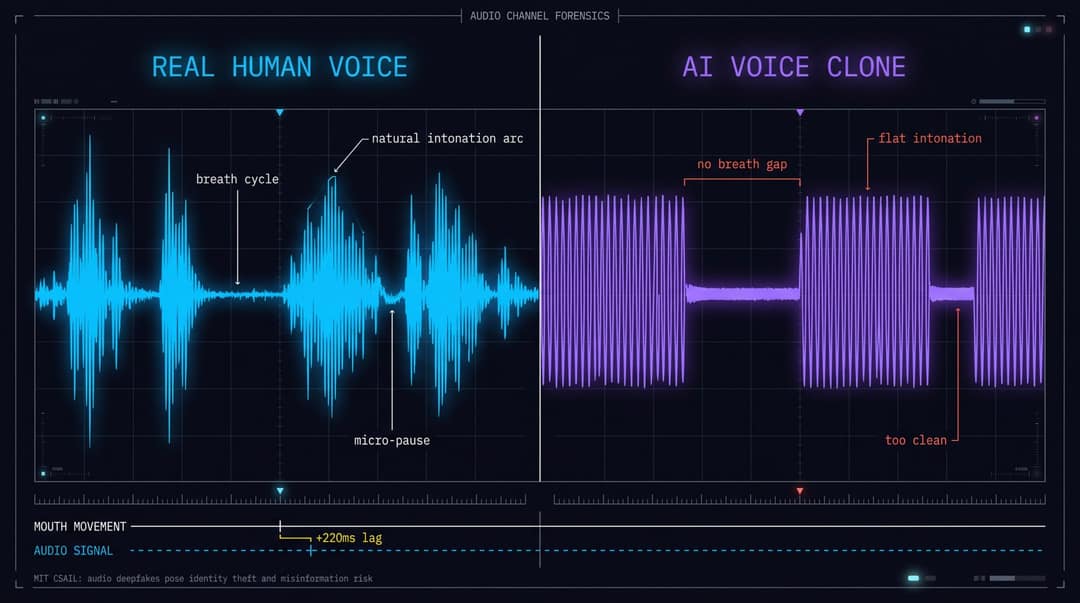
Most people check the picture and skip the sound, yet audio often exposes a fake faster. Close your eyes and listen:
- Is there breathing before long sentences, and natural pauses between thoughts?
- Does the voice sound recorded in that space, or studio-clean on a windy street?
- Does the intonation stay flat while the words are emotional?
- Does the accent shift mid-sentence?
- Does the background noise react to what happens on screen, or cut in and out?
Then mute the video and watch only the mouth. If the face is plausible on mute but the illusion breaks when the sound returns, the audio may be dubbed, lip-synced or cloned.
MIT's March 2024 explainer on audio deepfakes lists the risks (misinformation, identity theft, privacy violations) and notes that detection looks for liveness cues such as breathing and intonation rhythm. It also warns that future models may leave few detectable artifacts, so a clean voice proves nothing either way.
5. Nobody can trace the original source
Many fakes are caught by context, not pixels. Some are fully synthetic, some are real footage with a false caption, and some are real clips with a swapped face or a cloned voice. Source checks catch all three. Ask five questions:
- Who posted this first (not who shared it)?
- When was it first posted?
- Where was it supposedly filmed, and do the weather, signs, clothing and language match?
- Who else confirms it independently: an official account, a reputable outlet, a second angle?
- What would have to be true for this video to be real?
Warning signs: the clip lives only on anonymous repost accounts, the caption makes a huge claim with no date or place, the same clip circulates with different stories in different countries, and "source?" comments go unanswered. Real events leave more evidence than one low-context clip. Ofcom's July 2024 report on deepfake defences makes the same point: deepfakes are a systems problem, and source integrity matters as much as pixels.
6. Labels, watermarks and Content Credentials
Some AI videos carry signals that name their origin: a visible generator watermark, a platform label, embedded provenance metadata or a disclosure in the caption.
- C2PA Content Credentials. The Coalition for Content Provenance and Authenticity publishes an open standard that records where a file came from and which tools edited it. Adobe's Content Credentials overview explains how they can show whether content was captured by a camera, generated by AI or edited, and Adobe Firefly applies them automatically.
- SynthID. Google DeepMind's SynthID embeds an invisible watermark in AI images, audio, text and video, designed to survive cropping, filters and compression. Veo video generation in Gemini adds a visible watermark plus SynthID in every frame.
- Retired generators. Sora clips carried C2PA metadata and visible watermarks, but OpenAI closed the Sora app on April 26, 2026 and shut down the Sora 2 API on September 24, 2026. Those signals now matter only for older Sora clips still circulating.
How the main platforms label AI video today:
| Platform | What you see | How the label gets there |
|---|---|---|
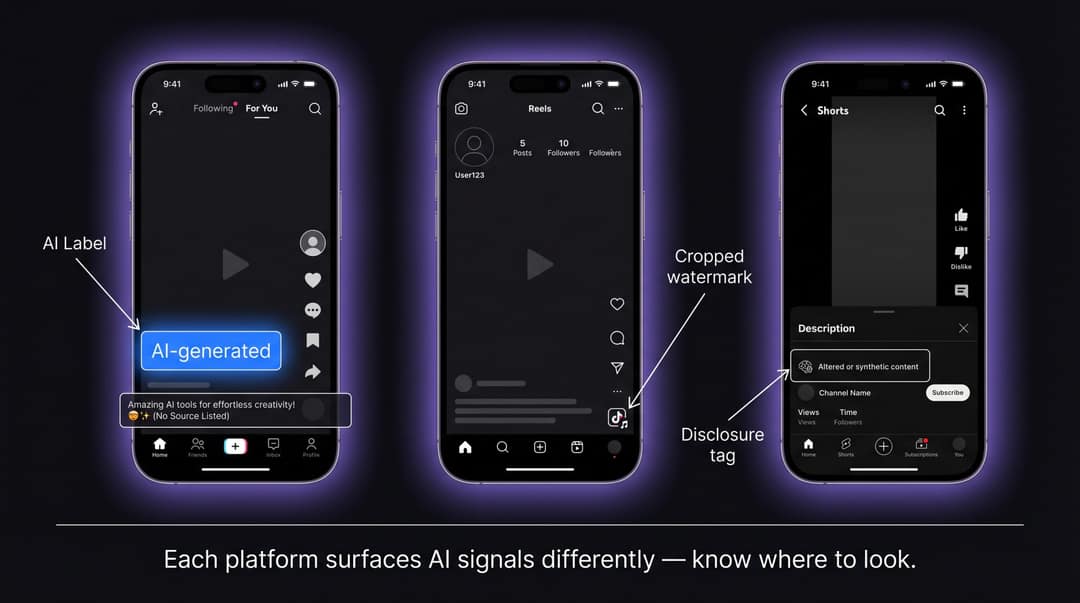
| YouTube | A label below the player on long-form videos, an overlay on Shorts (since May 2026) | Creators must disclose realistic altered or synthetic content; YouTube auto-labels undisclosed videos with significant photorealistic AI; labels are permanent for Veo, Dream Screen or fully generative C2PA content |
| TikTok | "Creator labeled as AI-generated", or an automatic "AI-generated" label | Creators must label realistic AI; TikTok auto-labels uploads with C2PA Content Credentials or TikTok AI effects, and an auto label cannot be removed |
| Instagram, Facebook, Threads | "AI info" | Users must disclose photorealistic AI video or realistic audio; Meta reads C2PA and IPTC signals; for content only edited with AI, the label sits in the post menu |
TikTok described how it reads Content Credentials in its post on AI transparency and literacy. Meta renamed its "Made with AI" label to "AI info" in July 2024. When it announced its labeling approach, it said 82% of more than 23,000 respondents in 13 countries supported warning labels on AI-generated content.
YouTube's disclosure policy names three cases that need a label: making a real person appear to say or do something they did not, altering footage of a real event or place, and generating a realistic scene that did not happen.
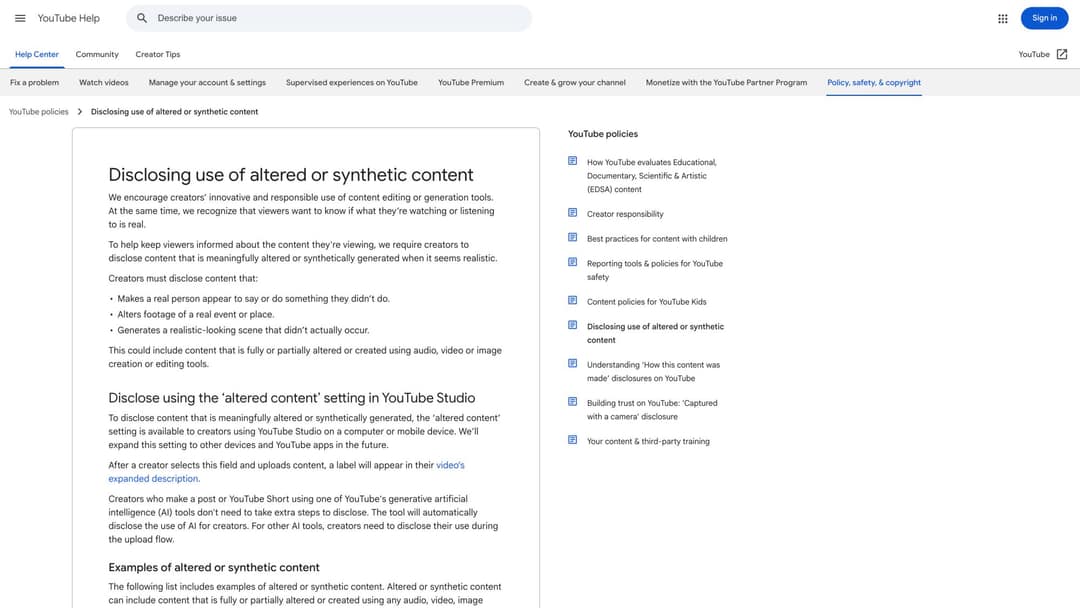
Even where labels exist, they are inconsistent. The UK House of Commons Library noted in January 2026 that there is no consensus yet on the most effective AI label design, and that companies use very different approaches.
7. Detector scores point the same way
AI video detectors estimate a probability. They do not deliver verdicts. They look for pixel and compression artifacts, face boundary errors, biological signals such as blink patterns, lip-sync alignment, known generator fingerprints and provenance metadata. The UK government report cited above reviews approaches including Microsoft Video Authenticator, Intel FakeCatcher, Google DeepMind SynthID and Meta Video Seal. It also lists their limits: scarce high-quality training data, inconsistent evaluation metrics and generators that keep changing.
NIST's January 2025 publication on evaluating analytic systems against AI-generated deepfakes treats deepfake forensics as an open evaluation problem. The Global Investigative Journalism Network's September 2025 reporter guide goes further: perfect detection may be impossible, so the goal is probability assessment and informed judgment.
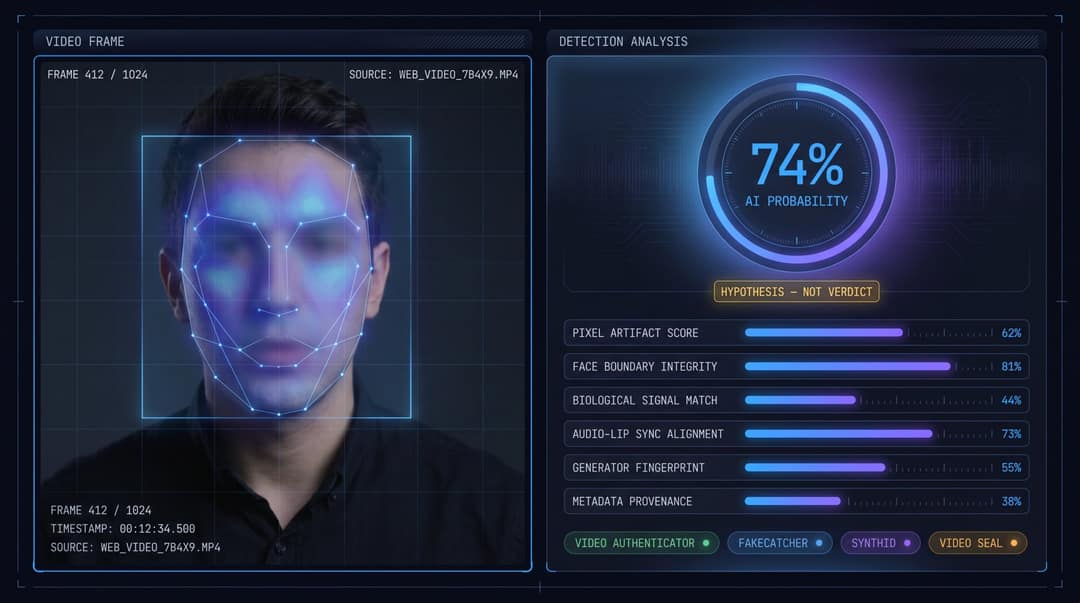
To use detectors safely:
- Save the original link or file before running anything.
- Confirm the tool analyzes video, not only still images.
- Know whether it checks a specific watermark (such as SynthID) or only estimates probability.
- For anything important, compare more than one tool.
- Combine the result with your manual checks and your source work.
- Never upload private or confidential footage to an unknown service.
How long are AI-generated videos?
Most AI video models generate one short shot at a time. Google's Veo 3.1 in the Gemini API, for example, produces 4, 6 or 8-second clips. Longer AI videos are stitched together from many such shots, or extended one segment at a time.
Two practical tells follow. First, many hard cuts every few seconds with no establishing shot or continuous context. Second, in long unbroken takes, small details (a logo, a face, the position of an object) slowly drift. Neither proves anything alone, since human editors cut fast too, but both justify a closer look.
The index leans toward videos that surface in hashtag and keyword searches, so its view counts run high: compare the groups, not the absolute numbers.
Source: Revid TikTok index: 2,377,477 TikToks with AI labels per video, snapshot of Sep 15, 2026. Median views estimated from view buckets.
Show the data
| Median views | Share past 1M views | |
|---|---|---|
| AI generated | 151.7K | 19.5% |
| Animation/Cartoon | 121.3K | 14.2% |
| Mixed | 87.3K | 11.4% |
| Real shot | 67.3K | 9.5% |
How can you tell if a YouTube, TikTok or Instagram video is AI generated?
Short-form clips are compressed, cropped and stripped of context, and AI clips spread fast. In Revid's analysis of 292,784 TikToks, AI-generated videos averaged 1.4M views against 661.4k for real footage, and 20% passed 1M views against 10%. On X, Instagram and Threads, AI visuals clustered in the lowest engagement tier instead. For more on how this content performs, see AI videos on Shorts and TikTok.
Platform by platform:
- YouTube: look for the AI label under the player on long-form videos or the overlay on a Short. Then read the description and scan the channel: dozens of near-identical narrated uploads is a pattern.
- TikTok: look for "Creator labeled as AI-generated" or an "AI-generated" label on the video, and read TikTok's guide to spotting AI-generated content. TikTok said it had labeled over 3 billion videos as AI-generated as of July 2026.
- Instagram and Facebook: look for "AI info", which sometimes sits only in the post menu. Since September 2026, Instagram also uses an "AI-generated profile" label for accounts featuring an AI-generated person.
Short-form tells worth a second look:
- AI voiceovers laid over generic, unrelated b-roll
- Watermarks that are cropped or half visible
- Hands and faces during fast cuts
- Celebrity investment, health or miracle-product endorsements from accounts with a thin history
- "Is this real?" comments that the poster never answers
Before you share, ask one question: would I believe this if it supported the opposite of what I already think? Emotionally engineered fakes are built to confirm what you expect.
How to check if an image is AI generated
The method is the same, with fewer clues: an image has no motion or audio, so you lean on detail and provenance.
- Zoom into text, hands, ears, jewelry, teeth and fabric patterns. AI still garbles small text and repeating detail.
- Check the light: one light source, one shadow direction, reflections that match the scene.
- Scan the background for melted railings, warped buildings and crowd faces that blur together.
- Inspect Content Credentials if the file carries them, and look for a generator watermark.
- Run a reverse image search to find the earliest copy and its original context.
As with video, a clean result does not prove the image is real.
How to verify a suspicious video in 15 minutes
When you might act on a video, share it or report it, run this first.
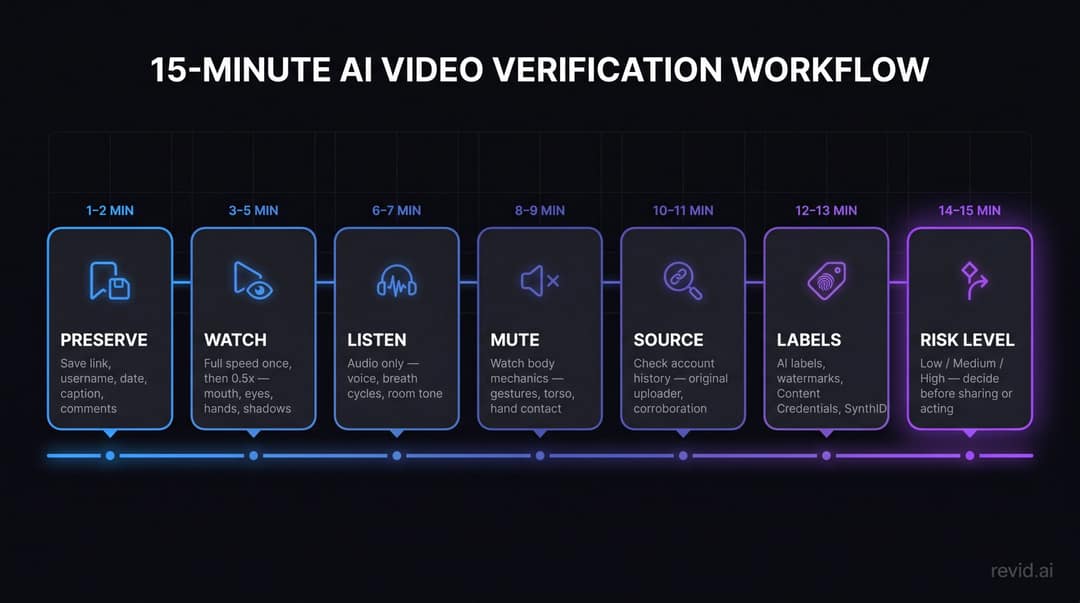
- Minutes 1 to 2, preserve the original. Open the source post, not a repost. Save the link, username, date, caption, any label, and screenshots of the comments. Don't download, crop or reupload yet, since that can strip metadata.
- Minutes 3 to 5, watch twice. Once at full speed for your gut reaction, then at 0.5x, focusing in turn on the mouth, eyes, hands, contact points, shadows, background text and reflections.
- Minutes 6 to 7, listen without watching. Does the voice fit the room? Are there breaths, self-corrections and natural pauses? Do background sounds react to the action?
- Minutes 8 to 9, watch muted. Do mouth shapes match the speech intensity, gestures match the emphasis, and the torso move with the head?
- Minutes 10 to 11, check the source. Is this the original uploader? Does the account have a real history, or does it mostly post outrage, celebrity bait and miracle products? Does anyone credible confirm the event?
- Minutes 12 to 13, check labels and provenance. Look for platform labels, creator disclosures, watermarks and Content Credentials.
- Minutes 14 to 15, decide based on the stakes.
| Stakes | Examples | What to do |
|---|---|---|
| Low | Memes, entertainment, obvious fiction | Don't reshare it as real |
| Medium | Brand reputation, workplace context, professional claims | Verify with independent sources first |
| High | Money, identity, health, politics, legal matters, private data | Don't act on the video alone; verify through a separate channel |
Score the risk before you share
Give one point for each sign present: face or mouth artifacts, hand or body errors, physics or lighting problems, audio mismatch, no traceable source, suspicious or stripped provenance, and a detector flag.
| Score | Assessment | What to do |
|---|---|---|
| 0 to 1 | Probably fine, judge by context | Don't overreact, don't assume |
| 2 to 3 | Unverified | Don't share it as fact; find the original |
| 4 to 5 | Likely synthetic, altered or miscaptioned | Treat with skepticism; add a warning if you discuss it |
| 6 to 7 | High-risk synthetic media | Don't act on it; keep the evidence; report fraud or impersonation |
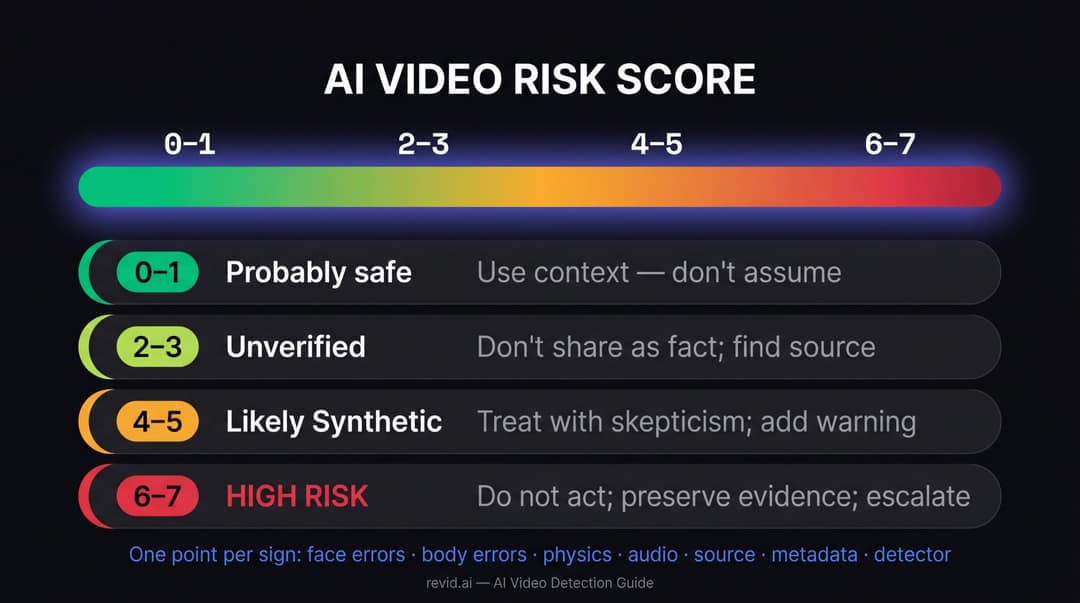
This is a decision aid, not a scientific test. Its value is forcing you to check every channel before you decide.
Deepfake video calls and the scam patterns to know
A live video call proves nothing about who is on it. An attacker can combine a face swap, a cloned voice and urgency in real time. Adopt one rule at work and at home: no money, credentials or sensitive approvals on the strength of a video call alone. The FBI's advice in the report above is the same: take a beat, then verify identity through a separate channel.
| Option | How to use it |
|---|---|
| Call back | Use a number you already have, never one given during the call |
| Internal messaging | Ask for confirmation through a secure internal system |
| Code phrase | Agree on one in advance with family or finance staff |
| Two-person approval | Require a second authorized person for sensitive requests |
| Delay | Refuse to act under time pressure until identity is confirmed |
Don't rely on "ask something only they would know". Attackers pull those details from social profiles, data breaches and old recordings.
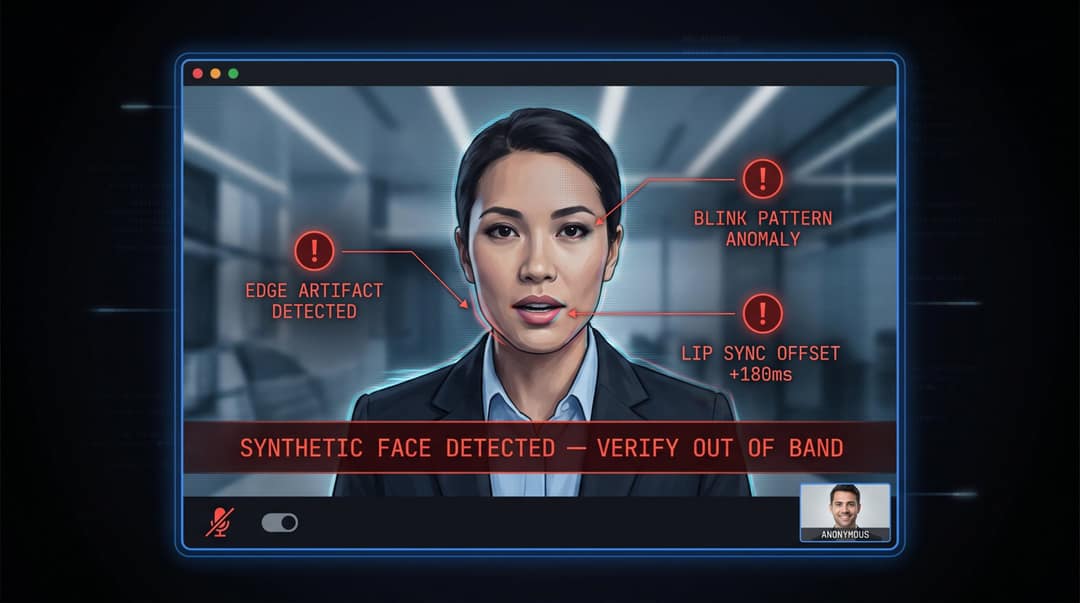
Four patterns come up again and again:
- Fake celebrity endorsement: a famous face promotes crypto, a supplement or a giveaway. Check the celebrity's and the brand's verified accounts, and whether the footage is recycled from an old interview.
- Shocking political confession: a public figure appears to admit something explosive, often right before a vote. Find the full-length original, official transcripts and reputable fact-checks.
- Miracle product demo: a device does something implausible. Check hand-to-object contact, physics, and whether the product exists anywhere outside that clip.
- Fake emergency call: a loved one urgently asks for money and secrecy. Call them back on a number you already have, or reach another family member.
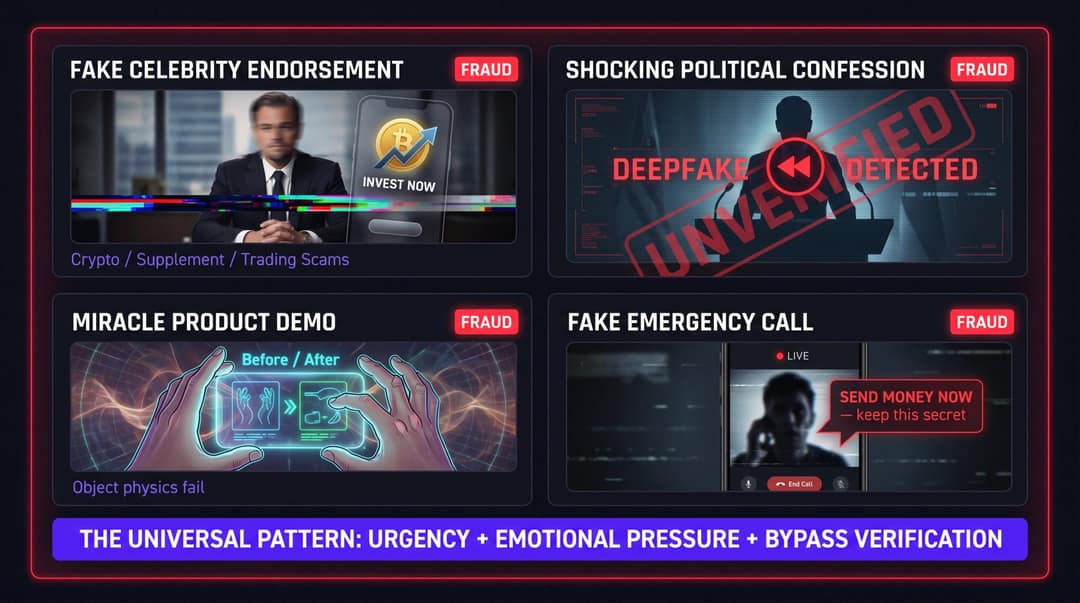
All four combine urgency, emotional pressure and a request that skips normal checks. When those three appear together, slow down.
Mistakes that make AI detection worse
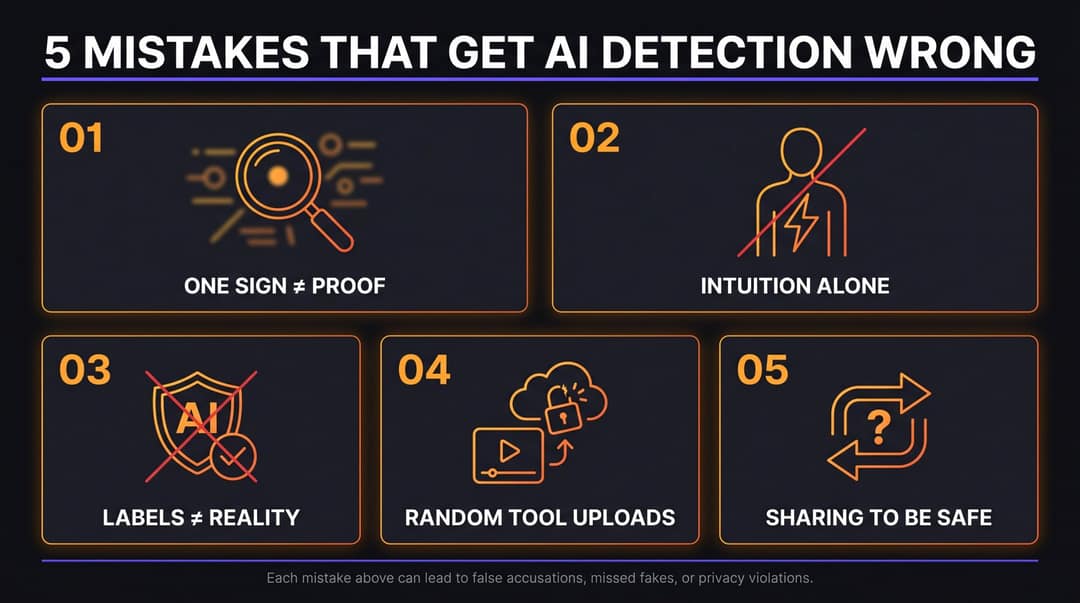
Accusing someone on one artifact. A blurry mouth or a distorted hand can come from compression, motion blur or bad lighting in a genuine video, and a public accusation that turns out wrong does real damage.
Trusting your gut. In an Alan Turing Institute survey of 1,403 UK adults in July 2024, 90.4% were very or somewhat concerned about deepfakes, while most were not confident they could detect them. A 2026 study in Nature Communications Psychology found that detection ability varies with video quality and context, and that people overestimate their own skill. The clips most likely to fool you are the ones you want to believe.
Assuming a label fixes everything. The same study discusses how people stay influenced by deepfake content even after seeing a warning. The opposite risk is blanket cynicism, where real videos get dismissed too. Concern is widespread: Sprout Social's Q3 2026 Pulse Survey found 84% of consumers are concerned about AI deepfakes, and 38% say it makes them more skeptical of ads in general.
Uploading sensitive videos to random detectors. Some services store uploads or pass them to third parties. For private or legally significant footage, use trusted tools or a forensic professional.
Sharing it "just in case it's real". That is how fakes spread. If you must discuss an uncertain clip, say so plainly: "Unverified video, I haven't found the original source" or "May be AI-generated or edited, treat accordingly."
Are AI voices and talking avatars allowed on YouTube and TikTok?
Yes. Both platforms allow AI voices and avatars, and both require a label when the result is realistic enough to mislead. The rules that matter for creators in 2026:
- YouTube requires disclosure (in YouTube Studio) when you make a real person appear to say or do something, alter a real event, or generate a realistic scene. No disclosure is needed for AI-written scripts, captions, thumbnails, beauty filters or cloning your own voice for a voiceover.
- TikTok requires you to label AI-generated content with realistic images, audio or video, and says the label does not affect distribution if the video follows its Community Guidelines. YouTube says the same about its disclosure.
- Meta requires its AI disclosure tool for photorealistic video or realistic-sounding audio that was digitally created or altered, and may penalize people who skip it.
- Monetization: YouTube does not let channels monetize AI personas presented as human experts giving health, legal, financial or political advice, or mass-produced template AI content without original insight.
- Regulation: the European Commission states that the EU AI Act's transparency rules, which require deepfakes to be clearly labelled, come into effect in August 2026.
The legal and ethical problems start with consent and deception: cloning another person's voice or using their face without permission, impersonation, fraud, non-consensual sexual content, misleading voters and infringing intellectual property. Laws differ by country and are changing fast, so check your jurisdiction before you publish anything featuring a real person. If someone impersonates you, use the Report option on the video or account, and check the platform's help center for its privacy and impersonation complaint forms.
Talking avatars are safe to use when the face is your own or a licensed stock avatar and the video is labeled where it could pass as real footage. Lip sync looks most natural with clean audio, a front-facing avatar and a moderate speaking pace, which also happen to be the conditions where detection is hardest.
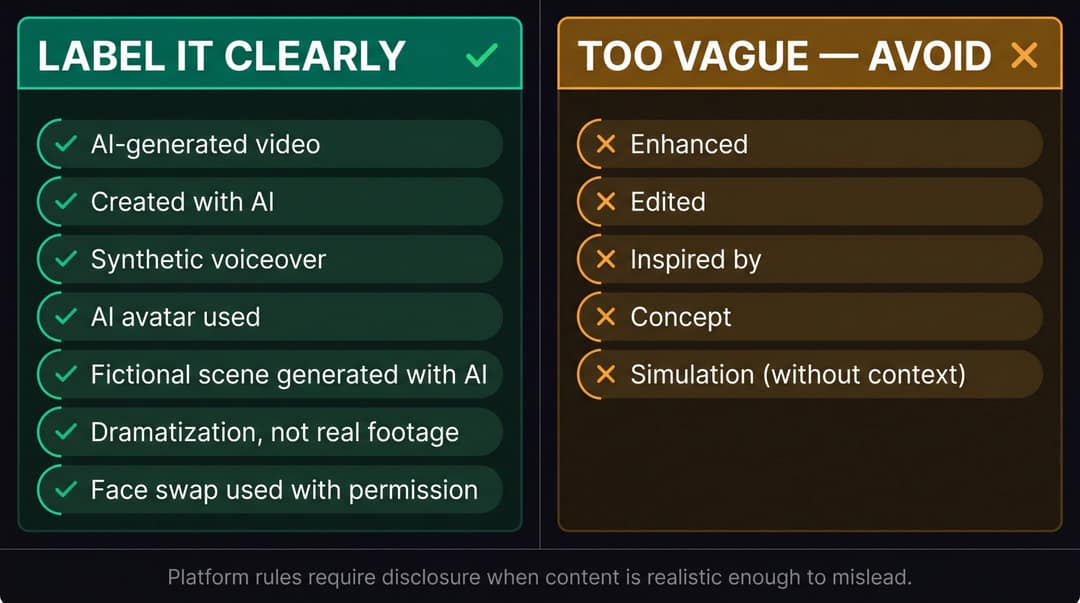
Clear disclosures name what is synthetic: "AI-generated video", "Synthetic voiceover", "AI avatar used", "Dramatization, not real footage", "Face swap used with permission". Vague words such as "enhanced", "edited" or "concept" do not count.
Making AI video with Revid, and labeling it
Revid's AI talking avatar, video face swap and AI video generator produce exactly the kind of realistic people, voices and scenes these rules cover. Voice cloning is available on Elite and above. To publish them cleanly:
- Keep your project: script, prompts, source assets and export date are your paper trail if anyone questions a video.
- Use your own face and voice, or get written permission from anyone you swap in or clone.
- When you post, including through Revid's direct publishing to TikTok, Instagram and YouTube, turn on each platform's AI disclosure for anything realistic, and add a plain line in the caption.
The line is not whether AI made the video. It is whether you pretend otherwise.
FAQ
Can you always tell if a video is AI generated?
No. The best AI videos can be impossible to identify by eye, especially after compression, cropping or reuploading. Combining visual checks, audio checks, source tracing, labels and detectors gives you the best odds, but the result is a probability, not certainty.
Are AI video detectors accurate?
They are useful as a first signal but produce both false positives and false negatives, especially on compressed clips and footage from newer models. Use a detector to decide whether to investigate further, never to close the case.
Does no AI label mean a video is real?
No. Labels and metadata are lost through screen recording, editing and reuploads, and some tools add no provenance at all. Only a present label is evidence.
Are AI-generated videos legal?
Yes, AI-generated videos are legal in general; creative, educational and marketing uses are common. They become a legal problem when they impersonate someone without consent, defraud people, create non-consensual sexual content, mislead voters or infringe intellectual property, and the details vary by country.
How do you know if something is AI generated?
Check consistency (faces, hands, text and physics that hold together), provenance (labels, watermarks, Content Credentials) and source (an original uploader and independent confirmation). When several of those fail at once, treat the content as unverified until proven otherwise.
Sources
- Revid TikTok index: 2,377,477 TikToks with AI labels per video, snapshot of Sep 15, 2026. Median views estimated from view buckets.
- TikTok, Helping people spot and understand AI-generated content on TikTok (July 2026)
- Sprout Social, The state of social media in 2026: Data from Sprout's latest pulse survey (September 2026)
Charts and figures checked on November 6, 2026.