
AI Video Creation Workflow: 6 Steps From Idea to Published Video
A six-step AI video creation workflow (source, brief, script, assemble, audit, publish) with a brief template, a platform checklist and data from 176,367 TikToks.

On this page
An AI video creation workflow has six steps: source an idea with proof that people watch it, write a short brief, script it for the ear, assemble visuals, voice and captions with AI, audit for accuracy and originality, then publish and feed the results into the next brief. AI does the production; you make the decisions.
Most of the quality is decided before anything renders. In Revid's analysis of 176,367 TikToks with 1,000+ likes posted between October 2025 and October 2026, videos with under 40 characters of speech had a median of 123K views and 20.2% passed 1 million views. Videos that talked throughout had 68K and 11.9%. The default AI draft does the opposite and narrates every second (full study and method). The sample only includes videos that already reached 1,000 likes, so these figures are patterns among successful videos, not proof of cause.
- Median views for TikToks with under 40 characters of speech
- 123K
- Revid analysis of 176,367 TikToks
- Share of low-speech TikToks that passed 1 million views
- 20.2%
- Revid analysis of 176,367 TikToks
- Median views for challenge TikToks, the top format
- 182K
- Revid analysis of 176,367 TikToks
- Companies already using AI in their video workflow
- 1 in 3
- Wistia, April 2026
The six steps at a glance
| Step | What you produce | What AI does | What you decide |
|---|---|---|---|
| 1. Source | A reference video, article or thread with proof of demand | Searches and summarizes sources | Which idea deserves a video |
| 2. Brief | One paragraph: viewer, promise, angle, platform | Drafts the brief from the source | The angle only you can add |
| 3. Script | Hook, beats, visual notes, call to action | Writes the first draft | What to cut and what to verify |
| 4. Assemble | A full cut with visuals, voice, captions and music | Generates scenes, voice and captions | Which scenes to replace |
| 5. Audit | A checked, correctly labeled export | Very little: this step is yours | Facts, originality, AI disclosure |
| 6. Publish | Platform versions plus a results log | Schedules posts and reports stats | What the next brief tests |
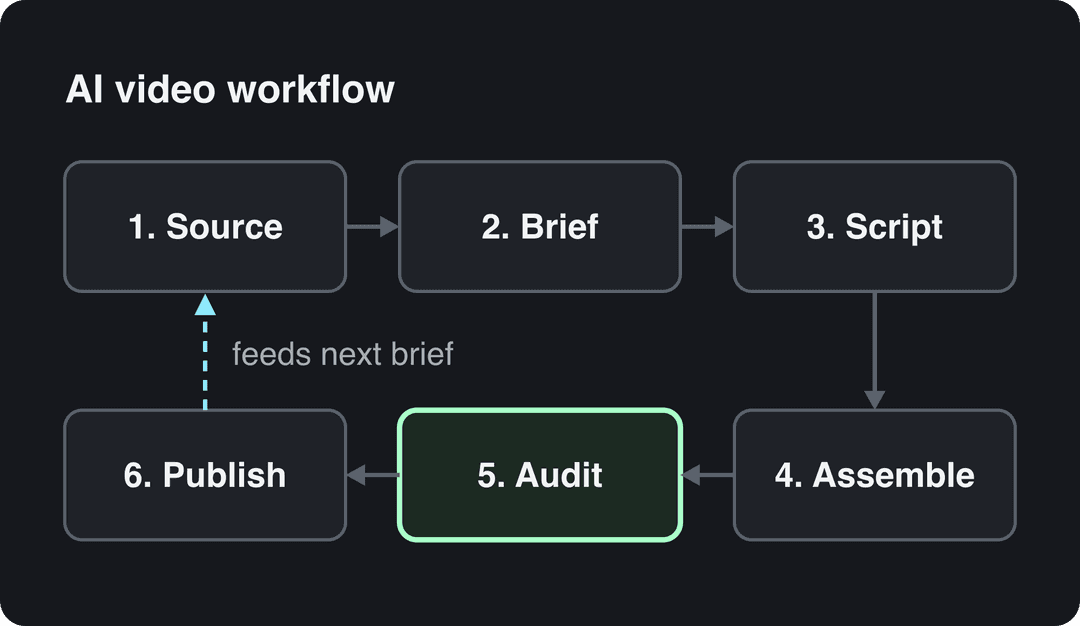
AI is already part of most production pipelines. Wistia's 2026 State of Video Report found that more than a third of companies use AI in their video workflow, mostly in pre-production (see Revid's short-form video statistics). The supply of tools is growing too. Grand View Research's AI video generator market report estimated the market at USD 788.5 million in 2025 and projects USD 3.44 billion by 2033.
More tools do not fix weak inputs. Most video tools use the same generation models, so two people who send the same prompt to the same model get comparable clips. The idea, the hook and the structure you feed in decide the result.
Step 1: Source an idea that already has proof
The fastest way to waste credits is to start from a blank prompt like "make a viral video about X". The model has no information about what performs in your niche, so the output drifts toward a generic average. Start from a source that already shows demand: a short-form video that performed, a question your customers keep asking, a thread with strong disagreement, or an article you wrote that gets traffic.
Pick the starting point from what you already have:
- You have a niche but no idea: find videos in your niche that cleared an engagement bar and study their hook and structure. Revid's viral video library lets you search about 2.77 million short-form videos by topic, platform and engagement tier.
- You have articles or blog posts: turn your own writing into a narrated short with an article to video converter. Only do this with text you wrote, or add real commentary: YouTube treats videos that only read out material the creator did not write as reused content, which it does not allow to monetize.
- You have long videos or podcasts: clip the strongest moments instead of generating new footage.
- You have nothing yet: use an idea list to build a shortlist, such as viral.new's article on AI video idea generators, then validate each idea against a real source.
Format matters as much as topic. In the same Revid study of 176,367 TikToks, challenges had the highest median views (182K, with 25.6% passing 1 million), followed by comedy (155K) and reactions (105K). Storytelling (66K) and tutorials (62K) sat lower. This is TikTok data, but it is a useful tiebreaker: when two ideas are equally strong, pick the one that fits a higher-performing format.
Challenges and comedy passed 1M views about twice as often as tutorials and storytelling, which are the most common formats.
Source: Revid analysis of 176,367 TikToks with 1,000+ likes posted between Oct 1, 2025 and Oct 16, 2026 (61,203 creators)
Show the data
| Median views | Share that passed 1M views | |
|---|---|---|
| Challenge | 182.3K | 25.6% |
| Comedy | 154.8K | 22.1% |
| Reaction | 104.8K | 16% |
| Dance | 83.8K | 15.5% |
| Storytelling | 66.1K | 12.2% |
| Lip Sync | 61.7K | 12.3% |
| Tutorial | 61.9K | 12.1% |
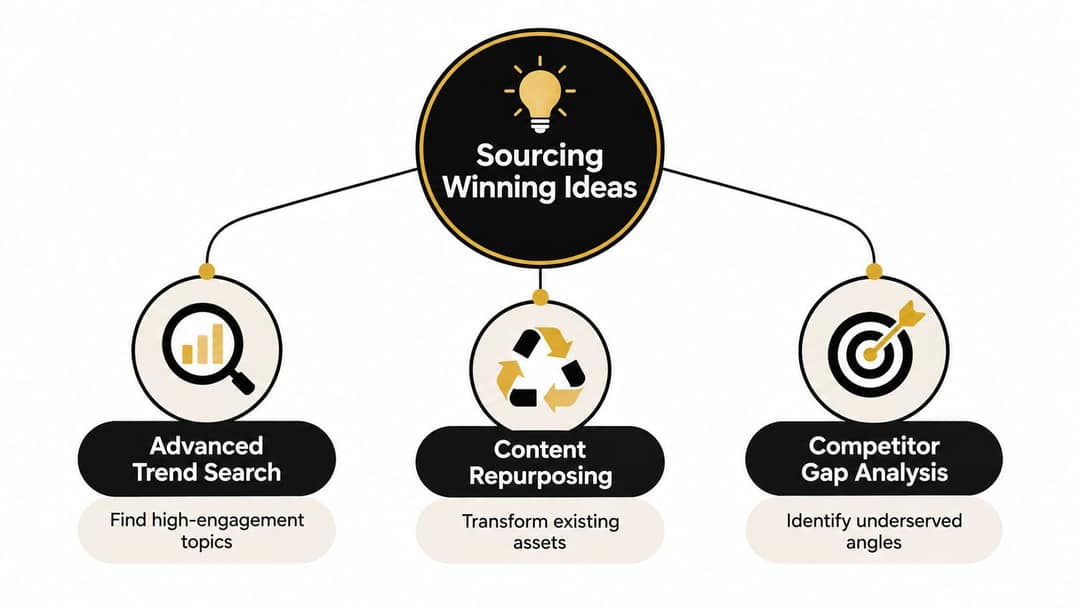
Before moving on, reject any idea that fails one of three checks: no clear viewer, no source you can inspect, or no original contribution you can make. Keep three to five validated ideas in a queue so you never source and publish on the same day. For more on picking ideas, see how to create viral content.
Step 2: Write a one-paragraph brief
The brief is where you add the part AI cannot: your angle. Keep it narrow enough that the video delivers one takeaway. Copy this template:
Viewer: who exactly is watching (role, problem, level)
Promise: what they will know or be able to do by the end
Source: link to the reference video, article or thread
Angle: what you add that the source does not say
Hook: first line, under one breath
Beats: 3 supporting points, one per scene
Visual direction: style, setting, camera feel
Platform: TikTok, Reels, Shorts (primary first)
Call to action: one action, tied to the promise"Everyone is talking about this" is not an angle. "The common explanation misses this practical consequence" is. If you cannot fill the Angle line, go back to Step 1.
Step 3: Script for the ear, then cut
Give the model the source, the brief and a clear constraint, then ask for one central claim, short spoken sentences, a visual note for every beat and a closing line that earns the call to action. A free AI script generator works for the first draft. Never ask for "a viral script" with no context: you get familiar rhythms, inflated claims and interchangeable narration.
Prompt to try
Make a 35-second vertical video for home coffee beginners. Open with the hook "Your espresso tastes bitter because of one setting, not the beans." Then show grind size as the cause, compare a fine and a coarse shot side by side, and end with one tip to try tomorrow morning. Warm close-up cafe visuals, calm voice, bold captions on key words.
Build the hook in three parts
- Problem: name the mistake, confusion or missed opportunity.
- Specific promise: say what the viewer will understand or be able to do by the end.
- Proof path: show the source, demonstration or comparison that backs it up.
Sample hooks built this way:
- "Your espresso tastes bitter because of one setting, not the beans."
- "This is the screen where most new users quit our app, and the fix took one line."
- "Three listings, same street, very different prices. Here is why."
Low-narration prompt
Create a 30-second vertical video showing the three stages of making sourdough bread: feeding the starter, folding the dough, and baking. Open on a close-up of a crackling crust with the on-screen line "3 steps, no recipe needed." Keep narration to a few short words and let the visuals carry each stage, with soft natural light and upbeat acoustic music.
Cut narration where the picture can talk
The speech data above points to one edit: after the first draft, delete every line the visuals already show. If the narration says a process has three stages, show the three stages and drop the sentence. For 30 to 60-second videos, read the draft aloud and remove throat-clearing, repeated points and vague adjectives.
Then verify every name, date, number and quote against the source. Fixing a script is cheap; re-rendering a full edit is not.
Videos with just a few spoken words (a line or two) beat both silent videos and videos that talk the whole way through, which were the most common and the weakest.
Source: Revid analysis of 176,367 TikToks analyzed by AI, with 1,000+ likes posted between Oct 1, 2025 and Oct 16, 2026 (61,203 creators)
Show the data
| Median views | Share that passed 1M views | |
|---|---|---|
| No speech | 73.3K | 14.3% |
| Under 40 | 122.7K | 20.2% |
| 40 to 120 | 97.2K | 17.6% |
| 120 to 300 | 91.6K | 16.8% |
| 300+ | 67.7K | 11.9% |
Step 4: Assemble visuals, voice and captions
Build vertical first, not a horizontal video cropped for phones. Choose the voice, the visual style, the caption treatment and the opening frame before polishing effects.
Choose the generation model scene by scene, not once for the whole video. Models differ in speed and failure rates: Revid's AI video model index measures both across 713,649 production generations. Public rankings such as VibeDex's AI video model leaderboard compare output quality. For the research behind these models, the IEEE Computer Society digital library publishes work such as a 2026 paper in an IEEE Computer Society journal. OpenAI's Sora 2 is no longer an option: OpenAI removed it from its API on September 24, 2026.
Work through the generated draft in four passes:
- Structure pass: the hook lands in the first scene, the sequence follows the script, and every scene supports the central claim.
- Visual pass: replace generic or inaccurate footage. Match the subject, action and mood of each line.
- Text pass: fix auto-generated captions, emphasize only key words, and check readability on bright or busy frames.
- Brand pass: apply consistent colors, fonts, voice and closing frame without covering the content.
Watch the result once with the sound off to test captions, and once without looking at the screen to test narration and audio balance.
Make one master, then platform versions
Keep the master project intact and create versions from it:
| Platform | Format to export | Limits that change your edit | Version tweak |
|---|---|---|---|
| TikTok | 9:16 at 1080x1920 (TikTok's recommendation) | Uploads up to 60 minutes | Most direct opening; label realistic AI |
| Instagram Reels | 1.91:1 to 9:16, at least 30 FPS | Reels over 3 minutes are not recommended to non-followers; up to 5 hashtags | Check the cover frame and caption placement |
| YouTube Shorts | Square or vertical | Up to 3 minutes; a Short over one minute with a Content ID claim is blocked | Make the promise clear without channel context |
For a manual editing reference, this walkthrough of editing Reels in CapCut shows a full sequence you can compare with your own:
Step 5: Audit for accuracy, originality and AI labels
The audit is the step that protects reach and monetization, so do it on every video, close to publication.
On July 15, 2025, YouTube renamed its "repetitious content" policy to "inauthentic content" to make clear it covers repetitive and mass-produced videos. Clippie's roundup of AI video creation trends discusses what that change means for AI channels. YouTube still allows AI tools when the final video shows your creative vision and gives educational or entertainment value.
Run this checklist before export:
- Original framing: the video adds an explanation, comparison or opinion the source does not have.
- Human contribution: a person verified the facts and made real editing choices.
- Distinct structure: it would still feel different with another template, voice or stock library.
- Useful transformation: it teaches, analyzes, demonstrates or entertains instead of reading material aloud.
- Channel consistency: your last ten uploads are not the same formula with new words.
Label realistic AI content
| Platform | When to disclose | Effect of the label |
|---|---|---|
| YouTube | Realistic AI scenes or a real person shown saying or doing something they did not ("AI use" setting in YouTube Studio). Not required for AI-written scripts, captions or your own cloned voice | Does not by itself limit audience or earnings |
| TikTok | AI-generated content with realistic images, audio or video | Does not affect distribution if the video follows the Community Guidelines |
| Instagram, Facebook, Threads | Photorealistic video or realistic audio that was digitally created or altered | Shown as "AI info"; skipping disclosure can be penalized |
Step 6: Publish, measure and feed the next brief
Treat each finished video as a test. Publish the platform versions, and log for every post: source, angle, hook, script version, platform, publish date and the response (views, likes, comments, saves). Publishing from one queue with direct social media publishing keeps that log in one place.
A rhythm a small team can sustain:
- One session a week: source ideas and write briefs.
- One session a week: review scripts and generate the batch.
- Short daily windows: audit, publish and read comments.
Batch the mechanical work but keep the audit close to publication, so one bad caption or wrong visual does not spread across every version. For a non-AI view of the same checkpoints, see Approved Experiences' content creation workflow guide. Agencies running several accounts can compare social media management tools for agencies to extend the system.
Why AI videos stall between brief and export
Most AI video pipelines do not fail at the idea stage. They fail between a promising brief and a usable export. Diagnose before adding more automation:
| Symptom | Likely cause | Fix |
|---|---|---|
| Drafts sound generic | Prompt had no source or angle | Rewrite the brief; feed the model a reference |
| Script will not render cleanly | Scene instructions ask for too much | One action per scene; separate required content from decoration |
| Visuals contradict the narration | Model chosen once for the whole video | Regenerate the failing scenes with another model |
| Viewers leave after the hook | The middle repeats the opening | Rewrite the middle beats, not the hook |
| Views drop across the channel | Every video uses the same formula | Change format, structure and visuals, not just topic |
If viewers save explainers but skip commentary, source more educational material. If they watch the setup and leave before the payoff, fix the middle before you increase output.
How to run this workflow in Revid
Revid covers the six steps in one product:
- Source: search the viral library by topic, platform, engagement tier and length. Run a free Deep analysis (up to 60 a day) to see why a video worked: its hook, timed structure and three ways to adapt it to your niche.
- Brief and script: pick a remix option such as "Make it about your topic" or "Same energy, new script", or start from a prompt, a script or a link. Revid keeps the reference's structure and pacing and writes new words and visuals. When it writes from a prompt, it first pulls related TikToks with more than 10,000 likes as references.
- Assemble: choose a model per scene (Seedance 2.5, MiniMax Hailuo H3, Wan 3.0 or Google Veo 3), then a voice from 1,000+ options in 70+ languages, and a caption style.
- Edit and export: adjust any scene in the timeline editor and export in 720p, 1080p or 4K.
- Publish and learn: publish or schedule to TikTok, Instagram and YouTube. Each post reports its views, likes and comments, and a post that did well can be remixed in one click.
Sign-up is free and new accounts get free credits to try video creation; regular creation then uses the credits of a paid plan (see Revid pricing).
FAQ
Can AI-generated videos be monetized on YouTube?
Yes, if the final video shows your creative vision and gives educational or entertainment value. YouTube refuses monetization for mass-produced template content, incoherent AI clip compilations, and AI personas presented as experts on health, legal, financial or political topics.
How long should an AI-generated short video be?
As long as the idea needs. In Revid's study of 176,367 TikToks, every length bucket from under 15 seconds to 10 minutes had a median between 58K and 76K views. Under 15 seconds got the most shares per view.
Which AI video model is best for short-form video?
No single model wins every scene, so choose per scene. Revid offers Seedance 2.5, MiniMax Hailuo H3, Wan 3.0 and Google Veo 3 under one credit system; Sora 2 is no longer available since OpenAI shut its API on September 24, 2026.
Can the whole AI video workflow run on autopilot?
Production can, judgment should not. Revid's Auto-Mode workers create a fresh video every day from a prompt or content source, but keep a human audit before anything goes live to protect accuracy and monetization.
Is Revid free for this workflow?
Sign-up is free, with no credit card needed, and new accounts get free credits to try video creation. A free account can also search the viral video library. Regular creation then uses the monthly credits of a paid plan, starting at $39 a month.
Sources
- Revid analysis of 176,367 TikToks with 1,000+ likes posted between Oct 1, 2025 and Oct 16, 2026 (61,203 creators)
- Revid analysis of 176,367 TikToks analyzed by AI, with 1,000+ likes posted between Oct 1, 2025 and Oct 16, 2026 (61,203 creators)
- Wistia, 2026 State of Video Report (April 2026)
Charts and figures checked on November 6, 2026.