Content Repurposing Workflow: 6 Steps, Template and ROI Metrics
A six-step content repurposing workflow (audit, map, produce, review, publish, measure) with a copyable template, 2026 platform specs, rules for automating with AI and an ROI framework.

On this page
A content repurposing workflow is a repeatable process that turns one source piece (a webinar, podcast, long video or article) into platform-native assets. It runs in six steps: audit, map, produce, review, publish and measure, with the results feeding the next audit.
The costly mistake is treating repurposing as reposting: one clip, resized, pushed to every channel. Since March 2026, Facebook deprioritizes reposts changed only with borders, captions or speed tweaks as unoriginal, and YouTube does not monetize AI content built from generic templates that looks mass-produced. A workflow that pays off builds a new version for each platform, not a copy.
- Teams that post repurposed video clips on LinkedIn, the top destination
- 67%
- Wistia, April 2026
- Median TikTok views across length buckets from under 15 s to 10 min
- 58K-76K
- Revid analysis of 176,367 TikToks
- Median views for TikToks with under 40 characters of speech
- 123K
- Revid analysis of 176,367 TikToks
- Monthly entry price of Revid's Growth plan with 3 Auto-Mode workers
- $39
- Revid pricing
The six-step content repurposing workflow
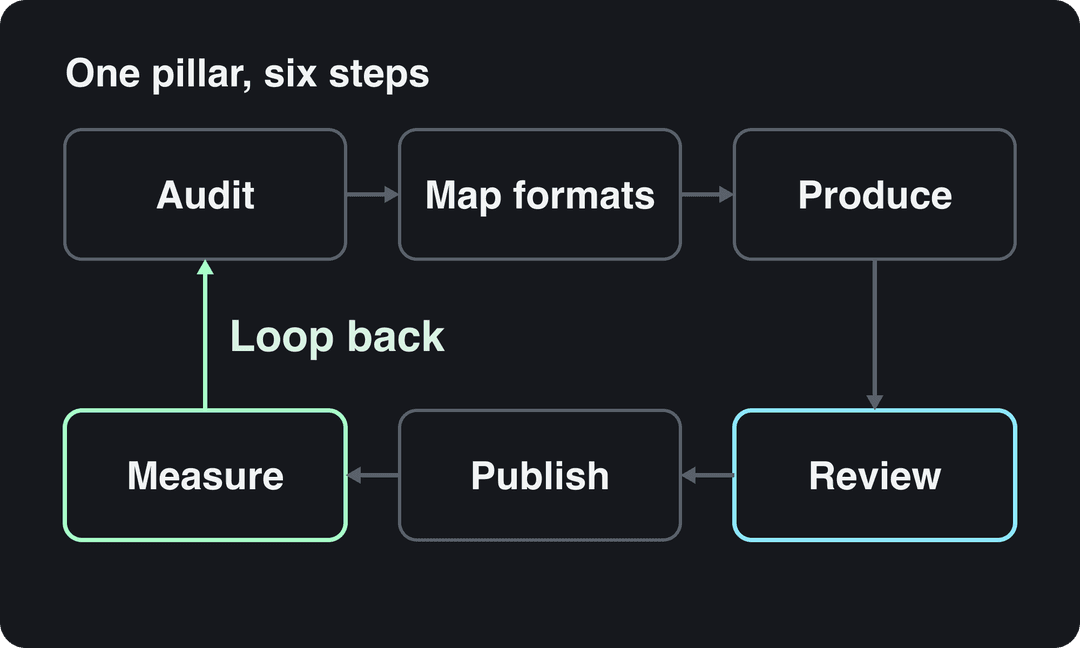
Run every pillar through the same six steps, with one owner per step and a written output at the end of each. That is what turns repurposing from a scramble after each launch into a production line.
Step 1: Audit your content and pick a pillar
Export your published content into one sheet: title, format, topic, date, traffic or views, and a yes or no on "still accurate today". Then pick a pillar, the source piece you will break apart. A good pillar has three traits:
- It already performed: top traffic, watch time, replies, or sales questions it triggered.
- It is evergreen: still true with light edits.
- It holds several self-contained ideas, each strong enough to carry its own post.
Webinars, podcast episodes, customer interviews and long how-to articles make the best pillars because they are dense. A launch announcement makes a weak one because it expires. If events are your main source, Goldcast's content repurposing workflow guide focuses on webinar and event recordings.
Prompt to try
Turn one tip from my long how-to article into a 45-second vertical video. Open with the hook "Most teams waste their best webinar after one post", then explain how to split one webinar into five platform-native clips, with clean captions and calm stock b-roll. End with one clear next step.
Step 2: Map each idea to a platform and format
The rule: one idea, one asset, one format native to the platform. List the ideas inside the pillar, then assign each to the format where it fits best.
| Source | Derivatives that usually fit |
|---|---|
| Webinar or podcast | Vertical clips of the best answers, a blog recap, a newsletter section, quote graphics, a LinkedIn text post |
| Long how-to article | A narrated short video per tip, a carousel, a newsletter issue, an X thread |
| YouTube video | Shorts, TikToks and Reels from its strongest moments, a blog post from the transcript |
| Data report | A chart post, a short video built on the headline number, a LinkedIn post |
| Customer interview | Testimonial clips, a written case study, quote cards for ads |
Where teams send clips is uneven. Wistia's 2026 State of Video Report found that over half of companies repurpose their videos into social clips, with LinkedIn the top destination (67% of teams post clips there), followed by Instagram (49%) and YouTube (41%), while about one in five share clips on TikTok (more in our short-form video statistics). If your audience lives on TikTok, that gap is an opening.
Before you cut anything, check the specs and limits of each destination:
| Platform | Shape | Length limits to know | Watch out for |
|---|---|---|---|
| TikTok | 9:16 at 1080x1920 recommended | Uploads up to 60 minutes; in-app camera up to 10 minutes | Label realistic AI content |
| Instagram Reels | 1.91:1 to 9:16, at least 720 px | Up to 20 minutes, but reels over 3 minutes are not recommended to non-followers | Up to 5 hashtags per post |
| YouTube Shorts | Square or vertical | Up to 3 minutes | A Short over one minute with a Content ID claim is blocked |
| 1:2.4 to 2.4:1 | Up to 15 minutes and 5 GB | You can't post straight to the vertical feed; it picks videos by relevance | |
| X | 1:3 to 3:1 | 20 minutes (non-Premium), 125 minutes (Premium) | Up to 4 photos or 1 video per post |
| Any orientation | No length limit; every video is shared as a reel | Lightly edited reposts are deprioritized |
Step 3: Produce each version
Production is where repurposing earns or loses its time savings. For every derivative:
- Rewrite the opening for the platform. A webinar answer that starts with "Great question" needs a new first line that states the payoff.
- Cut to one idea. If a clip needs context from earlier in the recording, add a line of on-screen text instead of keeping the setup.
- Reframe to the target shape and keep the speaker or subject inside the safe area.
- Add captions and a platform-specific post caption, not the same text everywhere.
- Export at 1080p or higher.
Don't obsess over a magic clip length. In Revid's analysis of 176,367 TikToks with 1,000+ likes posted between October 2025 and October 2026, every length bucket from under 15 seconds to 10 minutes had a median between 58K and 76K views. Clips of 61 to 90 seconds reached a 70K median; clips under 15 seconds had 58K but the most shares per view (1.41 per 100). The sample only holds videos that already cleared 1,000 likes, so it shows what successful videos share, not a cause. Practical rule: cut each clip to the length its single idea needs (see the full TikTok virality study).
Length alone barely moves views: every bucket lands between 58K and 76K median views (the 790 videos over 10 minutes are a small, unusual group). Clips under 15 seconds get shared the most per view.
Source: Revid analysis of 176,367 TikToks with 1,000+ likes posted between Oct 1, 2025 and Oct 16, 2026 (61,203 creators)
Show the data
| Median views | Share that passed 1M views | Shares per 100 views | |
|---|---|---|---|
| Under 15 s | 57.6K | 11.6% | 1 |
| 16 to 30 s | 64.9K | 12.3% | 1 |
| 31 to 60 s | 61.8K | 11.8% | 1 |
| 61 to 90 s | 70.5K | 12.2% | 1 |
| 91 s to 3 min | 63.4K | 11.1% | 1 |
| 3 to 10 min | 76.4K | 12.4% | 1 |
| 10 min+ | 129.6K | 13.8% | 0 |
Talk density matters more for webinar and podcast clips. In the same TikTok data, videos with under 40 characters of speech had a 123K median and 20.2% passed 1 million views, against 68K and 11.9% for videos with talking throughout. If your source is a talking head, trim filler hard and let on-screen text or b-roll carry part of the story. Our guide on how to repurpose video content covers the editing side in more depth.
Videos with just a few spoken words (a line or two) beat both silent videos and videos that talk the whole way through, which were the most common and the weakest.
Source: Revid analysis of 176,367 TikToks analyzed by AI, with 1,000+ likes posted between Oct 1, 2025 and Oct 16, 2026 (61,203 creators)
Show the data
| Median views | Share that passed 1M views | |
|---|---|---|
| No speech | 73.3K | 14.3% |
| Under 40 | 122.7K | 20.2% |
| 40 to 120 | 97.2K | 17.6% |
| 120 to 300 | 91.6K | 16.8% |
| 300+ | 67.7K | 11.9% |
Step 4: Review for accuracy, originality and rights
Every derivative gets a short checklist before it is scheduled:
- Facts: numbers, names and claims match the source, and nothing outdated slipped through.
- Originality: each platform gets a version with its own hook, edit and caption.
- Music: on YouTube, a Short longer than one minute with an active Content ID claim is blocked globally and can't be monetized, so clear the audio or swap it.
- AI labels: TikTok requires a label on realistic AI-generated images, audio or video, YouTube asks you to disclose realistic AI through the "AI use" setting in YouTube Studio, and Meta expects disclosure on photorealistic AI video. TikTok and YouTube both say the label alone does not reduce distribution.
Step 5: Publish on a schedule
Publish the pillar first, then release the derivatives over the following weeks so each one gets its own moment instead of competing with its siblings. Put every asset in one calendar with its platform, date and a tracking link (a UTM tag on any URL you share) so you can attribute traffic later. A social media publishing scheduler that posts to TikTok, Instagram and YouTube from one queue removes most of the manual work at this step.
Step 6: Measure and feed the next audit
Pull results for each derivative into the same sheet as the audit. Two decision rules keep the loop honest:
- If a derivative clearly beats the pillar's other pieces, treat it as a new pillar: expand it into a longer video, article or webinar.
- If a format misses on a platform twice in a row, stop making it there and move that effort to a format that works.
The metrics to track are in the metrics section below.
Content repurposing workflow template
Copy this into a spreadsheet or a project board as columns, one row per pillar:
| Stage | Owner | Input | Output | Done when |
|---|---|---|---|---|
| Audit | Content lead | Published content export | Chosen pillar plus idea list | Each idea fits in one sentence |
| Map | Content lead | Idea list | Derivative plan per platform | Every idea has a format and a platform |
| Produce | Editor or AI tool | Pillar file or link | Draft assets | Each asset has its own hook and caption |
| Review | Subject expert | Draft assets | Approved assets | Facts, rights and AI labels checked |
| Publish | Social manager | Approved assets | Scheduled posts with tracking links | Every post has a date and a UTM tag |
| Measure | Content lead | Platform analytics | Results per asset | Next pillar chosen from the data |
For each derivative, track these fields: pillar, idea, platform, format, owner, status, publish date, link, and results (views, engagement, clicks, leads).
AI content repurposing workflow steps: what to automate
AI speeds up the mechanical work in every step; judgment stays with a person.
| Step | What AI does well | What a human keeps |
|---|---|---|
| Audit | Transcribes recordings, summarizes them, clusters topics | Choosing the pillar |
| Map | Suggests derivatives and angles | Deciding which platforms your audience uses |
| Produce | Finds clip moments, reframes to vertical, drafts captions, generates visuals and voice-over | The hook, the facts, the brand voice |
| Review | Flags claims and numbers to check | Final approval |
| Publish | Schedules across platforms | Exceptions and launch timing |
| Measure | Pulls stats into one view | Interpreting results and picking the next pillar |
Platforms draw the line in the same place. YouTube allows AI and automated tools in monetized content when the final video shows the creator's creative vision and gives educational or entertainment value. Narrating your own article with an AI voice is fine; reading out text you didn't write counts as reused content.
How to turn long content into short videos with Revid
Revid covers the video part of the workflow, from source to published post:
- For a webinar, podcast or YouTube video, upload it to the long video to short video converter, which cuts it into short vertical clips.
- For a blog post or newsletter, paste it into the article to video converter to get a narrated short video with captions and music, with voice-overs in 70+ languages.
- Adjust any scene in the timeline editor and export in 720p, 1080p or 4K.
- Publish or schedule to TikTok, Instagram and YouTube from one queue. Each post then reports its views, likes and comments, and a post that did well can be remixed in one click.
- To keep a channel fed, set up Auto-Mode workers that create a fresh video every day from a content source (3 workers on the Growth plan, from $39/month).
What metrics show automated content repurposing is working?
Track the workflow and the content separately. Workflow metrics tell you whether automation saves effort; content metrics tell you whether the output works.
| Metric | What it tells you | Where to find it |
|---|---|---|
| Assets published per pillar | The yield of each source piece | Your tracker |
| Hours and cost per published asset | Whether automation saves effort | Time tracking, tool invoices |
| AI draft revision rate | How much automated output needs fixing | Your review step |
| Time from pillar to first derivative live | Speed of the workflow | Your tracker |
| Views per asset | Reach on each platform | Platform analytics |
| Likes, comments, shares and saves per view | Whether the content lands | Platform analytics |
| Click-throughs and sessions | Traffic sent to your site | UTM tags in your web analytics |
| Leads or sign-ups attributed | Business value | CRM or analytics conversions |
Two things to know about views in 2026. Since August 24, 2026, YouTube counts a view the moment a video starts playing, while YouTube Partner Program earnings still use engaged views, so compare engaged views across periods. Instagram insights now lead with Views, which counts plays and displays, separate from Viewers (unique accounts). For definitions and benchmarks, see our guide to video engagement metrics.
The revision rate is the metric most teams skip. If editors rewrite most AI drafts, the automation has moved work rather than removed it.
A strong ROI framework for AI-assisted repurposing vs net-new content
Compare the two workflows per asset, over the same period and against the same goals:
ROI = (attributed value minus total cost) divided by total cost
Total cost includes people's hours (ideation, scripting, editing, review), tool subscriptions and distribution. Attributed value comes from tracked leads, sign-ups or sales, plus a consistent value you assign to reach if awareness is the goal. Count review time on the AI side: it is the cost teams forget.
| Net-new content | Manual repurposing | AI-assisted repurposing | |
|---|---|---|---|
| Main cost | Research, ideation and production from scratch | Editing time per derivative | Tool costs plus review time |
| Speed | Slowest | Medium | Fastest per asset |
| Main risk | Ideas that never get tested | Editing bottleneck | Generic or unoriginal output, factual slips |
| Best for | New topics, launches, opinion | High-stakes pieces | Volume across platforms |
Decision rules:
- If AI-assisted assets cost less but perform far worse per view, they are not a saving: tighten the hooks or cut volume.
- If repurposed assets match net-new performance at lower cost, shift budget toward fewer, stronger pillars.
- Keep some net-new work in the mix: repurposing only multiplies ideas you already have.
Be skeptical of headline percentages when you build the business case. Stat roundups such as this 2023 list of content repurposing statistics and TranscribeTube's content repurposing statistics repeat survey figures that are hard to trace to a primary source; your own cost per asset convinces a finance team faster. For another angle on the trade-offs, read Project Aeon's guide to repurposing for marketing ROI.
Content repurposing workflow for healthcare
Healthcare teams can run the same six steps with a stricter review:
- Add clinical review twice: when the pillar is chosen and before each derivative goes live, because a short clip can drop the caveat that made a statement accurate.
- Keep sources visible: put the study or guideline on screen or in the caption. When Revid fact-checked 3,000 viral health TikToks, most cited nothing.
- Strip patient details from case stories and follow your privacy rules (HIPAA in the US) before anything is published.
- Don't present an AI avatar as a clinician. YouTube does not monetize channels that use AI personas presented as human experts giving health advice.
- Disclose realistic AI visuals on every platform that asks for it.
Tools that connect the workflow
You need four kinds of tools: a place to track work, an automation layer, production tools and a scheduler. A common setup uses Zapier, Make or IFTTT to watch for a new pillar (a published post, a new YouTube upload, a recording dropped in a folder) and create cards in Trello or tasks in Asana for each planned derivative. A text model such as ChatGPT drafts posts and newsletter copy, a design tool like Canva handles graphics, and a video tool handles clips. For a side-by-side of dedicated options, see our roundup of content repurposing tools.
Pick tools by the format you produce most, the size of your team, your budget, and whether they connect to each other without copy-paste.
FAQ
How many pieces of content can you get from one source?
It depends on how many self-contained ideas the source holds. A dense webinar or podcast episode can feed a series of clips, a blog recap, a newsletter section and several social posts; a thin piece may only support one or two derivatives.
What is the difference between repurposing and recycling content?
Recycling republishes a piece as it is; repurposing changes its format or angle for a new platform or audience. Platforms increasingly treat lightly edited reposts as unoriginal, so repurposing is the safer habit.
Does repurposed content hurt SEO?
Not when each version is adapted to its format. If you republish a full article on another site, link back to the original so readers and search engines can see which version came first.
Can AI fully automate content repurposing?
It can automate most of the mechanical work, from transcription to clipping to scheduling, but not the judgment. Keep a person on the hook, the facts and the final approval, since platforms limit reach or monetization for mass-produced, unoriginal content.
Does labeling AI-generated content reduce reach?
No, according to TikTok and YouTube: both say the disclosure label alone does not affect distribution, and YouTube says it does not affect eligibility to earn. Repeatedly failing to disclose realistic AI content can lead to labels being applied, removals or YPP suspension.
Sources
- Revid analysis of 176,367 TikToks with 1,000+ likes posted between Oct 1, 2025 and Oct 16, 2026 (61,203 creators)
- Revid analysis of 176,367 TikToks analyzed by AI, with 1,000+ likes posted between Oct 1, 2025 and Oct 16, 2026 (61,203 creators)
- Wistia, 2026 State of Video Report (April 2026)
Charts and figures checked on November 6, 2026.