On this page
AI video tools beat professional editors on speed and cost for high-volume short-form clips, while professional editors still win on brand films, long-form storytelling and any video where a mistake is expensive. Most teams do best with a hybrid: AI for rough cuts, captions and formatting, a human for strategy and final polish.
The usual mistake is comparing a monthly subscription with an editor's invoice. What counts is the cost of a video that does its job, and AI output is not automatically equal: in Revid's study of 292,784 TikToks, AI-generated videos averaged 1.4M views against 661.4k for real footage, but earned a 3.9% like rate against 7.7%. AI makes reach cheap. Trust still needs human judgment.
- Average views of AI-generated TikToks, vs 661.4k for real footage
- 1.4M
- Revid study of 292,784 TikToks
- Like rate of AI-generated TikToks, vs 7.7% for real footage
- 3.9%
- Revid study of 292,784 TikToks
- Video marketers who have used AI video tools to create or edit videos
- 63%
- Wyzowl, December 2025
- Monthly cost of an editor for 60 shorts, vs $89 for Revid Elite
- $1,800
- Article's cost example
AI video tools vs professional editors: side by side
| AI video tools | Professional editors | |
|---|---|---|
| Speed | Minutes from idea to first cut | Hours to days |
| Cost per extra video | Low once you have a plan (credits) | Tied to hours or project fees |
| Volume | Dozens to hundreds of clips a month | Capped by one person's hours |
| Consistency | High when templates are fixed | Varies with the editor and deadlines |
| Story and emotion | Fine on simple formats, weak on nuance | Strong when the editor knows the audience |
| Brand nuance | Needs setup and review | Natural for a good editor with context |
| Captions, ratios, platform formats | Automatic | Possible, but billable time |
| Testing hooks and variants | Cheap | Every variant costs hours |
| Originality | Drifts toward common patterns | Can break patterns on purpose |
| Learning curve | Low | High for Premiere Pro or DaVinci Resolve |
The market is splitting in two rather than flipping. Commodity editing (cutting, captioning, resizing, versioning) is moving to AI, and editors are moving toward high-context creative work. Adoption is already mainstream: in Wyzowl's 2026 survey (published December 2025), 63% of video marketers said they had used AI video tools to create or edit marketing videos, up from 51% a year earlier, as collected on our short-form video statistics page.
The index leans toward videos that surface in hashtag and keyword searches, so its view counts run high: compare the groups, not the absolute numbers.
Source: Revid TikTok index: 2,377,477 TikToks with AI labels per video, snapshot of Sep 15, 2026. Median views estimated from view buckets.
Show the data
| Median views | Share past 1M views | |
|---|---|---|
| AI generated | 151.7K | 19.5% |
| Animation/Cartoon | 121.3K | 14.2% |
| Mixed | 87.3K | 11.4% |
| Real shot | 67.3K | 9.5% |
What editing involves, and which parts AI can take
Editing is controlling attention over time to reach a goal. "Cut clips, add music, export" is the visible part; most of the value sits in decisions you never see. Split the job into six layers and the AI question gets much easier.
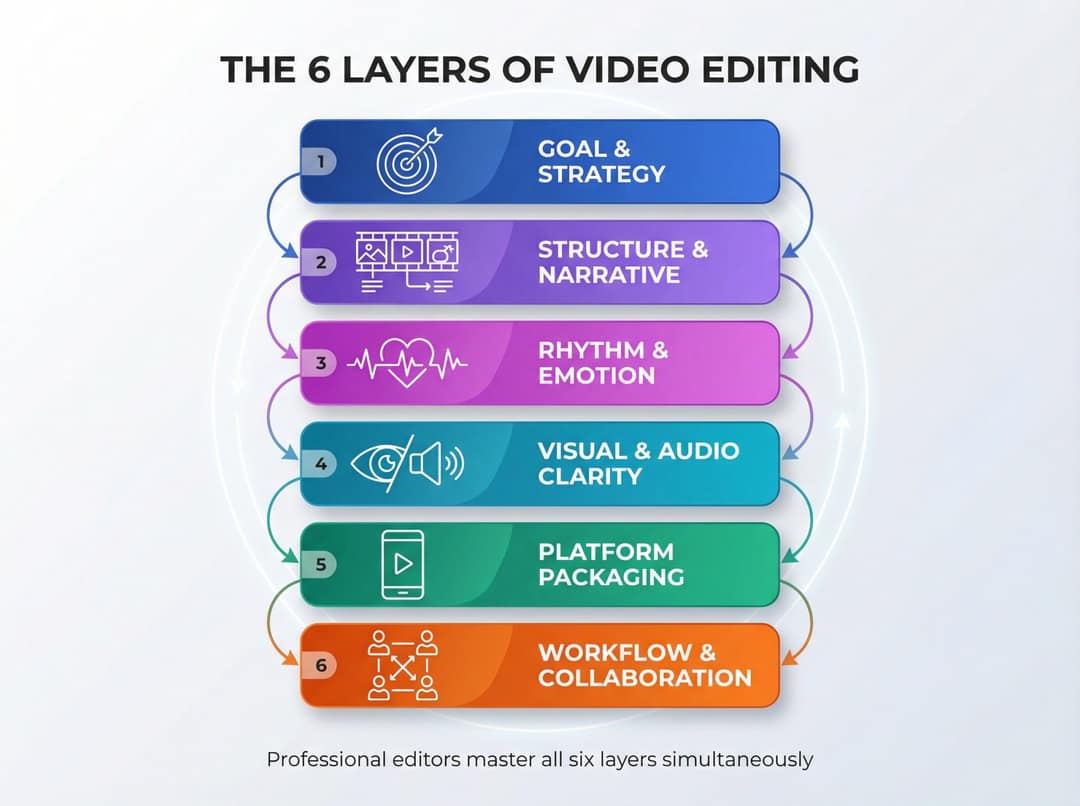
| Layer | What it covers | Who should own it in 2026 |
|---|---|---|
| 1. Goal and strategy | Audience, the action you want, where the video lives | Human |
| 2. Structure and narrative | Which ideas stay, the hook, the payoff, the order | Human, with AI drafts |
| 3. Rhythm and emotion | Pacing, pauses, when to hold a shot, music and silence | Human for stories, AI for simple formats |
| 4. Visual and audio clarity | Dead air, filler words, noise cleanup, color | AI first, human check |
| 5. Platform packaging | Aspect ratios, safe zones, captions, the opening hook | AI |
| 6. Workflow | Files, versions, delivery formats, deadlines | AI for volume, human sign-off |
A professional editor is paid for doing all six at once under deadline. AI tools don't replicate that: they take over layers 4 and 5 almost entirely and draft layers 2 and 3. That is why AI wins clearly on short social clips (mostly packaging) and loses on a documentary (mostly story).
The main kinds of AI video tools map onto those layers:
- Clipping and caption tools cut long recordings into vertical clips and caption them (layers 4 and 5).
- Transcript-based editors let you cut video by deleting words from the transcript, which is fast for podcasts and talking heads.
- Generation models such as Seedance, MiniMax Hailuo, Wan and Google Veo create new footage from text or images, but need direction for anything beyond a short sequence.
- Full short-form platforms such as Revid combine script, visuals, voice, captions, music, editing and publishing.
- Classic editors with AI features (Premiere Pro, DaVinci Resolve, CapCut) add AI help to manual timeline work.
How much can you save with AI video tools?
For a creator publishing 60 short videos a month, an AI-first workflow costs roughly a third of paying an editor for every clip, even after counting your own time. The exact saving depends on three inputs: the editor's real rate, how long each clip takes, and what an hour of your time is worth. Swap in your own numbers below.
The math for 60 shorts a month
Assumptions: each short is 30 to 60 seconds, a competent freelance editor charges $30/hour and needs about 1 hour per short, and your own time is worth $50/hour.
| Editor for every clip | AI-first with Revid | |
|---|---|---|
| Editing | 60 × 1 hour × $30 = $1,800/month | Elite plan: $89/month |
| Your time | Briefing and review | 10 hours × $50 = $500 |
| Hours spent editing | 60 hours | About 10 hours of your time |
Why Elite and not the cheaper plan: Revid's Growth plan is $39/month with 2,000 credits, and a 30-second video with Pro AI visuals and a voice-over costs about 40 to 80 credits. Sixty of those need more than 2,000 credits, so at this volume the Elite plan ($89/month, 5,000 credits) fits. Premium video models cost 100 to 130 credits per 5 seconds, so a channel built on them uses credits far faster. Check current plans on the Revid pricing page, which is the authoritative source.
Even if you send one hero video a month to a pro editor for $300, the AI-first total stays at about half the editor-only bill. You give up some craft on each clip and get volume, testing and speed in return. For short-form growth, that is usually the right trade.
When the editor is the cheaper option
Cost per video is the wrong metric. Track cost per result: per view, lead, sale or trained employee. A flagship brand film for your homepage, shown to investors and your biggest customers and used for a year or two, is the clearest case. An AI-only version will exist, but if you would not show it to your best customer, its low price buys nothing. Pay for a director and an editor there, and use AI for concept frames, animatics and cleanup.
The logic also runs the other way. An editor who needs a day to deliver one TikTok, when you wanted to test five hook variants this week, costs you the test.
When to use AI, an editor or both
Two questions settle most cases: how expensive is a mistake, and how many similar videos will you need this year? High stakes and few videos point to a human-led edit; low stakes and many videos point to AI-first.
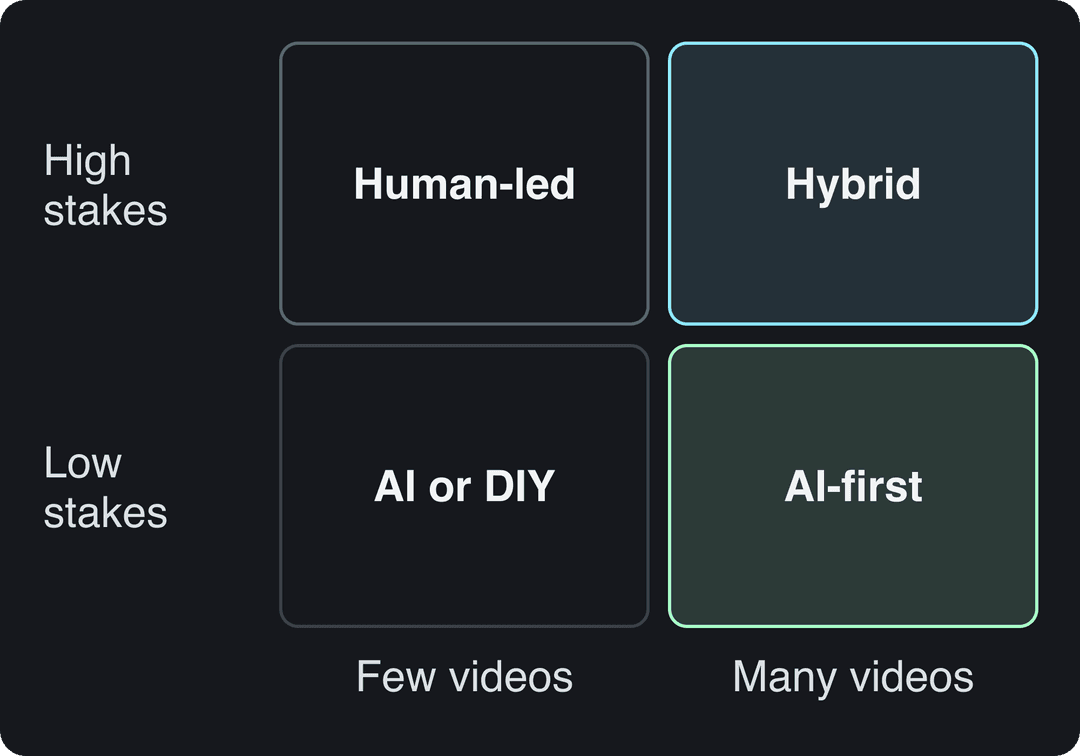
| Video type | What it must do | Best approach |
|---|---|---|
| TikTok, Reels, Shorts | Reach, fast testing | AI-first, a human picks and tweaks the winners |
| E-commerce and UGC-style ads | Many variants, constant refresh | AI-first, an editor tunes the highest-spend ads |
| Internal training and announcements | Clear and on time | AI-first, light human pass for accuracy |
| Courses and expert content | Clarity, trust, many micro-lessons | AI rough cut, human instructional design |
| Long-form YouTube and documentaries | Watch time, emotional arc | Hybrid: AI for transcripts and cleanup, editor for pacing |
| Brand films, hero ads, investor videos | Look expensive, build trust | Human-led, AI for previsualization and VFX support |
Short-form social is the strongest AI case because almost all of its work follows patterns: vertical crops, captions, hook tests, versions. The constraint is volume, not cinematic polish. Long-form is the weakest: deciding when to linger on a reaction, or reordering beats so a long video doesn't sag, is still an editor's job.
How to split one video between AI and a human
Stop framing it as AI versus editor. Break the pipeline into seven jobs and give each an owner based on how costly a small error is.
| Job | Owner | Why |
|---|---|---|
| 1. Strategy and objective | Human | A wrong goal wastes everything after it |
| 2. Script and structure | Human, AI drafts | AI writes fast first drafts; you fix the hook and voice |
| 3. Recording or asset capture | Human has the final say | Footage quality caps the result |
| 4. Rough cut | AI | Cheap to redo |
| 5. Fine cut and polish | AI, human review on key videos | Most errors are visible and easy to fix |
| 6. Platform packaging | AI | Captions, ratios and formats are rules, not taste |
| 7. Distribution and analysis | Human decides, tools report | Someone has to act on the numbers |
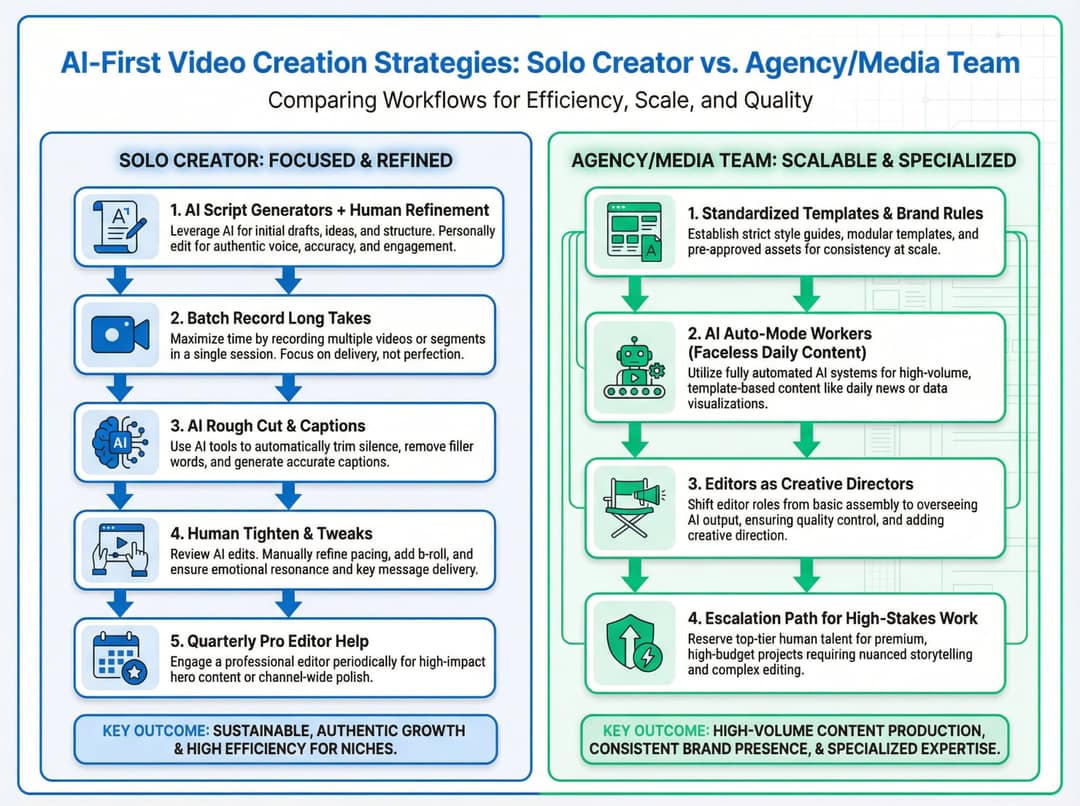
Solo creator or small team
- Draft scripts with AI, then rewrite the hooks so they sound like you.
- Batch-record long takes; don't chase perfect micro-edits on camera.
- Let AI do the rough cut, captions and first-pass visuals.
- Spend a few minutes per clip fixing on-screen text, wrong visuals and the timing of key moments.
- Once a quarter, hire an editor for one or two flagship videos or a reusable intro and outro package.
Prompt to try
Create a 45-second faceless vertical video for a daily series called "One Marketing Myth a Day". Open with the hook "Posting every day is killing your reach, and here is why." Use clean stock visuals, a calm confident voiceover and bold captions, and end with one practical tip.
Agency or media team
- Standardize templates, caption styles and voices per client.
- Run low-stakes daily content (blog recaps, faceless series) through automation, with a human approving each video before it posts.
- Turn senior editors into creative directors: they design templates, review AI output and solve narrative problems instead of cutting every clip.
- Escalate any piece that starts performing, or that carries a big budget, to a custom editing track.
In-house marketing or learning team
- Route training videos and quick announcements to AI-first production; send product launches, CEO messages and investor material to human-led production.
- Write internal rules: approved tools, style guide, sensitive topics, likeness and consent.
- Train your existing editors on AI tools so they multiply output instead of becoming the bottleneck.
How to do the AI-first part with Revid
Revid covers the commodity layers in one place, from source material to a published post:
- Start from what you already have: paste a long YouTube video into the YouTube clip maker for vertical clips, upload a talking video to auto edit with AI (your key lines become motion graphics), or paste a product page into the AI product video generator.
- Or start from a proven format: search Revid's library of about 2.77 million short-form videos with engagement data and remix one into an original video with your own script.
- Fix any scene in the timeline editor. Captions come in 30 styles and 100+ languages, voice-overs in 70+ languages.
- Publish or schedule to TikTok, Instagram and YouTube from one queue, and let Auto-Mode workers create a fresh video each day for low-stakes series (3 workers on Growth).
Keep a human on steps 1 and 3 for anything that carries your brand.
Input
Your video as it is
Output
Mistakes teams make when switching to AI
Treating AI as free
Credits run out, and premium models cost more per second. Your time is a cost too: if you spend an hour fixing every AI misfire, the cheap subscription stops being cheap. Budget credits per video type before you scale.
Assuming an editor is always better
Plenty of editors don't know platform-specific pacing or hook conventions, and many are slower than an AI-assisted beginner on simple social clips. The real question is whether the person or the tool understands the job this video has to do.
Letting every video look the same
Default templates make your content look like everyone else's. Customize caption styles, voices and visuals more than feels necessary, mix in real footage of your team, product and location, and treat AI styles as a starting point.
Posts with AI visuals
Source: Revid social index: 388,379 posts from X, Instagram, Threads, Reddit and LinkedIn with AI labels per post, snapshot of Sep 15, 2026.
Show the data
| Posts with AI visuals | |
|---|---|
| High engagement | 1.6% |
| Medium engagement | 2.9% |
| Low engagement | 6.7% |
Ignoring the trust gap
The view advantage in Revid's TikTok study came with about half the like rate, and the same study found AI visuals clustering in the lowest engagement tier on X, Instagram and Threads. For expert advice, emotional topics and anything that asks for trust, real faces and voices are the safer default. Test AI, human and hybrid versions of the same concept and decide from your own numbers.
Skipping platform rules and rights
You are responsible for the rights to everything you feed a tool: music, footage, brand characters and real people's likenesses. Celebrity avatars and deepfakes carry legal risk that varies by country.
Decision checklist: AI, editor or hybrid?
Run these ten questions for every new video project:
- What is the video's job: reach, trust, sales, learning or internal alignment?
- How long will it live: a one-week trend, a month-long campaign or a year as evergreen content?
- Who will see it: everyone, a narrow niche, or only staff?
- What does a small mistake cost: mild embarrassment, a missed chance, or real revenue or relationship damage?
- How many similar videos will you need in the next 12 months?
- What is your current constraint: money, speed, skills or creative direction?
- Which layers can AI safely take: script draft, rough cut, captions, formats, B-roll?
- Who owns taste and final approval? Name a person, not a tool.
- Where will you test AI, human and hybrid versions of the same concept?
- When will you review the mix? Put a date 3 months out.
Expensive mistakes and few videos point to an editor. Cheap mistakes and many videos point to AI-first. Everything in between is hybrid.
Is Revid AI good? An honest review
Revid is good at commodity editing plus creation: turning an idea, a link or a proven viral format into a finished short-form video and publishing it. It is not a replacement for a film editor.
Where it is strong:
- Creation grounded in data. A library of about 2.77 million real short-form videos and posts with engagement data feeds script writing and remixing, so you start from formats audiences already watch instead of a blank prompt.
- Several models under one plan. Seedance 2.5, MiniMax Hailuo H3, Wan 3.0 and Google Veo 3, chosen per scene, with export in 720p, 1080p or 4K at 30 or 60 fps.
- The full loop. Script, visuals, 1,000+ AI voices, captions, music, a timeline editor, and direct publishing to TikTok, Instagram and YouTube with post results.
- Automation and agents. Auto-Mode workers, plus an API, MCP server and CLI on every paid plan.
- Real usage. More than 100,000 videos rendered each month, and 400+ creators have reached 100,000+ views with videos made on Revid (Revid's own analytics, 2026).
Where another tool fits better:
- Long-form or cinematic work edited shot by shot: Premiere Pro or DaVinci Resolve.
- Corporate training with a fixed presenter: an avatar platform such as Synthesia.
- Cutting your own long recordings as the main need: a clipping tool such as OpusClip.
- Editing your own footage by hand only: a classic editor such as CapCut.
- Unlimited free generation: AI generation uses credits, on Revid as elsewhere.
If you are weighing Revid against another generator (TubeGen comes up often), compare them on the same checks: which video models are included, whether per-feature credit costs are public, whether you get a real timeline editor, direct publishing and API access. Revid publishes sourced head-to-head comparisons, and our roundup of Revid AI alternatives covers the model labs such as Kling and Runway.
FAQ
Can AI video tools completely replace professional editors?
For short-form social clips, high-volume product videos and internal training, often yes. For brand films, long-form storytelling and sensitive topics, no: use AI to assist an editor there, not replace one.
Is Revid AI safe to use?
Yes, Revid is an established product: an independent software company based in Paris, France, founded in 2023 (as Typeframes), with more than 3 million sign-ups since August 2024. Read Revid's privacy policy and terms before uploading client footage, and only upload material you have the rights to.
Is Revid AI free?
Sign-up is free with no credit card needed, and new accounts get free credits to try video creation. A free account can also search the viral video library and run up to 60 free deep video analyses a day. Regular creation then uses the monthly credits of a paid plan, starting at $39/month (Growth, 2,000 credits).
Will my audience notice AI-generated videos?
Often, if the video runs on default templates with no human direction. Customized AI videos with real footage, brand visuals and a human review hold up far better, and realistic AI content needs a label on YouTube and TikTok either way.
Can AI video tools handle other languages?
Yes, and usually more cheaply than a multilingual editing team. Revid offers AI voices in 70+ languages and automatic captions in 100+ languages, and its video translator converts an existing project into another language while keeping the edit, media and captions.
Sources
- Revid TikTok index: 2,377,477 TikToks with AI labels per video, snapshot of Sep 15, 2026. Median views estimated from view buckets.
- Revid social index: 388,379 posts from X, Instagram, Threads, Reddit and LinkedIn with AI labels per post, snapshot of Sep 15, 2026.
- Wyzowl, Video Marketing Statistics 2026 (December 2025)
Charts and figures checked on November 6, 2026.