Lullaby Videos With Soft Animated Visuals: Tools and 4 Steps
Turn any lullaby into a slow, soft animated bedtime video with Revid's From music tool, and see which other tools fit depending on what you start with.
On this page
One simple way to make a lullaby video with soft animated visuals is Revid's From music tool: upload the song (MP3, WAV or a Suno link), choose Animated AI images for slow zoom-and-pan scenes, and click Generate video. Neural Frames, Kaiber, CapCut and Canva also fit, depending on what you start with.
The usual mistake is borrowing short-form habits. Quick cuts, saturated colors and flashy transitions are built to keep an adult scrolling, and they work against a bedtime video. A good lullaby video moves slowly, stays calm and dim, and lets the music lead.
Here is a finished example made from a lullaby track:
- Recommended length for a lullaby video, about one or two lullabies
- 3-5 min
- Revid blog tips
- Revid entry paid plan (Growth) per month, after free sign-up credits
- $39
- Revid pricing
- Kaiber entry price per month, with no free tier
- $10
- Tool comparison table
- Highest export resolution in the Revid editor (also 720p and 1080p)
- 4K
- Revid editor
What tools make lullaby videos with soft animated visuals?
The right tool depends on what you start with: just a song, your own drawings or images, or footage you already shot.
| Tool | You start with | Best for | Price |
|---|---|---|---|
| Revid (From music) | An MP3 or WAV file, or a Suno link | A complete animated video generated from the song, with a timeline editor and direct publishing | Free credits on sign-up, then from $39/month |
| Revid AI Music Visualizer | An audio file | Calm visuals with an audio waveform | Same Revid credits |
| Neural Frames | An audio file | Audio-reactive visuals with frame-by-frame control | From $39/month ($26 billed yearly), free account with watermark |
| Kaiber | A track plus your own images or clips | Beat-synced edits of assets you already own | From $10/month, no free tier |
| CapCut | Footage you filmed | Editing your own clips by hand | Free tier with 1080p export |
| Canva | A template | Simple designs with light video | Free plan available |
Use these rules to choose:
- If you only have the song and want animated scenes made for you, use Revid's AI music video generator.
- If you want a simple kids' video from a nursery rhyme, lullaby or learning song, the Music Videos for Kids tool is built for exactly that.
- If you want slow, abstract visuals that pulse with the audio, try the AI Music Visualizer.
- If the lullaby has words children can sing along to, an animated lyrics video puts the lyrics on screen.
- If you already have drawings or photos and want to animate them to the beat, Kaiber fits. Here is a fair Revid vs Kaiber comparison.
- If you want fine artistic control over audio-reactive frames, look at Neural Frames (Revid vs Neural Frames).
Made your lullaby in Suno? The Suno to video converter takes the Suno link directly.
How to make a lullaby video in Revid
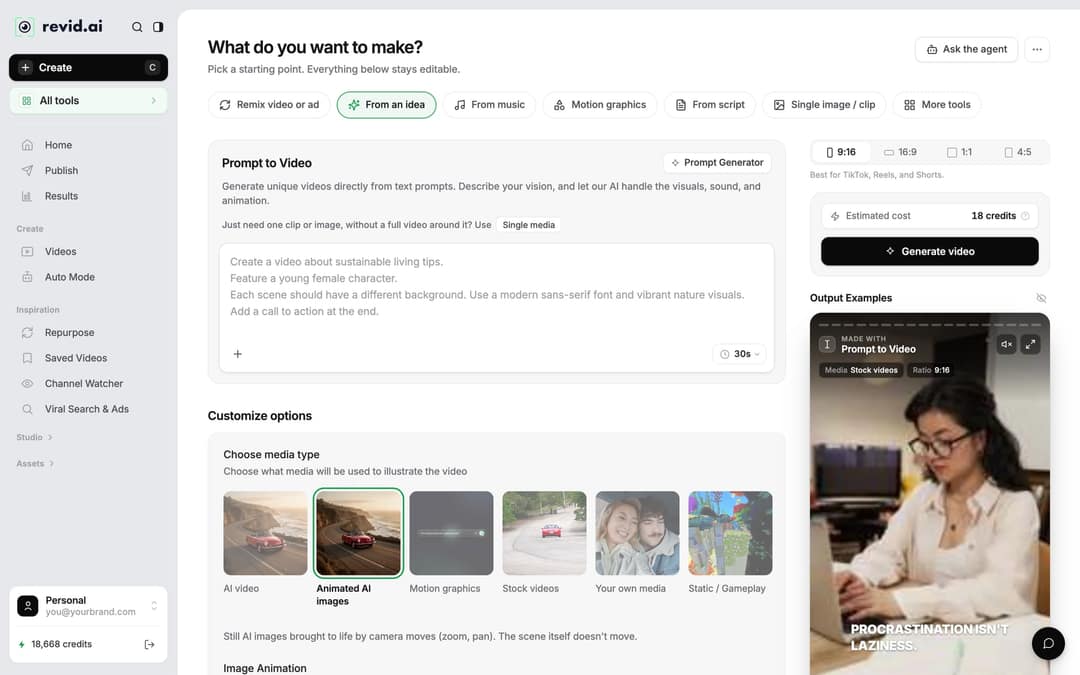
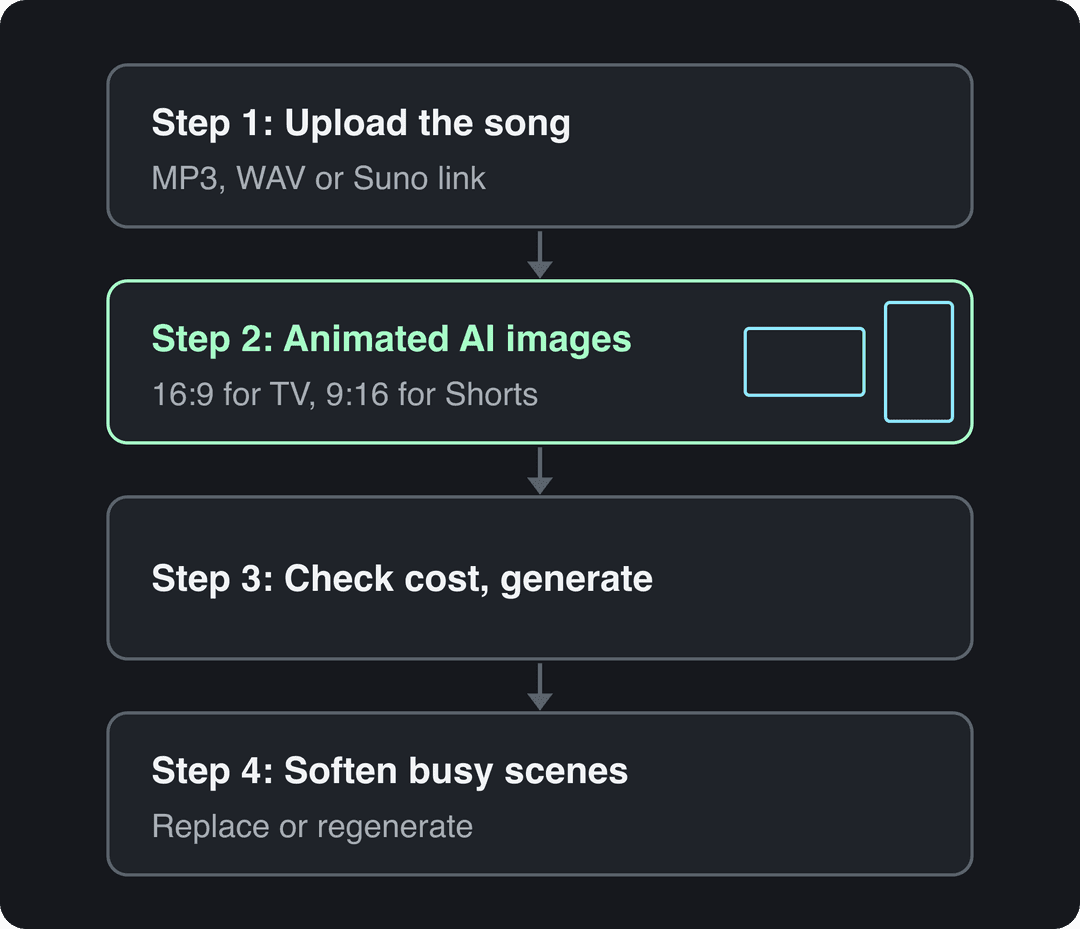
Step 1: Open Create and choose From music
- Click Create at the top of the left sidebar (or press C).
- On the "What do you want to make?" page, pick the From music tab.
- Upload your lullaby as an MP3 or WAV file, or paste a Suno link.
Step 2: Pick a calm media type and the right ratio
Under Choose media type, the options are AI video, Animated AI images, Motion graphics, Stock videos, Your own media and Static / Gameplay. For a lullaby, choose Animated AI images: still AI images brought to life by slow camera moves (zoom and pan) while the scene itself stays put. That is about as gentle as motion gets.
AI video (on a paid plan) adds real movement inside each scene, with models such as Seedance 2.5, MiniMax Hailuo H3, Wan 3.0 and Google Veo 3. It looks richer, but more movement is not what you want at bedtime, so use it sparingly.
Then set the ratio at the top right of the page:
| Where it will play | Ratio |
|---|---|
| YouTube video on a TV or tablet | 16:9 |
| YouTube Shorts, TikTok, Instagram Reels | 9:16 |
| Instagram feed | 4:5 |
| Square posts | 1:1 |
Animated AI images and Low-tier AI video make up 82% of music video generations. Other: still images (139) and motion graphics (51).
Source: Revid product analytics (Amplitude), 54,940 music video generations with the AI music video generator, July 25 to October 23, 2026
Show the data
| Share of generations | Generations | |
|---|---|---|
| Animated AI images | 59.1% | 32.5K |
| AI video, Low tier | 22.9% | 12.6K |
| AI video, Pro tier | 6.62% | 3.6K |
| AI video, Ultra tier | 1.31% | 718 |
| Stock video | 5.52% | 3K |
| Your own media | 4.13% | 2.3K |
| Other | 0.35% | 190 |
Step 3: Check the cost and generate
The Estimated cost in credits shows next to the Generate video button, so you know the price before you start. Click Generate video. If a build fails, Revid refunds the credits automatically.
Step 4: Soften any scene that feels busy
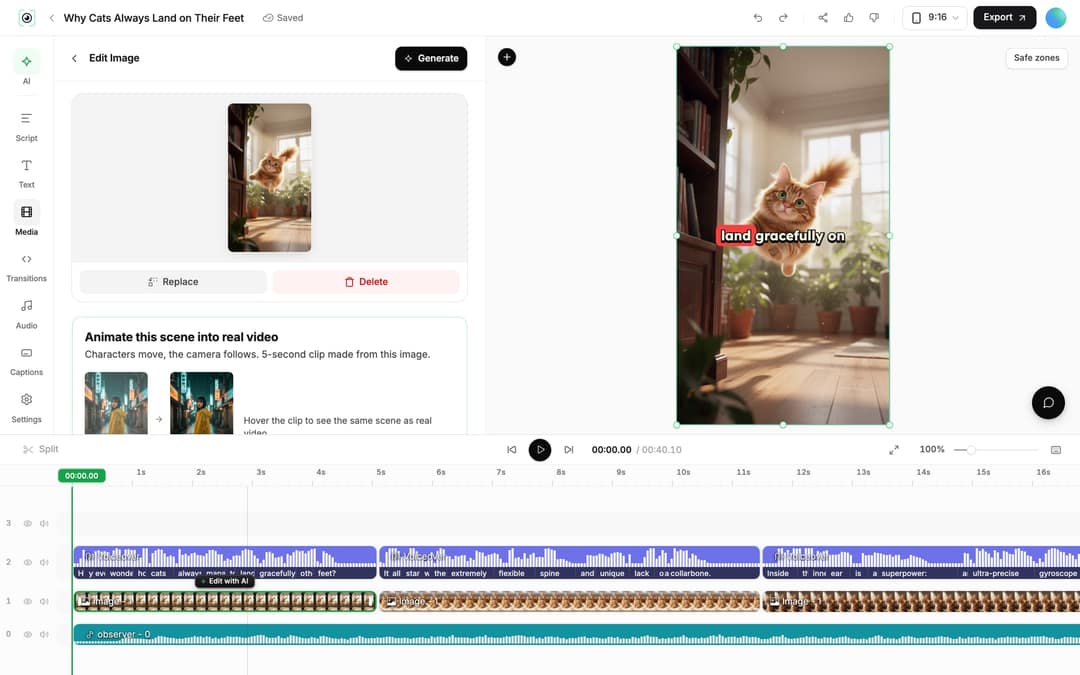
Open the finished video from Videos in the sidebar (click its card) to work in the Revid video editor.
- Play it through once at low volume, the way a child would hear it.
- Select any image that feels too bright or busy. Use Replace to swap it for a file from your library, or Regenerate/Edit image with a gentle prompt such as "soft pastel night sky, sleepy animals" or "moonlit forest, gentle watercolor".
- Shorten a scene by dragging its edge on the timeline, or cut it with Split (key S).
- Click Export (or Export / Publish on a free account) and export in 720p, 1080p or 4K.
Prompt to try
Create a 3-minute lyrics video for a gentle lullaby called "Little Star, Close Your Eyes", opening on a slow pan across a moonlit pastel sky as the first line appears. Use one soft watercolor style throughout: sleepy animals, deep blues and warm moonlight, with slow drifting motion and no flashes or hard cuts. Show the lyrics in a large, rounded, easy-to-read font.
Tips for soft, sleep-friendly lullaby videos
- Use soothing colors. Pastels, deep blues and warm moonlight. Put "soft", "pastel" or "night" in any image prompt you regenerate.
- Keep the motion slow. No flashing lights, fast zooms or hard cuts. If a scene feels jumpy, replace it rather than keep it.
- Keep one style per video. A single look for the whole song reads as one story. Mixed styles read as chaotic, which wakes kids up instead of settling them.
- Use a soft voice. If you add a short spoken intro or story, speak softly or pick a calm AI voice.
- Keep it short. Aim for 3 to 5 minutes, about one or two lullabies, so the video ends before attention does.
- Add gentle sounds carefully. Rain or waves help relaxation as long as they stay under the melody.
Highlighted styles have a real example in this post. Presets named after a studio, game or brand made up half of all animated-style videos (7,365 of 14,727) and are left out of this ranking.
Source: Revid product analytics (Amplitude): music video generations in the AI music video generator, Jul 25 to Oct 22, 2026 (90 days, UTC), event totals. 14,727 generations in styles flagged as illustration, by style. Pulled Oct 23, 2026.
Show the data
| Music videos | Made as AI video, not animated images | |
|---|---|---|
| Anime | 971 | 30.8% |
| Claymation | 627 | 38.3% |
| Sketch Color | 616 | 14.6% |
| Anime Realism | 615 | 41.3% |
| Modern Noir | 545 | 43.9% |
| Retro Cartoon | 442 | 29.4% |
| Stylized Illustration | 401 | 51.9% |
| Kids Book | 342 | 31% |
| Sketch B&W | 291 | 16.5% |
| Illustration | 256 | 33.2% |
| 3D Render | 240 | 60% |
| Cosmic Baroque | 209 | 43.1% |
| Lyrics | 200 | 65% |
| Expressive Ink | 199 | 10.1% |
| Paper Collage | 196 | 15.3% |
| 1950s Advertisement | 175 | 40% |
| Epic Lineburst | 174 | 42.5% |
| Manga | 153 | 38.6% |
| Flat Animation | 125 | 44.8% |
| Pixel Art | 124 | 27.4% |
Publishing a lullaby video for kids
To post from Revid, connect your accounts once in Settings > Integrations (TikTok, YouTube, Instagram and X are available), then publish or schedule from the video with Revid's social publishing.
On YouTube, set the audience to Made for kids in YouTube Studio for any video aimed at children; YouTube turns off some features, such as comments, on those videos. Cartoon and anime-style visuals are not photorealistic, so YouTube does not require an AI disclosure for them, and TikTok asks for an AI label only on realistic AI images, audio or video.
FAQ
Is Revid free for making lullaby videos?
You can start free: sign-up costs nothing and new accounts get free credits to try video creation, no credit card needed. Regular creation then uses the monthly credits of a paid plan, from $39/month (Growth); the live price list is at revid.ai/pricing.
What audio files can I use for a lullaby video?
An MP3 or WAV upload, or a Suno link. Make sure you have the right to publish the recording you upload.
Can I turn my child's drawing into part of a lullaby video?
Yes. The Animate Kids Drawings tool turns an uploaded drawing into a short animation, which you can then drag into your lullaby project in the editor's Media panel.
Do I need to label an AI lullaby video as AI-generated?
Usually not, if the visuals are clearly animated. YouTube and TikTok require AI labels for realistic content, and both say a label does not by itself reduce a video's reach.
Sources
- Revid product analytics (Amplitude), 54,940 music video generations with the AI music video generator, July 25 to October 23, 2026
- Revid product analytics (Amplitude): music video generations in the AI music video generator, Jul 25 to Oct 22, 2026 (90 days, UTC), event totals. 14,727 generations in styles flagged as illustration, by style. Pulled Oct 23, 2026.
Charts and figures checked on November 6, 2026.