On this page
To create a YouTube clip, open the video, click Clip (the scissors icon under the player, or in the More menu), drag the selection to 5 to 60 seconds, add a title and click Share clip. To make a Short from your own video instead, cut a vertical segment of up to 3 minutes and upload it as a Short.
Most people mix these two up, and it costs them reach. A Clip is only a link that replays part of an existing video: it creates no new upload and never appears in the Shorts feed, where YouTube said in August 2026 it sees over 200 billion daily views. To share a moment, make a Clip. To get discovered by people who don't know your channel, make a Short. This guide covers both.
- Daily YouTube Shorts views
- 200B+
- YouTube Official Blog, August 2026
- Share of global YouTube views in 2025 from videos under a minute
- 77%
- Tubular Labs (Tube Trends column on TVREV), January 2026
- Length of a clip made with YouTube's Clip button
- 5 to 60 s
- Maximum length of a YouTube Short
- 3 min
- YouTube Official Blog, October 2024
How to clip a YouTube video with the Clip button
The Clip button works on eligible videos and live streams from any channel, including yours. On a computer:
- Sign in to YouTube and open the video.
- Under the player, click Clip. If you don't see it, click More (the three dots) and choose Clip.
- Drag the handles on the selection bar to cover the moment you want, from 5 to 60 seconds.
- Type a title for the clip.
- Click Share clip, then copy the link or send it to another app.
Anyone who opens the link sees only the section you picked, with a way to jump to the full video. Your clips are saved in your library under "Your clips", where you can open or delete them later.
How to create a clip on the YouTube app
On iPhone or Android, open the video, swipe through the row of buttons under the player and tap Clip (or tap More, then Clip). Drag the selection to the part you want, add a title and tap Share clip. The limits are the same as on desktop: 5 to 60 seconds, and only on videos where clipping is available.
Why can't I clip a YouTube video?
If the Clip option is missing, one of these is usually the reason:
- You aren't signed in.
- The creator turned clipping off for their channel.
- The video is set as made for kids, and those can't be clipped.
- It's a live stream without rewind (DVR) enabled.
If none of these apply, update the app or try the desktop site. If you only need someone to start watching at a certain moment, use Share and tick "Start at" instead: the link opens the full video at that timestamp.
YouTube Clip vs Short vs regular video: which one do you need?
| YouTube Clip | YouTube Short | Regular video | |
|---|---|---|---|
| What it is | A link to part of an existing video | A new vertical or square upload | A new horizontal upload |
| Length | 5 to 60 seconds | Up to 3 minutes | 15 minutes by default; verified accounts up to 12 hours or 256 GB |
| Who can make it | Any signed-in viewer, if clipping is allowed | The channel owner | The channel owner |
| Where people find it | Wherever you share the link | Shorts feed, search, your channel | Search, home, suggested videos |
| Aspect ratio | Same as the original | 9:16 (square also counts) | 16:9 |
| Earns money | Not on its own | Shorts revenue sharing for YouTube Partner Program members | Ads, memberships and other YPP features |
The decision rule is simple. If you want to quote a moment in a chat, a post or an article, use a Clip. If you want new viewers, cut a Short, because that is where YouTube's audience spends its time: Tubular Labs data published in January 2026 found that 77% of global YouTube views in 2025 came from videos less than a minute long.
How to turn your own long video into YouTube Shorts
This is what most creators mean by "making clips": cutting the best moments of a long video into standalone Shorts that send viewers back to the full version.
- Find the moments worth cutting. Open YouTube Analytics for the long video and check the audience retention graph: bumps mark parts people rewound or rewatched. Strong candidates are a surprising fact, a firm opinion, a before-and-after, a mistake and its fix, or a punchline.
- Start on the payoff, not the setup. Cut so the first second already tells viewers what they get. "This setting fixed my audio" works; "So today I wanted to talk about" loses people. Other openers that work as cut points: "Stop doing this before you film" or "Nobody tells beginners this part." For more, borrow from this list of proven TikTok hooks.
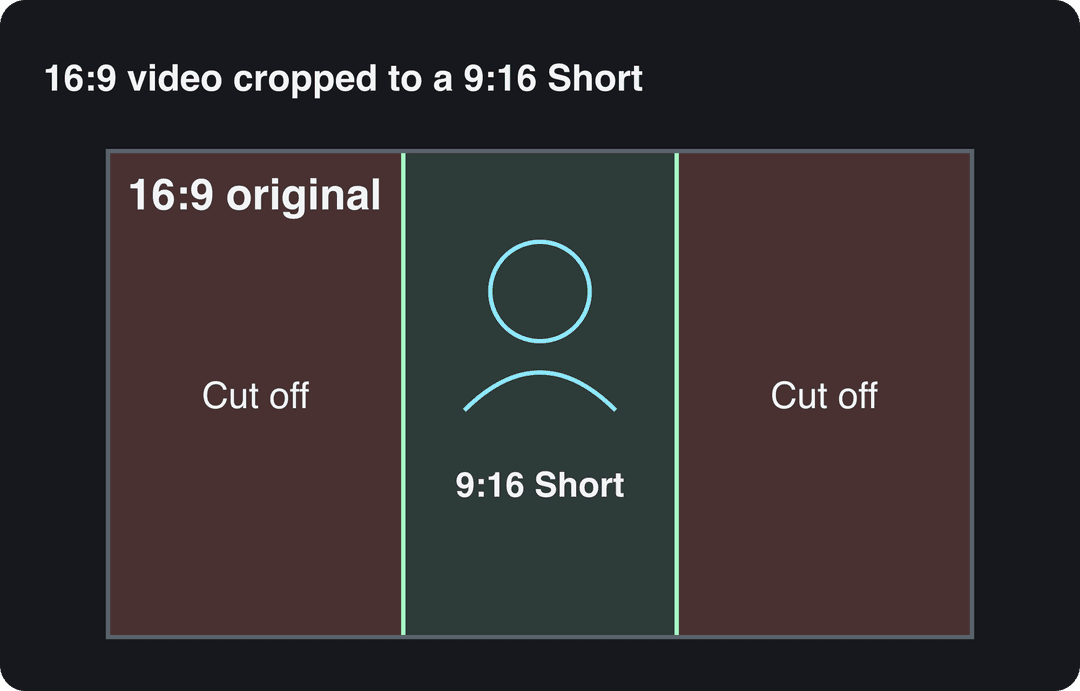
- Reframe to 9:16. A horizontal 16:9 frame cropped to vertical keeps only about the middle third of the picture, so anything at the edges disappears. Keep the speaker or the action centered, and reframe shot by shot when the subject moves. Then check the YouTube Shorts safe zone so text isn't hidden under the buttons.
- Add captions. Burned-in captions let the point land with the sound off and give the eye something to follow. Use YouTube's automatic captions or an AI caption generator for styled, word-by-word subtitles.
- Check length and music. A Short can run up to 3 minutes, but music changes what is safe (see the warning below).
- Upload as a Short and link the full video. Upload from your phone or computer, write a title of up to 100 characters (a YouTube title generator helps when you're stuck), and set the long video as the Short's related video so viewers can tap through to it. Verified accounts can add a custom Short thumbnail in YouTube Studio on a computer; YouTube recommends 9:16 at 2160x3840.
There is also a shortcut inside YouTube: open one of your own videos in the YouTube app, tap Remix, then Edit into a Short, pick the section and publish it. It is quick, but you get little control over framing and captions.
Videos include an AI voiceover; clip quotes are AI highlights without one. Clip and motion graphics quotes are minimums: the final charge depends on the source video or the footage generated. AI video clips are on the Pro model; the Base model costs 110 credits for 30 s.
Source: Revid public endpoint POST /api/public/v3/calculate-credits, queried October 29, 2026: workflow video-to-clips with 1 and 3 outputs, and prompt-to-video at 30 and 60 seconds with each media type. Cents = credits x $39 / 2,000, rounded.
Show the data
| Credits | US cents on Growth | |
|---|---|---|
| 1 clip from a YouTube link | 1 | 2 |
| 3 clips from a YouTube link | 3 | 6 |
| 30 s video, stock footage | 11 | 21 |
| 30 s video, animated AI images | 37 | 72 |
| 60 s video, animated AI images | 75 | 146 |
| 30 s video, motion graphics (estimate) | 190 | 371 |
| 30 s video, AI video clips (Pro model) | 341 | 665 |
How to create YouTube clips with Revid
If you'd rather not cut by hand, paste the video's link into Revid's YouTube clip maker. It picks the strongest moments and reframes them to vertical 9:16. Revid adds synced captions (30 caption styles, automatic captions in 100+ languages), lets you fix any cut in the timeline editor, exports in 1080p or 4K, and publishes or schedules the Shorts to YouTube, TikTok and Instagram from one queue. For a file on your computer rather than a link, use the long video to short video converter. Sign-up is free and new accounts get free credits to try it, no credit card needed; regular creation then uses the monthly credits of a paid plan, from $39/month.
Prompt to try
Make a 45-second YouTube Short titled "This one setting fixed my phone audio". Open on the payoff in the first second, then show three quick steps to enable it, with bold word-by-word captions and fast cuts. End by telling viewers the full tutorial is linked on the channel.
How long should a YouTube clip be?
For the Clip button the answer is fixed: 5 to 60 seconds. For a Short, let the moment decide, anywhere up to 3 minutes. Chasing a magic length matters less than cutting at the right start and end.
In Revid's analysis of 176,367 TikToks with 1,000+ likes posted between October 2025 and October 2026, length barely separated the winners: every bucket from under 15 seconds to 10 minutes had a median between 58K and 76K views, and 61 to 90 seconds landed at 70K. The shortest videos (under 15 seconds) had the lowest median, 58K, but the most shares per view, 1.41 per 100 views. These figures come from TikTok, not YouTube, and only cover videos that already passed 1,000 likes, so they show what successful videos have in common rather than what causes success. The full method is in our study of what makes a TikTok go viral.
Length alone barely moves views: every bucket lands between 58K and 76K median views (the 790 videos over 10 minutes are a small, unusual group). Clips under 15 seconds get shared the most per view.
Source: Revid analysis of 176,367 TikToks with 1,000+ likes posted between Oct 1, 2025 and Oct 16, 2026 (61,203 creators)
Show the data
| Median views | Share that passed 1M views | Shares per 100 views | |
|---|---|---|---|
| Under 15 s | 57.6K | 11.6% | 1 |
| 16 to 30 s | 64.9K | 12.3% | 1 |
| 31 to 60 s | 61.8K | 11.8% | 1 |
| 61 to 90 s | 70.5K | 12.2% | 1 |
| 91 s to 3 min | 63.4K | 11.1% | 1 |
| 3 to 10 min | 76.4K | 12.4% | 1 |
| 10 min+ | 129.6K | 13.8% | 0 |
Use these rules when you cut:
- One reaction, joke or reveal: keep it under 15 seconds. Short cuts get shared and rewatched.
- A tip or explanation with a payoff: 30 to 90 seconds, ending the moment the payoff lands.
- Over one minute: only with Audio Library music or no music, because of the Content ID rule above.
Best resolution and aspect ratio for YouTube clips
Export at 1080p or higher and match the shape to where the clip will play:
| Where it plays | Aspect ratio | Resolution | Note |
|---|---|---|---|
| YouTube Shorts | 9:16 (square also counts) | 1080x1920 or higher | Up to 3 minutes |
| Regular YouTube video | 16:9 | 1080p or higher | Verified accounts can go past 15 minutes |
| Instagram Reels | 9:16 recommended | At least 720 px | At least 30 FPS; reels over 3 minutes aren't recommended to non-followers |
| TikTok | 9:16 | 1080x1920 | Uploads can run up to 60 minutes |
| Facebook Reels | 9:16 | 1080p | Every new Facebook video is shared as a reel |
To convert an existing file without re-editing, a video resizer switches between portrait 9:16, feed 4:5, landscape 16:9 and square 1:1.
Tools to create YouTube clips
| Tool | Use it for |
|---|---|
| YouTube Clip button | Sharing a 5 to 60 second moment of any eligible video, free |
| YouTube app (Remix, Edit into a Short) | Quick Shorts from your own uploads, free |
| iMovie or Filmora | Simple editing when you're starting out |
| Adobe Premiere Pro | Professional editing on a paid subscription |
| DaVinci Resolve | Advanced editing, color grading and audio, with a free version |
| Kdenlive | Free, open-source multi-track editing |
| OBS Studio | Free screen and stream recording for tutorials and gameplay |
| Camtasia | Screen recording and editing in one paid app |
| Audacity | Free audio cleanup: noise removal and levels |
| Revid | Turning a link into captioned vertical clips and publishing them |
Gear matters less than people think when you cut clips from videos you already have. If you're recording new footage, fix sound before picture: a lavalier or USB microphone and a light facing you improve a phone recording more than a new camera does.
How to get more views on your YouTube clips
- Post Shorts on a steady rhythm next to your long videos. AIR Media-Tech's study of 18,000 English-language channels (March 2025 to March 2026) found the best results when Shorts made up 25% to 40% of a channel's uploads.
- Publish when your viewers are online. The Audience tab in YouTube Analytics shows when your viewers are on YouTube; schedule around those hours.
- Cross-post the same vertical file. Upload it natively to Instagram Reels, Facebook Reels and TikTok rather than sharing a YouTube link, and rewrite the caption for each platform.
- Read the numbers, then cut more of what works. Compare retention and traffic sources across your Shorts; when one type of moment keeps people watching, cut more of it from your back catalog.
- Treat Shorts as discovery, not income. AIR Media-Tech's September 2026 analysis of 274 channels found Shorts RPM was 3% to 14% of long-form RPM in almost every niche. The value of a clip is the viewer it sends to your long videos.
For context on YouTube's audience by country, age and device, third-party compilations from Backlinko, Global Media Insight, Sprout Social and Analyzify collect estimates; treat them as rough background and base decisions on your own Analytics. Official, sourced figures are on our YouTube Shorts statistics page.
FAQ
Is it legal to clip someone else's YouTube video?
Yes, with the Clip button: it links back to the original and only works where the creator allows clipping. Downloading someone else's video and re-uploading parts as your own Short is different: it can draw Content ID claims or copyright strikes, and a claimed Short over one minute is blocked globally.
Can I download a YouTube clip?
No, a YouTube clip is a link, not a file. To get a file of your own video, download it from YouTube Studio and cut it in an editor or a clip maker.
Can you make money from YouTube clips?
Not from Clips, but Shorts can earn. Today a channel qualifies for ad revenue with 1,000 subscribers plus 10 million qualified Shorts views in 90 days (or 4,000 watch hours), and creators keep 45% of their Shorts Creator Pool allocation. From February 1, 2027, new applicants need 20 million Shorts views or 8,000 watch hours, and monthly Shorts earnings require 10 million qualified Shorts views in the last 90 days.
Do I need to edit a clip before posting it as a Short?
Usually yes: at minimum reframe it to 9:16, trim the opening so it starts on the payoff, and add captions. A raw horizontal cut posted as is tends to look small on phones and lose viewers in the first seconds.
Sources
- Revid analysis of 176,367 TikToks with 1,000+ likes posted between Oct 1, 2025 and Oct 16, 2026 (61,203 creators)
- Revid public endpoint POST /api/public/v3/calculate-credits, queried October 29, 2026: workflow video-to-clips with 1 and 3 outputs, and prompt-to-video at 30 and 60 seconds with each media type. Cents = credits x $39 / 2,000, rounded.
- YouTube Official Blog, New opportunities to earn and changes to the YouTube Partner Program (August 2026)
- Tubular Labs (Tube Trends column on TVREV), Tube Trends: Over 75% Of YouTube Views Came From Shorts In 2025 (January 2026)
- YouTube Official Blog, Tall updates coming to Shorts (October 2024)
Charts and figures checked on November 6, 2026.