YouTube Clipping: How to Clip Videos Into Shorts Without Strikes
What YouTube clipping means, how to clip your own videos into Shorts step by step, and the copyright and monetization rules that decide whether a clip is legal.

On this page
YouTube clipping means cutting a short, self-contained moment out of a longer video and posting it as a Short, Reel or TikTok, or sharing it with YouTube's built-in Clip button. To clip your own videos, find the moments viewers rewatch, crop them to vertical 9:16, put the hook first, add captions and link back to the full video.
The rule most clippers learn too late: a Short longer than one minute with any active Content ID claim is blocked worldwide and can't be monetized. Clipping your own videos is safe. Clipping someone else's without permission is how channels collect claims, strikes and demonetization, so this guide covers the workflow and the rules together.
- Daily YouTube Shorts views
- 200B+
- YouTube Official Blog, August 2026
- Share of uploads as Shorts linked to the best channel results
- 25-40%
- AIR Media-Tech, May 2026
- Share of allocated Shorts Feed ad revenue monetizing creators keep
- 45%
- YouTube Help, October 2026
- Share of total revenue from Shorts for most channels
- <2%
- AIR Media-Tech, September 2026
What is clipping on YouTube?
"Clipping" on YouTube means one of these things, depending on who is searching:
- The Clip button. A YouTube feature (scissors icon under the player) that lets anyone select a short section of a video and share a link to it. The clip plays from the original video, so the original creator keeps the views.
- Cutting long videos into short ones. Taking a podcast, stream, tutorial or vlog and turning its best moments into Shorts, Reels and TikToks. This is what most creators mean by "clipping videos".
- Clipping as a job. "Clippers" cut moments from other creators' streams and podcasts and post them on their own accounts, ideally with permission and often as part of a paid clipping campaign run by the original creator.
In audio editing, clipping has another meaning: distortion when the sound level goes past the maximum. If your clip sounds crunchy or harsh, lower the gain on that track before export.
Why clip long videos into Shorts
Shorts are where new viewers find channels. YouTube said in August 2026 that Shorts get over 200 billion daily views, up from the 30 billion Alphabet reported in April 2022 (Adam Connell's roundup of YouTube Shorts statistics tracks the history). Alphabet also said in July 2023 that Shorts were watched by over 2 billion logged-in users every month (ProfileTree's YouTube statistics roundup collects more figures).
Clips from your own long videos are the cheapest Shorts you will ever make: the footage, the idea and the proof that it works already exist. Mixing formats also pays off in moderation. In AIR Media-Tech's study of 18,000 English-language channels, channels did best when Shorts made up 25% to 40% of their total uploads. More official numbers are on our YouTube Shorts statistics page, and the wider plan is in our guide to growing a YouTube channel fast.
How to use YouTube's Clip button
The Clip button is the fastest and safest way to share a moment from any video, including someone else's, because nothing is downloaded or re-uploaded.
- Open the video on youtube.com or in the YouTube app.
- Select Clip under the player (on narrow screens it sits in the "..." menu).
- Drag the slider to choose the section you want.
- Add a short title describing the moment.
- Select Share clip, then copy the link or share it to another app.
Not every video has the button: creators can turn clipping off, and some types of content don't support it. The result is a link, not a file, so you can't post it as your own Short. If the original video is deleted or made private, the clip stops playing.
How to clip your own YouTube videos into Shorts
This is the workflow for turning one long video into several Shorts.
- Find the moments viewers already like. In YouTube Studio, open the video, go to Analytics and look at the audience retention graph. Spikes (people rewinding or rewatching) are your best clip candidates; timestamps that viewers quote in the comments are the second-best source.
- Pick one idea per clip. The clip has to make sense to someone who never saw the full video. Test it: if the first sentence needs earlier context ("so, as I said..."), start later or record a new opening line.
- Start on the strongest line. Cut the setup and open on the claim, the result or the punchline, then let the explanation follow. Our list of TikTok hooks that stop the scroll works just as well for Shorts.
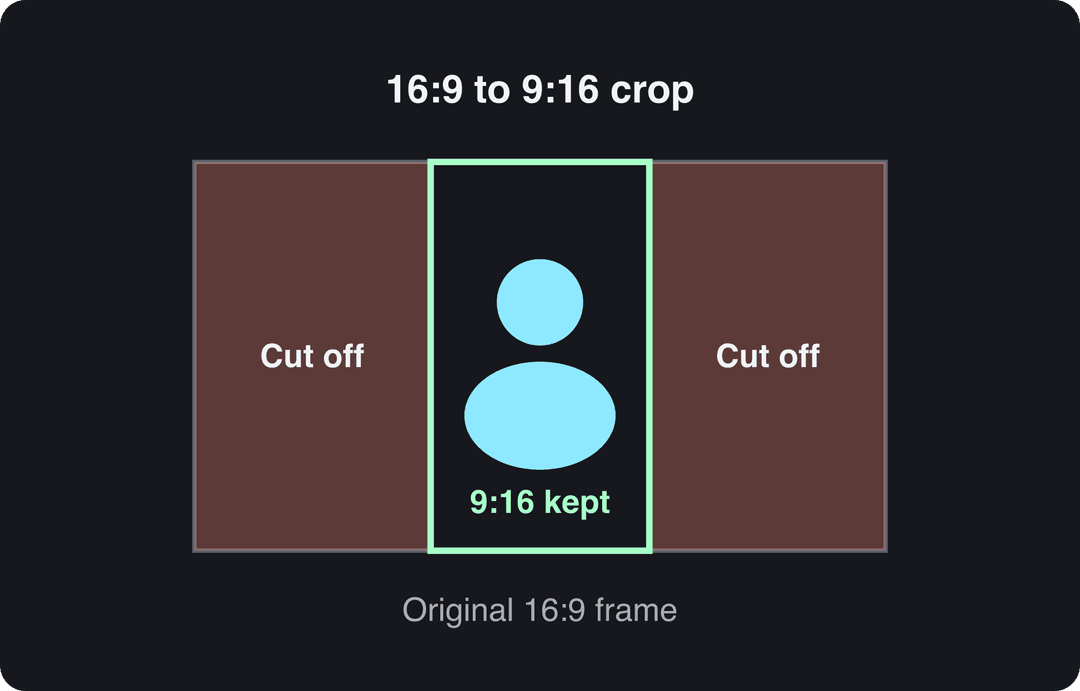
- Reframe to vertical 9:16. A horizontal 16:9 frame loses its sides when cropped to 9:16, so keep the speaker or the action in the center and reposition the crop scene by scene.
- Add captions. Many viewers watch without sound, and captions also carry the hook. Generate them with an AI caption generator, then keep them clear of the buttons and title using the YouTube Shorts safe zone.
- Link back to the full video. When you upload a Short, you can attach a related video from your channel, which shows a link to it in the Shorts player. End the clip with a reason to click ("the full breakdown is linked below").
- Write a title that names the payoff. A Short's title can be up to 100 characters; lead with what the viewer gets, not the episode number.
In the YouTube mobile app, the Remix menu under your own long video also lets you turn a section of it into a Short that links back to the original. It is quick for one-off clips, but you get less control over the crop and captions than in an editor.
How long should a clip be?
As long as the moment needs and no longer. In Revid's analysis of 176,367 TikToks with 1,000+ likes posted between October 2025 and October 2026, every length bucket from under 15 seconds to 10 minutes had a median between 58K and 76K views. Clips of 61 to 90 seconds reached a 70K median, while clips under 15 seconds had the lowest median (58K) but the most shares per view (1.41 per 100). This is TikTok data on videos that had already passed 1,000 likes, so it shows what successful videos have in common, not a guaranteed result for YouTube; the full method is in our study of what makes a TikTok go viral.
Length alone barely moves views: every bucket lands between 58K and 76K median views (the 790 videos over 10 minutes are a small, unusual group). Clips under 15 seconds get shared the most per view.
Source: Revid analysis of 176,367 TikToks with 1,000+ likes posted between Oct 1, 2025 and Oct 16, 2026 (61,203 creators)
Show the data
| Median views | Share that passed 1M views | Shares per 100 views | |
|---|---|---|---|
| Under 15 s | 57.6K | 11.6% | 1 |
| 16 to 30 s | 64.9K | 12.3% | 1 |
| 31 to 60 s | 61.8K | 11.8% | 1 |
| 61 to 90 s | 70.5K | 12.2% | 1 |
| 91 s to 3 min | 63.4K | 11.1% | 1 |
| 3 to 10 min | 76.4K | 12.4% | 1 |
| 10 min+ | 129.6K | 13.8% | 0 |
Decision rules for YouTube:
- If the moment is a reaction, a punchline or a surprising result, keep it under 15 seconds: short clips get shared more.
- If it is an explanation or a story, let it run 60 to 90 seconds, since length barely changes median views.
- If the clip contains music or footage you don't own, keep it under one minute or remove that material, because claimed Shorts over a minute are blocked.
- YouTube Shorts can be up to 3 minutes long (square or vertical). Anything longer belongs on your main channel as a regular video.
How to clip YouTube videos with Revid
If you would rather not scrub through a timeline, Revid does the cutting for you:
- Paste the link to your YouTube video into the YouTube clip maker. Revid turns the long video into short vertical clips.
- Pick a caption style (there are 30) and let Revid caption the clips automatically in any of 100+ languages.
- Open any clip in the timeline editor to adjust the cut, the text or the music.
- Export in 720p, 1080p or 4K, or publish and schedule directly to YouTube, TikTok and Instagram from one queue.
To send the same clips to TikTok specifically, the YouTube to TikTok converter works the same way. Sign-up is free with free credits to try it, and paid plans start at $39/month. Use it on videos you own or have permission to clip.
Price divided by included minutes, assuming you use the whole allowance. Descript's hours are editing hours, not automatic clipping, so it is cheap per hour but you do the picking. Klap (billed per clip) and Revid (billed per job in credits) do not bill by source minutes and are left out.
Source: Monthly prices and allowances from vendor pricing pages on October 29, 2026 (Quso, Descript, Munch Studio yearly price), OpusClip allowances (150 and 300 minutes) from Castmagic's OpusClip pricing guide verified August 20, 2026, Vizard from vizard.ai/pricing on September 30, 2026.
Show the data
| US dollars per 10 hours of uploads | Minutes of video included per month | |
|---|---|---|
| Quso Lite | 174 | 100 |
| Quso Essential | 78 | 300 |
| OpusClip Starter | 60 | 150 |
| OpusClip Pro | 58 | 300 |
| Munch Studio Essential | 46 | 500 |
| Vizard Creator | 29 | 600 |
| Descript Hobbyist | 24 | 600 |
Best tools for clipping YouTube videos
| Tool | Best for | Price |
|---|---|---|
| YouTube Clip button | Sharing a moment of any video as a link | Free |
| YouTube Studio editor | Trimming your own uploads | Free |
| Kapwing | Browser editing with text overlays and templates | Free and paid plans |
| Clipchamp | Precise trims, audio adjustments and transitions | Free and paid plans |
| CapCut | Editing your own footage by hand on mobile or desktop | Free tier; Standard about $9.99/month |
| OpusClip | Auto-clipping podcasts, streams and webinars with virality scoring | From $15/month; free plan with watermarked captions |
| Revid | Turning a YouTube link into captioned vertical clips, then generating original Shorts and publishing them | Free credits on sign-up; paid plans from $39/month |
Pick by job, not by feature list. For a one-off highlight from your own video, the YouTube Studio editor or Kapwing is enough. For a weekly podcast or stream that needs many clips, an auto-clipper saves hours. If you also want to make original Shorts from scripts, links or viral formats in the same place, see how Revid compares in Revid vs OpusClip and our roundup of OpusClip alternatives.
Searches for "vidIQ clipping" usually come from creators comparing YouTube growth tools. vidIQ is best known for keyword and channel research, so check its site for its current clipping features before you buy.
Is clipping YouTube videos legal?
Clipping your own videos is legal, and so is sharing a moment with YouTube's Clip button. Downloading someone else's video and re-uploading part of it is copyright infringement unless you have permission or your use qualifies as fair use, which is decided case by case.
| What you do | Legal? | Main risk |
|---|---|---|
| Share a moment with the Clip button | Yes | None: it plays from the original video |
| Clip your own videos | Yes | Claims on music or footage you licensed only for the original |
| Clip another creator's video with written permission | Yes, within the agreed terms | Content ID claims if the permission isn't on file with them |
| Re-upload someone else's clip with a credit | No | Credit is not permission: claims, strikes, takedowns |
| Use a short excerpt inside your own commentary or criticism | Possibly (fair use in the US; other countries have different exceptions) | Decided case by case; a claim can still land first |
Fair use leans on how much you transform the material: your analysis, commentary or teaching has to be the point of the video, with the excerpt only as long as your point needs. YouTube's Terms of Service also don't allow downloading videos except through features YouTube provides or with the owner's permission. YouTube explains claims, strikes and fair use on its copyright policy page.
Can you make money clipping videos?
Yes, but how depends on whose content you clip.
Clipping your own videos. Shorts earn through the YouTube Partner Program. Today, ad revenue sharing requires 1,000 subscribers plus either 4,000 qualified public watch hours in the last 12 months or 10 million qualified Shorts views in the last 90 days (watch hours from the Shorts Feed don't count toward the 4,000). Monetizing creators keep 45% of the Shorts Feed ad revenue allocated to them. From February 1, 2027, earning Shorts ad revenue in a given month requires 10 million qualified Shorts views in the last 90 days, and new applicants need 8,000 watch hours in 365 days or 20 million Shorts views in 90 days.
Treat clips as discovery, not the paycheck. In AIR Media-Tech's analysis of 274 channels, Shorts made up less than 2% of total revenue for most channels while generating 1% to 35% of their views.
Clipping other people's videos. Platforms are tightening the rules on reposted material:
- YouTube's reused content policy blocks monetization for videos that only read out material you didn't write or rely on mostly non-verbal reactions, and it applies to the whole channel. On July 15, 2025, YouTube renamed its repetitious content policy to "inauthentic content", covering repetitive or mass-produced videos.
- Since March 2026, Facebook treats reaction-only reels, clip-stitching and reposts with only borders, captions or speed changes as unoriginal, deprioritizes them and can demonetize repeat offenders.
- TikTok's Creator Rewards Program doesn't count Duets, Stitches or lightly modified reposts as original, and only pays on videos at least one minute long.
Clipping campaigns. Some streamers, podcasters and brands pay clippers to post clips of their content. This is the legitimate version of the clipping business: the owner gives permission, sets the rules and pays for results. Get the terms, the payout basis and the permission in writing before you post.
Where to post your clips: specs by platform
The same vertical clip works almost everywhere, but limits and reach rules differ. Post natively on TikTok and Instagram rather than sharing a YouTube link, and adjust the caption to each audience.
| Platform | Length | Format | Rule to know |
|---|---|---|---|
| YouTube Shorts | Up to 3 minutes | Square or vertical, 9:16 | Claimed Shorts over one minute are blocked |
| TikTok | Uploads up to 60 minutes | 9:16 at 1080x1920 recommended | Creator Rewards pays only on videos of one minute or more |
| Instagram Reels | Up to 20 minutes | 1.91:1 to 9:16 | Reels over 3 minutes aren't recommended to non-followers; 5 hashtags max |
| X | Up to 20 minutes (non-Premium) | Ratios from 1:3 to 3:1; 720x1280 portrait recommended | One video per post |
| Up to 15 minutes | Ratios from 1:2.4 to 2.4:1 | The vertical video feed is mobile-only; you can't post to it directly |
Clipping mistakes that cost you views
- Missing context. A clip that starts mid-thought loses viewers who never saw the original. Add a one-line text intro or re-record the opening.
- Misleading titles and covers. A title that promises something the clip doesn't deliver gets swiped away, and viewers remember.
- Captions under the interface. Text at the very bottom or right edge sits behind the title and buttons; check the safe zone before export.
- Distorted audio. Clipped (over-loud) audio and sudden volume jumps between scenes push people to swipe. Normalize levels across the clip.
- Posting a trend clip too late. Clips about a news story or trend lose most of their value once the conversation moves on; cut and post those first.
- Unlicensed music in long clips. Music you don't own in a clip over one minute gets it blocked; use the Shorts Audio Library instead.
FAQ
Does crediting the original creator make clipping legal?
No. A credit or a link is good manners, but it is not permission, and it doesn't stop a Content ID claim or a copyright strike. You need the owner's permission, or a use transformative enough to count as fair use.
Can you download a clip made with YouTube's Clip button?
No. The Clip button creates a link that plays a section of the original video on YouTube, not a downloadable file. If the original video is deleted or made private, the clip stops working.
How many Shorts should I clip from each long video?
As many as there are moments that stand on their own, but watch the overall mix. AIR Media-Tech's study of 18,000 channels found the best results when Shorts made up 25% to 40% of a channel's uploads.
What does a YouTube clipper do?
A clipper watches long videos, streams or podcasts, cuts the best moments into vertical clips, and posts them, usually on their own accounts. Legitimate clippers work with the creator's permission, often through a paid clipping campaign.
Can clipped Shorts get my channel monetized?
Yes, if they are clips of your own content. Until February 1, 2027, 1,000 subscribers plus 10 million qualified Shorts views in the last 90 days qualifies a channel for YPP ad revenue; channels built on reposted clips of other people's videos risk rejection under the reused content policy.
Sources
- Revid analysis of 176,367 TikToks with 1,000+ likes posted between Oct 1, 2025 and Oct 16, 2026 (61,203 creators)
- Monthly prices and allowances from vendor pricing pages on October 29, 2026 (Quso, Descript, Munch Studio yearly price), OpusClip allowances (150 and 300 minutes) from Castmagic's OpusClip pricing guide verified August 20, 2026, Vizard from vizard.ai/pricing on September 30, 2026.
- YouTube Official Blog, New opportunities to earn and changes to the YouTube Partner Program (August 2026)
- AIR Media-Tech, Do YouTube Shorts help your long-form videos? Data from 18,000 channels (May 2026)
- YouTube Help, YouTube Shorts monetization policies (October 2026)
- AIR Media-Tech, YouTube Shorts RPM vs long-form: real monetization data from 274 channels (September 2026)
Charts and figures checked on November 6, 2026.