On this page
To create a TikTok video, open TikTok, tap the + button, then record in the app (up to 10 minutes) or upload a clip (up to 60 minutes). Add a sound, text and effects, write a short caption with a few hashtags, and tap Post. Shoot vertically at 9:16 (1080x1920) and open with a hook.
The kind of video you make matters more than its length or polish. In Revid's analysis of 176,367 TikToks with 1,000+ likes posted between October 2025 and October 2026, challenges had a median of 182K views and comedy 155K, while tutorials sat at 62K. Every length bucket, from under 15 seconds to 10 minutes, landed between 58K and 76K. Decide what kind of video it is before you worry about anything else.
- Median views for TikTok challenges, the top format (tutorials: 62K)
- 182K
- Revid analysis of 176,367 TikToks
- Median views for faceless TikToks vs 67K for one person on camera
- 114K
- Revid analysis of 176,367 TikToks
- Median views for posts with 4 hashtags (9+ hashtags: 16K)
- 77K
- Revid analysis of 176,367 TikToks
- Share of U.S. adults who use TikTok, up from 21% in 2021
- 37%
- Pew Research Center, November 2025
How to create a TikTok video in the app, step by step
- Tap + at the bottom of the screen. This opens the TikTok camera.
- Record or upload. Press the red record button to film (the in-app camera records up to 10 minutes), or tap Upload to pick clips from your camera roll. Use the timer in the right-side toolbar for hands-free takes.
- Add a sound. Tap Add sound at the top to choose music or a trending audio. Pick it before you film if your cuts or moves need to land on the beat.
- Edit. Tap the checkmark or Next to open the editor: trim clips, add text, stickers, effects, a voiceover and auto captions.
- Write the post. On the post screen, write the description, add hashtags, choose a cover frame and set who can watch.
- Label AI content if it applies. TikTok requires a label on AI-generated content with realistic images, audio or video. TikTok says the label does not affect distribution if the video follows the Community Guidelines.
- Post or save to drafts. Drafts let you finish the caption later or batch a few videos and release them over the week.
Those are the mechanics. The rest of this guide covers the decisions that determine whether anyone watches.
Prompt to try
Make a 30-second faceless TikTok tutorial on 3 knife mistakes that ruin home cooking. Hook: "You're cutting onions wrong. Here's the fix." Use hands-only close-up shots, one short line of on-screen text per step, and keep the voiceover to the hook and key points.
What kind of TikTok content should you create?
Start with the format, then the topic. In Revid's dataset, challenges had a 182K median and 25.6% passed 1M views, comedy 155K, reactions 105K, dance 84K, storytelling 66K and tutorials 62K. Formats built around a reaction (laughing, competing, reacting) pulled far ahead of formats built around information.
Challenges and comedy passed 1M views about twice as often as tutorials and storytelling, which are the most common formats.
Source: Revid analysis of 176,367 TikToks with 1,000+ likes posted between Oct 1, 2025 and Oct 16, 2026 (61,203 creators)
Show the data
| Median views | Share that passed 1M views | |
|---|---|---|
| Challenge | 182.3K | 25.6% |
| Comedy | 154.8K | 22.1% |
| Reaction | 104.8K | 16% |
| Dance | 83.8K | 15.5% |
| Storytelling | 66.1K | 12.2% |
| Lip Sync | 61.7K | 12.3% |
| Tutorial | 61.9K | 12.1% |
Two limits apply to every number in this article: the index only holds TikToks that already reached 1,000+ likes, and the figures show what well-performing videos have in common, not what causes views. Format labels come from Revid's AI analysis of each video.
You also don't need to be on camera. Faceless videos had a 114K median and 17.4% passed 1M views, against 67K and 12.7% for one person talking on camera. Faceless tutorials did especially well: 156K median versus 52K for on-camera tutorials.
To turn this into a content plan:
- Pick a few content pillars, recurring topics you can make endless videos about. A fitness creator might run workouts, cheap meals and gym mistakes.
- Turn pillars into series. A numbered series ("Part 1, Part 2") gives viewers a reason to follow so they catch the next one.
- Use trends that fit your pillars. Check today's TikTok trends and only use a sound or challenge you can bend toward your niche. A cooking account doing a dance trend with a spatula fits; a random dance does not.
- If you teach, consider teaching off-camera. Screen recordings, hands-only shots and voiceover over footage are the faceless tutorial formats.
Prompt to try
Create a 20-second TikTok recipe video for one-pan garlic pasta. Open on the finished pasta being pulled apart with the line "This takes one pan." Show each step in a fast cut with text on screen and upbeat music, then end by asking "Would you try this?"
How do you write a hook for a TikTok video?
The hook is the first line or the first shot. Its only job is to make someone stop scrolling and want the next second. The most reliable hooks show the result first or name a specific problem the viewer has.
Hooks you can adapt (find more in our list of TikTok hooks):
- "You're [doing common thing] wrong. Here's the fix."
- "This [cheap thing] replaced my [expensive thing]."
- "Nobody tells you this about [topic]."
- "Watch what happens when I [action]."
- Visual hook: open on the finished result (the plated dish, the after shot, the final build), then show how you got there.
Say less than you think. In Revid's data, videos with under 40 characters of speech (about one short sentence) had a 123K median and 20.2% passed 1M views. Videos that talked throughout (300+ characters of speech) had 68K and 11.9%. Let the visuals carry the video and keep the voice for the hook and the key points.
A simple structure for a short TikTok script:
| Beat | What happens | Example (cooking) |
|---|---|---|
| Hook | First line or shot that promises the payoff | Pull apart the finished pasta: "This takes one pan." |
| Setup | One sentence of context | "Weeknight dinner, almost no dishes." |
| Payoff | The steps, cut fast | Each step in a quick shot, text on screen |
| End | A loop back to the start or a question | "Would you try this?" |
If you get stuck on the wording, a TikTok script generator drafts the hook and beats from a topic.
What equipment do you need to make TikTok videos?
A recent smartphone is enough. When you compare phones, image stabilization and low-light performance matter more than megapixels. Learn your camera's manual controls (exposure, focus lock, white balance) so your footage doesn't flicker between bright and dark as you move.
Light is the cheapest upgrade. Face a window in daylight so the light falls on you instead of behind you. A small LED panel or clip-on ring light, often under $30, gives you the same look at night.
Sound matters more than picture. Headphones with a built-in mic already beat the phone's own microphone from a distance; a clip-on lavalier is the next step. For stability, a stack of books works as a tripod and a plain wall works as a backdrop.
| Equipment | Budget ($0-$50) | Mid-range ($51-$200) | Professional ($201+) |
|---|---|---|---|
| Camera | Smartphone with a good camera | Smartphone with advanced camera features | DSLR or mirrorless camera |
| Lighting | Window light, white poster board as a reflector | Small LED panel, clip-on ring light | Lighting kit (softboxes, key and fill light) |
| Audio | Headphones with built-in mic | Lavalier microphone | Shotgun microphone, audio recorder |
| Stabilization | Stack of books | Phone tripod, gimbal | Pro tripod, advanced gimbal |
| Editing | Free mobile apps such as InShot | CapCut, a free editor with trend templates | Desktop software such as Adobe Premiere Pro |
How to film a TikTok video that looks right
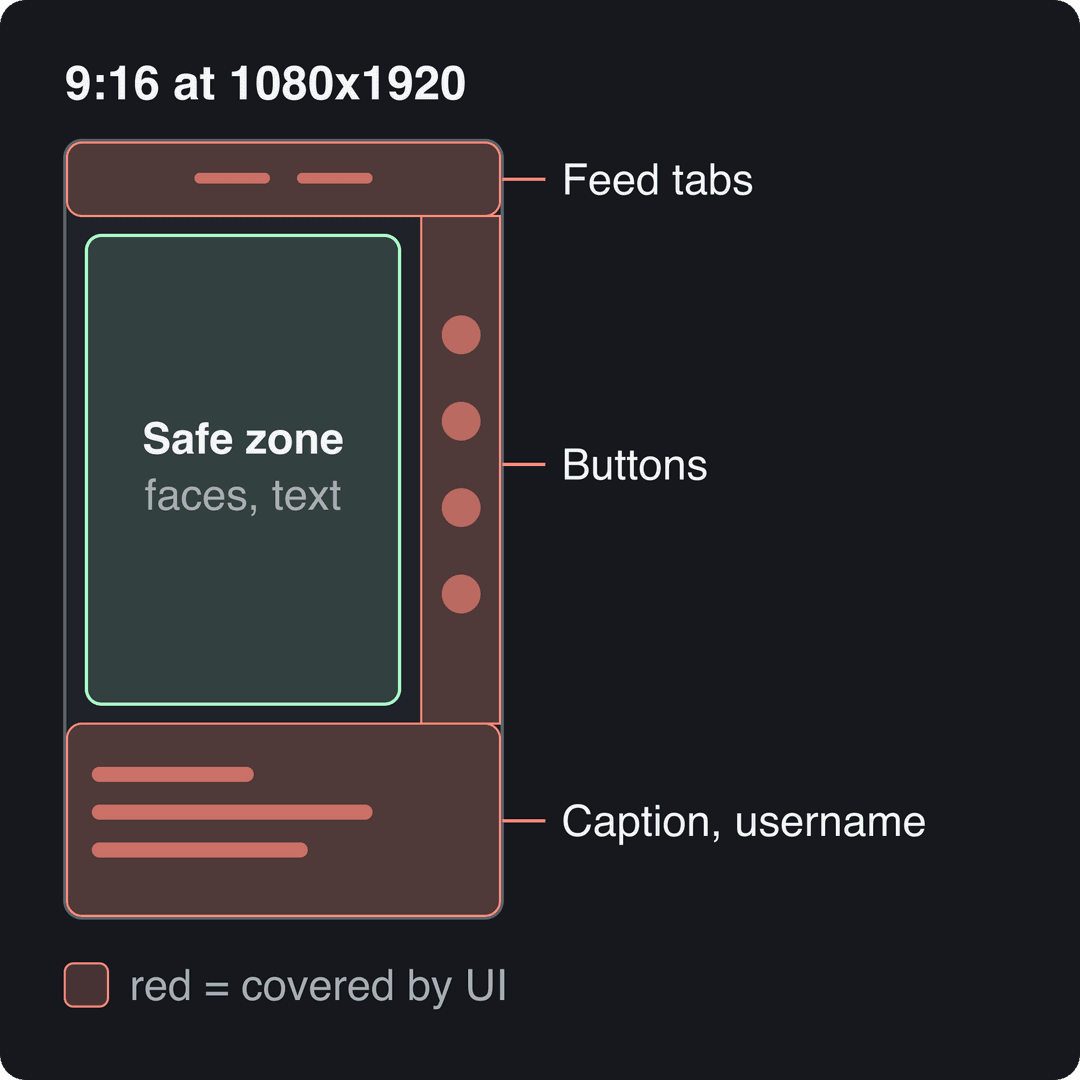
Film vertically. TikTok's Creator Academy recommends 9:16 at 1080x1920. Keep faces, text and the main action away from the edges, where TikTok's buttons, username and caption sit on top of your video; a TikTok safe zone template shows exactly which areas get covered.
Pick a shooting style on purpose. In Revid's data, POV clips had a 107K median (19% past 1M), screen recordings 91K, handheld 80K, tripod 77K and selfie-style talking clips 48K. If you default to talking into the front camera, try filming what you're doing instead.
A few framing rules:
- Tutorials: clean background, camera close enough that the viewer can read what your hands are doing.
- Product shots: a slow push toward the feature that matters beats a static wide shot.
- Angles: a low angle makes a subject look bigger and more confident; a high angle makes it look smaller.
- Filming alone: use the in-app timer, mark your spot on the floor, and lock focus and exposure before you hit record.
How to edit a TikTok video
Cut every pause. Start each clip on the action, end it the moment the point lands, and vary the rhythm: fast cuts for energy, a held shot for a reveal or an emotional beat.
Sync picture to sound. Put visual changes on the beat, land the reveal on the drop, and time a sound effect to the punchline. Add on-screen captions so the video works muted; the TikTok editor has auto captions, and a TikTok subtitle generator adds styled, synced subtitles in 100+ languages.
Use text to guide the eye, not to repeat everything. One short line per idea, placed inside the safe zone, is easier to read than a paragraph. Plain cuts are fine; a transition should mean something (a time jump, a before and after), not decorate.
To edit faster, keep a folder of recurring assets (intro shots, sound effects, your caption style) and reuse a template project so each new video starts half-built.
How long should a TikTok video be?
As long as the idea needs, because length barely separated winners from losers in recent data. In Revid's 12-month sample, every length bucket had a median between 58K and 76K views; 61 to 90 seconds was slightly ahead at 70K. Videos under 15 seconds had the lowest median (58K) but the most shares per view (1.41 per 100 views).
| Your goal | Length | Why |
|---|---|---|
| Shares and rewatches | Under 15 seconds | Most shares per view in Revid's data |
| Tutorials and stories | 61 to 90 seconds | Room to deliver, top of a tight range (70K median) |
| Creator Rewards earnings | At least 1 minute | Only videos of 1 minute or more can earn |
The Creator Rewards Program (which replaced the old Creator Fund) also requires being 18 or older, 10,000 followers and 100,000 video views in the last 30 days. Uploads can run up to 60 minutes, but long videos only hold attention when every minute pays off.
How to write the caption and hashtags before you post
Write a caption of one short line. Captions of 41 to 80 characters had the best median (67K views), while videos with no caption had 36K. Use it to add context the video doesn't say, or a question that invites comments.
Use 3 or 4 hashtags. Videos with 4 hashtags had the best median (77K, 13.4% past 1M) and 3 hashtags were close behind at 75K. No hashtags dropped to 51K (9.8%), and 9 or more hashtags fell to 16K (7.8%). Mix one broad tag with niche tags that describe the actual topic.
Posts with 3 or 4 hashtags earned the most views. Captions stuffed with 9 or more hashtags did worst of all, with median views cut by about 80%.
Source: Revid analysis of 176,367 TikToks with 1,000+ likes posted between Oct 1, 2025 and Oct 16, 2026 (61,203 creators)
Show the data
| Median views | Share that passed 1M views | |
|---|---|---|
| None | 51.1K | 9.8% |
| 1 | 64K | 11.8% |
| 2 | 71.3K | 12.7% |
| 3 | 75.4K | 13.1% |
| 4 | 77.2K | 13.4% |
| 5 | 67.3K | 12.1% |
| 6 to 8 | 71.8K | 12.7% |
| 9+ | 15.6K | 7.8% |
On timing, English-language posts published at 3 to 6 a.m. US Eastern did best in Revid's data and 5 to 9 p.m. did worst. Those early US hours are daytime in the UK, Europe, India and Asia, where many of these creators post from, so check when your own followers are active before copying a schedule.
How to make viral TikTok videos
TikTok opens on the personalized For You feed, not on the accounts you follow (a separate Following feed exists). So a video from a brand-new account can be shown to strangers on day one, unlike the follower-first feeds that Instagram and Facebook were built on. Distribution follows how viewers react: whether they watch to the end, rewatch, share, comment or follow.
You can't control the system, but you can control what it measures:
- Completion: cut the intro, deliver the promise of the hook, end before the viewer gets bored.
- Rewatches: loop the last frame into the first, or hide a detail people go back to catch.
- Shares: make something people send to a friend: a relatable joke, a useful trick, a hot take.
- Comments: end with a real question or leave a debatable choice in the video.
The competition is real. Business of Apps keeps a running compilation of TikTok user numbers, and SendShort's TikTok statistics page tracks how much gets uploaded. In Pew Research Center's 2025 survey, 37% of U.S. adults said they use TikTok, up from 21% in 2021 (more figures in our short-form video statistics).
Mood matters too: videos whose dominant emotion was outrage had a 156K median and humor 121K, against 45K for inspirational videos. Strong reactions travel; gentle encouragement mostly doesn't.
How do you recreate a TikTok video?
There are three ways, depending on how much of the original you want to keep:
- Use the same sound. Tap the sound name on the video, then Use this sound. You film your own version to the same audio.
- Duet or Stitch. From the Share menu, Duet puts your video next to the original; Stitch plays a clip of the original before yours.
- Recreate the format. Keep the structure (hook style, pacing, number of beats) and swap in your own topic, footage and words. This is the version that builds your own account.
Revid is built for the third option. Its viral video library holds about 2.77 million TikToks and posts with their engagement data. Search your niche, open a video that performed, and choose "Same energy, new script" (an original video with the same recipe) or "Make it about your topic". Revid's free deep analysis (up to 60 a day) also explains why a video worked: the hook, the timed structure and how to adapt it.
How to create TikTok videos with Revid
If you'd rather not film, Revid builds the whole video from an idea, a script or a link:
- Open the AI TikTok video generator and paste a script, an idea or a link (an article, a YouTube video, a Reddit post).
- Revid writes the script if needed and builds scene-by-scene visuals from stock footage, AI images or AI video (Seedance 2.5, MiniMax Hailuo, Wan 3.0 or Veo 3, chosen per scene), with a voice-over in 70+ languages, synced captions and music.
- Adjust any scene, line or caption in the timeline editor.
- Export in 1080p or 4K, or publish and schedule straight to TikTok.
Sign-up is free and new accounts get free credits to try video creation, no credit card needed; regular creation then uses the monthly credits of a paid plan, from $39/month.
Read your analytics, then make the next one
Your own numbers beat any general advice. Open TikTok Studio (profile > menu > TikTok Studio > Analytics) on the app or on the web, and compare your best and worst videos over the last 28 or 60 days. Look for the shared pattern: same format, same hook style, same topic.
The Viewers tab shows when your viewers were most active over the last 7 days, and the Followers tab breaks follower activity down by hours and days. Post your next video in that window, double down on the format that worked, and drop the one that didn't. For the follower side of the equation, see our playbook to grow TikTok followers.
FAQ
How do you make reels on TikTok?
The same way you make any TikTok video: tap +, record or upload, edit, then post. "Reels" is Instagram's name for short videos; on TikTok they're simply called videos.
Can you create a TikTok video on a computer?
Yes. TikTok Studio Web accepts vertical or landscape uploads up to 60 minutes long in 1080p, 2K or 4K, with files up to 30 GB. You can film on your phone, edit on your computer and upload from the browser.
Do you need to show your face on TikTok?
No. Faceless videos (screen recordings, hands-only shots, voiceover over footage, POV clips) outperformed one person talking on camera in Revid's data, as shown above.
Can you use any music in a TikTok video?
Use sounds from TikTok's own library to stay safe. For Creator Rewards, videos with copyrighted music playing for over one minute are not considered original and won't earn.
Can you make TikTok videos with AI?
Yes. Tools like Revid generate the script, visuals, voice-over and captions; label the video as AI-generated if it contains realistic AI images, audio or video. TikTok says the label does not reduce distribution for videos that follow its Community Guidelines.
Sources
- Revid analysis of 176,367 TikToks with 1,000+ likes posted between Oct 1, 2025 and Oct 16, 2026 (61,203 creators)
- Pew Research Center, Americans' Social Media Use 2025 (November 2025)
Charts and figures checked on November 6, 2026.