How to Find Trending Hashtags on Instagram, TikTok and X in 2026
Instagram has no trending hashtag chart, so you find rising tags through search, Reels and the posts already winning in your niche. Here is the step-by-step method for Instagram, TikTok and X, plus how many tags to use.
On this page
To find trending hashtags on Instagram, search a keyword, open the Tags results to see related hashtags, then check which tags the top recent Reels in your niche are using. Instagram has no public trending-hashtag list, so trends show up in Explore and Reels rather than in a chart. You can use up to 5 hashtags per post.
That limit changes the whole game. Old advice to paste 30 tags under every post now fails outright: Instagram won't publish a caption or comment with more than 5 hashtags. Stuffing doesn't pay on TikTok either. In Revid's data, videos with 9 or more hashtags had a fraction of the views of videos with a handful (numbers below). Finding hashtags in 2026 means finding a few right ones, at the right moment.
- Maximum hashtags allowed per Instagram post
- 5
- Instagram rule
- Median TikTok views for videos with 4 hashtags, the best result
- 77K
- Revid analysis of 176,367 TikToks
- Median TikTok views for videos with 9 or more hashtags
- 16K
- Revid analysis of 176,367 TikToks
- Short-form videos in Revid's library with hashtags and view counts
- 2.77M
- Revid viral video library
How to find trending hashtags on Instagram
Instagram surfaces trends through content, not a leaderboard. Use this routine before each post or once a week for your niche:
- Search a seed keyword. Type the topic of your post ("meal prep", "skincare routine") in the search bar and switch to the Tags results. Instagram lists related hashtags, which is the fastest way to discover new hashtags around a topic.
- Open each hashtag page. Look at the top posts. If they were posted in the last few days, the tag is active. If the top posts are months old, the conversation has moved on.
- Watch the top Reels in your niche. Scroll Reels and Explore while logged into an account that follows your niche, then open the captions of the Reels with the most views and note the tags they share. Revid's page of viral Instagram Reels does the same search without the scrolling.
- Type # in your caption. Instagram suggests matching hashtags as you type, which helps you spot related variants you hadn't thought of.
- Check accounts slightly bigger than yours. Creators a step ahead of you in the same niche are the best model. Mega accounts get reach from their audience, not from their tags.
- Cross-check other platforms. Topics often travel between TikTok, Reels and Shorts, so a tag rising on TikTok is worth testing on Instagram.
How to check how popular a hashtag is
The most popular hashtags on Instagram (#love, #instagood, #fashion) are also the least useful. Millions of posts compete on them, and the people browsing them are not looking for your niche. To judge hashtag popularity, check four signals on the hashtag page:
| Signal | Where to see it | What it tells you |
|---|---|---|
| Volume | The post count shown on the hashtag page or in search, when Instagram displays one | How much competition there is |
| Recency | The date of the top posts | Whether the tag is active right now |
| Engagement | Likes and comments on the top posts compared with each account's size | Whether people browsing the tag actually engage |
| Fit | What the top posts are about | Whether the audience is the one you want |
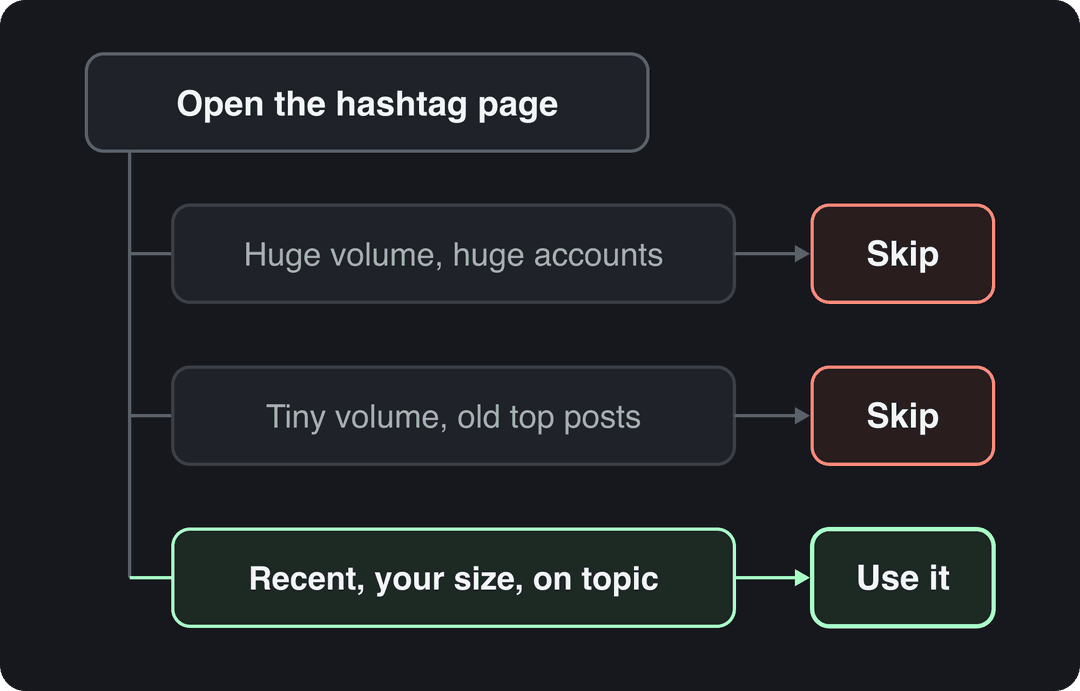
Decision rules:
- If the volume is enormous and the top posts come from huge accounts, skip it. You won't surface there.
- If the volume is tiny and the top posts are old, skip it. Nobody is browsing.
- If the top posts are recent, from accounts your size, and on your exact topic, that's a tag to use.
How to search a hashtag on any platform
Every major app lets you look up hashtags from its search bar. Here is where to go and how to see the hashtags a post used:
| Platform | How to search hashtags | How to see a post's hashtags |
|---|---|---|
| Search bar, then the Tags results | Tap "more" under the caption; some creators put tags in the first comment | |
| TikTok | Search bar, then the Hashtags tab | Tags appear in the caption above the sound name |
| X | Search bar or the Explore tab, type the tag with # | Inline in the post text |
| Type the tag with # in the search bar | At the end of the post text | |
| YouTube | Search the tag with #, or tap a hashtag on a video to open its page | Above the title or in the description |
YouTube works a little differently because hashtags sit next to titles and descriptions. Our guide to the best hashtags for YouTube covers that platform in detail.
Prompt to try
Make a 30-second vertical TikTok about 3 desk stretches that fix neck pain from working on a laptop. Open with the hook "Your neck hurts because of how you sit, not how long". Use clean stock footage of someone at a desk, bold synced captions, an upbeat voice and calm background music.
How to find trending hashtags on TikTok
TikTok gives you more trend signals than Instagram:
- Search a keyword and open the Hashtags tab. TikTok shows matching tags with their view counts, so you can compare variants side by side.
- Open the hashtag page and sort by recent videos. Fresh uploads with strong views mean the tag is climbing.
- Watch your For You feed in your niche. Tags that keep appearing on videos from different creators in the same week are trending.
- Use a trend tracker. Revid's free trending TikTok hashtags page lists rising tags by niche, which makes it easier to catch a tag in its growth phase rather than at its peak. TikTok's Creative Center (built for advertisers) has also offered a trending hashtag view by region; check whether it's available in your country.
How many hashtags should you use?
On Instagram the rule is fixed: 5 at most. TikTok has no cap that we could verify on an official page, so data is the better guide.
In Revid's analysis of 176,367 TikToks with 1,000+ likes posted between October 2025 and October 2026, videos with 4 hashtags had the best median (77K views, 13.4% past 1M views), followed by 3 hashtags at 75K. Videos with no hashtags had a 51K median (9.8% past 1M), and videos with 9 or more hashtags only 16K (7.8%). The sample only includes TikToks that already reached 1,000 likes, so this shows what successful videos have in common, not a guaranteed cause. The full method is in our study of what makes a TikTok go viral.
Posts with 3 or 4 hashtags earned the most views. Captions stuffed with 9 or more hashtags did worst of all, with median views cut by about 80%.
Source: Revid analysis of 176,367 TikToks with 1,000+ likes posted between Oct 1, 2025 and Oct 16, 2026 (61,203 creators)
Show the data
| Median views | Share that passed 1M views | |
|---|---|---|
| None | 51.1K | 9.8% |
| 1 | 64K | 11.8% |
| 2 | 71.3K | 12.7% |
| 3 | 75.4K | 13.1% |
| 4 | 77.2K | 13.4% |
| 5 | 67.3K | 12.1% |
| 6 to 8 | 71.8K | 12.7% |
| 9+ | 15.6K | 7.8% |
The practical takeaway for both apps is a short, specific set: a few tags that describe the video, not a wall of generic ones.
Prompt to try
Create a 25-second Instagram Reel showing a 5-minute high-protein breakfast: Greek yogurt bowl with oats, berries and peanut butter. Start with the hook "30 grams of protein before 8am, no cooking". Bright close-up food visuals, quick cuts, friendly voiceover and captions listing each ingredient.
How to find relevant hashtags for your niche
Trending tags bring reach, but relevant hashtags bring the right viewers. With only 5 slots on Instagram, build each set from these layers:
| Slot | Type | Example for a high-protein breakfast Reel |
|---|---|---|
| 1 | Broad niche tag | #healthyrecipes |
| 2 | Specific topic tag | #highproteinbreakfast |
| 3 | Audience or intent tag | #mealprepideas |
| 4 | Trending or seasonal tag (only if it truly fits) | a rising challenge or seasonal tag in your niche |
| 5 | Branded or series tag | #yourbrandrecipes |
To find related hashtags for slots 2 and 3, open the hashtag page of your broad tag and read the tags on its top recent posts; the ones that repeat are your related set. To find the best hashtags over time, keep a simple spreadsheet of tag sets and the views each post got. For a fuller system, see our Instagram hashtag strategy guide. If you write captions in bulk, the free Instagram caption generator drafts captions you can trim to your 5 chosen tags.
A caption of 41 to 80 characters (one clear sentence) performed best. Posts with no caption at all earned roughly half the median views.
Source: Revid analysis of 176,367 TikToks with 1,000+ likes posted between Oct 1, 2025 and Oct 16, 2026 (61,203 creators)
Show the data
| Median views | Share that passed 1M views | |
|---|---|---|
| No caption | 36.4K | 7.5% |
| 1 to 40 | 58K | 11.1% |
| 41 to 80 | 67.3K | 12.5% |
| 81 to 150 | 66.6K | 12.3% |
| 151 to 300 | 63.8K | 11% |
| 300+ | 67.8K | 11.7% |
How to find trending hashtags on X and LinkedIn
On X, open Explore and the Trending tab, which ranks topics and hashtags by location and by what's relevant to you. X moves in hours, so a tag is worth joining only if you can post while it's still climbing. X Pro, formerly TweetDeck, lets you keep columns open for searches and trends; it requires X Premium. For curated lists of evergreen tags, RecurPost's list of popular hashtags is a starting point, but check each tag's recent posts before using it, since lists age fast.
On LinkedIn, hashtags matter less than the post itself. Search the tag with # to see recent posts, and use a few that name your industry or topic (#productmanagement, #saas) rather than generic ones like #success.
When to jump on a trending hashtag
Every trending hashtag goes through the same arc: it emerges in a small community, climbs as more people join, peaks, then declines. The best moment to post is during the climb. You get in front of a growing audience before the tag is buried under a flood of posts.
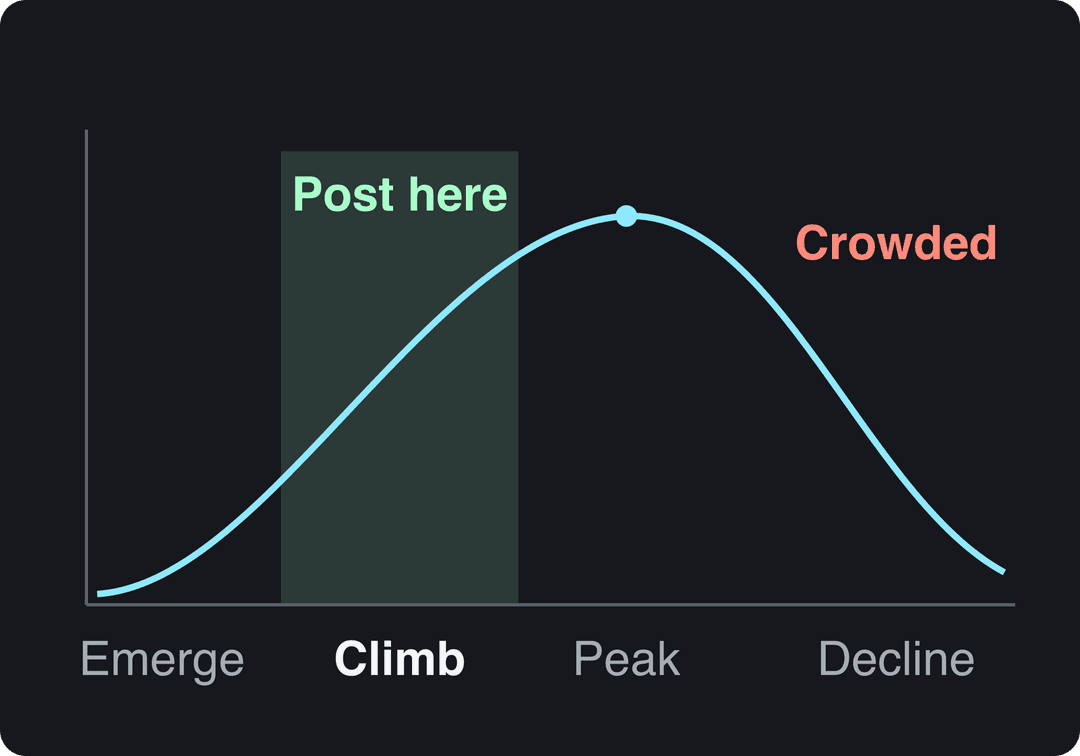
How to tell where a tag sits:
- Emerging: a few recent posts from niche creators, low volume. Use it only if it fits your content perfectly.
- Climbing: new posts every day from accounts of all sizes, top posts from this week. Post now.
- Peaking: big brands and news accounts piling in. Only join with a genuinely new angle.
- Declining: top posts are old and nothing new is getting traction. Move on.
The same lifecycle applies to topics as well as tags; our guide on how to find trending topics covers spotting them earlier. Before joining any trend, check what it's actually about. A tag can turn controversial overnight, and a brand post sitting under it can look careless.
Hashtag research tools worth trying
Native search covers most needs. Tools help when you manage several accounts or want alerts:
| Tool | What it does | Platforms | Cost |
|---|---|---|---|
| RiteTag | Suggests hashtags and rates how active they are | X, Instagram | Free and paid options |
| Flick | Hashtag search and performance tracking | Paid, with trial options | |
| X Pro | Live columns for trends and searches | X | Requires X Premium |
| Brand24 | Social listening: tracks mentions of keywords and hashtags | Multiple | Paid |
| Google Alerts | Emails you when a keyword appears in news and on the web | Web | Free |
| Revid trending hashtags | Rising TikTok tags by niche | TikTok | Free |
Check current prices on each tool's site before you commit. If Instagram is your main channel, Flick's hashtag analytics are the most focused of the group. If you want broader third-party numbers on how hashtags perform, Search Logistics keeps a roundup of hashtag statistics; treat it as a summary of other people's studies.
How to find hashtags with Revid
Revid's viral video library holds about 2.77 million real short-form videos and posts, and stores each one's hashtags with its public view, like, comment and share counts. That lets you see which tags the high-performing videos in your topic actually carry, instead of guessing.
- Search the library by topic, platform and engagement tier, then open the videos in the viral or high tier.
- Note the hashtags that repeat across them; those are your candidate set.
- Run a free deep analysis (up to 60 a day) on a video to see its hook, structure and how to adapt it to your niche.
- Choose "Make it about your topic" to turn that format into an original video, or start from the AI Reel generator, then publish or schedule it to TikTok, Instagram and YouTube from Revid with your chosen tags.
Creating your own branded hashtag
A branded hashtag works when it's short, easy to spell and tied to something people want to do: share a result, join a challenge, show your product in use. The ALS Ice Bucket Challenge spread because the action was simple, the cause was clear and every post invited someone else to join. Before you launch one, search it on every platform to make sure nobody else owns it and it doesn't read as something embarrassing. Then use it consistently on your own posts, reshare the posts that use it, and give people a reason to join. If you'll be asking customers to post their work, read up on precautions before posting creative work to social media so you handle rights and credit properly.
How to tell if your hashtags are working
Hashtags are worth keeping only if they bring new viewers. In Instagram insights, check each post's views and how many came from accounts that don't follow you; follower insights need at least 100 followers and cover up to the past 90 days. On TikTok, open TikTok Studio, then Analytics, and compare posts over the same date range.
Change one thing at a time: keep the same type of content and swap one tag set, so you know what moved the numbers. For a wider view of which metrics to track, this guide on how to measure social media engagement covers the basics.
FAQ
Does Instagram have a trending hashtags page?
No. Instagram has no public list of trending hashtags. You find them through search, hashtag pages, Explore and the captions of top Reels in your niche.
Can you use more than 5 hashtags on Instagram?
No. Instagram allows up to 5 hashtags per post, and a caption or comment with more than 5 won't post.
Do hashtags still matter in 2026?
Yes, but as labels more than as reach hacks. A few accurate tags help the apps understand and categorize your video, while long lists of generic tags add nothing, and in Revid's TikTok data videos with 9 or more hashtags performed far worse than those with 3 or 4.
What is the best free way to find trending hashtags?
The apps' own search. Search a keyword, open the hashtag results and check how recent the top posts are. For TikTok, Revid's free trending hashtags page lists rising tags by niche.
Should I put hashtags in the caption or the first comment on Instagram?
Either works for discovery, and the 5-tag limit applies to both. The caption is simpler and keeps tags with the post if you later share it elsewhere.
Sources
- Revid analysis of 176,367 TikToks with 1,000+ likes posted between Oct 1, 2025 and Oct 16, 2026 (61,203 creators)
Charts and figures checked on November 6, 2026.