On this page
The best hashtags for YouTube are 3 to 5 specific ones: 2 to 3 that name your video's exact topic (the game, the skill, the product), plus #shorts on vertical videos and an optional branded tag for your series. Put them at the end of the description. Broad tags like #YouTubeGaming or #viral add almost nothing.
Most hashtag lists get the mechanics backwards. A hashtag does not put your video in the Shorts feed (YouTube classifies square or vertical videos up to 3 minutes as Shorts on its own), and longer hashtag lists go with fewer views, not more: in Revid's TikTok data, posts with 9 or more hashtags had a median of 16K views, against 77K for posts with 4.
- Median views for TikToks with 4 hashtags, the best-performing count
- 77K
- Revid analysis of 176,367 TikToks
- Median views for TikToks with 9 or more hashtags
- 16K
- Revid analysis of 176,367 TikToks
- Share of global YouTube views in 2025 from videos under a minute
- 77%
- Tubular Labs (Tube Trends column on TVREV), January 2026
- Longest square or vertical video YouTube classifies as a Short
- 3 min
- YouTube Official Blog, October 2024
How YouTube hashtags actually work
You can add hashtags to a video's title or description. Each one becomes a link, and clicking it opens a page of other videos that use the same hashtag. When your title has no hashtags, YouTube can show the first three hashtags from your description as links near the title, so order matters: put the one you care about most first.
Hashtags are a context signal, not a ranking lever. Whether YouTube recommends a video depends on how viewers respond to it: do they click the title and thumbnail, and do they keep watching. A precise hashtag helps YouTube and viewers understand what the video is about. It cannot rescue a video nobody wants to watch.
YouTube also polices hashtags. Its hashtag policy covers hashtags that are misleading, unrelated to the video or used in excess, and a video with too many hashtags can have all of them ignored. Before you paste a long list, check the current limit in YouTube Help under "hashtag policy".
Three rules that always hold:
- No spaces inside a hashtag: #BossGuide works, #Boss Guide becomes #Boss.
- Only hashtags your video actually covers. A tagged topic the video never mentions is misleading under YouTube's policy.
- No hashtags that harass, insult or carry sexual or violent content.
How many hashtags should you use on YouTube?
Use 3 to 5, and make the first three your strongest, since those are the ones YouTube may show as links. Past five, each extra hashtag is broader and weaker, and you start drifting toward the stuffing that YouTube's policy targets.
YouTube publishes no data on hashtag counts, so the closest evidence comes from TikTok, where hashtags play the same labeling role. In Revid's analysis of 176,367 TikToks with 1,000+ likes posted between October 2025 and October 2026, videos with 4 hashtags had the best median views (77K, with 13.4% passing 1M views), and 3 hashtags came close behind at 75K. Videos with no hashtags had a 51K median (9.8% past 1M). Videos with 9 or more hashtags fell to a 16K median (7.8% past 1M).
Posts with 3 or 4 hashtags earned the most views. Captions stuffed with 9 or more hashtags did worst of all, with median views cut by about 80%.
Source: Revid analysis of 176,367 TikToks with 1,000+ likes posted between Oct 1, 2025 and Oct 16, 2026 (61,203 creators)
Show the data
| Median views | Share that passed 1M views | |
|---|---|---|
| None | 51.1K | 9.8% |
| 1 | 64K | 11.8% |
| 2 | 71.3K | 12.7% |
| 3 | 75.4K | 13.1% |
| 4 | 77.2K | 13.4% |
| 5 | 67.3K | 12.1% |
| 6 to 8 | 71.8K | 12.7% |
| 9+ | 15.6K | 7.8% |
Read it with its limits: this is TikTok data, the sample only holds videos that already reached 1,000+ likes, and it shows what well-performing videos have in common, not that hashtag count causes views. The pattern still matches YouTube's own rules, a few precise hashtags beat a long list. The full method is in our study of what makes a TikTok go viral.
The YouTube hashtag formula: topic, format, brand
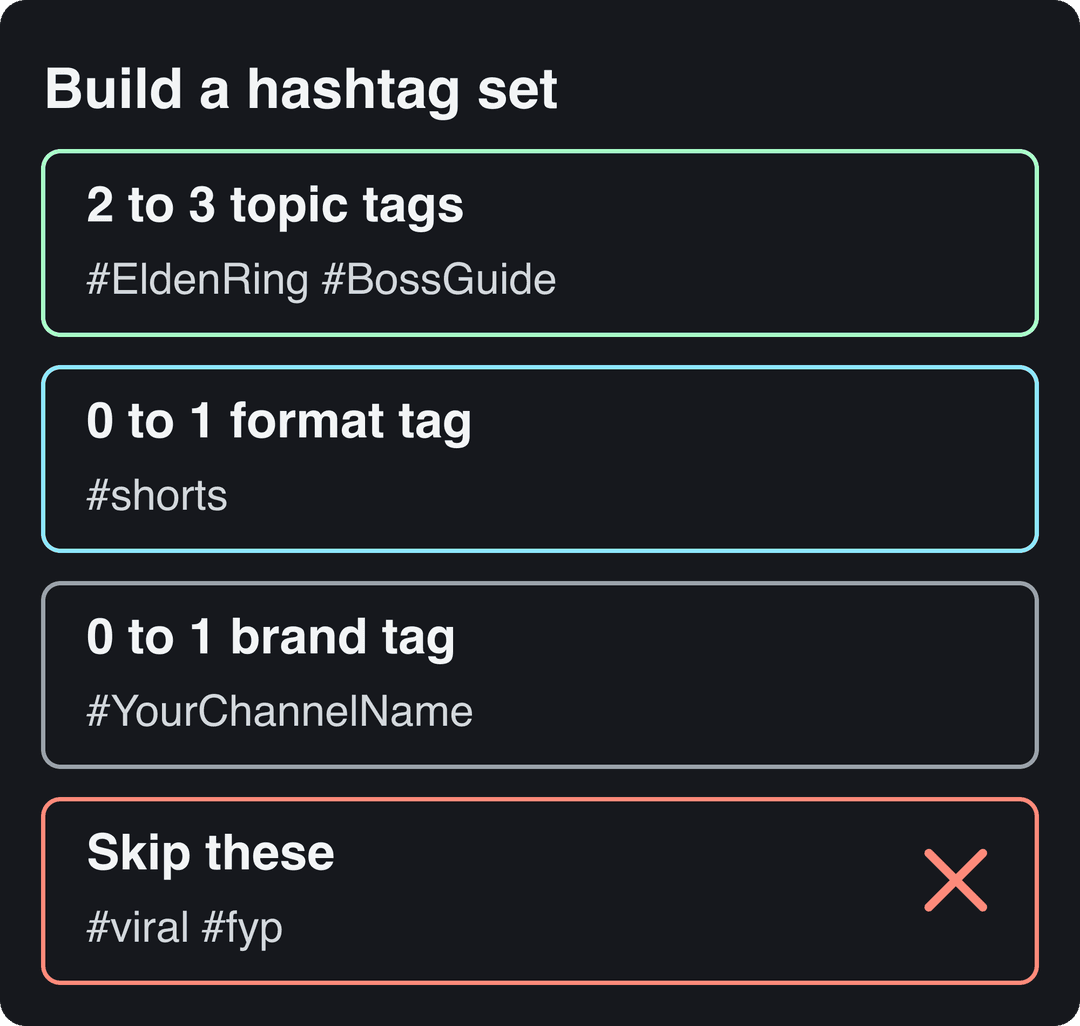
Build every set from three slots. Fill the topic slot first; the other two are optional.
| Slot | What it names | Example | How many |
|---|---|---|---|
| Topic | The exact subject: game, skill, product, place | #EldenRing #BossGuide | 2 to 3 |
| Format | The video type, when it helps viewers | #shorts or #tutorial | 0 to 1 |
| Brand | Your series or channel, for viewers who want more | #FridayBossFights | 0 to 1 |
| Skip | Generic tags with no topic | #viral #fyp #YouTubeTrending | 0 |
Why specific beats broad: a broad tag like #gaming or #YouTubeGaming puts you on a hashtag page with an enormous pile of unrelated videos, where yours is buried. #EldenRing #BossGuide reaches someone who wants exactly that video. If you want one broad tag, give it the last slot, never the first.
The index leans toward videos that surface in hashtag and keyword searches, so its view counts run high: compare the groups, not the absolute numbers.
Source: Revid TikTok index: 2,377,477 TikToks with AI labels per video, snapshot of Sep 15, 2026. Median views estimated from view buckets.
Show the data
| Median views | Share past 1M views | |
|---|---|---|
| #prank | 360.2K | 39.5% |
| #asmr | 244.8K | 34.1% |
| #brainrot | 206.8K | 26.3% |
| #comedy | 185.5K | 28.5% |
| #gaming | 151.3K | 24.4% |
| #storytime | 128.1K | 21.2% |
| #music | 127.5K | 23.9% |
| #dance | 121.7K | 24.1% |
Best YouTube hashtags by niche (copy and paste)
Swap the specific tags for your video's actual subject. The broad tag is optional and goes last.
| Niche | Specific hashtags (use these) | Optional broad tag |
|---|---|---|
| Gaming | #EldenRing #BossGuide | #gaming |
| Education | #Python #LearnToCode | #tutorial |
| Vlogs | #TravelVlog #Thailand | #vlog |
| Beauty | #SmokeyEye #BeginnerMakeup | #makeup |
| Fitness | #HomeWorkout #NoEquipment | #fitness |
| Music | #OriginalMusic #IndiePop | #newmusic |
Gaming hashtags
Lead with the game title, then name the moment: #Valorant #GamingHighlights for a match clip, #Minecraft #MinecraftBuilds for a build showcase, #IndieGames #GamingReview for a review. Players search by game, not by "gaming", so the title tag does the work.
Prompt to try
Make a 30-second YouTube Short for beginners: "3 Python mistakes every new coder makes." Open with the hook "You're probably doing #2 right now," show each mistake with a quick fix on screen, keep a clear friendly voiceover with bold captions, and end by teasing the next lesson in the series.
Education and tutorial hashtags
Name the tool or subject and the level: #Python #LearnToCode for a beginner series, #LearnSpanish #LanguageLearning for a lesson, #PhotoshopTutorial #GraphicDesign for a software walkthrough. On long tutorials, chapters and playlists do more for viewers than any hashtag.
Vlog hashtags
Tag the place or life stage, since that is what vlog viewers browse by: #TravelVlog #Thailand, #CollegeVlog #StudentLife, #FamilyVlog #DailyVlog. A branded series tag fits vlogs best, because returning viewers want the next episode.
Beauty hashtags
Combine the technique with the product type: #SmokeyEye #BeginnerMakeup for a tutorial, #Skincare #VitaminC for a serum review, #BeautyHacks #Lipstick for quick tips. If a brand paid for the video, tick the paid promotion box in YouTube Studio as well; a hashtag is not a disclosure.
Fitness hashtags
Tag the goal and the equipment: #HomeWorkout #NoEquipment for bodyweight routines, #Weightlifting #Powerlifting for gym form videos, #Pilates #CoreStrength for a beginner class, #MealPrep #Nutrition for diet content.
Prompt to try
Create a 40-second vertical Short: "A 5-minute no-equipment ab workout you can do at home." Hook with "No gym, no excuses, five minutes," then show four moves with rep counts in captions, an upbeat energetic voice and fast cuts, and close with a call to save it for tomorrow.
Music hashtags
Tag genre and format: #OriginalMusic #IndiePop for a release, #AcousticCover #MusicCover for a cover, #AlbumReview for a review. Covers carry a real risk on Shorts: any Short longer than one minute with an active Content ID claim is blocked worldwide and cannot be monetized, so check the rights before you post anything over a minute.
Hashtags for YouTube Shorts
#shorts is optional. YouTube treats any square or vertical video up to 3 minutes long, uploaded on or after October 15, 2024, as a Short, with or without the hashtag. Use #shorts as a label if you like, but spend your first slots on topic hashtags.
The format is worth getting right: Tubular Labs data published in January 2026 found that 77% of global YouTube views in 2025 came from videos under a minute long, up from 70% in 2024 (more in our YouTube Shorts statistics). A Short's title can be up to 100 characters, and hashtags in the title eat into the space your hook needs, so keep them in the description. For Shorts-specific examples, see our YouTube Shorts hashtag guide.
If the goal is income, Daniel Proctor's walkthrough on how to monetize YouTube Shorts covers the steps. Plan for the rule change: from February 1, 2027, earning Shorts ad revenue in a given month requires at least 10 million qualified Shorts views in the last 90 days.
Should you use trending hashtags on YouTube?
Only when your video is genuinely about the trend. Use the trend's own hashtag (the event, the challenge, the product launch), not #YouTubeTrending. YouTube's Help Center now only describes Trending Charts for movie trailers, music videos and gaming, not a general Trending tab, so a #YouTubeTrending tag points nowhere.
Trends reward speed: publish within a day or two of the spike, pair the trend tag with a topic tag that will still describe the video next month, and drop the trend tag from your next upload if the moment has passed. Our guide on how to find trending hashtags shows where to spot them early.
Hashtags vs tags: what are great tags for YouTube?
Hashtags and tags are two different fields, and people mix them up constantly.
| Hashtags | Tags | |
|---|---|---|
| Where | Title or description | Tags field in YouTube Studio |
| Visible to viewers | Yes, as links | No |
| Limit | Too many get ignored (see YouTube's hashtag policy) | 500 characters in total, not per tag |
| Best use | 3 to 5 topic labels | Misspellings and alternate names |
Great tags for YouTube are the variants viewers might type that your title doesn't cover: a misspelled game name, an abbreviation, the product's other name. YouTube's own help pages describe tags as most useful for commonly misspelled words and a minor factor otherwise. For tag ideas and examples, read our list of the best YouTube tags.
Title or description: where to put hashtags
Put them at the end of the description. The description holds up to 5,000 characters, so space is not an issue, and the first three can still appear as links near the title.
Use a hashtag in the title only when it reads as part of the title, for example a game name. YouTube titles are limited to 100 characters, and every hashtag there competes with the words that make people click. A YouTube title generator helps you test hook wording without stuffing.
How to see which hashtags work
YouTube Studio has no report that ranks your hashtags, so measure indirectly:
- Open YouTube Studio, then Analytics, then the Reach tab.
- Check Traffic source types to see how much each video gets from search and from hashtag or browse pages.
- Open the YouTube search report to read the exact terms viewers typed, and turn recurring terms into topic hashtags on your next videos.
- Change one thing at a time: keep the title style steady and rotate the topic hashtags across similar videos.
Hashtags are one small piece of discovery. Our YouTube SEO tips cover titles, thumbnails and retention, which matter more. And if you are still deciding what the channel is for, this primer on what a social media strategy is helps you pick the topics your hashtags should describe.
Make and publish the videos with Revid
A hashtag set only pays off on videos you actually post. Revid can handle the production and publishing steps:
- Create the Short with the AI YouTube Shorts generator: start from a prompt, a script or a link, and Revid writes the script and builds the scenes, voice-over, captions and music, with a timeline editor to fix any scene.
- Draft the description with the free YouTube description generator, then add your 3 hashtags at the end, most specific first.
- Publish or schedule the video from Revid's publishing queue for YouTube, TikTok and Instagram.
FAQ
Do hashtags help YouTube views?
A little. They tell YouTube and viewers what a video is about and add it to a clickable hashtag page, but clicks and watch time drive recommendations. A precise hashtag helps a good video reach the right viewers; it does not create views on its own.
Can too many hashtags hurt a YouTube video?
Yes. Under YouTube's hashtag policy, a video with too many hashtags can have all of them ignored, and misleading or unrelated hashtags can lead YouTube to remove the hashtags or the video.
Should I use the same hashtags on every video?
Only your branded series tag. Topic hashtags should change with each video's subject, otherwise they stop describing the content and attract the wrong viewers.
Is #YouTubeShorts better than #shorts?
Neither decides anything, since YouTube classifies Shorts by length and shape. If you want a format label, the shorter #shorts saves space; give your other slots to topic hashtags.
Sources
- Revid analysis of 176,367 TikToks with 1,000+ likes posted between Oct 1, 2025 and Oct 16, 2026 (61,203 creators)
- Revid TikTok index: 2,377,477 TikToks with AI labels per video, snapshot of Sep 15, 2026. Median views estimated from view buckets.
- Tubular Labs (Tube Trends column on TVREV), Tube Trends: Over 75% Of YouTube Views Came From Shorts In 2025 (January 2026)
- YouTube Official Blog, Tall updates coming to Shorts (October 2024)
Charts and figures checked on November 6, 2026.