Hashtags for YouTube Shorts: How Many, Where to Put Them (2026)
How many hashtags to use on YouTube Shorts, where to put them, how they differ from tags, and how to find trending ones, with example sets by niche and Revid's TikTok hashtag data.
On this page
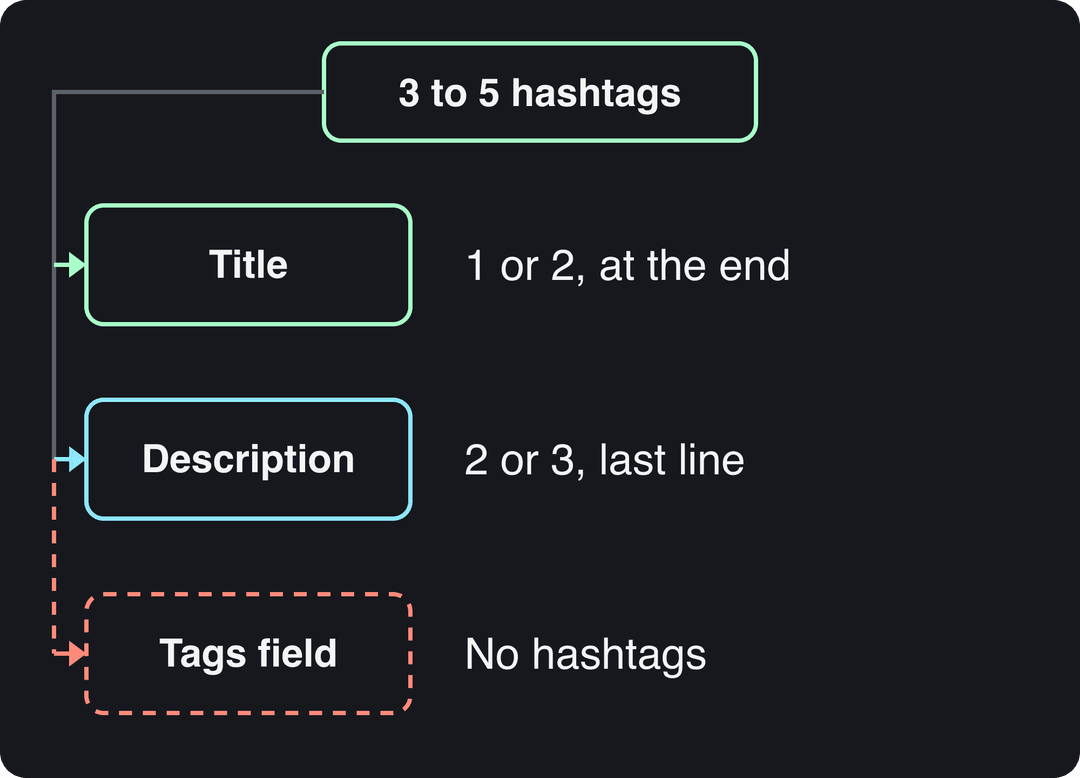
Use 3 to 5 specific hashtags on a YouTube Short: put the 1 or 2 most descriptive ones in the title and the rest at the end of the description. Hashtags label your Short so YouTube knows who to show it to first. They don't replace retention, which decides how far the Short travels.
YouTube publishes no data on how many hashtags work best, but TikTok data points the same way. In Revid's analysis of 176,367 TikToks with 1,000+ likes posted between October 2025 and October 2026, videos with 4 hashtags had the highest median views (77K) and videos with 3 were close behind (75K). Videos with no hashtags had a 51K median, and videos with 9 or more dropped to 16K.
Posts with 3 or 4 hashtags earned the most views. Captions stuffed with 9 or more hashtags did worst of all, with median views cut by about 80%.
Source: Revid analysis of 176,367 TikToks with 1,000+ likes posted between Oct 1, 2025 and Oct 16, 2026 (61,203 creators)
Show the data
| Median views | Share that passed 1M views | |
|---|---|---|
| None | 51.1K | 9.8% |
| 1 | 64K | 11.8% |
| 2 | 71.3K | 12.7% |
| 3 | 75.4K | 13.1% |
| 4 | 77.2K | 13.4% |
| 5 | 67.3K | 12.1% |
| 6 to 8 | 71.8K | 12.7% |
| 9+ | 15.6K | 7.8% |
Two caveats. This is TikTok data, not YouTube, and the sample only includes videos that already passed 1,000 likes, so it shows what successful posts have in common rather than proving cause. The pattern still matches how YouTube treats hashtags: a few focused tags beat none, and a wall of tags does worse. The method and every chart are in our study of what makes a TikTok go viral.
- Median views for TikToks with 4 hashtags, the best-performing count
- 77K
- Revid analysis of 176,367 TikToks
- Median views for TikToks with 9 or more hashtags
- 16K
- Revid analysis of 176,367 TikToks
- Longest a square or vertical video can be and still count as a Short
- 3 minutes
- YouTube Official Blog, October 2024
- Daily views on YouTube Shorts
- 200B+
- YouTube Official Blog, August 2026
Do hashtags work on YouTube Shorts?
Yes, as labels, not as a reach button. A hashtag does three jobs on a Short:
- It tells YouTube what the video is about, which helps the system pick a first audience to test it on.
- In the title, it shows in the Shorts player and is clickable, sending viewers to a page of other videos with the same hashtag.
- It makes the Short findable when someone searches or taps that hashtag.
What hashtags can't do is save a Short that people swipe away. If the first viewers watch to the end and replay, YouTube shows it to more people. If they swipe, no hashtag fixes that. So should you use hashtags on YouTube Shorts? Yes: they cost nothing and give YouTube a clear signal. Just don't expect them to carry a weak hook.
Hashtags are one input among several. Titles, on-screen text and spoken keywords matter too, and our YouTube Shorts SEO steps cover the rest.
Is #shorts required on a YouTube Short?
No. YouTube classifies a video as a Short by its format, not by a hashtag: since October 15, 2024, square or vertical videos up to 3 minutes long are Shorts. Adding #shorts was a common tip when the format launched, but today it tells YouTube nothing it doesn't already know.
It also does almost nothing for targeting, because a huge share of all Shorts carries it. If you like it, make it one of your 5 hashtags, never the only one.
How many hashtags should you use on YouTube Shorts?
Use 3 to 5. That gives YouTube enough context to categorize the Short without diluting the signal.
| Number of hashtags | What happens | Verdict |
|---|---|---|
| 0 | YouTube relies on your title, captions and audio alone | Works, but you skip a free label |
| 1 to 2 | A clear but narrow signal | Fine for a very tight niche |
| 3 to 5 | Topic, niche and series all covered | Recommended |
| More than 5 | Each extra tag dilutes the others and the title gets cluttered | Avoid |
| 15 or more | Reads as spam to viewers and to YouTube | Never |
Is there a YouTube hashtag limit?
YouTube doesn't stop you from typing more hashtags, but YouTube's hashtag policy says that if you add too many, it ignores every hashtag on the video, and over-tagging can count as spam. Check the policy page for the current threshold. If you stay at 3 to 5, you will never get close to it.
Where to put hashtags on YouTube Shorts: title or description?
Use both, with different jobs:
- Title: 1 or 2 hashtags. The title (up to 100 characters) is what viewers read in the Shorts player, so title hashtags are the visible, clickable ones. Put them at the end of the title, after the words that make people stay.
- Description: the remaining 2 or 3. Put them on the last line. They add context for YouTube without crowding the title.
- Tags field: no hashtags. Tags are plain keywords (see below).
Here is what a finished Short looks like:
Title: This kettlebell swing fix saved my lower back #kettlebellworkout

Description: The hip hinge cue that stops you from lifting with your back.
Full routine on the channel.

#fitness #homegym #YourBrandFitNever put a hashtag in the first words of the title. Viewers decide in the opening words whether the video is for them, and a tag there pushes the hook out of view. If you struggle to fit a hook and a hashtag in one line, a free YouTube title generator can draft options, and a YouTube description generator can write the description above your hashtag line.
On long-form videos, YouTube can show up to three description hashtags next to the title. On a Short, viewers mostly see the title, which is one more reason to put your best hashtag there.
A caption of 41 to 80 characters (one clear sentence) performed best. Posts with no caption at all earned roughly half the median views.
Source: Revid analysis of 176,367 TikToks with 1,000+ likes posted between Oct 1, 2025 and Oct 16, 2026 (61,203 creators)
Show the data
| Median views | Share that passed 1M views | |
|---|---|---|
| No caption | 36.4K | 7.5% |
| 1 to 40 | 58K | 11.1% |
| 41 to 80 | 67.3K | 12.5% |
| 81 to 150 | 66.6K | 12.3% |
| 151 to 300 | 63.8K | 11% |
| 300+ | 67.8K | 11.7% |
How to add hashtags to a YouTube Short
On your phone (YouTube app)
- Record or upload your vertical video and tap Next until you reach the details screen.
- In the title field, write your title, then type
#and a keyword. YouTube suggests matching hashtags as you type, which also shows you what people already use. - Add 1 or 2 hashtags at the end of the title and publish.
- If the app doesn't show a description field for your upload, open the Short in YouTube Studio after posting, add the remaining hashtags to the last line of the description and save.
On a computer (YouTube Studio)
- In YouTube Studio, click Create, then Upload videos, and choose your vertical file.
- Type 1 or 2 hashtags at the end of the Title field.
- Add 2 or 3 hashtags on the last line of the Description field (up to 5,000 characters, so space is never the problem).
- Open "Show more" to find the Tags field if you want to add keyword tags.
You can change hashtags after posting: open the Short in YouTube Studio, edit the title or description and save.
What are tags on YouTube Shorts (and how are they different from hashtags)?
Tags are hidden keywords you enter in YouTube Studio. Viewers never see them, and they are limited to 500 characters in total, not per tag. YouTube's own help pages describe tags as playing a minimal role in discovery, mostly useful when your topic is often misspelled.
| Hashtags | Tags | |
|---|---|---|
| Where | Title and description | Tags field in YouTube Studio |
| Visible to viewers | Yes, and clickable | No |
| Format | #oneword, no spaces | Plain keywords or phrases |
| How much they matter | A clear topic label | Minor; mainly for misspellings |
| What to add | 3 to 5 specific hashtags | Your main keyword and common misspellings |
So how do you tag a YouTube Short? Spend your effort on 3 to 5 good hashtags, then add a few keyword tags in Studio if your topic has spelling variants (for example, a game or product name people often type wrong). Don't paste your hashtags into the Tags field.
What hashtags to use on YouTube Shorts
The best hashtags for YouTube Shorts are the ones a viewer would tap to find exactly your video. Build each set from three layers:
| Layer | Purpose | Example |
|---|---|---|
| Broad | Tells YouTube the category | #gaming, #cooking, #fitness |
| Niche | Reaches the people who want this specific topic | #eldenringbuilds, #airfryerrecipes |
| Series or brand | Groups your own Shorts so fans can find more | #YourChannelShorts |
One test for each tag: would someone who taps this hashtag be glad to land on your Short? If not, cut it.
Prompt to try
Make a 30-second vertical YouTube Short on fixing your kettlebell swing to protect your lower back. Open with the hook "This one cue saved my lower back", then show the hip hinge in three quick steps. Use energetic gym b-roll, bold synced captions and an upbeat voiceover.
Example hashtag sets by niche
| Niche | Title hashtag | Description hashtags |
|---|---|---|
| Gaming | #eldenringbuilds | #gaming #eldenring #YourChannelBuilds |
| Cooking | #airfryerrecipes | #cooking #quickmeals #YourChannelKitchen |
| Fitness | #kettlebellworkout | #fitness #homegym #YourBrandFit |
| Personal finance | #budgetingtips | #personalfinance #moneytips #YourChannelMoney |
| Small business | #smallbusinesstips | #smallbusiness #entrepreneur #YourBrandHQ |
Swap the niche tags for your exact topic each time. For ready-made viral tag stacks by niche, see our YouTube Shorts tag stack, and for more lists to compare against, Awisee's roundup of hashtags for YouTube Shorts is a useful second opinion.
How to find trending hashtags and topics for YouTube Shorts
The best signal is what already works for viewers in your niche, not a hashtag generator.
- Use YouTube search autocomplete. Type
#plus a keyword (for example#eldenring) and YouTube suggests what people are searching, such as#eldenringbuildsor#eldenringlore. Fliki's guide to YouTube Shorts hashtags walks through the same search-bar method. - Open the hashtag page. Tap a candidate hashtag and check whether recent Shorts on it look like yours. If the page is full of unrelated content, the tag won't find your audience.
- Study 3 to 5 creators who win in your niche. Look at their best Shorts from the last few months, not their latest upload, and note the hashtags and topics on their outliers.
- Watch other platforms. Topics often show up on TikTok or Reels before Shorts. Check trending TikTok hashtags by niche and adapt the topic, not the platform tags.
- Check what is getting views on Shorts right now. The most-viewed YouTube Shorts ranking shows which formats are pulling views.
Don't plan around a general YouTube Trending tab. YouTube's Help Center now only describes Trending Charts for a few categories (Movie Trailers, Music Videos and Gaming), so for most niches, search and competitor outliers are better signals.
Revid can do steps 3 and 5 for you. Its library holds 73,227 YouTube posts (snapshot of September 15, 2026), each indexed with its hashtags, transcript and public engagement counts, and you can search viral videos and remix them by topic, platform and engagement tier. The channel watcher syncs the YouTube and TikTok channels you choose every night and flags their outlier videos.
Hashtag mistakes that cost your Shorts reach
https://www.youtube.com/embed/ThMRg-XiHtQ
- Adding unrelated trending tags. Putting
#drakeon a sourdough Short sends it to people who want music. They swipe, and YouTube learns your video doesn't satisfy that audience. - Stuffing 15 or more hashtags. It looks like spam and can make YouTube ignore all of them.
- Putting spaces or punctuation in a hashtag.
#fitness motivationonly registers#fitness. Write#fitnessmotivationor#FitnessMotivation. - Tagging only
#shorts. It tells YouTube nothing about your topic. - Pasting the same block on every video. A cooking channel posting a knife-skills Short and a dessert Short needs different niche tags for each.
- Expecting hashtags to fix the hook. If a Short gets no traction, look at the first seconds and the pacing first; our guide to getting more views on YouTube Shorts covers what to change.
Make the Short with Revid, then tag it
Hashtags only help a Short people want to watch. If you need the video itself:
- Open the AI YouTube Shorts generator and enter an idea, a script or a link.
- Revid writes the script, builds scene-by-scene visuals, and adds a voice-over, synced captions and music. You can adjust any scene in the timeline editor.
- Or start from a Short that already performed: pick it in the library and Revid turns its structure, hook and pacing into an original video on your topic.
- Publish or schedule directly to YouTube, with 1 or 2 hashtags in the title and the rest at the end of the description.
FAQ
Can you put spaces in a YouTube hashtag?
No. A hashtag ends at the first space, so #fitness motivation only counts as #fitness. Join the words: #fitnessmotivation.
Do capital letters matter in YouTube hashtags?
No, they only change how the tag reads. #FitnessMotivation is easier to read than #fitnessmotivation, so capitalize each word when a tag combines several.
Are "YouTube Reels" hashtags different from Shorts hashtags?
Reels is Instagram's format; YouTube's is Shorts, and the rules in this article apply to every Short. If you also post the video as an Instagram Reel, note that Instagram allows up to 5 hashtags per post.
Should you use the same hashtags on TikTok and YouTube Shorts?
Keep the topic and niche tags, drop the platform tags. Tags like #fyp mean nothing on YouTube, and #shorts means nothing on TikTok.
How long does it take for hashtags to work on a Short?
They work from the moment you publish, because YouTube reads them when it first categorizes the video. If a Short stalls, fix the hook or topic before blaming the hashtags.
Sources
- Revid analysis of 176,367 TikToks with 1,000+ likes posted between Oct 1, 2025 and Oct 16, 2026 (61,203 creators)
- YouTube Official Blog, Tall updates coming to Shorts (October 2024)
- YouTube Official Blog, New opportunities to earn and changes to the YouTube Partner Program (August 2026)
Charts and figures checked on November 6, 2026.